

Introduction
Updated 3/18/2010: Added Max sessions test results
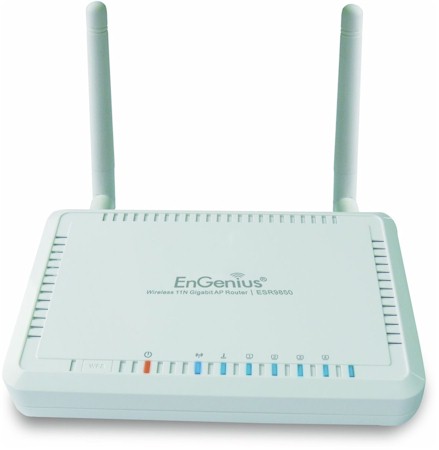
| At a Glance | |
|---|---|
| Product | EnGenius 300Mbps Wireless N Router with Gigabit Switch (ESR9850) |
| Summary | 2.4GHz, Ralink-based 802.11n router with WDS bridging / repeating, very fast routing and up and download bandwidth control. Not Wi-Fi Certified |
| Pros | • > 700 Mbps wired routing speed • Supports WDS bridging / repeating • Up and download bandwidth control • External, upgradeable antennas |
| Cons | • Minimal online support resources • Wireless range could be better • No USB print serving or NAS sharing |
Judging from the interest in the slideshow, people are pretty interested in this router. Perhaps it’s because the problems with D-Link’s DIR-655 have make folks look elsewhere for a decent 2.4 GHz 802.11n router. Or maybe it’s the 9850’s combination of low price and chart-topping routing speed.
The router is housed in an off-white plastic case the size of large paperback book. There are mounting slots on the bottom, but a vertical stand is not included.
Figure 1 shows the 9850’s back panel, which contains one WAN and four switched LAN 10/100/1000 Ethernet ports (all auto MDI / MDIX), reset button, power socket and two little upgradeable omni-directional dipoles antennas connected via RP-SMA jacks.
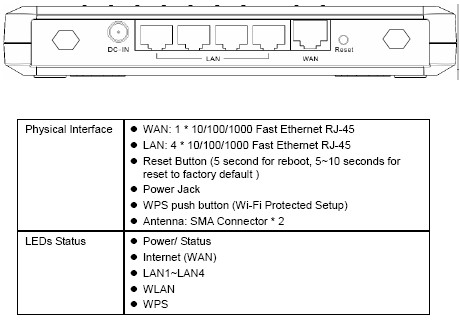
Figure 1: ESR9850 Rear panel
The front (top) panel contains the LEDs described in the Figure 1 table, plus a switch to initiate a Wi-Fi Protected Setup (WPS) push-button session. All indicators flash to indiate network traffic and are bright enough. But you’ll really need to squint to read the tiny icons above each light that denote its function.
Internal Details
Figure 2 shows the FCC ID photo, which is clear enough to identify the key devices as a Ralink RTL3052 SoC, which contains the CPU and 2T/2R 802.11n radio, MAC and baseband processing, Realtek RTL8366RB Gigabit Switch, 32 MB of RAM and 4 MB of flash (on the board bottom). The small devices to the photo left are RF amplifiers.
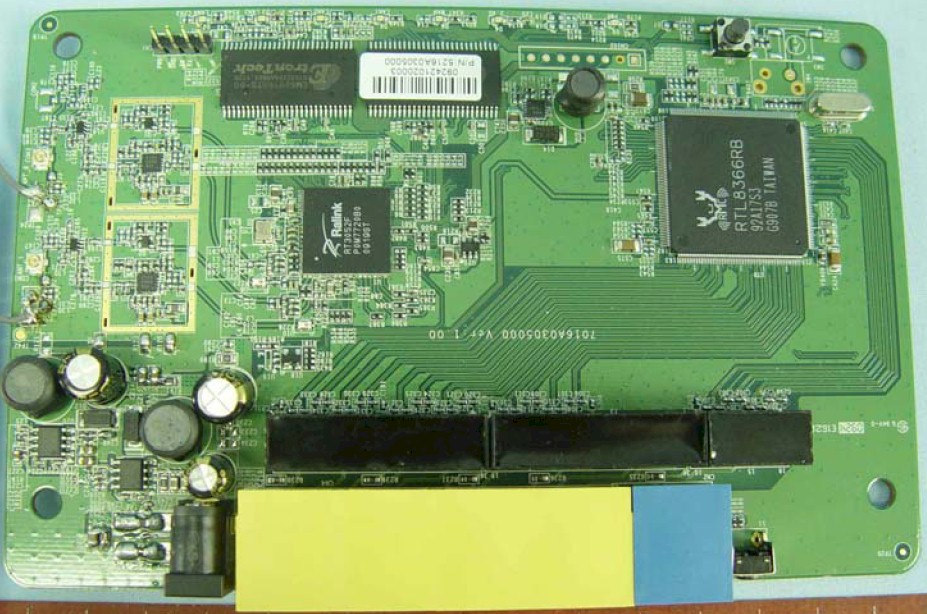
Figure 2: ESR9850 board
I was surprised that neither the Ralink or Realtek devices have heatsinks, given all that’s expected of them. But when I opened my review unit to double check, I was happy to see a flat ceramic heatsink on the RTL3052, but disappointed to find nothing on the Realtek switch. But at the 9850’s aggressive price point, I suppose it’s no surprise that heatsinking is sparse.
EnGenius doesn’t say whether the 9850’s switch supports jumbo frames. But when I checked by running an IxChariot test with 4k jumbos, it ran just fine. So, I’m guessing that up to 9K jumbo frames will work just fine.
Features
EnGenius doesn’t provide an online emulator so that you can explore the 9850’s GUI. But I put plenty of screenshots and commentary in the slideshow and tried to cover the key feature pages.
Here’s a summary of the 9850’s router feature set
- Static and Dynamic IP, PPPoE, PPTP and L2TP WAN connections
- DHCP server with IP reservation
- Logging (system events only, not traffic)
- Ethernet and WLAN monitor graphs
- NAT firewall with DMZ, DoS protection, PPTP and IPsec VPN passthrough
- MAC, IP and URL / Keyword filtering
- Switchable NAT / Router mode
- Single, range and triggered port mapping
- ALG (Application Layer Gateways) for H323, SIP and more
- UPnP enable / disable
- Up and download QoS: two level priority or bandwidth
And the wireless features:
- Up to four SSIDs, each with separate wireless security
- WDS bridging and repeating
- WEP and Personal / Enterprise WPA / WPA2 wireless security
- Wi-Fi Protected setup (PIN and pushbutton methods)
- Wireless Modes: B only, G only, N only, B+G and B+G+N (default)
- Wireless MAC address filtering
- Tranmit power control (100, 90, 75, 50, 25, 10%)
- Transmit data rate
- Connection control per SSID: WAN, Wireless-Wireless, Wireless-LAN
This is a pretty decent set of controls with all the basics covered, plus a few niceties. Of particular note is the inclusion of bandwidth control in both upload and download directions. Figure 3 shows an IxChariot plot of a test with upstream (LAN to WAN) bandwidth set to Full and download (WAN to LAN) set to 8 Mbps. The resulting nice-and-steady 7.7 Mbps is pretty sweet.

Figure 3: Bandwidth control example
Note, however, that uplink speed is running around 40 Mbps. So it appears that you must give up the 100s of Mbps of routing bandwidth that the 9850 can supply (more shortly) to benefit from bandwidth control. However, with the speed of most broadband connections, this is probably a decent tradeoff.
Also of note are the per SSID wireless connection controls that enable you to control whether clients in each SSID can talk to other clients, wired LAN clients and the Internet. Basically they’re using VLANs to separate the traffic, but with simple, easy-to-use controls.
The 9850’s feature set isn’t perfect and is missing traffic logging and scheduled radio enable / disable (for security). But the biggest omissions are USB print serving and NAS features. The latter, along with built-in Torrent downloading might be the biggest thing that keeps potential buyers away. Too bad, since EnGenius says the 9850 can handle up to 19,000 simultaneous sessions; more than enough to swamp most any Internet connection.
Routing Performance
I tested the ESR9850 with 1.1.0 firmware (1.1.0.83 kernel and 1.1.0.86 apps, specifically). Table 1 summarizes the results of the N9850’s routing tests (described here), which are quite impressive. These speeds beat the NETGEAR WNDR3700 handily and put the ESR9850 in second place in the Router Throughput charts behind D-Link’s DIR-685.
| Test Description | Throughput – (Mbps) |
|---|---|
| WAN – LAN | 619.3 |
| LAN – WAN | 640.0 |
| Total Simultaneous | 740.3 |
| Max. Connections | 200 |
| Firmware Version | 1.1.0 |
Table 1: Routing throughput
Figure 4 shows the IxChariot aggregate plot for WAN to LAN, LAN to WAN and simultaneous routing throughput tests, which shows very steady throughput in both directions.
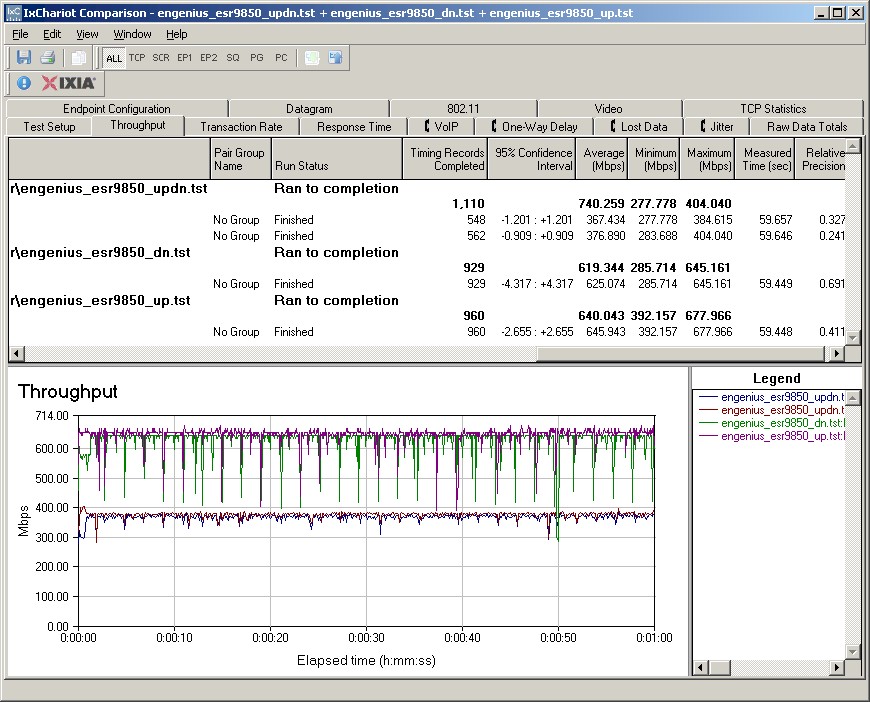
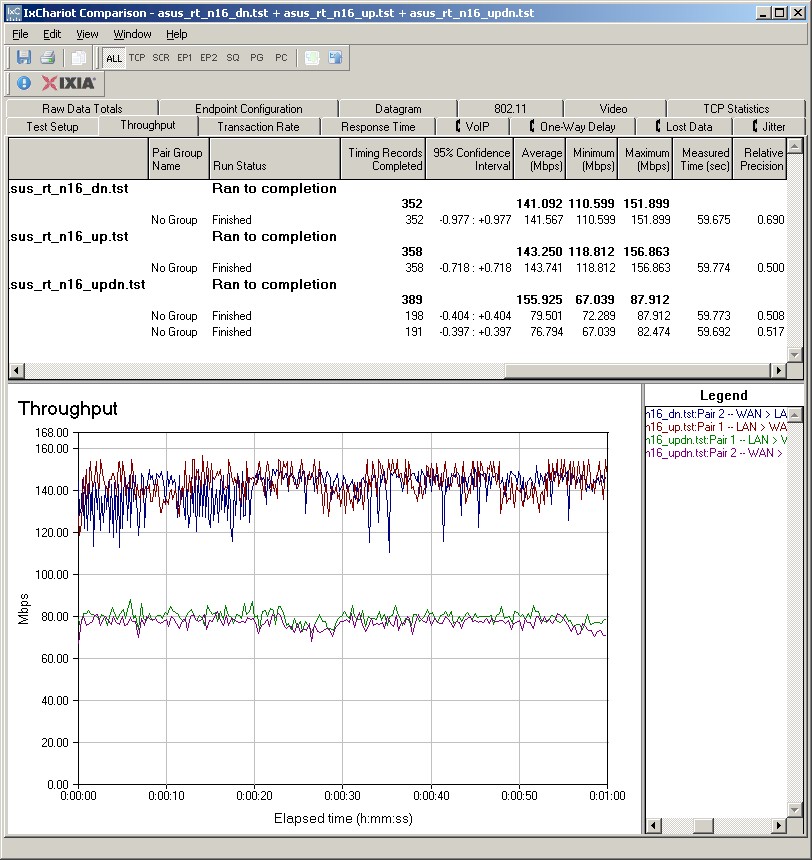
Figure 4: EnGenius ESR9850 routing throughput
Updated 3/18/2010
Since my Simultaneous connection test is limited to 200 connections, I could come nowhere near verifying EnGenius’ claim of 19,000 sessions. But they said they’d send me test results that verify their claim, and I’ll post them when I receive them.
EnGenius sent along a tool developed by Taiwanese developer Matrix21 that they used to confirm their 19,000 simultaneous session claim. The tool consists of server and client.exe files that are run on Windows systems connected to the WAN and LAN sides of the router under test.
The client tool opens multiple UDP sessions using consecutive port numbers and increments an on-screen counter for each session opened. When the client no longer receives a response from the server program, the on-screen count is taken as the maximum simultaneous session count.
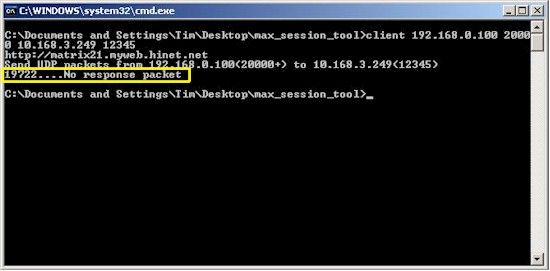
Figure 4a: Maximum simultaneous session test result
Figure 4a shows the result for the test that I ran on the 9850. The session count of 19,722 confirms EnGenius’ claims.
Looks like I finally have a tool to replace the IxChariot method that I’ve been using for the Router Charts Maximum Simultaneous session test, which is limited to only 200 sessions. I’ll start to use this new tool immediately, even though it’s going to throw the Simultaneous Sessions chart way out of whack!
Wireless Performance
I used our standard open air test method described here to test the 9850’s wireless performance. Testing was done using our standard wireless test client, an Intel Wi-Fi Link 5300 AGN mini-PCIe card in a Dell Mini 12 running WinXP Home SP3 and version 13.1.1.1 of the Intel drivers. I left all client-side defaults in place except for enabling throughput enhancement (packet bursting).
The 9850 was loaded with 1.1.0 firmware (1.1.0.83 kernel and 1.1.0.86 apps, specifically). All factory default settings were left in place, except setting channel 1 for the 2.4 GHz band.
I also ran checks with WEP 128, WPA / TKIP and WPA2 / AES wireless security modes and found that the router properly limited link rates to 54 Mbps when using WEP and WPA / TKIP. I also ran a WPS test using the PIN mode supported by the Intel client. It completed successfully on the first try, setting up a WPA2 / AES connection.
Figure 5 shows the IxChariot aggregate plot for all 2.4 GHz band downlink tests using 20 MHz channel width. Throughput variation is about par with most other products, with some good-sized throughput dropouts in evidence in some of the tests.
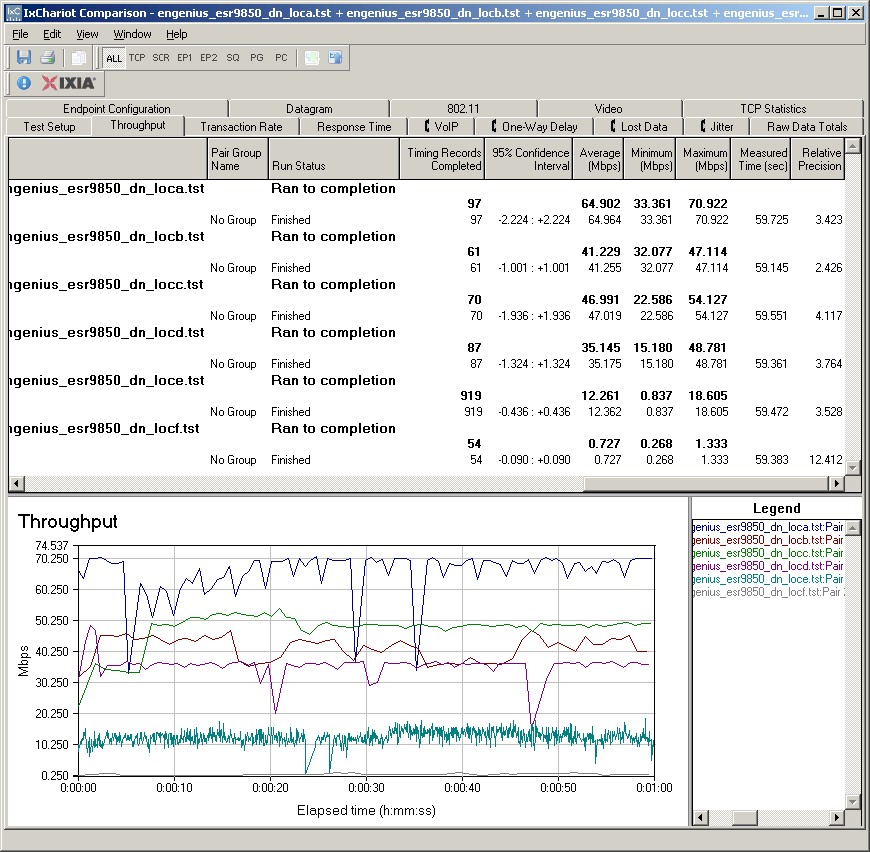
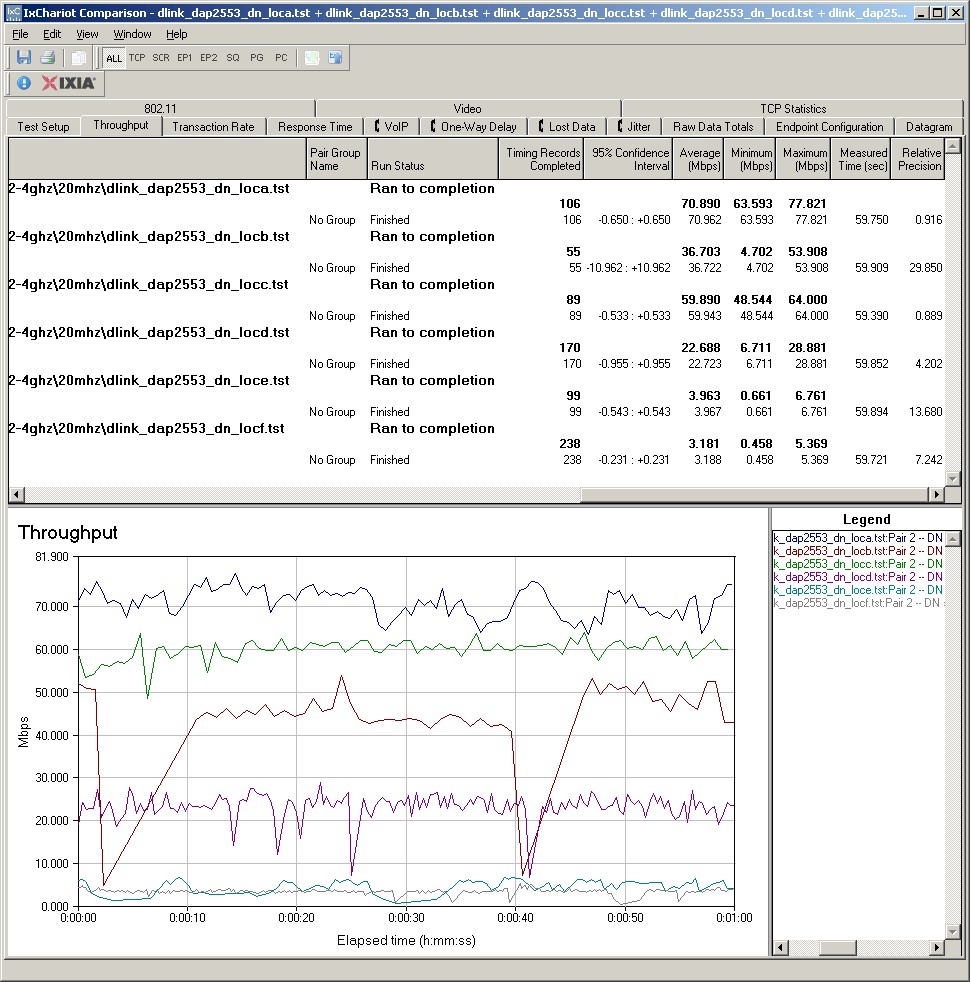
Figure 5: EnGenius ESR9850 wireless throughput – 2.4 GHz, 20 MHz mode, downlink
The 9850’s Ralink-based radio does pretty well with a strong to medium signal, turning in a peak speed of 90.1 Mbps running downlink in 40 MHz bandwidth mode. But the connection was kind of iffy in my toughest test locations E and F, which produce the weakest signal levels. While I was able to get a connection in both 20 and 40 MHz bandwidth modes, speeds weren’t as fast or reliable as I’ve seen with other products, such as the ASUS RT-N13U.
The other plots can be viewed via these links: 2.4 GHz uplink- 20 MHz BW; 2.4 GHz downlink 40 MHz BW; 2.4 GHz uplink 40 MHz BW.
For a competitive comparison, I generated a Performance table selecting a few other single-band N routers at the top of the wireless charts, i.e. D-Link DIR-655 [A4], Buffalo WZR-HP-G300NH and ASUS RT-N13U. While the Buffalo and ASUS may not be as popular as the D-Link, they are better performers.
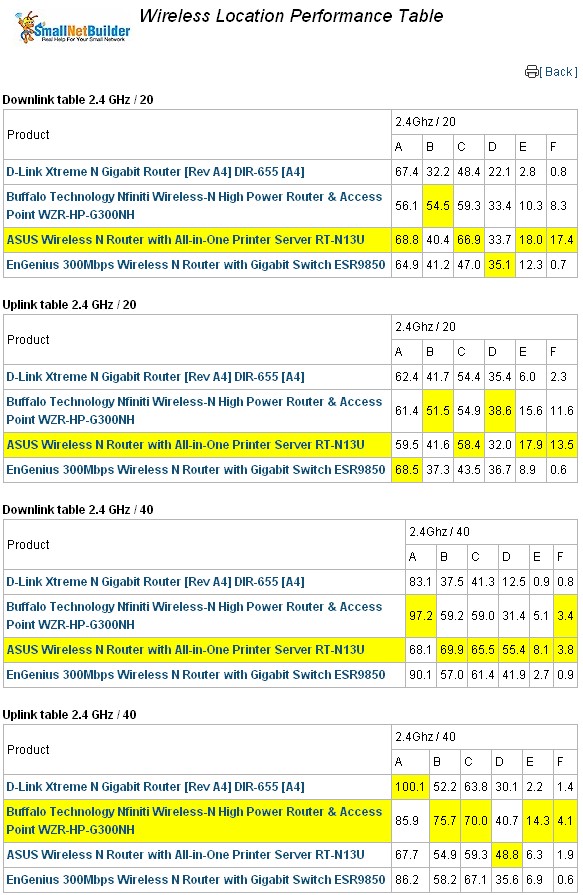
Figure 6: Wireless Competitive Comparison
In this comparison group, the ASUS RT-N13U outshines the 9850, which is surprising since they both use the RaLink RT3052 SoC. But it appears that ASUS has tweaked their design for slightly better wireless performance and much lower routing throughput (it tops out at only 93 Mbps with its 10/100 switch), while EnGenius went for the routing gusto.
Use the Wireless Charts to further compare and explore the 9850’s performance.
Closing Thoughts
I’m glad I went against my standing policy of reviewing only Wi-Fi Certified wireless products. Because EnGenius has produced a nice wireless router at a comparatively low price. It’s got a good feature set, including up and downlink bandwidth controls, multiple SSIDs with connection controls that can be set to allow Internet-only guest access and more routing speed than most buyers will know what to do with. And at a price closer to $50 than $100, it’s a pretty good deal.
I’ll probably be looking at some more of their products, notably the simultaneous dual-band version of the 9850, the ESR-7750. I also want to check out their implementation that allows a WDS connection to be secured by both WPA / TKIP and WPA2 / AES! This is rarely seen, since WPA requires a key rotation that isn’t normally WDS friendly. But EnGenius said they have a proprietary implementation and I’d really like to see if it works.