

Introduction
Updated 9/6/2011: Win 7 SSL VPN test update
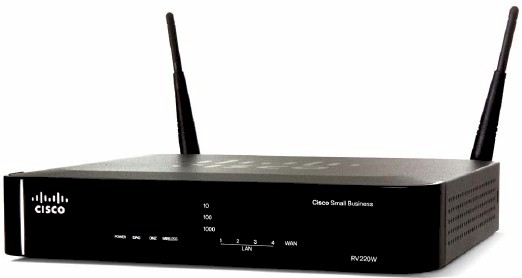
| At a Glance | |
|---|---|
| Product | Cisco Wireless Network Security Firewall (RV 220W) |
| Summary | Small-biz dual-band N router with 10/100/1000 ports and SSL, IPsec and PPTP VPN |
| Pros | • SSL, IPsec, PPTP VPN • > 700 Mbps routing throughput • Gigabit ports with jumbo frames • Dual band N radio • IPv6 support |
| Cons | • Undistinguished wireless performance • Slow reboots • A few odd menu organization choices |
The RV220W is a step up from the previously-reviewed Cisco RV120W. Both routers are recent additions to Cisco’s Small Business RV router series. The RV220W and RV120W are very similar in look and feature set, yet there are a few key differences. The focus of this review is to cover those key differences between the RV220W and RV120W.
Cisco has positioned the RV220W differently than the RV120W, emphasizing the “high performance” of the RV220W vs. the “cost-effectiveness” of the RV120W. As you’ll see, the Cisco RV220W has greater throughput, faster interfaces, more VPN options, and more security features than the RV120W.
The RV220W and RV120W share the same classic gray and black business color scheme as well as general shape. Both devices have a black panel on the front displaying the indicator lights for power, WAN, wireless and status of the 4 LAN ports. The RV220W adds indicator lights for diagnostic mode, DMZ, as well as indicators displaying the connection speed (10/100/1000) for devices connected to the LAN ports.
In back of the RV220W are the WAN and LAN ports, as well as a recessed reset button, power connector, and the power switch, shown in Figure 1. Both the RV220W and RV120W use an external power wart that are slightly different in shape, but appear to be interchangeable based on ratings and connector size. Note that the dual-band dipole antennas are attached via RP-SMA connectors so can be upgraded.
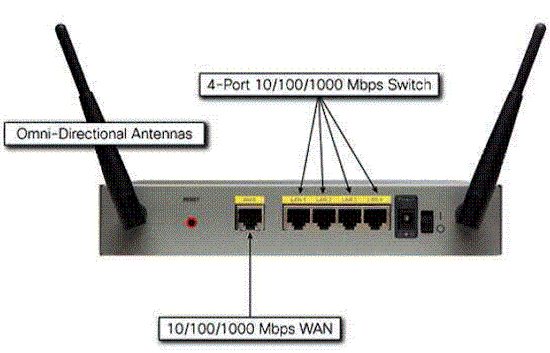
Figure 1: RV 220W rear view
The RV220W is physically bigger at 8.7”W x 6.7”D x 1.7”H compared to 5.9”W x 5.9”D x 1.3”H for the RV120W. The RV220W is more robust and heavier, with a metal case compared to the plastic case on the RV120W. This bigger metal case allows for better airflow over the components and better cooling. Like the RV120W, the RV220W does not have a cooling fan, allowing it to run silently.
Inside Details
Inside the metal case of the RV220W are the mainboard and components, shown in Figure 2. Components includes a Cavium CN5010 CPU and Broadcom BCM53115 10/100/1000 switch under the heatsinks in the photo, as well as 128 MB of RAM and 32 MB of flash. Wireless connectivity on the RV220W is based on a Broadcom BCM4322 802.11n radio on a mini-PCI module.
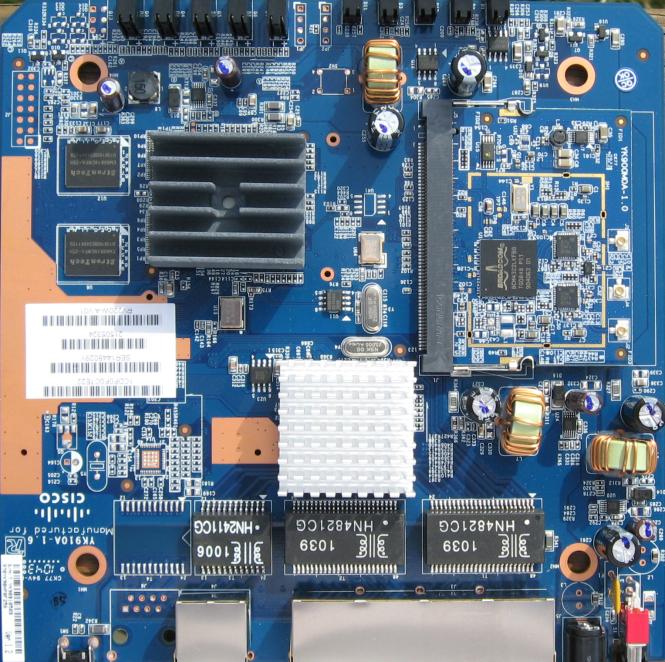
Figure 2: RV 220W board
Note that the RV220W’s Cavium CN5010 chip is clocked at 400 MHz, while the RV120W’s runs at 300 MHz.
Features
Cisco lists the RV220W along with other routers in the RV model line, which includes the RV120W, RV082, RV042, RV016, RVL200, RVS4000, WRV210, and WRVS4400N. You can compare the features of each of these devices with Cisco’s feature comparison tool. For convenience, I’ve also included a summary of the RV220W features below.
- DHCP, Static, PPPoE, PPTP, L2TP
- Built-in Dynamic DNS clients for TZO and DynDNS
- Static and dynamic routing (RIPv1, RIPv2)
- Spanning Tree Protocol (STP)
- Port-based and 802.1q tag-based VLANs (up to 16), inter-VLAN routing
- Port Address Translation (PAT). Network Address Port Translation (NAPT), NAT traversal, one-to-one NAT
- Session Initiation Protocol Application Layer Gateway (SIP ALG)
- IPv6: Dual-stack IPv4 and IPv6, 6-to-4, Stateless address auto-configuration, DHCP v6, Internet Control Message Protocol (ICMP) v6
- Firewall: Network edge (DMZ), Stateful packet inspection (SPI) firewall, firewall rules, MAC-based access control, IP/MAC binding, wireless profiles
- Security: Static URL blocking, keyword blocking, approved URL, Optional Cisco ProtectLink Web cloud-based security service, HTTPS, username/password, X.509 v3 certificates, Port-based RADIUS authentication (Extensible Authentication Protocol [EAP] MD5, Protected EAP [PEAP]), X.509 v3 certificates, certificate upload using PEM format
- VPN: 25 IPsec site-to-site tunnels, 25 QuickVPN tunnels for remote client access, 5 SSL VPN tunnels, 10 PPTP tunnels
- Encryption: Data Encryption Standard (DES), Triple Data Encryption Standard (3DES) and Advanced Encryption Standard (AES) encryption (128, 192, 256-bit)
- Authentication: MD5/SHA1 authentication
- QoS: 802.1p port-based priority on LAN port, application-based priority on WAN port, 4 queues
- Management protocols: Web browser, Simple Network Management Protocol (SNMP) version 1, 2c, 3, Bonjour, Universal Plug and Play (UPnP), Simple Network Time Protocol (SNTP)
- Event logging: Local, syslog, email alerts, packet captures
- Upgradability: Firmware upgradable through web browser, imported/exported configuration in text format
- Wireless 802.11 b/g/a/n – up to 64 active WLAN clients, supports multiple SSIDs – up to 4 separate virtual networks with separate wireless profiles, supports SSID to VLAN mapping with wireless client isolation
- WMM: Wireless multimedia with QoS (802.1e)
- Wireless Distribution System (WDS): Allows wireless signals to be repeated by up to 4 compatible repeaters
IPv6 fans will note that, like the RV 120W, the 220W must be switched between IPv4 and IPv6 modes. See the RV 120W review for more IPv6 info.
Configuration
The menu structure of the RV220W and RV120W are nearly identical, with menu options listed along the left side of the GUI and some menus having multiple sub-options. There are several additional features in the RV220W, as well as some differences, which I’ve listed in Table 1.
| Main Menu | SubMenus | |
|---|---|---|
| RV220W | RV120W | |
| Status | Interface Statistics | X |
| Status | Active Users | X |
| Status | SSL VPN Connection Status | X |
| Networking | Jumbo Frames | X |
| Wireless | X | WPS |
| Cisco ProtectLink | New Feature | X |
| VPN | SSL VPN Server | X |
| VPN | SSL VPN Client | X |
| VPN | PPTP Server | X |
| Administration | CSV File Import | X |
Table 1: RV 120W and RV 220W menu structure comparison
To begin, there are three new sub-menus in the Status menu. The Interface Statistics sub-menu provides a packet count on the WAN and LAN, while the Active Users sub-menu shows all the logged in users, whether they are an admin user configuring the router or a remote SSL VPN user.
The SSL VPN Connection status sub-menu seems misplaced, however. It would make more sense to me if it were with the other SSL VPN menus. Nevertheless, it provides a useful display of active SSL VPN connections, as shown in Figure 3.
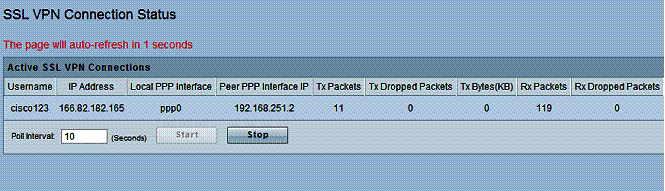
Figure 3: SSL Connection Status
Another menu that seems misplaced is the port forwarding configuration page for the RV220W. Initially, I thought port forwarding was omitted from the RV220W, because the port forwarding sub-menu on the RV120W is located in the Firewall menu. On the RV220W, the port forwarding sub-menu is located in the SSL VPN menu. The RV220W does allow port forwarding by application instead of specifying a port, possibly simplifying the configuration, if you look for it in the SSL VPN menu.
A carryover from the RV120W to the RV220W is the need to reboot the router to apply various configurations, such as enabling IPv6. Rebooting the RV220W is slow, it takes 150 seconds before you can log back in, and even more time for the router to re-establish its WAN connection and pass traffic.
Differences
There are two main differences between the RV220W and the RV120W for your internal network. One, the RV220W LAN has Gigabit Ethernet ports. And two, the RV220W WLAN has a dual band wireless radio. These two additions allow for higher data speeds between devices on the wired and wireless networks. Other than these two additions, wired and wireless LAN configuration options are virtually identical on the RV220W and RV120W.
I was pleased to see the RV220W had 10/100/1000 Ethernet ports plus jumbo frame capability supporting up to 9000 byte frames. This is lacking on the RV 120W, which has only 10/100 ports.
There is one more minor difference between the RV220W and the RV120W wireless options. WPS (WIFI Protected Setup) is not supported on the RV220W, even though the feature was available on the less expensive RV120W. But as Tim noted in his review, this is not surprising, given the business focus of the product.
Security
Firewall and security options on the RV220W and RV120W are also nearly identical and covered in the RV120W review. There is one big difference, though. As I noted in the menu differences above, the RV220W has a new subscription based security feature called Cisco ProtectLink.
Cisco ProtectLink is provided through a partnership with Trend Micro. Cisco has a couple of versions of this feature. The version of ProtectLink offered with the RV220W is the Gateway version. Features of ProtectLink Gateway include:
- Email spam blocker including virus and antiphishing protection
- Web/URL content filtering with more the 80 categories of website types
- Web threat protection for blocking malicious websites and monitoring accessed websites
Although ProtectLink works with the router, it is really a cloud-based service. When activated and properly configured, email and web traffic requests from clients behind the router are sent to email and web servers at Trend Micro. Replies to those requests are filtered or sent back to the clients, as depicted in Figure 4.
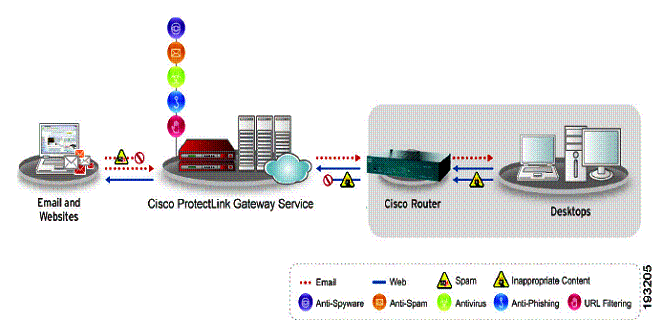
Figure 4: Cisco ProtectLink diagram
The advantage to this approach is the CPU intensive work of filtering traffic is performed by Trend Micro, not the router. An additional advantage is the database of spammers and web sites is maintained centrally instead of requiring the router to download regular updates.
ProtectLink email protection is targeted at networks with an internal email server that can reroute their email MX (mail exchange) record to Trend Micro. Once your MX record is pointed at Trend Micro, all email sent and received from PCs behind the RV220W is filtered by the Trend Micro service.
Web filtering doesn’t require any changes on your network, however. Web filtering is performed by Trend Micro, but you can enable and disable it, as well as define what is filtered on the RV220W. Web categories that can be filtered include Adult, Business, Computers/Bandwidth, Computers/Communication, General, and Social. Each of these categories has multiple different subcategories for a total of 80 filtering categories.
I enabled the entire Social category and tried to go to Facebook, and got the message shown in Figure 5.
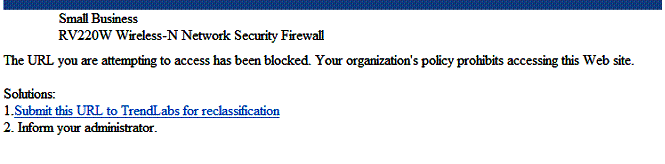
Figure 5: Web filtering block message
I played around with different categories to see what would be blocked. For example, enabling the subcategory labeled Computers/Internet under the Business category blocked access to smallnetbuilder.com!
Different websites can be filtered based on different times of day based on time schedules created on the RV220W. You can define two schedules: one labeled Business hours, the other Leisure hours. The times you don’t define as Business Hours will be considered Leisure hours. Thus, you can block Facebook from 8am-5pm M-F, but allow it outside those hours.
Controls within the RV220W for ProtectLink include defining various clients by IP address to exclude from web filtering. A whitelist of URLs can be entered for websites that should not be filtered. Last, you can enable Web Reputation, a feature to protect against malicious websites.
There is a 30 day free trial of ProtectLink, activated through sending an email and receiving a code. A 1 or 3 year license can be purchased through various vendors on line. For 25 email users and a 1 year license, the cost is $277.98. For 25 email users and a 3 year license, the cost is $455.98. There are also 100 email user licenses for 1 year and 3 years at $525.98 and $839.98.
VPN
As Tim mentioned in his performance review, one of the RV220W’s main attractions is its flexible VPN features, including IPSec, SSL, and PPTP. You can create an IPSec Site-to-Site VPN tunnel with the RV220W to another router and you can remotely connect to the RV220W via an IPSec tunnel using Cisco’s Quick VPN software.
If you’re not an IPsec fan, you can remotely connect to the RV220W via an SSL VPN tunnel, which supports Microsoft Windows 2000/XP/Vista, 32 and 64-bit/Windows 7, and Mac OSX 10.4+. Finally, you can remotely connect to the RV220W using Microsoft’s built in PPTP software. I tested all of the remote solutions using 64-bit Windows 7 as my OS.
I used the VPN Wizard on the RV220W to set up a Site-to-Site IPSec VPN tunnel with a NETGEAR SRX5308 to test a Site-to-Site VPN tunnel with the RV220W. The settings on the tunnel on both sides were Main exchange mode, 3DES encryption, SHA-1 authentication, DH Group 2, and Perfect Forward Secrecy (PFS) enabled. Figure 6 is a screenshot of the RV220W’s IPSec VPN connection status page.
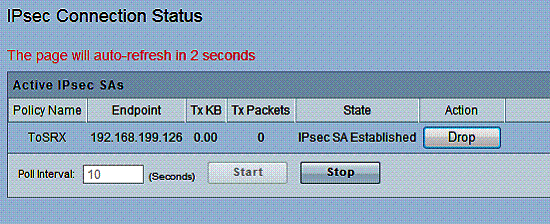
Figure 6: IPsec connection status
I used Cisco’s Quick VPN software, available on Cisco’s website, to test remote client IPSec VPN tunnels. As with the RV120W, IPSec client setup is a matter of installing the software on the PC and creating a user name and password on the router. Once complete, you click Connect on the PC software, and you’re connected as shown in the RV220W. Figure 7 is a screenshot of the RV220W’s QuickVPN connection status page.
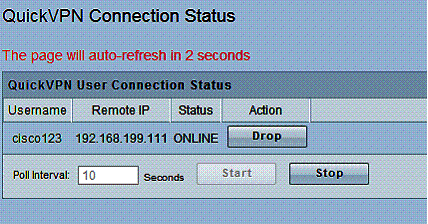
Figure 7: QuickVPN Connection Status
As I’ve stated before, I’m a fan of SSL VPN connections for their simplicity, and the RV220W is no exception. Remotely connecting to the router via the SSL VPN client was easy, since I didn’t have to install client software other than the drivers that are automatically installed on the first connection to the router.
I did have to enable SSL VPN Server on the RV220W, as well as create an SSL user name and password, which was simple. Figure 8 is a screenshot of the RV220W’s SSL VPN connection status page.
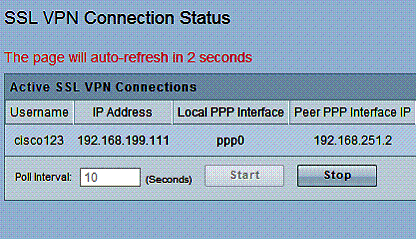
Figure 8: SSL VPN Connection Status
Updated 9/6/2011: Win 7 SSL VPN test update
I reported success with SSL VPN functionality in my review of the Cisco RV220W with the Windows 7 64-bit operating system. Since then, there have been posts to our forums with folks having problems with the RV220W SSL VPN and Win 7 64, which has led me to retest SSL VPN on the RV220W and write this update.
The first thing I did was default the RV220W and update the firmware to the latest version, 1.0.2.4. I then re-enabled and retested SSL VPN with the same PC I used for the RV220W review back in January. The steps I followed are below.
1. Enable remote access via the Administration-Management Interface-Web Access menu.
2. Add an SSL VPN user name and password via Administration-Management Interface-Users.
3. Start up IE64bit in Admin Mode, add the RV220W’s WAN IP address to the IE trusted site list, and set IE trusted site security to low.
4. Browse to https://WAN_IP_ADDRESS.
5. Click on VPN Tunnel, select SSL VPN Tunnel Client Installer/Launcher.
As before, my Win 7 64 PC quickly set up an SSL VPN connection. I further tweaked the RV220W settings for Split Tunnel Support and added an additional subnet to the VPN tunnel, all worked well. The screenshot below is from a Win 7 64 PC.
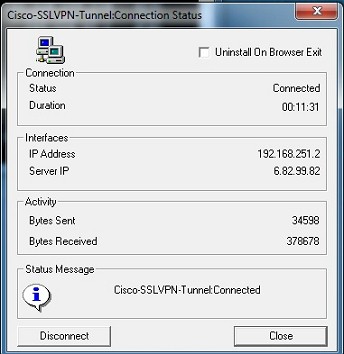
Figure 8a: SSL Tunnel VPN Connection Status
I then tried SSL VPN on a newer PC, also running Win 7 64, and was unable to connect to the RV220W via SSL VPN! I poked around with browser security settings and other tweaks, but no joy. I continuously received the message "Error Virtual Passage Installation Failed!" I did a Google search on this error message and could see there are numerous posts on various forums for this error.
So why did SSL VPN work with one Win 7 64 PC and not the other? I noticed on both Win 7 64 PCs I had a Virtual Passage interface, but there was a difference. On the working Win 7 64 PC, the Virtual Passage interface showed an ISDN channel – Virtual Passage SSLDrv Adapter, circled below, which was missing on the non-working Win 7 64 PC.
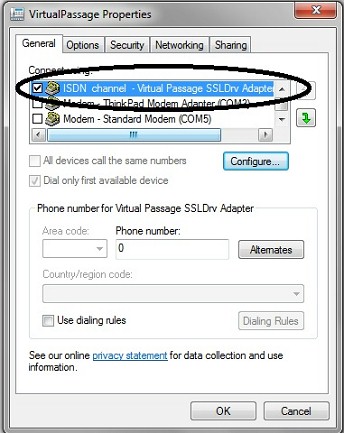
Figure 8b: Virtual Passage properties
Windows Device Manager showed the Virtual Passage interface uses a Cavium Networks driver, which reminded me that I used the working Win 7 64 PC to test the NETGEAR SRX5308 awhile back. Both the Cisco RV220W and the NETGEAR SRX5308 use a Cavium CPU and Cavium software for SSL VPN connectivity. (A little more poking around revealed that Cavium acquired the Virtual Passage software from a company called MenloLogic.)
I then attempted to set up an SSL VPN connection from my newer Win7 64 PC to the NETGEAR SRX5308. The Virtual Passage installation succeeded.
With Virtual Passage successfully installed in my newer Win 7 64 PC via the NETGEAR SRX5308, I tried connecting to the Cisco RV220W, and it worked. Below is a screenshot showing the Windows 7 64 Control Panel System page and a successful SSL VPN connection to the RV220W on a Win 7 64 PC.
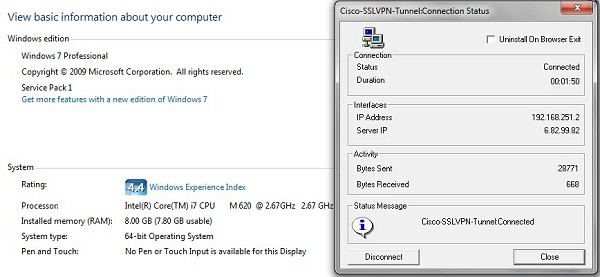
Figure 8c: Successful Win 7 64 bit SSL connection
Thus, it seems my original test with SSL VPN on the RV220W and Win 7 64 in the review worked because I was using a PC that had previously installed the Virtual Passage driver from a NETGEAR router.
I solved the Cisco RV220W problem by installing the Virtual Passage driver with a NETGEAR router. But that obviously doesn’t help those who don’t have an extra SSL VPN-capable NETGEAR laying around. We’ll notify Cisco of our observation and hopefully we’ll see a resolution soon.
End of 9/6/2011 update
To complete the gamut of RV220W VPN options, I tested a remote PPTP connection. Although the least secure of remote connectivity options, PPTP is a useful and also simple option that doesn’t require installing client software or drivers on a Windows PC. On the RV220W, enable the PPTP server and add a PPTP user and password.
Adding a PPTP connection is done via the Set up a Connection or Network option in the Networking section of the Windows control panel. Once there, create a new VPN connection, enter the destination IP (or Dynamic DNS name) and ensure you’ve selected PPTP as the type of VPN. Right click and select Connect on your new connection to establish the tunnel. Figure 9 is a screenshot of the RV220W’s PPTP VPN connection status page.
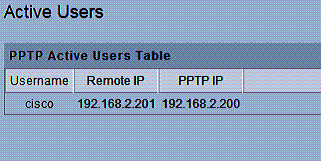
Figure 9: PPTP connection status
VPN Performance
Cisco rates the RV220W at 90 Mbps for IPSec VPN throughput and 25 Mbps for SSL VPN throughput. Cisco’s RV220W spec sheet doesn’t provide a throughput rating for PPTP tunnels. But it does list VPN capacity for up to 25 Site-to-Site tunnels, 25 Quick VPN tunnels, 5 SSL tunnels, and 10 PPTP tunnels.
I tested the RV220W’s VPN throughput with iperf using default TCP settings, with a TCP window size of 8KB and no other options. I ran iperf on two PCs running 64-bit Windows 7 with their software firewall disabled. All tests were done over a Gigabit network. (Running a simple iperf throughput test between two PCs uses the command iperf -s on one PC and iperf -c (ip) on the other PC.)
Table 2 summarizes my VPN test results. The first row is a baseline, showing throughput between my two PCs over a Gigabit LAN on the same subnet. The next rows show throughput using the Quick VPN connection, the SSL VPN connection, and the PPTP connection. I also added my results from testing of a previous router, the Netgear SRX5308, which I’ll explain shortly.
| Test | WAN-LAN (Mbps) |
LAN-WAN (Mbps) |
|---|---|---|
| Baseline | 334 | 353 |
| Quick VPN (IPSec) | 38.3 | 49.3 |
| SSL VPN | 0.72 | 12.5 |
| PPTP VPN | 16.3 | 14.1 |
| SRX5308 VPN Throughput | ||
| IPSec VPN | 38.1 | 42.6 |
| SSL VPN | 0.72 | 13.2 |
Table 2: RV220W VPN Throughput Test Summary
The Baseline shows my two PCs can send data between each other in either direction at over 300 Mbps, thus neither are a bottleneck. With one PC moved to the WAN side of the RV220W and connected via a VPN client, I then measured throughput via each of the VPN clients solutions.
As you can see, I measured 38.3-49.3 Mbps using IPSec,.72-12.5 Mbps using SSL, and 16.3-14.1 Mbps using PPTP. Compared to Cisco’s ratings of 90 Mbps for IPSec and 25 Mbps for SSL, these numbers are lower than expected. On the plus side, IPSec throughput of the RV220W nearly doubles that of the RV120W’s 25 Mbps.
Interestingly, the IPSec and SSL VPN throughput on the RV220W very closely match the throughput numbers of the NETGEAR SRX5308. In my review of the SRX5308, I measured 38.1-42.6 Mbps using IPSec and .72-13.2 Mbps using SSL. Looking at the components of the two routers, the similar performance makes sense, since they both use the Cavium CN5010 CPU and Broadcom BCM53115 Ethernet chip.
Administration
As listed in Table 1, new to the RV220W is a CSV File Import option, which provides a more efficient means to add users, groups, and domain names. Simply create a list of the desired users, groups, and/or domains in a comma separated values text file (or in a spreadsheet and save it as a.csv file) and import the list into the RV220W via the CSV File Import menu. Tools like this certainly make a device more scalable.
Performance Comparison
As mentioned in the beginning, the RV220W is the high performance option in Cisco’s RV router product line. On the wired side, clearly it meets that distinction. The RV220W’s performance numbers are at the top of our charts in all four categories.
For comparison, I’ve included the routing performance numbers of the previously mentioned NETGEAR SRX5308, as well as those of the Draytek 2130N and Cisco E4200 in Table 3.
| WAN-LAN (Mbps) |
LAN-WAN (Mbps) |
Total Simultaneous Throughput (Mbps) |
Max Connections | |
|---|---|---|---|---|
| Cisco RV220W | 720.0 | 728.4 | 1,113.1 | 34,925 |
| Netgear SRX5308 | 448.6 | 581.5 | 534.9 | 48,924 |
| Draytek 2130N | 638.2 | 691.1 | 765.7 | 16,384 |
| Cisco E4200 | 686.8 | 688.6 | 725.9 | 34,925 |
Table 3: Competitive routing performance summary
Note, the NETGEAR isn’t an apples to apples comparison with the RV220W, as the SRX is a multi-WAN router without wireless. But it is an interesting comparison because the RV220W and SRX have similar components. The Draytek 2130N is a VPN security router with a wireless N radio, so it is more direct comparison. I added the Cisco E4200, which is a consumer targeted router, because Tim used the E4200 as a comparison for wireless performance in his review.
As you can see, the RV220W has significantly higher wired router performance numbers than either the SRX or 2130N, and even the E4200. As a matter of fact, the RV220W is near the top of our wired router performance charts in all categories.
Wireless performance for a dual band router is decent, but as Tim mentions in his performance review, it is only average. Cisco’s “ultimate wireless home router”, the E4200, produces higher wireless performance in nearly all locations.
For my testing, however, I had no problem getting a signal and connection throughout my house. Depending on where I was, Windows’ Network Connection Status showed a wireless link rate between 54Mbps and 300Mbps.
Closing Thoughts
A consistent theme in this review has been to compare the RV220W to the RV120W. As mentioned earlier, Cisco provides a comparison tool on its website to look at the features of all the RV series routers. I’ve summarized some the of key differences between the RV220W and RV120W from this comparison tool in Table 4. With faster LAN ports, faster wireless, better throughput, more VPN options, and greater network capacity, the RV220W is clearly superior to the RV120W.
| Feature | RV220W | RV120W |
|---|---|---|
| WAN ports | (1) 10/100/1000 | (1) 10/100 |
| NAT (Routing) Throughput | 800 Mbps | 100 Mbps |
| Wireless Frequency Band | 2.4 GHz, 5 GHz (dual band) | 2.4 GHz (single band) |
| VPN Throughput (IPSec) | 90 Mbps | 25 Mbps |
| VPN Throughput (SSL) | 25Mbps | NA |
| IPSec Tunnels | 25 | 10 |
| Quick VPN Tunnels | 25 | 10 |
| PPTP VPN Tunnels | 10 | 0 |
| SSL VPN Tunnels | 5 | 0 |
| LAN ports | (4) 10/100/1000 | (4) 10/100 |
| Jumbo Frame Support | Yes | No |
| VLANs | 16 | 4 |
Table 4: RV 120W and RV 220W feature comparison
When you look at pricing and consider performance and features of the RV220W and the other routers mentioned, there is a compelling value picture. Table 5 lists the price of the RV220W along with the prices of the other routers mentioned in this review.
| Router | Price |
|---|---|
| Cisco RV220W | $255.15 |
| Cisco RV120W | $133.63 |
| Cisco E4200 | $179.00 |
| Netgear SRX5308 | $397.69 |
| Draytek 2130N | $235.00 |
Table 5: Price comparison
As you can see in Table 5, the RV220W is more expensive than the RV120W, but that is to be expected with its significantly higher performance. The RV220W is $76 more than the E4200, but includes VPN, security, and numerous other business grade features not included in the consumer targeted E4200.
The SRX is also not a direct comparison, but due to their similar components and performance, it is interesting to see that the RV220W provides better routing and VPN throughput than the SRX, as well as wireless, at a lower price. Finally, the 2130N is probably the closest router in our comparison charts to the RV220W in terms of target market and throughput and is $20 cheaper than the RV220W. However, the 2130N is also slower and has fewer VPN options than the RV220W.
Even though the RV220W is nearly twice as much as the RV120W, I think it is a good value. Heck, the RV220W’s performance and capabilities are essentially twice those of the RV120W!
If I’m running a network, I want Gigabit LAN ports for future-proofing. And if I’m supporting remote users, multiple VPN options makes life much easier. Add to that support for IPv6, VLAN tagging, a highly configurable firewall, QoS options, and a dual band radio, and I think Cisco has a winner on its hands with the RV220W.