

Introduction
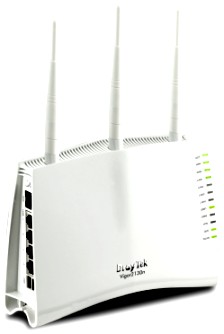
| At a Glance | |
|---|---|
| Product | DrayTek Vigor 2130n High Speed Gigabit Router (2130n) |
| Summary | Gigabit port single band 11n router with IPsec/ PPTP VPN endpoint and USB drive FTP and file sharing. |
| Pros | • Extensive Up and downlink bandwidth control • Smart switch features • USB drive and printer sharing • Two VPN tunnels- PPTP, IPsec, L2TP |
| Cons | • Not Wi-Fi Certified • Does not support 40 MHz bandwidth mode • Buggy drive sharing • WPS doesn’t work for PIN mode |
For their second review, I asked Draytek to suggest a single WAN N router and they came back with the 2110n. But I know SmallNetBuilder readers hunger for Gigabit ports on their N routers, so I instead asked them to send the 2130n for review.
The 2130n is aimed at fiber Internet connections with around 800 Mbps of routing speed, according to Draytek, and has features similar to its older sibling, the Vigor 2910G, minus the dual WAN ports. I was told that it’s the first Draytek router to support SMB file sharing from a USB attached drive and sports a completely rewritten OS.
The 2130n comes in tower-style case that is not designed to be laid down. But Draytek has included screw mounting slots on the back cover so that you can wall mount it if you like. Figure 1 provides the rundown on all the indicators, controls and ports.
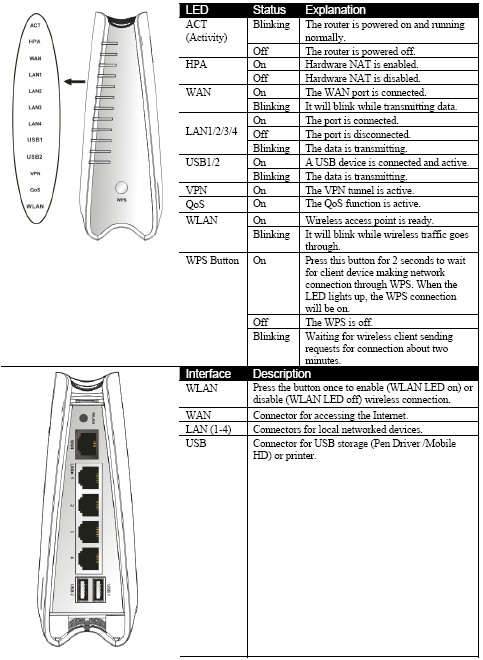
Figure 1: 2130n front and rear panels
All ports are 10/100/1000 and can be configured using the controls shown in Figure 2. You can check port status and set port speed, enable / disable Flow Control, set frame size for jumbo frames (up to 9600 Bytes), control excessive collisions and set port power saving modes.
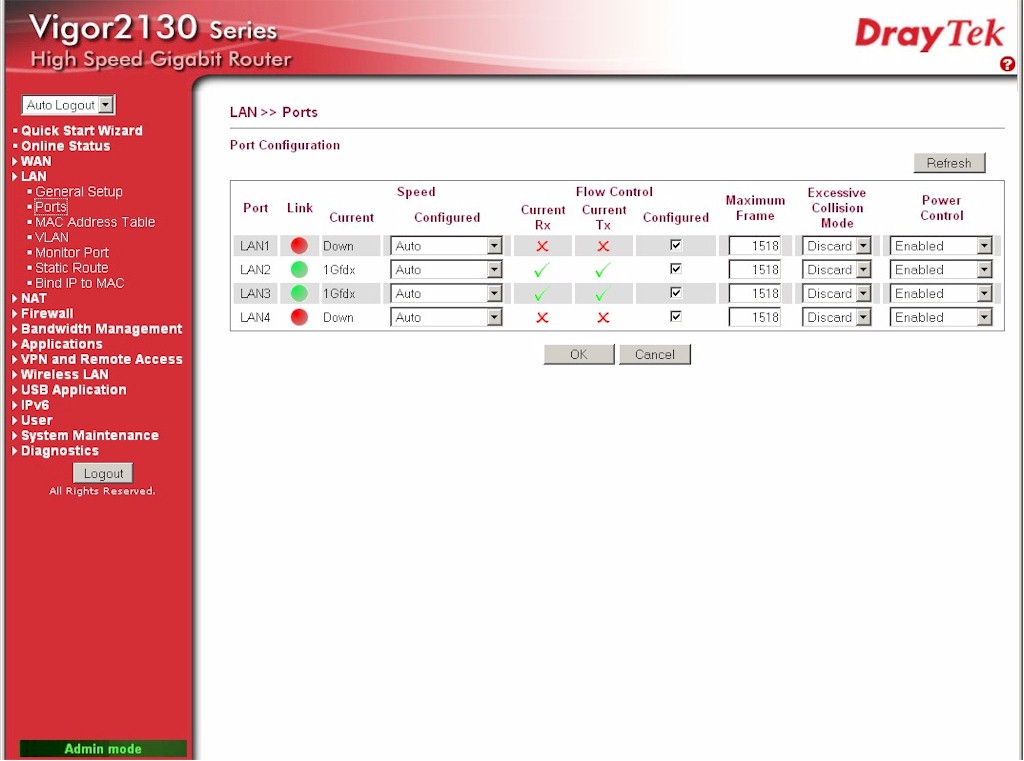
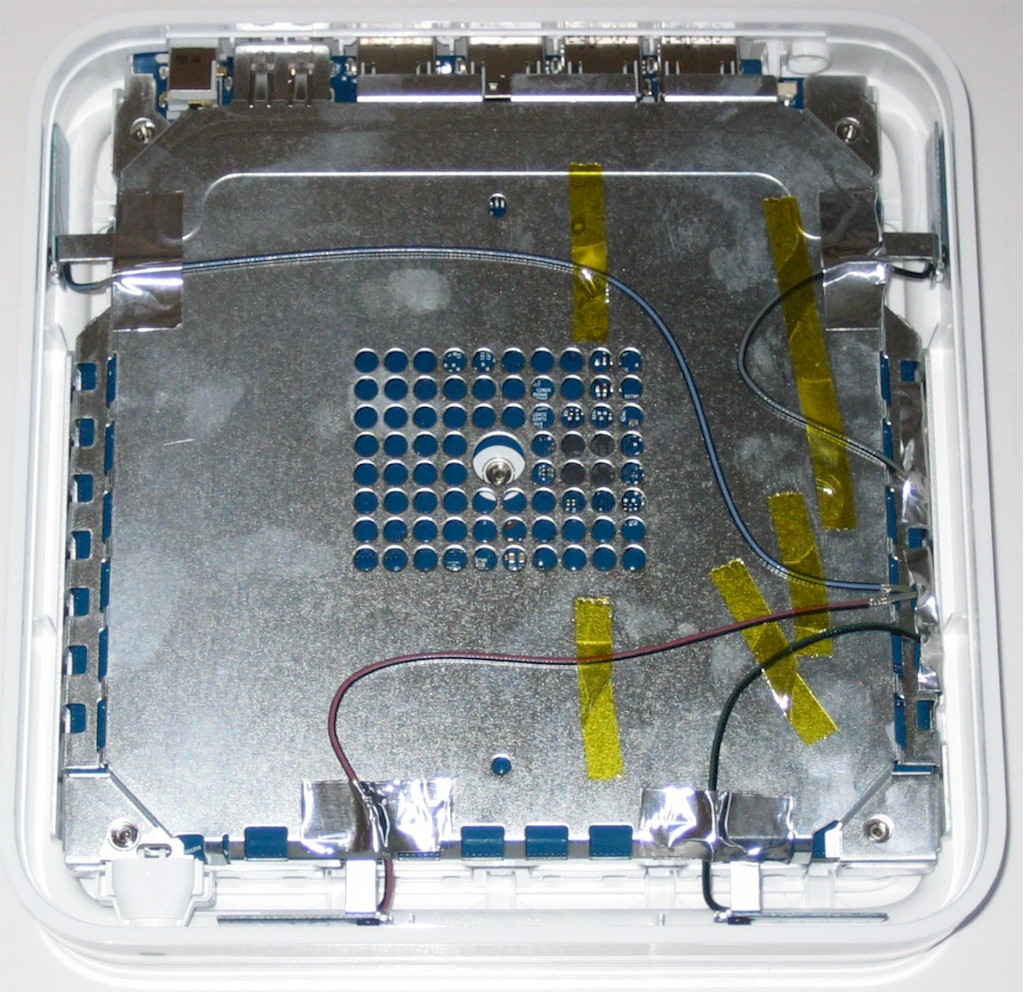
Figure 2: LAN Port settings
If you check the options under the LAN heading in the left-hand menu, you can see more "smart" switch functions built into the 2130n. You control the switch MAC address table and set up VLANs, monitor ports and static routes. And of course, using the Bind IP to MAC function, you can reserve IP addresses for specific clients.
The sample that Draytek sent didn’t have an FCC ID printed on it. But Draytek tends to just register the radio portion of their wireless routers, so I had to open the 2130n up anyway. The good news is that Figure 3 shows a hefty heatsink over what appears to be a single SoC that contains the processor and Gigabit switch ports. But bad for me, since it meant more digging to ID the processor.
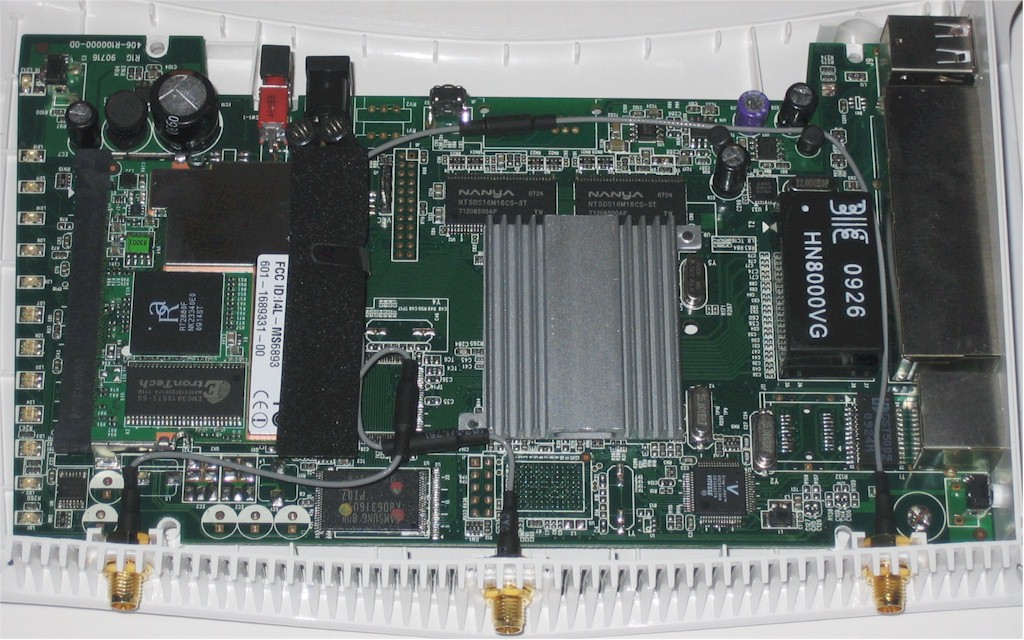
Figure 3: 2130n board
Fortunately, Draytek provides SSH access to the 2130n’s console. So I fired up PuTTY and found BusyBox upon login. After some digging around, I wasn’t able to identify the exact device. But the processor was called out as ARM926EJ-S based and there was a reference to Vitesse WebRocX. Bing actually beat out Google in providing this link, which refers to "Vitesse WebRocX chips". But this page lives on a staging server and a search for WebRockX on the main Vitesse site comes up empty.
The other components are 64 MB of RAM and 8 MB of flash, a Vitesse VSC8601 Gigabit Ethernet PHY for the WAN port and a Microstar International MS6893 mini-PCI 2.4 GHz radio module. The MS6893 uses a Ralink RT2880F 2T3R MAC/BB probably mated with an RT2820 2.4 GHz transceiver.
Features
Doug described the features found in Draytek routers pretty well in his 2910G review. Draytek also has an online demo of the 2130 series so you can browse through the screens yourself. You can also download the 233 page PDF User’s Guide.
Here’s a summary of the 2130n’s general features:
- Gigabit WAN port with configurable speed, flow control, jumbo frames and power control
- Static, DHCP, PPPoE, and PPTP/L2TP WAN connection
- IPv6 WAN and LAN support
- Smart switch functions (described earlier)
- Hardware NAT acceleration (this is said to produce the very high routing speed)
- Dynamic DNS (dyndns.org, changeip.com, zoneedit.com, no-ip.com, freedns.afraid.org)
- Schedulable WAN, WLAN and VPN enable / disable
- IGMP snooping and status
- Support for USB 3G modem primary and failover WAN (supported modems)
- UPnP (including bandwidth limits)
- HTTP and HTTPs admin
- Telnet, SSH command line admin access (Linux root via Busybox)
- USB printer sharing
- USB drive sharing (FTP and SMB file sharing, FAT format only)
- Bandwidth monitor
- Web log view and syslog support
- Email alerts
firewall features:
- Software DMZ
- Port forwarding w/ optional local port setting
- Per port rate limiting
- Access / Deny access control w/ physical & logical ports, frame type, rate limiting and IP address
- Per IP (or IP range) session limits, up / down bandwidth limitings
- DoS attack Unicast, multicast, broadcast rate limiting
- Port rate and QoS control and port priority
wireless features:
- Single 2.4 GHz B/G/N radio
- Transmit power control
- WEP, WPA / WPA2 (PSK and RADIUS) wireless security
- WPS pushbutton and PIN
- Allow / Deny MAC address filter
- AP discovery (for finding clear channel)
and VPN features:
- 2 tunnels
- IPSec LAN to LAN, L2TP over IPSec and PPTP Remote Dial in
- Encryption : 3DES, AES
- Authentication : MD5, SHA-1
- IKE Authentication : Pre-shared Key
- Aggressive mode support
- VPN pass thru support
Despite this impressive feature list, there are a few key omissions on the wireless side. First, the product currently isn’t Wi-Fi Certified, although Draytek says this is pending. Second, there is no WDS bridging repeating support and no router / AP mode switch (hardware or software).
More importantly, however, there is no way to control the wireless mode, which is set to Mixed (11b+11g+11n) and only 20 MHz bandwidth mode is supported. (Don’t pay any attention to the drop-down selector for Wireless Mode in Figure 4—it doesn’t have any other options.)
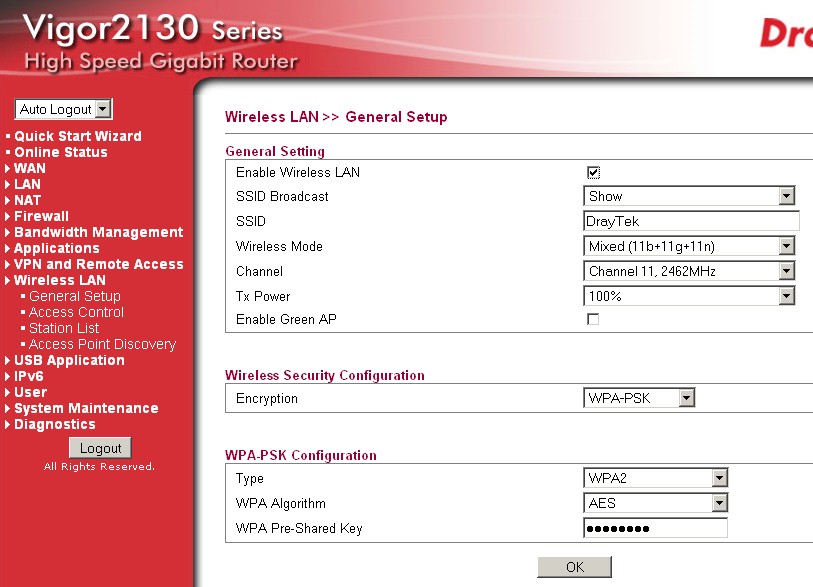
Figure 4: 2130n WLAN settings
Draytek says the latter issue will be fixed via a "not too distant future" firmware update. But, vendors have made such promises before and not delivered. So if 40 MHz mode support is important to you, don’t buy the product until the firmware fix is released.
Also note that the URL content filtering found on the 2910G is not implemented in the 2130n. That’s no biggie, since you can always use the free filtering offered by OpenDNS.
Doug talked about Draytek’s extensive bandwidth management features in the 2910G review. And in clicking through the various screens, I have to say the 2130n has probably the most extensive set of QoS features that I’ve seen in an off-the-shelf router.
Some of the features remind me of the magic shaper feature in m0n0wall, which would make sense, given the 2310n’s Linux core. Figure 5 provides a taste of what you can get into if you need to set the priority for particular applications.
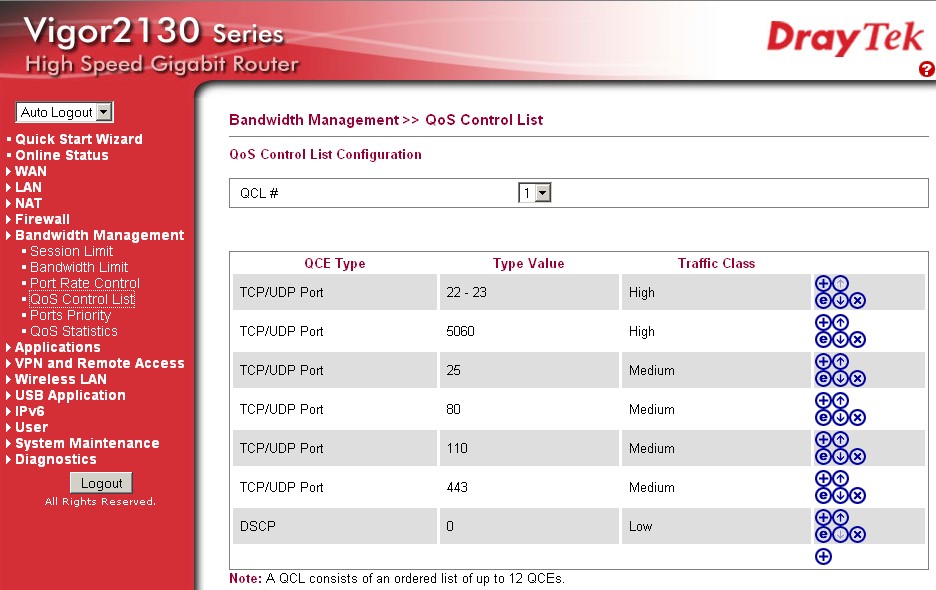
Figure 5:QoS Control List
Fortunately, there are also simpler controls that let you limit the maximum number of sessions or set up and download bandwidth limits for single or ranges of IP addresses (Figure 6).
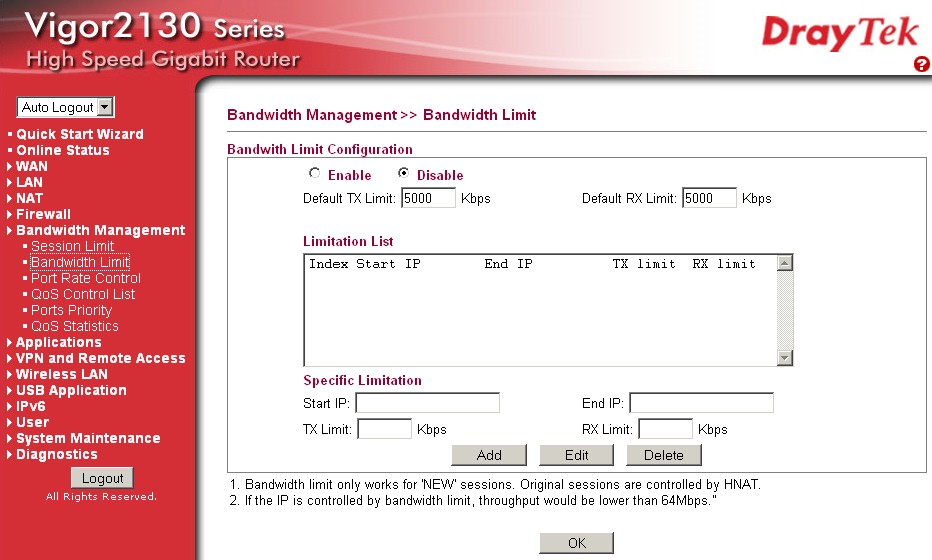
Figure 6: Bandwidth limit controls
VPN
The 2310n supports only two VPN tunnels. But they can be any combination of "dial-in" (client to router) or site-to-site (router to router) connections using PPTP, IPsec or L2TP/IPsec protocols.
Draytek provides its Smart VPN client free for download, which I tried unsuccessfully to use on an XP SP3 notebook to open an IPsec tunnel to the 2130n. This was a few months ago, however, and Draytek has since released a newer version of the utility (4.0.0.1) that I didn’t try.
But in the meantime, I took at shot at trying to connect using the VPN Wizard built into Win 7’s Network and Sharing Center. I configured the 2130n as shown in Figure 7 and set up a user with only IPsec/L2TP enabled.
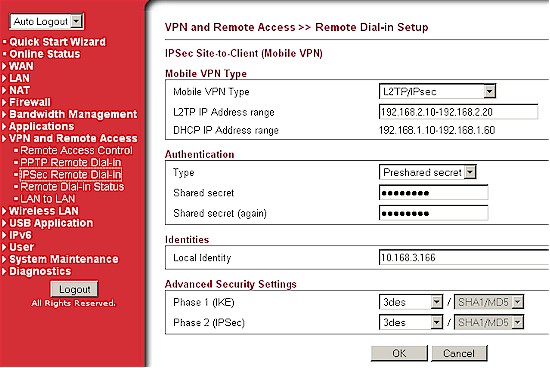
Figure 7: VPN IPsec client tunnel setup
On the Win 7 client, I just did the following:
- Opened the Network and Sharing Center
- Chose Set up a new connection or network, then Connect to a workplace
- Chose No, create a new connection, then Use my Internet connection (VPN)
- Entered the WAN IP of the 2130n
- Entered the username and password of the test user I set up
- Clicked the Connect button
Because I disabled the fallback of a PPTP connection, this didn’t get me connected. So when the connection failed, I then chose Set up the Connection anyway to save it so that I could make the required changes. After going back to the Network and Sharing Center, I just opened the saved connection and made the settings shown in Figure 8 in the connection Properties. I also clicked the Advanced settings button, to enter the preshared key I’d set in the 2130n.
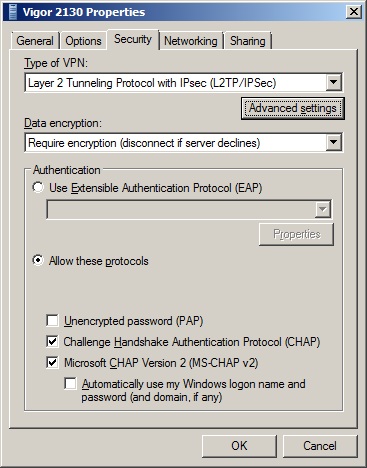
Figure 8: Win 7 IPsec/L2TP client setup
Once the changes were made, the connection opened within seconds of clicking the Connect button. The 2130n’s Remote Dial-in Status screen (Figure 9) showed the successfully opened tunnel.
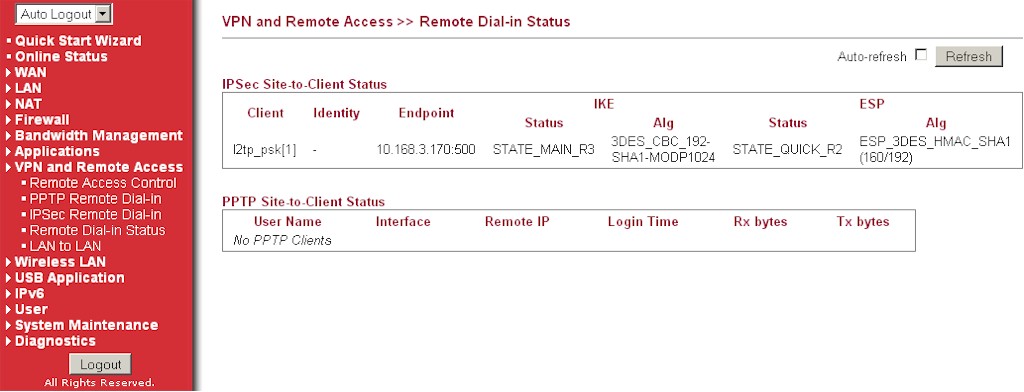
Figure 9: VPN status
I should note that the VPN setup information in the system log was detailed and informative, something not always found in VPN endpoint routers.
I used LAN Speed Test to run a quick check on the 3DES encrypted IPsec tunnel, using a 10 MB file size. Figure 10 shows 1.15 Mbps client to router and 1.3 Mbps router to client.
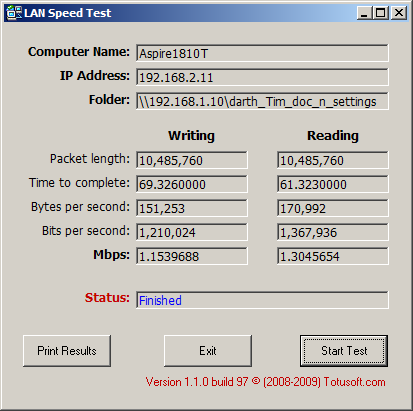
Figure 10: 3DES Ipsec tunnel throughput
Routing Performance
The 2130n was tested using our updated router test process, which includes the new Maximum Simultaneous Connections test. The results summarized in Table 1 show that the 2130n comes close to, but doesn’t achieve Draytek’s 800 Mbps throughput claims. Still, with unidirectional throughput in the 600’s and total throughput in the mid-700 Mbps, the 2130n should be fast enough for anyone’s needs.
| Test Description | Throughput – (Mbps) |
|---|---|
| WAN – LAN | 638 |
| LAN – WAN | 691 |
| Total Simultaneous | 766 |
| Max Simultaneous Connections | 16,381 |
| Firmware Version | 1.2.0 |
Table 1: Routing throughput
Figure 11 shows the IxChariot aggregate plots for WAN to LAN, LAN to WAN and simultaneous routing throughput tests, with nice, steady throughput.
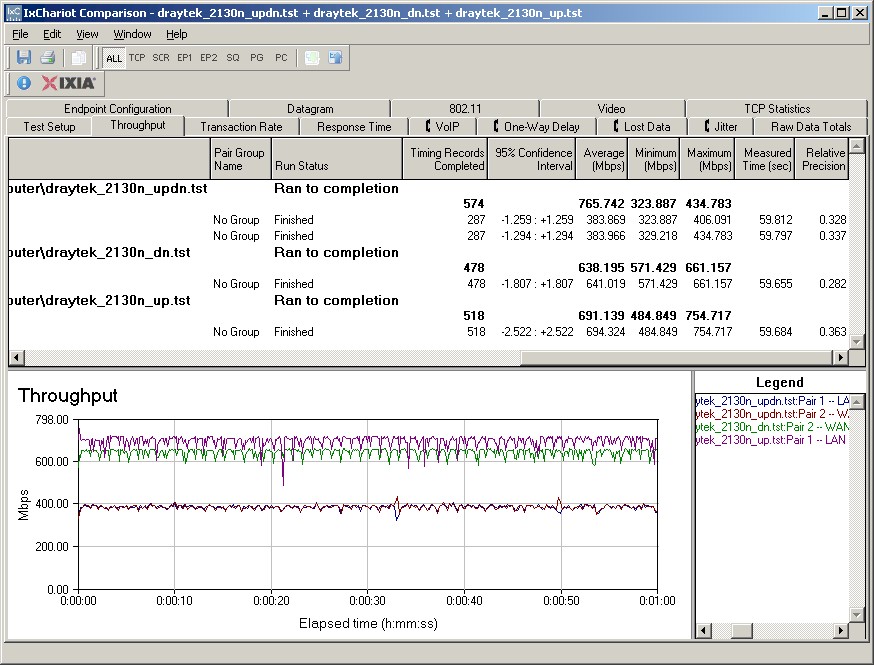
Figure 11: Draytek 2130n routing throughput
The new Maximum Simultaneous sessions test, which has a limit above 40,000 sessions, came through with a best case of 16,381 connections in three test runs. Looks to me like a 16K session table.
USB Drive Sharing
As mentioned in the Feature summary, the two USB 2.0 ports can be used to share a USB printer, connect a 3G modem for WWAN connection and share a flash or hard drive. Drives can be shared via FTP and SMB/CIFS and per-user password-protected shares can be configured, as Figure 12 shows.
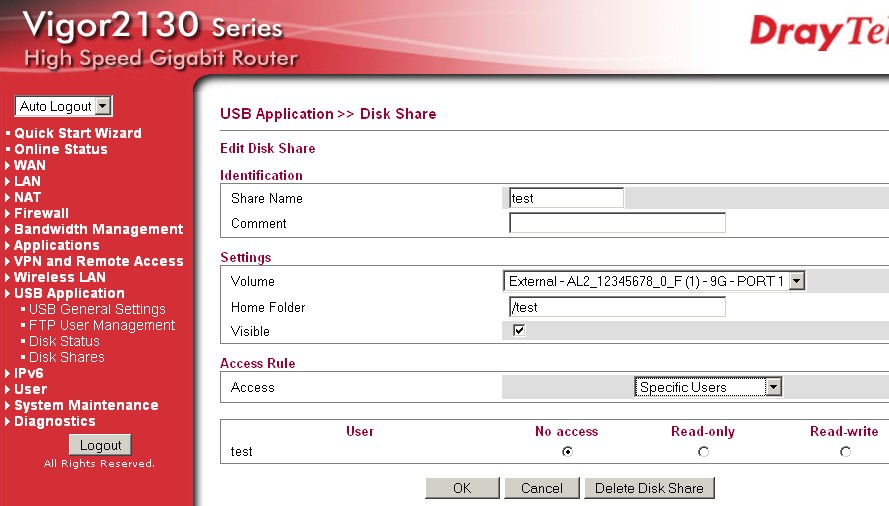
Figure 12: USB Disk share configuration
Draytek said the 2130n is its first router to support Windows-style file sharing. From my testing, however, it needs more work. I connected the Iomega Ultramax Pro configured in RAID 0 that I use for all USB file copy performance testing and tried a few times to run my robocopy script to copy a 4.35 GB folder of files to and from the 2130n’s share.
I was able to complete one write test (I normally run three writes and three reads in the script), which showed a throughput of 3.6 MB/s. But read tests would always fail with the share going missing shortly into the test. The disappearing share also happened when I tried to run other write tests, too. So, at least from my testing, I would not depend on this feature until Draytek gets new firmware out.
Wireless Performance
I used the open air test method described here to test the 2130n’s wireless performance. Testing was done using our standard wireless test client, an Intel Wi-Fi Link 5300 AGN mini-PCIe card in a Dell Mini 12 running WinXP Home SP3 and version 13.0.0.107 of the Intel drivers. I left all client-side defaults in place.
The router was loaded with version 1.2.0 firmware. All factory default settings were left in place, except setting channel 1 for the 2.4 GHz band. As noted earlier, I was not able to run tests using 40 MHz bandwidth mode. I was able, however, to verify that the 2130n properly limited link rates to 54 Mbps (802.11g maximum) when I selected WEP or WPA-TKIP security.
Although Draytek says the 2130n supports WiFi Protected Setup (WPS) for both PIN and pushbutton modes, I couldn’t get it to work. My Intel client supports only PIN mode, but there was no PIN available on either router labeling or the admin interface. I don’t think the router was properly advertising WPS mode anyway, since when I initiated connection on the client, with the 2130n encryption set to WPS, the client connected with no security!
Figure 13 shows the IxChariot aggregate plot for all downlink tests using 20 MHz channel width. Here’s the uplink- 20 MHz BW plot. I’d characterize the 2130n’s wireless performance as mostly average, with stronger than typical speeds in the weakest signal test locations E and F.
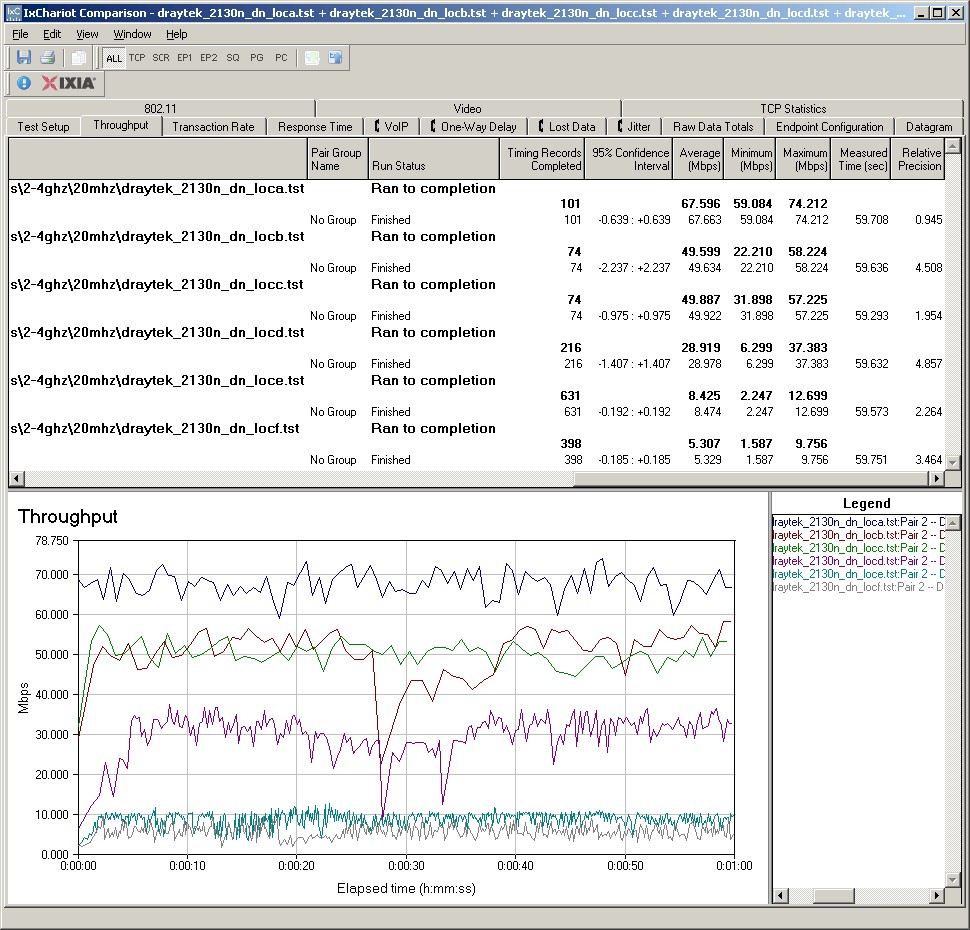
Figure 13: Draytek 2130n Wireless Throughput – 2.4 GHz, 20 MHz B/W downlink
Best case speed of 67.6 Mbps was measured running downlink at Location A. Running simultaneous up and downlink tests in Location A showed only a modest gain in total throughput to 77.8 Mbps.
Wireless Performance – Competitive
For a competitive comparison, I generated a Wireless Comparison Table for the 2130n and two other single band N routers with Gigabit ports, the ASUS RT-N16 and EnGenius ESR9850. Figure 14 shows that the 2130N was a clear winner on downlink. But the three products were more evenly matched running uplink, although the EnGenius won the comparison with three bests vs. two for the other two routers.
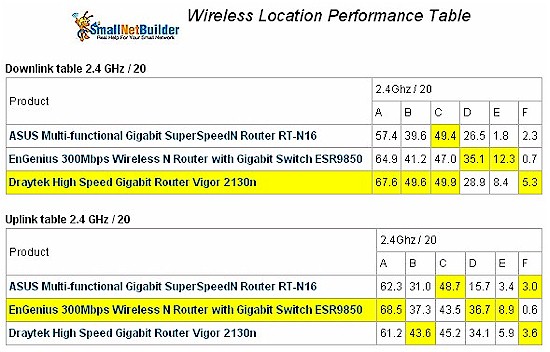
Figure 14: Wireless performance comparison – 2.4 GHz band
Given the limitations and other issues with the 2130n’s wireless feature set, I’d say its wireless portion is the weakest part of the product. And I certainly would not recommend buying the 2130n for its wireless performance alone!
Closing Thoughts
The 2130n is a damned fast wired router with extensive QoS features. But its high price ($243), limited availability, modest IPsec tunnel throughput, missing wireless controls and buggy USB drive file sharing make for a poor overall value.