

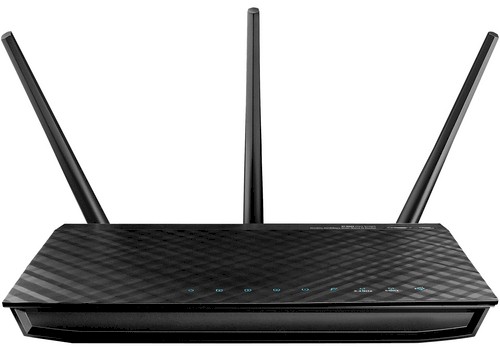
| At a glance | |
|---|---|
| Product | ASUS Dark Knight Dual-Band Wireless-N900 Gigabit Router (RT-N66U) [Website] |
| Summary | Broadcom-based simultaneous dual-band, Gigabit, three-stream 802.11abgn router with USB printer and multi-featured drive sharing and PPTP VPN server |
| Pros | • Outstanding wireless performance • Many features including WWAN backup and VPN server • Redesigned GUI • 2 USB ports |
| Cons | • Work in progress for some features (DLNA, VPN) • Incomplete and incorrect documentation |
Typical Price: $100 Buy From Amazon
Overview
Updated 2/20/2013: Corrected RT-N56U information
Updated 2/9/2012: Added Wireless Performance and Conclusion
Updated 2/8/2012: Deleted RT-N56U alternate firmware availability
The SNB Forum thread about the RT-N66U has been one of our most active with 478 posts and 80,000+ views as I write this. And our review of the "Dark Knight"’s predecessor, the RT-N56U "Black Diamond" continues to be our most read review each week—almost a year now after it posted.
This is an awful lot of excitement for a single-band an N600 Gigabit router with a few USB ports. But there are enough people who think buying much more routing throughput than they could ever even hope to use gets them a better router, no matter how many times I tell them it doesn’t.
Those folks who got worked up over the "Black Diamond" will find even more to go ga-ga about with the Dark Knight. First, it’s Broadcom-based, which opens up the possibility of alternate firmware support, unlike the Ralink-based RT-N56U. While DD-WRT isn’t yet available, TomatoUSB (shibby) appears to be. But I’m getting a bit ahead of myself. Let’s start with the basics.
The RT-N66U is a simultaneous dual-band three-stream "N-900" router with one Gigabit WAN port, four switched Gigabit LAN ports and two USB 2.0 ports that support drive and printer sharing. "N-900" means that it will support 450 Mbps link rates when both radios are set to 20/40 or 40 MHz channel bandwidth.
The first thing that struck me about the 66U was the size of the box it came in, which is almost 16" wide. The router itself is only about 8" wide, which is about the width of its primary competition, Cisco’s Linksys E4200V2 and NETGEAR’s WNDR4500. So the main reason for the bigger box could be to impress naive buyers (Gee, Martha, if the box is bigger then it must be a better router!).
Figure 1 calls out the lights, ports and switches on the front and rear panels where you can see that ASUS is making a few moves counter to current home router design trends. They have included a full complement of stylish blue front panel link/activity indicators. But more notably, they are using external, upgradeable antennas.
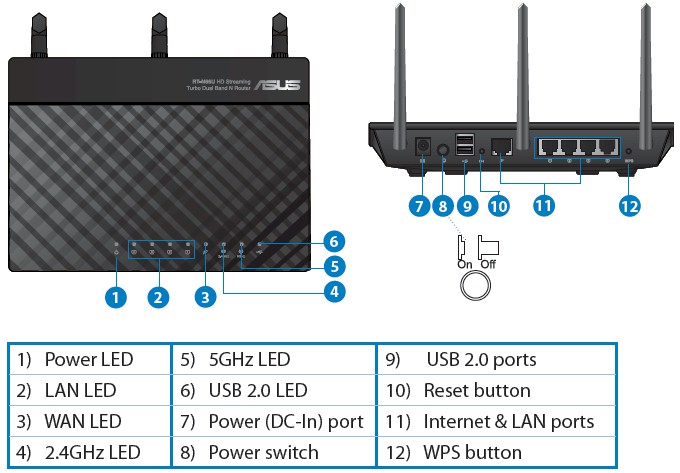
Figure 1: RT-N66U front and rear panels
This will excite those who like the idea of being able to install higher-gain antennas. But in reality, it’s difficult to find higher-gain dual-band antennas. There is also the potential of reduced performance from using dual-band vs. separate single-band antennas. And there is always WAF to consider.
Inside
ASUS decided to emulate Cisco and asked the FCC to delay the release of the internal photos it filed, so I was going to open up my sample after I finished testing. But a little searching turned up some very nice photos in Prohardver.hu’s review, which I’m using instead.
The Dark Night that is shipping is actually the second revision (B1) of the design. VR-Zone got an early peek at the product last October in its A1 form, which had a fan as shown in Figure 2. Note that the A1 never shipped and didn’t even make it to the FCC. The B1 is the first shipping model.
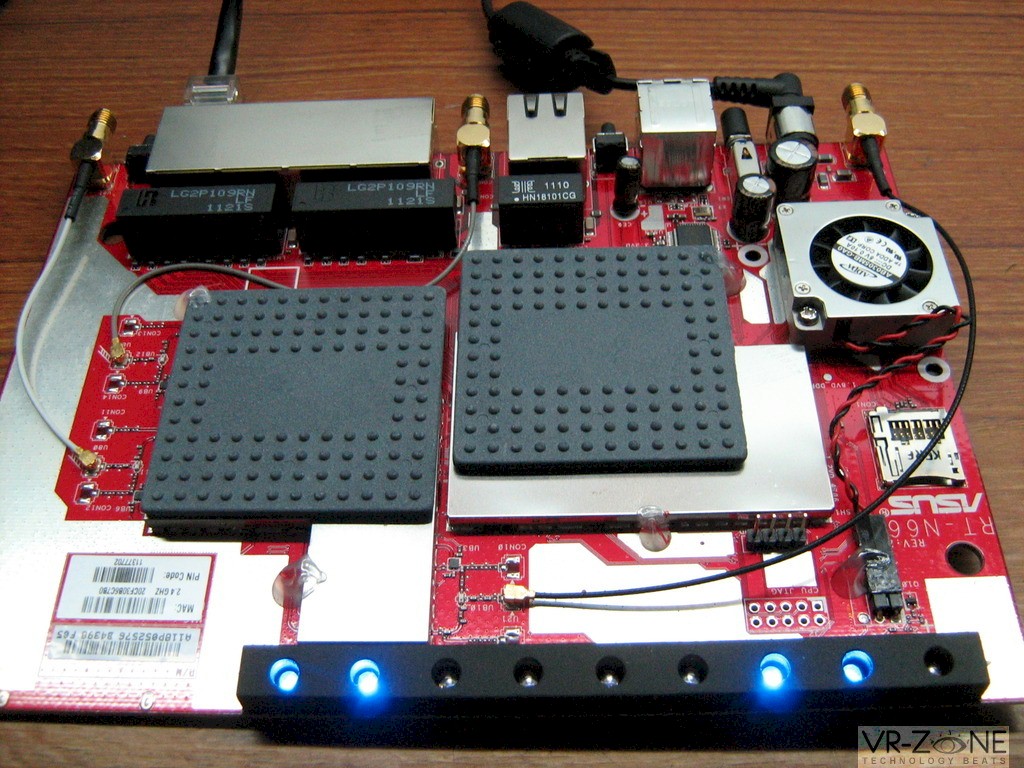
Figure 2: RT-N66U A1 board w/ fan
[photo credit: VR-Zone]
Figure 3 shows the board from the current B1 design, with a hefty heatsink replacing the fan (this is the reason why the router is so heavy). This is a smart move by ASUS, since fans fail and are noisy, neither of which would enhance the 66U’s appeal.
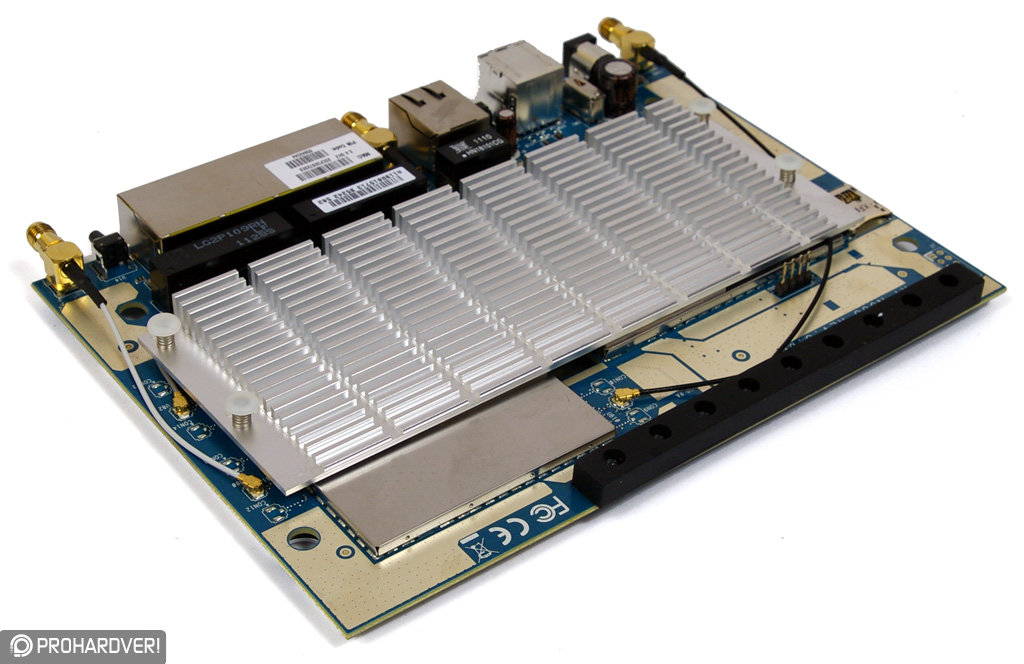
Figure 3: RT-N66U B1 board w/ heatsink
[Photo credit: Prohardver.hu]
Figure 4 shows the heatsink removed, which doesn’t reveal much due to the RF "cans" covering all the good stuff. Note the SD card slot at the lower right, which has some folks excited over in the Forums. But so far, it doesn’t do anything and it’s not externally accessible anyway.
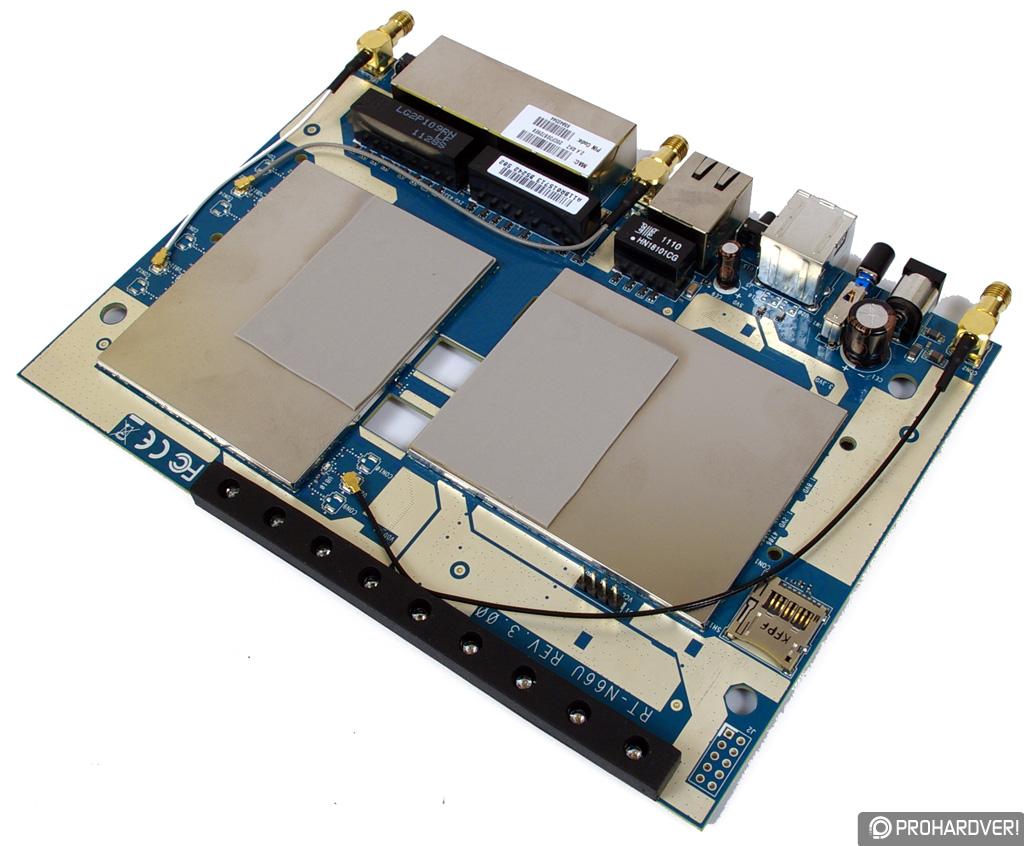
Figure 4: RT-N66U B1 board w/o heatsink
[Photo credit: Prohardver.hu]
The bottom view in Figure 5 is pretty clean, containing only a lone 32 MB flash device.
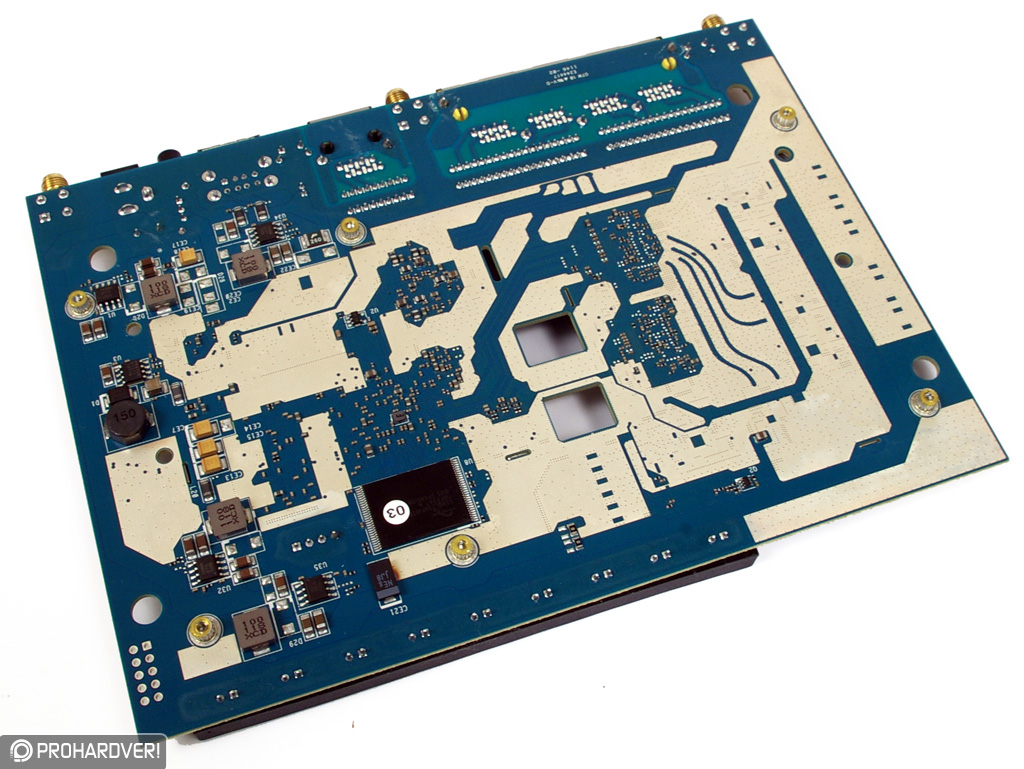
Figure 5: RT-N66U B1 board bottom
[Photo credit: Prohardver.hu]
Reviewer documents that ASUS sent detailed the key components used. It turns out that the Dark Knight’s design is very similar to another dark-colored router, NETGEAR’s WNDR4500. Table 1 shows that the designs are very similar for the CPU and radios. Both use a 600 MHz Broadcom BCM4706 processor and a BCM4331 single-chip 3×3 SoC for each radio.
| RT-N66U | WNDR4500 | |
|---|---|---|
| CPU | Broadcom BCM4706 | Broadcom BCM4706 |
| Switch | Broadcom BCM53115 (?) | Broadcom BCM53115 (?) |
| RAM | 256 MB | 128 MB |
| Flash | 32 MB | 128 MB |
| 2.4 GHz Radio | – BCM4331 | – BCM4331 – 2.4 GHz power amps (x3) (?) |
| 5 GHz radio |
– Broadcom BCM4331 |
– Broadcom BCM4331 |
Table 1: ASUS RT-N66U and NETGEAR WNDR4000 component comparison
The 66U’s webpage refers to "built-in Wi-Fi amplifiers", but doesn’t provide further details. I’m guessing transmit only and on both bands. I also have to guess on the switch, so a Broadcom BCM53115 is what I’m thinkin’.
Given the similarity of silicon, it will be interesting to see how the 66U’s three dual-band antenna approach matches up to the WNDR4500’s six dedicated-frequency antennas when it comes to wireless performance.
Features
ASUS has revamped its admin GUI for the RT-N66U with an updated look. But users of other ASUS routers will notice a similarity to some of the old GUI’s features and organization. Logging into the admin interface for the first time launches a wizard (Figure 6).
You don’t have an option to skip the wizard and it makes you enter a username and password, but allows you to continue to use the default (admin/admin). Detection of my DHCP WAN connection type was very quick.
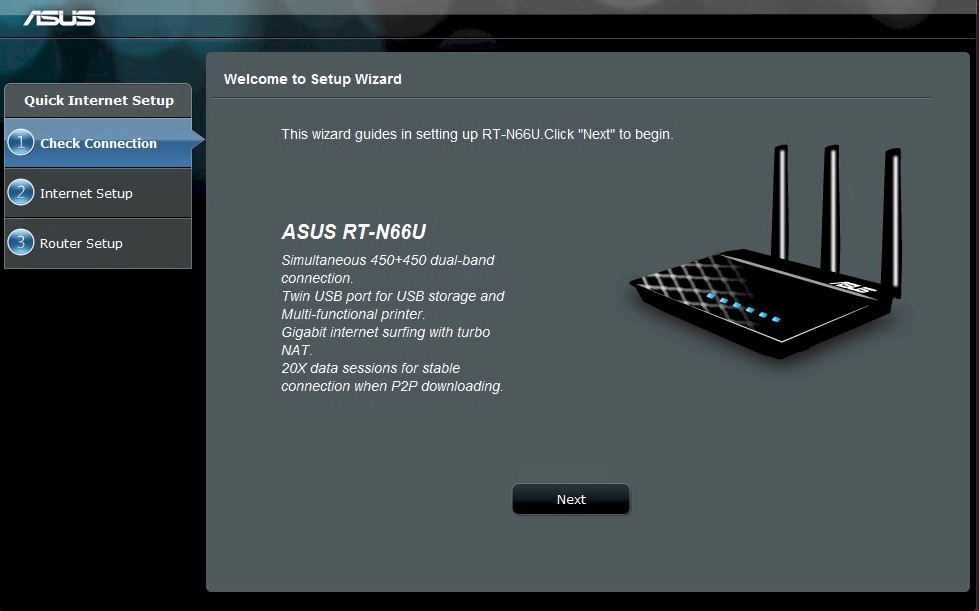
Figure 6: RT-N66U Setup Wizard
Part of the wizard is wireless network setup. I chose to not enable wireless encryption because I wanted to test WPS. But when I attempted to connect to the router, my client didn’t indicate that it had found a WPS-enabled router and just let me connect unsecured.
I found that the wizard had set the WPS mode to Configured, but with no security enabled. So I had to reset WPS to take it out of Configured mode so that my client could execute a WPS PIN session, which ran successfully.
To double check, I reset the router to factory default and attempted to connect a wireless client without running the Wizard first. The client properly started a WPS session, which concluded with a WPA2/AES connection.
After you complete the wizard, subsequent logins take you to the Network Map. The Map is a similar mechanism to ASUS’ previous GUI, providing clickable shortcuts to key setup features. Figure 7 shows the Network Map after clicking on the Internet Status box, with the right-side box showing Internet Status.
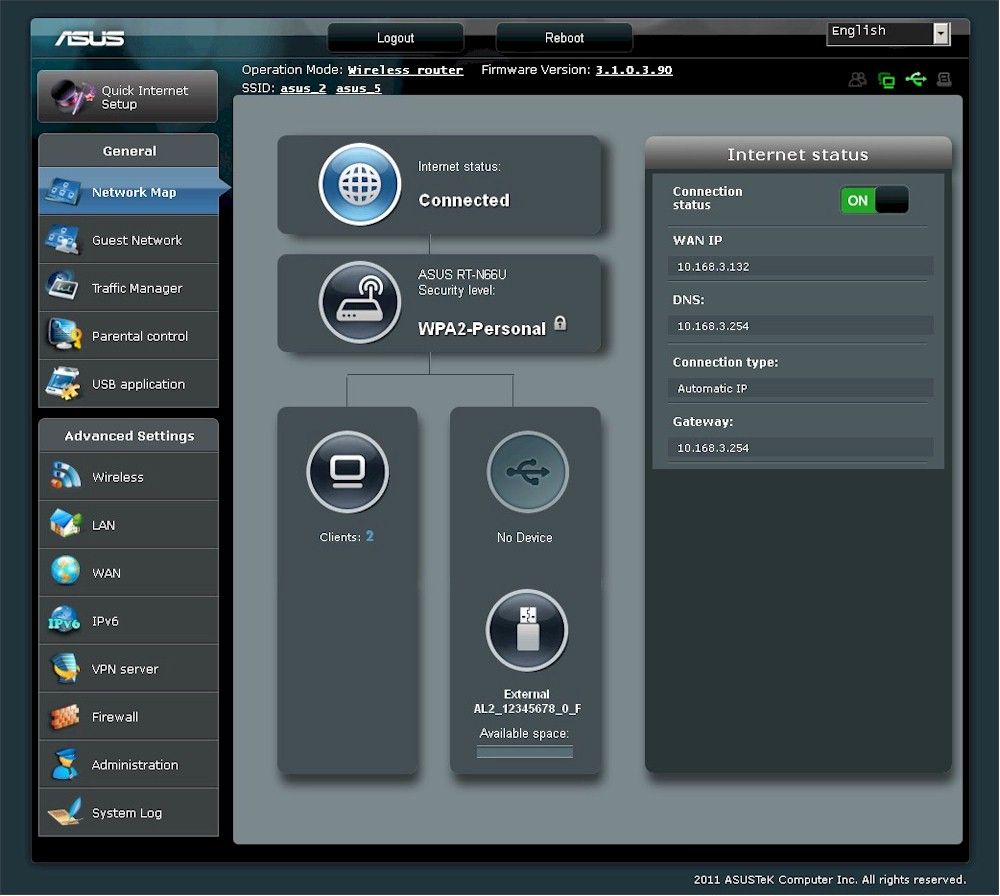
Figure 7: Network Map showing Internet Status
Before diving further into the user interface, here’s a summary of the Dark Knight’s features compiled from its data sheet and admin interface.
Routing
- Static and Dynamic IP, PPPoE , PPTP, L2TP WAN connections
- MTU/MRU adjust (PPPoE only)
- DHCP Server w/ lease time setting, default domain and primary/secondary DNS
- DHCP Client list
- DHCP reservation
- Multicast routing and forwarding
- UDP proxy
- Switch jumbo frame enable
- UPnP enable/disable
- IPv4 Static Routes
- IPv6 support: Native; Native w/DHCP; Tunnel 6to4; Tunnel 6in4; Tunnel 6rd
- DDNS support for asus.com, dyndns.org, tzo.com, zoneedit.com
- Five level bandwidth-based QoS for upand download traffic.
Firewall
- Firewall enable/disable
- DoS protection enable
- Virtual Server/port forwarding for single or multiple ports with TCP, UDP or both protocols forwarded. Separate source and destination ports, not schedulable
- Triggered port forwarding for single ports, TCP or UDP, not schedulable
- URL keyword filter
- Per client internet access scheduling
- DMZ Host
- RTSP passthrough
- PPPoE relay
- Ignore Ping Packet from WAN port
- Outbound port filtering: black/white list with port range, source/destination IP, protocol and day/time filter
VPN
- PPTP server
- PPTP, L2TP,IPsec passthrough (default enable)
Management
- Remote Management with user configurable port (but no HTTPS)
- Syslog server support
- Command line interface via Telnet (default disable)
- Reboot and reset to factory default
- Save/restore settings
- Logs: System console, DHCP, Wireless, port forwarding, routing table
Wireless
- WEP, WPA / WPA2 Personal and Enterprise (RADIUS) support
- Wi-Fi Protected Setup (WPS) support, pushbutton and PIN
- Auto, N-only, Legacy modes
- Auto and manual channel set
- Transmission rate set
- SSID broadcast enable/disable
- Radio enable day/time schedule
- WDS bridging / repeating
- Multicast transit rate
- Transmit power adjust
- Beacon period, RTS threshold, DTIM interval adjusts
- Transmit burst (default enable), multicast forwarding (default disable), WMM APSD (default enable) enables
- Wireless client isolation (from each other)
- Scheduled wireless enable/disable
- AP/router mode switch
- Four Guest networks per radio
- Wireless MAC address filtering (allow or deny based on MAC address)
- WMM disable
The main omission from the list above is support for secure HTTPS admin access. This isn’t that big a deal for LAN-based management. But you’d really want to have it for remote access. The ability to limit access to an IP address or range, which the 66U also doesn’t have, would also be helpful.
Features – more
As noted earlier, many of the Dark Knight’s features have been carried over from ASUS’ other routers. And if your needs are basic, they will probably do you just fine.
But because of the new processor platform, some features are, uh, a work in progress. Folks in the SNB Forums have been complaining most about the non-functional DLNA server, which I verified does not work. Others would like NAT loopback to work so that they can access LAN-side servers, or even the built-in AiDisk function, via DDNS domain names or at least WAN IP addresses. Right now, you need to use the LAN IP when you are accessing a server from the LAN.
You will run across Enabled buttons in various spots in the 66U’s GUI, like the Guest Network manager. But these buttons really mean Enable, a grammatical/translation error that ASUS really should have caught.
New features include IPv6 support with Native, Native w/DHCP, Tunnel 6to4, Tunnel 6in4 and Tunnel 6rd modes supported. If you don’t know what these mean or how to deal with the settings, you’re on your own, unfortunately. The User Guide, which you can download here, is mostly unhelpful on this and many other topics.
In addition to sharing USB drives and printers, you can also plug in a USB 3G modem to provide a backup Internet connection, should the main WAN port go down. Figure 8 shows an few interesting options for USA ISPs…
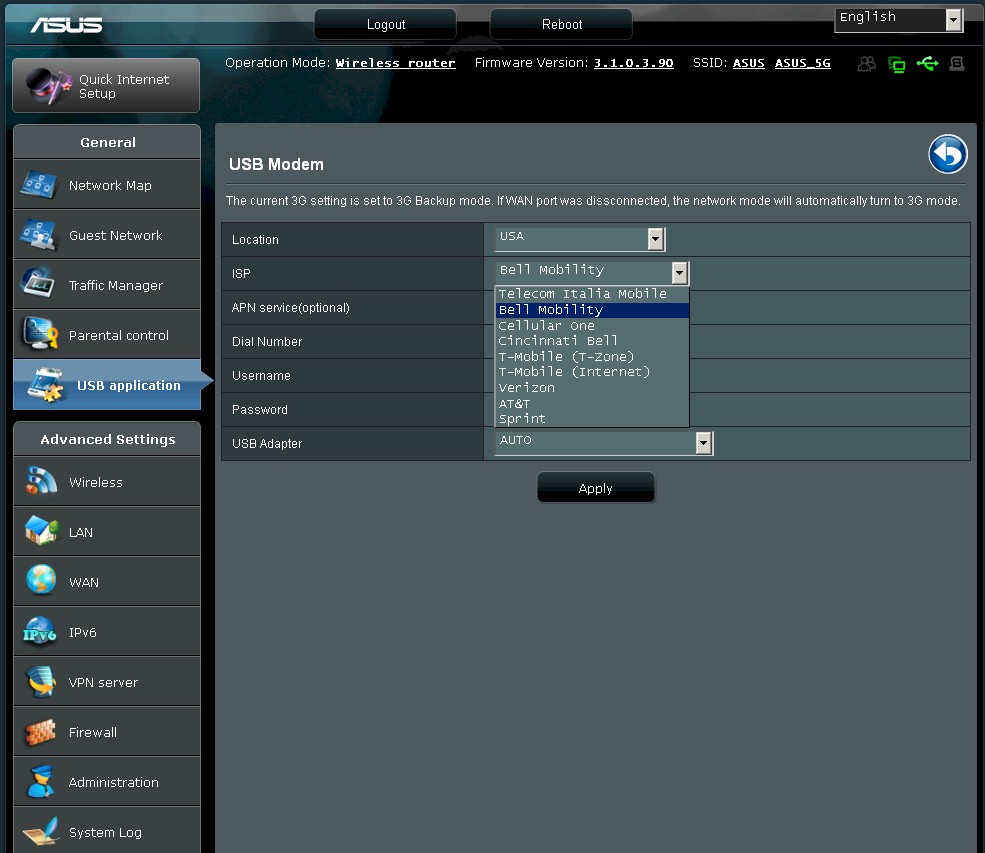
Figure 8: USB Modem page
I looked at the page source code and put a shot of the supported modems from the selector list in the Gallery. The list is dominated by Huawei models, followed by ZTE, then other vendors. Figure 9 shows the complete list of things you can do with the USB ports, most of which you’ve seen on previous ASUS products.
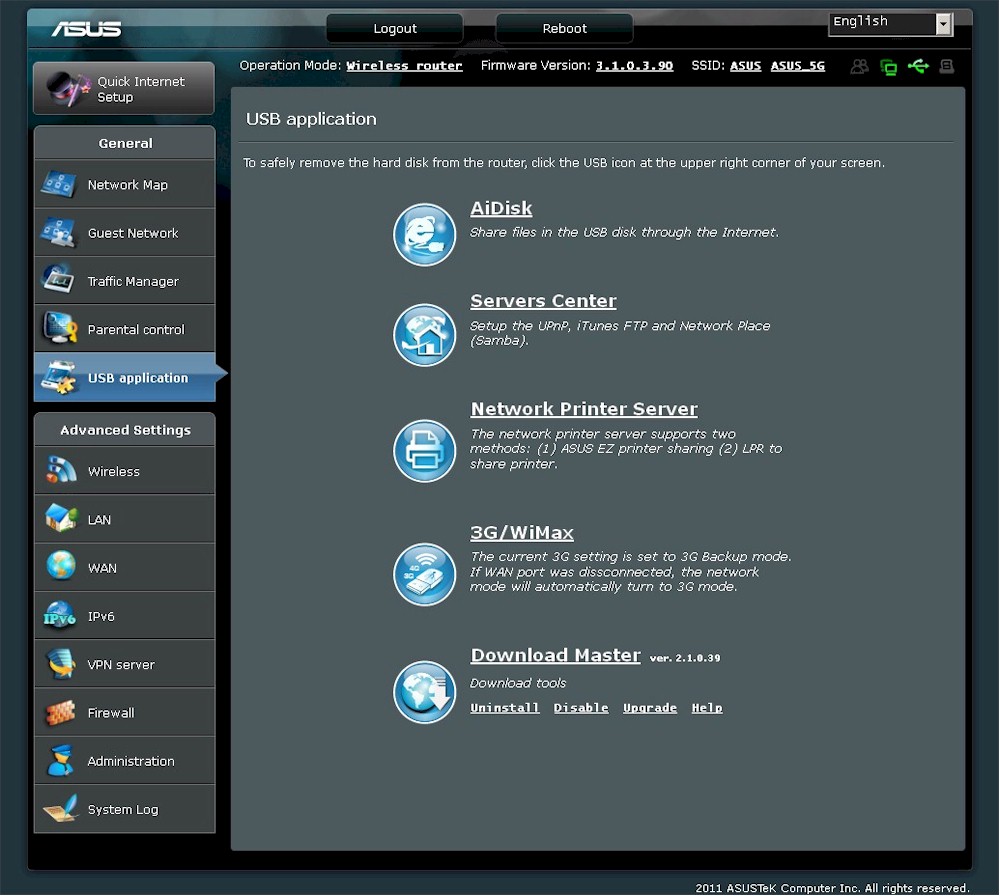
Figure 9: USB applications
That Parental Contol feature you see in the menu may disaapoint you if you’re looking for web filtering. All it does is provide schedulable Internet access (all or nothing) for users you define.
The Automatic mode QoS feature under Traffic Manager is again misleading. The only "automatic" part of it is that it engages a default rule set that "sets online gaming and web surfing as the highest priority and are not influenced by P2P applications".
The QoS feature itself is a bit odd. It looks like a priority-based system, with five levels. But instead of each level having a relative priority to the other, you can set a max/min bandwidth limits both up and download for each level. I’ve never seen this approach and wonder how well it works.
The Traffic Monitor itself shows you pretty plots of bandwidth in real-time, last 24 hours and daily views. Unlike the Bandwidth monitor on NETGEAR routers, however, you can’t set bandwidth limits or alarms. There’s a screenshot in the Gallery if you want a look, along with more shots of the admin interface with commentary.
The look is different but the approach similar to the old ASUS GUI. This overview allows quick access to select WAN, Client, Wireless and USB drive status and settings.
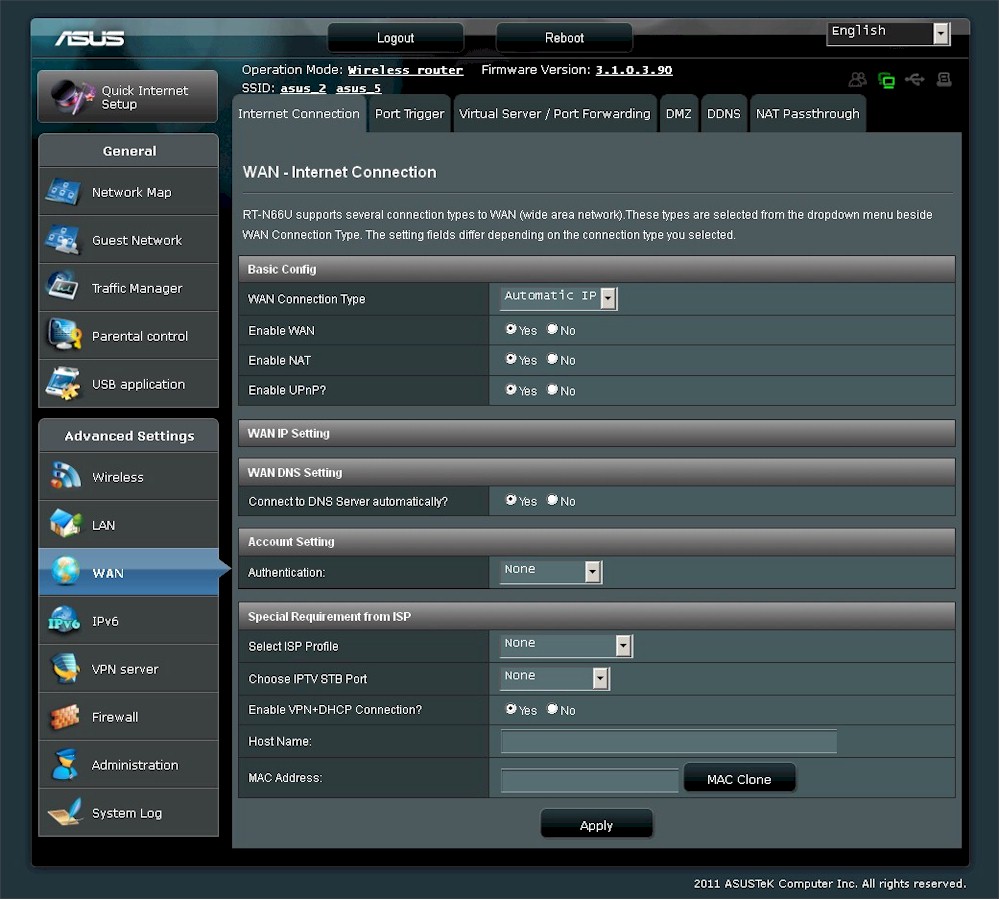
WAN types include automatic (DHCP), PPPoE, PPTP, L2TP and static IP. MTU adjust is available only on PPPoE
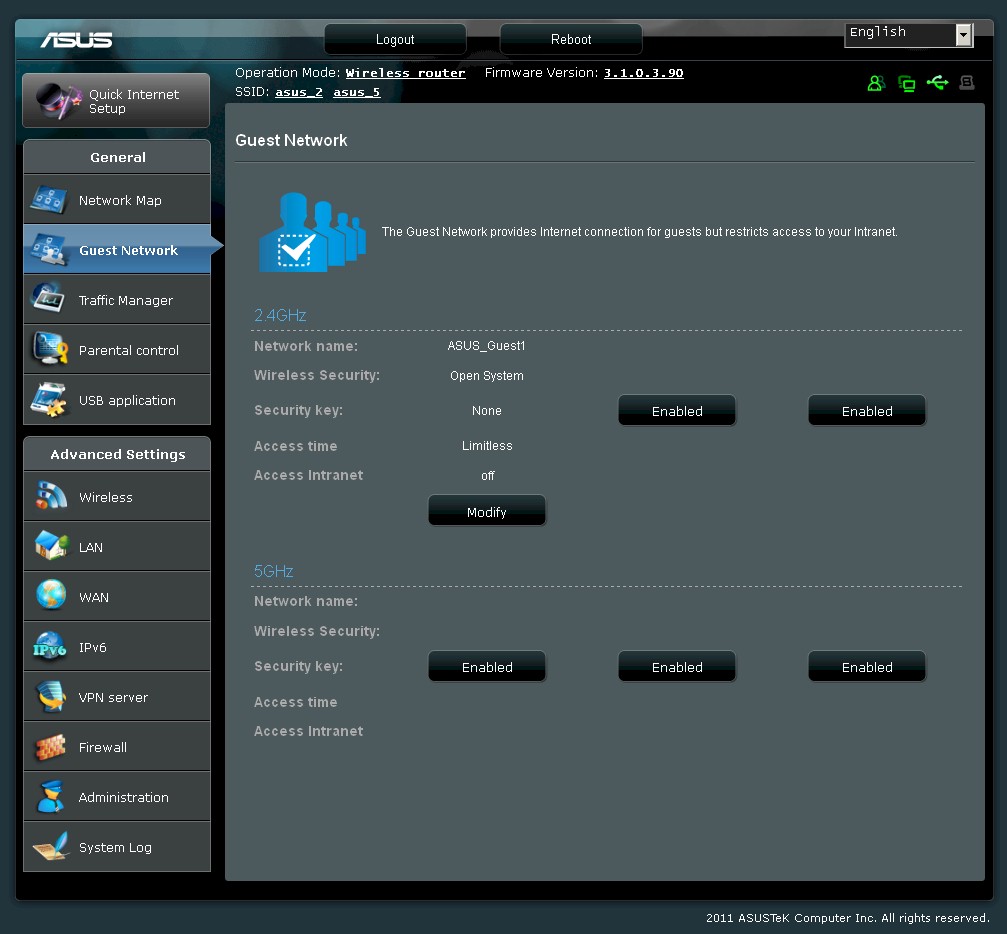
The Enabled buttons are misleading. They really mean Enable, an error you will see on other screens. You can define three Guest SSIDs per radio with different security settings for each.
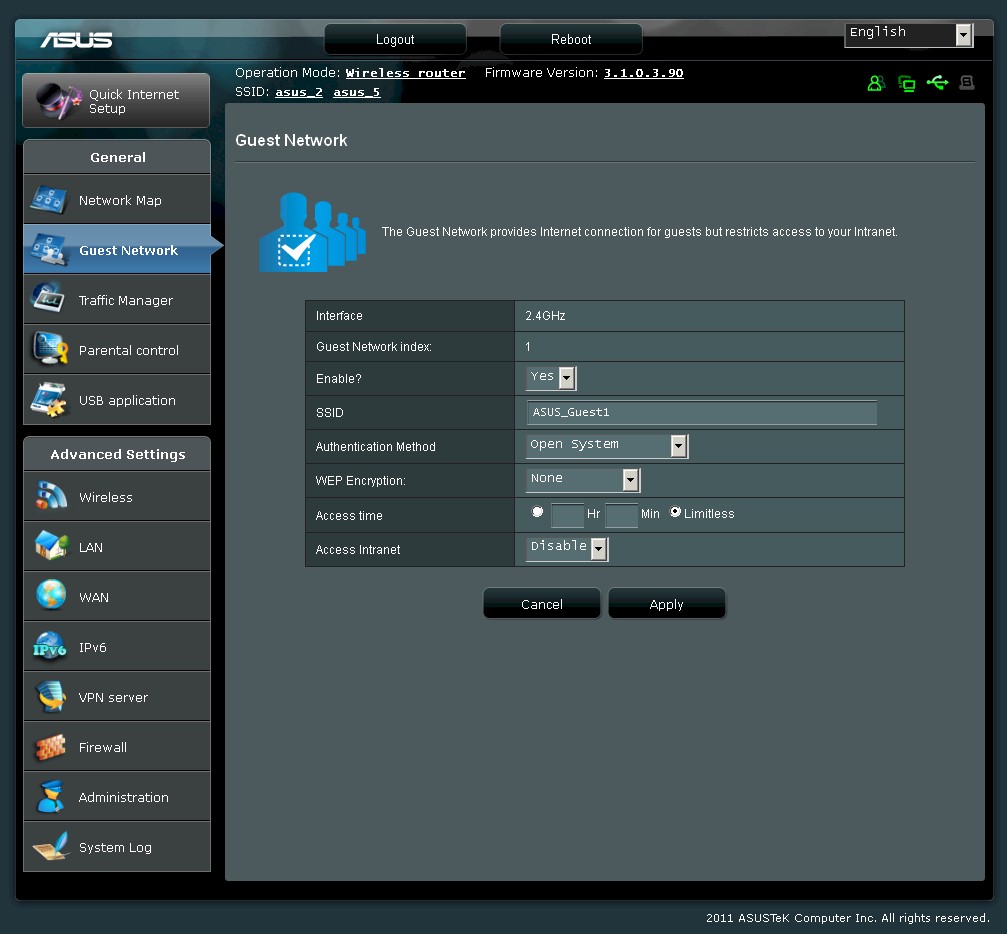
Guest network settings. Note you can define how much access time is allowed, but not the day and time.
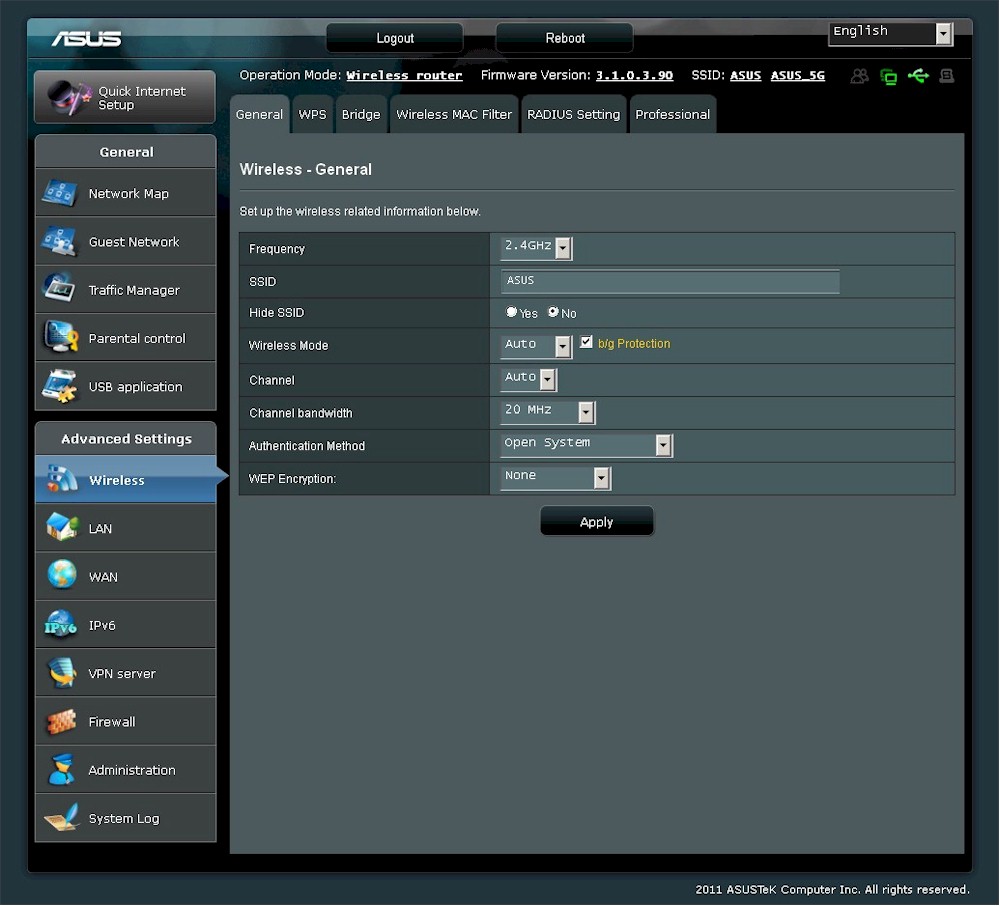
A peek at the main wireless controls. Note that WDS bridging/repeating is supported
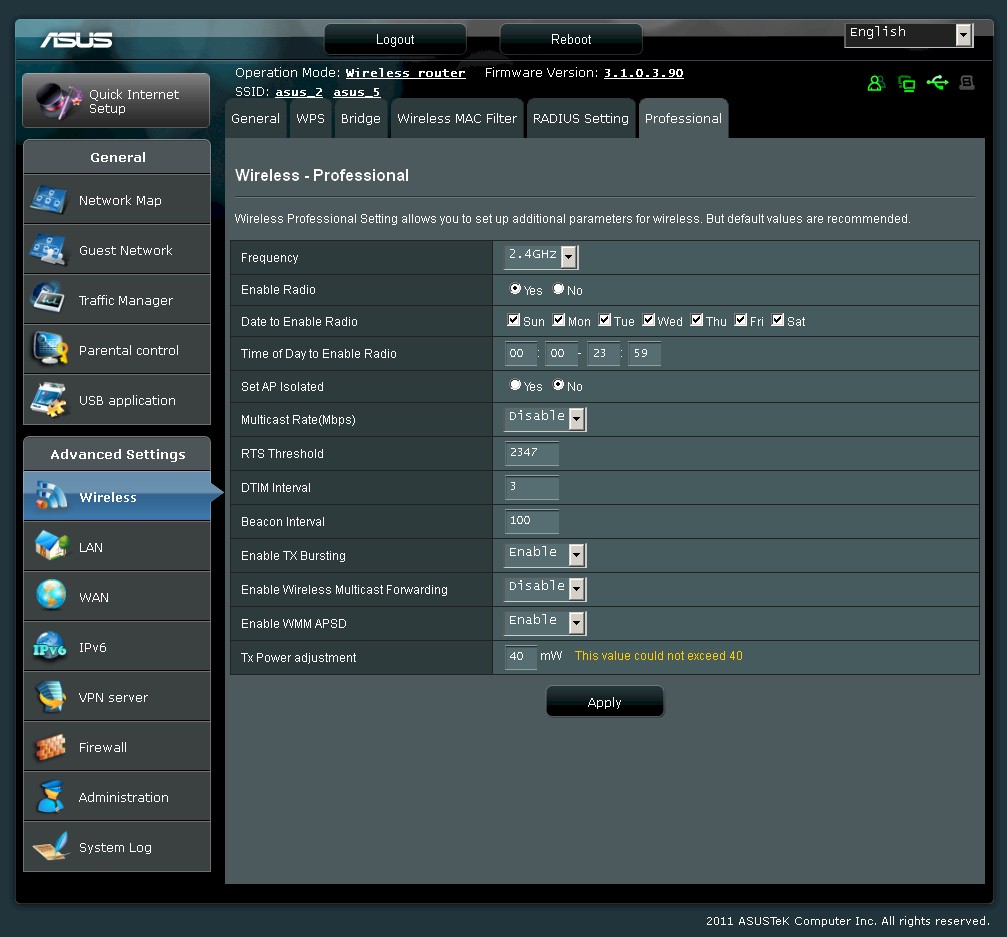
The Professional Wireless settings contain day/time radio enables for all SSIDs on each radio.
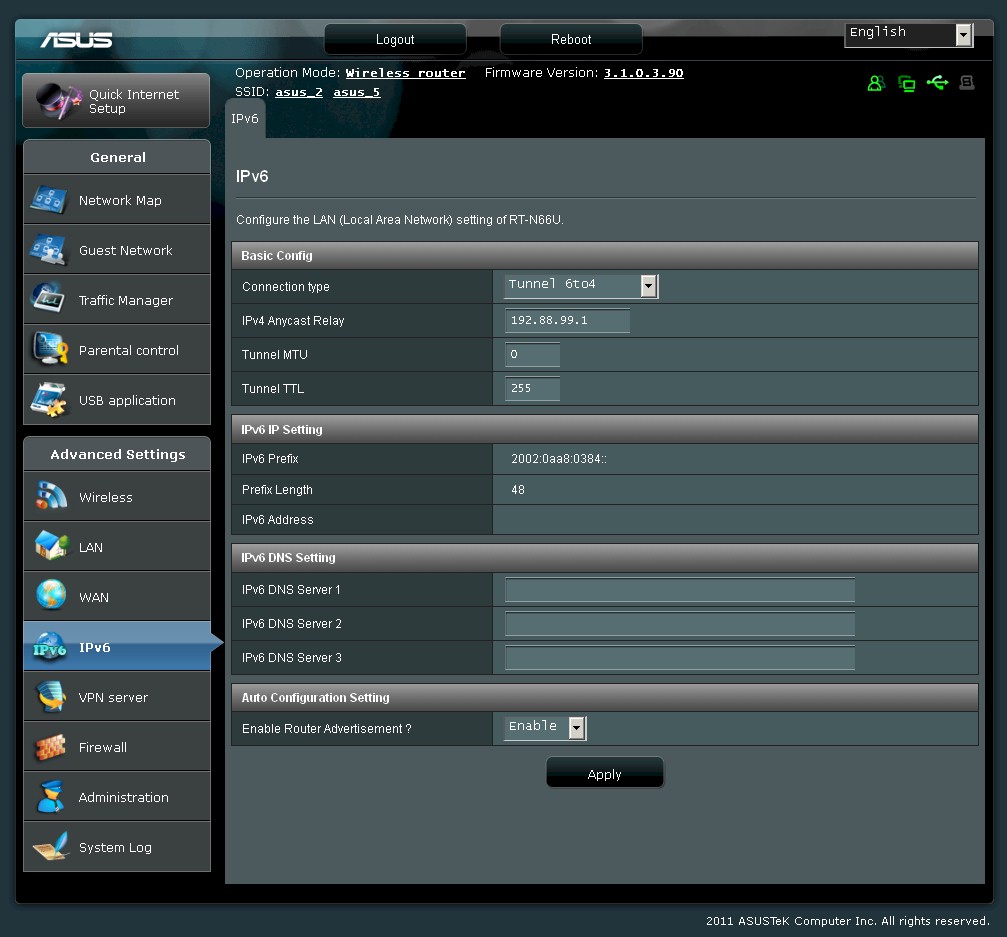
IPv6 modes supported include Native, Native w/ DHCP, Tunnel 6to4, Tunnel 6in4 and Tunnel 6rd. You’re on your own for settings, there is no help.
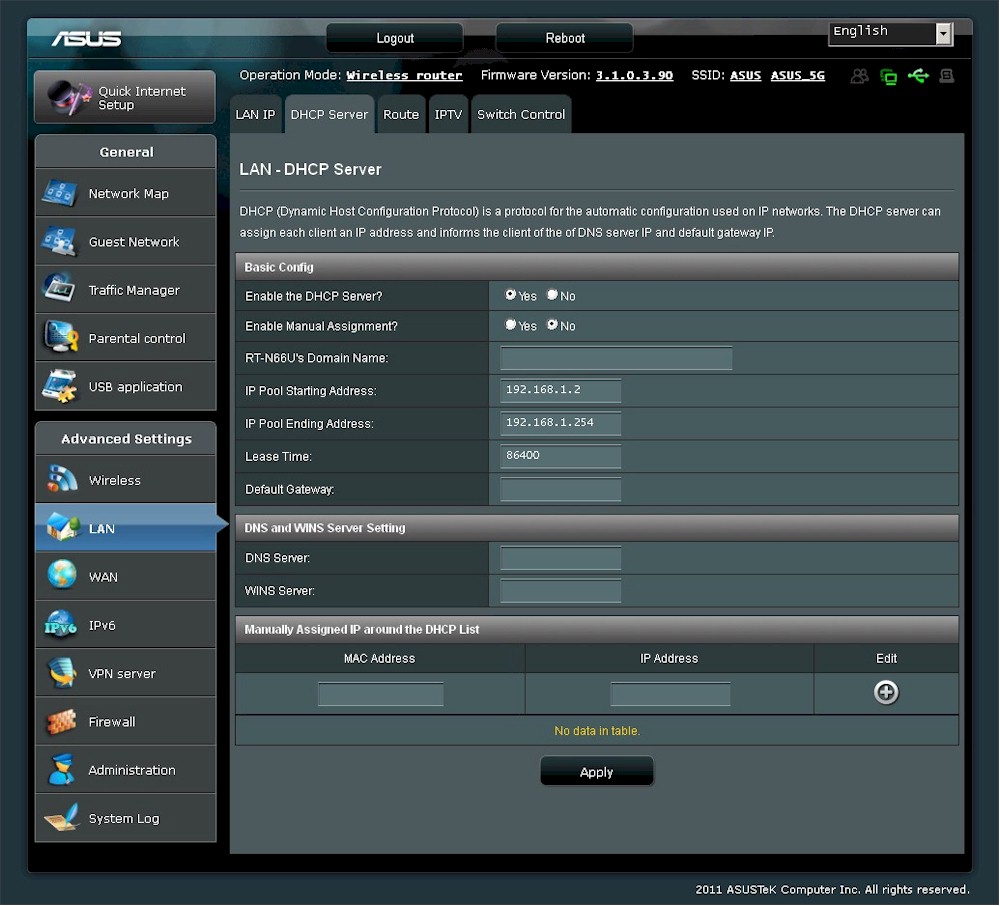
You can reserve DHCP addresses, but you must manually enter the MAC and IP address. You can also set lease time.
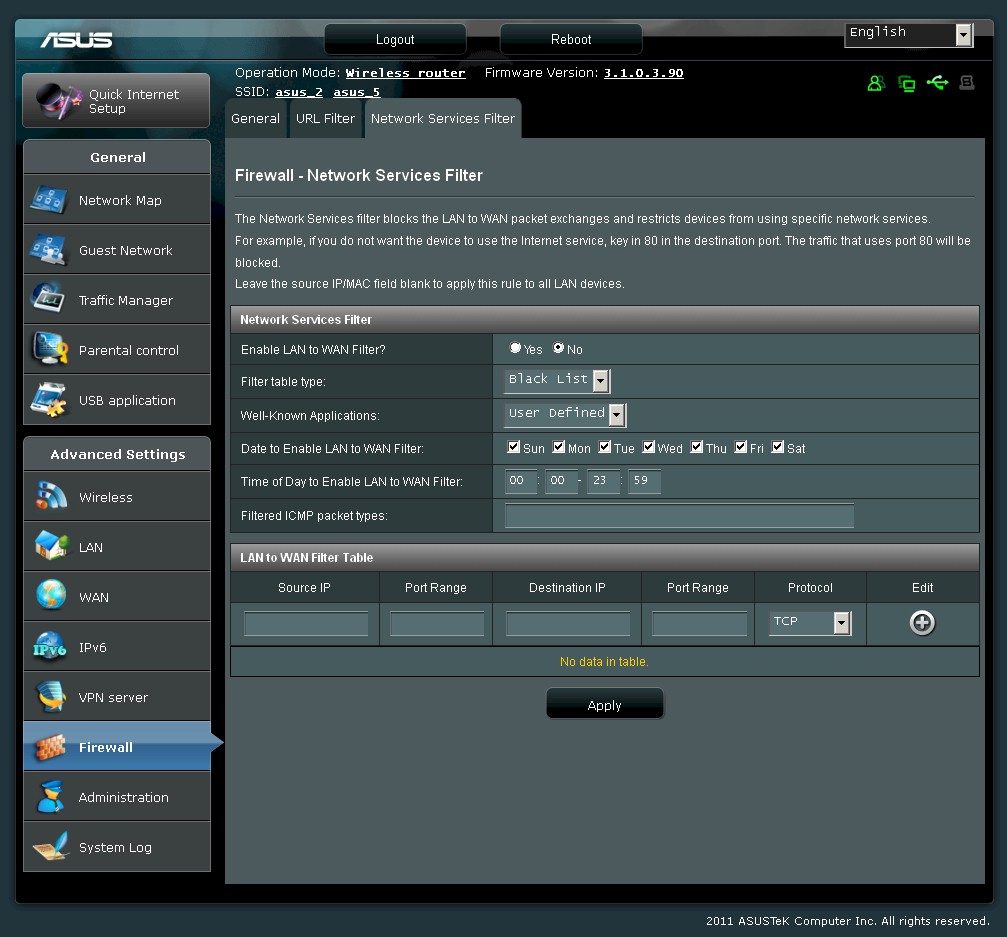
Outbound filters are schedulable and can be set as black or white list.
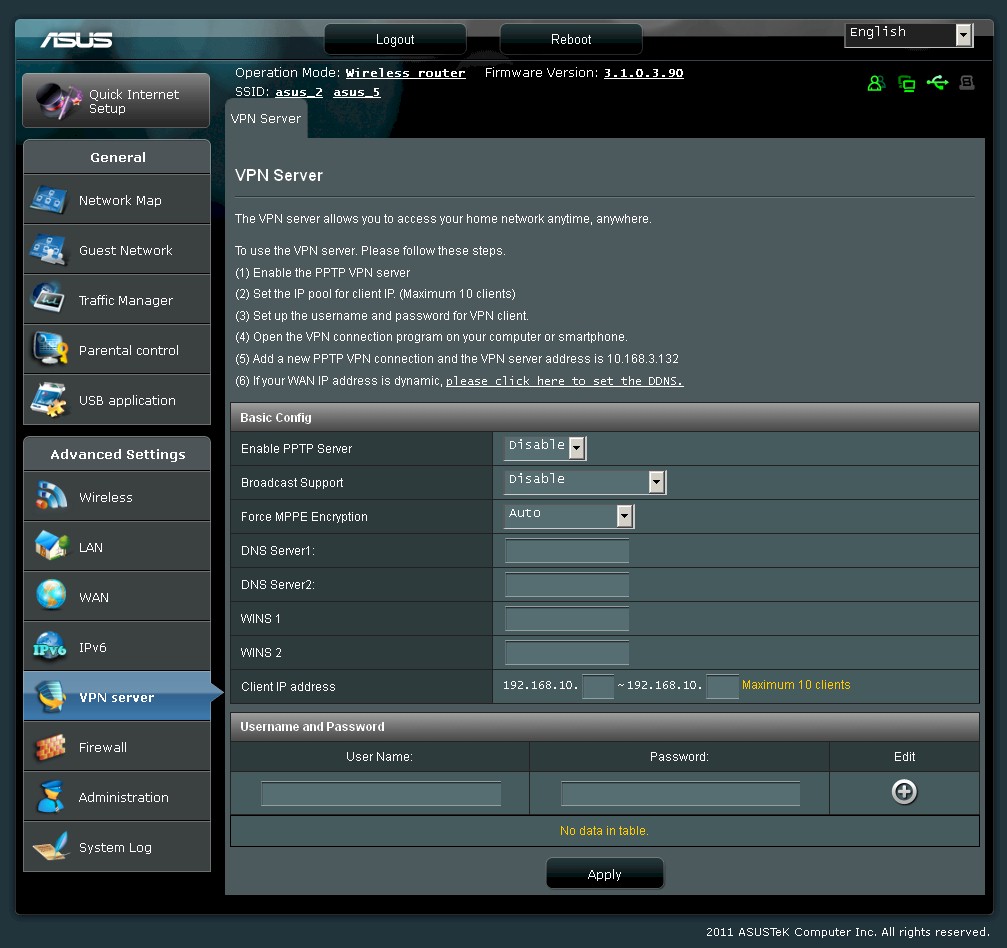
The PPTP server supports up to 10 clients and supports MPPE 40 and 128 bit encryption
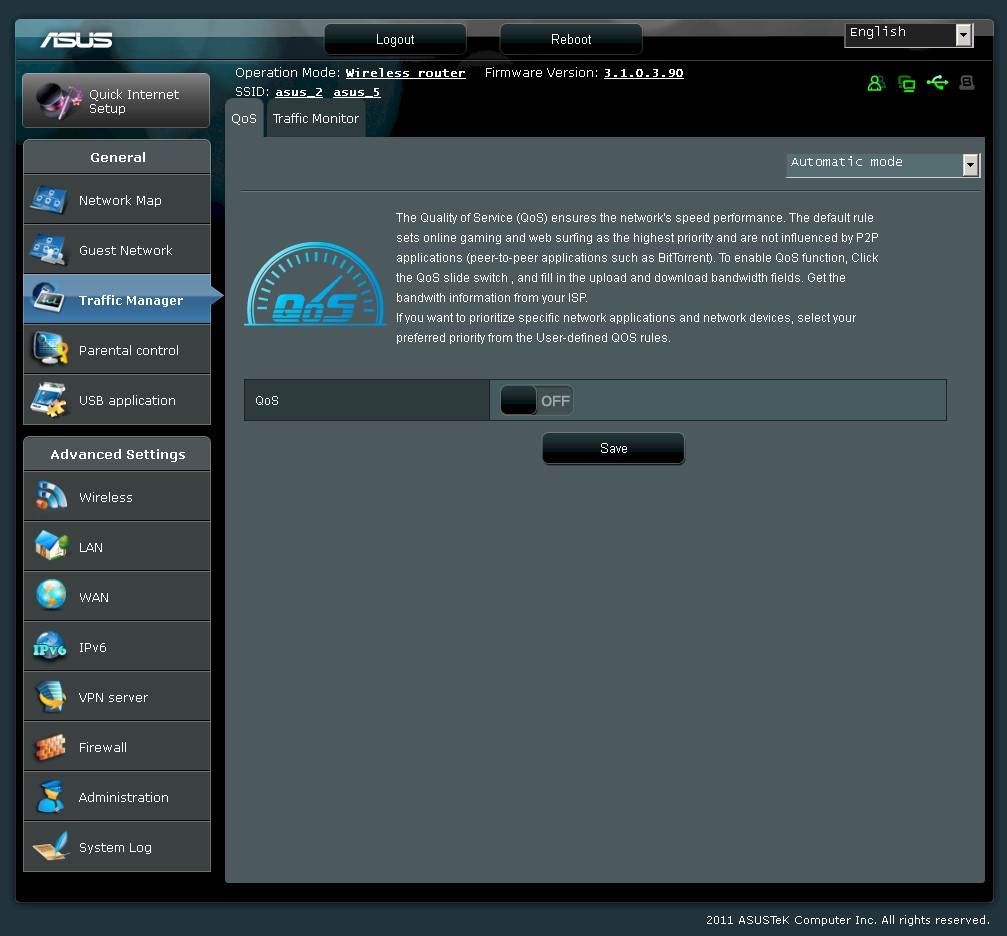
The automatic QoS just uses the preset values, which prioritize web browsing over file transfer traffic.
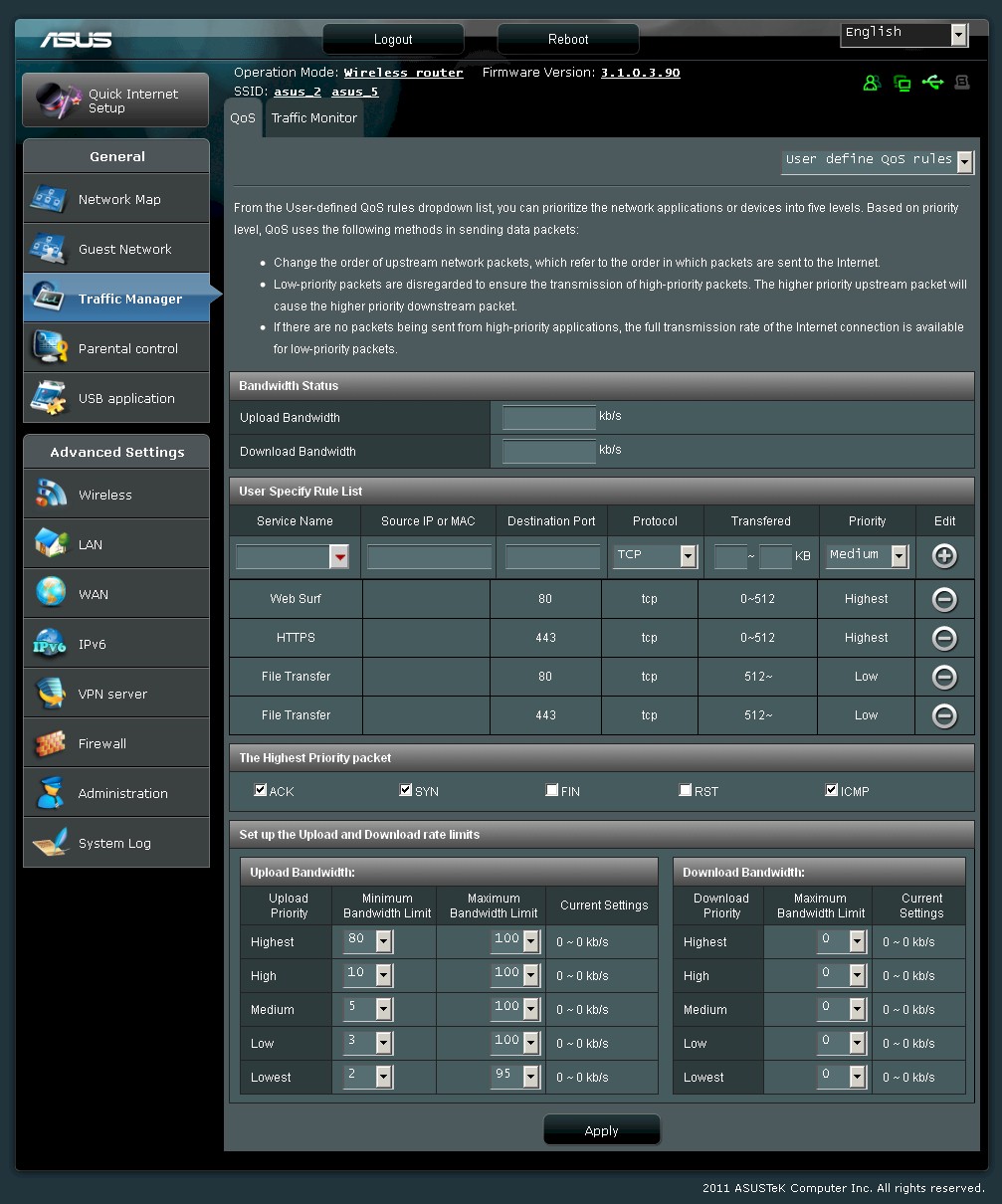
Each of 5 priority levels has max and min bandwidth limits for up and download associated with it.
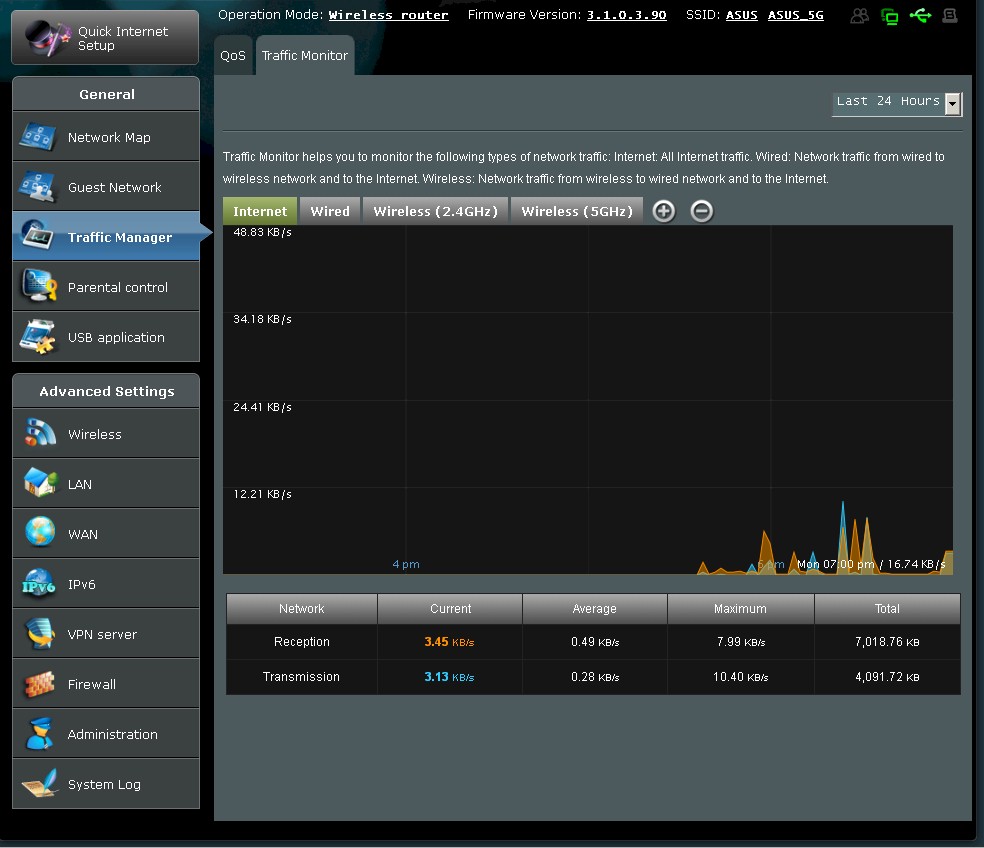
Pretty plots of bandwidth use. But there are no alarms or limits you can set.
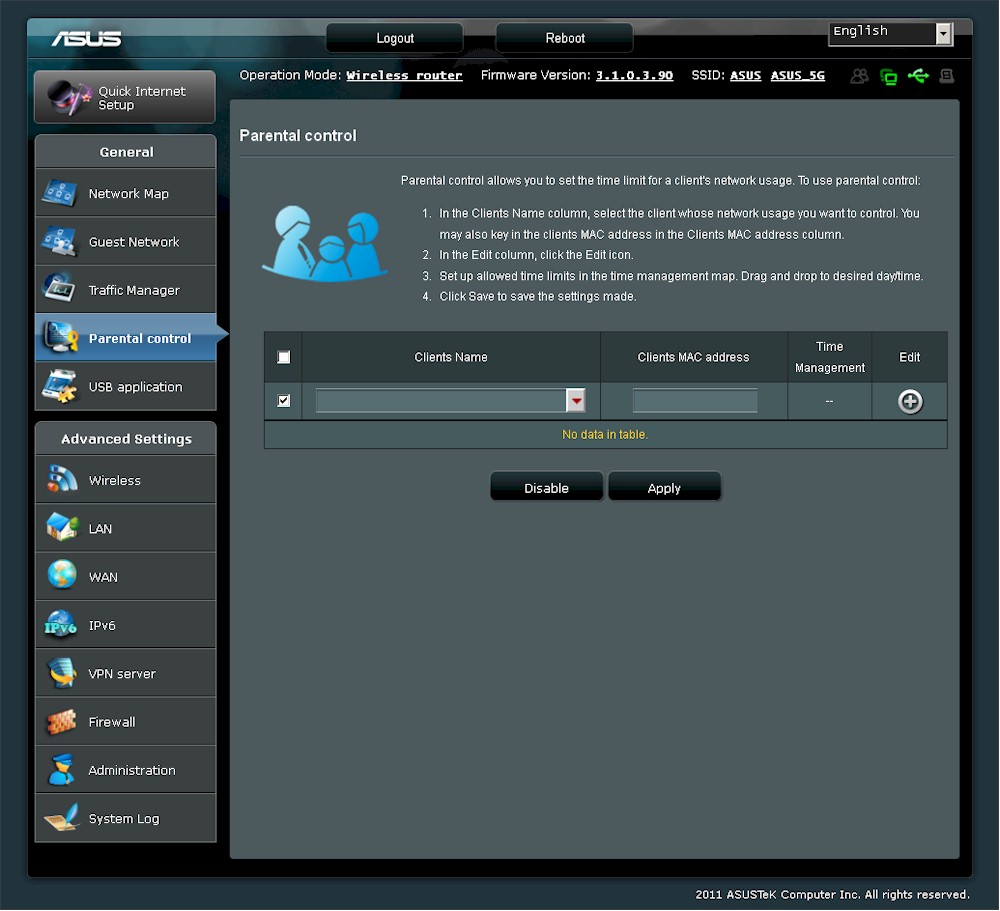
This feature just lets you control internet access time for each user.
Most of the USB functions are carried over from other ASUS products. The 3G Modem support is new.
This feature lets you use a WWAN USB modem for backup.
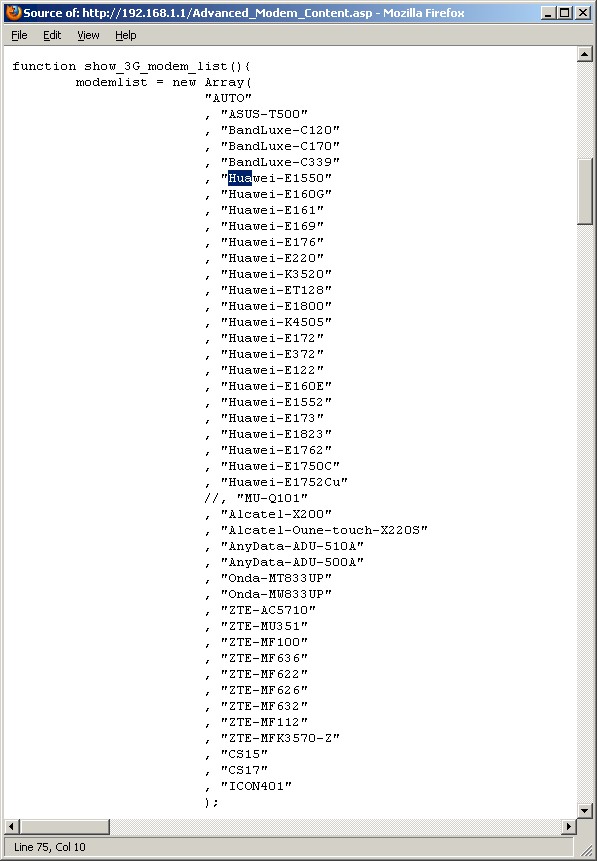
Here’s the list taken from the page source code.
Updated 2/9/2012
VPN
A reader pointed out that I didn’t say anything about the built-in "VPN" server or try it when I first posted this review. So I first checked the User Guide, which had no information whatsoever about the router’s VPN server settings. Then I enabled the VPN Server, set Force MPPE Encryption to Auto, set the client address range and added a test/test user.
I created a VPN connection in a Win 7 Home Premium system, setting the VPN Type to Automatic then to PPTP and tried all the encryption and authentication options. But no matter what I did, there was no connection. There is no separate VPN log, but I saw this message in the General Log around the time I tried to connect: kernel: protocol 0000 is buggy, dev eth0. ‘Nuff said.
Routing Performance
Routing performance for the RT-N66U using our standard test method is summarized in Table 2. The product was loaded with the just-released 3.1.0.3.90 firmware for our testing. Unidirectional throughput is 10 – 15% lower than the chart-topping RT-N56U. But the thing that is sure to cause some people to think that the 66U’s routing code is broken is that simultaneous bidirectional throughput is only ~ 800 Mbps. Nothing’s broken, folks. It’s more throughput than anyone will ever use.
| Test Description | RT-N66U | RT-N56U |
|---|---|---|
| WAN – LAN | 732 Mbps | 802 Mbps |
| LAN – WAN | 729 Mbps | 862 Mbps |
| Total Simultaneous | 810 Mbps | 1269 Mbps |
| Maximum Simultaneous Connections | 34,925 | 34,925 |
| Firmware Version | 3.1.0.3.90 | 1.0.1.2 |
Table 2: Routing throughput
Figure 10 shows the composite IxChariot plot for the three routing speed tests, with everything looking pretty stable. And there are plenty of simultaneous sessions to go around. Like the 56U, the 66U maxed out at our 34,925 test limit.
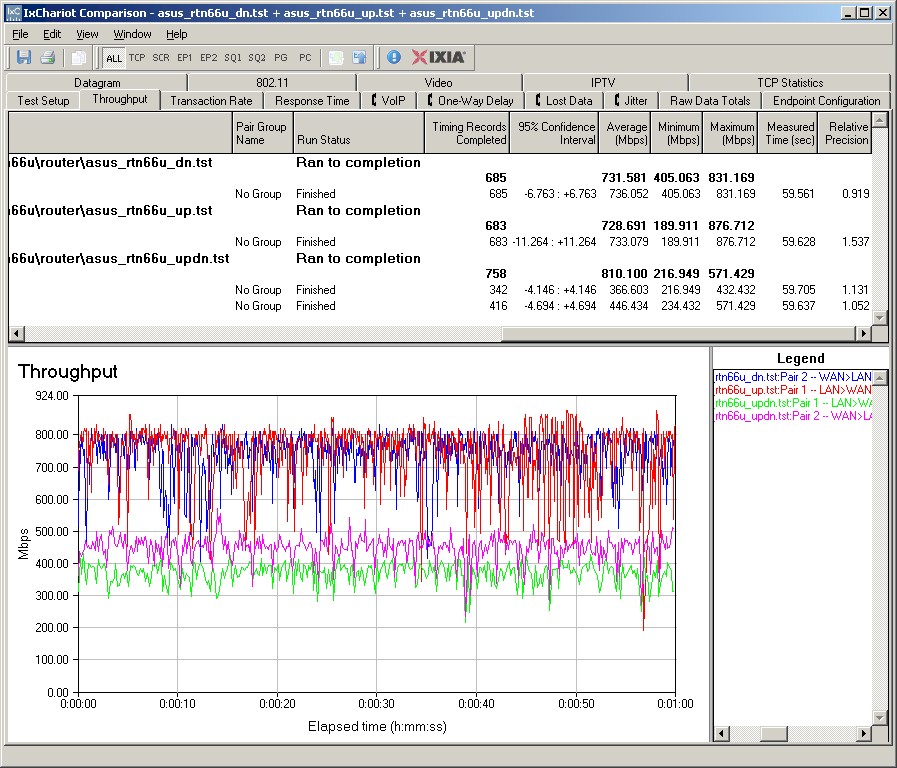
Figure 10: ASUS RT-N66U routing throughput
Storage Performance
I ran quick Windows filecopy tests using the standard NAS testbed to the RT-N66U with my standard Iomega UltraMax Pro drive configured in RAID 0 and formatted in FAT32 and NTFS. I pulled results from a few other interesting routers into Table 3.
| RT-N66U | RT-N56U | WNDR4500 | E4200V2 | |
|---|---|---|---|---|
| FAT32 Write (MBytes/s) | 10 | 7.6 | 9.2 | 9.8 |
| FAT32 Read (MBytes/s) | 12 | 13 | 11.6 | 21.6 |
| NTFS Write (MBytes/s) | 17 | 9.5 | 6.7 | 20.1 |
| NTFS Read (MBytes/s) | 11 | 13 | 6.5 | 22.2 |
Table 3: Router filecopy performance comparison
Results show that the current storage sharing throughput champ is the Cisco Linksys E4200V2 with 20+ MB/s reads and writes with an NTFS formatted drive. The RT-56U and 66U are about the same for FAT32 format, with the 66U able to write about 2X faster (17 MB/s vs. 11 MB/s) than the 56U to an NTFS formatted drive.
Wireless Performance – Overview
The RT-N66U is Wi-Fi Certified and properly defaulted to 20 MHz bandwidth mode on the 2.4 GHz radio on power-up. The 5 GHz band came up in 20/40 MHz mode.
I was able to run a Wi-Fi Protected Setup (WPS) pushbutton session with a Win 7 client that resulted in a WPA2/AES secured connection to each radio. But, as noted earlier, I first had to reset WPS to unconfigured after having run the setup wizard. All tests were run with this secured connection using the four-location wireless test process with latest 3.1.0.3.90 firmware.
As with all "N-900" routers, we’ll start with an overview, then provide the details for those who want to wallow in the data.
The Benchmark Summary in Figure 11 tells a familiar tale, i.e. the overall average difference between two and three stream operation isn’t that striking. That’s because three-stream N provides significantly higher throughput only under very strong signal conditions (same room or next-room).
The Summary also includes eight new benchmarks. I’ve finally added the simultaneous up/down tests I run in Location A to the charts. Like the router total simultaneous throughput tests, the "UpDown" tests show whether more bandwidth can be accessed by running more than one client. With three-stream routers, you usually do see higher throughput in these tests.
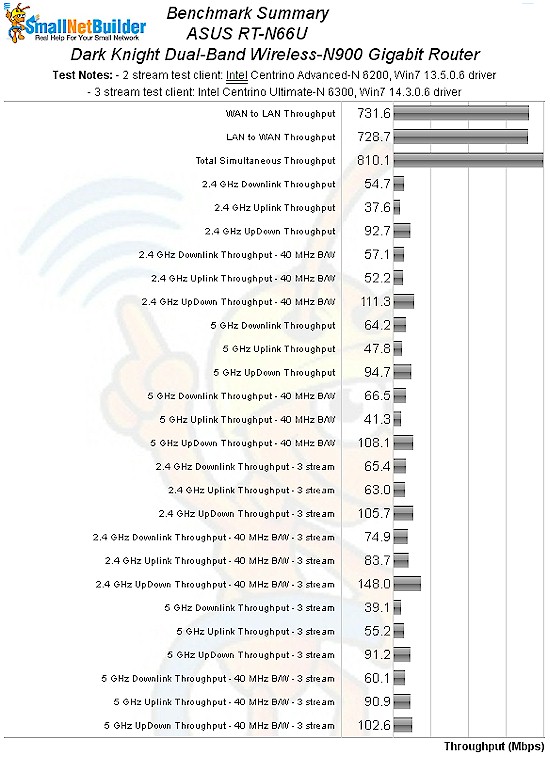
Figure 11: ASUS RT-N66U benchmark summary
Table 4 summarizes the highest wireless throughput measured out of all locations in the 20 MHz mode test runs. Most times the highest throughput was measured in Location A. The table includes the simultaneous Downlink/Uplink tests.
| Test Group | Max Dn (Mbps) | Max Up (Mbps) | Dn/Up (Mbps) |
|---|---|---|---|
| 2.4 GHz, 2 stream, 20 MHz | 80 | 63 | 93 |
| 2.4 GHz, 3 stream, 20 MHz | 86 | 101 | 106 |
| 5 GHz, 2 stream, 20 MHz | 82 | 66 | 95 |
| 5 GHz, 3 stream, 20 MHz | 61 | 99 | 91 |
Table 4: Highest Throughput, 20 MHz mode
These results are, for the most part, pretty good. Most N routers produce around 60 Mbps of best-case throughput in Location A with 20 MHz bandwidth mode. The Table shows that the 66U yielded 80 Mbps best case downlink speed in both bands, except for one test case. Running the 5 GHz radio in three stream mode produced only 61 Mbps best case.
As I do with all products, I reran tests multiple times if they produced significantly different results or had high variation. The 61 Mbps for 5 GHz, 3 stream was the best I achieved.
Table 5 summarizes the 40 MHz bandwidth mode results. Eating up more spectrum definitely produces higher total bandwidth, as shown by the 148 Mbps Dn/Up result for 2.4 GHz, 3 stream.
| Test Group | Max Dn (Mbps) | Max Up (Mbps) | Dn/Up (Mbps) |
|---|---|---|---|
| 2.4 GHz, 2 stream, 40 MHz | 83 | 87 | 111 |
| 2.4 GHz, 3 stream, 40 MHz | 101 | 138 | 148 |
| 5 GHz, 2 stream, 40 MHz | 79 | 72 | 108 |
| 5 GHz, 3 stream, 40 MHz | 57 | 136 | 103 |
Table 5: Highest Throughput, 40 MHz mode
In looking through the results, you can see performance anomalies like I’ve found with every router. Like the products that have come before it, the Dark Knight does not deliver consistently highest performance in all tested modes. For example, 5 GHz, 3 stream downlink performance in both 20 and 40 MHz bandwidth modes is consistently lower than the other downlink modes tested. Yet uplink and down/up results are among the best tested.
On the other hand, the 66U is, the only router I’ve tested in a very long while to actually produce results in 5 GHz in my Location F "dead zone" location. Many manufacturers have tried to reach this spot, but ASUS seems to have succeeded. The performance table shows results only for the three-stream client and only for 20 MHz mode. And the 1.7 Mbps down and 0.5 Mbps up throughput would be useful only for email and very limited web browsing. But it speaks to the Dark Knight’s 5 GHz performance that it works at all in that location.
I should also note that while it could not produce a reliable enough connection to run the IxChariot test, the two-stream client was able to maintain connection with the 5 GHz radio in 20 MHz mode in Location F.
The overall impression I came away with is that the RT-N66U certainly does a better job than the NETGEAR WNDR4500 using the same Broadcom CPU and radios. I’ll have a bit more to say in the Closing Thoughts. But for now, let’s walk through the wireless performance details and do some competitive comparison.
Wireless Performance – 2.4 GHz Two Stream
For performance comparison, I chose three other full "N-900" routers: the NETGEAR WNDR4500, Cisco Linksys E4200V2 and TRENDnet TEW-692GR. I didn’t compare the Gen 5 Apple Airport Extreme because it doesn’t support 40 MHz bandwidth in 2.4 GHz.
The comparison tables are large, so I’m going to provide links that will open them in a new window/tab to make things easier. Let’s start with the Performance Table for 2.4 GHz, 2 streams. The Dark Knight is the clear winner in this round, taking all four comparisons. Of particular note is the generally higher Location D and F performance, although the Linksys E4200V2 does better in Location D in one test and is hot on the 66U’s heels on the others.
The IxChariot plot summary in Figure 12 for 20 MHz mode downlink shows generally stable throughput.
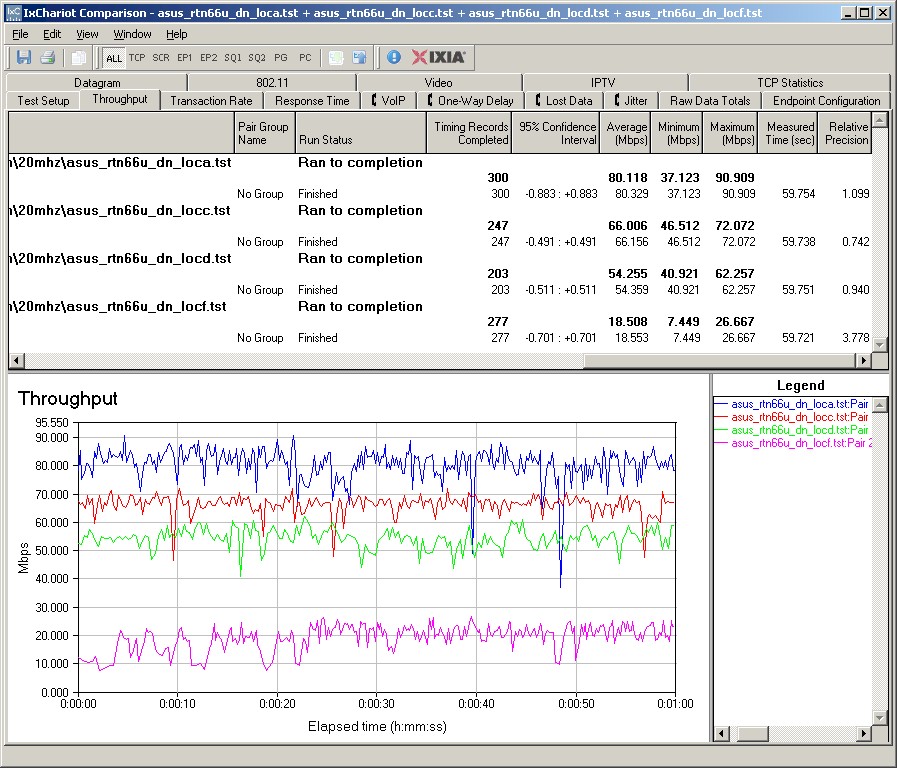
Figure 12: ASUS RT-N66U IxChariot plot summary – 2.4 GHz, 20 MHz mode, downlink, 2 stream
Here are links to the other plots for your reference.
- 2.4 GHz / 20 MHz uplink
- 2.4 GHz / 20 MHz up and downlink
- 2.4 GHz / 40 MHz downlink
- 2.4 GHz / 40 MHz uplink
- 2.4 GHz / 40 MHz up and downlink
Wireless Performance – 2.4 GHz, Three Stream
Next, we’ll look at the Performance Table for 2.4 GHz, 3 streams. Once again, the 66U wins all four tests and is significantly better running uplink in both 20 and 40 MHz bandwidth modes. The standout for downlink performance is in the weakest signal Location F, turning in 20+ Mbps with both 2 and 3 stream clients.
Figure 13 is the IxChariot plot summary for 20 MHz mode downlink in three-stream mode, where throughput is again generally well-behaved, as are most of the other plots (40 MHz mode, downlink gets a bit messy).
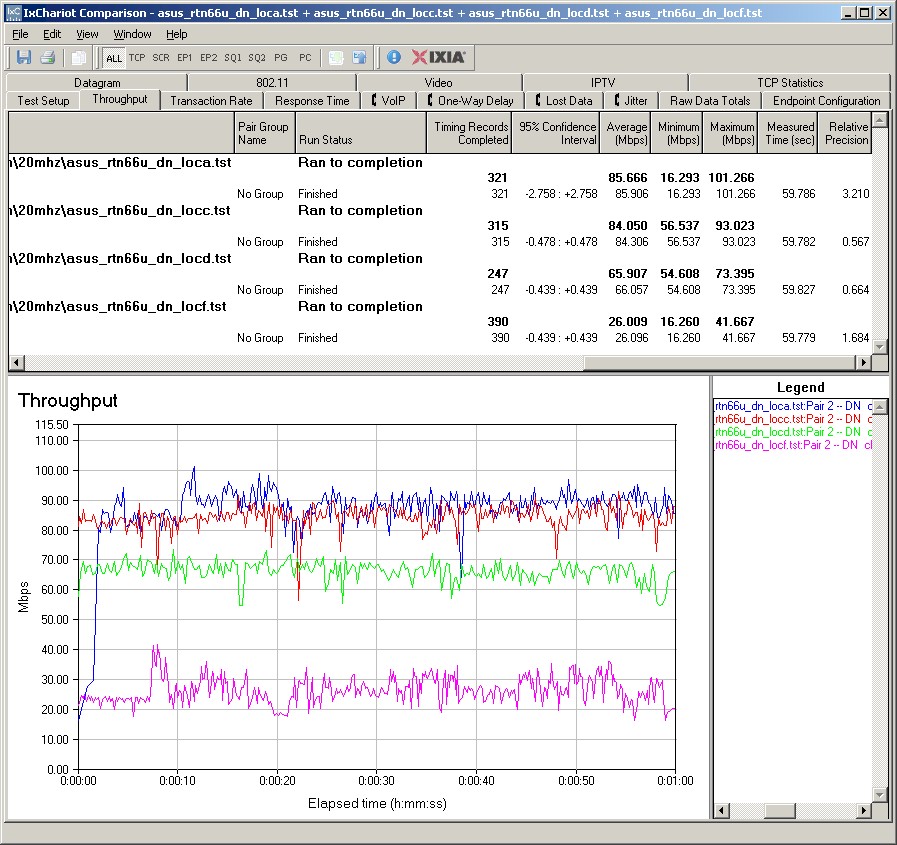
Figure 13: ASUS RT-N66U IxChariot plot summary – 2.4 GHz, 20 MHz mode, downlink, 3 stream
Here are links to the other plots for your reference.
- 2.4 GHz / 20 MHz uplink
- 2.4 GHz / 20 MHz up and downlink
- 2.4 GHz / 40 MHz downlink
- 2.4 GHz / 40 MHz uplink
- 2.4 GHz / 40 MHz up and downlink
Wireless Performance – 5 GHz, Two Stream
Moving up to 5 GHz, here is the Performance Table for 5 GHz, 2 streams. The ASUS takes three out of four comparisons, but is bested by both the NETGEAR and Cisco running uplink in 40 MHz bandwidth. The 66U’s particularly strong showing in Location D throughput disappears in this test group, too.
The IxChariot plot for 20MHz mode downlink (Figure 14) shows well-behaved throughput—a characteristic that is carried through to the other plots. I should note that in the simultaneous up/downlink tests downlink throughput is about 2X uplink.
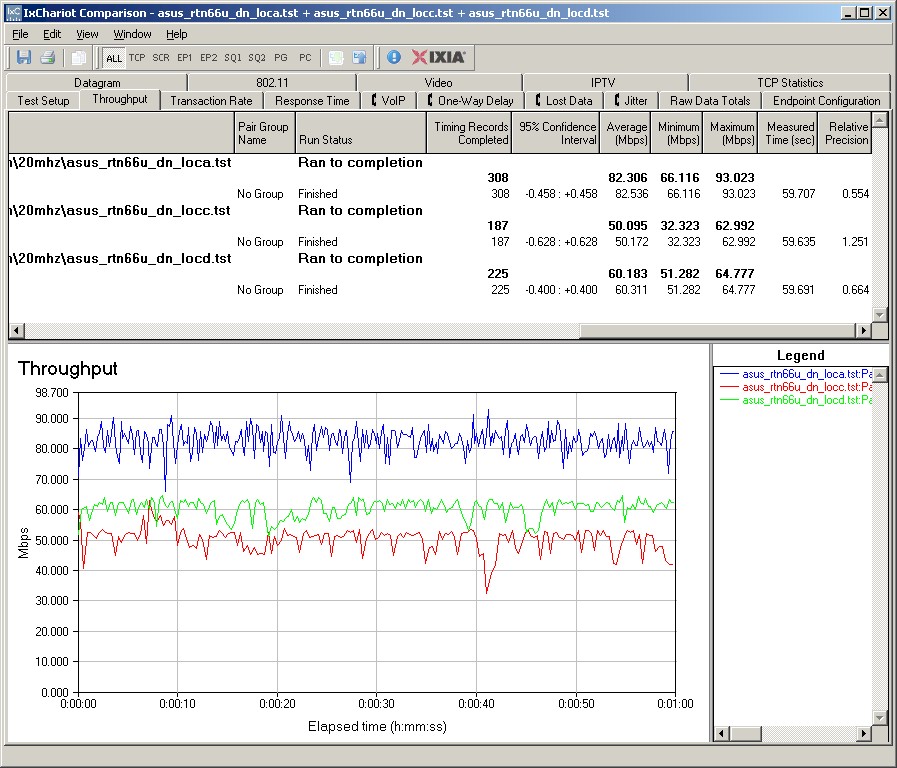
Figure 14: ASUS RT-N66U IxChariot plot summary – 5 GHz, 20 MHz mode, downlink, 2 stream
Remember that even though there are no Location F results, the two-stream client was able to remain connected to the router, albeit with an unusable connection. But what is unusable in my test location, might be perfectly fine in yours. Don’t expect miracles, though!
Here are links to the other plots for your reference.
- 5 GHz / 20 MHz uplink
- 5 GHz / 20 MHz up and downlink
- 5 GHz / 40 MHz downlink
- 5 GHz / 40 MHz uplink
- 5 GHz / 40 MHz up and downlink
Wireless Performance – 5 GHz, Three Stream
Last, but not least is the Performance Table for 5 GHz, 3 streams. If you’re looking to stream HD video, this is where you’d like to see the highest throughput. Unfortunately, the Dark Knight doesn’t deliver. Oddly, it produced its highest throughput of 136 Mbps running uplink in 40 MHz bandwidth mode. Downlink performance was very disappointing in this mode (57 Mbps), with very high variation. Figure 15’s view of 20 MHz mode downlink shows fairly high variation, too.
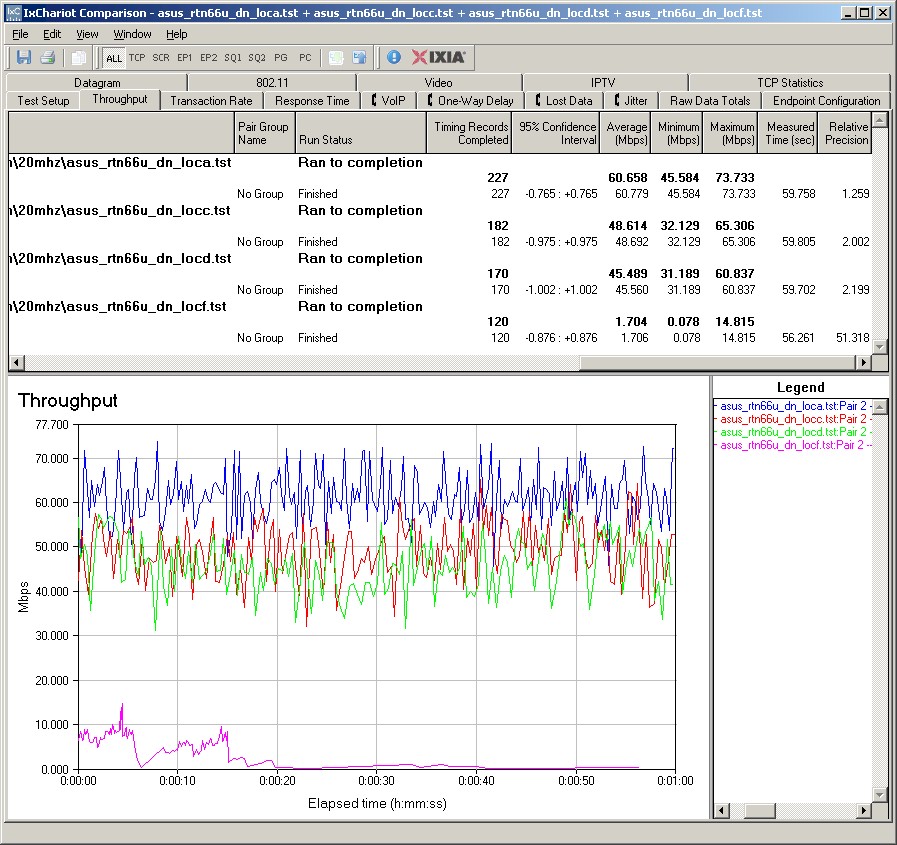
Figure 15: ASUS RT-N66U IxChariot plot summary – 5 GHz, 20 MHz mode, downlink, 3 stream
Here are links to the other plots for your reference.
- 5 GHz / 20 MHz uplink
- 5 GHz / 20 MHz up and downlink
- 5 GHz / 40 MHz downlink
- 5 GHz / 40 MHz uplink
- 5 GHz / 40 MHz up and downlink
Stress Test
When there’s a top-end router on the bench, I like to push it a bit to check for interactions and limitations. So I set up my two test laptops with the three-stream N Lenovo x220i on 2.4 GHz and the Acer Aspire 1810T on 5 GHz with two streams. Both radios were set to 40 MHz bandwidth mode and both laptops were about 10 feet away from the router in the same room.
The test consisted of six test pairs running the IxChariot throughput script with TCP/IP. One pair was 2.4 GHz three-stream up/downlink, the second pair was 5 GHz 2 stream up/downlink and the last pair was wired routing LAN>WAN and WAN>LAN. I staggered the start times of the scripts and adjusted the length of each pair so that the effects of each pair could be seen. Figure 16 tells the tale.
The 2.4 GHz, 3 stream pair starts first and hums along at maximum throughput. But when the 5 GHz, 2 stream pair starts at the 20 second mark, I was surprised to see the 2.4 GHz pair throughput drop. Since each radio has its own BB/MAC processor and there is a separate CPU handling routing, this indicates a bottleneck somewhere. I’d have to guess the CPU, since it’s the only thing common to both radios.
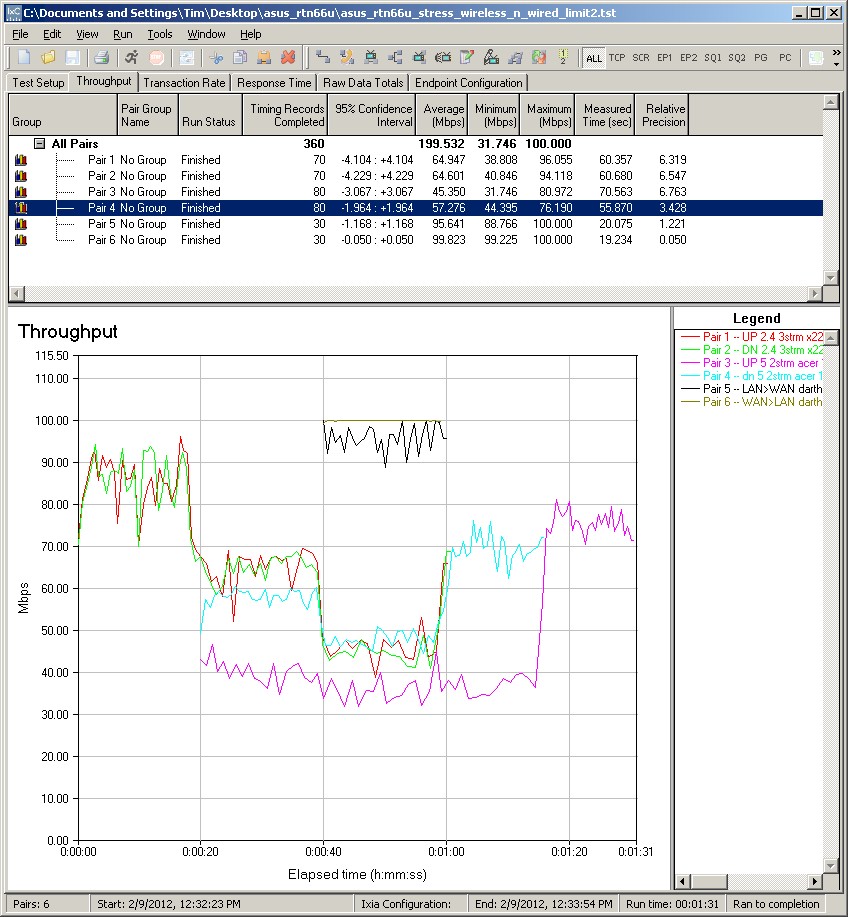
Figure 16: ASUS RT-N66U wireless and wired stress test
When the wired routing pair kicks in at the 40 second mark, both radios again lose throughput. The only exception is the 5 GHz uplink stream, which is down around 35 Mbps. When the routing pair stops at the 1 minute mark, you can see both radios’ throughput jump back up.
When the 2.4 GHz pair stops, you can see the 5 GHz downlink trace reach a new high, indicating it had been held back by the 2.4 GHz radio when it started. And finally, when the 5 GHz downlink stops, the uplink test reaches its own high, which shows the downlink/uplink interaction we saw previously on the performance tests.
Note that I limited the routing pair throughput to 100 Mbps. I did this first, because I found the wireless throughput would have been even more negatively impacted if I didn’t. But more on a practical basis, there aren’t that many people who will be running the router at 100 Mbps up/down. I also ran a test limiting routing throughput to 50 Mbps, which showed no additional reduction of wireless throughput and with no limit.
The no-limit test pushes the 2.4 GHz pair throughput down further to 20 – 25 Mbps. But it also plays havoc with the wired routing throughput, causing high variation, as is clearly shown in the plot.
I’m surprised by the interaction of the two radios, given the architecture of the router, with its separate CPU and fully independent radio SoCs. I would expect a throughput hit, and got one, with a router like the original Cisco Linksys E4200, which uses one of the radio CPUs as the router’s main CPU.
Whether you see the effects of any of this in real life will depend on how much you push the router. Remember that I’m using continuous streams with no bandwidth limits (except as noted for the router). Even a 1080p HD stream isn’t going to do that, although a long local wireless filecopy could.
Closing Thoughts
As good as the RT-66U is, our wireless performance results once again show that no router is good in every mode that we test. But that said, the Dark Knight clearly outperformed both the NETGEAR WNDR4500 and Cisco Linksys E4200V2 in most of our two and three-stream tests. And it’s the only router in recent memory able to reach to our worst-case/lowest-signal test location on the 5 GHz band, albeit with barely-usable throughput. Still, this is an accomplishment in itself.
If you’re going to spend close to $200 for a wireless router, you should get a lot for your money. The Dark Knight seems to deliver wireless performance to justify its high price and has routing speed fast enough to handle any service a consumer is likely to have, even our friends in Europe and Asia.
But other aspects of the product are a work in progress. Documentation is poor and incomplete, with no mention of many of the product’s key features like IPv6, USB Download Master, VPN server and 3G backup WAN support. And the non-functional DLNA server isn’t bringing smiles to some buyer’s faces. So if you decide to take the plunge, be prepared to wait for both firmware updates and better documentation to make the Dark Knight all that I’m sure ASUS wants it to be.
Buy Dark Knight Dual-Band Wireless-N900 Gigabit Router from Amazon