

| At a glance | |
|---|---|
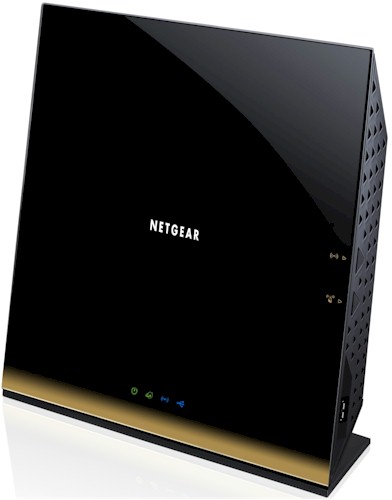
| Product | NETGEAR WiFi Router – 802.11ac Dual Band Gigabit (R6300) [Website] |
| Summary | Broadcom-based simultaneous dual-band AC1750 class Draft 2.0 802.11ac router |
| Pros | • Has WDS, Client Bridge and AP modes • Can reach almost 500 Mbps total 11ac throughput |
| Cons | • No site survey in client bridge mode • Can’t adjust transmit power |
Typical Price: $128 Buy From Amazon
Introduction
The First Look was based on original V1.0.0.68_1.0.16 firmware, which lacked support for guest networks. NETGEAR has since posted three updates with the lastest V1.0.2.14_1.0.23 firmware including both the missing guest networks and, according to NETGEAR, providing some improvements in draft 11ac mode performance. So this review includes a retest of 5 GHz 80 MHz mode tests as well as 2.4 and 5 GHz testing with our standard Intel 6300 three-stream N client.
NETGEAR has posted the R6300’s User Manual, so I was able to grab my usual front and rear panel annotated views shown below.
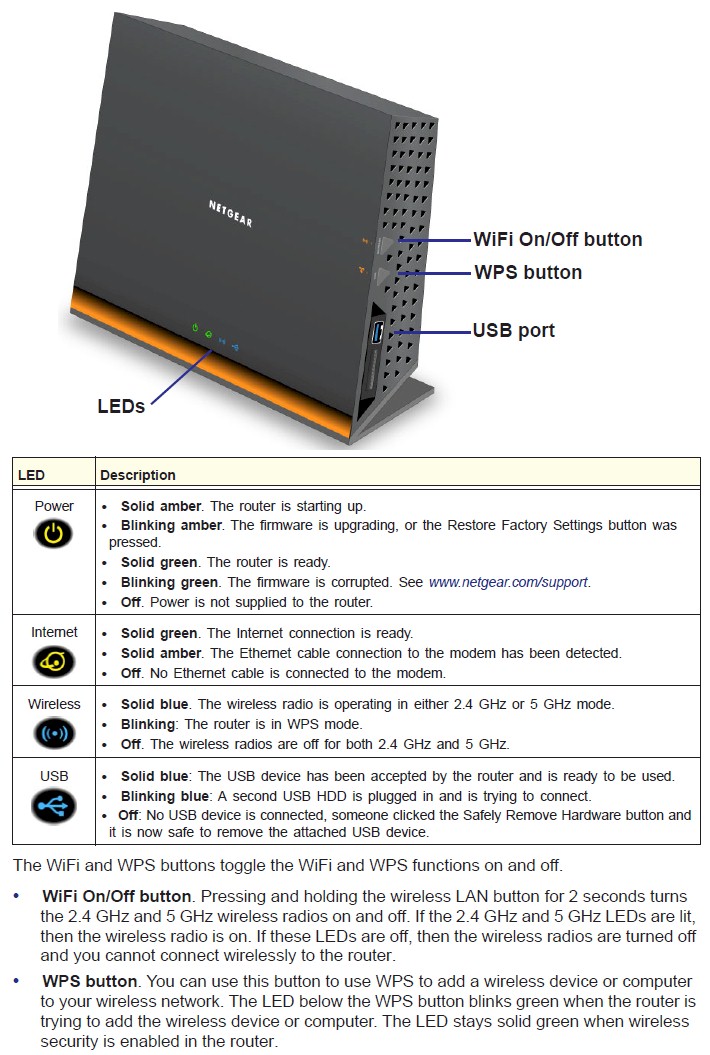
R6300 front panel callouts
As noted in the First Look, the two USB ports are 2.0 and there is no indication on either the front or rear panels of wired or wireless network activity.
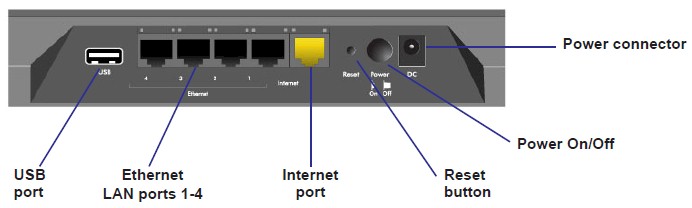
R6300 rear panel callouts
Inside
An anonymous donor was kind enough to open up the R6300 and pass along some photos. The photo below shows six antennas—three for each radio.
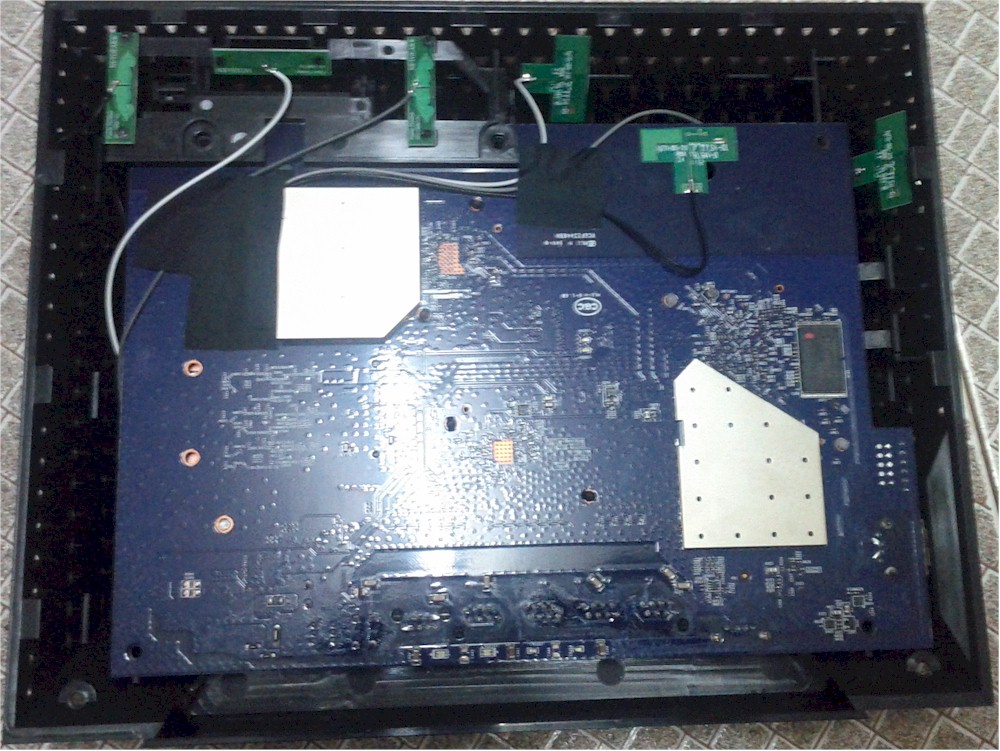
R6300 inside front
Removing the board and flipping it over shows all key components with heatsinks or spreaders. The mini-PCIe module at the left of the photo looks awfully familiar. It’s safe to say that it’s the same one used in Buffalo’s WZR-D1800H router and WLI-H4-D1300 bridge.
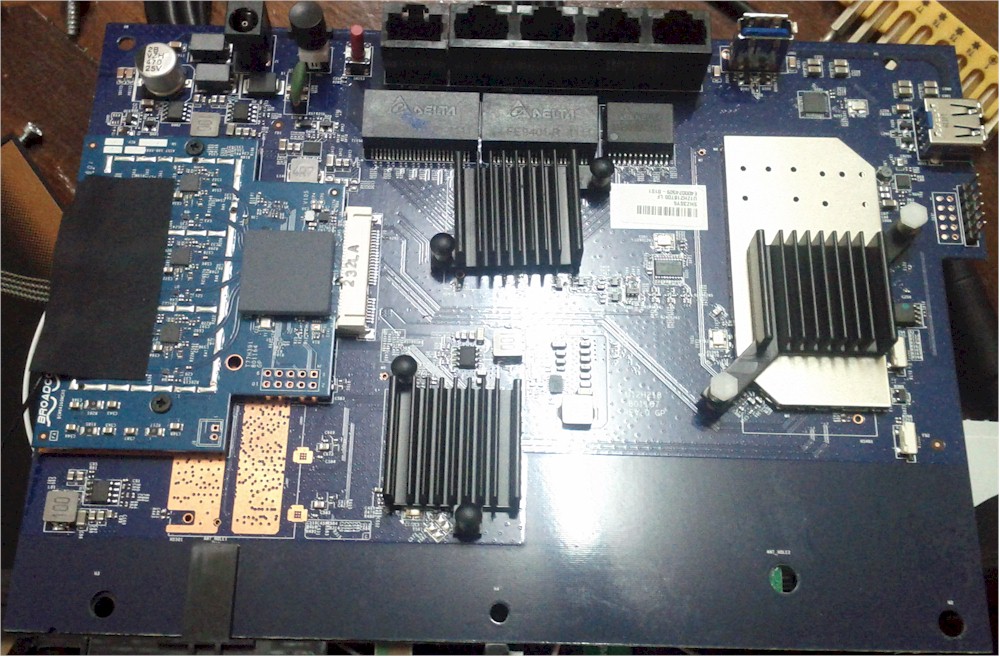
R6300 inside rear
Some digging around has confirmed that the components used in the R6300, aside from the 5 GHz radio, are the same as used on the WNDR4500. The component summary below pulls all the details into one handy place. The components are the same used in the Buffalo draft 11ac products except for the switch, which is a BCM53125 in the Buffalos.
| NETGEAR R6300 | |
|---|---|
| CPU | Broadcom BCM4706 |
| Switch | Broadcom BCM53115 |
| RAM | 128 MB |
| Flash | 128 MB |
| 2.4 GHz Radio | – BCM4331 – SiGE SE2594L Dual Band 802.11a/b/g/n Wireless LAN Front End (x3) |
| 5 GHz radio | – Broadcom BCM4360 – Skyworks SE5003L 5 GHz, 23dBm Power Amp w/ Power Detector (x3) |
Table 1: Component summary
Features
For those of you who won’t rest until you know that guest networks are really supported, here is the screenshot to prove it.
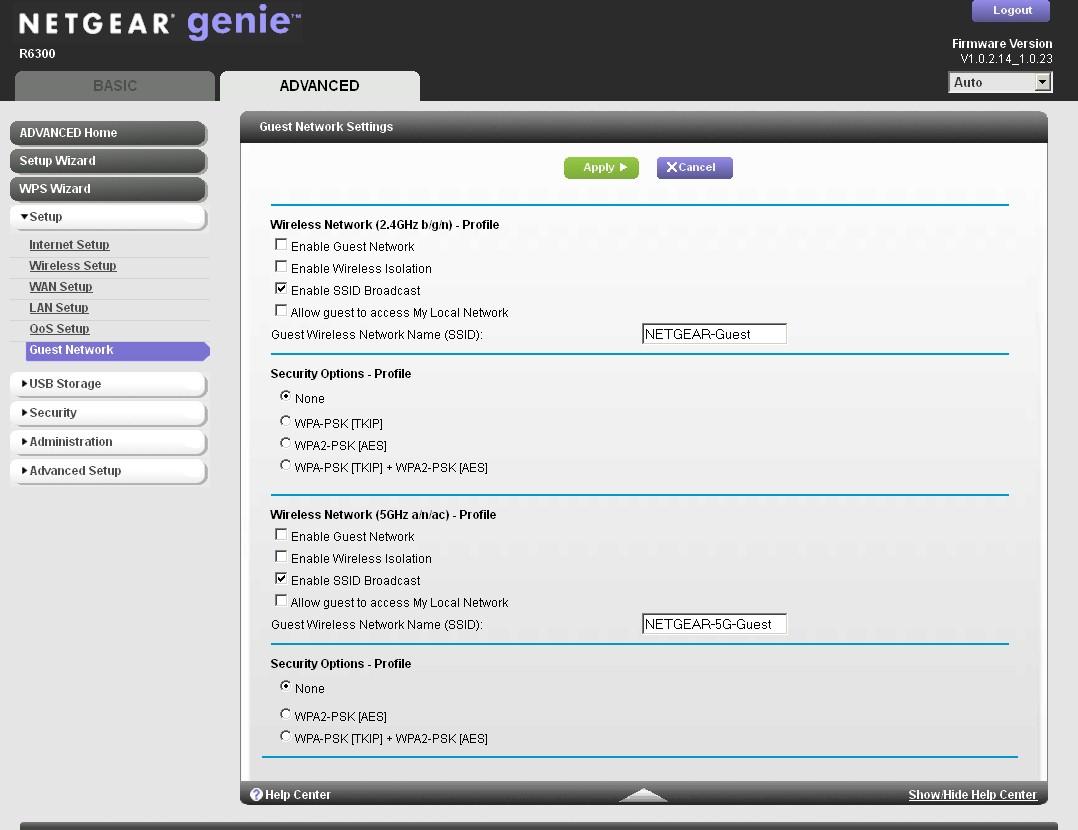
R6300 guest network settings
I also stumbled across a Performance Boost option in the Advanced Wireless settings page that is highlighted in the screenshot below. There is no explanation of what this does in the online help or User Manual. But here’s what NETGEAR had to say about it:
The Performance Boost feature reduces the CPU utilization for WLAN processing on the router.
The typical scenario where it will help improve WiFi performance is where CPU is the bottleneck:
– Dual band concurrent performance
– Full speed 802.11ac performanceWe recommend keeping this feature enabled for best performance.
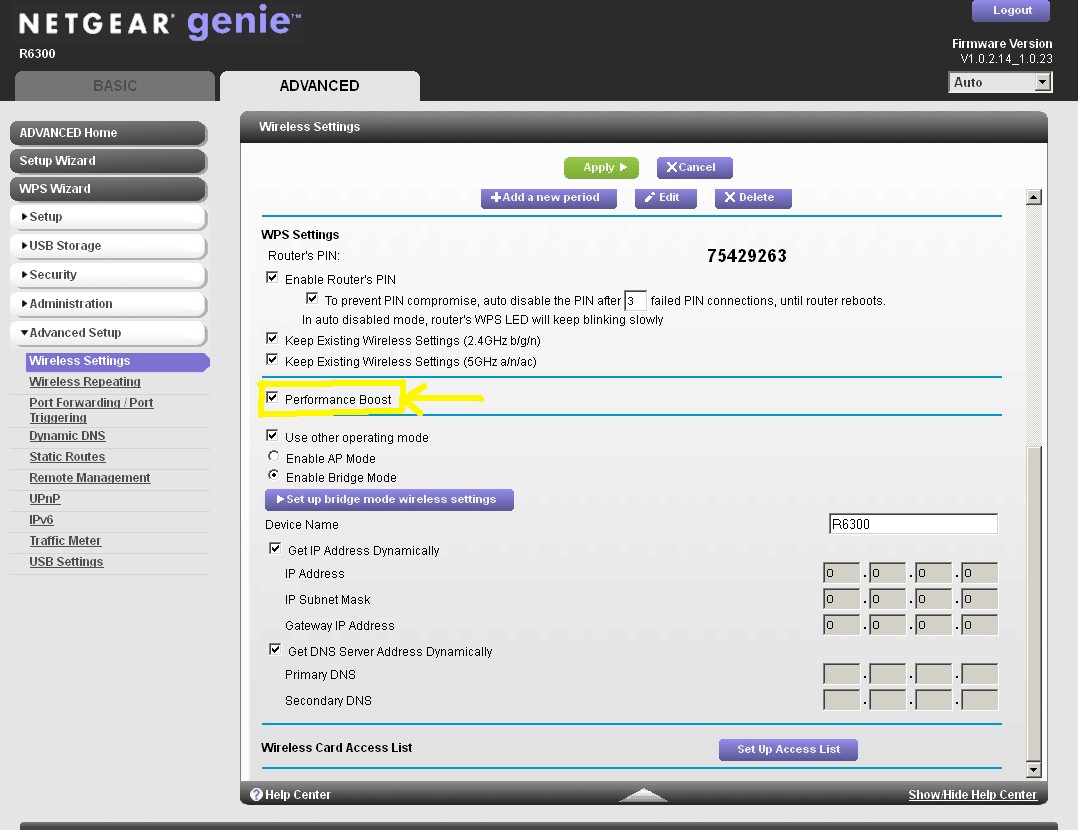
R6300 guest network settings
Not all routers support the same channels in 5 GHz, so I’ve summarized that and other wireless setting information in Table 2. Note that unlike the Buffalos, the R6300 doesn’t support Channel 165 in 5 GHz, nor does it have an Auto channel setting in that band.
| Setting | 5 GHz | 2.4 GHz |
|---|---|---|
| Channel | 36, 40, 44, 48, 149, 153, 157, 161 | Auto, 1 – 11 |
| High-Throughput Mode (bandwidth) | Up to 289 Mbps Up to 600 Mbps Up to 1300 Mbps |
Up to 54 Mbps Up to 217 Mbps Up to 450 Mbps |
| Security | None WPA-PSK [TKIP] WPA2-PSK [AES] WPA-PSK [TKIP] + WPA2-PSK [AES] |
None WEP (Up to 54 Mbps only) WPA-PSK [TKIP] WPA2-PSK [AES] WPA-PSK [TKIP] + WPA2-PSK [AES] |
Table 2: Wireless settings summary
Also unlike the Buffalo draft 11ac router and bridge, you can’t adjust the R6300’s transmit power, nor can you set the advertised base rates. You do, however, get the ability to adjust Fragmentation length, CTS/RTS Threshold and select short or long preamble. You can also schedule radio on/off periods for both radios on a daily basis and set wireless access filtering (MAC address) using a handy client pick list.
If you need a walkthrough on the Genie feature set, Craig’s feature review of the WNDR3800 should give you what you need.
Routing Performance
[This is copied from the First Look for your convenience.]
Routing performance for the R6300 using our standard test method is summarized in Table 3, along with Buffalo’s draft 11ac router. The R6300 has higher routing throughput, if that’s important to you. But NETGEAR has kept to its traditional 4,096 limit on simultaneous sessions.
| Test Description | R6300 | WZR-D1800H |
|---|---|---|
| WAN – LAN | 783 Mbps | 566 Mbps |
| LAN – WAN | 829 Mbps | 590 Mbps |
| Total Simultaneous | 808 Mbps | 590 Mbps |
| Maximum Simultaneous Connections | 4096 | 34,925 |
| Firmware Version | V1.0.0.68_1.0.16 | Ver.1.86 |
Table 3: Routing throughput
The IxChariot plot for the routing tests shows generally stable throughput, but with a few pronounced dips.
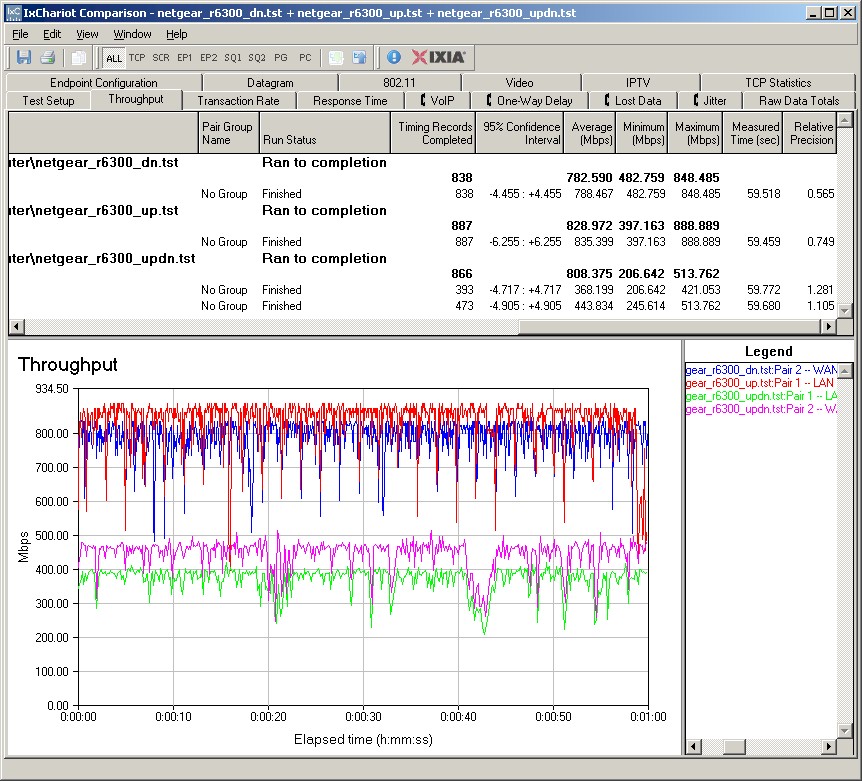
R6300 Routing throughput IxChariot plot summary
Storage Performance
I ran quick Windows filecopy tests using the standard NAS testbed to the R6300 with our standard Iomega UltraMax Pro drive configured in RAID 0 and formatted in FAT32 and NTFS. I pulled results from a few other high-end routers for comparison into Table 4.
| R6300 | WNDR4500 | WZR-D1800H | RT-N66U | E4200V2 / EA4500 | |
|---|---|---|---|---|---|
| FAT32 Write (MBytes/s) | 8.6 | 9.2 | 7.3 | 10 | 9.8 |
| FAT32 Read (MBytes/s) | 10.2 | 11.6 | 11.8 | 12 | 21.6 |
| NTFS Write (MBytes/s) | 11.3 | 6.7 | – | 17 | 20.1 |
| NTFS Read (MBytes/s) | 10.3 | 6.5 | – | 11 | 22.2 |
Table 4: File copy throughput
Cisco’s E4200v2/EA4500 is still the champ for everything except FAT32 writes. But it looks like the R6300 has improved NTFS read and write performance over its WNDR4500 sibling. Since the two routers use the same CPU, I suspect that if I went back and retested the WNDR4500 with current firmware I might it now equals the R6300.
Wireless Performance – Overview
As mentioned earlier, I conducted wireless testing in two rounds. The first round measured 5 GHz, 80 MHz bandwidth mode (draft 802.11ac) with pair of R6300s running V1.0.0.68_1.0.16 firmware. One was configured in its normal router mode, while the test "client" was configured in client bridge mode. I also ran a full set of two-stream N tests in 2.4 and 5 GHz using our standard two-stream client, an Intel Centrino Advanced-N 6200 in a Acer Aspire 1810T notebook running Win 7 Home Premium SP1 (64 bit).
As is our standard practice, all tests were run using WPA2/AES encrypted connections with Channel 1 used for 2.4 GHz tests and Channel 36 for 5 GHz
For the second round, I updated both R6300’s with the latest V1.0.2.14_1.0.23 firmware. I reran the 5 GHz, 80 MHz mode tests, since NETGEAR said the latest firmware contained some tweaks to improve its performance. I also ran a full set of three-stream N tests in both bands using our standard three-stream client, an Intel Centrino Ultimate-N 6300 in a Lenovo x220i Thinkpad running Win 7 Home Premium SP1 (64 bit). I didn’t rerun the two-stream tests, since the new firmware doesn’t affect its performance.
Each entry in the Benchmark Summary below shows the average of throughput measurements made in all test locations.
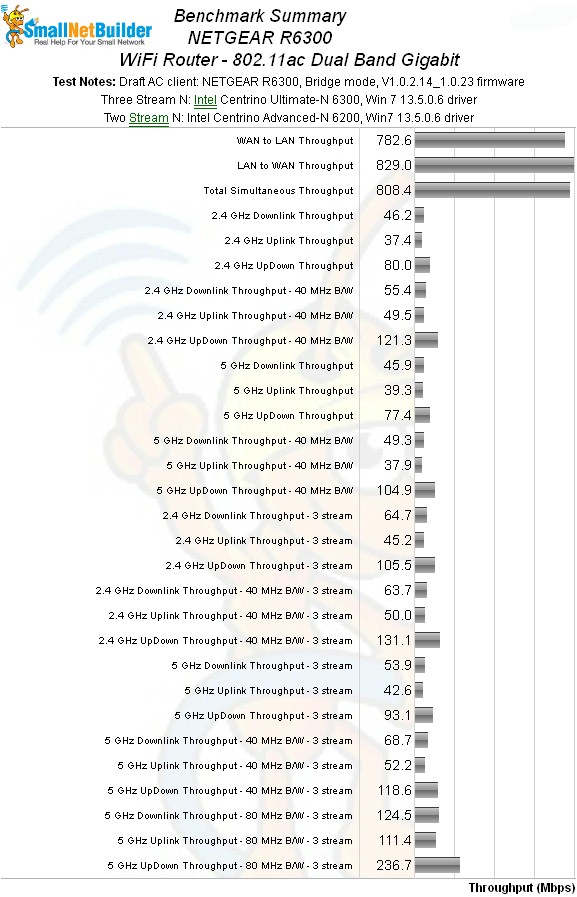
NETGEAR R6300 Benchmark Summary
Table 5 summarizes the highest wireless throughput measured out of all locations in the 20 MHz mode test runs. In most cases, highest throughput was measured in Location A. Note that the Dn/Up result is for simultaneous up and downlink tests in Location A.
The R6300 appears to perform about the same as other three-stream routers for performance improvement between two and three stream modes. As is typical, best improvment is in the up/down test that uses two simultaneous traffic streams, coming in at 33% for 2.4 GHz. Up/down test improvement for the 5 GHz band is lower, only 21%. More notably, however, is that the 5 GHz two-to-three stream change is in the expected direction, i.e. higher, vs. the Buffalo WZR-D1800H, where three stream throughput was actually lower.
| Test Group | Max Dn (Mbps) | Max Up (Mbps) | Dn/Up (Mbps) |
|---|---|---|---|
| 2.4 GHz, 2 stream, 20 MHz | 67 | 56 | 80 |
| 2.4 GHz, 3 stream, 20 MHz | 82 | 71 | 106 |
| 5 GHz, 2 stream, 20 MHz | 64 | 53 | 77 |
| 5 GHz, 3 stream, 20 MHz | 72 | 61 | 93 |
Table 5: Highest Throughput, 20 MHz mode
Table 6 summarizes highest 40 MHz mode throughput. Gains here are much more modest with the highest improvement only 13% for the 5 GHz up/down benchmarks.
| Test Group | Max Dn (Mbps) | Max Up (Mbps) | Dn/Up (Mbps) |
|---|---|---|---|
| 2.4 GHz, 2 stream, 40 MHz | 82 | 77 | 121 |
| 2.4 GHz, 3 stream, 40 MHz | 87 | 86 | 131 |
| 5 GHz, 2 stream, 40 MHz | 75 | 74 | 105 |
| 5 GHz, 3 stream, 40 MHz | 80 | 82 | 119 |
Table 6: Highest Throughput, 40 MHz mode
Table 7 calls out the draft 11ac mode best case throughputs. % gains from the 5 GHz, 3 stream 40 MHz benchmarks are 98% (down), 78% (up) and 99% (up/down).
| Test Group | Max Dn (Mbps) | Max Up (Mbps) | Dn/Up (Mbps) |
|---|---|---|---|
| 5 GHz, 3 stream, 80 MHz | 158 | 146 | 237 |
Table 7: Highest Throughput, 80 MHz mode
Wireless Performance – Draft 802.11ac
As noted earlier, I reran the draft 11ac mode tests with V1.0.2.14_1.0.23 firmware loaded into a pair of R6300s. The "client" R6300 was set to its client bridge mode found on the Advanced > Advanced Setup > Wireless Settings page. The connection on channel 36 was secured with WPA2/AES.
It appears that NETGEAR’s tweaks have improved the 80 MHz mode performance. The pair of R6300s now outperform the Buffalo WZR-D1800H / WLI-H4-D1300 pair in locations A and C running downlink. But while location D throughput has improved significantly from 63 Mbps to 84 Mbps, the Buffalo still wins in this location. (Click here for the old downlink comparison plot.)
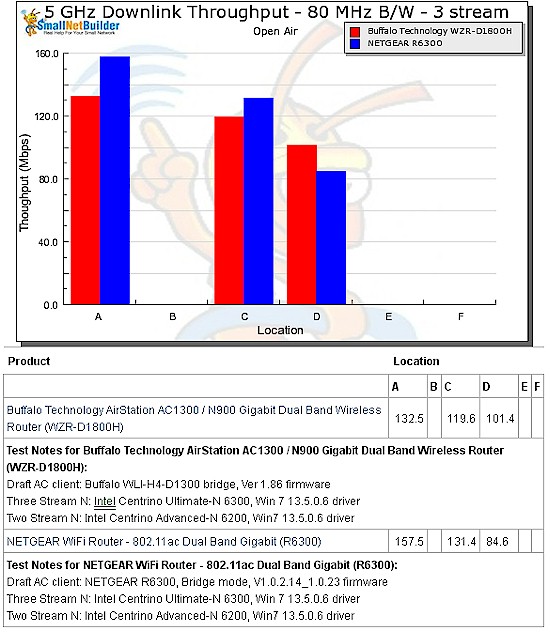
Draft 802.11ac throughput vs. location – NETGEAR R6300 vs. Buffalo WZR-D1800H – downlink – retest
The improvement isn’t as dramatic for uplink, with a slight gain in location A widening the lead over Buffalo and a similar one in location C allowing the R6300 to now just squeak past the Buffalo by 5 Mbps. A 14 Mbps gain in location D, however, still leaves the Buffalo as winner there, by a very comfortable margin.(Click here for the old downlink comparison plot.)
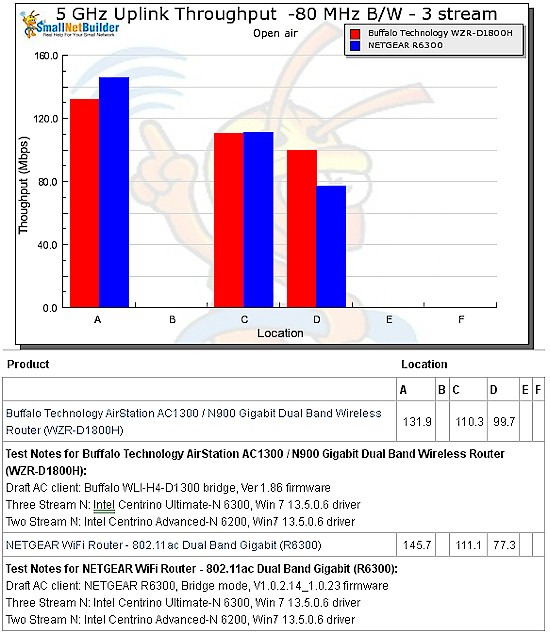
Draft 802.11ac throughput vs. location – NETGEAR R6300 vs. Buffalo WZR-D1800H – uplink
When I sanity-checked these results with NETGEAR pre-review, they were surprised at the location D throughput, which they expected would be higher. But NETGEAR runs its tests on the U-NII-3 channels (149 – 165), where the maximum power limit is 1W vs. the 50 mW limit on my standard test channel 36.
I have rerun tests in the past using the high 5 GHz channels and found little throughput change. This is because clients are typically unable to increase power as much as APs on these higher channels, so can’t "shout louder" back. But since the pair of R6300’s used in this test are both capable of higher transmit power, I would expect to see higher throughput and that’s what I got.
I repeated the location D test, using channel 157 instead of 36 and measured 118 Mbps down and 107 Mbps up, which is a significant increase from the 85 Mbps down / 77 Mbps up measured using channel 36. So in this case, using the higher group of channels does indeed provide higher throughput and, I would expect, increased range. But since my test standard is channel 36, those are the numbers you see entered in the Router Charts for apples-apples comparison.
Wireless Performance – Draft 802.11ac – more
Here’s the IxChariot plot for downlink. Throughput is surprisingly stable, although the location C run gets a bit wonky toward the end of its run.
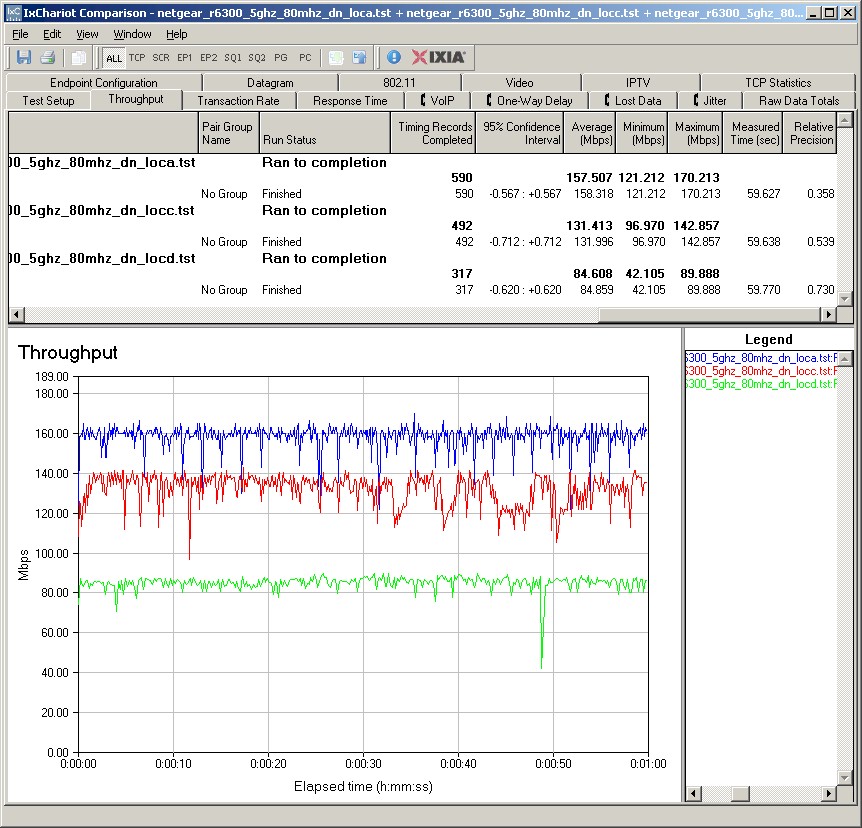
Draft 802.11ac throughput IxChariot plot – NETGEAR R6300 – downlink – retest
Location C again has the most variation running uplink.
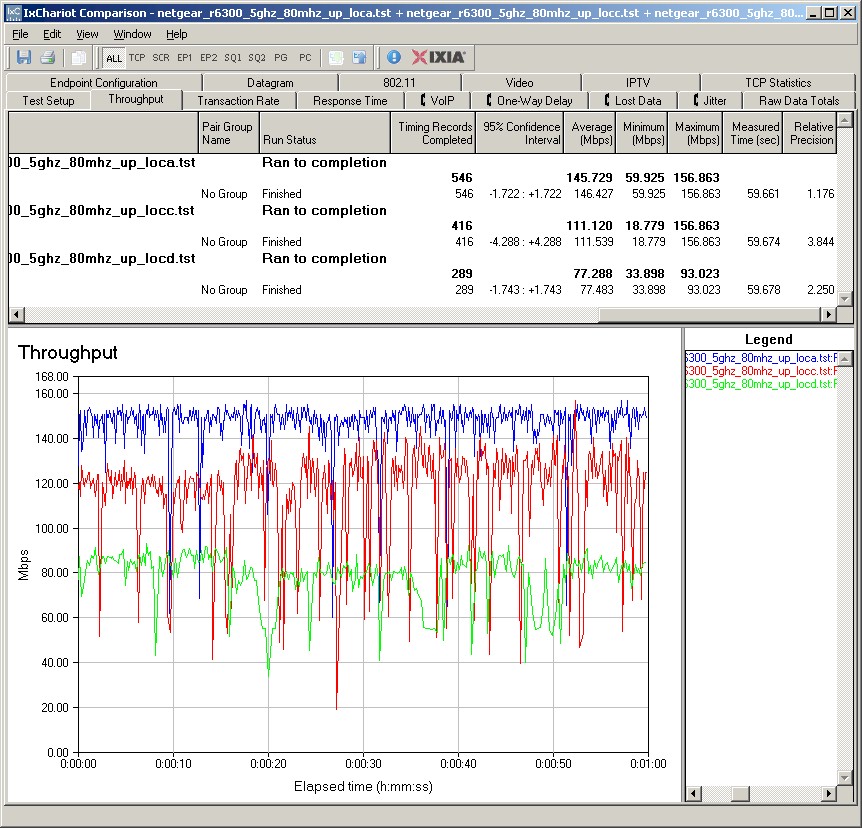
Draft 802.11ac throughput IxChariot plot – NETGEAR R6300 – uplink – retest
Maximum 11ac Throughput
I reran the multi-pair test to see how much total throughput I could squeeze from the firmware-upgraded R6300. The plot below shows the original and retest R6300 data along with the Buffalo draft 11ac pair. The new firmware has improved the total peak throughput from 413 Mbps to 496 Mbps. Throughput still peaks at five up/down pairs and falls off as more pairs are added.
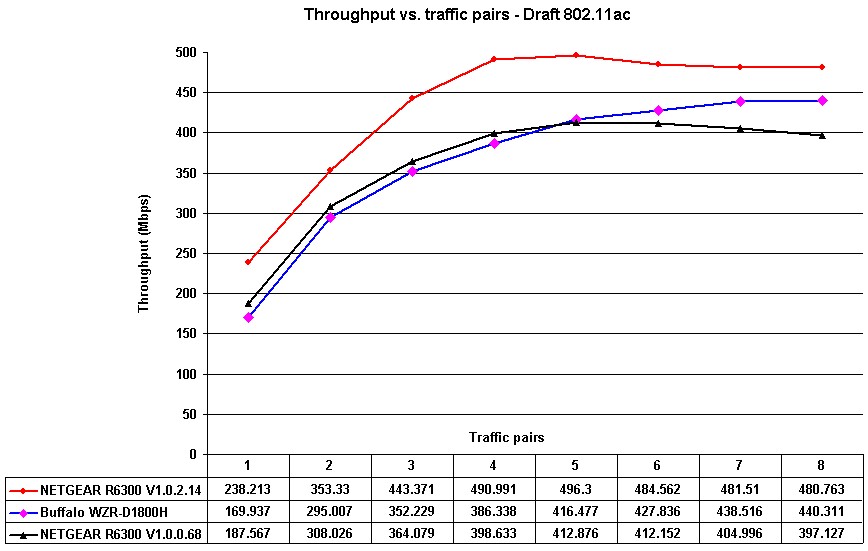
Draft 11ac throughput vs. traffic pairs
Wireless Performance – 2.4 GHz 2 Stream
I used our standard test method to test the the R6300’s two-stream N wireless performance with our standard two-stream client an Intel Centrino Advanced-N 6200 in a Acer Aspire 1810T notebook running Win 7 Home Premium SP1 (64 bit). 2.4 GHz tests were run on Channel 1 and 5 GHz band tests on Channel 36. As noted earlier, I did not rerun two-stream tests, so this data was taken with V1.0.0.68_1.0.16 firmware.
For performance comparison, I chose two top-performing three-stream N routers, the ASUS RT-N66U and NETGEAR WNDR4500. And I, of course, included the Buffalo WZR-D1800H draft 11ac router.
The comparison tables are large, so I’m going to provide links that will open them in a new window/tab to make things easier. Let’s start with the Performance Table for Two-stream 2.4 GHz.
The R6300 doesn’t win any of the comparisons across all test locations, but the results aren’t as bad as that might seem. If you look closely at the actual numbers, the R6300 in most cases outperforms the WNDR4500. And, as you might expect, its performance tracks the Buffalo pretty well.
The IxChariot plot summary below for 20 MHz mode downlink shows generally stable throughput with the stronger signals in locations A and C. But I wasn’t able to get rid of the throughput dips and bumps by rerunning the weaker signal location D and F tests a few times.
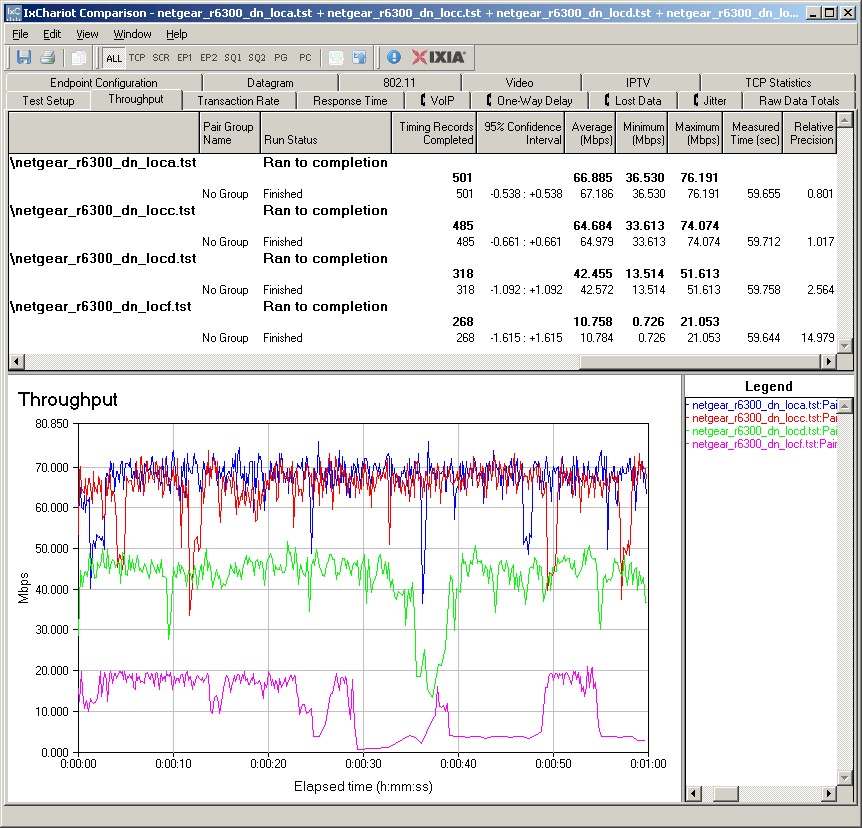
NETGEAR R6300 IxChariot plot summary – 2.4 GHz, 20 MHz mode, downlink, 2 stream
You’ll see the occasional throughput dropout on many of the other plots linked below.
- 2.4 GHz / 20 MHz uplink
- 2.4 GHz / 20 MHz up and downlink
- 2.4 GHz / 40 MHz downlink
- 2.4 GHz / 40 MHz uplink
- 2.4 GHz / 40 MHz up and downlink
Wireless Performance – 2.4 GHz 3 Stream
Next, we’ll look at the Performance Table for three-stream 2.4 GHz.
The R6300 offers improved performance over the WNDR4500 for many of these tests. But the ASUS "Dark Knight" still takes most of the benchmarks, particularly running uplink.
The IxChariot plot summary below for 20 MHz mode downlink once again shows dropouts in test locations D and F.
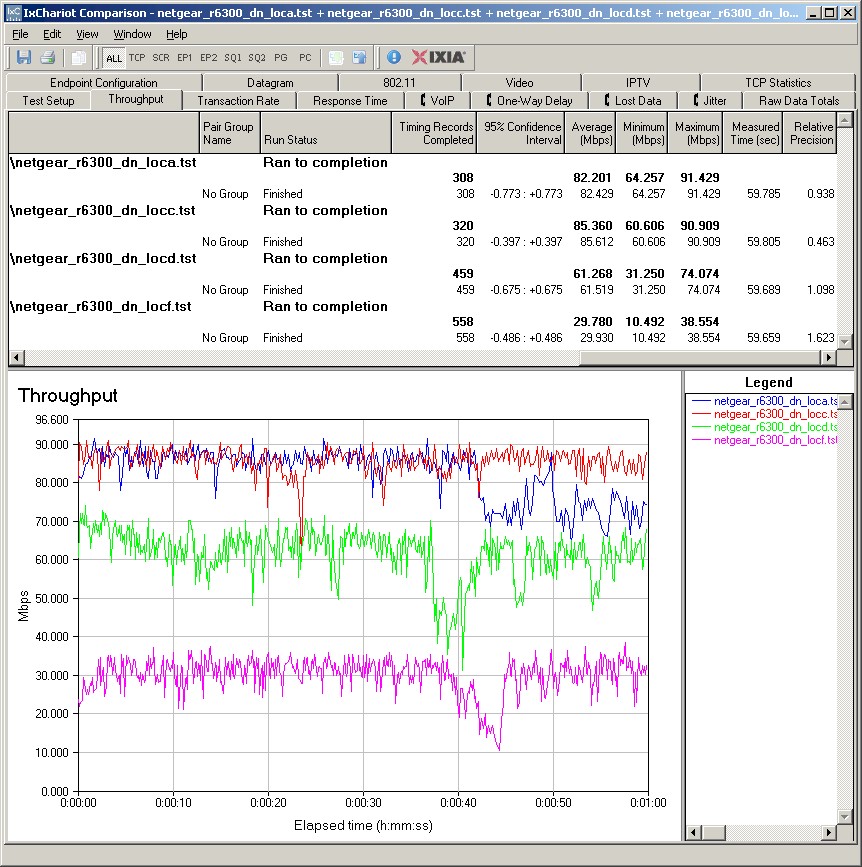
NETGEAR R6300 IxChariot plot summary – 2.4 GHz, 20 MHz mode, downlink, 3 stream
There aren’t many dropouts on the other plots linked below.
- 2.4 GHz / 20 MHz uplink
- 2.4 GHz / 20 MHz up and downlink
- 2.4 GHz / 40 MHz downlink
- 2.4 GHz / 40 MHz uplink
- 2.4 GHz / 40 MHz up and downlink
Wireless Performance – 5 GHz 2 Stream
Next, we’ll look at the Performance Table for two-stream 5 GHz.
At the risk of repeating myself, the tables once again show the ASUS winning three and tieing one of the benchmarks
The IxChariot plot summary below for 20 MHz mode downlink shows some rate-shifting behavior in the location C run.
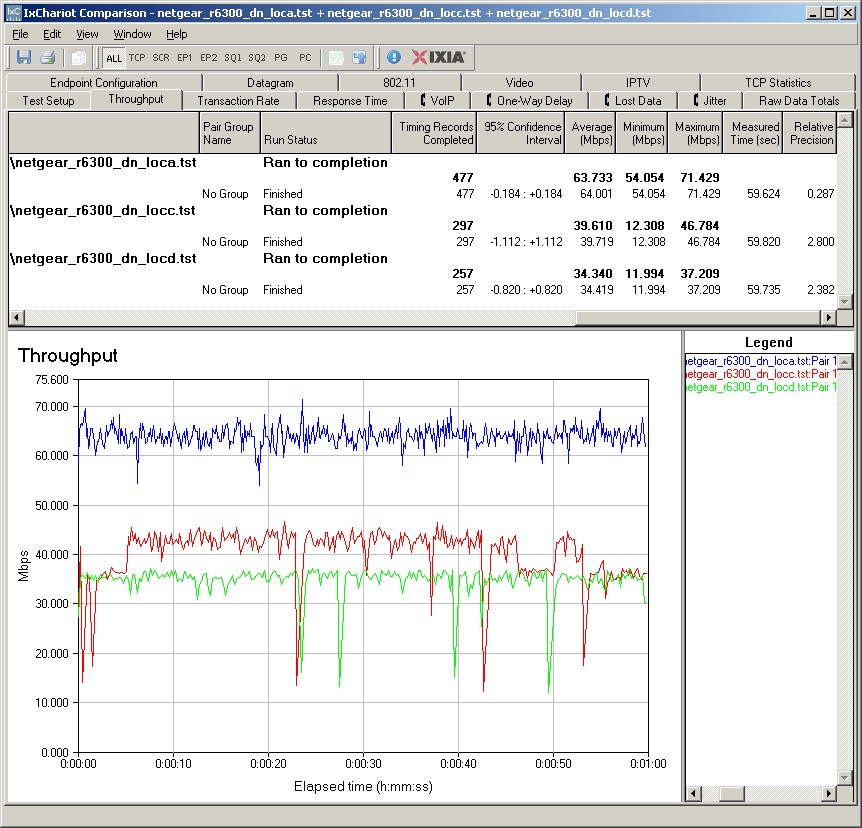
NETGEAR R6300 IxChariot plot summary – 5 GHz, 20 MHz mode, downlink, 2 stream
You’ll also see higher throughput variation for in the location C in the plots linked below.
- 5 GHz / 20 MHz uplink
- 5 GHz / 20 MHz up and downlink
- 5 GHz / 40 MHz downlink
- 5 GHz / 40 MHz uplink
- 5 GHz / 40 MHz up and downlink
Wireless Performance – 5 GHz 3 Stream
Next, we’ll look at the Performance Table for three-stream 5 GHz.
The R6300 holds its own pretty well against the ASUS in this set of benchmarks running downlink. But uplink performance pales against the ASUS’ in both 20 and 40 MHz bandwidth modes.
The IxChariot plot summary below for 20 MHz mode downlink shows both dropouts and rate-shifting.
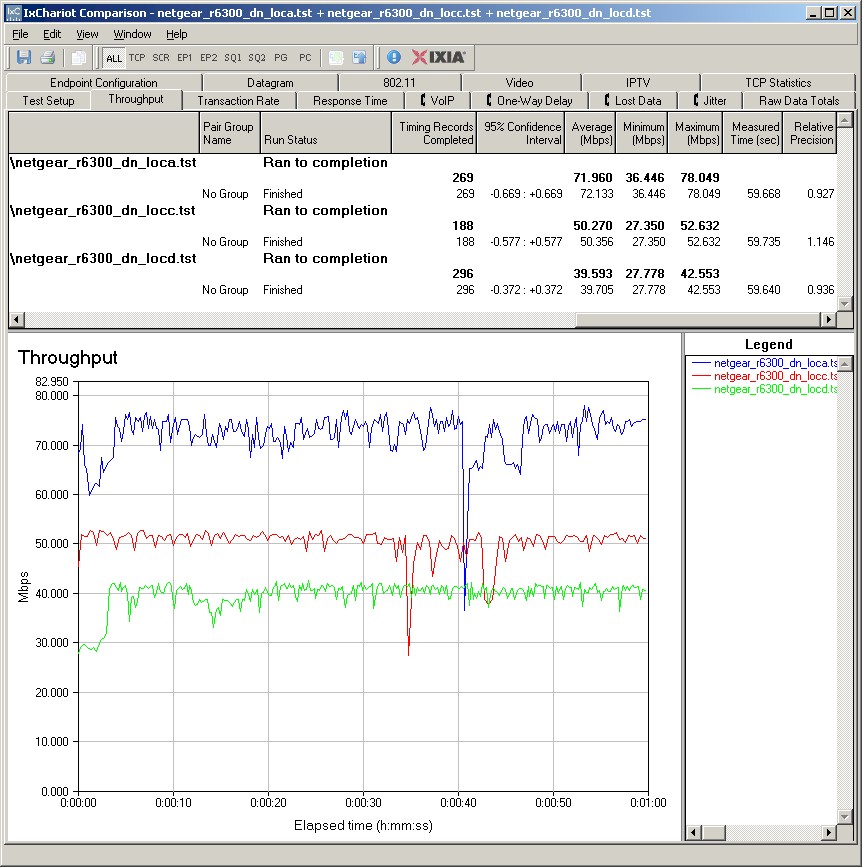
NETGEAR R6300 IxChariot plot summary – 5 GHz, 20 MHz mode, downlink, 3 stream
You’ll see more dropouts for location A on the other plots linked below.
- 5 GHz / 20 MHz uplink
- 5 GHz / 20 MHz up and downlink
- 5 GHz / 40 MHz downlink
- 5 GHz / 40 MHz uplink
- 5 GHz / 40 MHz up and downlink
Closing Thoughts
If you are trying to decide between the R6300 and Buffalo’s WZR-D1800H purely on the basis of their draft 11ac capability, it’s largely a toss-up. With the V1.0.2.14_1.0.23 firmware, the R6300 can pump out higher total bandwidth if you are running multiple 11ac clients. But at this point, with only $200 routers or bridges that support full three-stream draft 11ac, how many people are going to do that? More realistically, single client throughput is more evenly matched with a slight edge going to Buffalo as signal levels drop.
The R6300 has significantly higher wired routing throughput than the Buffalo, but you’ll need > 500 Mbps internet service to have that matter. What could be more in Buffalo’s favor is its much higher simultaneous session handling, which hit our almost 35,000 test limit while the NETGEAR maintained the 4,096 session limit that is common across its WNDR router line.
All that being said, I think buyers will opt for NETGEAR rather than Buffalo if they decide to plunk down their $200 to enter the draft 802.11ac beta test. Buyers like flexibility and features and the R6300 handily beats Buffalo on both counts. The R6300 supports both WDS bridging/repeating, AP and client bridge modes and guest SSIDs on both bands as well, while the Buffalo supports none of these. The NETGEAR’s routing feature set is also more complete than the Buffalo’s, with parental controls, scheduled firewall rules, bandwidth metering and more.
Perhaps as counterpoint to these advantages, both the WZR-D1800H and WLI-H4-D1300 are already down to $180 at Amazon. Pay your money. Take your choice.