

| At a glance | |
|---|---|
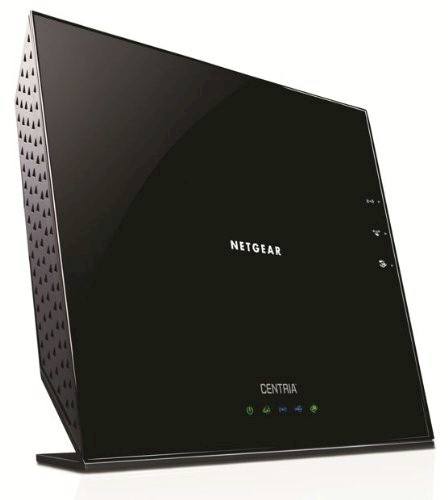
| Product | NETGEAR CENTRIA (WNDR4700) [Website] |
| Summary | Storage-centric Atheros-based “N900″ abgn router with user-installable 3.5” internal drive, dual USB 3.0 ports and SD card slot. |
| Pros | • Supports WDS and AP modes • Dual USB 3.0 ports • SD card slot • User-installable SATA drive |
| Cons | • Uneven wireless performance • No network activity indicators • Much slower storage writes than reads • Native internal drive format slower than NTFS |
Typical Price: $135 Buy From Amazon
Introduction
Updated 4/23/2013: Product is now Wi-Fi Certified
Part 1 of this review provided a feature and function overview, look at the internal details and analysis of the Centria’s routing and storage performance. We conclude our coverage of NETGEAR’s latest top-of-line N router with a look at its wireless performance and a bit of stress testing.
First an update on noise. I’ve noticed that the router’s blower has gotten more noticeable over the week that the Centria has been powered on. I can now clearly hear it in my quiet home office, over the sound of the other quiet fans in my home office. (Note that the Centria is sitting on a desk and my desktop machine is on a low equipment rack about four inches off the floor.) And this is without a hard drive installed.
This noise probably won’t bother you if the router is sitting in a family room or den. But if it’s in a bedroom, it could be annoying.
Wireless Overview
Updated 4/23/2013
It’s odd that the WNDR4700 is not Wi-Fi Certified, since it is not a draft 11AC router and NETGEAR usually certifies all of its wireless routers. The WNDR4700 was Wi-Fi Certified in March 2013.
Table 1 summarizes the Centria’s key wireless settings. Note that both Personal and Enterprise (RADIUS) forms of WPA/WPA2 security are supported and channel 165 is not supported on the 5 GHz radio.
| Setting | 2.4 GHz | 5 GHz |
|---|---|---|
| Channel | Auto 1 – 11 |
36, 40, 44, 48 149, 153, 157, 161 |
| Mode | Up to 54 Mbps Up to 195 Mbps (default) Up to 450 Mbps |
Up to 54 Mbps Up to 195 Mbps Up to 450 Mbps (default) |
| Bandwidth control | Set by Mode | Set by Mode |
| Security | None WEP (Up to 54 Mbps mode only) WPA-PSK [TKIP] WPA2-PSK [AES] WPA-PSK [TKIP] + WPA2-PSK [AES] WPA/WPA2 Enterprise |
|
Table 1: Wireless settings summary
The main settings page shown below contains channel, mode and security settings. Wireless isolation (client-to-client access blocked) can also be enabled on each radio and there is an Enable Video Network option on the 5 GHz radio only. NETGEAR recommends checking this box if you are streaming HD video so that they can kick in "reliability algorithms to reduce jitter and packet loss during video presentations". I did not test this feature. Transmit power on both radios can be stepped down in 25% increments on the Advanced Setup > Wireless Settings screen.
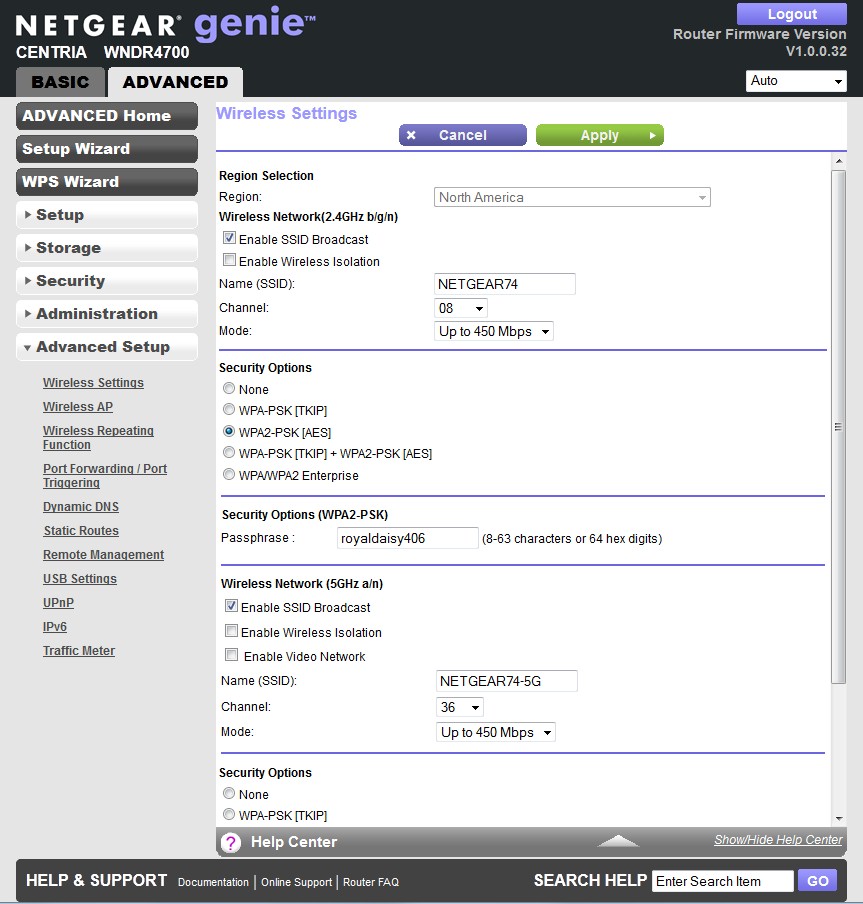
NETGEAR Centria Wireless Settings
I’ve highlighted the Enable 20/40 MHz Coexistence control, which is enabled by default, on the Advanced settings page shown below. As noted below, the router properly implements both Coexistence and Fat Channel Intolerant behavior. But by unchecking this box, the Centria will ignore both rules and stay in 40 MHz mode in 2.4 GHz if you set the Mode to Up to 450 Mbps.
The 802.11 spec and Wi-Fi Certification requires that both 20/40 MHz Coexistence and Fat Channel Intolerant mechanisms be implemented in 2.4 GHz. So if you uncheck this box, your router will be in violation of the spec.
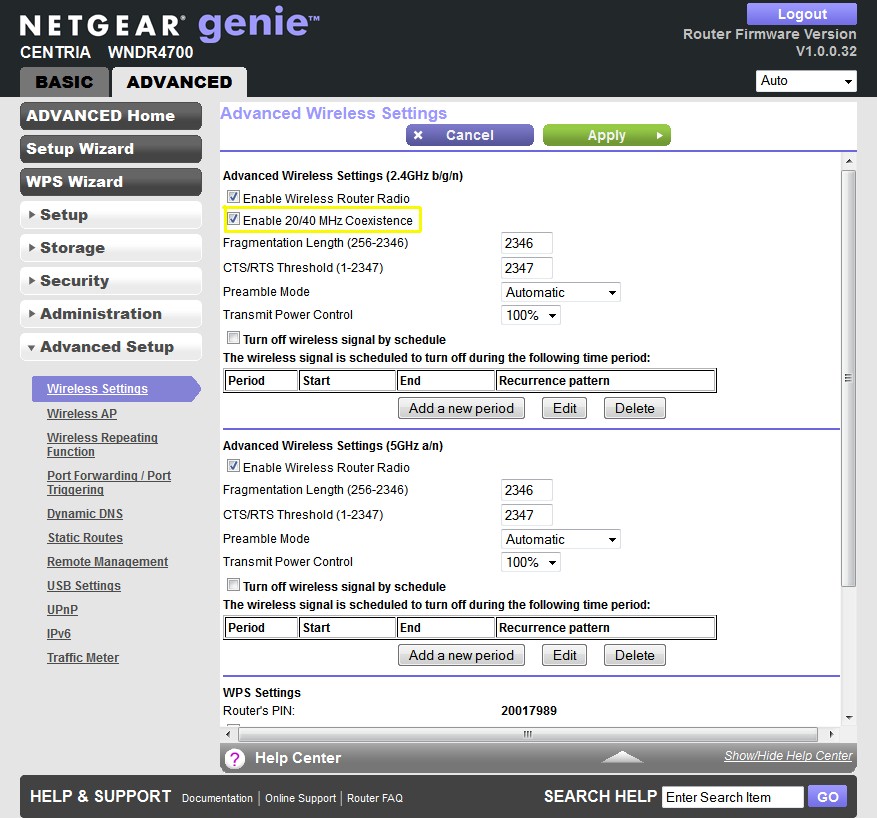
NETGEAR Centria Advanced Wireless Settings
Continuing on with wireless features, there is one guest network that can be enabled on each radio. The creenshot below shows that each network has its own wireless security and isolation controls. By default, guest network clients get only internet access. But by checking the Allow guest to access My Local Network box, you allow full access to your LAN’s wired and wireless clients.
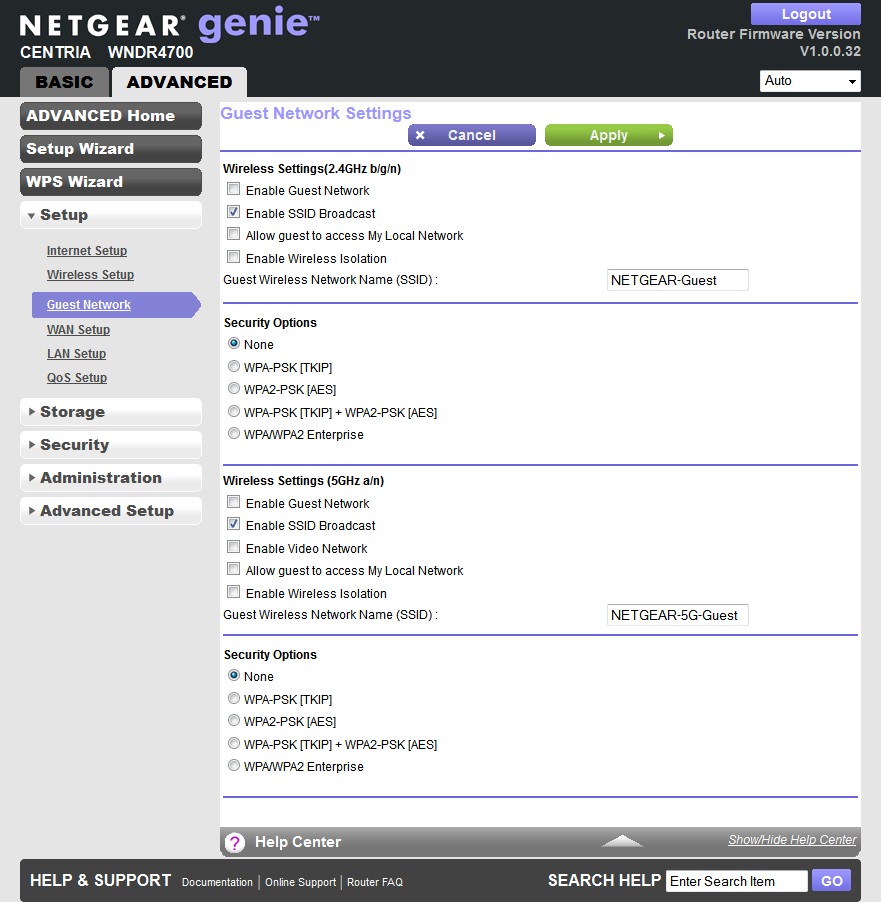
NETGEAR Centria Advanced Wireless Settings
Wireless Performance – Overview
Out of the box, the Centria defaults to NETGEAR’s version of 20 MHz mode ("Up to 195 Mbps") on the 2.4 GHz radio and Auto 20/40 ("Up to 450 Mbps") on 5 GHz. Both bands have Wi-Fi Protected Setup (WPS) enabled and prompted to enter the router’s PIN on first association of the Win 7 test notebook. After entering the PIN, a WPA2/AES connection was quickly set up and used for all further testing.
I ran 40 MHz Coexistence and Fat channel intolerant tests and found that the Centria properly refrained from switching into 40 MHz bandwidth mode for both tests. When I reassociated the notebook during both tests, the client showed only 20 MHz mode link rates.
I used our Intel Centrino Ultimate-N 6300 in a Lenovo X220i notebook running Win 7 Home Premium SP1 (64 bit) standard test client for all three stream testing. Our other standard test client, an Intel Centrino Advanced-N 6200 in a Acer Aspire 1810T notebook running Win 7 Home Premium SP1 (64 bit) was used for two-stream tests. V1.0.0.32 firmware was loaded in both routers for all testing.
As is our standard practice, all tests were run using WPA2/AES encrypted connections with Channel 1 used for 2.4 GHz tests and Channel 36 for 5 GHz, using our standard wireless router test suite.
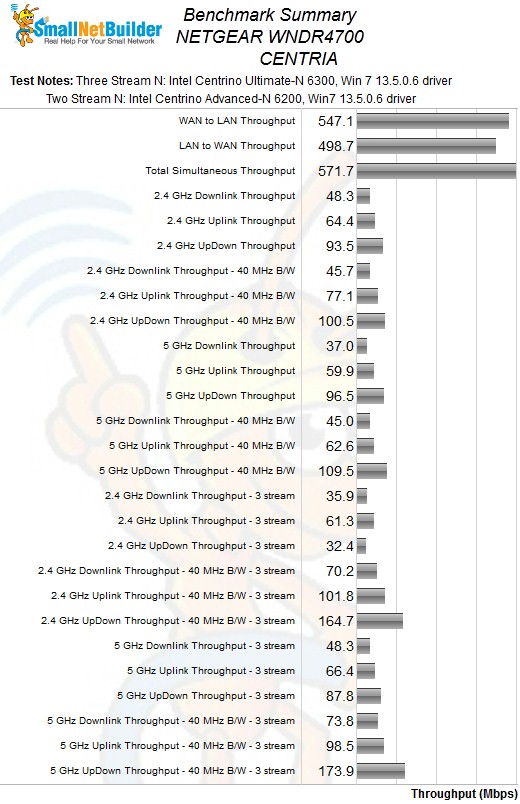
Each entry in the Benchmark Summary below shows the average of throughput measurements made in all test locations.
NETGEAR WNDR4700 Benchmark Summary
If you look closely at the table, you’ll see that, in general, the CENTRIA has higher throughput running uplink vs. downlink, with a difference of about 2X in many cases. The good news is that the CENTRIA turns in some of the highest throughput we’ve seen in a three-stream N router. But for wireless HD streaming, you want that throughput in the downlink direction and the CENTRIA provides just the opposite.
Table 2 summarizes the highest wireless throughput measured out of all locations in the 20 MHz mode test runs. In most cases, highest throughput was measured in Location A. Note that the Dn/Up result is for simultaneous up and downlink tests in Location A.
| Test Group | Max Dn (Mbps) | Max Up (Mbps) | Dn/Up (Mbps) |
|---|---|---|---|
| 2.4 GHz, 2 stream, 20 MHz | 63 | 94 | 93 |
| 2.4 GHz, 3 stream, 20 MHz | 47 | 82 | 32 |
| 5 GHz, 2 stream, 20 MHz | 65 | 92 | 97 |
| 5 GHz, 3 stream, 20 MHz | 66 | 83 | 88 |
Table 2: Highest Throughput, 20 MHz mode
The table shows that 20 MHz mode three-stream performance in both bands tends to go in the opposite direction of what you would want, i.e. lower. You’ll see the detail behind this in the sections that follow. But the overall pattern isn’t what you want.
Table 3 summarizes highest 40 MHz mode throughput. The two-to-three stream trend here is in the correct direction and even shows some significant (~40%) gains.
| Test Group | Max Dn (Mbps) | Max Up (Mbps) | Dn/Up (Mbps) |
|---|---|---|---|
| 2.4 GHz, 2 stream, 40 MHz | 68 | 133 | 100 |
| 2.4 GHz, 3 stream, 40 MHz | 96 | 157 | 165 |
| 5 GHz, 2 stream, 40 MHz | 65 | 126 | 110 |
| 5 GHz, 3 stream, 40 MHz | 88 | 169 | 174 |
Table 3: Highest Throughput, 40 MHz mode
This provides some hope for high 5 GHz downlink throughput, but not so much for 2.4 GHz. Even if you force the CENTRIA to blast away in 40 MHz mode when it shouldn’t, competition from busy neighboring networks won’t be kind to your throughput stability.
Wireless Performance – 2.4 GHz 2 Stream
For performance comparison, I chose three other "N900" routers: ASUS RT-N66U, Cisco/Linksys E4200v2/EA4500 and NETGEAR WNDR4500. Let’s start with the Performance Table for Two-stream 2.4 GHz.
As noted in the summary above, CENTRIA generally provides higher throughput running uplink vs. downlink. You’ll see this pattern in all the tests. You’ll also see it in the Performance Table linked above, where the CENTRIA wins the uplink comparisons handily in both 20 MHz and 40MHz modes.
Oddly, the CENTRIA’s downlink throughput doesn’t benefit from 40 MHz mode operation. It turned in virtually identical results in all locations except weakest-signal location F, where 40 MHz mode throughput was 4 Mbps vs. 18 Mbps in 20 MHz mode.
Highest throughput measured was 133 Mbps running uplink, 40 MHz mode in Location A. This was higher than the 100 Mbps simultaneous up/down test in the same mode.
The IxChariot plot summary below for 20 MHz mode downlink shows generally good throughput stability, but with some periods of link shifting evident in the Location D trace. As is our practice, I repeated the test a few times and got similar behavior each time.
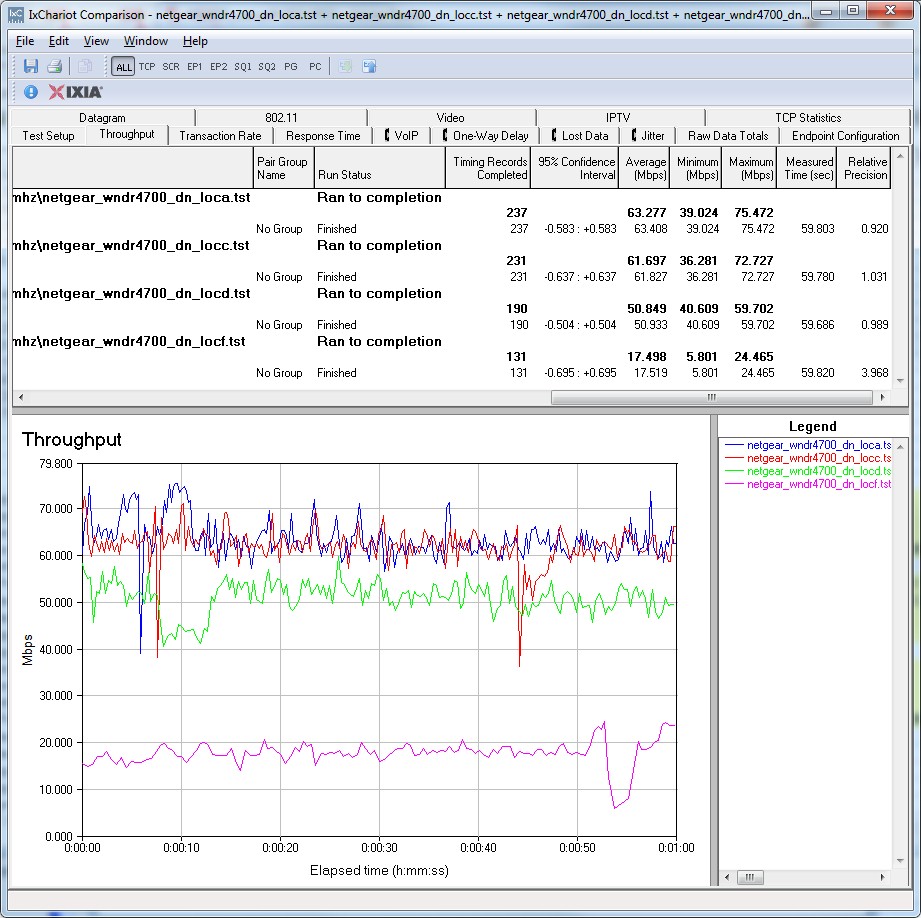
IxChariot plot summary – 2.4 GHz, 20 MHz mode, downlink, 2 stream
You will also see that it takes up to 10 seconds for the CENTRIA and test client to negotiate the highest link rate in some of the other plots linked below. Most notably in the 20 MHz uplink run.
- 2.4 GHz / 20 MHz uplink
- 2.4 GHz / 20 MHz up and downlink
- 2.4 GHz / 40 MHz downlink
- 2.4 GHz / 40 MHz uplink
- 2.4 GHz / 40 MHz up and downlink
Wireless Performance – 5 GHz 2 Stream
Next, we’ll look at the Performance Table for two-stream 5 GHz.
The CENTRIA didn’t perform as well as the ASUS RT-N66U in 20 MHz mode downlink, turning in a top throughput of only 65 Mbps vs. the ASUS’ 82 Mbps. The lower throughput pattern continued as signal levels dropped in Locations C and D. Uplink turned the tables, however, with the CENTRIA coming in at 93 Mbps vs. the ASUS’ 66 Mbps in Location A.
In 40 MHz mode, the CENTRIA has the lowest best case throughput in Location A of all four routers at 65 Mbps. But once again, uplink was an entirely different story with the WNDR4700’s best-case 127 Mbps throughput trouncing the other three products.
Highest throughput measured was that 127 Mbps running uplink, 40 MHz mode in Location A. This was again higher than the 110 Mbps simultaneous up/down test in the same mode.
The IxChariot plot summary below for 20 MHz mode downlink again shows steady throughput.
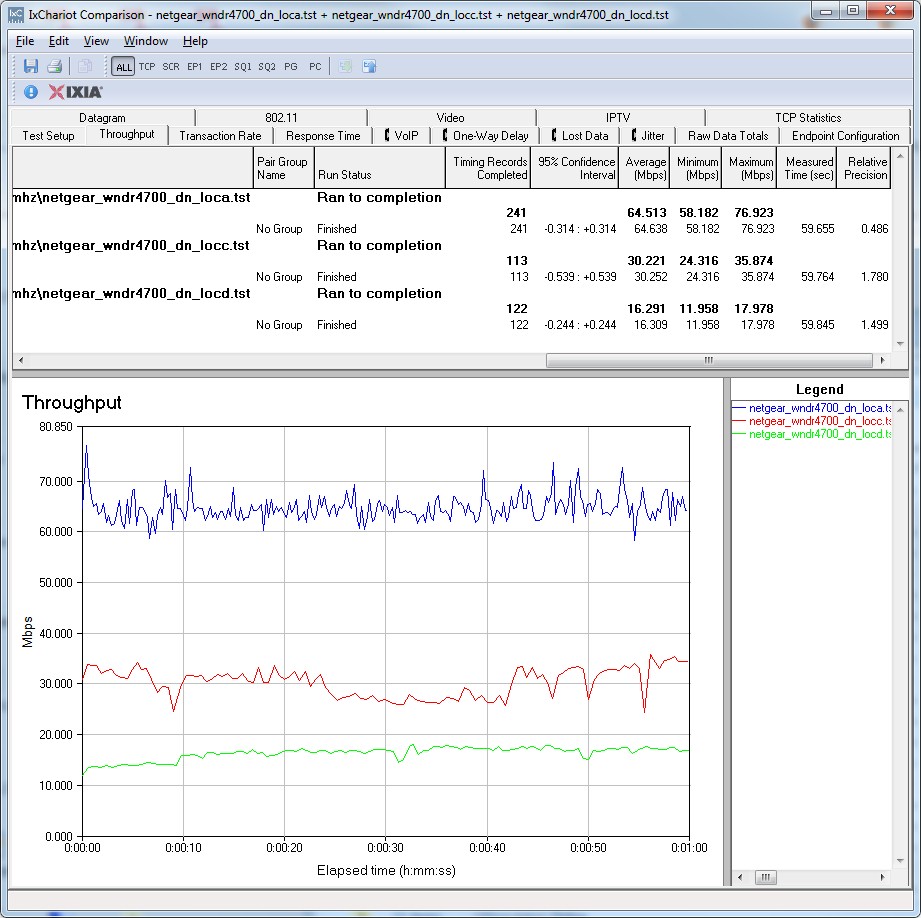
IxChariot plot summary – 5 GHz, 20 MHz mode, downlink, 2 stream
Throughput looks generally steady in the other plots linked below. But I once again found some instances where it took the router and client up to 10 seconds to move up to their highest throughput for the rest of the test run.
- 5 GHz / 20 MHz uplink
- 5 GHz / 20 MHz up and downlink
- 5 GHz / 40 MHz downlink
- 5 GHz / 40 MHz uplink
- 5 GHz / 40 MHz up and downlink
Wireless Performance – 2.4 GHz 3 Stream
Moving along, we come to the Performance Table for three-stream 2.4 GHz. In 20 MHz mode downlink, the WNDR4700 didn’t even look like a three-stream N router, with throughput peaking at 48 Mbps in location A. Uplink was much better, even beating the other three products in locations D and F with 64 Mbps and 18 Mbps, respectively.
Switching to 40 MHz mode really let the WNDR4700 shine. It was better than the ASUS in two out of four locations and tied in one running downlink and better than the second-best ASUS by a wide margin running uplink.
Highest throughput measured was that 157 Mbps running uplink, 40 MHz mode in Location A. The simultaneous up/down test in the same mode finally turned in the highest throughput at 165 Mbps.
The IxChariot plot summary below for 20 MHz mode shows the reason for the CENTRIA’s overall poor showing in that mode with large jumps in throughput and a roller-coaster-like quality.
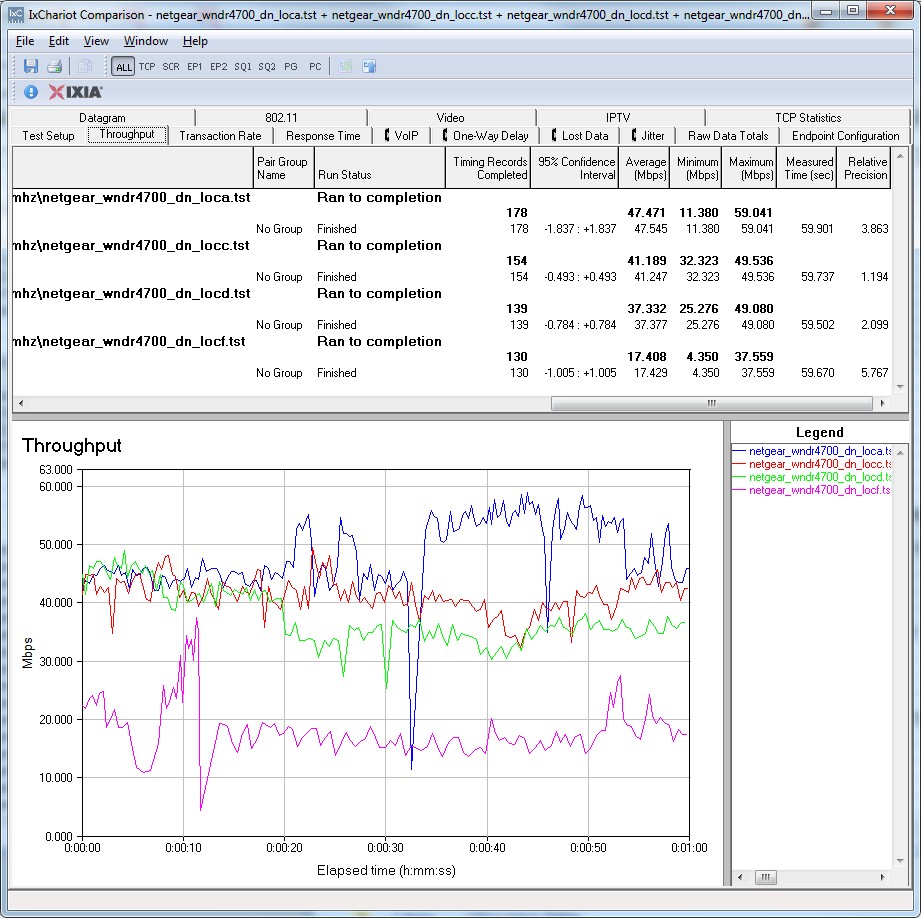
IxChariot plot summary – 2.4 GHz, 20 MHz mode, downlink, 3 stream
The 20 MHz up/downlink plot is particularly interesting. Something is definitely wrong between client and router in this mode.
- 2.4 GHz / 20 MHz uplink
- 2.4 GHz / 20 MHz up and downlink
- 2.4 GHz / 40 MHz downlink
- 2.4 GHz / 40 MHz uplink
- 2.4 GHz / 40 MHz up and downlink
Wireless Performance – 5 GHz 3 Stream
Finally, we’ll look at the Performance Table for three-stream 5 GHz. The CENTRIA once again looks much better in 40 MHz mode than in 20, beating or tying the next-best products in all but one case, both up and downlink. Not that it didn’t win any of the location comparisons in 20 MHz mode. But 5 GHz 20 MHz mode is probably the poorest overall mode for all the routers compared.
As you might expect, the case throughput for the CENTRIA was in 40 MHz mode, Location A running uplink, coming in at 170 Mbps. Simultaneous up/down throughput in that same mode was even a bit better at 174 Mbps.
The IxChariot plot summary below for 20 MHz mode downlink shows decent throughput stability.
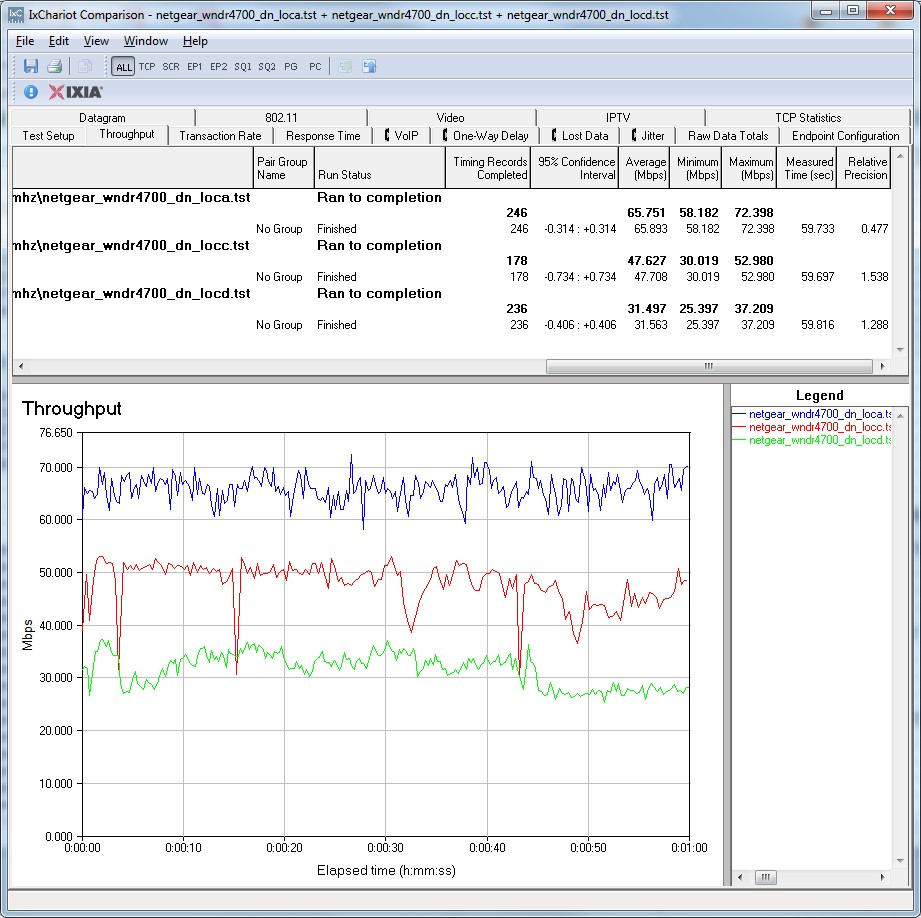
IxChariot plot summary – 5 GHz, 20 MHz mode, downlink, 3 stream
Variation looks like it is higher in some of the other plots. But that’s mainly because I didn’t adjust the test file size to compensate for the generally higher overall throughput in this mode.
- 5 GHz / 20 MHz uplink
- 5 GHz / 20 MHz up and downlink
- 5 GHz / 40 MHz downlink
- 5 GHz / 40 MHz uplink
- 5 GHz / 40 MHz up and downlink
Stress Testing
Since its storage features and performance are central to the WNDR4700’s value proposition, I decided to first look for interaction between routing and file transfer performance.
The test setup used our USB 3.0 drive formatted in NTFS attached to the router. I connected our standard NAS testbed computer to the CENTRIA and drag-and-dropped our standard ripped-DVD folder to and from the shared drive.
With the router otherwise idle, the Win 7 filecopy progress window reported around 30 MB/s writing to the CENTRIA’s drive and around 36 MB/s reading.
I then connected two other computers, one to a LAN port and one on the WAN side and ran unlimited rate uplink traffic between them using an IxChariot throughput script. The IxChariot plot below shows uplink throughput being affected while the filecopy is running, evidenced by the dips and variation in uplink throughput.
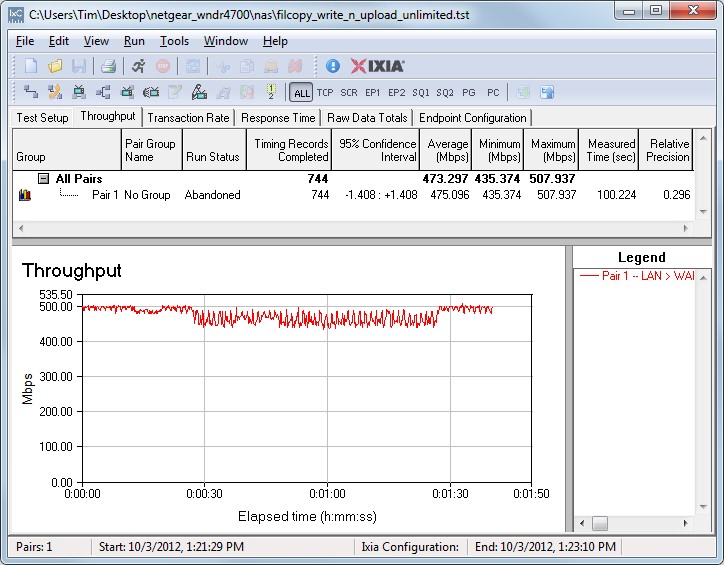
Stress test – Filecopy to USB drive and ulimited router uplink
While the uplink traffic was running, I checked the filecopy in progress and found that throughput dropped to around 3 MB/s from 30 MB/s for write and around 7 MB/s from 36 MB/s for read.
Since few of us have 500 Mbps internet connections and even fewer continuously load that connection, I also tried a more realistic test. I repeated the same tests, but limited uplink throughput to 5, 50 and 100 Mbps in multiple runs. In each case, the uplink throughput plot looked like the one below and the Windows filecopy progress window reported no change in throughput. So the takeaway from this test is that you won’t see any interaction between routing and storage performance in real world use.
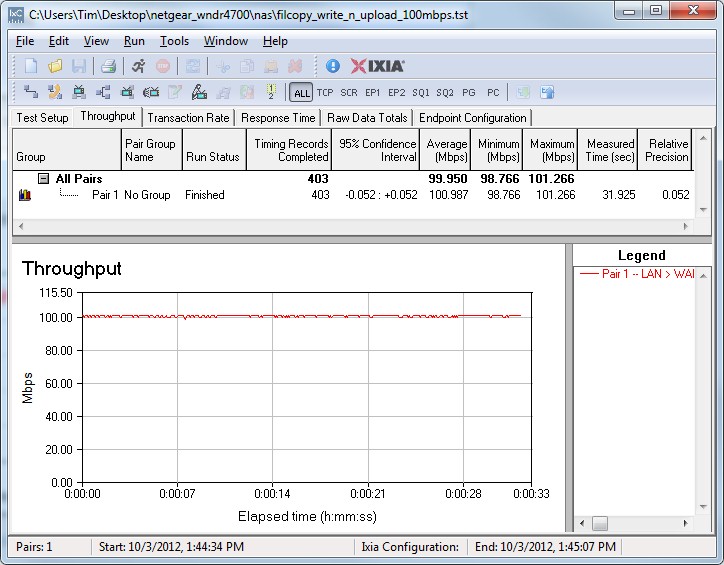
Stress test – Filecopy to USB drive and 100 Mbps router uplink traffic
I tried a similar test to look for interaction between wireless and storage performance. I ran steady uplink traffic from a three-stream N client in 40 MHz mode on the 5 GHz radio and then ran the filecopy test. Frankly, given the higher natural variation in wireless performance vs. wired routing performance, I couldn’t see any significant interaction between the two.
Finally, I checked for interaction between the router and two radios, with interesting results. The setup was two notebooks associated with the router, the three-stream N client on 5 GHz and a two-stream on 2.4. Both radios were set to 40 MHz bandwidth mode and running uplink for highest throughput. The routing portion of the test used the same test setup as used on the storage test above.
The plot below starts the 5 GHz stream first, then the 2.4 GHz stream, then the router. The initial change in 5 GHz traffic is previously-observed behavior, i.e. that it takes awhile for maximum link rate to kick in. When the 2.4 GHz traffic starts at the 30 second mark, it also starts out low and doesn’t cause 5 GHz throughput to suffer. But as the 2.4 GHz throughput picks up, 5 GHz throughput drops.
The next significant change occurs when 5 GHz traffic stops at around 45 seconds in. Routing throughput picks up significantly, but 2.4 GHz throughput remains unchanged. Finally, the 2.4 GHz traffic is holding back routing throughput, since normal LAN > WAN throughput is around 500 Mbps.
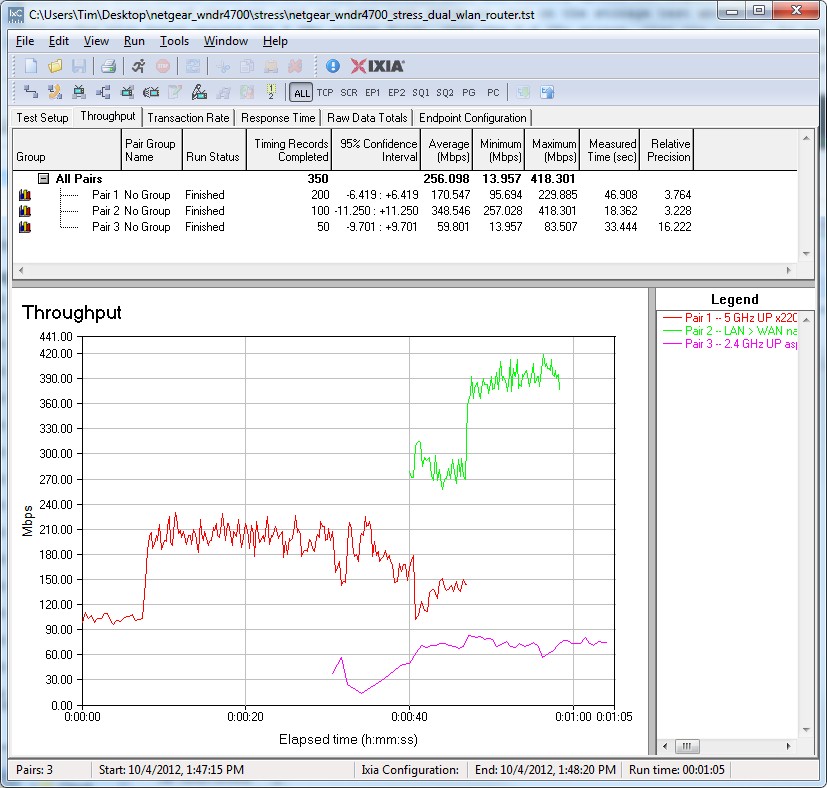
Stress test – simultaneous dual wireless and wired routing
I ran another test using different timings that more clearly shows the interaction between 5 and 2.4 GHz radios. In the plot below, 5 GHz throughput clearly drops when 2.4 GHz traffic starts 10 seconds in, then inversely mirrors 2.4 GHz throughput variation until its traffic stops. Note again that 2.4 GHz throughput is unaffected when routing traffic starts at the 30 second mark.
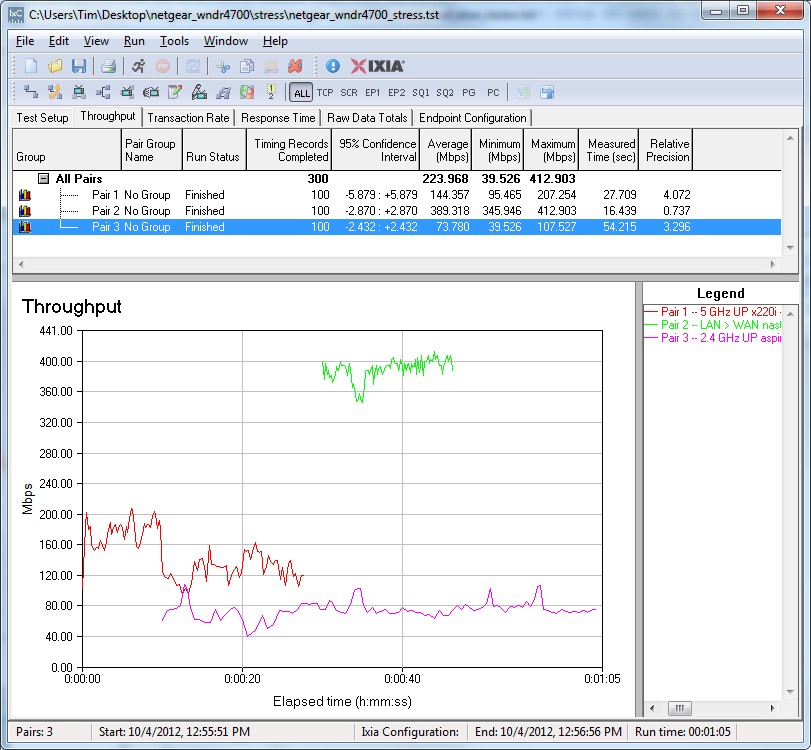
Stress test – simultaneous dual wireless and wired routing
The upshot of all of this is that, like all other high-end routers I’ve tested, the WNDR4700’s wired routing and wireless performance affect each other, as well as its storage performance to a lesser extent.
I’ll emphasize that most users will never see these effects, since the test traffic I use is constant and rate unlimited and far above the loads that a home or even small business user would impose on the product. Of all the effects, I think the interaction between the two radios would be of the most concern, since it seems to kick in regardless of wired routing load. But again, unless you are able to put 100 Mbps+ of constant wireless traffic on a radio, which would take multiple three-stream N clients hammering away at strong signal levels, there is little cause for real concern.
Closing Thoughts
For people looking for a wireless router with best-in-class storage performance, it looks like NETGEAR has come up with one with the CENTRIA. Whether you use the internal drive or attached USB 3.0, as long as you format the drive NTFS, you’ll get 30 MB/s writes and 60 MB/s reads—better than some entry-level single-drive standalone NASes can provide.
Unfortunately, the CENTRIA’s best wireless performance is obtained running uplink rather than down, which will do little to help those looking for a better alternative for wireless HD streaming.