

Introduction
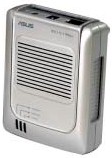
| ASUS Pocket Wireless Access Point | |
|---|---|
| Summary | Teeny 802.11b access point based on Marvell chipset. Supports WDS-based repeating and can be used as client adapter. |
| Update | 1/19/2005 – ASUS says it was in error. Neither WPA nor WPA-PSK is now or will be supported. They are concentrating efforts on 802.11g products. 9/23/2004 – V2.04 firmware adds WPA support 2/24/2004 – USB cable is now included |
| Pros | • Extremely small and portable • Good performance • Can run as an AP or Ethernet client adapter • WDS-based bridging / repeating |
| Cons | • Very limited monitoring features • Can’t attach higher-gain antennas |
Though you might think there’s no interest or innovation left in the 802.11b market, ASUS seems out to prove otherwise. Its WL-330 Pocket Wireless Access Point may not win points for exciting styling, but it’s packed with features that should prove very useful to wireless LAN builders.
Basic Features
The WL-330 is a dual-function product. In one mode, it’s an 802.11b access point that supports WDS-based wireless bridging and repeating. But when you flip a switch it functions as an 802.11b to Ethernet adapter that supports both AdHoc and Infrastructure operation. It doesn’t however, support routing, so can’t be used to wirelessly share an Internet connection all by itself (hey, what do you want for $69?).
I thought Buffalo Technology’s WLA2-G54 [reviewed here] was the smallest-available AP I’d seen (and it is the smallest 802.11g AP), but the 330 moves the bar a little lower. This is one of those products that you have to hold in your own hand to appreciate how small it really is, but Figure 1 is intended to give you some basis for comparison.
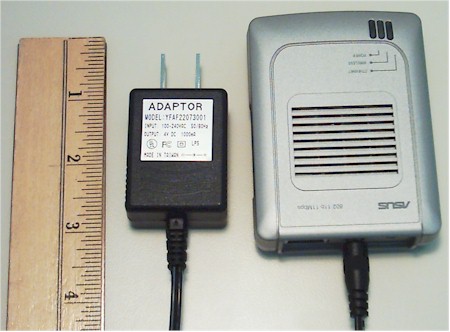
Figure 1: The AP with appropriately tiny power supply.
For some reason, the WL330’s case reminds me of an electric shaver, but it’s thoughfully designed. It has ventilation slots on the top – which is good because it gets fairly warm in operation – along with Power and Wireless and Ethernet link / activity LEDs which are bright enough to be seen at a distance.
The AP / Adaptor switch, ventilation holes, a keyhole slot for wall mounting and four rubber feet are on the bottom. The power and 10/100 Ethernet jack are on one end, along with a button that provides Reset-to-factory-defaults in AP mode and AP scanning in Adaptor mode. Note that the Ethernet connector is auto MDI / MDI-X, which means that it will connect up to whatever you plug it into using either a normal or crossover Ethernet UTP cable.
By the way, ASUS provides a nice little carry case for the 330, its power supply and other assorted odds and ends, which I thought was a nice touch!
Construction Details
I included the 330’s appropriately tiny power adapter in the Figure 1 photo and want to thank ASUS for putting some thought into its choice. It’s small enough – though a tight squeeze – to take up only one slot in an outlet strip when flanked by typical grounding plugs. I’m sure it cost ASUS a little more than a larger adapter would, but the result it worth it. Hey, PDA manufacturers! If adapters this small are available, why are you still shipping those big, heavy wall-warts with your “mobile” devices?!
Moving on, Figures 2 and 3 show the construction details of the 330.
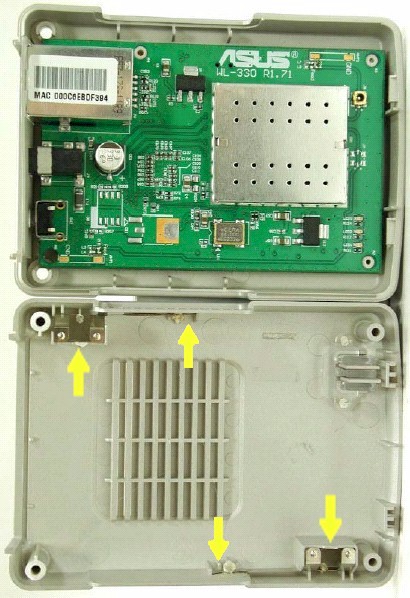
Figure 2: The innards (with antenna detail)
It uses Marvell’s Libertas 802.11b Access Point Solution made up of the ARM9-based 88W8500 processor and CMOS 88W8000 transceiver. The product spec sheet says the chipset has slightly over 100mW of transmit power and “2X” receiver sensitivity. Also of note is support for hardware AES encryption / decryption, 802.1x authentication and “Marvell proprietary 22 Mbps high data rate mode” – none of which are available to the user in the WL330, however.
The yellow arrows in Figure 2 point out the diversity antennas, which are made from flat metal and are nestled into slots in the top cover’s sides.
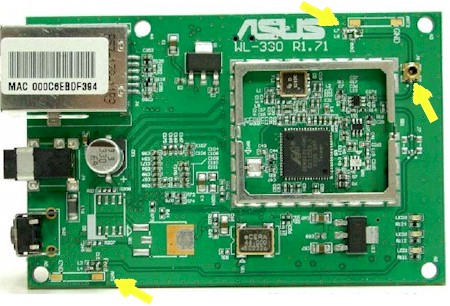
Figure 3: Other side of board
The arrows in Figure 3 show the antenna contact points on the board and the single teeny-tiny antenna jack that’s available for the adventurous who may want to hack on a higher-gain antenna (while voiding your warranty, of course!).
Setup and Administration
Configuration of the 330 is straightforward and can be done without the aid of the Windows-based Discovery and Setup Wizard applications that ASUS includes. The trickiest part of the setup will be setting a computer to an IP address compatible with the 330’s 192.168.1.1 default address. Unlike other utilities I’ve used, neither of the ASUS programs can change the 330’s IP address, which makes them of limited use in my opinion.
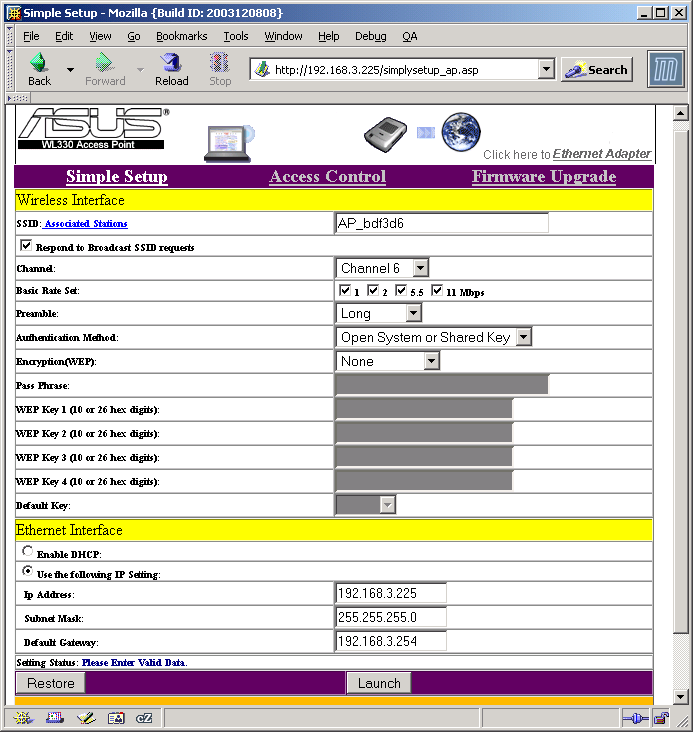
Figure 4: AP Setup screen
(click on the image for a full-sized view)
What you see in Figure 4 is pretty much what you get in the way of configuration options, except for the Wireless Distribution System (WDS) bridging options shown later in Figure 5. I don’t know why ASUS chose such a small default font for the interface, but thankfully it can be enlarged using your browser’s Text Size control.
Another negative is that the changes you make on each page must be saved with the Launch (?) button that invokes an over 20 second reboot cycle. I was also disappointed to find only one monitoring feature, which lists only the MAC address of associated clients.
ASUS’ User Manual says the Basic Rate Set setting controls the Transmit rate and Basic Rate set that the 330 sends out, but my tests showed it controlled neither. Though 64 and 128 bit WEP is supported, unfortunately the more secure Wi-Fi Protected Access (WPA) isn’t.
When enabled, the Access Control feature denies access to all clients except for the ones you enter into its MAC address list. But it doesn’t show a pick list of associated clients or allow Import / Export of a pre-made list.
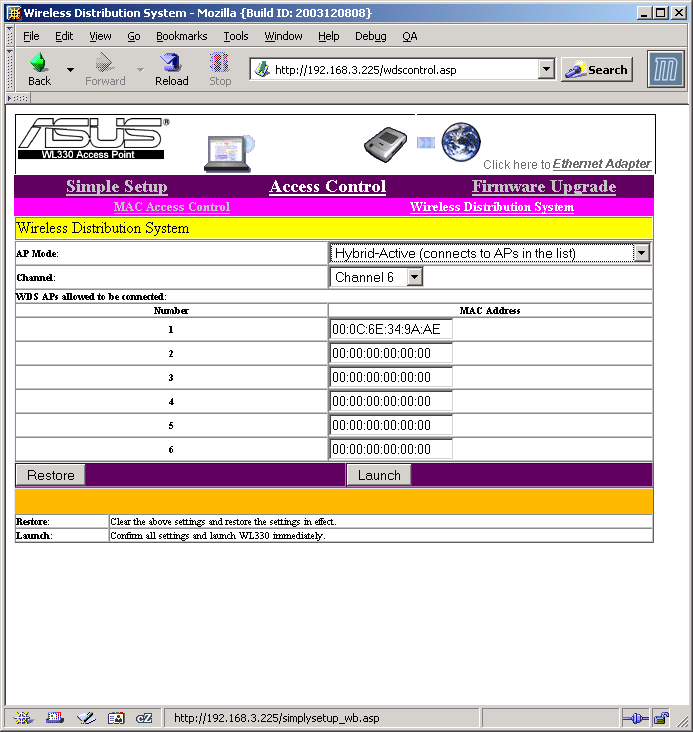
Figure 5: WDS setup
(click on the image for a full-sized view)
The WDS features have a few important subtleties. First, the 330 supports what ASUS calls “Hybrid” mode, which is illustrated by Figure 6 – an animated graphic I grabbed from ASUS’ WL-300g’s admin page.
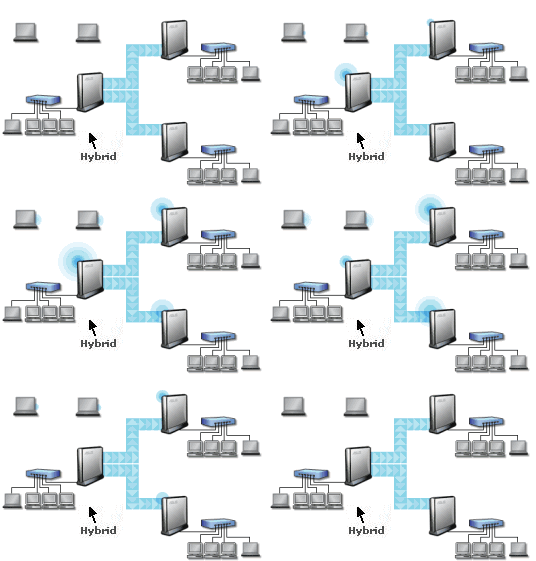
Figure 6: WDS “Hybrid” (repeating) mode
(graphic courtesy of ASUS)
In ASUS’ terminology, “Hybrid” means that the AP can both wirelessly bridge traffic between LANs while at the same time supporting connection to associated wireless clients.
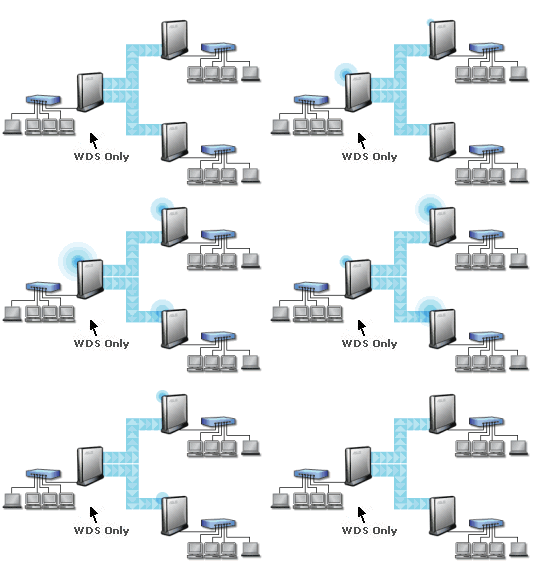
Figure 7: WDS-only (bridging) mode
(graphic courtesy of ASUS)
Figure 7 – also grabbed from ASUS’ WL-300g’s admin page – shows the bridging-only mode that the WL330 does not support. This distinction will probably not matter to most users – after all, we’re not talking about an “enterprise-grade” bridge here – but this difference does require further security precautions to be taken. Two “Hybrid” modes are actually supported: Active, which requires entering the MAC addresses of devices that are allowed to bridge; and Passive, which allows any WDS device to connect.
I tried out the bridging using an ASUS WL-300g 11g Access Point and after some experimentation, got things up and running. I had to set the WL-300g to also use Hybrid mode, both devices to the same channel and entered the WL-330’s MAC address into the 300g’s Remote Bridge List.
Client Mode
If you don’t need an Access Point, the 330 can also act as an 802.11b-to-Ethernet converter, supporting both AdHoc and Infrastructure modes. The 330’s default settings should allow you to get connected to any in-range AP or wireless router that’s not running WEP-encrypted, simply by powering off, moving the 330’s mode switch from AP to Adaptor, then powering up.
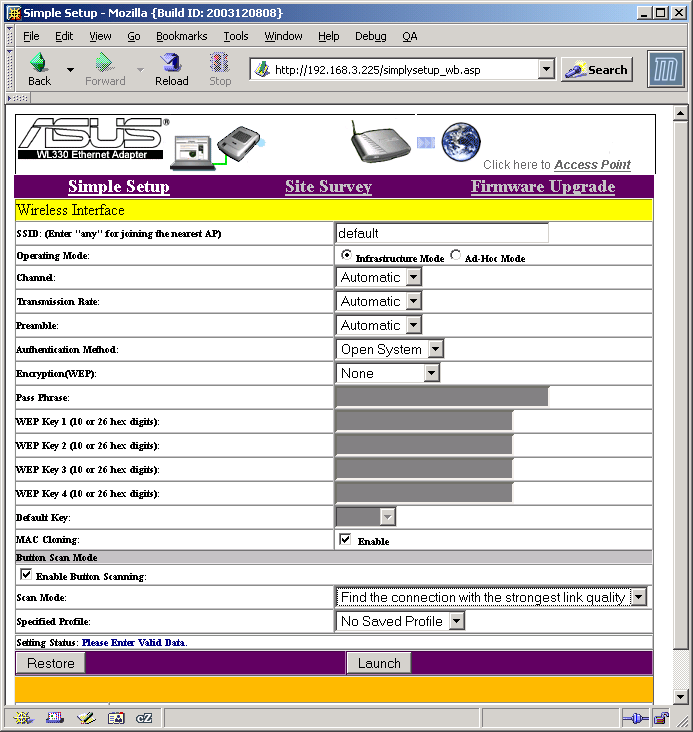
Figure 8: Adapter mode setup
(click on the image for a full-sized view)
If you’d rather (or must) control the setup of the 330 in Adaptor mode, it also has a web-based admin interface. Figure 8 shows that you have a full set of configuration options to chose from. (Note that the Scan Mode and Specified Profile selectors in the Button Scan Mode section provide only the options shown.)
The default settings worked fine to join the WL-300g Access Point that I had set up, with the 330’s Wireless LED lighting up within a minute of being powered up with its mode switch set to Adaptor. It was nice to not have to experiment with switch settings or normal / crossover cables thanks to the 330’s auto MDI / MDI-X feature of the Ethernet port!
Updated 2/24/2004
NOTE: The 330’s manual refers to a USB cable that’s supposed to let you power the 330 from a USB port. After not finding one in my 330’s box, I checked with the folks at ASUS, who confirmed that the cable was not included with some early WL-330’s but now is. If your WL-330 comes without the cable, call ASUS’ service department at (510) 739-3777 option 3 to request it.
Wireless Performance
– All tests were run with WEP disabled
– All tests were run with the WL-100g CardBus client card’s antenna in the raised position
– All tests were run with the AP placed on raised table top in horizontal position unless otherwise noted
Given the 330’s diminutive internal antennas , I expected not-so-great throughput vs. range. But Figure 9 shows that size doesn’t necessarily matter!
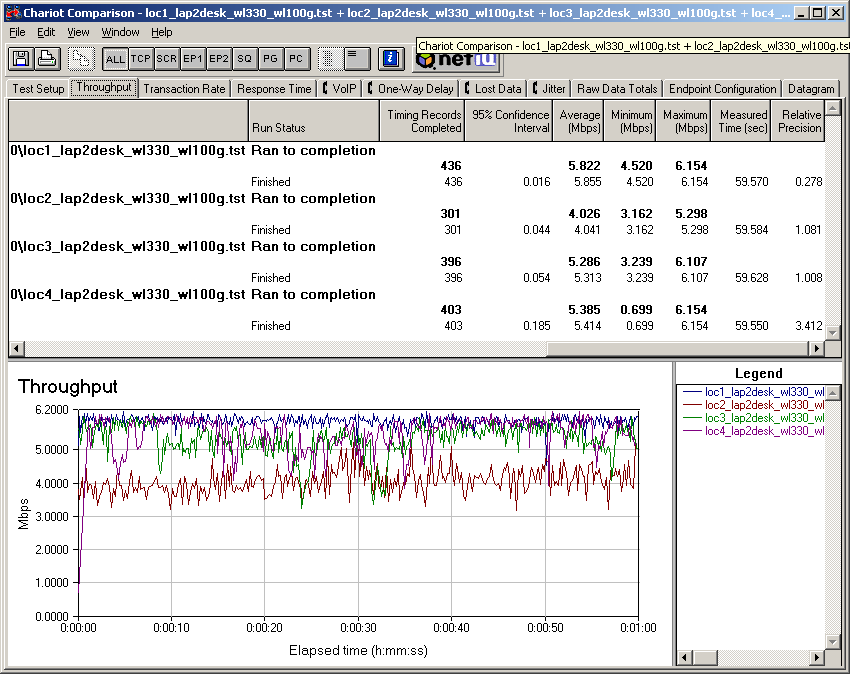
Figure 9: Four location throughput
(click on the image for a full-sized view)
The relatively high 100mW transmit power and higher sensitivity of the Marvell chipset apparently help make up for the small antennas because these results are better than I’ve seen with some older-generation products with external “rubber duckie” type antennas. I also checked Location 1 performance with 128 bit WEP enabled and saw no appreciable throughput slowdown.
I was somewhat puzzled by the good Location 3 results, because this location one floor below the access point usually shows more of a throughput reduction. I suspected this was due to the horizontal antenna orientation, which directed more signal than normal down into the lower level of my home.
So I ran a second test with the WL330 propped up into a vertical orientation. If my suspicion were true, I’d expect to see poorer results, since the vertical antenna radiation pattern would direct less energy below it.
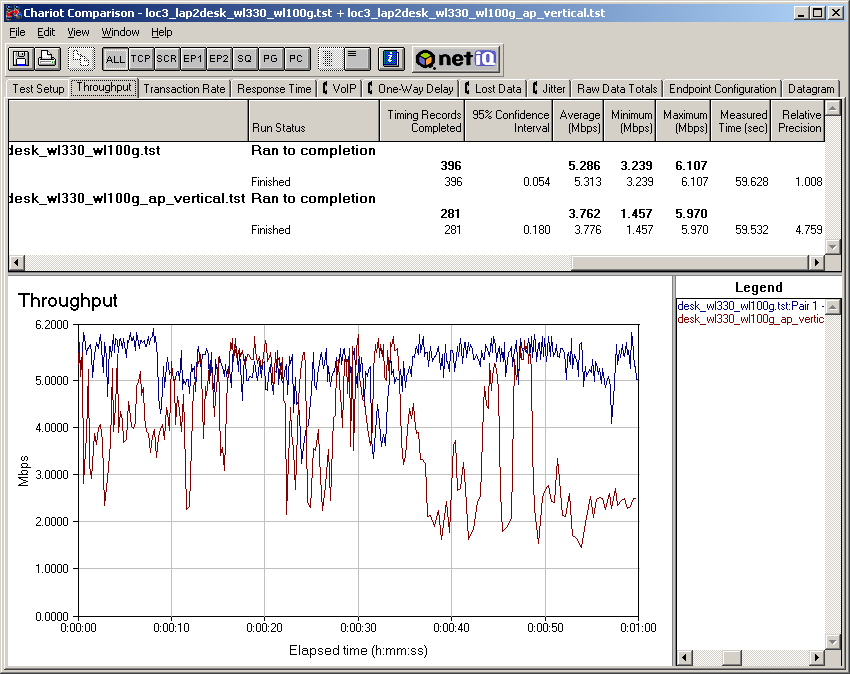
Figure 10: Location 3 comparison with antenna orientation change
(click on the image for a full-sized view)
Figure 10 shows that my theory was correct, with the run done with the propped-up WL330 turning in lower average throughput and higher throughput variation. The lesson here is that you need to position the WL330 to match your desired coverage area. For most folks this may mean a vertical orientation, so the wall-mounting screw slot on the back of the 330 may come in handy!
802.11b Wireless Performance Test Results
| Test Conditions
– WEP encryption: DISABLED |
Firmware/Driver Versions
AP f/w: |
||||
|---|---|---|---|---|---|
| Test Description | Signal Strength (%) | Transfer Rate (Mbps) | Response Time (msec) | UDP stream | |
| Throughput (kbps) | Lost data (%) | ||||
| Client to AP – Condition 1 | 100 | 5.9 [No WEP] 5.8 [w/ WEP] |
1 (avg) 4 (max) |
500 | 0 |
| Client to AP – Condition 2 | 74 | 4 | 1 (avg) 3 (max) |
500 | 0 |
| Client to AP – Condition 3 | 62 | 5.3 | 1 (avg) 2 (max) |
500 | 0 |
| Client to AP – Condition 4 | 50 | 5.4 | 1 (avg) 4 (max) |
500 | 0 |
See details of how we test.
Wrap up
The WL-330 packs a lot into a very small package. Its performance is comparable to that of full-sized 11b access points and has a feature set that can go also toe-to-toe with the big boys’.
I would have liked to see it (and every other wireless product introduced from now on) support WPA. A few other monitoring features would also be helpful, especially when setting up bridged connections.
Its inability to attach to higher-gain antennas will probably keep it out of outdoor bridging applications, but its size and packaging make it perfect for fleshing out the dead spots in home and office WLANs.
The WL-330 may not have the sex appeal of 100+Mbps 802.11g gear, but it’s perfectly equipped to solve the problems that most WLANs really have.