

Introduction
| At a Glance | |
|---|---|
| Product | Belkin Cable-Free USB Hub (F5U301) |
| Summary | Wireless USB extender using UltraWideband technology |
| Pros | • Easy installation |
| Cons | • Expensive • Dog slow |
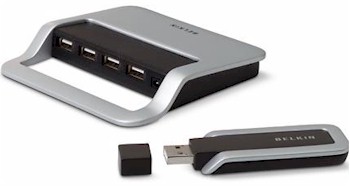
When Belkin’s Cable-Free USB Hub was announced at last year’s (2006) Consumer Electronics show, I was pretty hot to get my hands on it. After all, it was the first consumer product to use UltraWideBand technology. But Freescale, whose chipset that the product was originally based on, thought better about going up against the Intel-backed Wireless USB juggernaut and quietly exited the market a few months later.
This left Belkin scrambling to find another UWB chipmaker, which it found in Wisair. So after a complete redesign, the product reappeared at this year’s (2007) CES and was finally released for sale and review. My review copy actually arrived over a month ago, but my excitement had already been cooled by Craig Ellison’s PC Mag review that found it to be yet another example of an "all hat (advertised throughput), no cattle" (actual throughput) product. But since it has been patiently waiting review, I might as well have at it.
Please note that Belkin has already announced this product’s replacement, which is a version that will be compatible with other Wireless USB devices.
The product can be thought of as a wireless USB extender that uses UWB technology instead of something less exotic like 802.11b/g or Bluetooth. You get a USB adapter ("dongle") that plugs into a computer running WinXP SP2 (only) and a four-port hub (that is powered by a supplied wall-wart) that you plug your USB devices into.
Belkin says that the hub supports "USB printers, cameras, scanners, and other devices", but a note in the User Manual warns that "audio devices ("USB Audio" class) and some webcams ("USB Video" class), which have isochronous end points are not supported".
The photos of the hub board in Figures 1 and 2 show the Wisair 531 / 502 UWB chipset and Star STR9104 ARM922-compatible RISC CPU.
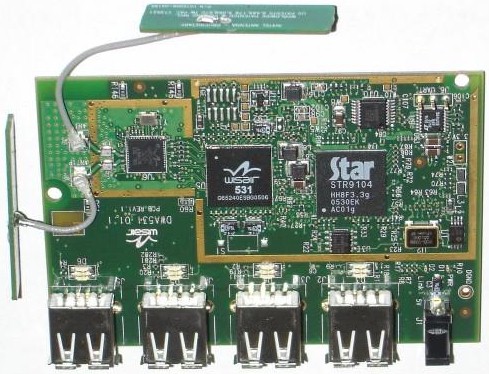
Figure 1: Hub board top
The bottom view of the board shows RAM, flash and what appears to be an AMCC programmable logic chip.
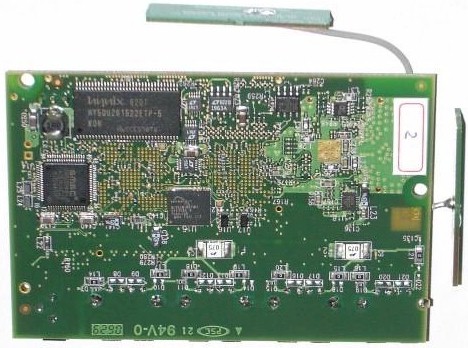
Figure 2: Hub board bottom
The companion USB dongle shown in Figure 3 also uses the Wisair 531 / 502 chipset and a USB controller that I can’t determine the manufacturer of from the fuzzy photo.
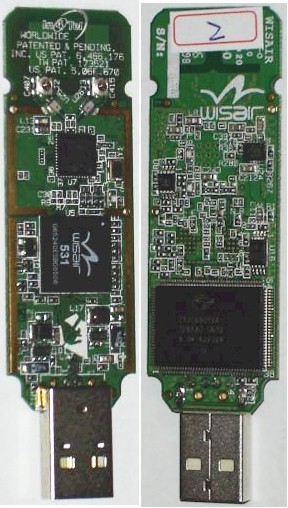
Figure 3: Dongle top and bottom
In Use and UWB USB Performance Primer
Setting up the product was uneventful. I just loaded the CD onto my notebook, installed the drivers and plugged in the dongle. The Cable Free Hub client application appeared in the System tray, showing a yellow icon (dongle enabled, but no connection). But once I plugged the power wall-wart into the hub and entered the "Product ID" from a label on the hub bottom into the client app, the icon turned green and I was connected up and ready to go.
Note: There are two labels on the bottom of the hub, each with numbers that could be the "Product ID". The Product ID is actually listed as the "ID Number:" on the serial # label above a bar code. The format of the number reveals its real identity, the hub MAC address.
Figure 4 shows the client application screen, with a connection up and running. The Product ID was entered in the area that has the Un-Register button in the screenshot.
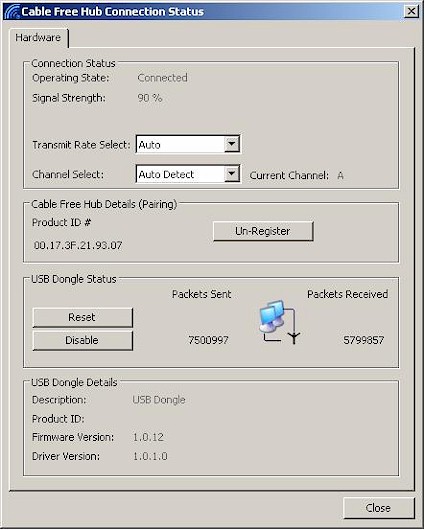
Figure 4: Cable Free Client Application
Before I present my performance test results, let me equip you with some information you’ll need to be an informed consumer of UWB/USB products. Belkin provided the handy diagram in Figure 5 in its reviewer’s guide, which while instructive, still bears some translation.
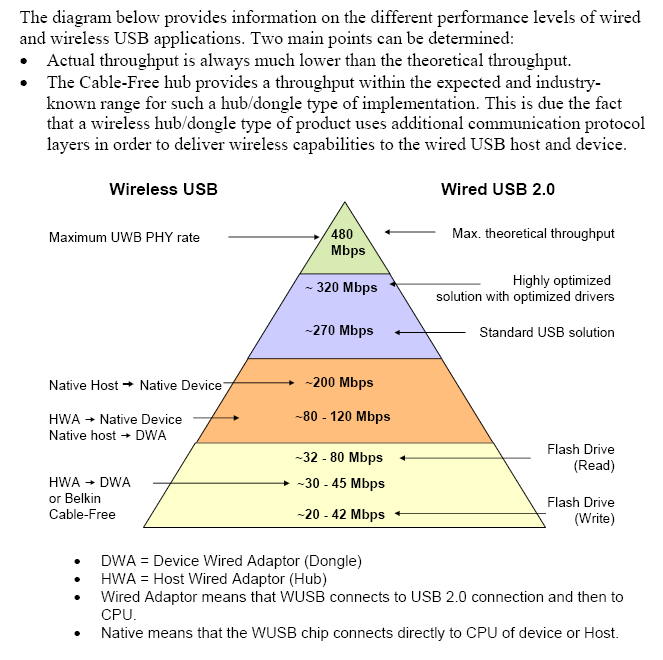
Figure 5: The Pyramid of wireless USB throughput truth
What the diagram is trying to say is that no real UWB/USB device will ever reach the pinnacle of the advertised 480 Mbps PHY rate. The best that a "highly optimized" solution could reach would be ~320 Mbps, with a more realistic expectation being the ~270 Mbps of a "standard (wired) USB solution. This isn’t really a shocker since we all know by now that the number on the product box is usually a lie.
The Belkin product falls into the bottom "HWA > DWA" area of the pyramid that represents a connection that has the UWB radio connecting to the CPU via a USB 2.0 connection on each end of the connection. You can see that the additional interface slows things down considerably to a 30 – 45 Mbps range—over a factor of 10 reduction from the advertised number. Note that this will be the performance range of any of the UWB/USB "hub+dongle" products that are expected out over the next year—Wireless USB flavor included.
The next step up in performance to the 80-120 Mbps range will be products having "Native" host and/or device interfaces. An example of a "Native" device could be a Wireless USB printer—if it doesn’t actually hide a "Wired" (additional USB 2.0) intermediate interface inside. So you’ll have to be on your toes and pay attention to the specification details that manufacturers will hopefully provide when Wireless USB devices start appearing.
Even when those devices do hit the stores, you won’t get the best possible (~200 Mbps) throughput until computers with "Native" Wireless USB host adaptors start appearing. If what I heard at CES is true, you shouldn’t expect to see those until 2008 at the earliest.
Performance and Closing Thoughts
Since I didn’t have computers at both ends of the connection, I couldn’t use my favorite throughput test tool, IxChariot. But since I used a USB Flash and USB Hard drive to check out the Cable Free, I instead could use my filesystem peformance tool, iozone.
I started by plugging a 256 MB Kingston flash drive into one of my notebooks, a Fujitsu Lifebook S2020, with AMD Athlon XP-M (LV) 2100+ 1.6GHz processor and 496 MB RAM, running Win XP SP2.
Figure 6 shows the results of three test runs: with the drive plugged into the notebook USB port; with the drive plugged into the Cable Free Hub sitting one foot away from the dongle; and with the drive in the Hub and a four foot distance between it and the dongle. As recommended by Belkin, I had the dongle connected via cable, sitting vertically in the included stand and aimed directly at the Hub.
The results show an 80% throughput reduction going from direct to 1 foot wireless connection, and an additional 30% reduction when the dongle – Hub distance was increased by only three feet! So without even having the hub and dongle separated by a more realistic across-the-room distance, throughput was already sitting at around 1 Mbyte/sec.
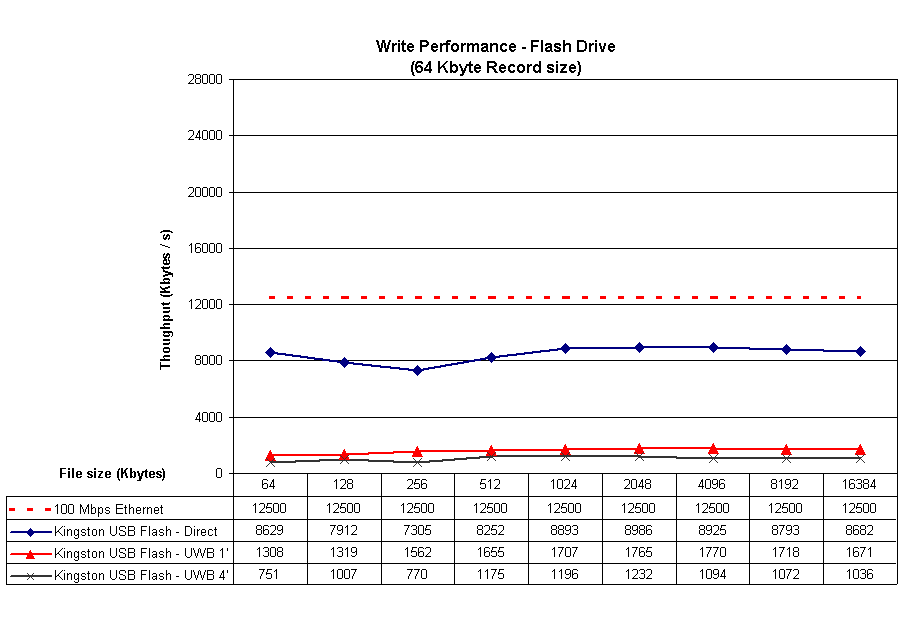
Figure 6: Write Throughput Comparison – Flash Drive
The read results in Figure 7 look startlingly good, until you realize that you are seeing cached behavior. Since my notebook has about 512 MB of RAM, the small file sizes used in this test come nowhere near busting the cache.
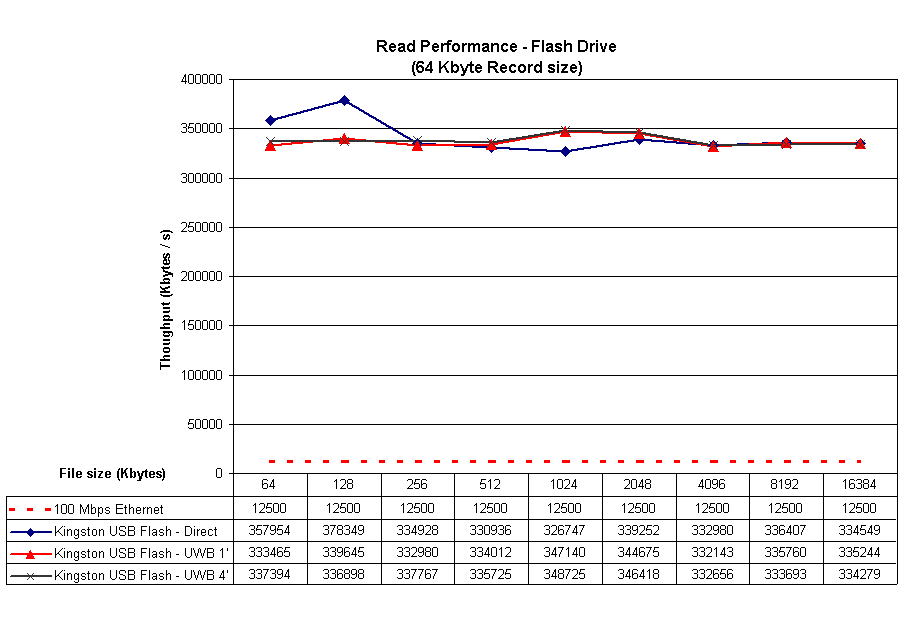
Figure 7: Read Throughput Comparison – Flash Drive
Since I didn’t have a flash drive larger than 256 MB available, I switched over to a generic USB hard drive I had lying around. Figure 8 shows significantly faster USB write performance, with Cable Free speeds again dropping down near 1 Mbyte/sec. Note the larger file sizes used for this test (you’ll see why shortly).
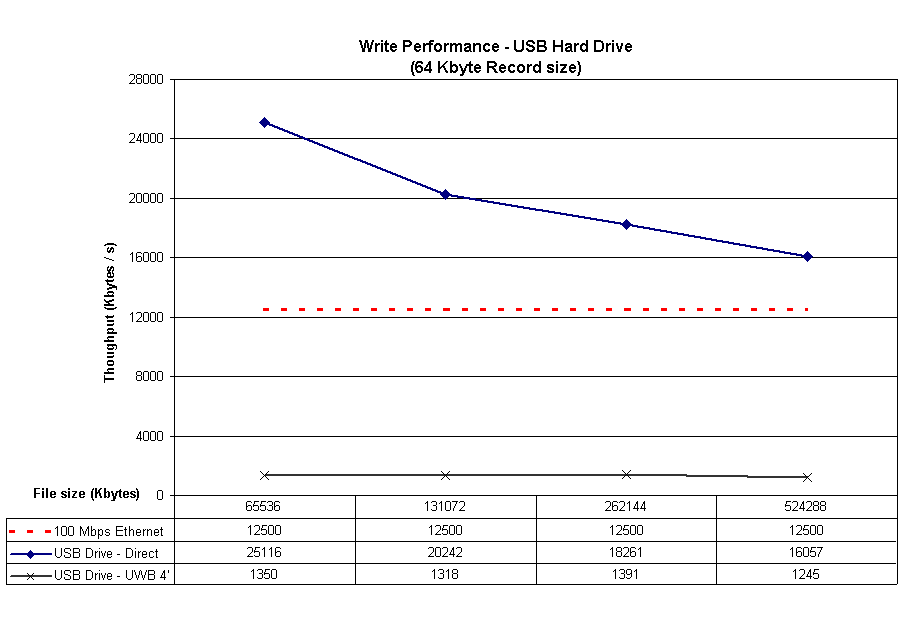
Figure 8: Write Throughput Comparison – USB Hard Drive
Figure 9 shows read performance with the USB Hard drive, which again shows cached behavior for the 64 and 128 MB tests. But the 256 and 512 MB show that the cache was finally exceeded, with uncached throughput finally shown to be around 1.5 MByte/sec for the Cable Free reads.
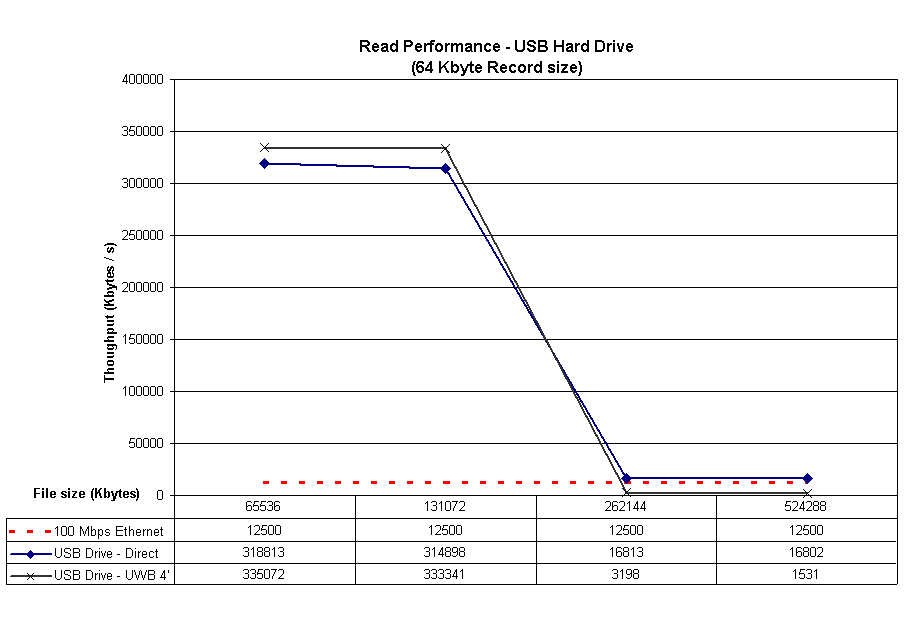
Figure 9: Read Throughput Comparison – USB Hard Drive
So no matter how close you can get the dongle and hub, you’re going to be waiting significantly longer to transfer files using them!
New technology is supposed to provide some real benefit and not just introduce a new set of acronyms to befuddle consumers. And someday UltraWideband will provide those benefits in the form of eliminating cables between A/V components and displays, cameras and computers and other devices that need to move lots of data but could do without the need to futz with mating up tinier and tinier connectors. But not today.
So with Belkin’s Cable Free USB Hub and dongle, wireless USB has finally become real. But the forms of it that you’re going to see anytime soon are really only suited to be added to the history of technology museum that you have growing in that back closet. It’s interesting technology, but not something I’d spend my money on at this point.