

Introduction
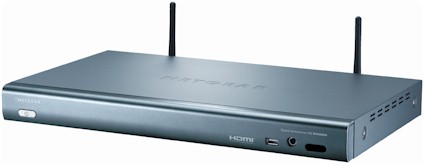
| At a Glance | |
|---|---|
| Product | NETGEAR Digital Entertainer HD (EVA8000) |
| Summary | Powerful Network Multimedia Player supporting many formats, Internet video and photos and iTunes DRM playback |
| Pros | • Supports playback of many video formats • Supports playback of YouTube and Flickr content • HDMI port (1080i) |
| Cons | • Still has a number of bugs • User Interface needs work • GIF files not supported • YouTube, Flickr and iTunes features require Windows |
Over the last couple of years, I’ve tried out a number of networked multimedia devices. These gadgets are designed to act as a bridge between your entertainment center and your digital photos, movies, and music stored on a computer. Typically the way they work is that specialized software on a PC feeds content across your network to the device for playback on your TV or stereo. After trying out a number of different devices, I settled down with NETGEAR’s High-definition capable EVA700 for general-purpose use, mostly due to its support for wide variety of video formats.
But now NETGEAR has come out with a successor to the EVA700. The EVA8000 builds on the functionality of the EVA700 by supporting TV tuner cards in an associated PC and adding an 1080p-capable HDMI port, playback of content from some popular Internet sites such as YouTube and support for even more video formats. And to top it off, NETGEAR had added the capability to play DRM-restricted music purchased from the iTunes store. In this review, I’ll put the box through its paces, checking out its feature set to see just how well all this new functionality works.
Setup
Figure 1, from the manual, shows the back of the box. You can see both analog and digital connectors, an Ethernet port, and antennas for wireless use.
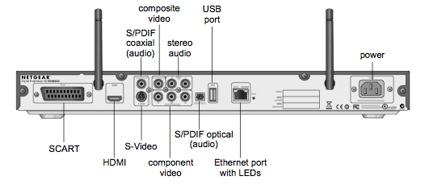
Figure 1: EVA8000 Back Panel
Also note the presence of a USB 2.0 port on the rear. One of my complaints about the EVA700 was that the only USB port was on the front panel—meaning that if you wanted to permanently attach a drive full of media instead of streaming it from a PC, you’d have to put up with a cable dangling off the front. The EVA8000 solves this issue by supporting two ports: one on the front panel and one on the rear. Disks from a number of common Windows, Macintosh and Linux filesystems can be used. The reference to Linux filesystems indicates the box is running Linux internally, which I discuss later.
Since I have an Ethernet drop in my entertainment center, I first hooked up Ethernet and composite HD cables, and then powered up the unit. Setup was straightforward, switching between the user interface on the TV and installing software on my PC. When the installation was complete, one curiosity was the presence of a new virtual “sound card” installed on my Windows system.
Although Macintosh and Linux systems are supported, some features such as YouTube playback and iTunes DRM support are Windows-only because they require the Windows application that comes with the 8000 to be running.
As I went through the device setup, I recognized one main difference between the EVA700 and the EVA8000. Whereas the EVA700 relied on a UPnP Audio Video server for getting content, the EVA8000 was using network shared drives (Figure 2).
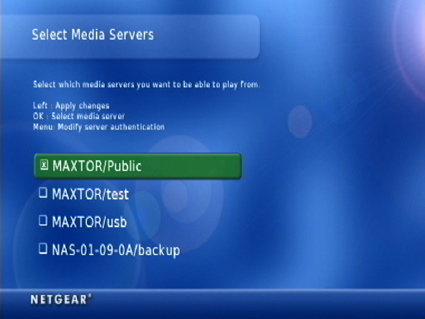
Figure 2: Shared drive setup
The EVA8000 supports UPnP AV servers, but according to the documentation, using network disks is the preferred means of serving content. One step in getting the device configured is telling it to scan and index the chosen network drives for content. In my case, this took over 30 minutes, since I have a fairly large collection of photos, music, and videos. In my experience with other devices, a UPnP server does this initial media scan in less than a minute. Be careful when selecting network shares and UPnP servers. If the coverage of your shares and servers overlap, you’ll get multiple menu entries for the same files.
Once the initial scan is done, you can set up a schedule for the device to look for new media. Unfortunately this “New Media Scan” once occurred during the time I was watching a movie. When this happened, the indexing screen automatically came up and my movie shrunk down to an inset window until the scan was completed.
Figure 3 shows the main menu once the device has been set up. Note the weather display that gets customized based on your zip code.
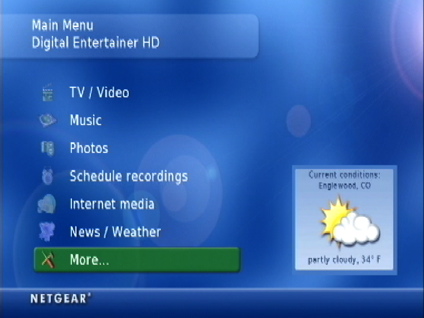
Figure 3: EVA8000 Main Menu
Video Features
Under the TV/Video menu there were two options: “Recorded Video” and “YouTube video”.
The “Recorded Video” option allows you to browse through videos you’ve created yourself or downloaded from the Internet. The system has the ability to control a video-capture card on your PC, but I didn’t have the hardware to check this feature out. Figure 4 shows a list of my videos in the menu.
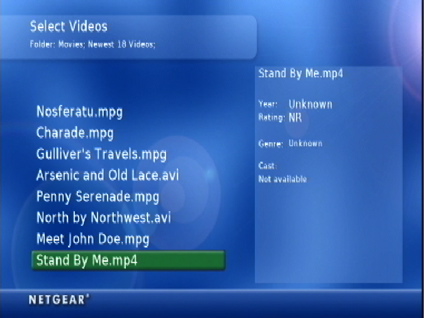
Figure 4: Movie Selection
I played a bit with the YouTube feature and it worked well, although video quality was pretty low and browsing through the available videos was a bit awkward using a remote instead of a mouse, as you would on your computer. And don’t expect the fast-forward and reverse buttons on the remote to work with these videos, either. Occasionally, I had some video stutter, but it’s hard to tell if that was due to the box, my Internet connection, or slowness from the YouTube server. In general, however, this was a fun feature and a great time-waster.
Video Formats
As mentioned earlier, the EVA8000 supports a wide range of video formats. I successfully played a number of my AVI, WMV, and MPEG- 1, 2 and 4 files, including XviD, DivX, and even H.264 codecs. But as with all of these boxes, there were files that could not be played. I had a number of Quicktime videos (.mov extension) that would cause the box to crash and go into a minute-long reboot. A stress test of a 1080i mpeg2, 16Mbit stream showed that the video would play for a while, but then begin to pause and stutter.
The “fast-forward” and “reverse” buttons on the remote were also a bit problematic. With some videos they would work fairly well, but with others they wouldn’t. This is fairly common with these types of devices. It’s a tough issue when streaming content across the network, so just don’t expect to jump around a video like you would in a DVD.
Speaking of DVDs, I was able to play VOB files that were decrypted and ripped from my DVDs. The files would play, but there was no menu interaction as you would normally see in a DVD. And while checking out my DVDs, I came up with another annoyance. The EVA8000 is evidently trying to “help” you by collapsing deep directory structures into something more manageable by a remote-control.
But in my case, I have a large collection of my ripped DVDs arranged in a deep directory tree named by year, episode, etc. with a deepest directory of “VIDEO_TS” as found in the original DVD. But when the EVA8000 menu was presented to me, my entire directory structure was collapsed into a single VIDEO_TS option. Inside this menu I had 130 VOB files with many, many identical names and no indication of what DVD they originally came from (Figure 5).
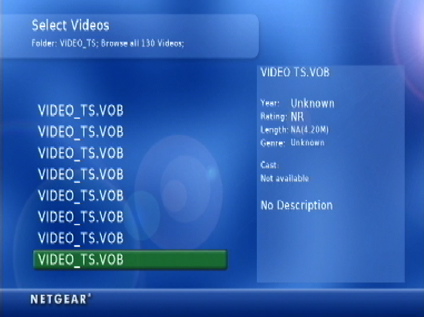
Figure 5: Buggy Menu
This "feature" was useless. One of the things I liked about the EVA700 was its ability to use an alternate media server that understood DVD structures, enabling it to re-create the functionality from the original DVD menu. The EVA8000 doesn’t seem to share this feature. This capability is somewhat of a gray area as far as what manufacturers are licensed to do, but at least one company has won a DVD copying lawsuit
with the DVD Copy Control Association, so maybe it will become more of a standard feature in the future.
The EVA8000 also has the capability to view Windows Media DRM-restricted video files when serving content from a Windows system running Windows Media Connect, but I didn’t have any restricted content to test this with.
Music
The next capability I checked out was “Music”. The EVA8000 can play your own music or music from Internet radio stations. The Internet radio station capability worked well. Stations were well organized and could be quickly connected to for playback. For playing your own music, options are presented for browsing by Playlist, Artist, Album, Genre, etc. Organization is an important feature when you have thousands of songs. Like all of the EVA8000 menus, I found the responsiveness to be good. I could scroll up and down and to sub-menus fairly quickly.
As far as album art, I’ve had trouble in the past with systems that would fail to play music where I had added album art using the iTunes music player. As you can see in Figure 6, the EVA8000 had no such problem.
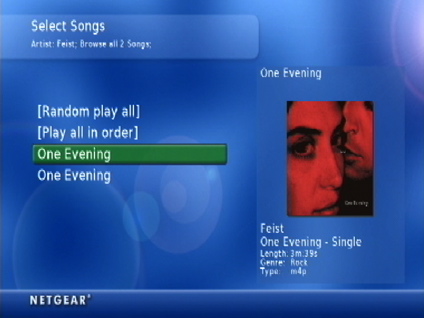
Figure 1: Music Selection
Art wouldn’t always show up, but at least it didn’t affect the ability to play the file. If you look closely in Figure 6 you can see the same song listed twice. This will happen if you run a UPnP AV server on the same files that are being exported via a shared folder. The EVA8000 documents support for MP3, WAV, WMA, AAC, and FLA file formats.
I was a bit surprised to see the advertised capability for iTunes DRM playback. Apple has held this technology close-to-vest, and as far as I recall, they’ve only licensed it out once for a Motorola cell-phone. When I went to try it out, it worked! My protected music played back just like any other song. But I could tell when a protected song would begin to play. My CPU usage would flat-line at 100% causing my laptop’s fan to kick on (Figure 7).
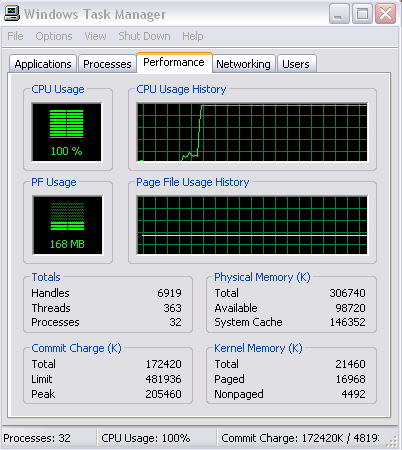
Figure 7: CPU Pegged during iTunes playback
As a comparison, when playing the same protected song through Apple’s Airport Express, my CPU would vary between 0 and 2%. NETGEAR obviously has somewhat of a hack going on here when playing these songs. The capability involves the virtual sound device, because when I disabled it, the protected music wouldn’t play.
I would guess that NETGEAR’s engineers have figured out a way to hook into the iTunes FairPlay libraries for performing the decryption. The result of the decryption is then directed to the virtual sound card, which ships the result over the network to the EVA8000. When queried about this capability, NETGEAR stated: “We do not have Apple Fairplay DRM on the EVA8000. We won’t elaborate on the details of how it’s done but you will be able to select an iTunes file and hear it on a TV or stereo connected to the EVA8000”.
It’s a nice hack, but as others have found out, Apple doesn’t always take it kindly when other companies piggyback on their DRM system. The danger to NETGEAR is that Apple will make changes in their library to thwart this type of usage in the future. If this happens, you’ll no longer be able to play your DRM-restricted iTunes music on the EVA8000.
Photos
Selecting photos for playback on the EVA8000 is similar to the music selection. Your photos are presented in a structured menu where you can select by date, folder, size, etc (Figure 8).
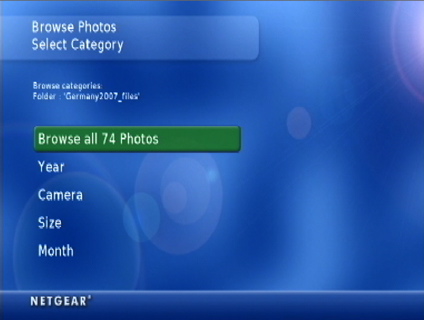
Figure 8: Photo Selection
When setting up to play a slide show, I found it took a lot of button presses to actually start it. For example, after I’ve told the system I wanted to browse by folder, I’d like to just select a folder and then hit the play button. Instead, the sequence was: select the folder; next screen – choose again between Browse Photos, Year, Camera, etc.; next screen – select “Play all in order”; next screen – wait for a thumbnail page of the photos to display; next screen – select a photo to start playing the slide show. Yeesh!
Preferences are available for how long to keep a picture on screen, and for selecting several nice transition effects, such as fade, slide, zoom etc. While a slide show is playing, you can navigate into the music menu and select music to accompany your slide show.
NETGEAR advertises support for JPEG, BMP, PNG and TIFF files, although I had one TIFF file fail to display. It was somewhat curious to see GIF files left off the list, since they are so common. I thought maybe it was just an oversight in the documentation, but then I noticed that indeed my GIF files were not showing up in the photo menus.
The EVA8000 has a screen-saver that will come on if you stay on a menu too long, but I found that, at least in the photo thumbnail screen, it didn’t work. So be careful if you have a TV that is susceptible to burn-in. Speaking of the screen-saver, I was annoyed to find that whenever you hit a button to leave the screen-saver, you ended up back at the main menu rather than where you left off.
The EVA8000 can also display photos directly from the online Flickr website. This was kind of fun, but one again, navigation was more clumsy than using your computer. Capabilities are provided for viewing by user, tags, etc. A couple of times while viewing Flickr photos, the system seemed to lock up, requiring a reset.
Other Features
The EVA8000 has a number of other features that I didn’t find all that useful, but others might. You can view RSS feeds, which is kind of nice. But formatting codes would often display embedded in the text, as shown in Figure 9. Plus, if the RSS headline had a URL for the real info, there was no way to follow it.
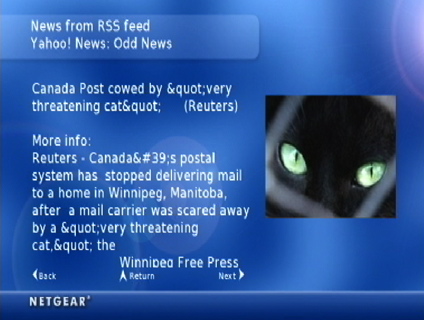
Figure 9: RSS Display
You can view weather maps, but the resolution was so low that it wasn’t very useful.
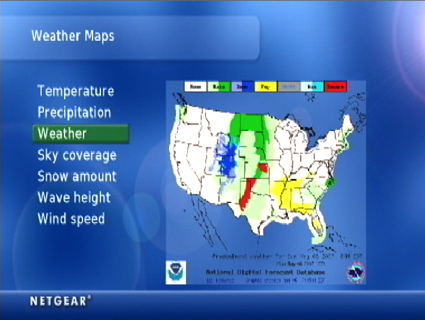
Figure 10: Weather Map
The EVA8000 will also let you see and control the desktop of your PC on your TV. However, you can’t plug a mouse or keyboard into the USB ports. So, if you want to do anything, you’ll have to move the PC mouse cursor around with the remote, using the select button for mouse clicks. If you happen to have multiple EVA8000s on your network, you can send text messages between them, or arrange to have your media playback moved from one to the other.
Finally, if you’d like to control your EVA8000 from a web browser, the box runs a web server with a menu that mimics the on-screen one (Figure 11).
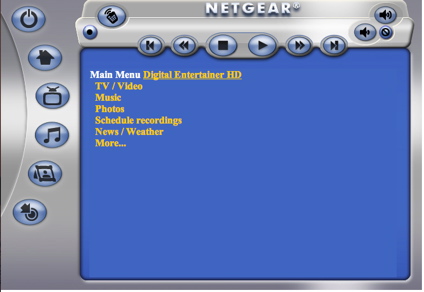
Figure 11: Web Interface
This feature could come in handy if you have a laptop near your entertainment center, or if you want to set up a recording while away from home.
Wireless
After I checked out all the features, I wanted to see how well the box worked wirelessly. Setting up for wireless was fairly painless. A “site-survey” found my access point; a setup screen (Figure 12) let me enter my encryption info.
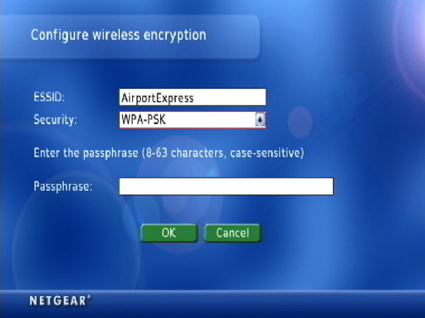
Figure 12: Wireless Setup
Key entry was a bit of a pain with a remote, but once everything was set up, the box rebooted and I was running wirelessly. My access point is directly underneath my entertainment center, one floor down, so I should have had pretty good signal strength, but there was no screen to measure it.
In operation, everything worked the same, although my high-definition MPEG-2 stress-test video broke up much earlier than on my wired network. Other videos seemed to work fine, but in general, I would recommend a wired network when you plan on using this box for video. To see how well it worked further away from my access point, I moved the box to the far corners of my house where I typically have a lower signal. I couldn’t tell any difference in these locations, but I would expect to occasionally see some break-up issues when viewing video.
Under the Covers
Figure 13 shows the main board of the EVA8000 with the mini PCI wireless card pulled back.
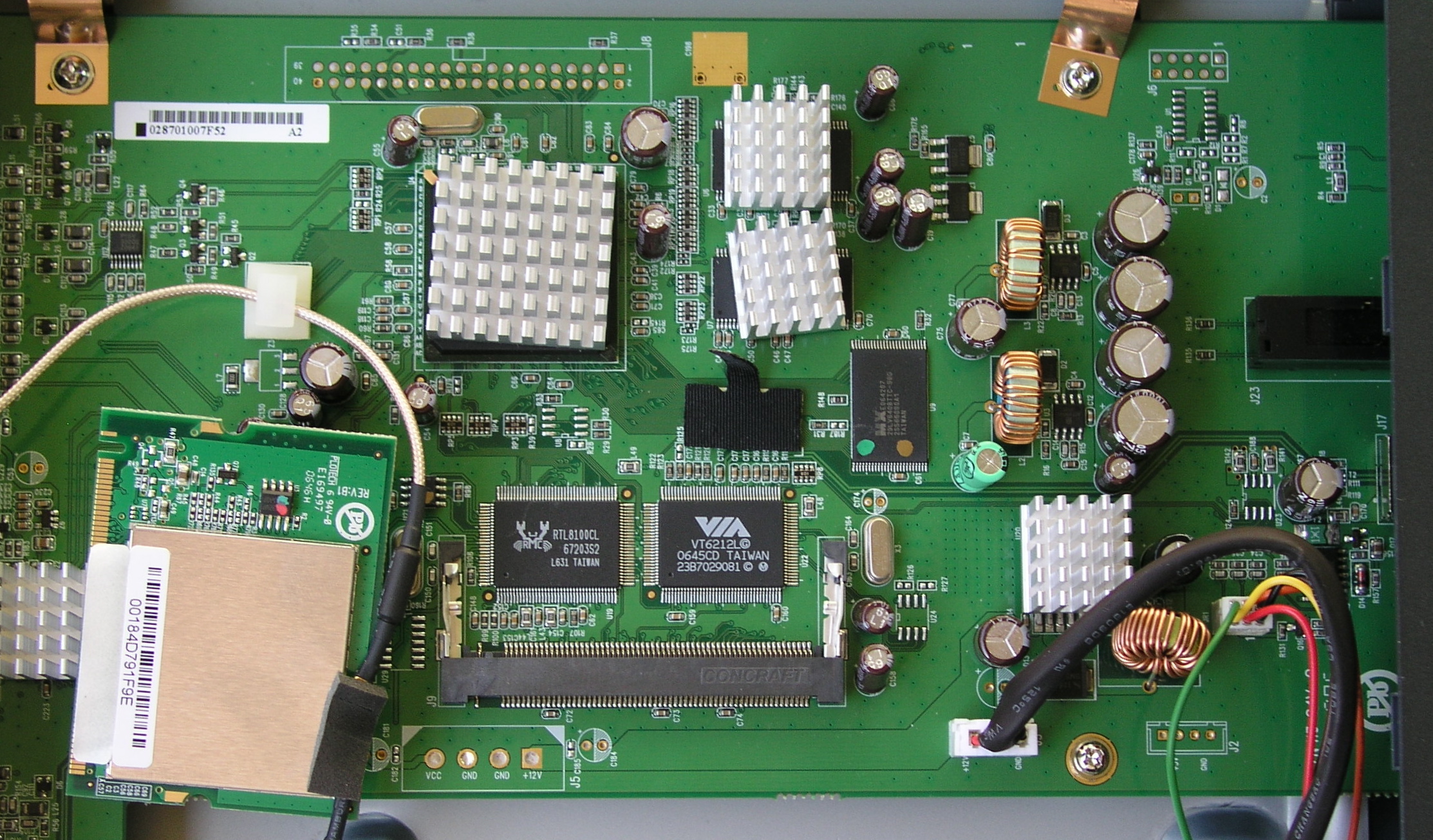
Figure 13: Main Board
Like the EVA700, the board only takes up a small portion of the case. Unfortunately, the main CPU and several support chips are hidden under large heat sinks, so I couldn’t identify them. But this post in the Netgear forums identifies the Sigma Designs EML8623—the non-Macrovision version of the EM8622L Digital Media Processor as one of the mystery chips. Wired network support is provided by a Realtek RTL8100C
and wireless by an Atheros AR5005G chip
on the mini PCI card. USB 2.0 support is by a VIA VT6212 Chip.
As far as software, like most of these types of devices, the box runs Linux internally. Specifically, the kernel is identified as: 2.4.22-uc0-sigma-20051018-nm.
NETGEAR provides a download site where interested parties can download
the GPL-licensed software used on the box to review and rebuild it. NETGEAR even includes the complete tool-chain for doing cross-compilations, although you’ll be on your own if you try to build and install custom firmware. NETGEAR does provide a pretty-good support forum
where knowledgeable support personnel answer questions.
On the Windows side, I noticed that the YouTube playback capability is provided by FFmpeg.
Digging a bit into the receiver.exe executable that provides the rest of the functionality shows a couple of interesting tidbits. When an iTunes protected song was played back, a whole slew of Quicktime DLLs are loaded, presumably to perform the decryption hack. Looking at strings embedded in the executable turns up a “SkipJam” copyright. This probably explains the difference in architecture and new features between the EVA700 and the EVA8000. NETGEAR recently acquired SkipJam, who made their own network multimedia box, so the 8000 is likely bringing in the new SkipJam functionality.
Conclusion
The EVA8000 is a powerful box for bridging the gap between the digital content stored on your computer and your entertainment center. I was pleased to see H.264 video support; no other box I’ve worked with supported this codec. Video format-wise, the EVA8000 tops everything I’ve used so far. Plus, the HDMI connector will be a big feature for many people, although to my eye, there’s little-to-no picture quality difference as compared to the component HD cables. The EVA8000 also starts bringing digital content from the Internet to your living room by supporting YouTube videos, Flickr pictures and RSS feeds.
But all is not rosy in EVA8000-land. The box still has a number of annoying bugs, poorly implemented functionality and features of questionable value. I would prefer that NETGEAR support fewer features and concentrate on doing them well.
As far as a comparison to NETGEAR’s EVA700, for me, I’d still take the EVA700, mainly due to its handling of ripped DVDs. Comparisons are also going to be made to the newcomer on the block: AppleTV. I’ve only tried out an AppleTV in the store, but I can make some judgments.
The AppleTV has nowhere near the feature-set of the EVA8000, but it does have one other thing: polish. The AppleTV user interface simply blows the EVA8000’s away. It’s like the difference between Windows 3.1 and Apple OSX or Windows Vista. Time will tell if the marketplace will prefer polish over an extended feature-set. But if the MP3 player market is any barometer, NETGEAR better get busy polishing.