

Introduction
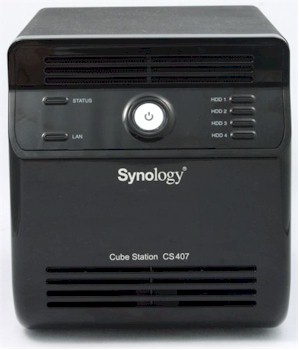
| At a Glance | |
|---|---|
| Product | Synology Cube Station CS407 / CS407e |
| Summary | Four drive BYOD SATA NAS with eight built-in server functions |
| Pros | • Gigabit Ethernet with jumbo frame support • Simple setup • Easy access to drives for replacement • Built-in servers for Web, FTP, iTunes, Printer, UPnP AV, Photo sharing, Backup, and Bit Torrent download • Mac/PC Compatible with support for legacy Macs • NT Domain/ADS support |
| Cons | • Default configuration doesn’t provide optimum RAID 5 performance • Limited alert options • Cold-swappable drives • Very limited documentation for using built-in web server/MySQL |
Last fall, Bill Meade reviewed Synology’s then top of the line CS406 and
really liked it. It was easy to use and easy to set up. But
now it’s time to say goodbye to the CS406—it’s been replaced by this year’s new models, the CS407 and the CS407e.
As with the introduction of new models of cars each year,
the new CS407 represents an evolutionary, not a revolutionary step. The “e”
model is a lower cost version of the CS407. It has all of the same features of
the CS407, but has less memory and uses a different processor to achieve its lower price point.
The CS407 is based on the Marvell 5281/500 processor and has 128MB of RAM and 4MB flash. While a Freescale MPC8241/266 processor with 64MB RAM and 4MB flash powers the CS407e.
Both of the new models feature upgrades in the installed software packages, an iTunes server (something that Bill complained that the CS406 was missing), Vista compliance, and improved performance.
The Basics
Both models of the Synology CS407 are BYOD NASes that accommodate up to four 750 GB SATA drives for a total 3 TB of maximum raw capacity. The case design is virtually
identical to its predecessor, the CS406. Whereas the CS407 has a black case, its less powerful
sibling, the CS407e, is housed in a white case—like the CS406. The front panel has LEDs for
Status, Link/activity and four individual lights for each of the four drives. A large blue-backlit power switch is centered between the LEDs.
Both NASes measure 230 X 168 X 184 mm (9.0 X 6.6 X 7.2 in), weigh in at 11.2 Lbs with four drives loaded, and support RAID 0, 1, and 5.
Synology markets the CS407/e as an 8-in-1 server. In addition to being a file server, the CS407 has seven other server functions built in: Printer, Download, Web/PHP/MySQL, UPnP multimedia, Backup, iTunes, and FTP.
Like its predecessor, the CS407 has vents on the top and the
bottom of the front case for flow through ventilation provided by the 80mm fan.
The CS407 is a very quiet office mate. You can barely hear the fan, yet it seems fairly efficient at keeping the internal drives cool. In my office, which
on a June day approached 90 degrees, the highest individual drive temperature was 123 degrees (Figure 1).
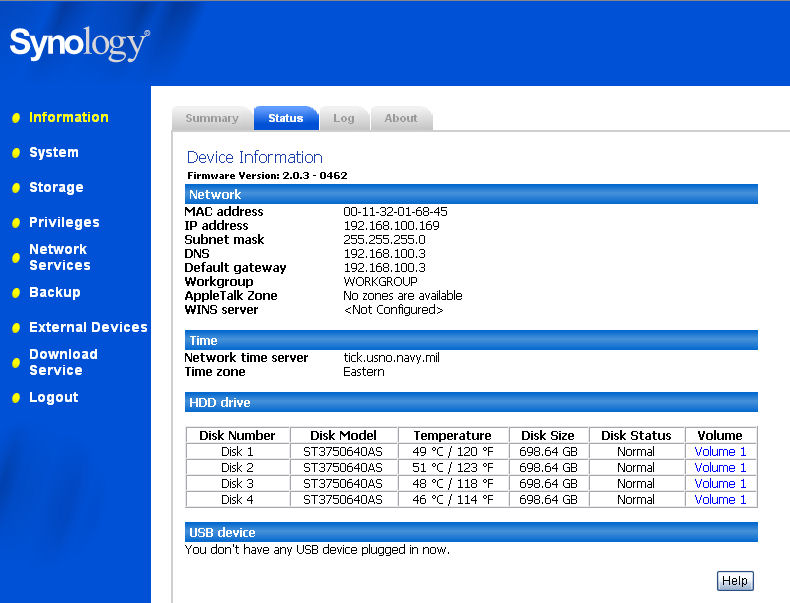
Figure 1: CS407 Status page showing drive temperature
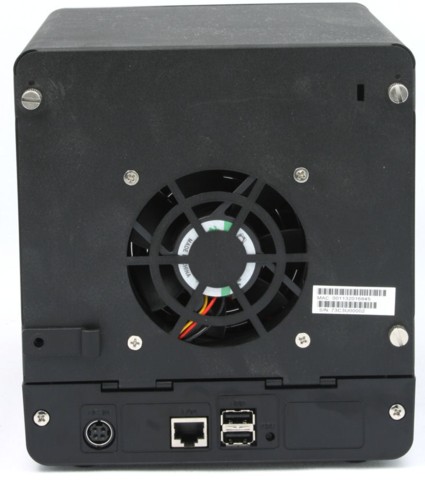
Figure 2: CS407 Rear Panel
The rear panel (Figure 2) has a power connector, 2 USB ports that can
be used to expand storage with USB drives or to support a USB printer, a
10/100/1000 Mbps Ethernet port, and, located in the upper right corner, a
security slot for attaching a security cable. Power comes from an external,
inline “brick” power supply. As you might suspect, to support four drives, it’s
a fairly large brick that measures 6.5″ X 2.5″ X 1.5″ and is rated at 12VDC @
8.33 amps. Power consumption was measured at 47W active and 15W when the hard drive spin-down featured kicked in.
The CS407 was designed for easy access. Just remove the four screws on the rear panel, and the top of the rear panel (above the USB/Ethernet ports) hinges open to reveal the four drive bays (Figure 3).
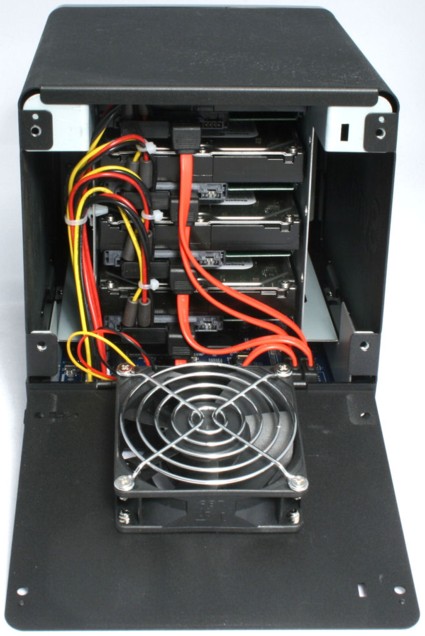
Figure 3: CS407 with case open
The Basics – more
Once the four screws are removed, you can easily remove the
top by just lifting it up and out of the way. With the case top removed, to install
drives, you just slide them into the tray and connect each side to the tray with two screws (Figure 4).
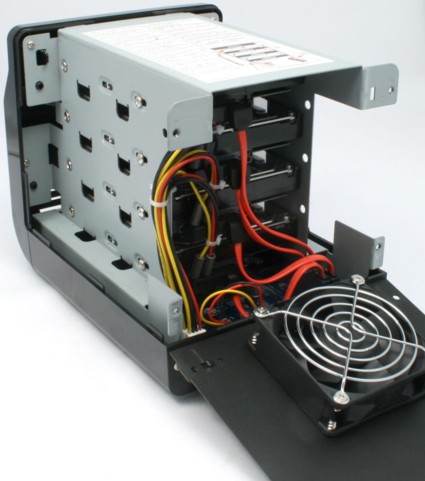
Figure 4: CS407 with case top
removed. Here you can see the sets of screws that secure the drives to the drive trays.
Synology has placed a well-illustrated installation guide that
shows how to install and cable the drives right on top of the drive cage. In addition, the PCB is
labeled with hard drive designations that correspond to the installation
illustration that’s on the top of the drive cage (Figure 5). As you might guess, the drives are not hot swappable.
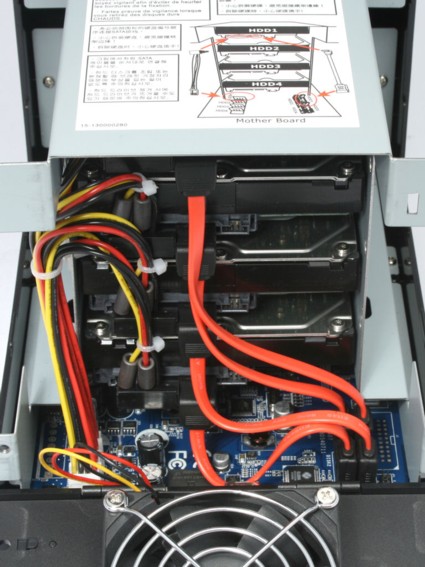
Figure 5: Cable locations are clearly marked. A cabling diagram is affixed to the top of the drive cage.
Setup
Synology ships the CS407 with a CD that contains both a PC
and Mac version of the Synology Assistant (Figure 6). Since the CS407 lacks an LCD
information panel such as the Buffalo’s TeraStation Pro 2 and Infrant NV+ have,
you’ll need to use this utility to find the CS407 on your local network. Both versions
will discover the CS407 on your network and will let you click on a “Manage” button that takes you to the web browser interface, which is on port 5000 (Figure 7).
Optionally,
secure management via SSL is available on port 5001. The PC version will also
let you “map” a drive, install a printer, and install the Windows-based backup and download redirector software.
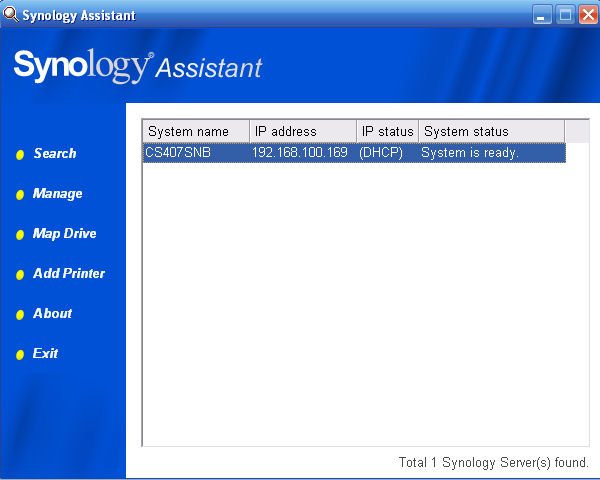
Figure 6: Synology Setup assistant discovers the CS407 on your local network.
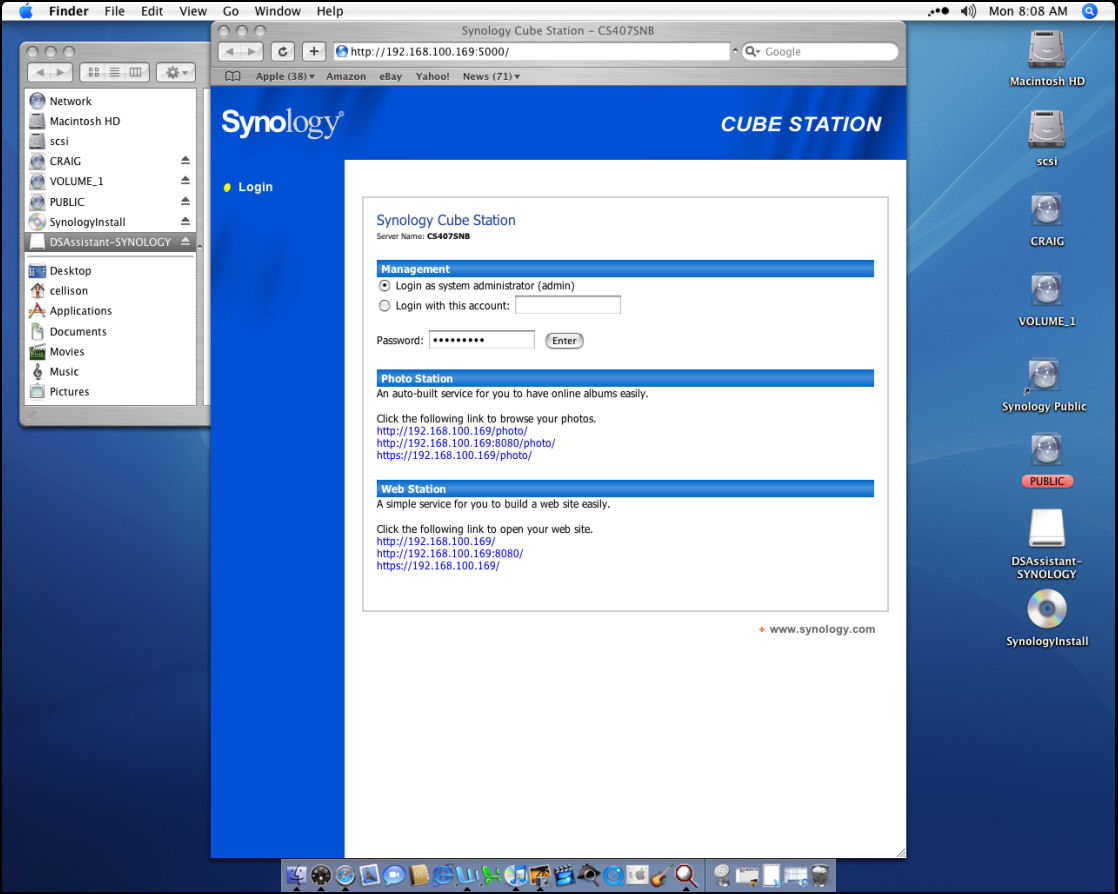
Figure 7: Synology Login screen. Addresses for the photo station and web station are shown on the home page
Feature Tour
Once logged into the CS407, the user interface is virtually
identical to the UI found on the CS406, so I won’t duplicate those screen shots
here. The menu structure is arranged with menu items along a vertical tab to
the left side of the screen. Sub-menus corresponding to the menu selected appear across the top of the user interface.
I’ll highlight each menu item briefly.
- Information – This is the landing page after login.
The home page has a management site map, shows summary information, status info, access to system, connection, backup logs, and current connections. - System – This menu tree lets you configure your LAN
settings, NTP time synch configuration, power management, email notifications,
and restore/upgrade the device.
Energy conscious users will be happy to
know that the CS407 supports hard drive spin down (range: 10 minutes to 5
hours in pre-defined choices). You can also configure email notification
for up to two email addresses. Unlike the TeraStation Pro II, the CS407
does support SMTP authentication. However, there’s no “trigger list” of
events that will send an email. I guess you just have to trust that Synology is notifying you about the right events. - Storage – Here you manage your hard drives and RAID
configurations, manage Volumes, and create/modify shared folders. After
your drives initialize, you must first create a volume before you can
create any shares. The CS407 creates shares for music, photo, video, and web when you enable their respective services in the network menu. - Privileges – This menu lets you create users and
groups and assign either user or group rights to shares that have already
been defined. By default, all newly created users are automatically added
to the group “users.” This group has RW rights to Public. There is a
“special” predefined user—Anonymous FTP for use in setting up FTP services. - Network Services – The menu you use to start/stop
FTP, Web services, Multimedia and iTunes services. There are a couple of important notes about two of the sub menus: - Win/Mac OS – This tab lets you set either the
workgroup or the Domain name, and for (really) legacy Macs, enable
AppleTalk. This sub menu also lets you enable or disable CIFS database
optimization operations. Tim Higgins posted an excellent backgrounder on Opportunistic Locking (“oplocks”) that’s well worth reading. - FTP services – The CS407 supports enabling/disabling
anonymous FTP. In addition, passive mode is supported using default port ranges
or user defined ranges. You can also restrict upload and download bandwidth on
a per connection basis. IP auto-block will automatically block IP hosts who have repeatedly failed to login. - Backup – here you back up system configuration
settings, perform local backups to attached USB drives or set up backups
between other Cube Stations. This is very similar to Buffalo’s network backup between LinkStations and TeraStations. - External devices – manages external USB devices (disks, printer or UPS) connected to the USB ports
- Download Service – This service enables the CS407
to download files without having a computer turned on. A web-based utility
lets you configure downloads. The CS407 will either download based on the
time the request was entered into its queue, or will take turns servicing each user’s queue. As with FTP, you can restrict upload/download rates.
Hands On
I enabled web services and configured Photo Station 2. Photo
Station 2 (Figure 8) is a built-in application that lets you share your photos on the net
with whomever you choose. It’s quite simple to set up. Once granted rights, you
merely drag and drop files or folders onto the pre-defined photo share. By
default, all albums (folders) in the “photo” share are available for public
browsing. However, the administrator can log into the Photo Station 2 admin
console to create Photo Station users and remove albums from public accessibility.
It’s worth noting that Photo Station uses its own local user
database—Cube Station users are not picked up by Photo Station. Once a user
accesses the photo-sharing site, they can browse public albums, or log in to
view private albums. The Photo Station admin can assign viewing rights to
individual top-level folders to each defined Photo Station user. Users can also view thumbnails, view a slide show, and set the slide show interval.
Additionally, detailed information about the photos is
displayed. Unfortunately, you can’t suppress the detailed information. I’m
happy to report that Photo Station 2, also available on the CS406, now
automatically generates thumbnails when the files are dropped into the photo
folder. In the older version, the first person to view an album had to wait for
thumbnail generation. While it might be nice to have additional templates or
provide directory-level access control, not just top folder-level control, the
Photo Station 2 photo sharing is one of the simplest I’ve seen. I hope that a future version will also include full screen slideshows.

Figure 8: CS407 Photo Station 2 Slide show. Users can select their own slideshow interval.
The FTP server worked quite well. I set up an FTP share and
enabled anonymous FTP. I only granted RO rights to anonymous and only to the
FTP share. When I logged in as anonymous, the only directory I could view was
“FTP,” and the rights were indeed RO. I also logged in as “cellison” who had RW
rights to all shares and I had access to all of the shares. I tried command line FTP, WS FTP Pro and Putty, and all worked well.
A real sore point
with me is the lack of FTP logging often found on NAS devices. Synology,
however, does a pretty good job (Figure 9). The user’s name, IP address, and Kbytes
uploaded and downloaded are all logged along with the session start/end time,
but there’s no listing of files uploads/downloads. Still, it’s a lot better than most NASes.
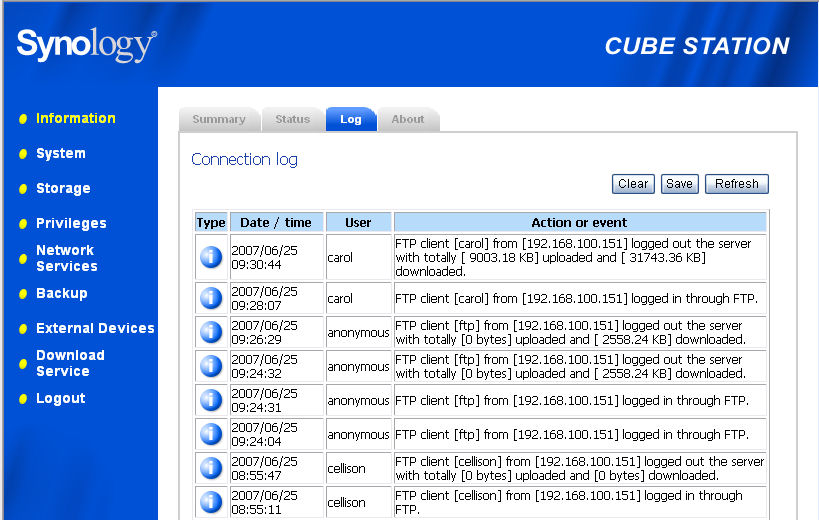
Figure 9: CS407 Connection Log
A new feature on the CS407 is an iTunes server. I enabled
the service, and it automatically indexed the music that I dropped into the
predefined “music” share. Both the iTunes client on the PC and the Mac
recognized the Synology server and served up unprotected music without a hitch.
I streamed music to my Mac for 14 hours continuously without a hiccup. The one
anomaly I noticed is that the number of days of music estimated using the
iTunes server is way off. It estimated my 4369 titles at 90.3 days. The iTunes
client using the same file share estimates the time at 12.7 days—a much more reasonable estimate.
Synology ships the CS407 with a fairly basic Windows-only
backup program called Data Replicator II (Figure 10). You can choose which files/folders
you want to back up, and, based on your privileges on the Cube Station, where
the backup will reside. You can either back up or synchronize files, and
determine the number of backups and restore points to keep. However, you can’t
perform incremental or differential backups as some dedicated packages do. If you prefer synchronization, I personally like Smart Sync Pro.

Figure 10: Synology Data Replicator II
Originally, I had the CS407 configured as RAID 0—virtually
no fault tolerance. I shut down the NAS and disconnected the power cable from
drive four to simulate a failure. When I powered back up, the only indication of
failure was that the status light was yellow rather than green. I re-ran the
Synology setup assistant, which reported that it had found an un-configured
Cube Station. I re-initialized the box, which, as warned, wiped all information.
It essentially turned it back into a default installation like what you’d get after installing new drives.
Once I logged back in, I found that even the system
settings, local user names, etc, had been wiped. Apparently, none of this
information is saved in the flash memory, but rather on the hard disk. Thus, in
a RAID 0 installation, email notification would be of little use. Of course, if
you’re going to the expense of a four drive NAS, most likely you’re going to set it up with either a RAID 1 or RAID 5 fault tolerant configuration. During performance testing we found that it took about 5 hours to fully resync a 1 TB RAID 5 array, although the volume was accessible after a few minutes.
Performance
The interactive NAS performance charts let you compare
performance results in an almost infinite number of combinations. However, for
simplicity of comparison, it’s fairly easy to look at a product’s rank in the
charts compared to other products with similar capabilities. For the Cube Station 407 and 407e, here are the relative rankings:
| Test | CS407 | CS407e |
|---|---|---|
| 1000 Mbps Average Write | 7/30 | 19/30 |
| 1000 Mbps Average Read | 8/30 | 25/30 |
| 1000 Mbps 4K Jumbo Average Write | 5/19 | 10/19 |
| 1000 Mbps 4K Jumbo Average Read | 5/19 | 13/19 |
| 1000 Mbps RAID 5 Average Write | 15/15 | 11/15 |
| 1000 Mbps RAID 5 Average Read | 13/15 | 15/15 |
| 1000 Mbps RAID 5 4K Jumbo Average Write | 4/13 | 7/13 |
| 1000 Mbps RAID 5 4K Jumbo Average Read | 8/13 | 13/13 |
Table 1: NAS Chart rankings
NOTES:
- Firmware version tested was v2.0.3 – 0462
- Tests were performed with two 4X ST3750640AS 750 GB
Seagate Barracuda 7200.10 drives on the CS407 and 4X WDC WD2500JS-98NCB1 Caviar 250 GB drives on the CS407e. All drives were provided by Synology. - The full testing setup and methodology are described on this page
- To ensure connection at the intended speeds, the iozone
test machine and NAS under test were manually moved between a NETGEAR
GS108 10/100/1000Mbps switch for gigabit-speed testing and a 10/100 switch for 100 Mbps testing.
I should note that in keeping with our policy of testing
with default product settings, performance tests were done with oplocks on,
i.e. the CIFS database optimization setting disabled. However, since
there is such a performance boost with this setting enabled, we produced the comparative plots below (Figures 11 and 12) to give you an idea of the boost that disabling oplocks, i.e. enabling database optimization, can provide.
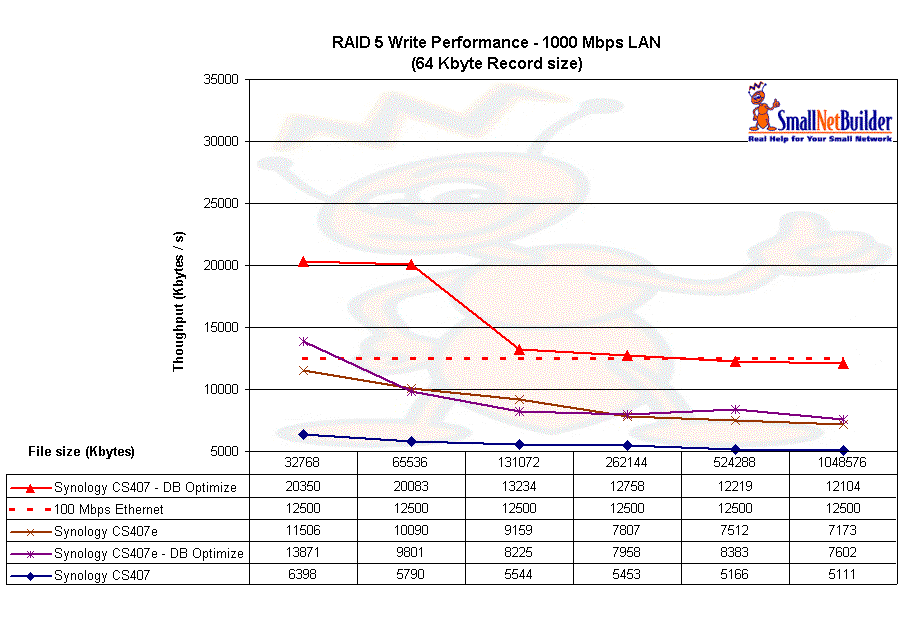
Figure 11: Write comparisons with and without oplocks
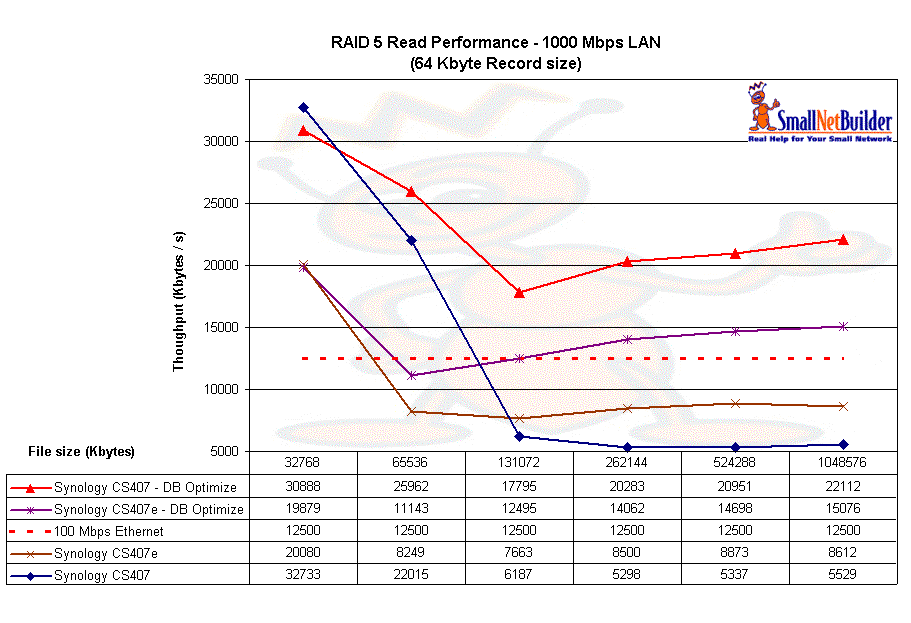
Figure 12: Read comparisons with and without oplocks
Note, however, that some applications might not like oplocks being disabled. So if you choose to enable the database optimization feature, be on the lookout for read/write problems.
From the throughput summary in Table 2 below, you can draw a couple of conclusions:
- The CS407, as expected, outperforms the CS407e with the
exception of the 1000 Mbps RAID 5 Average Write test in which the CS407
placed last. Note, however, that using jumbo frames seems to make the CS407 really perk up, for both RAID and JBOD modes. - Neither product claimed bragging rights for top
performance in our Charts. In fact, if you look at the test results averages on the
eight tests above, you’ll see that the Thecus Ultra high Performance 1U
Storage server and the Thecus High performance NAS server as well as the Buffalo TeraStation Pro II outperformed the CS407 on all tests.
| Test | CS406 | CS407 | CS407e |
|---|---|---|---|
| 1000 Mbps Average Write | 13.9 | 17.1 | 10.9 |
| 1000 Mbps 4K Jumbo Average Write | 16.1 | 19.2 | 13.8 |
| 1000 Mbps RAID 5 Average Write |
11.0 | 5.6 | 8.9 |
| 1000 Mbps 4K Jumbo RAID 5 Average Write | 14.5 | 15.7 | 11.4 |
| 1000 Mbps Average Read | 16.8 | 20.5 | 12.2 |
| 1000 Mbps 4K Jumbo Average Read | 18.4 | 26.3 | 15.6 |
| 1000 Mbps RAID 5 Average Read |
12.9 | 12.8 | 10.3 |
| 1000 Mbps 4K Jumbo RAID 5 Average Read |
14.4 | 21.0 | 10.5 |
Table 2: Throughput summary
Final Thoughts
As noted in the introduction, the CS407 and CS407e are
evolutionary products with incremental improvements in both software and
performance compared with last year’s CS406. More importantly, Synology improved an already solid platform without breaking anything.
Like Bill Meade, I really like the Synology Cube Station, in particular, the built-in Photo Station 2 photo sharing application. You can also define an additional port for the web server—a consideration in a multi-server environment; in addition, management by HTTPS is a plus.
While I was somewhat disappointed by its relative RAID 5
performance, keep in mind that it may be possible to speed things up
significantly if you are able to live with the database optimization mode
enabled. There is no guarantee, however, that this will work with all your
applications and you might notice problems, in particular, in multi-user environments.
All things considered, the Synology CS407 / 407e deserve consideration if you’re looking for a BYOD RAID 5 NAS with all-in-one server features.