

Introduction
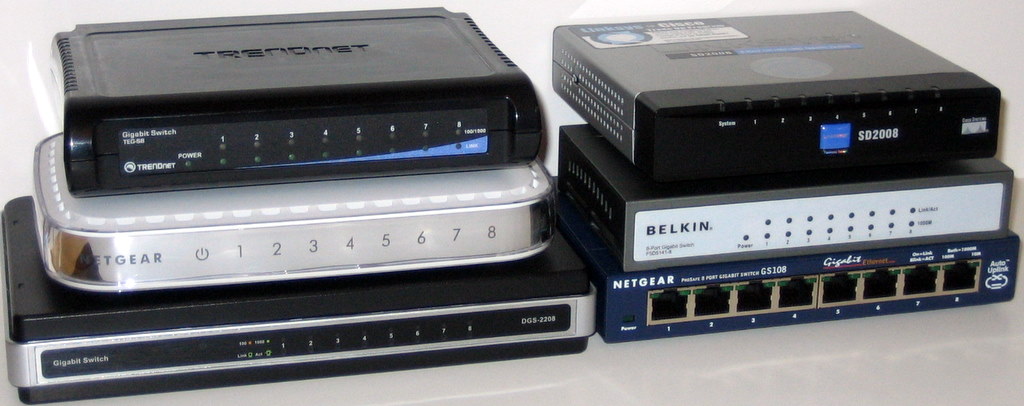
As long-time readers of our reviews know, we don’t generally review or test Ethernet adapters and unmanaged switches. The reason for this is that I’m a firm believer that these are commodity products, to be purchased based on price, brand preference and perhaps warranty.
The technology at the heart of these products is well-established and has long-ago been encapsulated into single-chip solutions which offer "wire-speed" performance, i.e. equal to that of a naked cable, both for adapters and switches.
But I have to confess that I had never done any testing to back up my assertion that all switches and NICs (network interface cards) are created equal. That, plus a comment from one reader that he was unable to find a gigabit switch that had performance equal to a straight cable, brings us to this roundup.
We asked the "big three" consumer networking companies—Linksys, Netgear and D-Link—for eight port gigabit Ethernet switches that supported jumbo frames up to 9K. We started with these companies because their products are widely available and chose 8 ports because of the price point and, well, because having those extra ports is cheap insurance for probable network expansion. After perusing the Pricegrabber listings, we decided to also ask Belkin and Trendnet to submit their products to add a bit of variety. In all, we ended up with six switches, because Netgear decided to submit two products.
Since these are all "dumb" or unmanaged switches, there are no functional features to review. So I’ll dispense with the usual walk through of each product and distill the few differences among the products into Table 1.
| Product | Price | Ports | Switch Chip |
|---|---|---|---|
| Belkin F5D5141-8 [Website] |
$72.42 – $222.59 Check price |
Rear | Vitesse VSC7388 |
| D-Link DGS-2208 [Website] |
$48.48 – $82.63 Check price |
Rear | Vitesse VSC7388 |
| Linksys SD2008 [Website] |
$60.08 – $119.99 Check price |
Rear | Broadcom BCM5398 |
| Netgear GS108 [Website] |
$60.20 – $134.48 Check price |
Front | Broadcom BCM5398 |
| Netgear GS608 [Website] |
$54.99 – $125.88 Check price |
Rear | Broadcom BCM5398 |
| Trendnet TEG-S8 [Website] |
$35.99 – $53.00 Check price |
Rear | Broadcom BCM5398 |
Table 1: Switch Feature Summary
I tried to get switches with a variety of chipsets, but it seems like Broadcom is the chip of choice for two of the "big three". D-Link also uses a Vitesse 5 port gigabit switch (VSC7385) in its DIR-655 draft 11n wireless router [reviewed here]. I was surprised to find no products using Marvell switches.
You can get a closer look at the products at each of their websites (linked in Table 1) if the opening group shot (or its larger version) doesn’t meet your needs. Internal board shots can be found in this slideshow, along with board design commentary.
 See the slide show for the inside details on each switch.
Performance
My performance testing was quick and dirty, since a true switch performance test would require a Spirent SmartBits test platform or its equivalent, which I don’t have access to. I used two computers with 2.4 GHz Pentium 4 and AMD Athlon 3000+ processors, both running Windows XP SP2. Yes, I know that the Windows TCP/IP stack isn’t the fastest, but it’s what I had handy. (Pummel me in the comments if that’s what you enjoy…)
The gigabit adapters in each machine were Intel PRO/1000 MT Desktop PCI cards with 8.9.1.0 drivers downloaded from Intel’s support website. I tried both 4 and 9K jumbo frame settings, but settled on using 4K, since it seemed to work best with my setup. Short (under 6′) CAT 5e cables were used to connect each computer to the switch.
I ran separate transmit and receive tests using IxChariot, with the console and Endpoint 1 running on the P4 machine. So the data directions are with respect to the Intel system. I used the IxChariot high_performance_throughput script, running 1 minute tests in each direction using TCP/IP. This script uses a 10,000,000 byte filesize and 65,535 byte send and receive buffers and blasts data as fast as it can.
Figures 1 and 2 plot the average transmit and receive throughputs reported by IxChariot for the six switches. They also include reference runs using the same two computers connected via a 100 Mbps switch and the same two CAT 5e cables attached to each machine connected via a generic, i.e. not bandwidth or Category rated, RJ45 inline coupler. The Gigabit Straight cable runs were done without jumbo frames and with 4K jumbo.
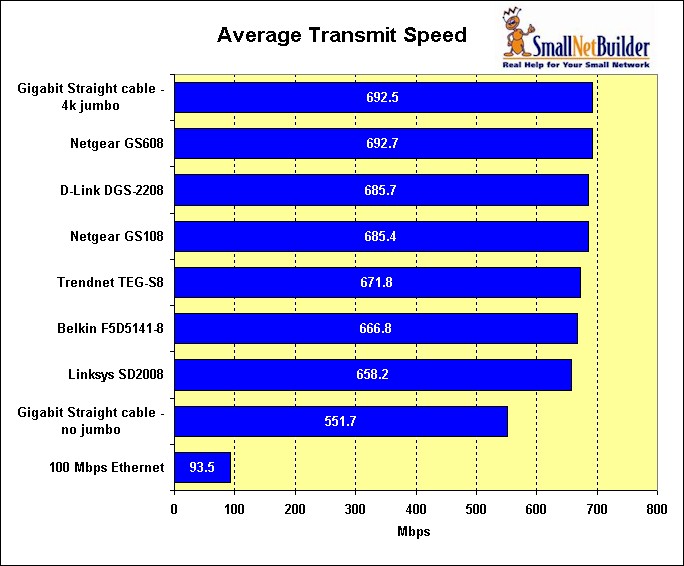
Figure 1: Transmit Performance Comparison
Figure 1 clearly shows three things:
- There is a significant difference (~20%) between not using jumbo frames and 4K jumbo frames
- There is little difference among switches
- Best-case % throughput loss is significantly less for 100 Mbps than gigabit Ethernet (7% vs. 30%)
Table 2 summarizes the percent of throughput loss for each switch and the no jumbo frame case, using the straight cable, 4k jumbo frame test as a reference. All transmit results are within 5%, which I think can safely be said to be within measurement resolution.
| Product | Transmit (Mbps) | % Loss |
|---|---|---|
| Gigabit Straight cable -no jumbo | 551.7 | 20% |
| Linksys SD2008 | 658.2 | 5% |
| Belkin F5D5141-8 | 666.8 | 4% |
| Trendnet TEG-S8 | 671.8 | 3% |
| Netgear GS108 | 685.4 | 1% |
| D-Link DGS-2208 | 685.7 | 1% |
| Netgear GS608 | 692.7 | 0% |
| Gigabit Straight cable – 4k jumbo | 692.5 | – |
Table 2: Transmit throughput relative loss
Similar conclusions can be reached using Figure 2 and Table 3, which summarize receive test results.
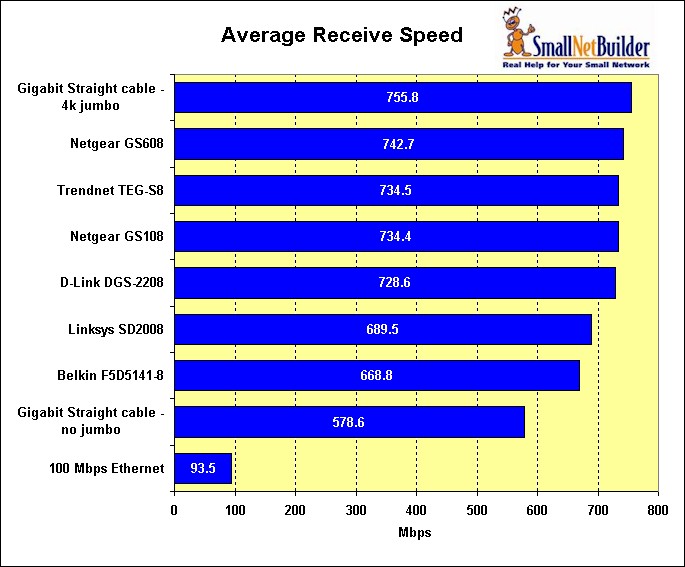
Figure 2: Receive Performance Comparison
Receive loss is a bit of a puzzle, since the percentage throughput reduction for the Belkin and Linksys switches is twice that of the other switches. But I’m reluctant to attribute the loss to anything other than measurement error, since both Vitesse and Broadcom-based products show higher losses.
| Product | Receive (Mbps) | % Loss |
|---|---|---|
| Gigabit Straight cable -no jumbo | 578.6 | 23% |
| Belkin F5D5141-8 | 668.8 | 12% |
| Linksys SD2008 | 689.5 | 9% |
| D-Link DGS-2208 | 728.6 | 4% |
| Netgear GS108 | 734.4 | 3% |
| Trendnet TEG-S8 | 734.5 | 3% |
| Netgear GS608 | 742.7 | 2% |
| Gigabit Straight cable -4k jumbo | 755.8 | – |
Table 3: Receive throughput relative loss
Closing Thoughts
So there you have it. It’s nice to see that manufacturers have gotten the word that jumbo frames count, even if only for bragging rights and to make a potential sale-killer go away. Every one of these switches automatically supports jumbo frames up to 9K, although it would be nice if Linksys and Belkin added this information to product boxes and the information posted on their websites.
Note that when consider the throughput loss data you have seen, your mileage may vary for jumbo frame performance improvement and actual throughput obtained. Pumping bits along at gigabit speeds demands much more from your OS, computer bus architecture (and speed!) and TCP/IP stack. So those of you with speedier machines than mine might see faster speeds and lower throughput loss.
But what won’t make a difference is the switch you choose. You can buy any of these products and feel confident that they aren’t a throughput bottleneck.
Be sure to see the slide show for the inside details on each switch.