

Introduction
Updated 11/2/2007 – Corrected info regarding UDP DF handling.

In many of our reviews, we comment on a device’s support for gigabit Ethernet, as well as whether it supports jumbo frames. But what are jumbo frames and why should you care about them? In basic terms, a jumbo frame is any frame larger than a standard Ethernet frame. Their main value is that they can dramatically improve network performance by raising effective bandwidth.
Jumbo frames
can be a bit of a challenge, though, as there are multiple sizes,
interpretations, and technologies, making it difficult to fully understand and
leverage their value, as well as fully integrate jumbo frame devices into your
network. The goal of this article is to explain jumbo frames and help you determine if and how you can use jumbo frames in your network.
Gigabit Ethernet
An important fact is jumbo frames are not supported at
speeds less than 1000 Mbps. There are some exceptions, with larger frame
sizes possible on FDDI, POS, and Fiber Channel connections, but for typical
small network purposes, you’re going to need equipment with gigabit Ethernet
interfaces that support jumbo frames to see network gains from larger frame
sizes. We’ve covered the details on gigabit Ethernet pretty thoroughly in our Gigabit Ethernet Need to Know
a few years back; it’s an excellent discussion on the facts and details regarding gigabit network speeds.
Gigabit Ethernet interfaces are now common on PCs, NAS
devices, switches and routers. Not all gigabit Ethernet interfaces support
jumbo frames, though, and since there isn’t a standard for jumbo frames, there are different sizes.
For example, I have a laptop and desktop PCs with gigabit
Ethernet NICs (Network Interface Card). The desktop gigabit Ethernet NIC allows jumbo frame
configuration, whereas my laptop NIC supports gigabit Ethernet, but does not
support jumbo frame configuration. Figure 1 is a screen shot of the
configuration options I have for jumbo frames on my desktop PC, showing the different sizes of jumbo frames it supports.
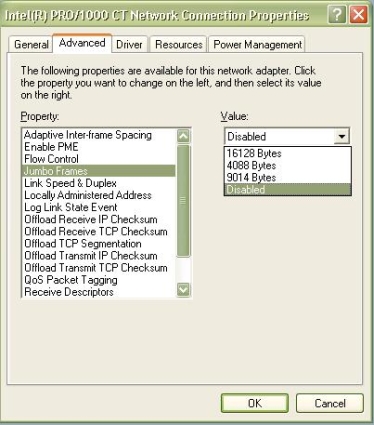
Figure 1: Properties of a NIC supporting jumbo frames
As you can see, my desktop PC NIC supports jumbo frame sizes
of 16128, 4088, and 9014 bytes. Based on the 9014 byte supported size, it
appears my desktop PC is one of those interpretations that doesn’t consider the
4 byte CRC header as part of the countable frame size, a detail I’ll cover in the “What is a Jumbo Frame?” section.
Why Jumbo Frames?
Every data unit on a network has to be assembled by the
sender, and its headers have to be read by the network components between the
sender and the receiver. The receiver then reads the frame and TCP/IP headers
before processing the data. This activity, plus the headers added to frames and packets to get them from sender to receiver, consumes CPU cycles and bandwidth.
Sending data in jumbo frames means fewer frames are sent
across the network. This generates improvements in CPU cycles and bandwidth. A
single 9k jumbo frame replaces six 1.5k standard frames, producing a net
reduction of five frames, with fewer CPU cycles consumed end to end. Further,
only one TCP/IP header and Ethernet header is required instead of six, resulting in 290 (5*(40+18)) fewer bytes transmitted over the network.
It takes over 80,000 standard Ethernet frames per second to fill a gigabit Ethernet pipe, consuming a lot of CPU cycles and overhead. Sending the same data with 9k jumbo frames, only 14,000 frames need to be generated, with the reduction in header bytes freeing up 4 Mbps of bandwidth.
These savings in CPU cycles and bandwidth can produce some
significant increases in network performance. In a 1999 study on jumbo
frames over gigabit Ethernet, “Microsoft, Sun, Compaq, Hewlett-Packard, and IBM
all recorded at least 50% increases in TCP throughput with reduced CPU utilization on single- and multi-processor systems using jumbo frames.”
Figure 2 is from an often cited Alteon Networks study (Alteon has since been acquired by Nortel) showing the improvements on a gigabit
network utilizing jumbo frames with throughput gains and CPU savings of nearly 50%!
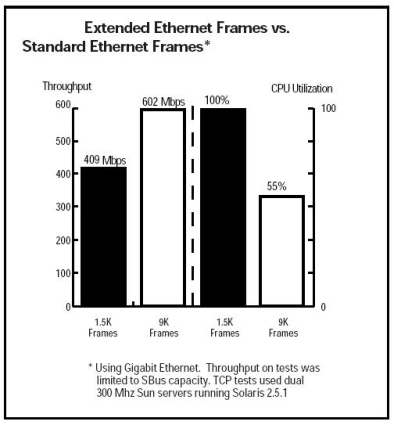
Figure 2: Alteon Networks jumbo frames benefits chart
In many of our tests and reviews, we’ve demonstrated the
value of jumbo frames. As I’ll show in Table 1, Write and Read throughput to
NAS devices can benefit greatly through the use of jumbo frames. Further, as
showed in our recent review of unmanaged gigabit Ethernet switches, there can be significant improvements in TCP throughput by using jumbo frames.
What is a Jumbo Frame?
I already stated that a jumbo frame is a frame larger than a
standard Ethernet frame, but let’s get more specific. As you know, frame is the
term for data units at Layer 2 of the OSI model, while packet is the term for
data units at Layer 3. Figure 3 is a handy reference on the various layers of the OSI model.

Figure 3: Reference chart for the OSI model (Source: wikipedia.org)
A standard Ethernet frame is comprised of payload produced
at Layer 4 and above, an IP header produced at Layer 3, and a data header
produced at Layer 2. The payload at Layer 4 is the MSS, or maximum
segment size, and is typically 1460 bytes. Add the TCP/IP header of 40 bytes
and we have the Layer 3 MTU, or maximum transmission unit of 1500 bytes.
At Layer 2, a frame header is added to the MTU, which is
comprised of the source and destination MAC addresses (6 + 6 = 12 bytes), the
Ethernet type (2 bytes) and the CRC information (4 bytes), totaling 18 bytes. Many
refer to an Ethernet frame as 1518 bytes, which is simply the 1500 byte MTU
plus the 18 byte header. The 4 byte CRC information is sometimes not counted, leading
to the 1514 byte size. If 802.1q VLAN tagging is in use, an additional 4 bytes are added, bringing the total to 1522 bytes.
So a jumbo frame is basically anything bigger than 1522 bytes, with a common size of 9000 bytes, which is exactly six times the
size of a standard Ethernet frame. With Ethernet headers, a 9k byte jumbo frame
would be 9014-9022 bytes. This makes it large enough to encapsulate a standard
NFS (network file system) data block of 8192 bytes, yet not large enough to exceed
the 12,000 byte limit of Ethernet’s error checking CRC (cyclic redundancy check) algorithm.
There are other jumbo frame sizes used, but larger sizes don’t always lead to better performance, as I’ll explain later. We often use 4k jumbo frames on SmallNetBuilder to test NAS devices that support jumbo frames.
TCP, UDP, and Frame Size
A key point regarding jumbo frames is:
Key Point #1: For a large frame to be transmitted intact from end to end, every component on the path must support that frame size.
This means that the switch(es), router(s), and NIC(s) from one end to the other must all support the same size of jumbo frame transmission for a successful jumbo frame communication session.
Jumbo frame communication can occur utilizing either TCP or
UDP as the Layer 4 protocol, but in different manners. TCP has a setup process
for each flow between sender and receiver where devices exchange their maximum
MSS value. The lower of the sender and receiver maximum MSS values determines
the MSS used for that flow, and the subsequent MTU and frame size. So, if PC A
and PC B are both using standard Fast Ethernet NICs, they will agree on an MSS
of 1460 bytes, generating an MTU of 1500 bytes, resulting in a frame size of 1518 bytes.
In the event that both ends agree to jumbo frame
transmission, there still needs to be end-to-end support for jumbo frames,
meaning all the switches and routers must be jumbo frame enabled. At Layer 2,
not all gigabit switches support jumbo frames. Those that do will forward the jumbo frames. Those that don’t will drop the frames. This is another key point:
Key Point #2: Switches
that don’t support jumbo frames will drop jumbo frames.
Fragmentation, which can occur in routers, as I’ll discuss below, is a Layer 3 function. This leads us to another key point:
Key Point #3: For a jumbo packet to pass through a router, both the
ingress and egress interfaces must support the larger packet size. Otherwise, the packets will be dropped or fragmented.
In TCP/IP packets, there is a DF or “Don’t Fragment”
bit. This is a TCP function, commonly set on most hosts. Routers will look at
the packet, and if the DF bit is set on a packet too large for its interfaces,
the router will drop the packet and send an ICMP message back to the sender saying,
“fragmentation needed and DF set”. The sender will then throttle down its frame size until the frames pass successfully.
Network communication enabling MSS adjustments by the sender
is dependent on ICMP messages being transmitted all the way back to the sender.
The problem is that many network attacks, such as DOS attacks, utilize ICMP, and for
security, many firewalls block ICMP. This results in the ICMP “fragmentation
needed and DF set” message not reaching the sender. The sender then gets no
information to send its packets at a smaller size, nor does it get a TCP
confirmation that its packets were successful. Subsequently, the sender then
continuously resends the frame at the same large size, but it never reaches the destination, resulting in a condition known as a “black hole.”
When the DF bit isn’t set, the packets will get fragmented
by the router to the largest size supported by both its ingress and egress
interfaces. If any of the fragmented packets are dropped, TCP will enable a
retransmit. However, the sender will resend the jumbo frame, not the smaller
fragmented packet. This can result in more data being sent over the network, consuming more bandwidth and defeating the value of the jumbo frames.
The process of utilizing the DF bit and ICMP messaging is
referred to as PMTUD, or
Packet MTU Discovery. This process applies to TCP flows, which provides retransmission. If the jumbo frames are utilizing UDP, there is no retransmission. If the sender sends jumbo frames utilizing UDP
across a network that does support jumbo frames, and the receiver doesn’t accept
jumbo frames, the packets will be dropped. If the sender sends jumbo frames
utilizing UDP across a network that doesn’t support jumbo frames, the packets will either be dropped at Layer 2 or fragmented at Layer 3.
To summarize, there are many factors working against jumbo
frame transmissions. Every device from end to end must support jumbo frames of
the same frame size. The maximum frame size in a transmission is determined by
the smallest maximum frame size supported end to end. Security restrictions on
a network may cause black hole occurrences. Dropped packets will degrade
connections. Finally, fragmentation and dropped packets can result in excessive retransmissions of data, defeating throughput gains.
Hardware and Network Traffic
One of the early drivers for using jumbo frames was limited CPU speed. As I noted earlier, it takes over 80,000 standard Ethernet frames per
second to fill a gigabit Ethernet pipe, which is a lot of CPU cycles. PCs with
slower CPUs and bus speeds could not generate and pump enough Ethernet frames
to fully utilize gigabit Ethernet’s bandwidth. So network performance gains of 50%
(!) were realized with jumbo frames on PCs with slower CPUs and bus speeds than the PCs in use today.
Today’s CPUs and bus speeds are faster and can handle more
instructions and frames per second than those used to generate the chart in
Figure 2. So, ironically, today’s higher CPU and bus speeds have made utilizing
smaller frames over gigabit Ethernet less of a problem for PCs. NAS devices, on
the other hand, have slower CPUs and bus speeds, making NAS data transfers a main beneficiary of using jumbo frames.
This brings us to the more important consideration for determining whether jumbo frames can help improve your LAN’s performance: your
network and the type of traffic it carries. If the bulk of your network
activity is Internet and email traffic, jumbo frames are of little value, as
you don’t have a gigabit Ethernet pipe to the Internet. And if you have a high
amount of latency sensitive traffic, such as voice, jumbo frames can be counterproductive, as they can add delay in filling the packets.
The key value of jumbo frames comes with large file transfers. As demonstrated in our NAS
charts, many devices have significant throughput gains when utilizing jumbo
frames. I looked at three different NAS devices we’ve reviewed that have gigabit
interfaces and support jumbo frames, including the Synology Cube Station
(CS-407), the Linksys gigabit Network Storage System (NSS4000), and the Buffalo Technology LinkStation Pro (LS-250GL). As you can see from Table 1, both Write and Read performance is improved by utilizing jumbo frames.
| Test | Synology CS407 |
Linksys NSS4000 |
Buffalo LS-250GL |
|---|---|---|---|
| 1G Average Write Throughput (MB/s) | 12.4 | 17.07 | 16.13 |
| 1G Average Write w/4k Jumbo Frame Throughput (MB/s) | 13.55 | 19.15 | 19.63 |
| 1G Average Read Throughput (MB/s) | 15.33 | 20.5 | 24.38 |
| 1G Average Read w/4k Jumbo Frame Throughput (MB/s) | 15.5 | 26.25 | 31.88 |
Table 1: Jumbo frame and regular gigabit throughput comparison
Evaluation Tools
A tool you can use to evaluate your network is a modified
ping test. Using a ping with the options -f -l and setting the packet size can
be used to test the end devices and network to determine the largest frame size supported. In Figure 4, you can see three ping tests.
Note: When setting the packet size in a ping test, you set the packet size at 12 bytes greater than the desired MSS.
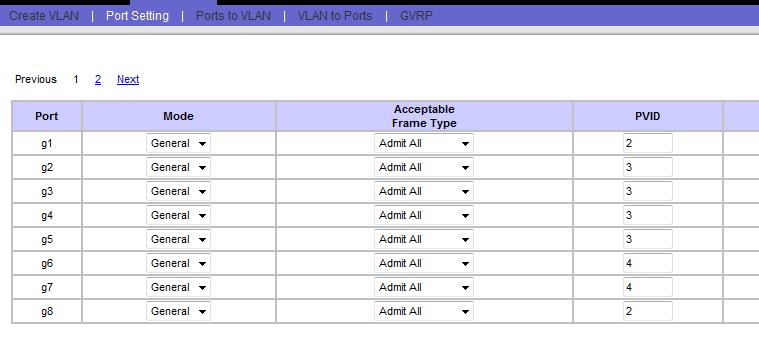
Figure 4: Ping tests showing different MSS results
In the first two pings, sent over my WAN connection to
smallnetbuilder.com, you can see in Figure 4 that I received the
fragmentation warning with a packet size of 1472 bytes, but succeeded at 1464
bytes. This highlights one more common frame limitation; various circuits have
different MTU sizes. My ISP connection utilizes PPPoE, which has a maximum MTU
of 1492 bytes due to the need for an additional 8 bytes of header space. In the
third ping, sent over my LAN, I was able to ping my gateway’s interface using a
packet size of 1472 bytes. This same methodology can be used to run tests with larger packet sizes over gigabit Ethernet LANs.
Once you’ve identified the highest packet size that works
with a ping, do some testing between devices. Figure 1 showed a PC with an
Intel NIC that supports frame sizes of 4088, 9014, and 16128 bytes. Your NAS
options may list 4k and 9k frame sizes. In this scenario, try sending a single
file to and from PC and NAS multiple times using the 4088 byte setting on the
PC and the 4k setting on the NAS. Repeat the test using the 9014 and 9k
settings to determine the average throughput. Throughput can be calculated by taking the file size and dividing by the seconds to transfer the file. You can do the calculation in MBytes/sec or Mbps (M bits per second); just be consistent.
As you may find, the largest size supported by both devices
may not necessarily result in the fastest throughput. Limitations in PC
hardware and software, as well as network hardware, can result in higher drop
rates at higher frame sizes, causing excessive retransmissions and leading to lower throughput. Most of our testing on SmallNetBuilder is done using 4k jumbo frames because that’s what works best with our computers and their 32 bit PCI NICs.
Mixed Networks
Some people recommend using only networking components from a single manufacturer when implementing jumbo frames. While this might seem like an easy way to go, it’s questionable that there is any value in it. As long as all components support the same desired maximum jumbo frame size, they should work just fine.
A more important consideration is how to configure networks that have a mix of gigabit, gigabit + jumbo frame and 10/100 Ethernet devices. This is common in smaller networks where "forklift" gigabit upgrades of all devices are unlikely. You also have some devices such as phones and networked media players that aren’t available in gigabit flavors.
Two approaches to mixed networks are to group devices physically or
logically. If there are specific devices and traffic flows that merit jumbo
frame transmission, isolating them to their own network is a means of
leveraging jumbo frame throughput. This can be done on a physical device basis, or logically by separating jumbo frame devices into their own VLAN.
In the physical model depicted in Figure 5, the jumbo frame
devices on the left are on a Layer 2 switch that supports gigabit Ethernet and
jumbo frames, while the non-jumbo frame devices on the right are on a different
Layer 2 switch. The two switches are connected to a router. Even if the link to
the router from the jumbo frame LAN is only Fast (100 Mbps) Ethernet, the traffic between devices on the jumbo frame LAN can utilize jumbo frames safely.
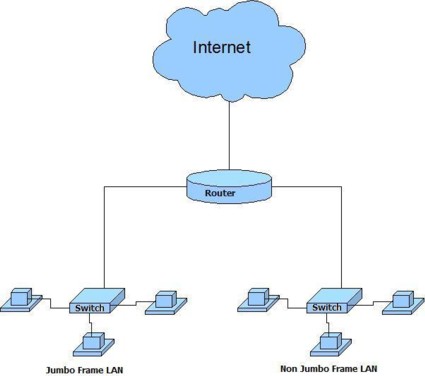
Figure 5: Setting up jumbo frames using a physical model
Mixed Networks – more
The logical approach depicted in Figure 6, uses a
Layer 2 (or 3 if you have it) switch that supports gigabit Ethernet, jumbo frames, VLANs and 802.1q
tagging or port based VLANs. An example is the Linksys SRW2008, reviewed here. In
addition, you’ll need a router that supports 802.1q tagging or port based VLANs.
An example is the D-Link DFL-CPG310, reviewed here.
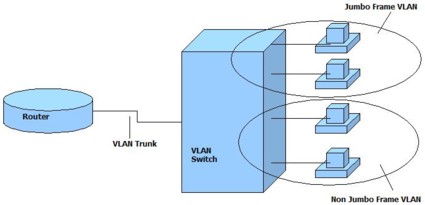
Figure 6: Setting up jumbo frames using a VLAN model
In both scenarios above, we’ve isolated the jumbo frame
devices to a VLAN that supports gigabit Ethernet and jumbo frame transmission,
allowing inter-device jumbo frame transmission. Once again, even if the link to
the router is Fast Ethernet, the devices on the jumbo frame LAN can still
access the Internet. The traffic from the jumbo frame devices to the Internet
(recall that HTTP uses TCP) will just throttle down to a lower frame size
utilizing Packet MTU Discovery, or the router will automatically fragment them. As noted in
the earlier ping test discussion, if you have a PPPoE Internet connection, your router is already fragmenting packets.
If you experience lower Internet throughput with jumbo
frames enabled, try running a few ping tests to determine if the problem is
fragmentation or ICMP blocking. If a large packet ping with the -f flag from
your jumbo frame PC to a website is not coming back successfully, that could
indicate there is a problem with ICMP blocking. A lower frame size may be necessary in this case.
So mixed networks with jumbo frame devices and non-jumbo frame
devices can work nicely. For example, I have a gigabit Ethernet switch with jumbo
frames enabled. A PC on this switch with jumbo frames enabled can print to my
network printer, which has a 100 Mbps Ethernet interface connected to this same
switch. HP network printers use TCP port 9100, so print requests from the
jumbo frame PC use TCP MSS discovery to send standard Ethernet frames to
the printer. On the other hand, UDP flows from the jumbo frame PC to this printer, if there were any, would likely fail because UDP can’t perform MSS discovery.
Conclusion
To wrap things up, here are the key points for using jumbo frames on small networks:
- Jumbo frames require gigabit Ethernet.
- The highest frame size for a connection is the lowest end-to-end maximum frame size.
- Gigabit Ethernet Layer 2 switches forward or drop jumbo frames; they don’t fragment.
- Fragmentation is a Layer 3 (routing) function.
- TCP can adjust frame size between different devices. UDP can’t.
- Using jumbo frames for low latency applications (gaming, VoIP) can be counterproductive
- Bigger isn’t necessarily better. Jumbo frame sizes need to be matched to device computing power.
The bottom line is that jumbo frames sizes aren’t
standardized, and it may take some investigation and testing on your part to
get the most benefit for your particular LAN and its clients. I hope
that this article has provided some insight into jumbo frames and the tools to intelligently implement them on your network.