

Introduction
| At a Glance | |
|---|---|
| Product |
Edimax nMax Wireless 802.11n Broadband Router (BR-6504n) Edimax nMax Wireless 802.11n USB Adapter (EW-7718Un) |
| Summary | Low cost 2.4 GHz Wi-Fi Certified 802.11n Draft 2.0 router with WDS bridging / repeating |
| Pros | • Fast router • High simultaneous sessions • Port based QoS for up and downlink • Supports WDS bridging / repeating |
| Cons | • 10/100 instead of gigabit switch • Unsophisticated user interface • Improper WPS implementation |
Price is usually an important factor when choosing networking gear and, judging from lackluster product sales, is no different for draft 802.11n products. So manufacturers are introducing draft 11n routers that aim to meet or beat the $100 "sweet spot" price point.
The Edimax BR-6504n is one of those 100 buck draft 11n products, so I thought I’d check it out to see how it compares to the higher-priced 11n routers that I’ve been testing. I also wanted to see how a solution using Ralink draft 11n devices in both router and client stacked up against more expensive chipsets.
Overview
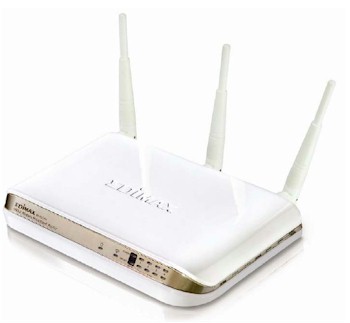
The 6504n comes in a white plastic enclosure that’s not bad looking, but won’t win any design awards. It’s designed to sit horizontally on your desk, although Edimax throws in a stand in case you prefer a vertical orientation. There are no screw wall-mounting slots on the case bottom.
The front panel (Figure 1) has the usual collection of indicators. The right stuff is there, but suffers from a narrow viewing angle and low-contrast markings.
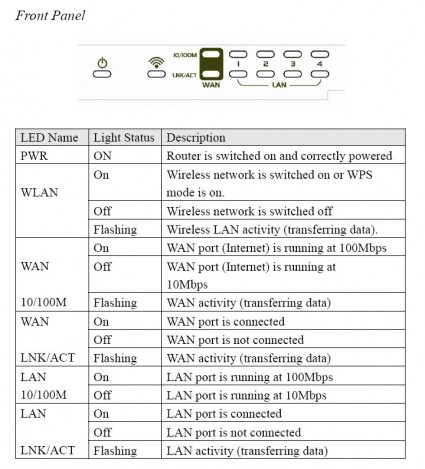
Figure 1: Front Panel
The rear panel (Figure 2) has four 10/100 LAN ports, one 10/100 WAN port and power jack. All ports are auto MDI / MDI-X. The push-button serves double duty for reset-to-factory-defaults and to initiate a Wi-Fi Protected Setup (WPS) push-button session (more on that later). The three 3 dBi dipole antennas are movable and upgradable (RP-SMA connectors).
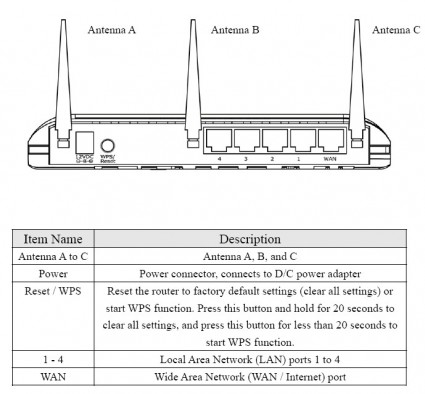
Figure 2: Rear Panel
Internal details
Figure 3 is a shot of the 6504n’s main board. The CPU is a Ralink RT1310, with 16 MB of RAM and 4 MB of flash. The 10/100 switch is a Realtek RTL8305SC, which handles both LAN and WAN port. It’s too bad that Edimax opted for 10/100 Ethernet instead of gigabit, but I guess they wanted to save their pennies.
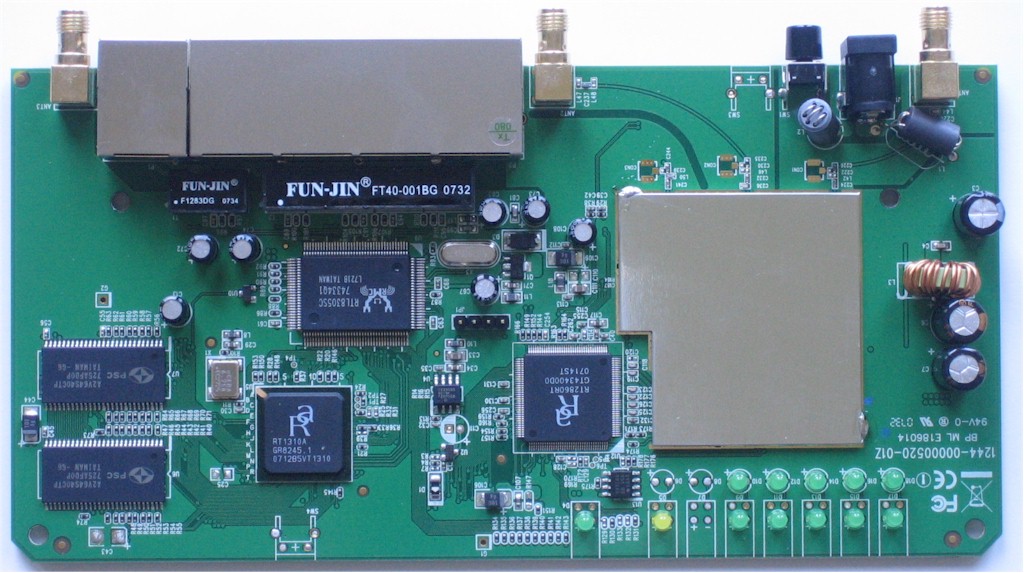
Figure 3: Main board
The radio is integrated into the main board and uses the Ralink RT2860 Baseband / MAC and RT2820 2T3R Tranceiver.
Edimax sent an EW-7718Un nMax Wireless 802.11n USB Adapter along for testing, since their notebook (Cardbus) card wasn’t Wi-Fi 802.11n Draft 2.0 certified. Figure 4 shows a composite photo taken from the FCC ID docs of the top and bottom of the board.
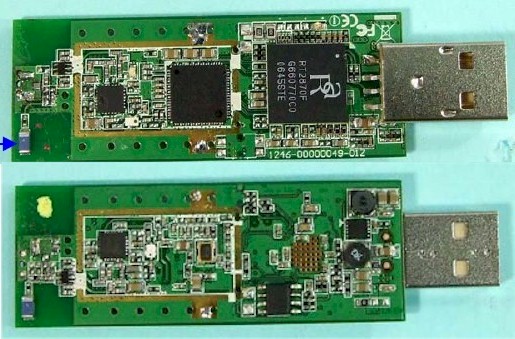
Figure 4: USB adapter board
This time, it’s a Ralink RT2870 Baseband/MAC that is paired with the RT2820 transceiver. As near as I can tell, there are only two antennas in this adapter.
Routing Features
The User interface is another thing that won’t win any design awards and has a definite old-school feel. But the routing section itself is actually surprisingly good—better, in some respects than I’ve found in products from better-known brands.
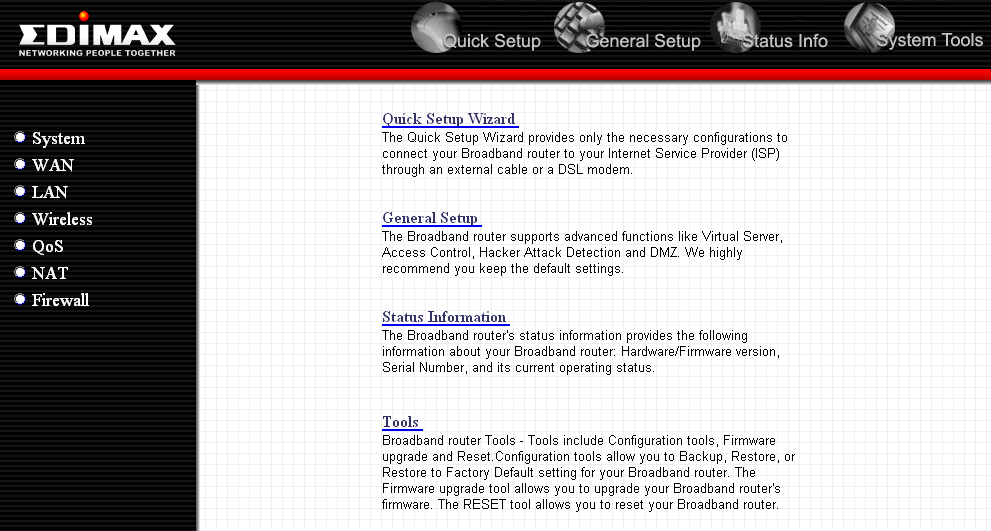
Figure 5: Login Landing page
 See the slideshow for User Interface screen shots and more
Here’s a quick summary of the key routing features.
- WAN Support – Types handled include Static, Dynamic, PPPoE, PPTP, L2TP and Telstra BigPond. All modes support MAC address spoofing, but MTU can be set only for PPPoE, PPTP and L2TP.
- LAN features include 802.1d Spanning Tree support (default disabled) and DHCP server features including ability to set lease time, set static leases by MAC address and disable the DHCP server.
- Firewall – The firewall feature actually comes disabled. Enabling it provides access to Access Control, URL blocking, DoS blocking and the DMZ function. But even with the firewall disabled, you still get basic NAT protection.
Access Controls include MAC-based access control and IP-based port filtering, which can be set for deny or allow.
URL blocking just results in a browser hang when you try to access a blocked site. It also can be bypassed by using the site’s IP address.
None of the firewall features can be scheduled and there isn’t an SPI disable.
- NAT Settings are where you find Port Forwarding (ranges), Virtual Server (single ports), Special applications (Triggered port forwarding), UPnP (default disabled) and Application Layer Gateway (ALG) controls (see the slideshow to see what applications are included).
The instructions for the Special applications didn’t match the controls presented, which included a pre-built application pick list. I couldn’t find a way to add a custom triggered application.
The top NAT menu has a "Fast NAT module" enable (default disabled) that I couldn’t find documented anywhere.
- Dynamic DNS – Clients for 3322 (qdns), DHS, DynDNS, ODS, TZO, GNUdip, DyNS, ZoneEdit, DHIS and CyberGate are supported under the WAN options.
- Logging and Reporting – These features are pretty disappointing. Router status is divided into three screens that could have been combined into one. There are no email alerts or syslog support and both the System and Security Logs add new entries to the bottom of each scrollable screen.
Neither log contained reports of my attempts to access URL-blocked pages and there is no traffic logging. The logs can be saved to a file, cleared or refreshed on demand.
- Remote access – HTTP remote access can be enabled and has options to change the port from its default of 8080 and limit access to a single remote IP address. Secure HTTPS admin access is not supported.
Routing Performance
The results of our suite of router tests are shown in Table 1.
| Test Description | Throughput – (Mbps) |
|---|---|
| WAN – LAN |
74
|
| LAN – WAN |
78
|
| Total Simultaneous |
86
|
| Maximum Simultaneous Connections | 190 |
| Firmware Version |
1.32
|
Table 1: Routing test results
The results show that the 6504n is plenty fast for any ISP connection. And the high number of Simultaneous connections means that it should be fine for BitTorrent and gaming use, too.
Use the Router Charts to see how the 6504n stacks up against other routers.
Figure 6 shows a composite of WAN to LAN, LAN to WAN and simultaneous up/down IxChariot throughput tests. I’m not sure what is causing the high throughput variation when I run up and downlink separately. Note that the QoS feature was disabled for these tests.
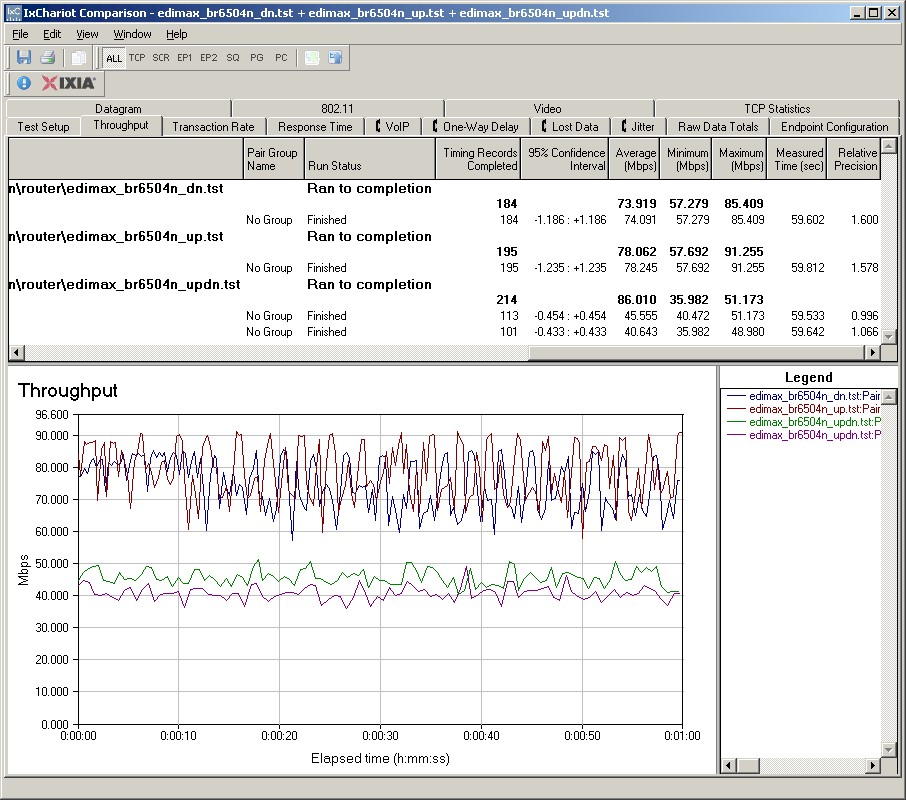
Figure 6: Throughput test results
Speaking of QoS, I thought I’d see how close the router came to the programmed limits and how smooth the throughput was. I’ve seen some routers with similar bandwidth-limiting QoS that appeared to limit throughput by using an on/off technique and controlling the duty cycle—not a very sophisticated technique!
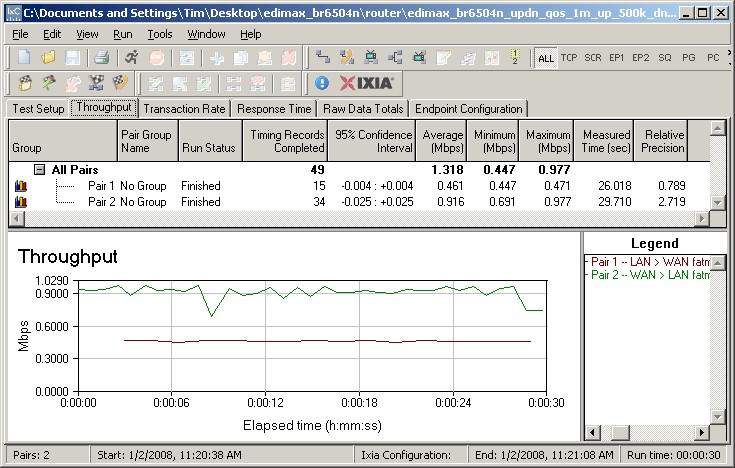
Figure 7: QoS test throughput
Figure 7 shows the IxChariot throughput when I programmed a 0.5 Mbps uplink (LAN > WAN) bandwidth limit and a 1.0 Mbps downlink (WAN > LAN) limit. Throughput looks nice and smooth with the actual values around 8% lower than the programmed value. Close enough for me!
Wireless Features
The 6504n holds a few surprises in its two wireless menus. The Wireless Basic Settings screen shown in Figure 8 has Mode, Band, ESSID and Channel controls. Mode selection includes normal (AP) and three bridging modes: Point-to-Point; Point-to-MultiPoint; and WDS.
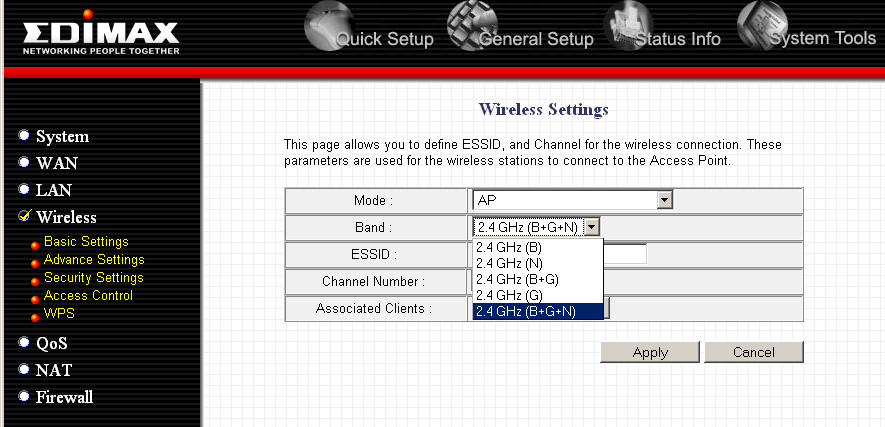
Figure 8: Basic Wireless Setup
The first two establish router-to-router links with no client support, while the WDS mode supports bridging and client association. Note that the "AP" mode is actually the normal "router" mode; there is no "AP" mode like that on other products that allows the 6504n to function as a non-routing access point.
The Associated Clients is actually a button that shows active wireless clients. It doesn’t allow you to forcefully disconnect them, however.
Figure 9 shows the Wireless Advanced Settings page, with more interesting settings. Data Rate lets you force 11b and 11g data rates from 1 to 54 Mbps, while the N Data Rate controls, uh, N data rates. You’ll need to know the translation from the MCS (Modulation Coding Scheme) codes (0-15) to actual data rates, though, which you can view here.
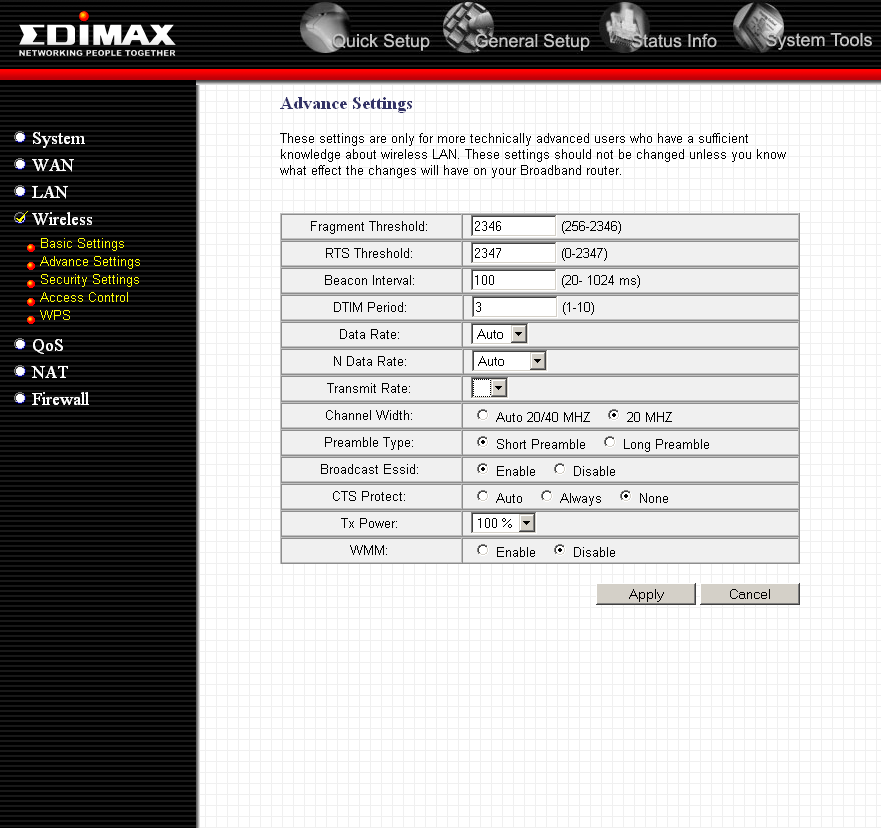
Figure 9: Advanced Wireless Setup
The Transmit Rate dropdown is blank and looks like a control that someone forgot to remove. The Channel Width is where you control the bandwidth mode.
Since the 6504n is Wi-Fi Certified to 802.11n Draft 2.0, this is supposed to default to the 20 MHz setting shown. But I found that it defaulted to the Auto 20/40 MHz mode, which is in violation of the Wi-Fi Draft 2.0 Certification requirements. This makes the 6504n the second Wi-Fi Certified product I’ve tested (the Linksys WRT600N was the first) that doesn’t actually meet the 802.11n Draft 2.0 certification requirements.
I’ve also had a reader report that he found his AirLink 101 Draft 11n router also defaulted to 40 MHz bandwidth mode, which makes three non-compliant "certified" products. I wonder how many more there are, but the Wi-Fi Alliance continues to refuse comment on the issue. I asked my Edimax contact whether there are any plans to address this problem on the 6504n and he has yet to get back to me.
Note that there is no indication of the 40 MHz mode extension channel in the settings and it is not shown in the Wireless Status page, either. But, as with all 11n products, the extension channel is four channels away from the Primary channel. So for my Channel 1 setting (the default was 11), the extension channel used is 5.
The other wireless feature of note is the product’s Wi-Fi Protected Setup (WPS) implementation. Given my experience with WPS on other draft 11n products to date, I didn’t expect it to work. But when I tried a push-button initiated WPS session, it actually worked…sorta.
The router and client completed the process in under a minute just fine. But the session didn’t automatically configure the router and client for WPA2-PSK. Instead, it just moved whichever security mode that the router was set to over to the client and completed the connection. Nice try, but that’s not how WPS is supposed to work. So, like every other draft 11n router I’ve tested so far, WPS doesn’t work on this one, either.
Wireless Performance
I was all set to test the 6504n using our Azimuth-based procedures, but ran into a snag when I opened up the EW-7718Un USB adapter. I need a direct connection to the Azimuth system for both client and router, but the USB adapter’s board didn’t have the mini-connectors found on Cardbus adapters. Since I didn’t want to risk damaging the board by trying to solder on a pigtail, I had to fall back to all open-air testing, using my five test locations.
The EW-7718Un adapter was inserted into a Fujitsu P7120 Lifebook (1.2 GHz Intel Pentium M, 504 MB) notebook running WinXP Pro SP2 with all the latest updates. I used the 1.0.1.0 Driver and Utility that came with the adapter, after checking the Edimax site for update. I used mostly Windows Zero Config for testing, but used the Edimax client utility for testing WPS.
The router had 1.32 firmware and I left all factory default settings in place, except to set Channel 1 and change to 20MHz mode from the improper Auto 20/40 MHz default.
Maximum Throughput
Figure 10 shows a composite IxChariot plot of wireless uplink, downlink and simultaneous up and downlink tests with the router set to 20 MHz channel bandwidth mode. Testing was done with the router and notebook about 10 feet apart in open air sitting in my lab with no other networks in range.
The plots show top up and downlink speeds of around 75 Mbps, but with variation that lowers the 1 minute average speed to around 70 Mbps.
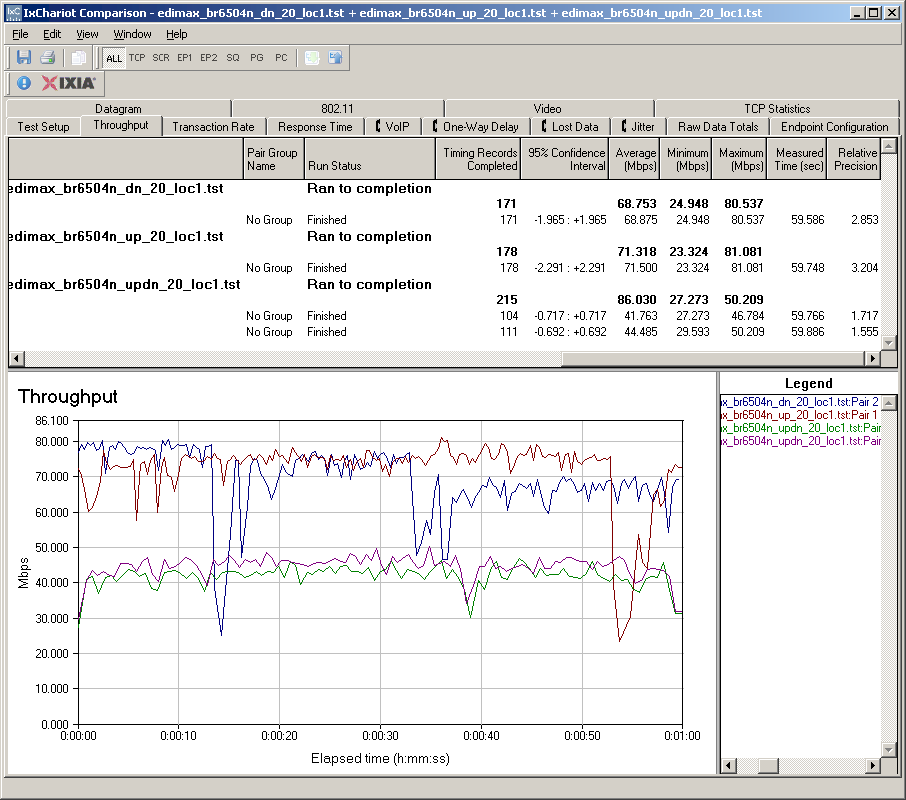

Figure 10: Up and downlink throughput – 20 MHz bandwidth
You can also see the highest throughput is clocked with the simultaneous up and downlink test, with a total average throughput around 86 Mbps.
Figure 11 shows a composite of test runs with the Auto 20/40 MHz mode set. I monitored spectrum use during testing with the Cognio Spectrum Expert, which confirmed that Channels 1 and 5 were used when the tests were run.
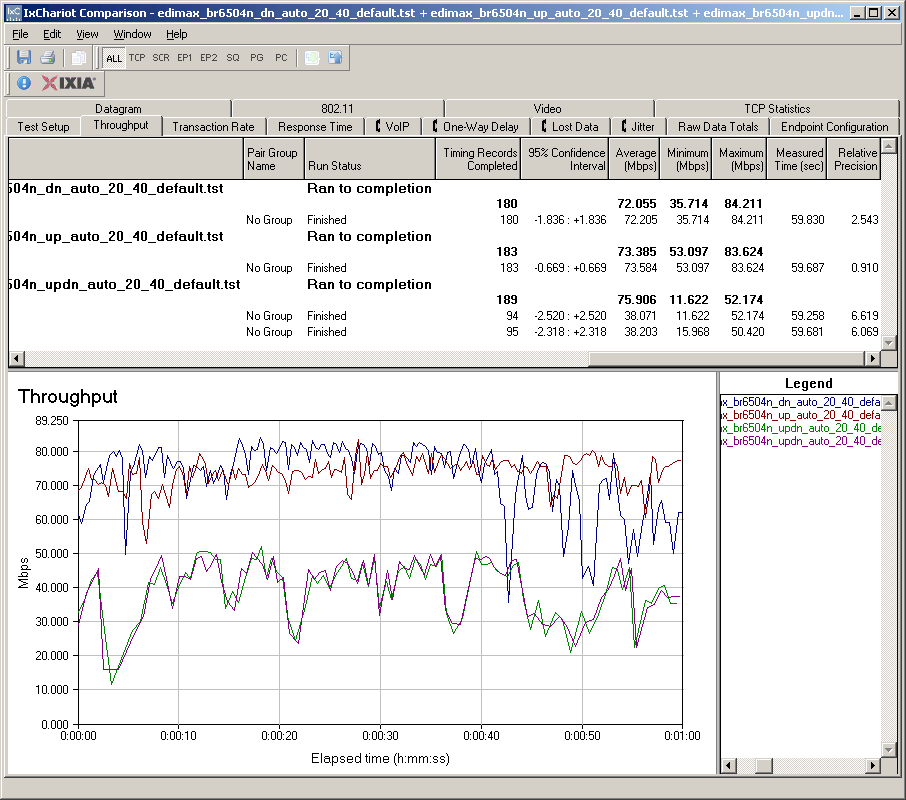
Figure 11: Up and downlink throughput – 40 MHz bandwidth
The plot shows that peak and throughput is only a few Mbps higher, with 1 minute averages around 72 Mbps for up and downlink. The simultaneous up and downlink total throughput actually came in 10 Mbps lower at 76 Mbps, primarily due to higher variation.
The bottom line here is that there is little performance advantage to be gained by running the 6504n in its 40 MHz mode. So by using the legacy-friendly mode, you can be kind to your wireless neighbors and get good throughput, too.
Security Mode Performance
Since this was the first time I had a fully Ralink-based draft 11n router and client in the lab, I tested throughput in all security modes, in 20 MHz bandwidth mode. Figures 12 and 13 show quite surprising results!
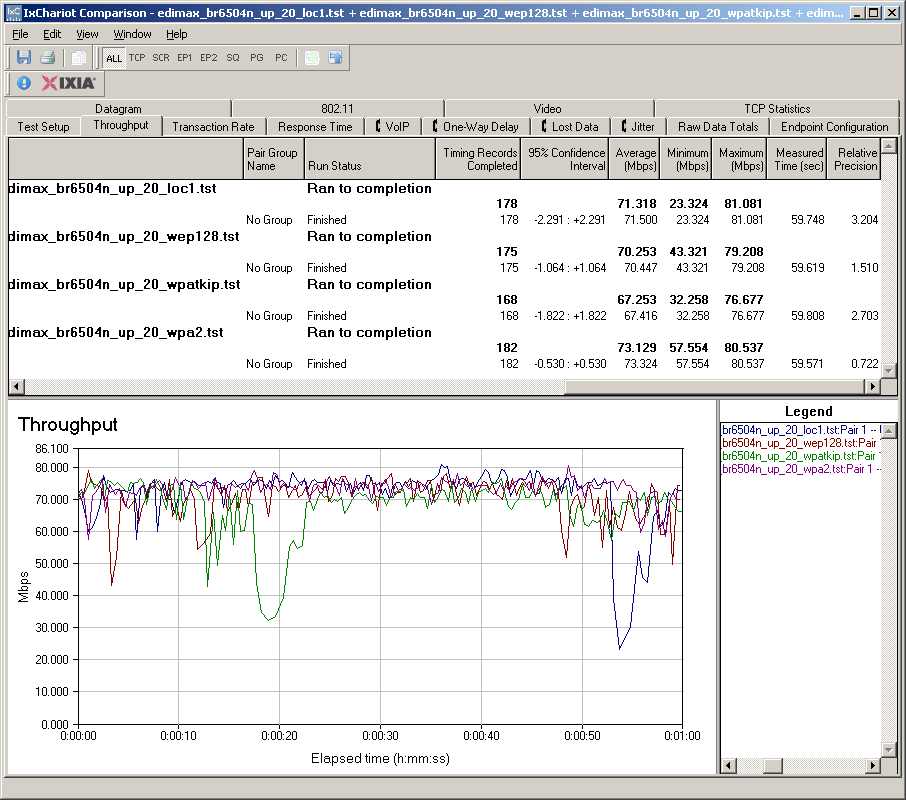
Figure 12: Security mode throughput comparison – uplink
Both plots show essentially no throughput loss in any security mode, WEP and WPA/TKIP included! This is in contrast to every other draft 11n product tested to date, which suffer throughput losses between 50 and 90% when using WEP or WPA/TKIP.
Let’s hope this starts a trend that other draft 11n chip and product manufacturers will follow.
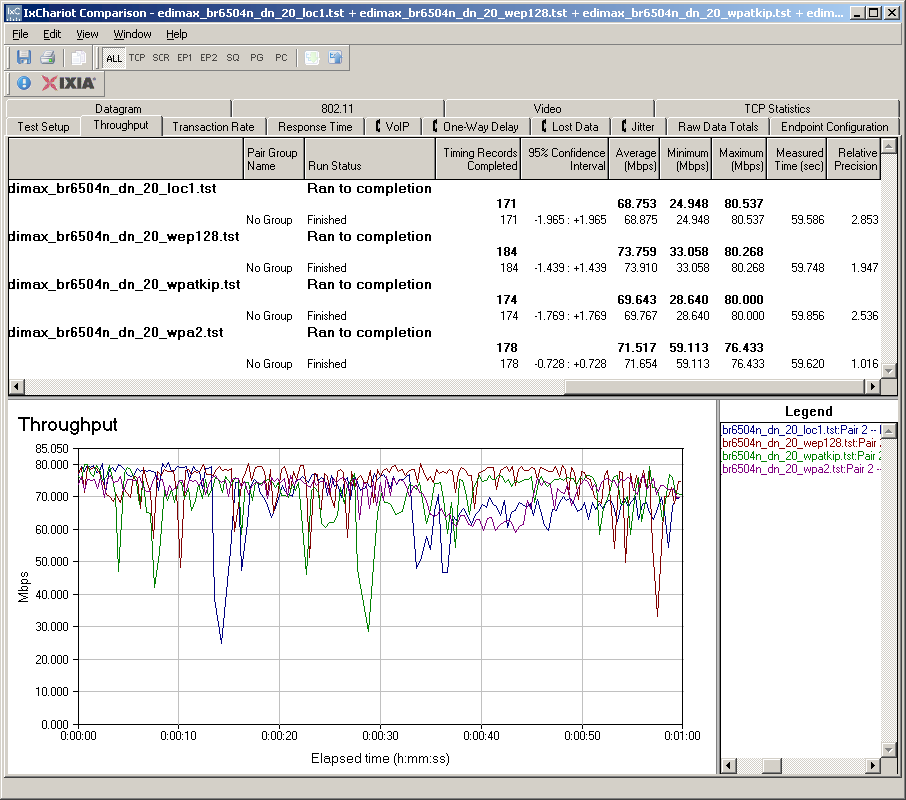
Figure 13: Security mode throughput comparison – downlink
Throughput vs. Range
As noted earlier, I couldn’t use the Azimuth system to run my usual throughput vs. path loss plots. So the plots below represent throughput vs. actual range, for the five test locations around my home.
Figure 14 shows downlink test results, with high variation in Locations 1 and 2, which seems to indicate some rate switching, especially in the Location 2 plot. Location 3 throughput is the steadiest, measuring around 18 Mbps.
I’m not really surprised about the poor showing in Locations 4 and 5, which seem to defeat efforts by most wireless products to operate. While the connection stayed up in both locations, throughput was so low as to be unusable.
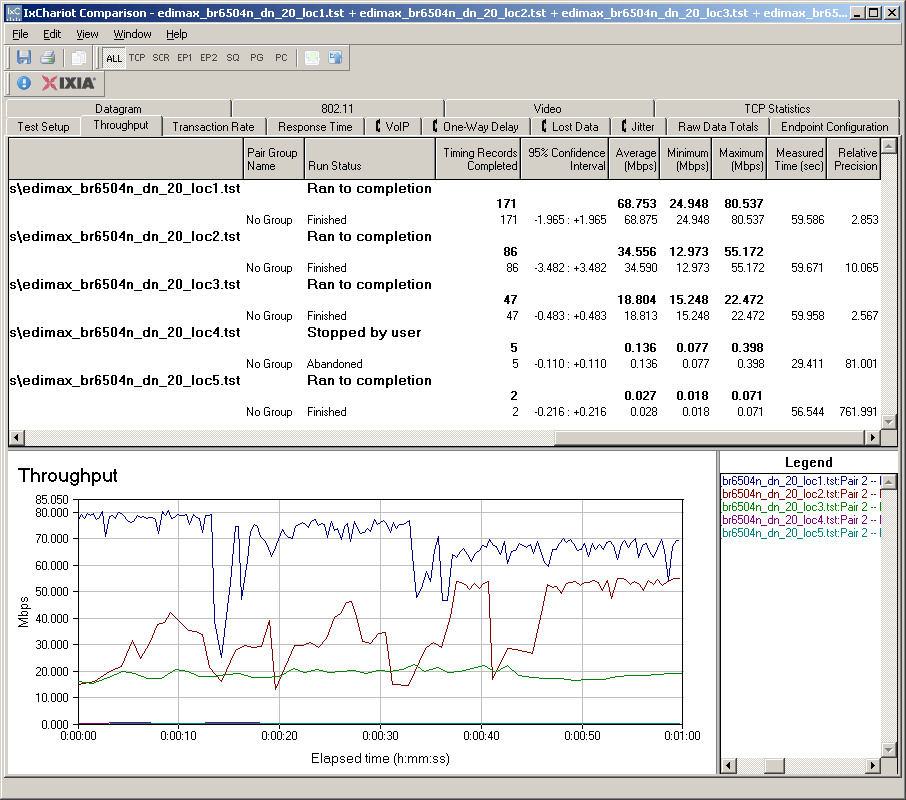
Figure 14: Throughput vs. Range – Downlink
Figure 15 shows uplink tests. Location 2 seems to again indicate rate switching, which takes around 30 seconds to find the optimum setting, and this time Location 3 also looks like it causes the same effect. Location 4 once again turns in unusuable throughput, but Location 5 fares a little worse and is unable to complete the test.
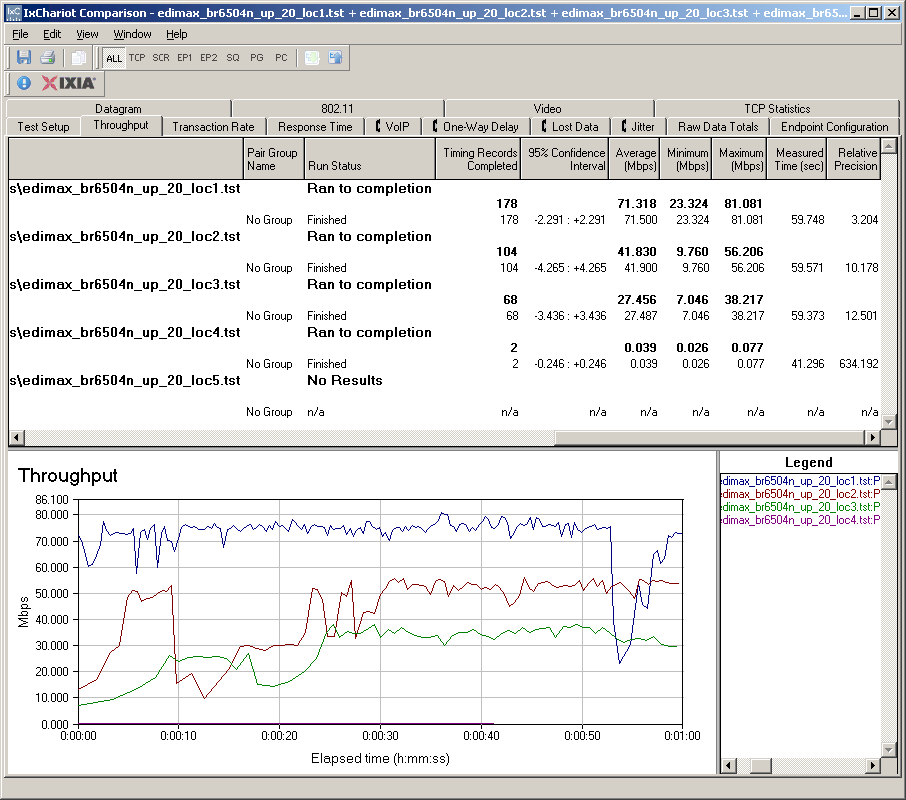
Figure 15: Throughput vs. Range – Uplink
Note that all testing was done with the router in 20 MHz bandwidth mode. Given the earlier testing, I wouldn’t expect using Auto 20/40 mode to improve the results.
If you use the path loss to distance conversion method that I came up with, you can do rough comparisons with other draft 11n products using the Wireless Charts. Locations 2 and 3 have between 80-90 dB of Path Loss, which tends to fall somewhere on the "waterfall" portion of most products’ throughput vs. path loss curves. So that would account for the range switching seen in Location 3.
The location 4 and 5 results would tend to indicate a sharper waterfall and earlier disconnect, especially in the uplink direction. This seems to be performance similar to the Belkin N1 and D-Link DIR-655, whose plots stop abruptly at around 103 dB of path loss.
In other words, the 6504n doesn’t seem to have the range that some other draft 11n products have, with a shorter reach running uplink than down.
Mixed STAs
Since the 6504n broke the established pattern for security mode throughput, I hoped that it would also handle mixed clients (STAs) and neighboring legacy WLANs better than the competition. But, alas, that was not the case.
I set up my usual test using a second notebook with a Linksys WPC54G V3 11b/g card (Broadcom chipset). Both it and the Fujitsu notebook with the Edimax EW-7718Un adapter were associated with the 6504n, which was set to its 20 MHz Channel mode.
I then ran two IxChariot throughput.scr streams, alternating the STA that got on the air first. Figure 16 shows how uplink throughput was shared when the 11n pair started first, while Figure 17 shows the 11g pair starting first.
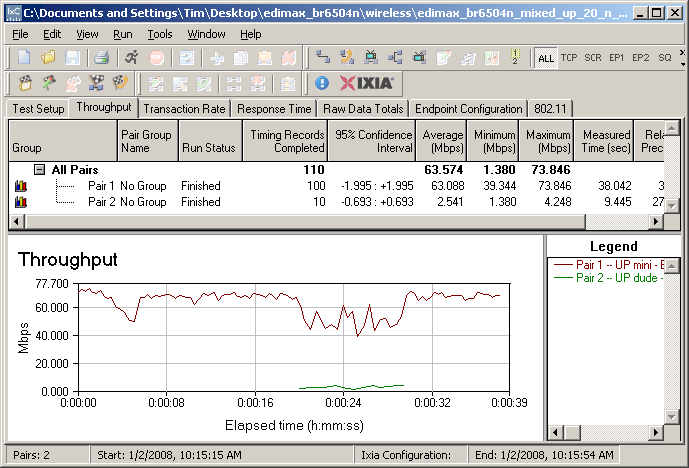
Figure 16: Mixed 11n, 11g STAs – Uplink, N starts first
The results show familiar behavior: the 11g STA gets knocked down a lot (3 Mbps, in this case), while the 11n STA takes about a 50% throughput hit.
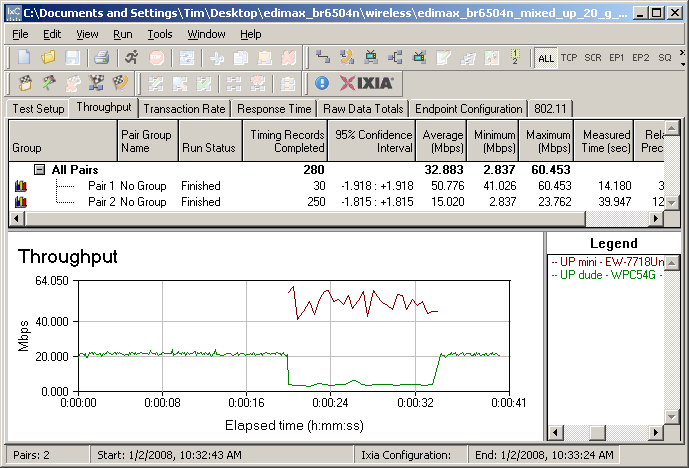
Figure 17: Mixed 11n, 11g STAs – Uplink, G starts first
When running downlink, the 11g STA does a lot better, getting reduced only to about 10 Mbps. (Downlink plots are available: N first, G First.)
Legacy Neighbor WLAN Tests
My last set of tests checked the Clear Channel Assessment (CCA) mechanism that is supposed to ensure "neighbor friendly" operation with legacy WLANs. (See this page for an explanation of CCA).
For this test, I configured the 6504n as an AP, set to Auto 20/40 mode, Channel 1 and no encryption. This made Channel 1 the primary channel and Channel 5 the extension.
I then set up a second wireless LAN using a Linksys WRT54G router (original rev) and WPC54G V3 CardBus card. The WRT54G had most recent firmware and was set to its default Mixed mode and Channel 5—the extension channel. I also operated it as an AP and connected it to the same switch that the 6504n was connected to.
Two IxChariot throughput.scr scripts were used to drive traffic to both 11n and 11g test pairs. I tested both uplink and downlink traffic and alternated between having the 11n and 11g WLANs start first. (If you need a diagram of the test setup, this one showing a similar test setup should give you the basic idea.) I also used the Cognio Spectrum Expert to monitor spectrum use.
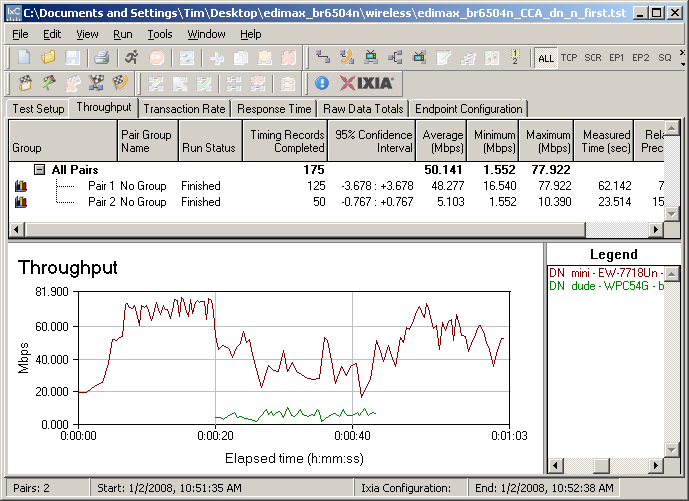
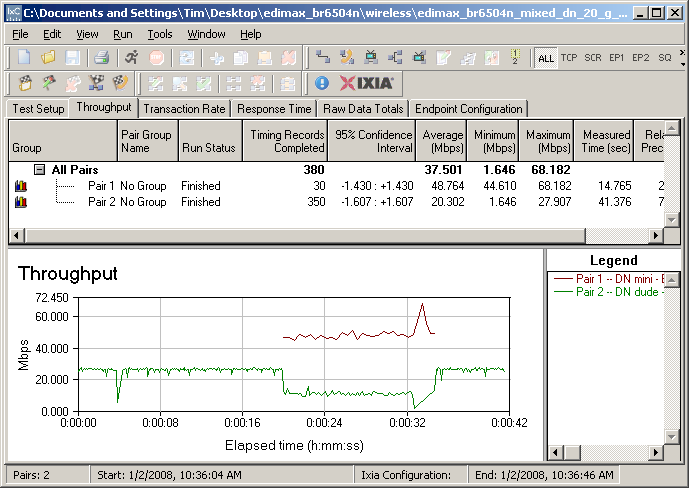
Figure 18: CCA Test – Downlink, N starts first
The 6504n didn’t set any new standards for "legacy friendly" behavior, but did have different performance in up and downlink directions. Figure 18 shows that the 11g WLAN gets to stay on the air, although at significantly reduced performance.
My monitoring of the spectrum during the test run showed that the 6504 kept using both channels 1 and 5. But there must have been some packet-by-packet adaptation that allowed the 11g WLAN to keep operating, as I’ve seen with some other products.
Figure 19 shows a very different story with both WLANs running uplink. This time, when the 11g WLAN goes active, the 11n WLAN essentially goes off-air. You can also see that even when the 11g WLAN stops transmitting, it takes around 20 seconds for the 6504n to resume transmission.
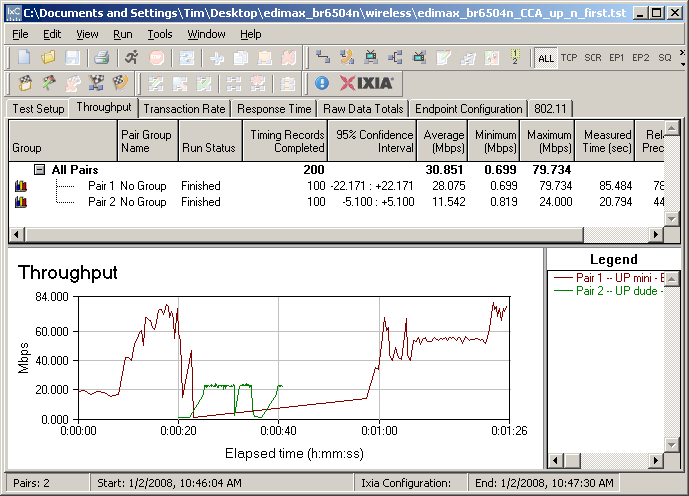
Figure 19: CCA Test – Uplink, N starts first
I also started the 11g WLAN first and saw similar performance. So, once again, I haven’t seen a draft 11n router statically fall back to 20 MHz mode when encountering a legacy WLAN in its extension channel. It also looks like Ralink has some work to do for handling neighboring legacy wireless networks.
Closing Thoughts
The 6504n is suprisingly good for a 100 buck draft 11n router, with a fast, solid routing section and no throughput penalty if you can’t run with WPA2 encryption. You also get the ability to control the amount of bandwidth used in both up and downlink directions and can throttle down throughput by application, user or both. And if you’re looking for bridging and repeating support, the 6504n delivers there, too.
On the downside, you don’t get a gigabit LAN switch, which should be included in any draft 11n product. And, while I can’t directly compare my wireless test results to the other draft 11n products I’ve tested, I think the 6504n falls a bit short on throughput vs. range. The user interface can also use a bit of work and the logging and documentation, as well.
If you want draft 11n on the cheap, there are plenty of options below $100. So if Edimax wants to be the low-price draft 11n leader, it has plenty of competition to beat.