

Introduction
| At a Glance | |
|---|---|
| Product | ADTRAN NetVanta (3120) |
| Summary | Full-featured small business router with built-in managed 10/100 switch, QoS and 5 IPsec VPN tunnels |
| Pros | • VLAN and Switching Functionality • Integrated reporting and monitoring tools • Multiple Routing Protocol Support • Integrated Access Point Control |
| Cons | • Web GUI doesn’t access all functions • No bundled SSL VPN or IPSec Client Software • 10/100 vs. gigabit LAN |
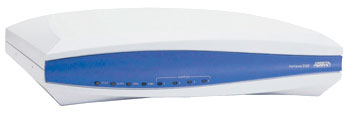
ADTRAN’s NetVanta line is a range of business-class network products designed to securely support multipurpose networks in home, medium, and large enterprise networks. In this review, we’re looking at the NetVanta 3120, which ADTRAN refers to as a fixed-port router and is the company’s entry-level router.
The sweet spot for the 3120 is in a smaller network, such as that depicted in Figure 1 below. The 3120 has a single WAN port to connect to Internet cable or DSL services and (4) 10/100 LAN ports to share that connection to multiple devices.
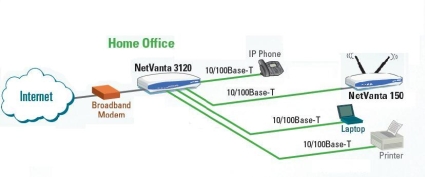
Figure 1: NetVanta 3120 in use
Physically, the NetVanta is rather unassuming. It is housed in a white and blue plastic case, measuring 9.25”W x 6.6”D x 2.25”H. The power supply is external, but there is a power switch on the back panel.
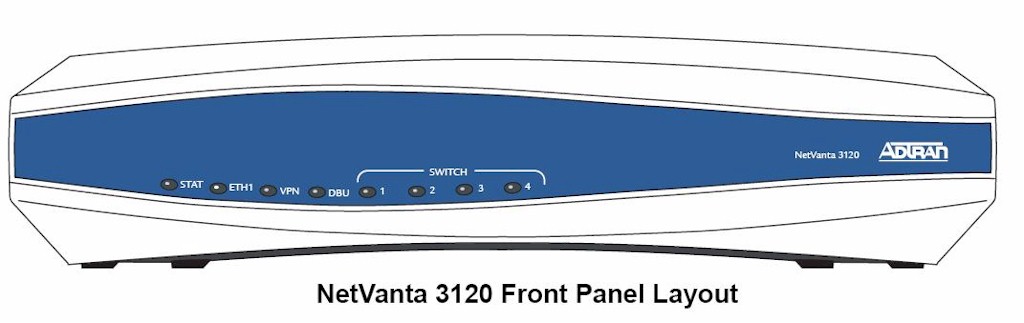
Figure 2: Front panel
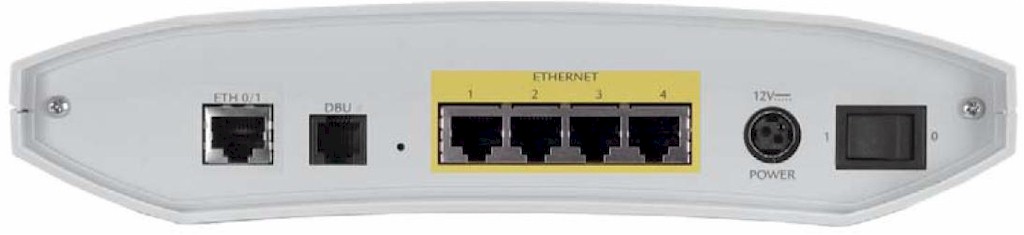
Figure 3: Rear panel
Internally, the 3120 runs a Broadcom BCM6349 residential gateway CPU with 64MB RAM and 32MB Flash. We’ve put together this slideshow with a good look at the internal components and screenshots.
Configuration
The 3120 is configurable via both a web GUI (Figure 4) and command line interface (CLI, Figure 5). I found ADTRAN’s Web GUI about average in terms of web utilities for a router, although documentation on the GUI is limited.
Figure 4: Web Admin GUI
For those comfortable with CLI configurations on a router, the ADTRAN Operating System (AOS) is similar to Cisco’s IOS, with a lot of the same commands and key stroke combinations. ADTRAN provides a 2600+ page PDF manual covering the CLI-based ADTRAN Operating System (AOS) in detail.
The ADTRAN CLI is less taxing on the router’s CPU for configuration and management of the device. Further, using the CLI for configuration is also considered a security best practice, as a Web GUI not only simplifies things for internal users, but hackers as well.
The CLI can be accessed via Telnet or SSH, with SSH considered a best practice for its security. I used Putty, a free Telnet and SSH terminal emulator, to connect to the 3120 via both Telnet and SSH (Figure 5).
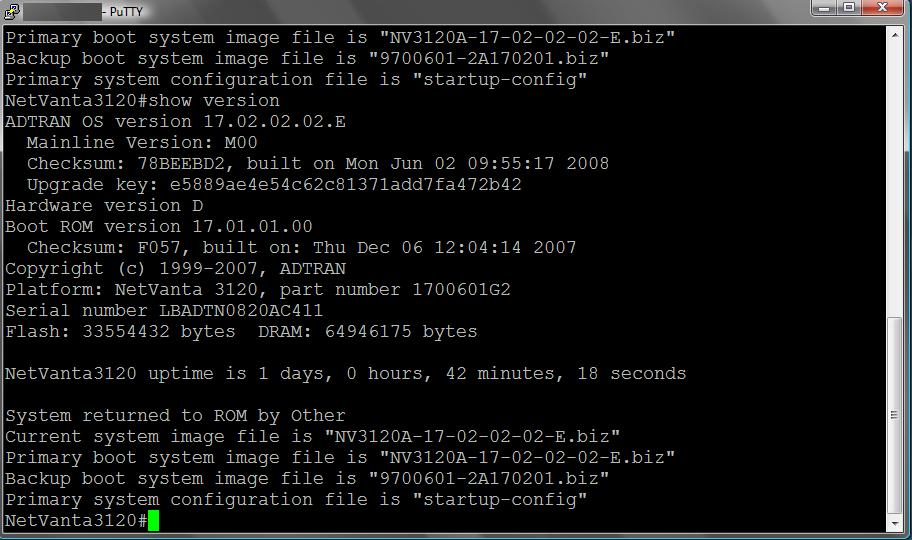
Figure 5: CLI via SSH
I used the GUI for my setup and testing, with its main menu bar on the left, expandable with more options provided based on the submenu selected. Table 1 provides a matrix of the GUI menu options.
| System | Data | Monitor | Utility |
|---|---|---|---|
| Get Started | Switch | Voice Quality | Port Mirror |
| System Summary | Router | Traffic | Configuration |
| Public Interface | Firewall | Firmware | |
| Private Interface | Wireless | Logging | |
| Password | VPN | Debug | |
| IP Services | Network Monitor | Troubleshooting | |
| DHCP Server | URL Filter | 2-way ping | |
| Hostname/DDNS | Reboot | ||
| LLDP | Factory Default | ||
| SNMP | Telnet | ||
| Connectivity |
Table 1: Web GUI structure
For the most part, I was able to configure and enable the options I wanted to test via the GUI. However, there is minimal help documentation in the GUI, and I found I had to do a lot of back and forth configuring and checking before I got the desired functionality.
Further, some of the 3120’s functions are configurable only via the CLI, such as Border Gateway Protocol (BGP). Another key issue with the GUI is saving changes. Changes to the 3120 via the GUI require a click on "Apply" and a second click on "Save" so they’ll persist through a reboot or power cycle of the router.
Features
The opening view into the NetVanta 3120 is a useful live display of key details which automatically refreshes every 5 seconds. Details including uptime, memory, CPU utilization, storage space, and status of all physical interfaces are presented, as shown in Figure 6. Interestingly, the System Information screenworked with IE6.0 and Safari, but not Firefox 3.0.
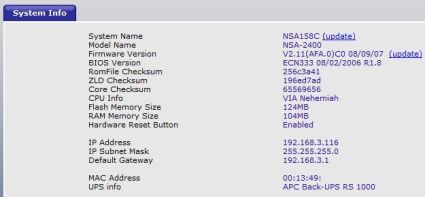
Figure 6: System Information screen
The System menu also has a Getting Started menu option, which will walk you through configuring the WAN interface, adding VLANs, setting up routing protocols (RIP and OSPF) and prompting you to save your selections. But I took the manual route and configured things individually.
The WAN interface, listed as the "Public" interface, supports Ethernet connections common to cable ISPs, or PPPoE connections common to DSL. I had no problem connecting the 3120 to Time Warner Cable and getting on line. The 3120 also includes a client for DynDNS.org, to keep your dynamic public IP address pointed to a domain name.
The Private Interface submenu is the VLAN menu, as shown in Figure 7. VLANs can be added in this section along with the IP address for each VLAN interface on the router. By default, the Private interface is VLAN1.
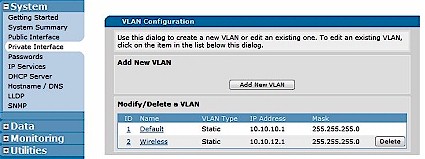
Figure 7: VLAN Configuration
The 3120 can function as a DHCP server for multiple different subnets/VLANs. I added a second DHCP pool for the Wireless LAN’s subnet (10.10.12.0/24), shown in Figure 8, so wireless devices could be differentiated from other devices on the network based on IP addresses.
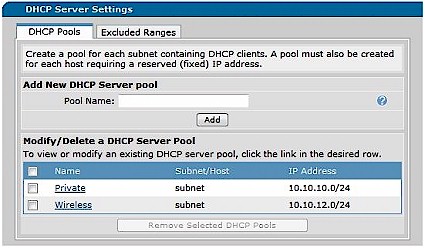
Figure 8: DHCP Pools
Additional options in the System menu include support for SNMP (v1, v2c, v3), with email notification capability and Link Layer Discovery Protocol (LLDP). LLDP is a vendor-neutral Layer 2 protocol allowing devices to communicate capabilities, device type, and VLAN information.
Switching and Routing Options
For a router with only 4 switch ports, the 3120 has significant Layer 2 switching features, including support for VLANs, 802.1q trunking, link aggregation, spanning tree protocol (802.1d and 802.1w), and port based security. In addition, QoS parameters can be applied based on CoS and DSCP markings and traffic can be managed using Weighted Round Robin and Priority Queuing. I tested VLAN functionality in conjunction with the Access Point which I’ll cover in the Wireless section.
Even with a dumb switch connected to one or more of its ports, the 3120’s VLAN features allow for separating various devices into different networks and applying different controls such as prioritization or firewall restrictions based on subnet or VLAN.
A simple strategy with the 3120 would be to define a separate VLAN for each switch interface, and connect unmanaged switches to each of the 3120’s LAN ports. This would be a cost effective way to run up to 4 separate VLANs, while using inexpensive Layer 2 switches. On a more advanced scale, a 3120 connected to one or more managed switches that support VLANs and 802.1q trunking can be the hub of an even more sophisticated small network.
The 3120’s routing features are impressive. Static and dynamic RIP routing is supported by most small network routers today, yet the 3120 also supports Open Shortest Path First (OSPF) and BGP (Border Gateway Protocol). OSPF and BGP are non-proprietary and powerful routing protocols, with OSPF useful for passing route updates between routers within an organization, and BGP for passing route updates between routers of different organizations.
Figure 9 is a screen shot of the 3120’s route table showing eight routes of types Other, Connected, and Static. Routes learned through a dynamic routing protocol such as RIP, OSPF, or BGP would be listed with that protocol as its type.
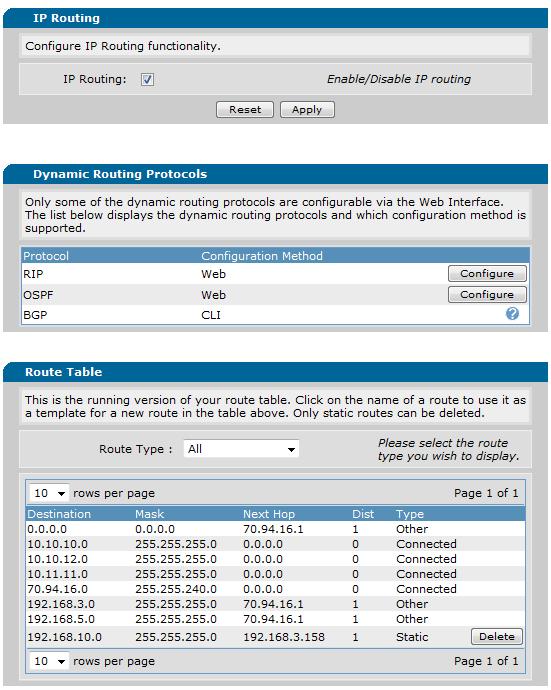
Figure 9: Routing screen
The top "Other" route is the default route for general Internet traffic, while the first three "Connected" routes are internal routes for VLAN1 and 2, as well as a “loopback” interface I created. The fourth Connected route is for the WAN interface, the two Other routes are the VPN tunnels, and last is a Static route I entered to route traffic through another router on my LAN.
“Loopback” interfaces are virtual interfaces that are useful in routing protocols and network testing since they can be pinged but are not susceptible to circuit or network failure.
Firewall
The 3120 has a very capable firewall supporting Access Control Lists (ACLs), Access Control Policies (ACPs), NAT, and Stateful Packet Inspection (SPI). ACLs are used to permit or deny specific types of network traffic based on origination and destination IP addresses and ports. In conjunction with VLANs and separate subnets, ACLs can be used to control not only the traffic that can enter the network, but also traffic within the network.
To enable remote access to the 3120, an ACL has to be created and the Access Policy for the Public interface has to edited, which can be accomplished through the GUI. Figure 10 shows an Access Policy where I’ve enabled remote access through the Public/WAN interface for HTTPS and SSL protocols.
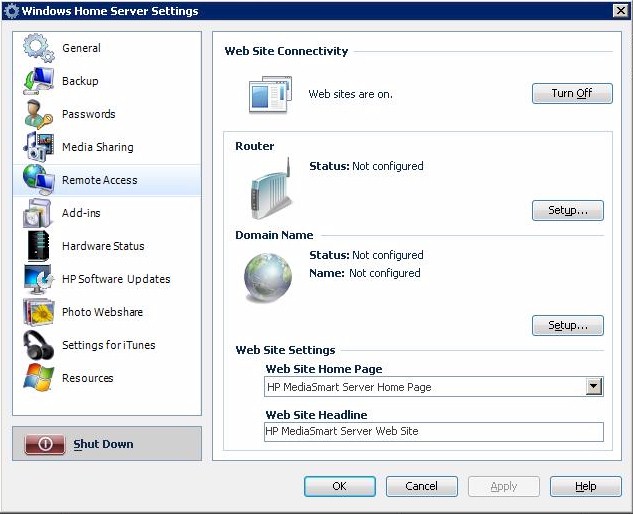
Figure 10: Remote Access enabled
Applying and saving these configurations resulted in the following lines being added to the running configuration, viewable in the CLI with the show run command. This is a good way to start learning AOS commands.
ip access-list extended web-acl-8
remark Remote Access
permit tcp any any eq https log
permit tcp any any eq ssh log
ip policy-class Public
allow list web-acl-8 selfinterface eth 0/1
interface eth 0/1
access-policy Public
Access Control Policies can be used in conjunction with ACLs for port forwarding. This is an area where you’ll probably want to use the CLI, since the Web GUI has some limitations. For example, the way to set up port forwarding in the GUI is to run the Firewall Wizard. But the problem I had with the Firewall Wizard was that it consistently disabled incoming and outgoing VPN traffic, forcing a reconfiguration of settings for restore full VPN connectivity.
I also wanted to forward TCP port 5001 traffic through the 3120’s Public (WAN) Interface to a PC on the LAN side. An extended ACL is needed to permit traffic to the IP address/DNS of the WAN interface and corresponding port. The commands are as follows:
ip access-list extended dougsacl
permit tcp any hostname (mydyndns.com) eq 5001 log
The log keyword at the end of the above statement triggers a log entry every time the ACL is activated. In addition to this ACL, traffic to port 5001 has to be mapped through the NAT function of the router. This is achieved with an entry to the ACP defined for the Public Interface. The statement below tells the 3120 that traffic matching the ACL dougsacl should be forwarded to the PC with the IP Address 10.10.12.11.
ip policy-class Public
nat destination list dougsacl address 10.10.12.11
VPN
The 3120 supports up to five IPsec Site-to-Site VPN tunnels. It also supports IPsec Client connections, but does not support SSL Client VPN connections. I was disappointed to find that ADTRAN doesn’t include even a single license for IPsec Client VPN software with the 3120, since I have seen less expensive routers that do.
In my testing, I configured the 3120 to run IPsec Site-to-Site VPN tunnels tunnels to both a Netgear FVS336G router and a SonicWall TZ190W, simultaneously. The NetVanta VPN Menu has both a Wizard and a manual option for configuration. But to set up a static connection to a remote Dynamic DNS domain, I found it necessary to use the manual configuration option, since the Wizard would take only an IP address for the remote Peer Address.
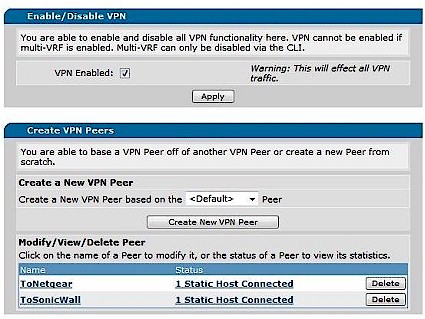
Figure 11: VPN Peer configuration
VPN configuration took a bit of trial and error to find the right combinations. To enable the ADTRAN-Netgear Site-to-Site tunnel, I set up a static VPN Peer to the Dynamic DNS address of the Netgear. The tunnel came up using Aggressive Mode for IKE (Internet Key Exchange), Domain Names for Local and Remote Identification, and a Preshared Key for authentication.
IPsec configurations were flexible, however, and I had success with PFS (Perfect Forward Secrecy) enabled or disabled, 3DES or AES encryption, as well as MD5 or SHA-1 hashing algorithms. Of course, each of the options had to match on both the ADTRAN and Netgear. Figure 12 shows the configuration screen where IKE and IPsec options are selected.
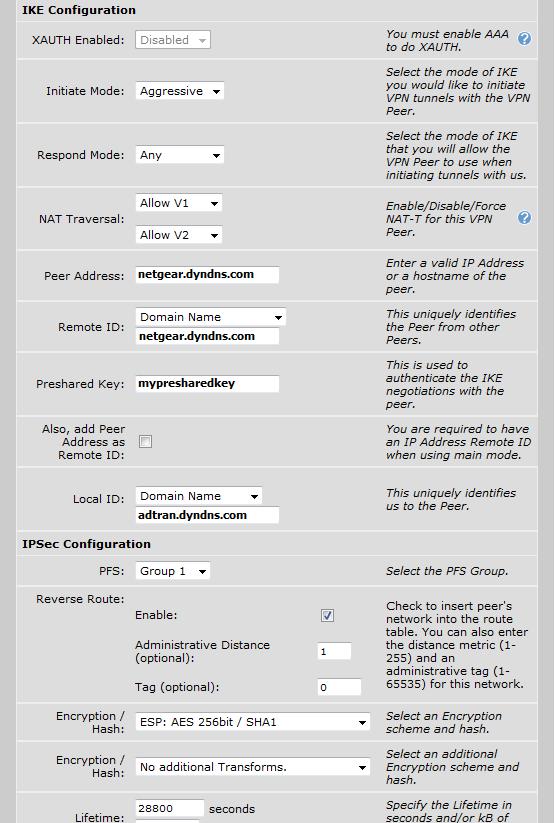
Figure 12: IKE and IPsec settings
To enable the ADTRAN to SonicWall Site-to-Site tunnel, I tested the same Phase 1 and Phase 2 settings as with the Netgear, but could only get the ADTRAN-SonicWall VPN tunnel to come up using AH (Authentication Headers) instead of ESP (Encapsulating Security Payload) for the Phase 2 configurations. With ESP configured on both sides of the ADTRAN-SonicWall tunnel, Phase 1 was successful but Phase 2 negotiation failed.
Wireless
The NetVanta 3120 can perform as a wireless access controller to integrate with multiple ADTRAN access points such as the dual-band NetVanta 150. I like the idea of using separate access points with an integrated access controller in the router for multiple AP installations. So ADTRAN sent a 150 along with the 3120 so that I could check out the wireless admin functions.
Installation of the AP was plug and play. I enabled the Access Controller checkbox in the 3120’s Wireless submenu to allow the 3120 to dynamically detect the AP, then connected the AP to power and one of the 3120’s switch ports.
Note that the AP doesn’t need an IP address, since communication with the router is fully functional at Layer 2 (MAC address). Further, even with an IP address, the AP is configured via the router’s GUI. In a network running multiple APs, this is a nice efficiency instead of managing multiple APs separately.
Once the AP is detected, the wireless 802.11a and 802.11b/g radios need to be enabled, as shown in Figure 13. From there, configuring the SSID and security parameters are required to enable Wifi access Security options include WEP, WPA, and WPA2. The WPA and WPA2 options include Personal (PSK) as well as Enterprise modes with support for RADIUS and 802.1x authentication.
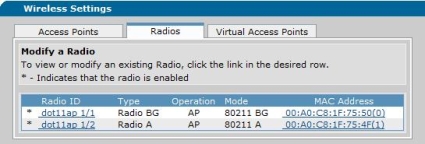
Figure 13: Enabling the NetVanta 150 radios
As I described earlier, the 3120 supports VLANs. So I configured a new DHCP pool (10.10.12.0/24), added VLAN 2, and assigned it to the AP as shown in Figure 14. I also had to configure the Ethernet port on the 3120 that the 150 was plugged into to be a member of the new VLAN. Finally, the 3120’s firewall had to be modified to allow members of this new VLAN to access the Internet, which is done through the Firewall Wizard, discussed previously.
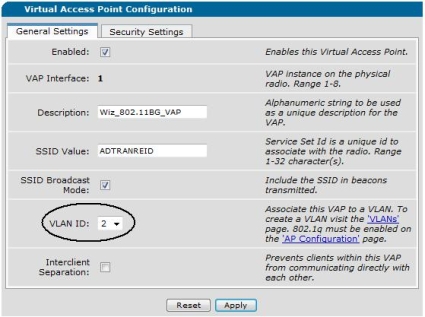
Figure 14: Assigning the AP to a VLAN
Tools
The 3120 has a wide array of network tools for monitoring and troubleshooting. Network Monitoring can be performed within the 3120 itself via various different tests, such as an HTTP check of a device. For example, I set up a basic probe to check the web page of my network printer over the VPN tunnel (Figure 15).
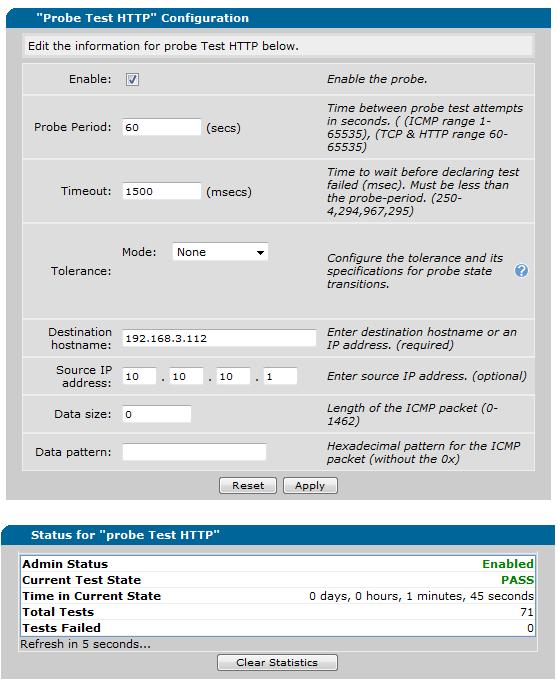
Figure 15: HTTP Probe test
The Network Monitoring menu has more sophisticated options and can be configured to respond to single failures, all failures, or some volume or ratio of failures. Upon detecting a failure, the route table can be updated to send traffic to a different destination as appropriate.
The 3120 has additional traffic monitoring tools, including URL filtering to track the most commonly visited web sites on 15 minute, hourly, and daily intervals. RTP monitoring is an option for monitoring VoIP quality. Various other IP flows can be tracked, with the option to graph traffic flows such as the 24 hour usage report shown in Figure 16.
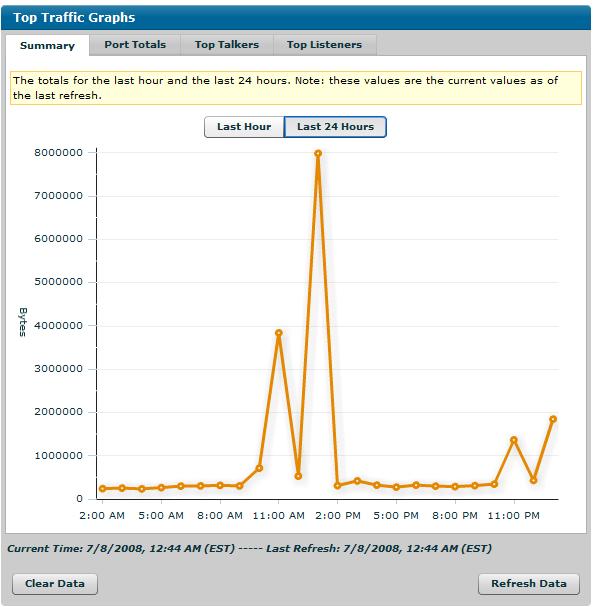
Figure 16: Top Traffic Graph
The 3120’s Utilities menu has some nice management and troubleshooting tools. Port mirroring is a nice feature, allowing remote packet captures to be run on traffic flowing through another port. Most routers have the capability to send a ping to a destination IP. But the 3120 allows you to send a ping to a destination IP and source that IP from any of the available interfaces.
RoutingPerformance
We put the 3120 through our standard set of router tests using IxChariot and the results are summarized in Table 2.
| Test | Result |
|---|---|
| WAN to LAN | 29 Mbps |
| LAN to WAN | 33 Mbps |
| Total Simultaneous | 32 Mbps |
| Maximum Simultaneous Sessions | 180 |
Table 2: Routing test results
Figure 17 is a screenshot of the Router Chart WAN to LAN throughput rankings at the time of this review, filtered to show only routers with built-in VPN endpoint features. The 3120 falls right in the middle of the pack with just shy of 30 Mbps throughput. Although it’s not the fastest IPsec router available, 30 Mbps should be fine for most business Internet connections.
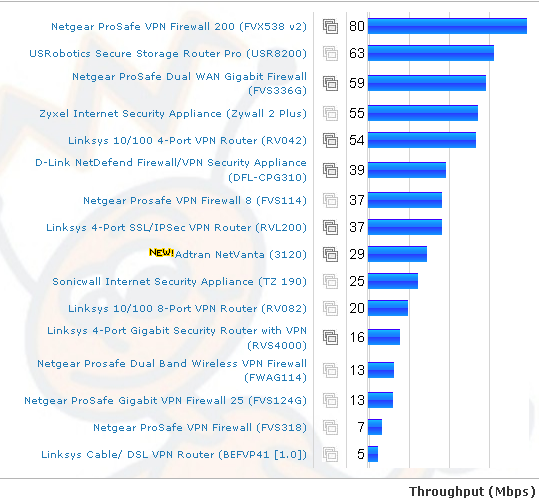
Figure 17: WAN to LAN throughput comparison – Tested VPN routers
VPN Performance
I did some real world testing to evaluate the 3120’s IPSec VPN performance. The router was connected to a cable ISP (TimeWarner) with measured download/upload speeds of 6838 / 493 Kbps and the Netgear was connected to a fiber ISP (Verizon FIOS) with measured download/upload speeds of 18809 / 4309 Kbps. I used speakeasy.net to measure the ISP speeds.
The ADTRAN was located near Chicago and the Netgear back in my lab in New England, for a total distance of over 1000 miles. I used Jperf to run default TCP throughput tests over the tunnel between the ADTRAN and the Netgear configured with 3DES encryption (For more details on testing using Jperf , check out this article.)
Running a Jperf test from a PC behind one router to the other is going to limited to the ISP’s upload speed on the side of the PC acting as the client/transmitter in the Jperf test. So a good result would be throughput equal to or just under the measured upload speed of that ISP connection.
Based on the speakeasy.net measurements, good results would be throughput from ADTRAN to Netgear of up to 493 Kbps and from Netgear to ADTRAN of up to 4309 Kbps. Table 2 summarizes my test results.
| Direction | ISP Upload | Throughput |
|---|---|---|
| ADTRAN-Netgear | 493 Kbps | 459 Kbps |
| Netgear-ADTRAN | 4309 Kbps | 2397 Kbps |
Table 2: VPN test summary
I ran the test multiple times in both directions and saw throughput from the ADTRAN to the Netgear between 458-460 Kbps, while throughput from the Netgear to the ADTRAN between 2369-2421 Kbps. The 458-460 Kbps throughput from the ADTRAN to Netgear is good, since the ISP connected to the ADTRAN peaks at 493 Kbps upload.
But I expected the 2369-2421 Kbps measured throughput from the Netgear to the ADTRAN to be higher with an ISP connection that peaked at 4309 Kbps upload. However, it appears that the 3120 is the limiting factor with around 2.4 Mbps tunnel throughput using 3DES encryption. On the other hand, because the test was not done on a private LAN, the lower speed could be due to ISP/Internet congestion or rate limiting unrelated to the 3120.
Figure 18 shows Jperf output from a test using the PC on the faster ISP connection.
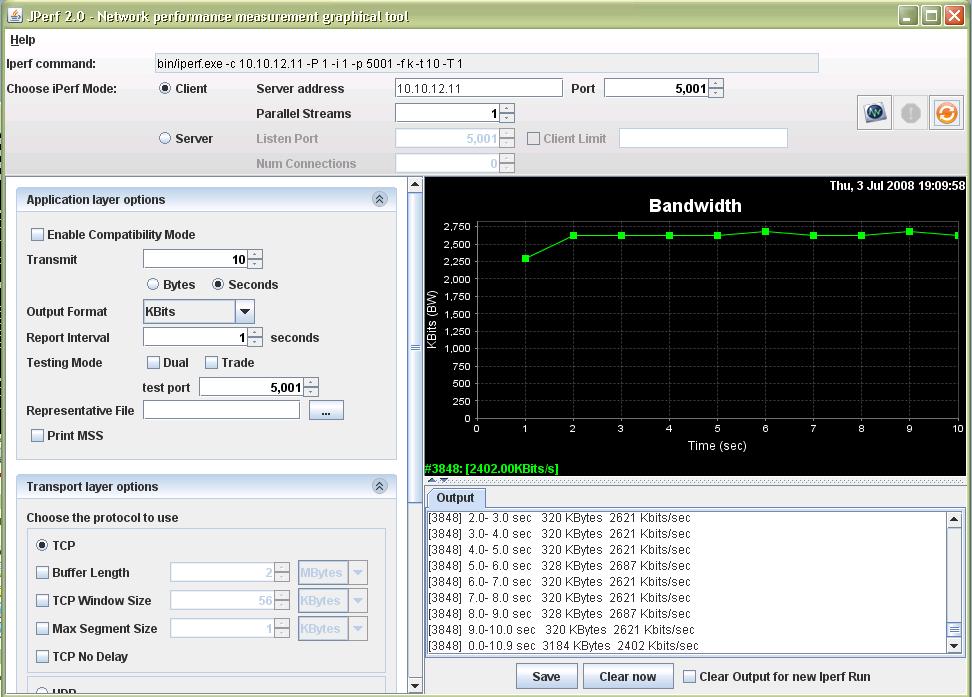
Figure 18: Jperf Ipsec test screen
A more serious problem that I encountered during testing was that the tunnels from the ADTRAN to both the Netgear and SonicWall did not remain continuously connected. I had to restart the VPN connections several times during my evaluation to restore connectivity.
Unfortunately, the 3120’s web GUI doesn’t have an effective means to stop and start a VPN tunnel, so I restarted the connections from the Netgear and SonicWall, or rebooted the 3120. Rebooting the 3120 was an effective means of restoring the tunnels, but obviously not practical in production.
The ADTRAN 3120’s reboot menu option indicates a reboot takes about 60 seconds. But my experience was that reboot and full restoration of Internet and VPN connectivity was closer to 120 seconds. The end result of my testing is that Site-to-Site VPN with other IPsec capable routers works. But settings may be limited with some brands, such as I experienced with the ADTRAN-SonicWall connection.
Conclusion
I put together Table 3 to try to compare the 3120 with other small-business routers with IPsec capability. The closest product in terms of features (and price) would be the SonicWall TZ190/W.
| Product | WAN Ports | LAN Ports | WAN-LAN (Mbps) |
LAN-WAN (Mbps) |
Total Thruput (Mbps) | Max Connects | Price |
|---|---|---|---|---|---|---|---|
| ADTRAN 3120 | 1 | 4 | 29 | 33 | 32 | 180 | $409 |
| Netgear FVS336G | 2 | 4 (GbE) | 59 | 58 | 56 | 200 | $255 |
| SonicWall TZ190/W | 2 | 8 | 25 | 26 | – | – | $483/ $760.00 |
| Linksys RVL200 | 1 | 4 | 37 | 39 | 39 | 180 | $133 |
| D-Link DFL-CPG310 | 2 | 4 | 39 | 45 | 50 | 96 | $227 |
Table 3: VPN router comparison
But the 3120 beats all the other routers in the table with its routing feature set that includes multiple routing protocols and VLAN capability. With the ability to run a wide array of Layer 2 and Layer 3 protocols from VLANs to OSPF, as well as its integrated access point management and numerous other features, it easily has the most network functionality of any of the routers in the table.
Of course, I would prefer to see a gigabit switch and the dual WAN ports available on less expensive routers. And for a VPN-capable router, it would also be nice to have at least one IPsec client software license included, or better yet, support for SSL VPN connectivity that simplifies tunnel setup.
But the main thing that might hold off potential buyers looking to upgrade from consumer-grade VPN routers is the 3120’s reliance on its CLI command set to get the most out of the product. Although the GUI will get you going, you’ll need to learn the AOS to get the most out of your 3120. On the other hand, experienced network jockeys accustomed to CLI-based management will feel right at home and probably be glad to be rid of a web-based interface.
Nevertheless, the ADTRAN NetVanta 3120 is the most full-featured network device I’ve had the pleasure of testing, and I didn’t cover anywhere near all this router’s features. Put a 3120 at the hub of your network and it will be a long time before you exhaust all its capability.