

The Network
With the testbed construction of Part 1 out of the way, I next turned to the task of making sure that my NAS test setup was up to the task of testing 100 MB/s products. Table 1 shows the key components of the current machine that runs iozone and that has been used to produce all test results shown in the NAS Charts to date.
| Component | |
|---|---|
| CPU | Intel 2.4GHz Pentium 4 |
| Motherboard | ASUS P4SD-LA (HP/Compaq custom) |
| RAM | 512 MB DDR 333 (PC2700) |
| Hard Drives | 80GB Maxtor DiamondMax Plus 9 ATA/133 drive with 2MB buffer and NTFS formatted |
| Ethernet | Intel PRO/1000 MT (PCI) |
| OS | Windows XP SP2 |
Table 1: Current NAS Test bed iozone computer
The first thing I had to do was to remove the throughput cap that my PCI-based gigabit NIC was imposing by switching to a PCIe-based NIC. Of course, my current NAS testbed machine didn’t have the required PCIe X1 slot, so that meant switching to a different machine.
I have only one machine with a PCIe X1 slot, but it already has an onboard gigabit NIC using an Intel 82566DM-2 PCIe gigabit Ethernet controller. The configuration of that Dell Optiplex 755 Mini Tower is shown in Table 2.
| Component | |
|---|---|
| CPU | Intel Core 2 Duo E4400 |
| Motherboard | Dell Custom |
| RAM | 1 GB DDR2 667 |
| Hard Drives | Seagate Barracuda 7200.10 80GB SATA (ST380815AS) |
| Ethernet | Onboard (Intel 82566DM-2) |
| OS | Windows XP SP2 |
Table 2: New NAS Test Bed
I actually did this work for the Gigabit Ethernet NeedTo Know – 2008 where the test setup is fully described. Figure 1 shows a composite of throughput test results for two PCI NICs with no jumbo frames and 4K jumbo frames and two PCIe gigabit NICs without jumbo frames enabled.
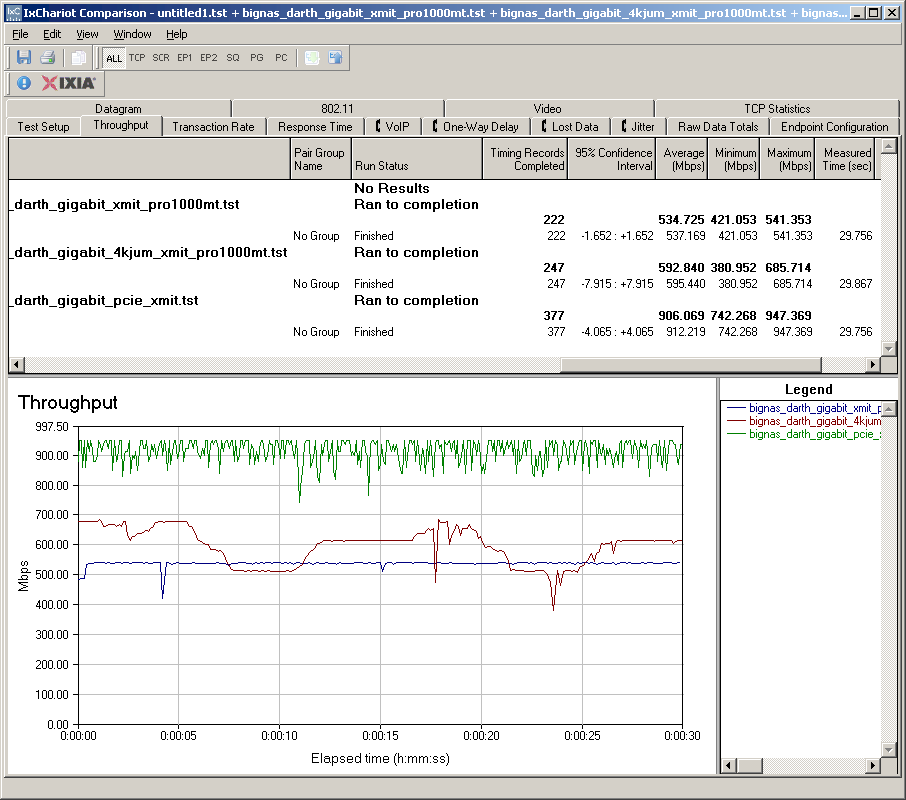
Figure 1: Gigabit Ethernet tests w/ PCI and PCIe NICs
The PCI NICs without jumbo frames limit any non-cached NAS test results to about 67 MB/s without jumbo frames and 74 MB/s with 4k jumbo frames. But the PCIe NICs, even without jumbo frames, raises network bandwidth to 113 MB/s. Although this isn’t the full, theoretical 125 MB/s of a gigabit Ethernet connection, it should be plenty for the next few years of NAS testing.
Testing the Gigabit LAN
So was this simple change enough to ensure that my iozone computer wouldn’t limit my ability to fully test 100 MB/s NASes? I didn’t have any of those around, but instead turned to the QNAP TS-509 Pro that I had recently reviewed. The 509 Pro has the most computing horsepower of any NASes tested to date combining a 1.6 GHz Intel Celeron M 420 Processor and 1 GB of DDR2 667 RAM.
A look at the comparative RAID 5 read performance NAS Chart plot (Figure 2) shows that the 509 Pro’s performance is suspiciously flat while the next three top-performing products show typical variation. It didn’t occur to me at the time, but the 509 Pro appears to be bumping up against some performance limit.
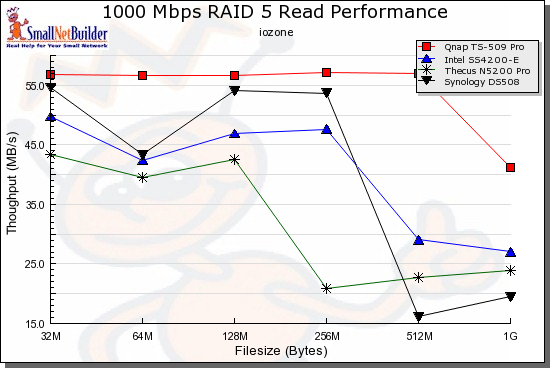
Figure 2: RAID 5 Read competitive performance – 1000 Mbps LAN
So I used the new iozone machine documented in Table 2 to run a few more tests. The TS 509 Pro was configured as it was in the review, in RAID 5 with five Hitachi Deskstar HDS721010KLA330 1 TB drives (7200RPM 3.0 Gb/s SATA 32 MB) that were provided by QNAP.
I connected up the new iozone machine and reran the tests, once with the onboard PCIe gigabit NIC and once with the same Intel PRO/1000 MT PCI-based gigabit NIC used in the old iozone machine. Figure 3 shows the results.
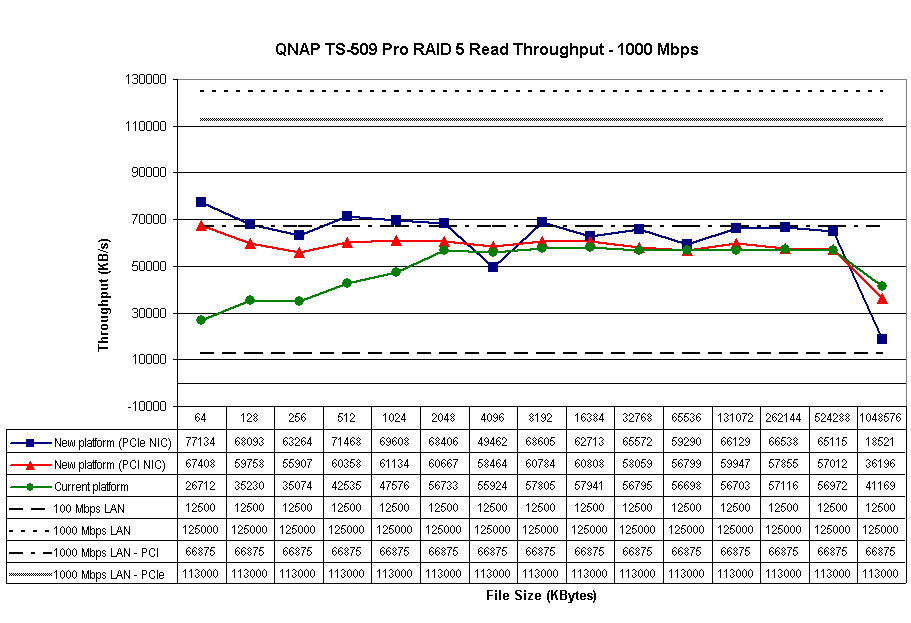
Figure 3: QNAP TS-509 Pro – Testbed iozone computer comparison
The plot also has lines for 100 and 1000 Mbps maximum theoretical throughput (12.5 MB/s and 125 MB/s) and actual results from the gigabit NIC testing shown in Figure 1 (marked 1000 Mbps LAN – PCI and PCIe). Note that jumbo frames were not used in any of the tests shown.
The two lower plot lines both use the Intel PCI-based NIC. I’m not exactly sure why the old iozone machine has lower throughput at the smaller filesizes, but remember we’re talking two very different computers here. The old, a Pentium 4 with 512 MB of DDR 333 memory and the new, a Core 2 Duo E4400 with 1 GB of DDR 667 memory.
But the throughput lines converge from filesizes 2 MB on up, showing that the additional horsepower in the new iozone machine doesn’t really affect the test outcome at larger filesizes. Note also that both lines are well below the tested 67 MB/s throughput of the PCI gigabit NIC.
The top trace is the new iozone machine with the PCIe onboard gigabit NIC. That result is closer to 70 MB/s; a gain of more than 10 MB/s over the other two runs. But it is still well-shy of the 113 MB/s of the PCIe gigabit Ethernet connection, which means that some other limiting factor is in play.
It’s the Drive, Stupid!
It was time to contact my expert in these matters, Don Capps, creator of iozone and a recognized expert in filesystems (his LinkedIn page). Don took one look at the results in Figure 3 and said "it’s the drive". It took some convincing and additional testing on my part before I convinced myself that Don was right, but he was.
Basically, drive performance specs, like too many other specs, present an optimistic picture of real-life performance. A SATA drive with a 3 Gbps interface, really has a 300 MB/s "real speed" (3 Gbps is the signaling, or clock, rate and 300 MB/s (2.4 Gbps) is the maximum data rate).
But this is really the physical bus interface speed, which applies only when the data being written can fit into the drive’s internal buffer. Although buffers have been getting larger (the 7K1000 drive has a 32 MB buffer), file sizes have been increasing even more rapidly. If you are moving around a lot of ripped video files, 32 MB of drive cache isn’t going to matter much. On the other hand, if your file sizes are smaller, drive cache can provide a significant write performance boost.
Drive data rate is ultimately limited by the speed that bits can be read / written to the drive platters, which comes down to bit density and rotational speed.
So I first turned to the spec for the Hitachi Deskstar HDS721010KLA330 drive used in the 509 Pro. Unfortunately, as Figure 4 shows, it wasn’t much help. The Interface Transfer rate is incorrectly listed as 300 Mb/s instead of the 300 MB/s that all "3 Gbps" SATA drives have (as explained earlier).
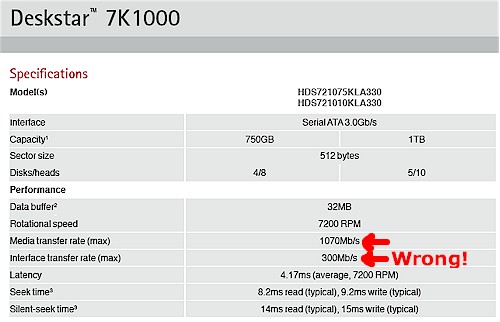
Figure 4: Hitachi Deskstar 7K1000 spec
The Media Transfer Rate describes the physical limit that I mentioned earlier and says that the fastest that data can be read / written to a single track on the disk. Since a single track doesn’t hold much data, this is going to be a very optimistic number, which it is, at 134 MB/s. This is more than twice what is shown in Figure 3.
However, in real life your data is scattered among many tracks, so the time it takes the head to move from track to track (seek time) comes into the equation. So we have to turn to real-life testing to get a more accurate measure of drive performance.
StorageReview reports the 7K1000 drive’s Maximum Read Transfer Rate as 86.9 MB/s and Minimum Read Transfer Rate as 46.4 MB/s. Since our ~66 MB/s maximum throughput in Figure 3 is between these two numbers, it looks like we are getting closer to reality.
Since both the 509 Pro and system running iozone have 1 GB of RAM, it’s impossible to find out which memory is providing the cache / buffering performance improvement. Fortunately, the iozone test machine’s 1 GB is made up of two 512 MB DIMMS. So I removed one and re-ran the test, with the results plotted in Figure 5. The difference in iozone machine RAM doesn’t appear to make a difference, with the 509 Pro’s 1 GB memory taking up the slack.
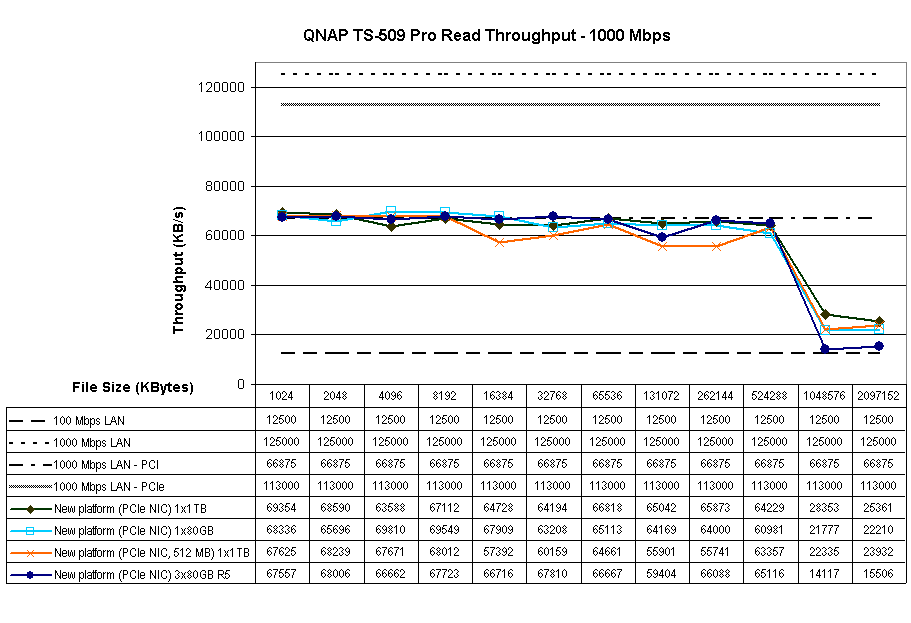
Figure 5: Single drive read throughput comparison
Actually, Figure 5 contains a couple of configuration variations so that we can explore a bit more. The light blue plot line marked "1 x 80 GB" represents performance with an 80 GB Hitachi 7K160 drive (specifically a Hitachi Deskstar HDS721680PLA380) instead of the 1 TB 7K1000 drive.
I had to go to the TomsHardware 3.5" Drive charts for the 7K160’s performance test data, so the benchmark program used is different. Toms’ reported the Maximum Read Transfer Rate as 75.8 MB/s and the Minimum Read Transfer Rate as 36.2 MB/s. However, the iozone tests show that even with the 80 GB drive, the results are virtually the same as with the 1 TB drive.
Three of the four runs were done with a single drive. So I added a fourth plot ("3x80GB R5") to see the effect of RAID 5 on read performance. Performance is virtually the same for most of the run. But once we hit the gigabyte file size, RAID 5 performance drops down to 15.5 MB/s! It also looks like the 7K1000 drive is providing a bit of performance advantage over the 7K160 drive (1×1 TB vs. 1x80GB lines), but neither is anything to write home about.
It’s the Drive, Stupid! – more
For writing, there are many caches and buffers that hide the physical limitations of the drive(s). Figure 6 shows the write results of the same group of tests. I kept the vertical scale the same so that we can see the details of the non-cached performance. The relative results are remarkably similar to the read results, with the RAID 5 configuration losing the most steam as the effects of the cache in the iozone machine and 509 Pro run out.
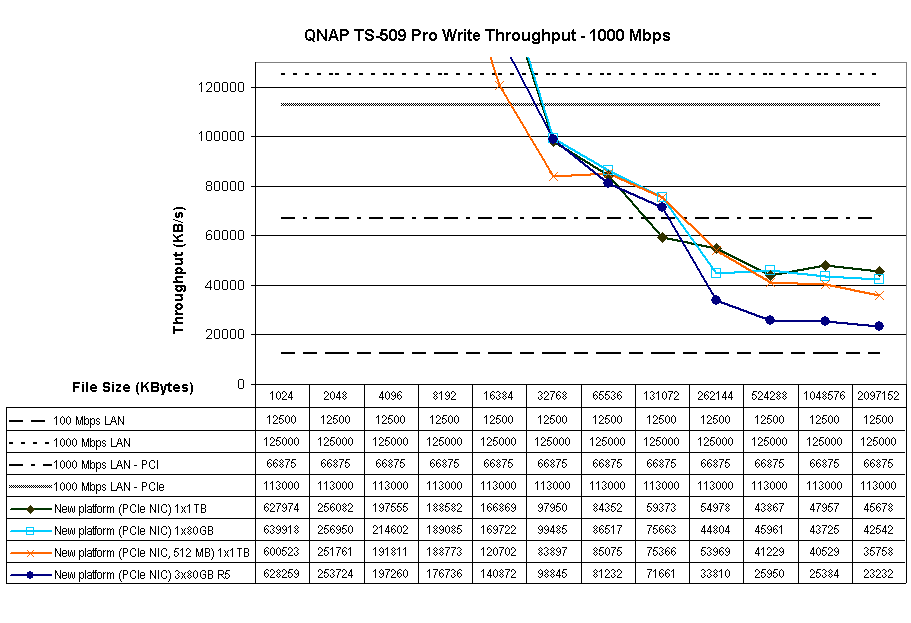
Figure 6: Single drive write throughput comparison
Closing Thoughts
The exercise of proving out my new iozone test machine turned out to be more complicated than I expected because I was dealing with two unknowns: the test system and the target system that was being tested. This meant that I had to understand the results that I was seeing, especially when they were far from what I expected. (In the end, the drastically different results were a good thing, because they challenged my assumptions and made me do my homework!)
In the end, I probably had enough compute power in the old P4 based testbed. But the change to the PCIe gigabit NIC was definitely necessary to ensure that the network connection doesn’t limit test results.
The other "lesson learned" through this exercise, that drive performance can affect NAS performance, actually was already learned through Bill Meade’s investigation a little over a year ago. The main difference between then and now is the appearance of NASes with enough compute power, memory and networking performance to reveal the limits that drive performance can impose!
Next time, we’ll see if Windows Home Server really deserves the reputation that it has garnered (from its fans, at least!) as a high performance NAS.