

Introduction
| At a Glance | |
|---|---|
| Product | Western Digital ShareSpace Network Storage System (WDA4NC40000N) |
| Summary | Four drive RAID 5 NAS with remote access service |
| Pros | • Remote web access feature • Aggressively priced • Quiet and low power consumption |
| Cons | • Low performance • Very slow RAID 5 build / recovery • No NAS to NAS or scheduled backups • WD-only drive replacement policy |
Western Digital is a major force and innovator in the world of hard drives, with its top-selling and top-performing Raptor and VelociRaptor products. And if the Pricegrabber popularity rankings are any indication, its My Book World NASes sell pretty well, too.
But in function and especially performance, the My Book Worlds are clearly aimed at first-time NAS buyers, as we found when we reviewed the product last year. WD has apparently decided to move upscale and go after more experienced home users and the SOHO, small biz crowd who want the larger capacity and robustness of a RAID 5 NAS. Unfortunately, what the ShareSpace doesn’t offer is high performance, which we’ll see when we get to the Performance tests.
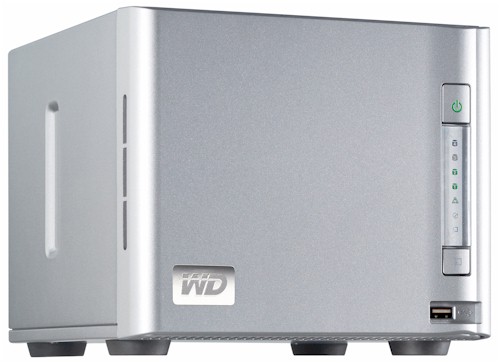
The ShareSpace presents a professional look as a compact cube dressed in all-business grey. The chassis is all metal except for the plastic front panel, which, contrary to what you might think, does not come off to provide access to the drives. For that, you loosen the two captive thumbscrews on the rear panel and slide off the cover.
Figure 1 shows a summary of the front and rear panel indicators and connectors.
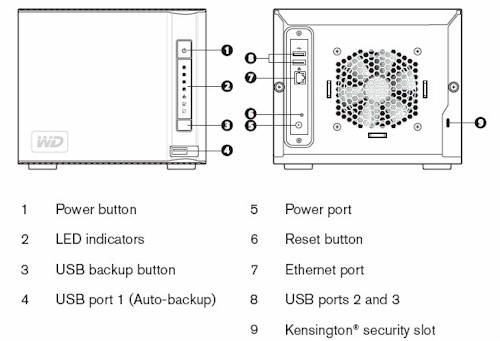
Figure 1: Front and Rear Panels
There are three USB 2.0 ports and a single 10/100/1000 Ethernet port that supports jumbo frames up to 9K. There are no eSATA or Firewire ports. The front panel power switch has the typical press-and-hold-to-shutdown function. There is no audible acknowledgement of the shutdown start, but the power light does go out when shutdown begins.
The pushbutton above the front panel USB port can initiate an automatic copy from or to a flash or USB hard drive. You press the button for one second to initiate the "from" copy and three seconds to initiate the "to".
Internal Details
Figure 2 shows the left side of the ShareSpace with the cover removed. Each of the four WD Caviar "Green" WD10EACS-00D6B0 drives (1 TB, 7200 RPM, 3 Gb/s, 16 MB) is mounted on a plastic U-shaped bracket that is even more flimsy than the one used in the Promise NS2300N and NS4300N.
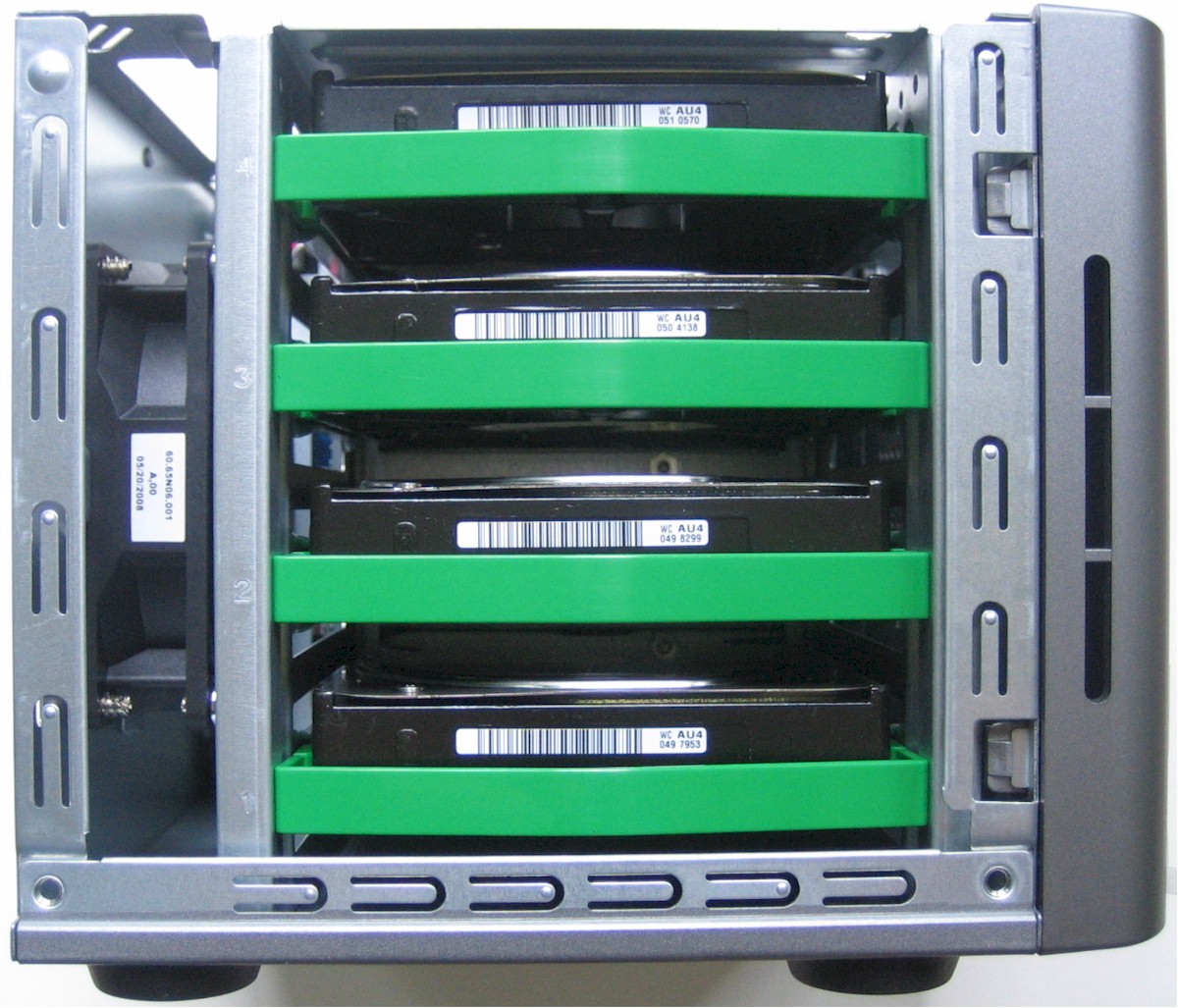
Figure 2: ShareSpace internal view – drive side
These brackets hold the drives very firmly in place; so firmly, in fact, that I thought they were somehow screwed down. But a firm yank on the flexible front strap was able to free the drives from the backplane. The straps were no use when re-inserting the drive; I had to push the drive body with my thumbs to plug them back in.
Note that the drives are not hot-swappable, which is logical given the remove-the-cover-to-access design. But this note in the "Replacing a Drive" section of the ShareSpace’s User Guide may give some potential purchasers pause:
Important: Only WD hard drive assemblies can be inserted into the network storage system enclosure.
When I asked my WD contact about this, she provided this additional information:
The system will detect and initialize WD storage. If another manufacturer’s drive is used, our system will recognize it as a foreign disk and not allow you to initialize it. If this is attempted, it does not void the warranty – it simply does not work.
It is policies like this and reports of experiences like this one with a Hammer MyShare that make BYOD NASes more attractive than diskful products. I hope that WD reconsiders this policy.
The board (Figure 2) is easily accessible on the right side of the chassis. Key components are a Marvell 88F5182 @ 500MHz CPU, 512 MB of soldered-in RAM, 16 MB of flash, a Marvell 88SX7042 4 Port SATA controller and Genesys GL850A USB Hub Controller. An unmodified EXT3 filesystem is used.
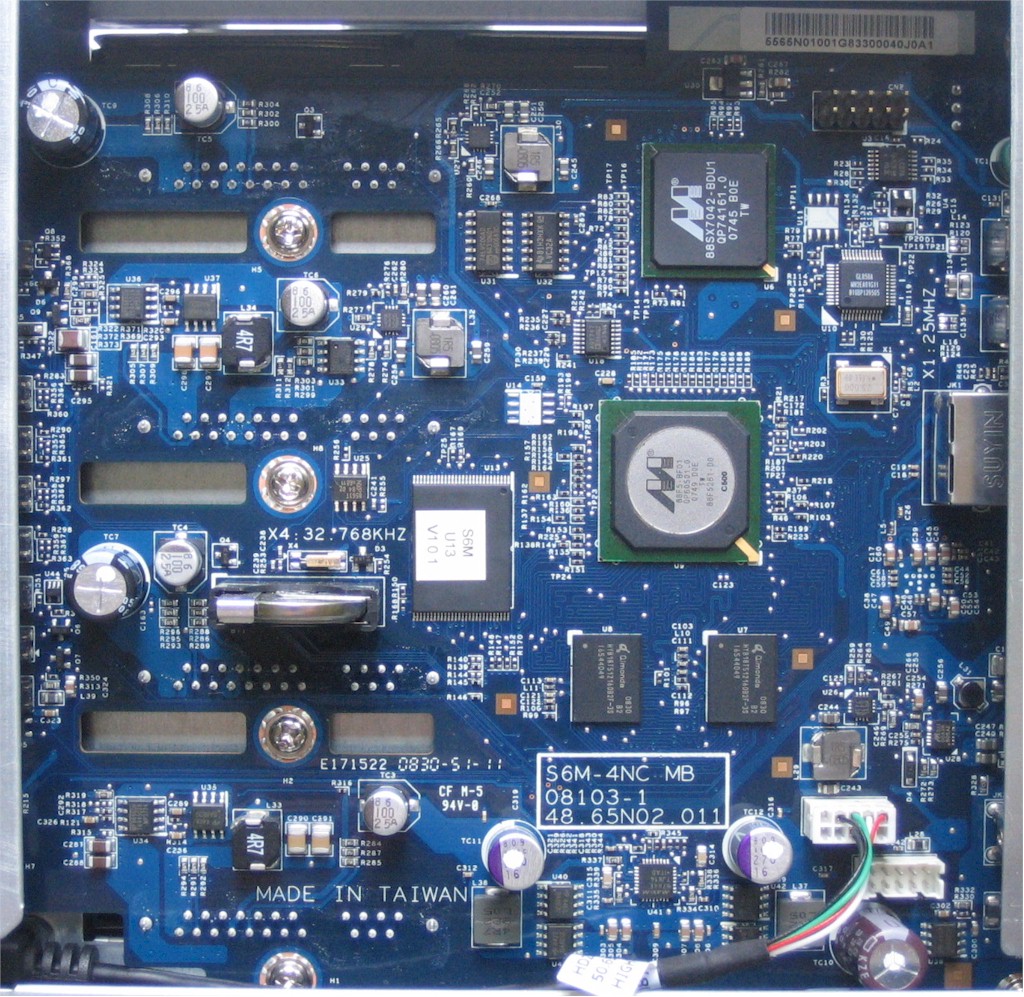
Figure 3: ShareSpace motherboard
I couldn’t find the Ethernet PHY, which I suspect is on the other side of the board. If this design is like others I have seen, it’s probably a Marvell 88E8111 or 88E8118.
Power draw was a relatively low 30W with the four "Green" drives, which reduced to 22 W when the optional HDD Standby function kicked in. You can’t set the spindown time, but he user manual says it varies from 125 to 375 seconds.
Features
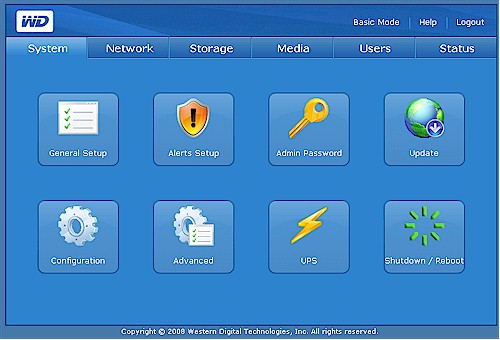
Figure 4: ShareSpace web admin – Advanced view
A run-through of most of the ShareSpace’s features can be found in the slideshow. So I’ll just summarize them here and expand on a select few.
- JBOD (span), RAID 0, 5, 10 modes
- NFS and SMB/CIFS network filesystems (no AFP)
- Active Directory and NT Domain support
- User and anonymous FTP
- User and group level permissions
- HTTP and HTTPS web administration
- "One touch" backup from and to USB-attached drive
- iTunes server
- HTTP and FTP Download manager
- Email alerts
- USB UPS shutdown support
- Remote access to shares via MioNet Web service
The feature list covers the basics, but falls short against competitive offerings for both home and small business users. Home users won’t find support for BitTorrent downloading in the Scheduled Downloads feature, only HTTP and FTP. And there is no support for general UPnP AV / DLNA media streaming in addition to the iTunes server, nor is there any photo webserving available.
The main missing feature for business users is the lack of scheduled backups, either to USB-attached or networked drives. The USB Backup feature doesn’t have a scheduled backup mode and you can’t use the Download manager to copy networked shares (unless they are served by HTTP or FTP). WD does throw in a three user license for its Anywhere Backup Windows app, which I didn’t try out.
Both home and small-biz users might miss a built-in print server, but I don’t think that’s so great an omission.
The other weakness for business users is in the RAID management features. On a positive note, each mode has an illustration to help clarify how the volume is going to be set up. But the downside is that there is no ability to configure drives in multiple volumes, or support for RAID 5 + spare. Figure 5 shows the only RAID 1 mode presented in the four-drive version of the ShareSpace, which actually looks like a RAID 10 configuration. You can’t set up a two-drive RAID 1 configuration, or limit the number of drives used in any of the modes.
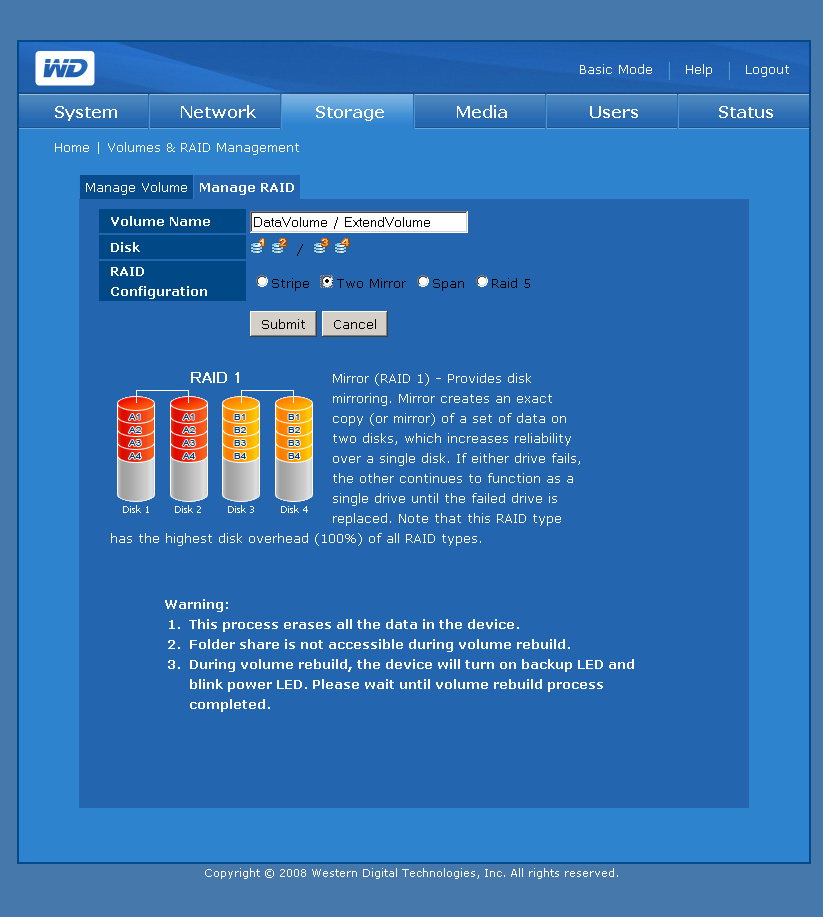
Figure 5: Manage RAID screen
I also was confused by the Manage Volume Edit and Manage RAID screens, which seem like two ways to do the same thing; i.e. create a volume. The subtle difference is that the Edit screen presents a subset of volume options, depending on the current configuration, while the Manage RAID screen presents all options.
The Manage Volume Option table shown in Figure 6 that I grabbed from the User Guide is, I think, an attempt to convey the options available. But the table is presented with no useful explanation and I didn’t find the table to be self-explanatory.
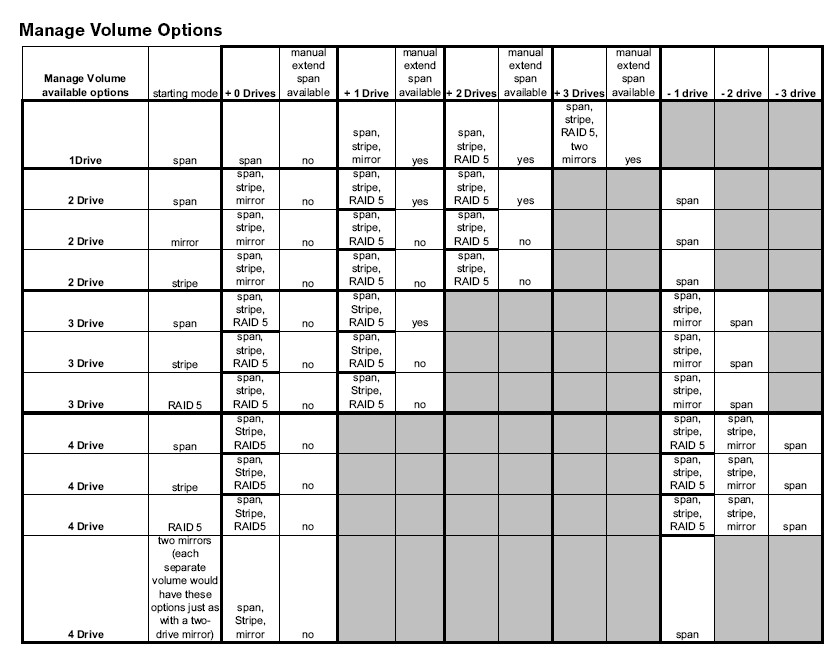
Figure 6: Manage RAID options
It appears from the table that some sort of volume migration is available, i.e. the ability to add drives and/or change RAID modes without having to lose all your data. But neither the User Guide nor marketing material specifically mention RAID migration. And the inability to limit the number of drives used in a volume makes me doubt that migration is supported.
MioNet
The last time we looked at WD’s MioNET remote access option, we didn’t have a very good experience. But that was over a year ago and shortly after WD acquired the service. I gave it only a brief look, but still encountered some startup hiccups. Figure 7 illustrates the problem.
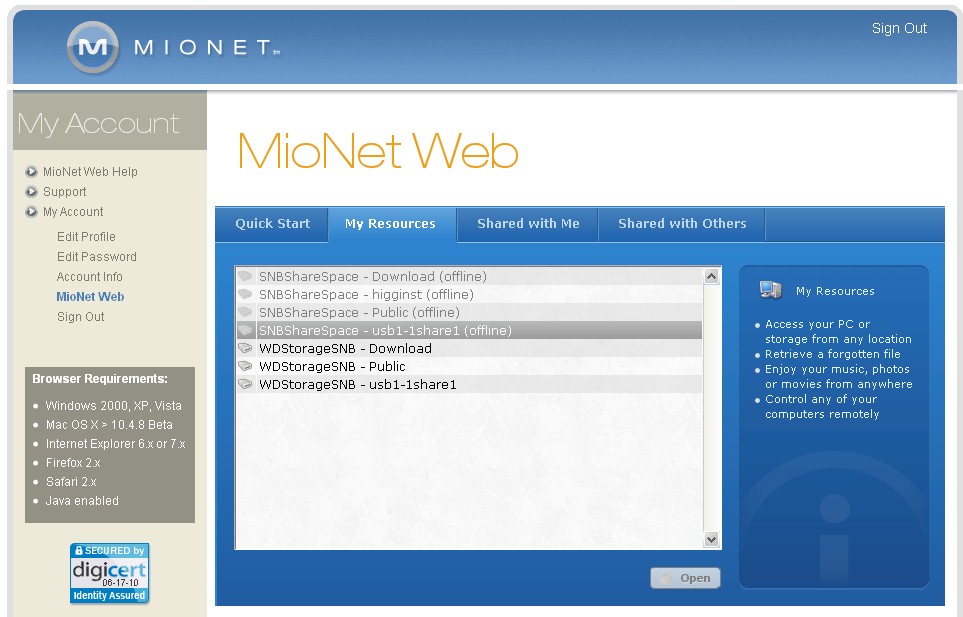
Figure 7: MioNet web access
The set of greyed-out shares in the Java applet were the first ones created when I initially set up the account. But I was never able to get them to be active and WD wasn’t able to offer any guidance. At some point when I went to give it a final try, a pop-up appeared that asked me to (if I remember correctly) choose a name for my shares, which I thought I already had done. But I entered the WDStorageSNB name anyway, which produced the accessible shares that you see in Figure 7.
With the shares now available, I was able to click on a share to open a browse window (Figure 8). Depending on the permissions on the share, you can drag and drop to file copy in both directions.
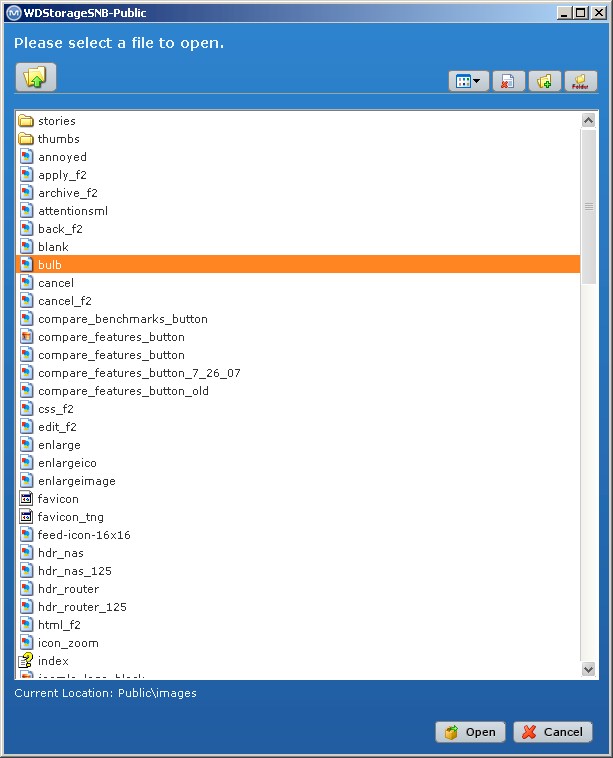
Figure 8: MioNet Web – share browsing
The view defaults to an Icon view, with Thumbnail and List (shown) alternatives available. But there is no way to set the view and it changed back to Icon view each time I entered a folder. I also couldn’t find a way to display the file type suffix.
You get the ability to access your ShareSpace’s shares for "Free for the Life of Drive" according to the Upgrade page (Figure 9). If you want the other features shown, there are monthly and yearly subscription plans available.

Figure 9: MioNet upgrade options
RAID Fail Test
The pull-the-drive test on the ShareSpace produced mixed results. After waiting for the 16 hour RAID 5 build to complete, I started a filecopy of a large folder of images, waited about 30 seconds for the copy to get underway, then pulled a drive. I had previously set up email alerts and when I checked my mail within 10 seconds or so of the drive pull, I found an email titled "HDD Status" with the following message:
HDD 2 is absent.
on Sun Sep 28 11:54:50 EDT 2008
In the meantime, the folder copy process continued uninterrupted. I had logged out of the web GUI, so then logged back in to check for failure notifications. I was pleased to find a clear indication of drive failure as shown in Figure 10. This message was presented on every page in the Web GUI until I clicked the Acknowledge button to remove it. WD deserves kudos for this, since virtually every other NAS we have tested makes the user hunt to find any indication of drive failure.
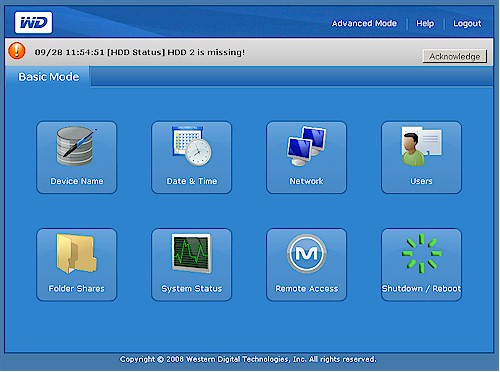
Figure 10: Drive failure alert
Since the ShareSpace does not support hot-swapping, I powered it down, re-inserted the drive, then turned it back on. When I logged back in, however, I found no indication of a problem with the RAID volume, no prompting to perform a drive rebuild and no rebuild automatically in progress. The RAID 5 volume was available, however, and I was able to resume the folder copy.
I navigated to the Volumes and RAID Management > Manage Volume screen which showed the drive as missing with a Degraded status. As I was browsing through the screens looking for a way to rebuild the volume, however, a message similar to the one shown in Figure 10 appeared, announcing that the volume was degraded. The only option presented, however, was the Acknowledge button; there was no option to start a volume rebuild.
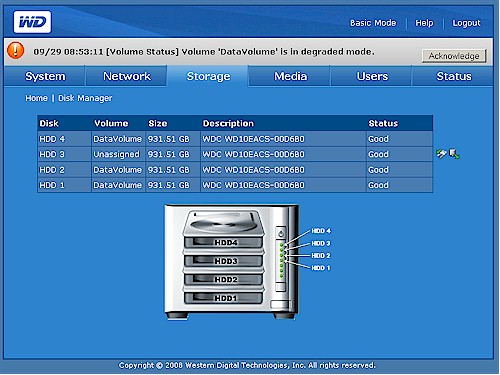
Figure 11: Degraded message and new icons
Browsing to the Storage > Disk Manager page (Figure 11, above) showed two new icons next to the failed drive (yes, that’s a different drive… I did this experiment twice). The left icon is "Safely Remove Disk" and the right was "Clean Disk". There was no guidance in the User Manual, so I tried the "Safely Remove Disk" option, which resulted in the drive being removed from the array.
So now my only option was to go back to the Manage Volume or Manage RAID pages and see what happened when I chose the RAID 5 options. Unfortunately, when I tried both options, I was warned via a pop-up that I was going to wipe all data and start a 16 – 17 hour rebuild process.
After checking with WD, it turns out that I encountered a problem similar to the one I found with the D-Link DNS-321 pull-a-drive test. In a nutshell, the odd behavior was due to my inserting the same drive (which normally would not be the case) instead of a fresh WD drive. Had I done that, WD said that the system would have automatically started a rebuild upon start up.
There actually is a way to recover from my odd situation. All I had to do was choose the "Clean Disk" icon and reboot to shart an automatic rebuild. (If you do as I did, and choose the "Safely Remove Disk" option, just reboot and you’ll get the two icons back and you can choose the "Clean Disk" option.)
Be forewarned, however, that recovery can take a very long time if you are actively changing contents on the damaged volume. I started copying a large folder during recovery and got an estimated recovery time of over 35 hours at one point! Recovery time may not seem important as long as the recovery is successful. But remember that until the recovery is complete, your volume will go bye-bye if you get another drive failure.
Performance
I used IOzone to check out the file system performance on the ShareSpace (the full testing setup and methodology are described on this page). My test unit had the latest 1.0.4 with MioNet 2.3.9.9 firmware. I tested it in RAID 0, 5 and dual-mirror modes (which I call RAID 10) with 100 Mbps, 1000 Mbps and 1000 Mbps w/ 4k jumbo frame LAN connections.
I’ll start with a comparison of write and read performance in RAID 0, 5 and 10 configurations with a 1000 Mbps LAN connection for filesizes between 32 MB and 1 GB. Figure 12 summarizes the write tests, with relative performance as you would expect.
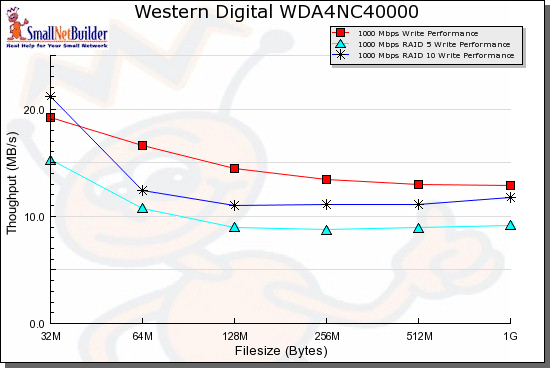
Figure 12: Benchmark comparison – RAID 5 write, 1000 Mbps LAN
Figure 13, displaying the read test summary, shows a moderate performance boost for RAID 10 mode and very little difference in RAID 0 and 5 once the test file size exceeds the internal 128 MB of RAM. It’s interesting to see read performance fall off when the test file size is equal to the ShareSpace’s 128 MB of RAM and above, while write performance is relatively flat across the same file sizes.
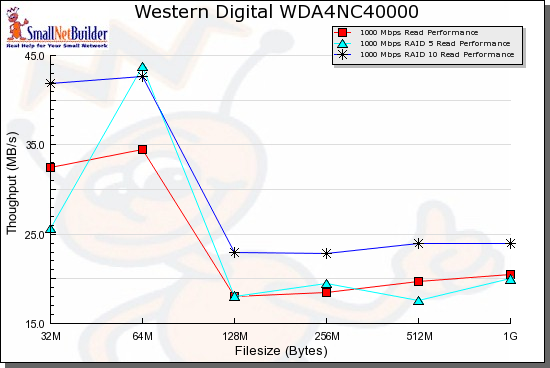
Figure 13: Benchmark comparison – RAID 5 read, 1000 Mbps LAN
The next set of plots bundle read and write results for each mode with both 1000 Mbps and 1000 Mbps plus 4k jumbo frame LAN connections. We start with Figure 14, which summarizes RAID 0 read and write performance. We can see that jumbo frames provide only a modest performance improvement.
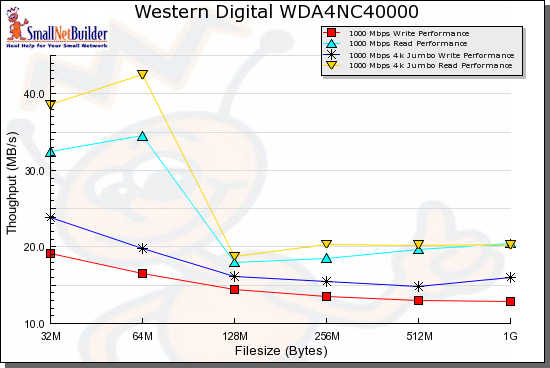
Figure 14: RAID 0 benchmark summary
Figure 15 contains the same benchmark summary, but for RAID 5 tests. The same large falloff in read performance is once again seen at the 128 MB file size.
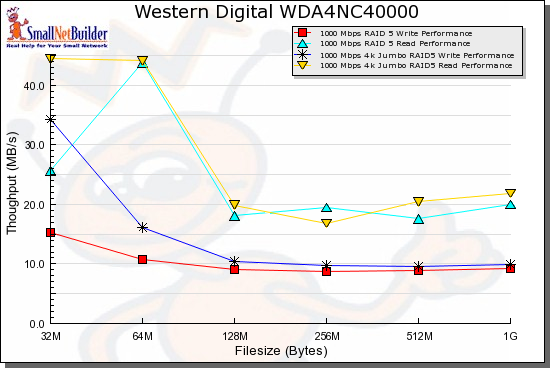
Figure 15: RAID 5 benchmark summary
Figure 16 summarizes the RAID 10 benchmarks and shows a similar pattern as the other tests.
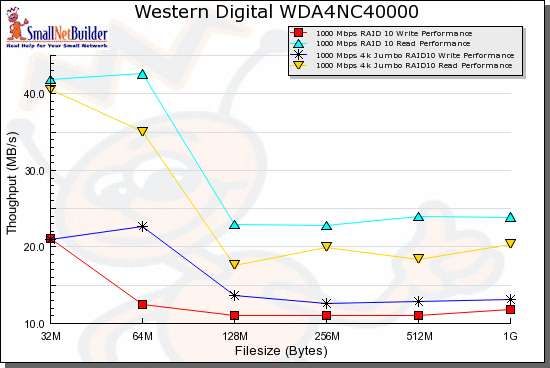
Figure 16: RAID 10 benchmark summary
Competitive Comparison
I also used the NAS Charts to compare the few diskful four-drive NASes that I have tested. I was surprised that there were so few; it seems like the trend of late is toward BYOD RAID 5 NASes. But I compared the Sharespace to the Buffalo TeraStation Pro II and Netgear ReadyNAS NV+. I also threw in D-Link’s DNS-343 to compare against a less expensive BYOD alternative.
Figure 17 is a comparison of RAID 5 write performance with a gigabit LAN connection and shows the ShareSpace with the lowest performance. This is quite surprising, since the DNS-343 and ShareSpace both use the same Marvell "Orion" processor!
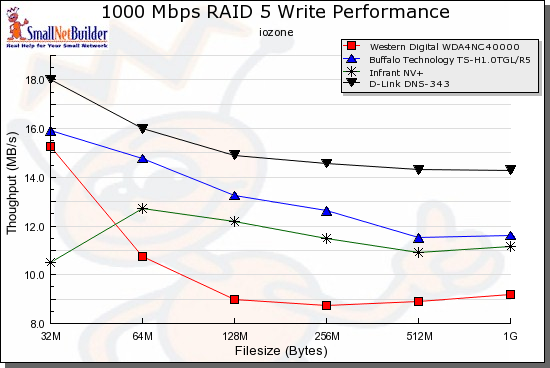
Figure 17: Competitive comparison – RAID 5 write, 1000 Mbps LAN
The ShareSpace fared better on the read comparison, however, moving up one position and leaving the Buffalo in last place for filesizes 128 MB and higher.
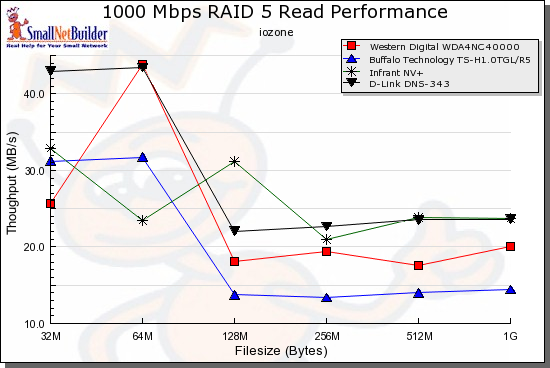
Figure 18: Competitive comparison – RAID 5 read, 1000 Mbps LAN
Note that three of the four NASes have 128 MB of memory (the NV+ has 256 MB).
Closing Thoughts
Given WD’s focus on high performance in its hard drive business, I’m surprised that its NAS offerings have been downright poky. The MyBook World, even with its gigabit LAN interface, sits near the bottom of the NAS charts (1000 Mbps Average Write / Read). And while the ShareSpace manages to move into the middle group of RAID 5 products with average large file write in the teens and reads in the 20’s of MB/s, it drifts more toward the bottom than the top of that tier.
But on the positive side, the ShareSpace also shares something else with its MyBook World siblings—aggressive pricing. Table 1 shows the lowest prices at time of review for the products I compared above. Note that these are all 4TB, i.e. 4 x 1 TB drive, configurations.
| Product | Lowest Price |
|---|---|
| Netgear ReadyNAS NV+ | $2195 |
| Buffalo TeraStation Pro II | $1700 |
| WD ShareSpace | $999 (list) |
| D-Link DNS-343 (plus 4 1TB WD Green drives) |
$867 = $367 + ($125×4) |
Table 1: Pricing summary (Source: Pricegrabber 9/29/08)
While these prices aren’t chump change, they show that WD is taking an aggressive pricing approach with what I think is the lowest price for a diskful 4 TB NAS yet. And retail pricing could be somewhat lower once the product gets into wide distribution. You can also opt for the two-drive (WDA4NC20000N) model for $700 if you don’t need the capacity and want to save some dough.
I wish WD had pushed for better write performance and had included scheduled backup capability to make NAS backup easier. But with the WD name, aggressive pricing, remote web access, low power / noise design and "good enough" feature set, I’m sure they’ll sell a bunch of ’em!
 See the slideshow for a feature tour