

Introduction
| At a Glance | |
|---|---|
| Product | Promise SmartStor (NS4300N) |
| Summary | Inexpensive four-drive BYOD Network Storage Device |
| Pros | • Hot-Swap RAID capabilities • Gigabit Ethernet with jumbo frame support • Inexpensive • Windows, Apple and Linux support |
| Cons | • Noisy • Middle-of-the-road performance • Flimsy case |
Over the last few years, I’ve checked out Network Attached Storage (NAS) devices from a number of different manufacturers. I’ve tried devices from disk drive companies, consumer appliance manufacturers and network device builders. But in this review, I’m going to check out a NAS device from a company that is more normally known for their expertise in RAID controllers: Promise Technology.
Promise’s SmartStor is a four-drive unit with gigabit Ethernet support, hot-swappable drives, USB expansion ports and some powerful RAID capabilities.
Setup
The SmartStor is a Bring Your Own Drive (BYOD) device, but Promise was kind enough to supply me with a unit pre-populated with four one-terabyte drives. Four terabytes of space in a device only a little larger than a toaster. Wow. Installing SATA drives into the SmartStor would be fairly straightforward, but the rails used for disk installation were the flimsiest I’ve ever seen. They were nothing more than a strip of plastic that wrapped around the drive to form the rail.
In general, the device used a lot more plastic than I usually see. The use of all this plastic made the device light, but it also made it a bit flimsy. The plastic front door on my unit wouldn’t completely close because of a poor fit.
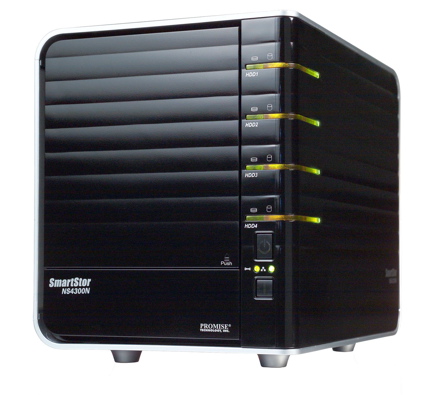
The front of the device, seen above, had a disk access door, four rows of drive-status LEDs, a power button and a one-touch backup button. The rear of the device, shown in Figure 1 from the SmartStor manual, had a couple of USB ports, a power connector, fan vent and a gigabit Ethernet connector.
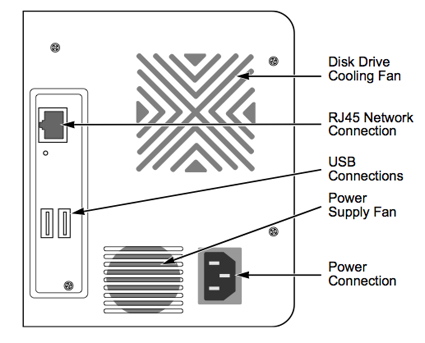
Figure 1: SmartStor Back Panel
When I plugged in the device, I judged the fan noise to be fairly high. I wouldn’t want to use the device in a room that didn’t already have noisy computer components. Measuring the power-draw of the unit showed that it pulled around 60 W. Although support for Linux and Apple computers is advertised, the only configuration software provided (Figure 2) was for Windows systems, so I started out with my XP instance.
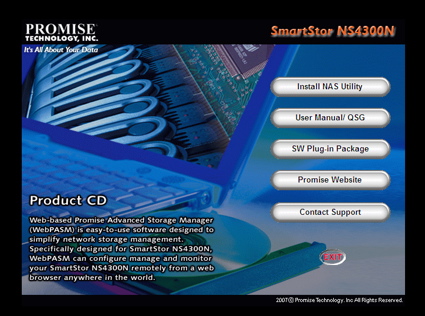
Figure 2: Windows installation software
Setup – more
Like installation of most software, one of the first screens to appear was a License Agreement. So, with only a quick glance, I clicked the Accept button and started to hit “Next” when something caught my eye. As shown in Figure 3, the license was a bit unusual. Oops. Interestingly enough, this same “license” screen is shown in the installation manual.
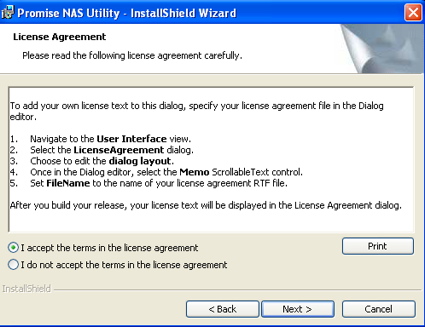
Figure 3: SmartStor “License”
It looks like someone at Promise forgot to complete the install utility, and it wasn’t even caught when the manual was written. As I read the manual, I also realized that the installation utility was a bit unusual. Normally the installation software for a NAS device does nothing much more than spawn a web browser that connects to a web server on the device for configuration. But the configuration software for the SmartStor appeared to do the entire job itself. Unfortunately, when I tried to run it, I ended up with the screen shown in Figure 4.
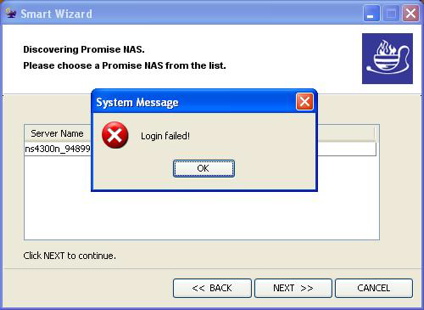
Figure 4: Login failure
For whatever reason, the configuration utility was failing to log into the device. It was also clear from the manual that all configuration could be done from a web browser and this is what Linux and Macintosh users would use to set up the device. So using the IP address of the SmartStor (discovered by the utility) I turned back to my preferred system, a MacBook Pro.
I connected to the SmartStor, logged in using the default username and password and started configuring the device. I’ll note here that the configuration is documented to be done using the default port 80, and there was no way to change this.
I’ll also note that the configuration could also be done using an encrypted HTTPS connection although this did not appear to be documented. Figure 5 shows the basic configuration web page on the SmartStor. From my perspective, it was a bit ugly with predominant colors of orange and blue and a number of instances of fractured English.
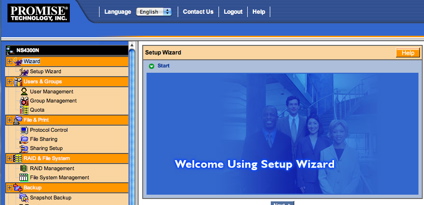
Figure 5: Configuration web page
However, its appearance aside, the setup using the web interface was straightforward. Figure 6 shows the network setup screen. Other features available in the standard setup include definition of users, changing the admin password, initial share setup and services setup.
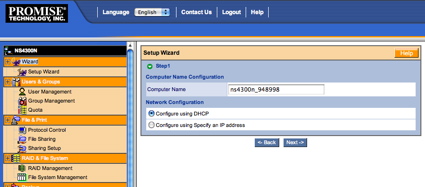
Figure 6: Network configuration
Figure 7 shows the screen where various services such as FTP, NFS and AFP can be enabled.
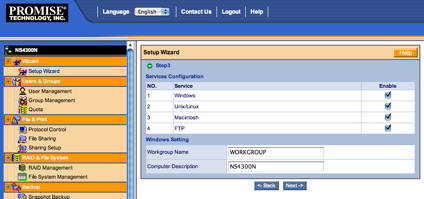
Figure 7: Services setup
I appreciated seeing support for all these protocols.
RAID Configuration
As far as RAID configuration, Figure 8 shows the setup screen where I have selected RAID level 5, which reduces usable capacity by about 25%, but provides the ability to recover from any single disk failure.
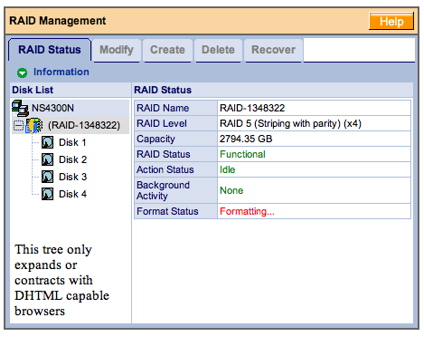
Figure 8: RAID setup
The initial RAID format took around 20 minutes. Note the warning on the lower left part of the screen where there is an erroneous indication that my browser (Safari) is not “DHTML capable”.
Promise has been doing RAID controllers for quite a while, so they know about RAID capabilities. And as a reflection of this, there are a couple of options that I don’t normally see in a consumer-level NAS device. Figure 9 shows the menu where the RAID level can be selected when creating an array.
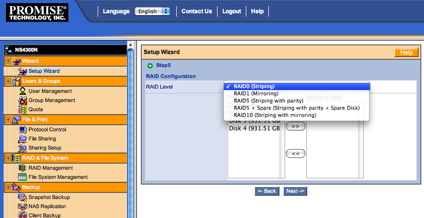
Figure 9: RAID creation
The first unusual option is the ability to specify that a drive is to be designated as unused, or “spare”. The other unusual option is RAID level 10, which is a combination of RAID levels 0 and 1. This
nested RAID level provides the benefit of RAID level 0, mirroring, with the fault-tolerance of RAID level 1.
Speaking of fault-tolerance, I wanted to see how the SmartStor performed when a disk failed. To simulate a failure, I yanked a drive out of my RAID 5 array while the device was running.
The first thing I noticed was the LED for the drive going dark. Shortly thereafter, I heard two short beeps that repeated every 15-20 seconds. I appreciated the notification, but if I had to run in this mode for a while, the beeping would get quite annoying. Fortunately, there is a menu option to completely turn off the beeper. Checking out the status screen (Figure 10) showed that my RAID array was in a “critical” state.
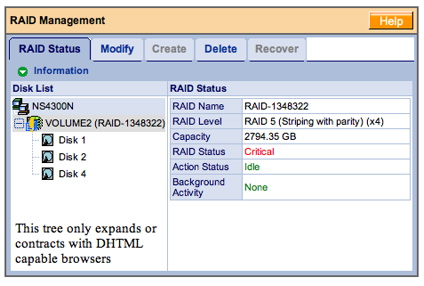
Figure 10: RAID status
A quick test showed that although I was in a critical state, all my data was still available as normal.
To check out recovery, I then hot-plugged the drive back in. When I did this, the beeping stopped, the LED went to red and the recovery process automatically started. A check of the status screen (Figure 11) now showed that I was in a rebuilding state and I got a little progress bar telling me how far along I was in the process.
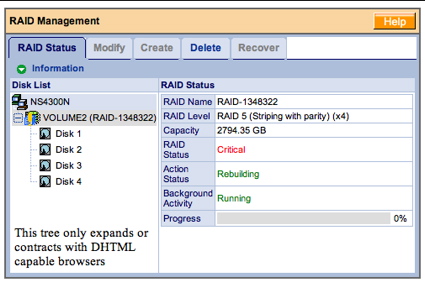
Figure 11: RAID Rebuild
But this rebuild took a long time. I checked on it on and off for a while, but I had to leave the house after about 14 hours—when I was only 73% complete. Fortunately this rebuild was all automatic and going on in the background. My data was available throughout this process, but I would expect that performance would be degraded.
Alerts and Additional Features
For significant alerts such as a drive failing, the SmartStor provides a way to set up an email address to receive notifications. Figure 12 shows the basic screen where alerts can be set.
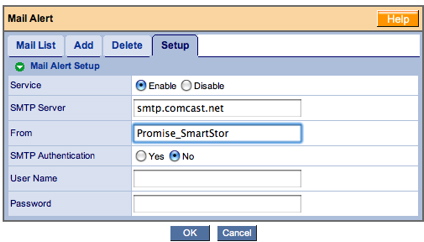
Figure 12: Alert setup
I like to see a “test” button in these types of screens so I can verify that everything has been set up properly. I don’t want to find out after a failure occurs that I didn’t get alerts because something was misconfigured. But this screen had no test button, and it turned out something was wrong. During the time of this review, I never received an email from the device, even during my disk failure tests.
Promise also provides a web interface to review alerts, and this screen did show the various steps such as rebuild starting, complete, etc. that occurred during my test. And for keeping track of the general health of the drives in your system, the status display also shows the SMART status of the drives.
As for the other capabilities found in the setup menus, I won’t cover them all in detail, but I found most of the standard-type features you’d expect in this class of device.
For user-management, there were options for defining users, defining groups of users, and setting quotas for users. Under network control, there were the standard options for defining TCP/IP parameters and turning on jumbo frames. For setting the time on the device, the option was given to manually set the time, or to set it via an NTP server.
One interesting configuration I noticed was the idea of “plugins,” a method for adding individual capability packages to a existing system. Figure 13 shows a pop-up dialog I received after successfully installing a DLNA UPnP A/V plugin that I downloaded from the Promise web site (it was the only one available).
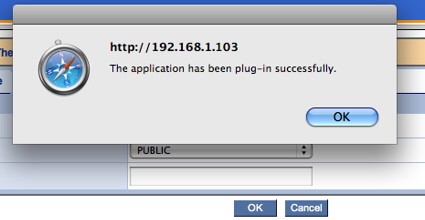
Figure 13: Plugin success
Although the installation was successful, there was no information or documentation on configuration or usage.
Under the “Protocol Support” menu (Figure 14) a number of capabilities can be configured.
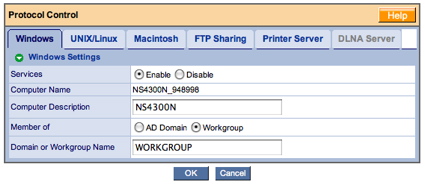
Figure 14: Protocol Control
For Windows users, the device can be configured to be part of an AD domain or as a member of workgroup. For Unix, Linux and Apple users for that matter, configuration can be controlled by joining a NIS domain.
This section of the configuration also allows the turning on and off of a nice collection of sharing protocols, CIFS, NFS, AFP, FTP, and a print server. And for sharing itself, menus are provided for creating a share, modifying a share (Figure 15), deleting a share, etc.
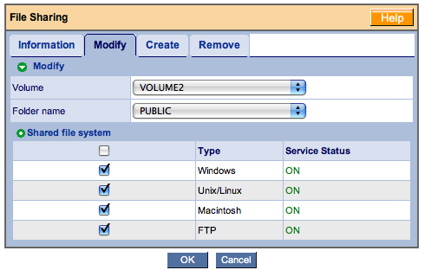
Figure 15: Share modification
Backup
These types of devices are often used for backup, and Promise provides several tools for assistance. Internal to the device, there are capabilities for taking “snapshots” of your shares and for backing up the entire device to another SmartStor on the LAN.
For interaction with other computers on the LAN, Promise supports a “one-touch” backup from the front panel. Pressing this button kicks off interaction with a (Windows only) utility that defines which shares to backup, allows restore, etc. (Figure 16).
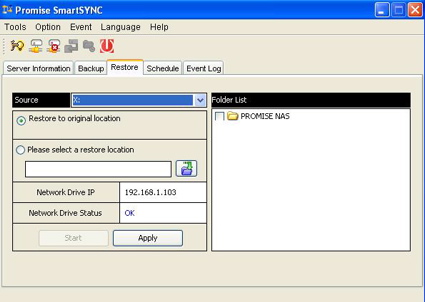
Figure 16: Windows utility for backup
Linux and Apple users are on their own, as no comparable utility was provided.
Once I had checked out the configuration menus, the one capability I didn’t see was any to tell the system to spin down the drives when idle. Most of the time my NAS appliances sit idle on the network, so it’s nice to have them spin down the drives, reducing both power-usage and noise. In fact, some competing manufacturers take it one step further. My Infrant NAS can be set to completely turn on and off on a specified schedule.
Performance
SmallNetBuilder’s performance charts can do an almost infinite variety of performance charts, but to give you a head-start, I chose a few other mid-range, four-drive NAS devices for comparison. I chose the Synology CS407e, the Lacie Ethernet disk RAID, the Freedom9 Freestore and the Iomega StorCenter Pro.
As you can see in the charts below, the SmartStor fell pretty much in the middle of the pack for these devices, and was much lower than other higher-end units that are not shown. But as an offset against its mediocre performance, the SmartStor is pretty much the least expensive device in the group.
NOTES:
- The maximum raw data rate for 100Mbps Ethernet is 12500 KBytes/sec (12.5 MBytes/sec) and 125000 KBytes/sec (125 MBytes/sec) for gigabit
- Firmware version tested was 01.02.0000.05
- The full testing setup and methodology are described on this page
- To ensure connection at the intended speeds, the iozone test machine and NAS under test were manually moved between a NETGEAR GS108 10/100/1000Mbps switch for
gigabit-speed testing and a 10/100 switch for 100 Mbps testing.
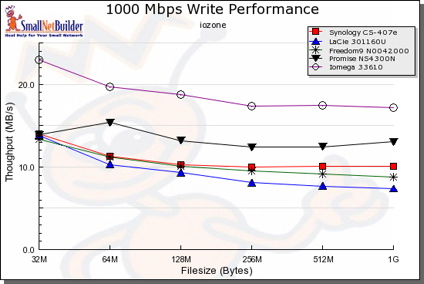
Figure 17: 1000 Mbps Write comparative performance
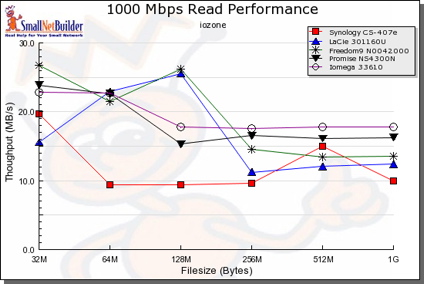
Figure 18: 1000 Mbps Read comparative performance
To do a “real-world” type test, I did a simple drag-and-drop test moving files back and forth to the SmartStore. For this test, I used my MacBook Pro, 2 GHz Intel Core Duo with 1.5 GB of RAM running Windows XP SP2 natively. The directory tree I copied contained 4100 files using just over a gigabyte.
I found that with a gigabit connection, moving the files to the SmartStor (write) took just about 3 minutes 15 seconds (~5.25 MB/s). With a 100 Mbps connection, the same transfer took around 4 minutes, 31 seconds (~3.7 MB/s).
Reading from the SmartStor to my XP system, the transfer took around 2 minutes 54 seconds (~5.8 MB/s) with a gigabit connection and just under 4 minutes 30 seconds with a 100 Mbps connection (~3.8 MB/s).
Under the Covers
Normally I like to take these devices apart to see what chips they’re using, but this one thwarted me. Instead of using standard bolts in the construction, Promise used some of those odd star-headed (Torx) bolts that manufacturers like to use when they don’t want you inside their device. I didn’t have anything on hand to unscrew these bolts, so I needed to take a different approach to see what was in use.
As for the processor, Promise documents it as a highly integrated Freescale MPC8343 processor that includes Ethernet and USB support. Software-wise, it’s clear that internally this unit runs Linux. Promise references the GPL license in their documentation and provides a download site for the required source code.
To find out more about the internals of the device I started poking around. A port-scan turned up the fact that a telnet server was running on a non-standard port of 2380. I could connect to the server, but none of the users that I created were allowed to log in. But a quick “Google” for more info turned up a bug report from September that indicated that there was an error in the way that Promise was validating input, specifically for changing user passwords.
Like many of these devices, an assumption was made that parameter validation would be done by JavaScript in the browser. This assumption doesn’t hold water since it’s easy to intercept and modify the input that is being sent to the device by using an argument-modifying web proxy.
Once I set this up, I used the standard forms to change a user password, but when the proxy intercepted the data, I modified the username parameter to be “root”, the “super user” on Unix/Linux systems. When this was done, I was successfully able to telnet to the SmartStor, log in and start exploring. Note that the technique I used to get into the device required me to have the administrator’s password initially, so this was not a wide-open vulnerability that anyone could exploit.
By poking around I could see the standard set of utilities such as BusyBox, Samba, etc. The MPC8343 processor was running at 400 MHz. The Ethernet capabilities were identified as being provided via a Gianfar driver. The SmartStor had 128 MB of RAM, the Linux kernel was a 2.6.11 variation, the DLNA/UPnP support was provided by FUPPES and the web server in use was thttpd.
I also noticed the presence of rsync on the SmartStor, which may indicate that this is the utility used to back one SmartStor up to another.
Closing Thoughts
Overall, the SmartStor had a decent feature set. I appreciated the multi-platform protocol support and its RAID capabilities. The SmartStor didn’t have as many services as other four-drive devices such as the Synology line. But for use as a standard file server, its feature set was adequate. And at a street price as low as $390, the SmartStor is quite a bit cheaper than most. Then again, the higher-end devices are also better performers than the SmartStor, so you’re trading cost for performance and fewer features.
Comparing the SmartStor to the Iomega StorCenter Pro 150d shows a similar feature set and comparable performance—which is not surprising since they have similar hardware. But a price comparison between the two is difficult since the Iomega unit doesn’t come in a BYOD configuration.
As far as physical construction of the SmartStor, I would have preferred to have a better constructed case, and the noise level was too high for my tastes. I was able to get a command-line on the device, but it would be better if this were a supported feature. When I trust my data to a device, I want full access in case something goes wrong.
The RAID rebuild time also seemed excessive to me, and I was also a bit disappointed that the email alert feature didn’t work. With this much data at stake, problem notification is important.
If I were in the market for a four-drive RAID NAS, I think I’d spend the extra money and go with something like one of the higher-end Synology devices. But if you’re on a limited budget and want only basic functionality in a RAID 5 capable NAS, the SmartStor might be worth a look.