

Introduction

| At a Glance | |
|---|---|
| Product | ZyXEL Unified Security Gateway (USG100) |
| Summary | Multi-function Network Unified Threat Management (UTM) appliance |
| Pros | • Multiple Routable Networks • Detailed Firewall Controls • Gigabit ports • 3G WWAN support • VLAN support and options |
| Cons | • VPN Interoperability • No SSL VPN Vista support • No Jumbo Frames • Slow to reboot • Relatively low VPN throughput |
Two months ago, ZyXEL announced their new line of Unified Security Gateway products, the USG100, USG200, and USG1000. ZyXEL introduced this product line as “the most complete security platform of its kind providing small to medium size businesses enterprise-class security features for offices with as few as 10 employees and up to 300 PC users.”
This article will cover the USG100, a Unified Threat Management (UTM) device targeted at networks of 10 to 25 users. Supporting Dual WAN connections, 3G Wireless connection, multiple VPN technologies, High Availability failover, Intrusion Detection & Protection, Anti-Spam, Anti-Virus and Content Filtering, as well as extensive network management tools, this is a device designed to provide a full array of network functionality in a single box.
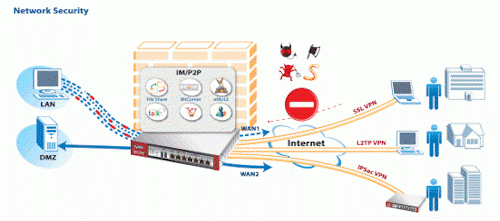
Figure 1: The USG100 at work
With all these capabilities, I’m going to divide my coverage of the USG100 into two reviews. In this review, I’m going to cover the networking and VPN aspects of the USG100. In a subsequent review, I’m going to cover the security and UTM features.
On the outside, there are two USB ports and seven Gigabit Ethernet ports on the front of the 9.5 (W) x 6.9 (D) x 1.4 (H) inch sliver metal case with a red highlights on each side. The two USB ports shown in the product shot above are used for connecting 3G cards, not flash or storage drives as you might expect.
The rear of the USG100 shown in Figure 2 has ports for an auxiliary modem, a console connection, a PCMCI 3G WWAN card, and the power connection to an external power brick.
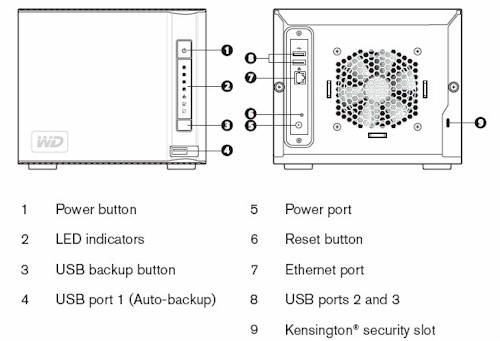
Figure 2: USG100 rear panel
Figure 3 shows the internal components of the USG100, which include 256MB of DDR2 RAM, 256MB of Flash, a PCMCIA slot, and a passively cooled Freescale 8343 CPU, running at 400Mhz with a front side bus of 266 MHz. The gigabit Ethernet ports are provided by a Vitesse VSC7388 Integrated Gigabit Ethernet Switch.
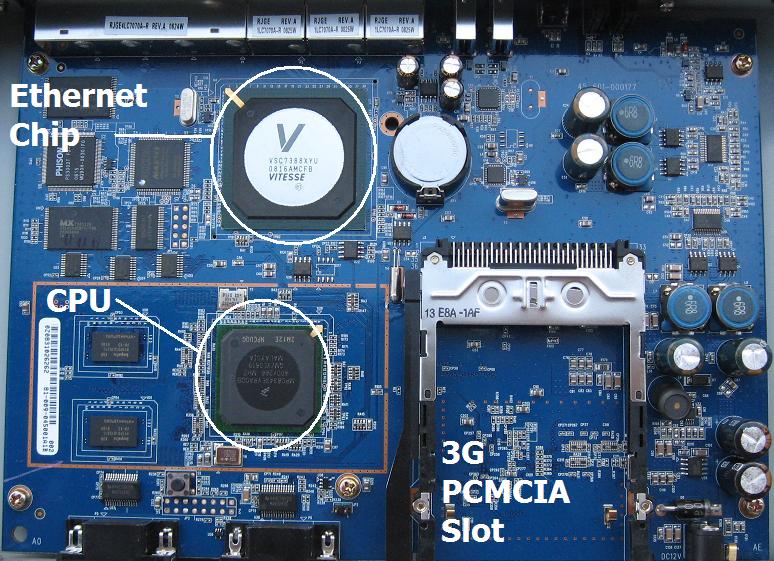
Figure 3: USG100 board
Object Oriented Configuration
The key to understanding how to configure the USG100 is that it is object oriented, i.e. each interface (wan1, wan2, lan1,…) is an object. The IP addresses and subnets assigned to each interface are also objects, as are subnets accessed via a VPN tunnel and devices behind the router, such as servers or another router.
At first, configuring all these different objects seems tedious, especially for someone who doesn’t like reading a manual. (There is a 902 (!) page manual that comes with the device and available on line.) As you layer on functionality, though, having an object comes in handy, because you can reuse predefined objects in multiple configurations.
Routing, VPN, and Firewall rules are all created using various objects. In Figure 4 below, the first five lines are default objects defining the subnets for the various interfaces. Below the first five default objects, I created objects for the IP address to a Windows PC which I named WindowsMachine, a subnet that I accessed over a VPN tunnel which I named ZLAN, a subnet I accessed through another router which I named DFLLAN and the IP address for that other router’s interface which I named DFL. I ended up using each of these objects for port forwarding, a VPN tunnel, and a static route, as I’ll explain later.
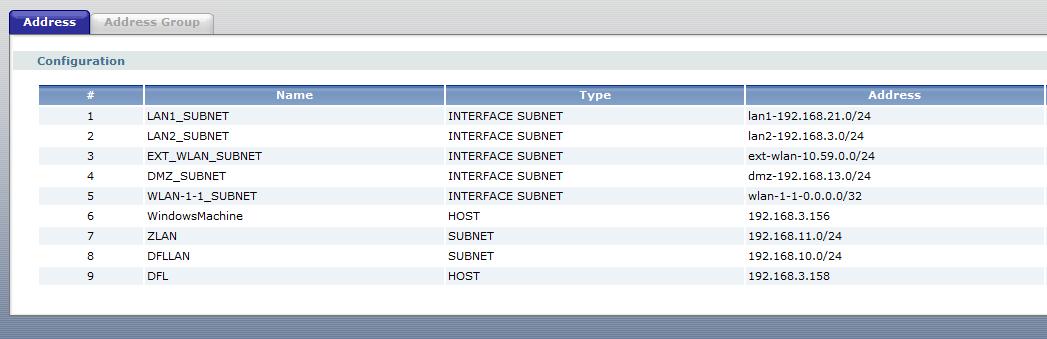
Figure 4: Objects
In more basic routers, defining the subnet on the other end of a VPN tunnel is done within a single VPN configuration screen. But the USG100 requires that the subnet on the other end of a VPN tunnel be defined as an object and added to the VPN configurations, plus a Policy Route has to be defined so the traffic will be routed through the tunnel. The point is the USG100 will do a lot, but you have to give it the necessary instructions.
Interfaces
Of the USG100’s seven Gigabit interfaces, the first two ports are designated as WAN interfaces and the other five separate internal traffic into various LANs. Even though the WAN ports will likely be connected at far lower speeds than 1000 Mbps, it is encouraging to have this level of functionality in all ports on a router. MTU is adjustable by interface, but only from 576-1500 bytes; jumbo frames are not an option.
The default configuration has Ports 1 and 2 designated for WAN connections, Ports 3 and 4 for LAN1, Port 5 is for LAN2, Port 6 for a wireless LAN intended to connect to an Access Point, and Port 7 for the DMZ. Ports 3-7 can be reconfigured to any of these four designations, though, as shown in Figure 5 below.
Figure 5: Port Assignment
As you can see in the status screen in Figure 6, there are different subnets for the LAN1, LAN2, WLAN, and DMZ interfaces. The value in running different subnets for each of the LANs is the ability to control traffic between each of your networks using Firewall rules which can be applied by interface, IP, or subnet.
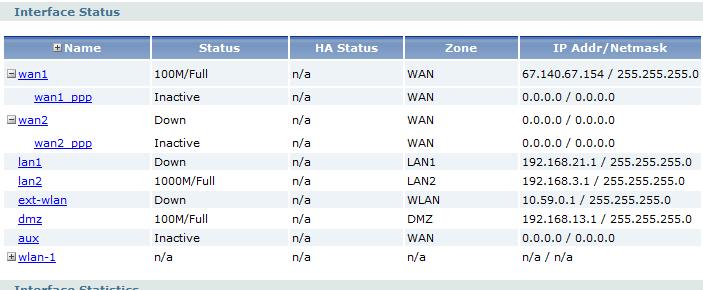
Figure 6: Interfaces
In addition to the seven gigabit Ethernet interfaces, the PCMCIA slot on the back of the USG100 will support a 3G WWAN card or an 802.11b/g WLAN card. Further, a 3G USB WWAN device can be connected to one of the two USB ports on the front of the USG100.
VLANs
Dividing a network into multiple subnets effectively provides the value of VLAN broadcast control without using expensive managed switches. With the above configuration on my test USG100, a PC connected to an unmanaged switch off the LAN1 interface received an IP in the 192.168.21.0/24 subnet, while a PC connected to another unmanaged switch off the DMZ interface received an IP in the 192.168.13.0/24 subnet.
Further, multiple VLANs can be configured on a single USG100 interface, allowing the USG100 to be connected to a managed switch that supports 802.1q VLANs. The USG100 can then be configured with different DHCP servers per VLAN, enabling 1-1 subnet to VLAN network mapping.
I tested this functionality by configuring two different VLANs on the LAN1 interface of the USG100 with separate DHCP servers for each VLAN as listed in Figure 7 below. I then configured a Netgear GS716T managed switch with the same VLANs, and assigned the new VLANs to two different ports on the switch.

Figure 7: VLANs
There were a few more configurations applied in the GS716T. But the end result was I could plug a PC into the appropriate ports of the GS716T and get an IP addresses corresponding to the VLAN assignments in the USG100, validating the USG100’s recognition of 802.1q VLAN tags.
Routing
Configurable routing options include Policy Routes, Static Routes, RIP and OSPF. Policy Routes are the workhorse for controlling traffic through the USG100. The Policy Route option in the USG100 allows for defining traffic paths based on incoming interface, source and destination subnets, service (protocol), and a next-hop destinations such as an interface or IP.
In Figure 8, I’ve configured the top Policy Route to route traffic to a subnet behind another router. The traffic being routed is originating on the LAN2_SUBNET (192.168.3.0/24) and going to a subnet behind another router, defined by an object I created called DFLLAN (192.168.10.0/24). The next-hop for this traffic is the IP address of the other router, which I created in an object called DFL.
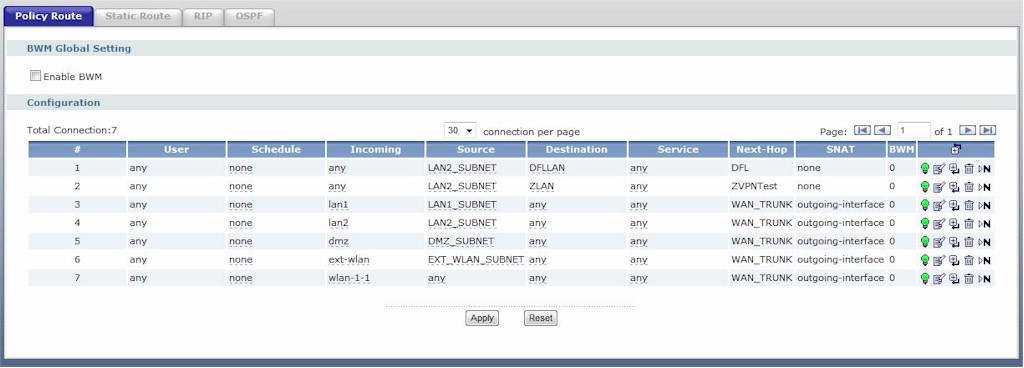
Figure 8: Policy Routes
The second Policy Route shown in Figure 8 is to route traffic over the VPN tunnel. This configuration specifies that traffic originating from my internal subnet (LAN2_SUBNET) going to a remote subnet (ZLAN) accessible over the VPN tunnel is reachable via an object called ZVNTest, which specifies the IP address at the other end of my VPN tunnel.
WAN
The USG100 uses WAN Trunks for WAN failover and managing multiple ISP connections. WAN interfaces 1 and 2 are by default members of the first WAN Trunk. Instead of one WAN interface active and the other in a standby mode, the USG100 keeps both interfaces active and balances the traffic.
“Link Sticking” is enabled by default on WAN Trunks. This feature ensures that traffic from internal devices to a specific external server is not load balanced across multiple WAN interfaces. This will prevent connection problems to servers that track source IP addresses.
Options for WAN connections include Least Load First, Weighted Round Robin (WRR), and Spillover. In all three algorithms, configuring egress and ingress bandwidth on each WAN interfaces is useful to ensure optimal utilization.
With Least Load First, the USG100 will send traffic over the WAN interface with lower traffic utilization, calculated based on configured bandwidth and measure utilization, effectively maximizing traffic over both WAN interfaces.
WRR utilizes a configured weight value on each WAN interface. If WAN2 has a weight of 2 and WAN1 has a weight of 1, twice as much traffic will be sent out WAN2.
With Spillover, the USG100 will send traffic to one interface until measured utilization equals configured bandwidth values, then rollover to the next interface.
Enabling the Traffic Statistics option allows for viewing graphical reports on WAN or LAN interface utilization, as shown in Figure 9. This tool provides a means to see traffic levels by interface, as well as observe traffic types by Port and Protocol.
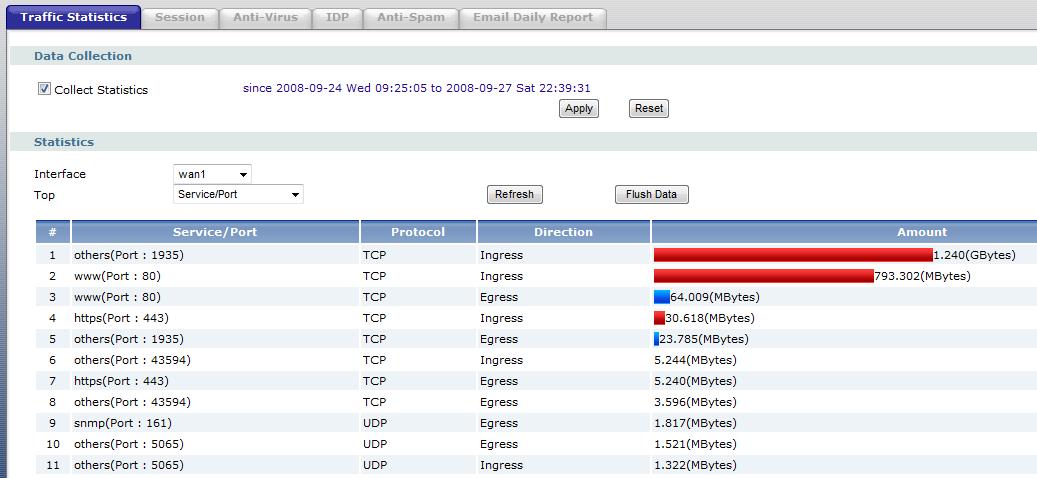
Figure 9: Traffic Statistics
Firewall
Configuring the USG100’s firewall is very similar to configuring routing. The firewall is managed with rules constructed from interfaces and objects, defining which traffic is permitted and denied. As with most firewalls, the USG100 blocks the majority of incoming traffic and allows outgoing traffic.
For example, even though there is a DMZ port, I found I had to add a rule to the firewall to allow external traffic to reach devices connected to the DMZ port. In line 1 of Figure 10 below, you can see that I added a simple rule to allow all traffic from any source to the DMZ interface. Prior to adding that rule, I couldn’t receive calls on my VoIP phone even though it was in the USG’s DMZ.
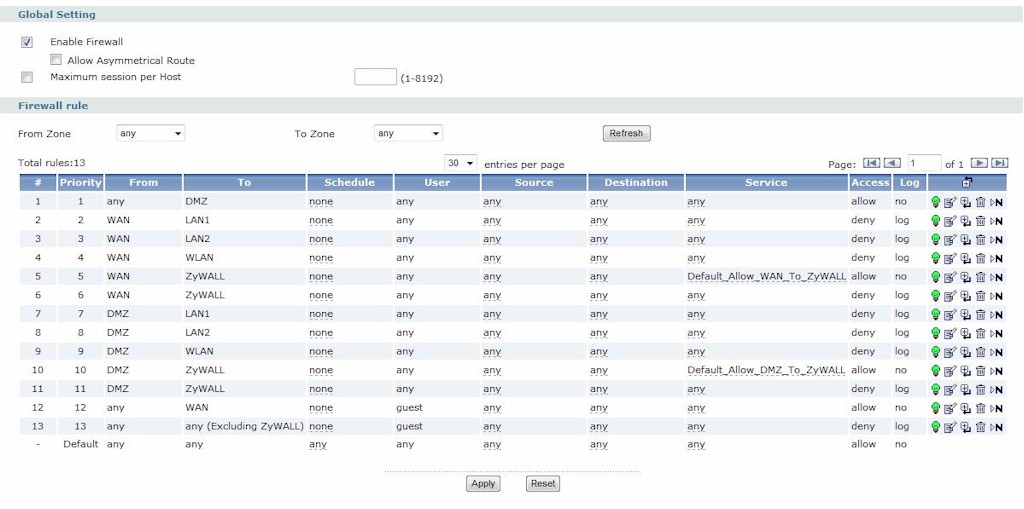
Figure 10: Firewall configuration
A common element to most firewalls is port forwarding, which is for directing external traffic using a specific protocol to some internal server or device. On the USG100, port forwarding is done by creating Virtual Servers.
To forward Remote Desktop Connections (RDC) to my Windows PC, I first created a Host object identifying the IP address of my Windows PC, which I called “WindowsMachine” shown in Figure 11 below. Second, I created a Virtual Server rule to forward the traffic from the WAN1 interface to that Host object with the specific port used by RDC, 3389. This did the trick, enabling me to access my Windows machine over the Internet.

Figure 11: Virtual Server configuration
VPN
A more secure way to access devices over the Internet is through the use of VPNs. The USG100 supports multiple VPN technologies, including IPSec Site-Site VPNs, IPSec Client VPNs, and SSL Client VPNs. I tested each of these VPN capabilities, and found strengths and weaknesses on all three.
In Figure 12 below, you can see a status display of two active VPN connections. The first is an IPSec Site-Site VPN connection, the second is an IPSec Client VPN connection. The icon on the far right under Action indicates the connections are active, demonstrating the USG100’s ability to run VPN connections of multiple types, simultaneously.

Figure 12: VPN Configuration
IPSec Site-Site tunnels enable the USG100 to connect to other routers over a public network such as the Internet. In my testing, I liked the USG100’s simplicity in configuring an IPSec Site-Site VPN tunnel, but was disappointed in interoperability and throughput.
I attempted to set up a Site-Site VPN tunnel between the ZyXEL USG100 and a NETGEAR FVS336G [reviewed]. I’ve used the NETGEAR in the past to successfully test Site-Site VPN tunnels with other routers and security appliances. Although I could get the ZyXEL and NETGEAR to establish a connection, I couldn’t pass traffic through the connection.
ZyXEL gave me access to a USG100 in their lab, and I was able to easily set up a cross country tunnel over the Internet between my USG100 to ZyXEL’s USG100. ZyXEL supports all the typical encryption and authentication algorithms, including DES, 3DES, and AES-128/192/256 encryption along with MD5 and SHA-1 authentication. I used the default settings of DES encryption and SHA-1 authentication.
I configured a Dynamic DNS (DDNS) URL as my WAN interface identification for the VPN tunnel. The USG100 supports DDNS service through DynDNS, Dynu, No-IP, and Peanut Hull. The ZyXEL end of the VPN tunnel was on a static public IP address.
To measure VPN throughput, we used Jperf to generate traffic from my LAN to ZyXEL’s LAN, and then in reverse from ZyXEL’s LAN to my LAN. Prior to measuring VPN throughput, we used a commonly available web site (www.speakeasy.net) to measure our ISP upload and download speeds. This is important, as VPN throughput can’t exceed the lower value of the upload speed on the transmit side and the download speed on the receive side.
The first line of Table 1 shows the Jperf throughput measured from my LAN to ZyXEL’s LAN. The Tx Speed of 790 Kbps is my upload speed, while the Rx Speed of 308 Kbps is ZyXEL’s download speed, thus the maximum possible speed from my LAN to ZyXEL’s LAN will be 308 Kbps.
Running Jperf at default settings, we were able to measure throughput from my LAN to ZyXEL’s LAN over the VPN at an average speed of 270 Kbps, which is 88% of the maximum possible speed of 308 Kbps.
(Yes, it is unusual to see such a low download speed of only 308 Kbps. ZyXEL has throttled the download speed to their lab for network management purposes.)
| Device | ISP Speed (Kbps) | VPN Throughput (Kbps) | % of Maximum Possible Speed | |
|---|---|---|---|---|
|
Tx Speed (upload) |
Rx Speed (download) |
|||
| My USG100 | 790 | 308 | 270 | 88% |
| ZyXEL Lab USG100 | 6672 | 4880 | 742 | 15% |
Table 1: VPN Performance Test Summary
The second line of the table below shows the Jperf throughput measured from ZyXEL’s LAN to my LAN. The Tx Speed of 6672 Kbps is ZyXEL’s upload speed, while the Rx Speed of 4880 Kbps is my download speed, thus the maximum possible speed from ZyXEL’s LAN to my LAN will be 4880 Kbps.
In this direction, we measured throughput over the VPN connection at an average speed of 742 Kbps, which is just 15% of the maximum connection speed of 4880 Kbps.
Since we’re using the public Internet as transport, it is hard say whether the ZyXEL is the limiting factor here or whether it the public Internet. But the measured speeds are lower than one might expect for a business-class UTM.
IPSec Client
IPSec Client VPNs also had some strength and weaknesses. ZyXEL uses the Layer 2 Tunneling Protocol (L2TP) and IPSec technologies for IPSec Client VPN Connections. The strength of this solution is LT2P software is included in Windows XP and Vista, eliminating the hassle of loading and configuring another application. The USG100 will support up to 50 IPSec Clients without any additional licensing fees.
The ZyXEL manual has a useful configuration example on how to set up both the USG100 and the Client PC, which I followed step by step. As with other configurations on the USG100, there were multiple steps, including setting up the VPN Gateway, VPN Connection, multiple Address Objects, a user name and password, and a Policy Route.
I configured my Vista laptop for a L2TP/IPSec VPN Connection by entering the preshared key, user name and password, the IP address of the USG100, and enabling PAP as shown in Figure 13. Note, PAP, or Password Authentication Protocol, is a common technology for authentication, but considered less secure since authentication is passed unencrypted. Once configured, I had no problem connecting to the USG100 from my Vista laptop.
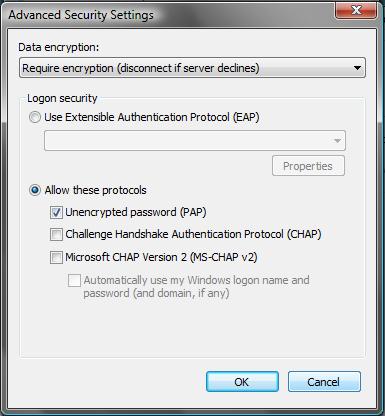
Figure 13: PAP Configuration
The weakness of this solution, as stated in the ZyXEL manual, is the L2TP/IPSec VPN Connection won’t work over a NAT, so the Client PC has to have a Public IP address. If the remote clients are using an aircard or have their home PCs directly connected to their ISP, this limitation shouldn’t be a problem. If remote clients need access from WIFI connections behind a NAT, common in hotels, libraries, airports, coffee shops, etc., this limitation is a problem.
SSL VPN
My favorite VPN solution for remote client access is SSL VPN technology, which is also supported by the ZyXEL USG100. SSL VPN technology works using a browser instead of a client, tends to work better from more remote networks and is generally easier to configure.
I found SSL VPN connections on the USG100 to be easy to set up as well as incredibly flexible in terms of network access. On the USG100, all I had to do was create a user name and password, then enable and configure Access Privileges for SSL Clients.
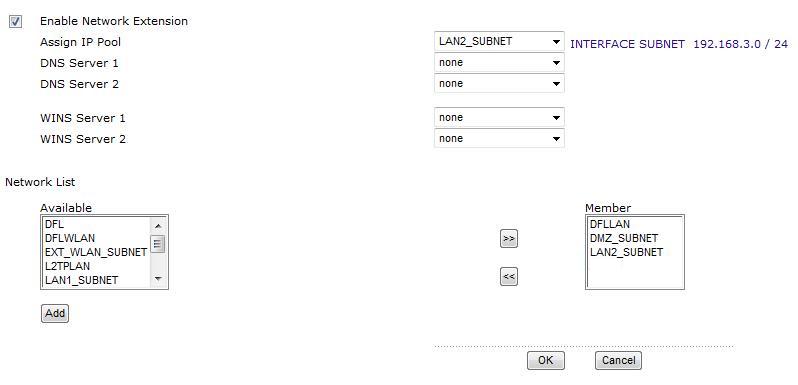
Figure 14: SSL VPN Setup
Part of the Access Privilege configuration is shown in Figure 14 above. Notice in the bottom right a window labeled Member. Here I am telling the USG100 that SSL Clients have access to the Address Objects named DFLLAN, DMZ_Subnet, and LAN2_SUBNET. This means the USG100 will set up a remote connection to each of these subnets behind the USG100.
Once configured and enabled, I was able to use an XP Pro based laptop and remotely connect to devices in each of these three different subnets. I later modified the USG100 to allow access via the SSL Client to devices on the other end of the Site-Site VPN.
Figure 15 below, produced using the DOS command netstat -r, shows the routing table on my laptop while running the SSL Client. Notice the Network Destinations on the left equal to 192.168.3.0, 192.168.10.0, and 192.168.13.0. These subnets are the Address Objects LAN2_SUBNET, DFLLAN, and DMZ_Subnet. This output shows that my laptop has installed routes via the SSL VPN to access each of these networks.
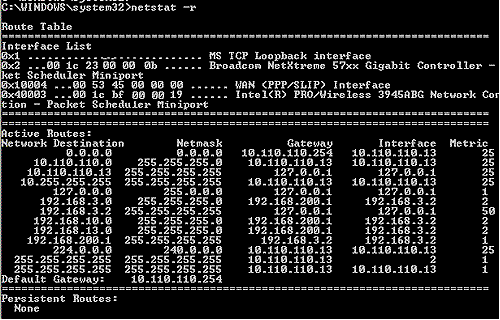
Figure 15: netstat of SSL connection
One of the values of SSL VPNs is there is no configuration required by the remote PC user, since the connection is established using a browser that automatically downloads an SSL connection applet. The applets, however, still must be compatible with various browsers. I was able to connect to the USG100 via an SSL VPN using both IE7 and Firefox 3.01, but not Safari.
SSL applets must also be compatible with the client computer’s operating system. Unfortunately, the USG100’s SSL VPN applet only works on XP and only supports two licenses.(The latter is a product policy, not a technology limitation.) In a conference call with ZyXEL, I was informed that Vista support for SSL connections will be out in 2009 and that additional licenses can be purchased (upgrade from 2 to 5 licenses is $95).
Other Features
A couple other aspects of the USG100 I found interesting are the File Management system and the option to run the USG100 in High Availability (HA) configuration. With its File Management System, the USG100 can store and run multiple files on its 256MB of flash storage, including configuration files, firmware, and shell scripts.
With the plethora of configurable options, an administrator may want to try one configuration, save it, try another, and then return to the previous. Configuration files are stored with a .conf extension, and are readable in any text editor. Restoring any of those files is a matter of uploading it to the USG, highlighting the file, and clicking run. I found this a convenient way to return the device to its default settings, although reboot times were pretty slow, consistently requiring nearly 4 minutes to fully restore.
In the small network market, it is unusual to see High Availability functionality, which is the ability to run a pair of devices with one active and the other in a passive or standby mode. Two USG100s running the same firmware and subscription levels can be installed together, providing not only redundancy via Dual WAN ports if deployed, but in physical hardware as well!
One last important feature is the USG100’s bandwidth controls. You can set egress (outbound) bandwidth limitations on all ports and between interfaces. Ingress controls are also provided, but the documentation says that they are for "future use".
Performance
To evaluate router performance, I used Jperf to run throughput tests from the LAN to WAN, and then in reverse from WAN-LAN on a local private LAN. I ran my tests three times in each direction, then switched endpoints to the opposite port, and repeated the tests. The throughput chart in Table 2 shows the average values.
I used a pair of newer Dell Laptops to transmit and receive data, each with gigabit LAN ports, one running Vista and the other XP. I tested the laptops head-head to ensure they were capable of generating and receiving data flows at speeds greater than 100 Mbps.
To test WAN-LAN and LAN-WAN throughput, I initially ran my tests with the Firewall disabled to avoid having to map ports for the WAN to LAN traffic. I re-enabled the Firewall while testing LAN1-LAN2 throughput, and noticed lower throughput results from LAN1-LAN2 than WAN-LAN and LAN-WAN. So, I re-ran all tests, measuring throughput with the Firewall enabled and disabled.
The data in Table 2 tells me two things. First, although its performance was balanced and higher than other UTM devices I’ve tested, specifically the Dlink DFL-CPG310 and the SonicWall TZ190W, the USG100 doesn’t appear to have the internal horsepower to fully take advantage of its gigabit interfaces. Second, the USG’s Firewall reduces throughput by 5-6 Mbps.
| Product |
Throughput (Mbps) |
|||
|---|---|---|---|---|
| WAN-LAN | LAN-WAN | VLAN1-VLAN2 | LAN1-LAN2 | |
| ZyXEL USG100 (Firewall Off) |
57 | 57 | 55 | 56 |
| ZyXEL USG100 (Firewall On) |
51 | 51 | 50 | 51 |
| SonicWallTZ190W | 25 | 26 | N/A | N/A |
| DLink DFL-CPG310 | 39 | 45 | N/A | N/A |
Table 2: Throughput comparison
In normal operation with the Firewall enabled, you can expect about 50-51 Mbps throughput on data flows from any interface to any another interface on the USG100, including VLAN interfaces and between LAN ports. Note that this throughput is very far below the 600+ Mbps normally measured between gigabit switch ports. But it should be more than adequate for most business Internet connections.
Further, data flow throughput is consistent, without spikes or drops. All of the plots from Jperf during my testing were relatively flat, as shown in the LAN-WAN chart in Figure 16 below.
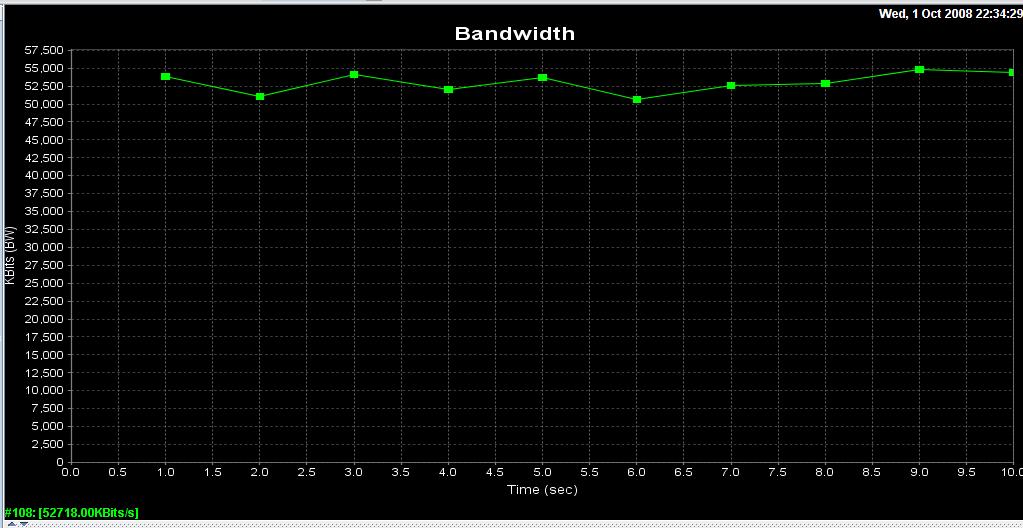
Figure 16: LAN to WAN Jperf throughput
Closing Thoughts
UTM devices are hard to compare, since there aren’t easy apples-to-apples comparisons. Table 3 below shows the variation in features and pricing on three UTM devices that we have reviewed.
The “*N” in the WIFI row references the fact that although the USG100 doesn’t act as an Access Point, a PCMCIA WIFI card can be installed to pick up an 802.11 signal as a WAN connection.
| USG100 |
D-Link DFL-CPG310 [review] |
Sonicwall TZ190W [review] |
|
|---|---|---|---|
| Price | $470.95 | $110.82 | $735.00 |
| AV+IDP | $166.10 | $219.00 | $295.00 |
| AV+IDP+CF | $246.95 | $418.00 | $395.00 |
| WIFI | *N | Y | Y |
| Firmware | Free | $$ | $$ |
| Support | Free | $$ | $$ |
| SSL VPN | 2-10 | N | N |
| IPSec VPN | Y | Y | Y |
| Dual WAN | Y | Y | Y |
| WWAN | Y | N | Y |
| Gigabit | Y | N | N |
Table 3: Competitive feature, price comparison
Compared to the Dlink and SonicWall, the USG100 distinguishes itself with free firmware upgrades and telephone support. A robust guarantee and support program says a lot about a product, and ZyXEL stands behind the USG100 with a five year warranty.
In all, I enjoyed working with the USG100! The VLAN capability was impressive. And the USG100’s multiple subnets plus VLAN functionality provides the option of using inexpensive unmanaged switches or fully leveraging the power of VLANs with more expensive managed switches.
On the downside, I was disappointed in the trouble I had with the Site-Site VPN and the lack of SSL VPN applet support for Vista. Further, I would like to have seen the USG100 take advantage of its gigabit interfaces with higher routing throughput.
Still, I have to say it was a pleasure testing a product in this price range that incorporates so many networking tools and configurable options. Although targeted at networks with up to 25 devices, the USG100 provides "enterprise" network features that typically cost thousands of dollars in a very affordable package that even smaller businesses can afford.
In particular, ZyXEL has brought HA enterprise class features to the small business market. With a retail price of $649.99, but available online for typically below $500, installing a pair of USG100s isn’t cheap. But if your mission-critical network requires a complete redundancy solution, having a hot standby router to automatically take over could likely pay for itself by minimizing or eliminating down time.
But I’m not done yet. There is simply too much in the USG100 to cover in a single review. Come back for Part 2, where I’ll dive into the product’s UTM features.