

Introduction
| At a Glance | |
|---|---|
| Product | ZyXEL Unified Security Gateway (USG100) |
| Summary | Multi-function Network Unified Threat Management (UTM) appliance |
| Pros | • Multiple Routable Networks • Detailed Firewall Controls • Gigabit ports • 3G WWAN support • VLAN support and options |
| Cons | • VPN Interoperability • No SSL VPN Vista support • No Jumbo Frames • Slow to reboot • Relatively low VPN throughput |
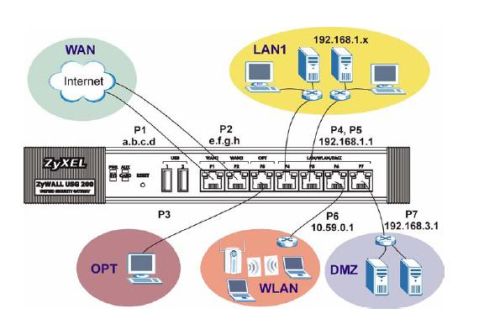
In my previous review of Zyxel’s USG100, I covered the impressive routing capabilities of this comprehensive network device, leaving coverage of its security and Unified Threat Management (UTM) for this review. As depicted in the above diagram, Zyxel’s device has the ability to separate a network into multiple different network zones. This network segmentation along with its UTM features allows for quite granular control over multiple different traffic types to and from each network.
The list of security functionality for this device is long. The USG100 has Anti-Virus (AV), Intrusion Detection and Prevention (IDP), Content Filtering (CF) and Anti-Spam features. Further, it has Anomaly Detection and Prevention (ADP), Application Layer Gateway (ALG), and Application Patrol features for complex traffic flow management. WOW!
The AV, IDP, Application Patrol and CF features are enabled for a 30 day trial with annual subscriptions required thereafter. But the Anti-Spam, ADP, and ALG features are all included in the price of the UTM. I’ll list the subscription rates again at the end of this review.
Each of the UTM features on the USG100 can be individually enabled or disabled. As I’ll show at the end of this review, they do have varying impact on throughput. So you should consider carefully which are required for your network.
Anti-Virus
The USG100’s Anti-Virus functionality allows for centralized Anti-Virus filtering. This functionality works at the center of your network, without running client software on each PC. It is a subscription based service, so once the 30 day trial runs out; you’ll have to subscribe to keep it running.
The two subscription options on the USG100 are Zyxel’s International Computer Security Association (ICSA) approved solution and Kaspersky solutions. Kaspersky is a well known software provider of security solutions, but their solution for the USG100 isn’t ICSA approved. The Zyxel solution, provided directly by Zyxel and not provided by a third party, is ICSA approved.
With the USG100’s Anti-Virus feature enabled as shown in Figure 1, a current subscription, and one of the two Anti-Virus options selected, the USG100 will filter emails, web surfing, and downloads for various virus signatures.
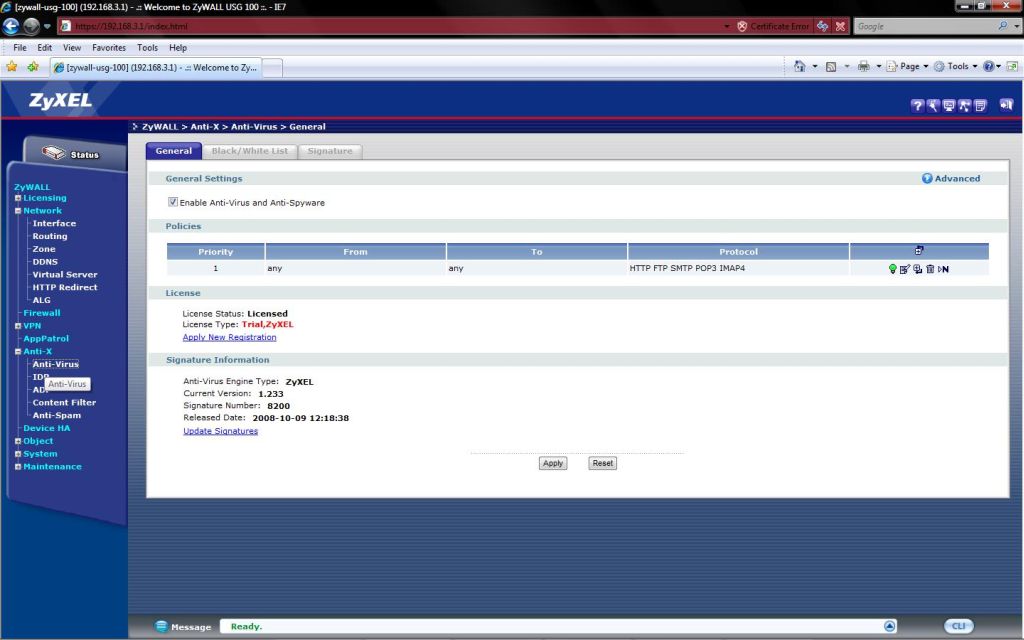
Figure 1: AV Enable
The USG100 monitors data flows via the common SMTP, POP3, IMAP4, HTTP and FTP applications. More specifically, the USG100 is monitoring traffic using TCP ports 25, 110, 143, 80/8080/3128, and 21, respectively.
The USG filters FTP traffic by default on port 21. But ports other than 21 can be filtered if configured via the Application Layer Gateway configuration screen. I’ll touch on the ALG aspects of the USG100 later.
Other than FTP, it is important to note that only the ports specified above are monitored. This is important because there are virus-sensitive services that use non-standard ports, which will not be monitored by the USG100. For example, Google’s popular Gmail uses ports 587 and 995 for SMTP and POP3. Subsequently, the USG100 will not filter emails sent and received via Gmail, or other email services using non-standard ports.
The USG100 looks at traffic on the monitored ports and then checks the contents of that traffic for patterns that match a known virus signature. This is why a subscription based service is required, since those signatures are constantly changing.
The USG100 Anti-Virus solution is customizable, with Black and White List functionality. By defining various file types, you can tell the USG100 to look for and block (Black List) or allow (White List) specific file attachments.
I set up a simple Black List rule shown in Figure 2 to block Microsoft Word documents, using the criteria of *.doc as shown. I tested it by sending a Word file from a non-filtered Gmail email account to a standard POP3 filtered email account.
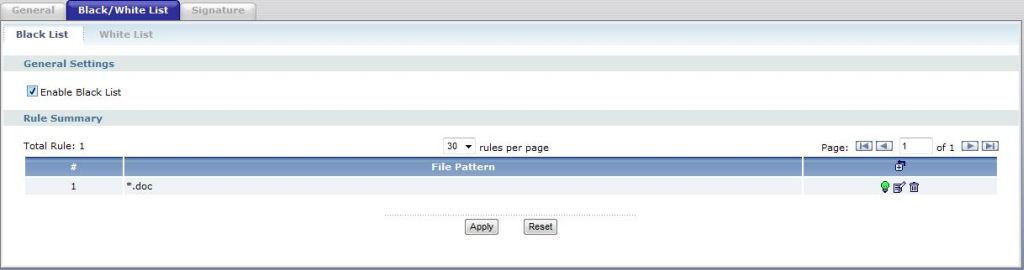
Figure 2: Blacklisting
I sent the same file twice, once with the Black List enabled, once with it disabled. In both cases, the email went through with the file attached. However, with the Black List enabled, the file was unreadable, while with the Black List functionality disabled, the file went through unchanged. As you can see in Figure 3, the USG100 logged that a file was received matching my Black List rule.
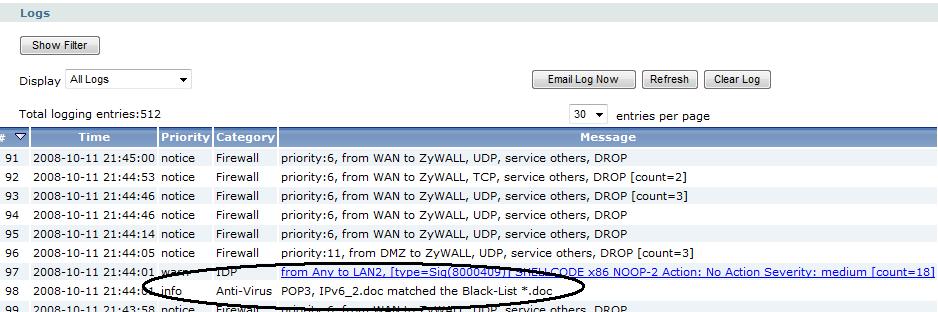
Figure 3: Blacklist hit logged
Anti-Spam
The USG100’s Anti-Spam feature is a base service that doesn’t require an additional subscription. To filter spam, the USG100 has three different means to look at the header information within emails sent and received.
White Lists, Black Lists, and/or configured DNSBLs (DNS Black List) are used to determine if an email is considered Spam. If it an email is determined to be Spam, the configuration options are to forward, forward with a tag such as “[Spam]”, or drop the packets. The USG100 can also be configured to generate log entries when spam is detected.
White List and Black List rules can be constructed to filter emails based on an email address, IP address, or the contents of the subject or mail header fields. Common wildcards such as “*” can be used in rule creation.
As you can see circled in Figure 4, I’ve created two simple rules to filter email from @aol.com and email with the keyword “shop” in the subject line. Just above my two rules in Figure 4, I’ve also circled the Tag option. In this case, I’m using the default tag “[Spam]” for emails that match either of my rules.
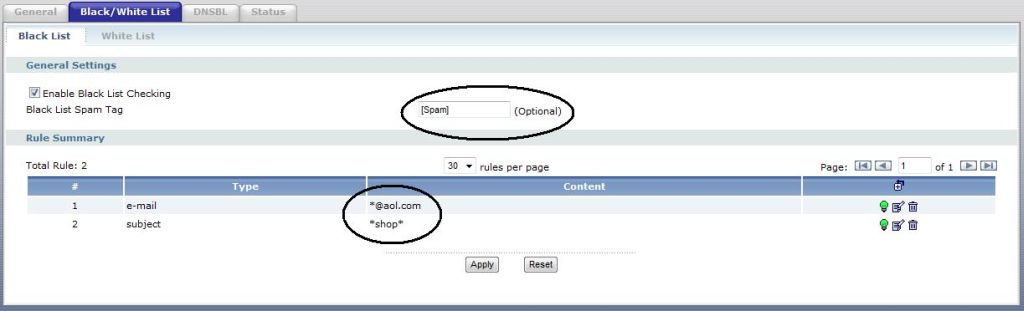
Figure 4: Blacklist keyword filtering
To ensure true spam is filtered while good email isn’t filtered, it is important to know the sequence used by the USG100 for checking email. First, the USG100 will check emails against White List rules to see if there is a match. If there is a match in the White List, the email will pass and no further checking will be performed. Thus, the White List functionality is useful to ensure known good emails aren’t filtered, or to override a filtering condition that exists in a Black List or DNSBL.
Second, the USG100 will compare the parameters of the email to any configured Black List rules. Using default configurations, an email that matches a Black List rule will be forwarded with a tag.
Third, the USG100 can use multiple different Spam services, such as spamhouse.org or sorbs.net, to see if an IP addresses found in the email’s "Received" field are associated to mail servers known to be sources of spam. This is a nice feature, since there aren’t default filters in the USG100 configuration. So having the option to connect to a free Anti-Spam service is helpful. As shown in Figure 5, I’ve configured my USG100 to query the free DNSBL maintained at zen.spamhaus.org for known spammers.

Figure 5: Anti-Spam DNSBL configuration
Note that the USG100 Anti-Spam functionality does not inspect the contents of email. It filters standard POP3 and SMTP traffic, and then examines headers only.
Content Filtering
Running security controls at the core of your network isn’t designed to eliminate the need for software based anti-virus or anti-spam protection on servers or desktops, but provides another layer of protection to your network. Running a content filter at the core, however, can be an effective single solution to controlling Internet usage.
Zyxel has partnered with Blue Coat as their Content Filtering provider. The USG100’s content filter has 60 different Categories of web sites it will recognize. With a current subscription, it will constantly keep up to date on web site ratings and classifications.
Users browsing an unapproved web site will be presented with a customized message, such as the one I created for my kids in Figure 6.
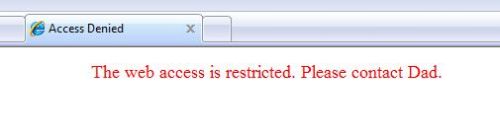
Figure 6: Blocked site message
Alternatively, users browsing an unapproved web site can be redirected to some other web site by entering that URL in the USG100’s Content Filter general configuration page. In my experience testing the Content Filter, I wasn’t able to access objectionable materials once the filter was enabled, including simple image searches from normal web portals like Yahoo! And Google.
The USG100 can be configured to perform content filtering based on customizable Profiles, and then those Profiles can be applied on user-defined schedules to specified subnets or users of your network, giving you control of what levels of filters are applied to which users.
For example, a Profile can be created to block only traffic that matches the Category Online Games. This profile could then be selectively applied just during business hours, and only to PCs with IP addresses from the LAN2 interface.
Intrusion and Anomaly Detection and Prevention (IDP / ADP)
Intrusion and Anomaly Detection identifies threatening traffic, while Intrusion and Anomaly Prevention will drop or block detected traffic flows. Both forms of network security perform packet inspection on Layer 4 through Layer 7 headers to detect network attacks. They differ in how they identify threats.
Intrusion Detection compares traffic patterns called signatures to a database of known threatening signatures. If there is a match, the USG100 can then be configured to act on that traffic. Custom signatures can be created on the USG100, which helps understand the whole concept of a traffic signature.
Figure 7 shows the USG100 custom signature configuration page. As you can see, a custom IDP signature can be created to match traffic specific to a certain Platform (Operating System), Service (protocol), and with user defined values in the Layer 3 (Network Protocol) and Layer 4 (Transport Protocol) headers.
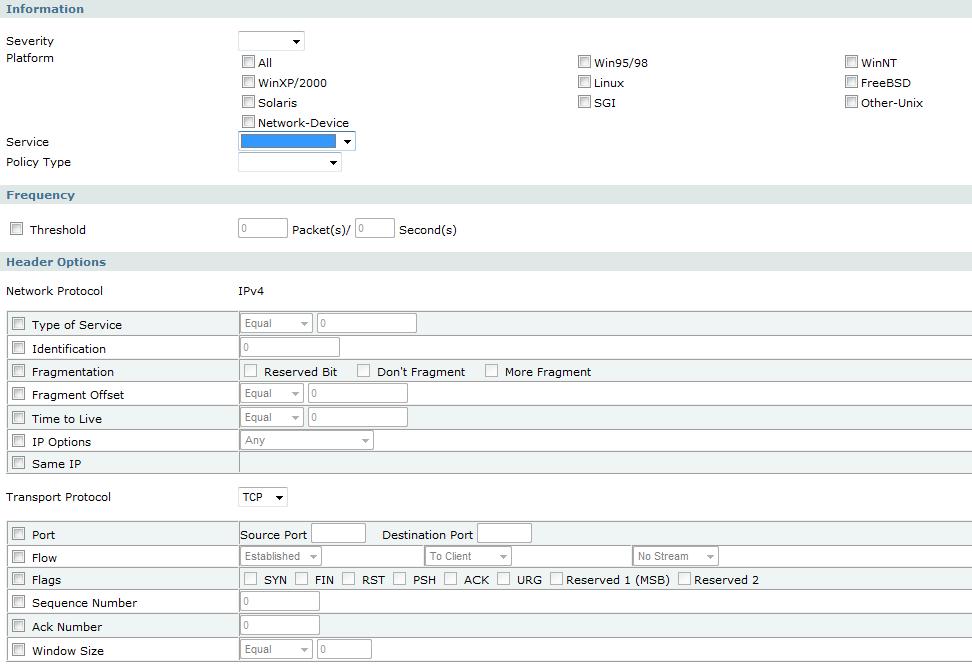
Figure 7: IDP Custom Signature creation
I created a basic custom signature called Cs-reid to match traffic from any operating system using the ICMP service (protocol), and set the action to log the activity. To keep it simple, I didn’t specify any parameters in the Layer 3 or 4 headers. Ping uses the ICMP protocol, so I generated a WAN to LAN ping, and was pleased to see my simple signature was matched and generated a log entry as shown in lines 7 and 8 of Figure 8 below.

Figure 8: IDP Custom Signature matched and logged
IDP configuration options are based on profiles and interfaces. Profiles are collections of traffic signatures by protocol, such as IMAP, POP3, SMTP. Profiles also define the action taken on traffic that is detected to be intrusive or abnormal. Actions include logging, logging with an email alert, dropping, or rejecting the traffic. Profiles are then applied on traffic coming from one interface and going to another.
Anomaly Detection also monitors traffic, but looks for abnormal traffic activity based on the protocol. For example, an excessive number of simultaneous TCP SYN messages sent to a large range of TCP ports would be a pattern typical of a port scan, which is a type of network attack that looks for open holes in a firewall.
Intrusion Detection and Anomaly Detection are pretty complex, but fortunately, the USG100 has pre-defined profiles for both. The USG100’s IDP configuration includes a profile for LAN and DMZ interfaces. Within those profiles, there are dozens of different signatures defined in 28 different protocols. For example, under TELNET, there is a signature called “TELNET EZsetup account attempt” which will match traffic generated by an attempted login to a telnet server using the username “OutOfBox.”
The IDP feature requires a current subscription in order for the USG100 to be able to access Zyxel’s database of packet inspection signatures. As with their Anti-Virus solution, the USG100’s IDP solution isn’t outsourced, it is provided directly by Zyxel.
ADP patterns are added with firmware updates, which do not require a subscription. Still, the ADP feature has a base profile that detects over 60 types of port scans, sweeps, floods, and HTTP/TCP/UDP/ICMP attacks.
Application Control
The USG100 has two network application management functions. The first is the Application Layer Gateway (ALG) function, which is useful for managing VoIP and FTP applications. Network Address Translations (NAT) can cause security and connection problems for VoIP and FTP, which can be alleviated in some cases through the use of an ALG. The USG100 ALG has options to enable SIP, H.323 and FTP transformations as shown in Figure 9.
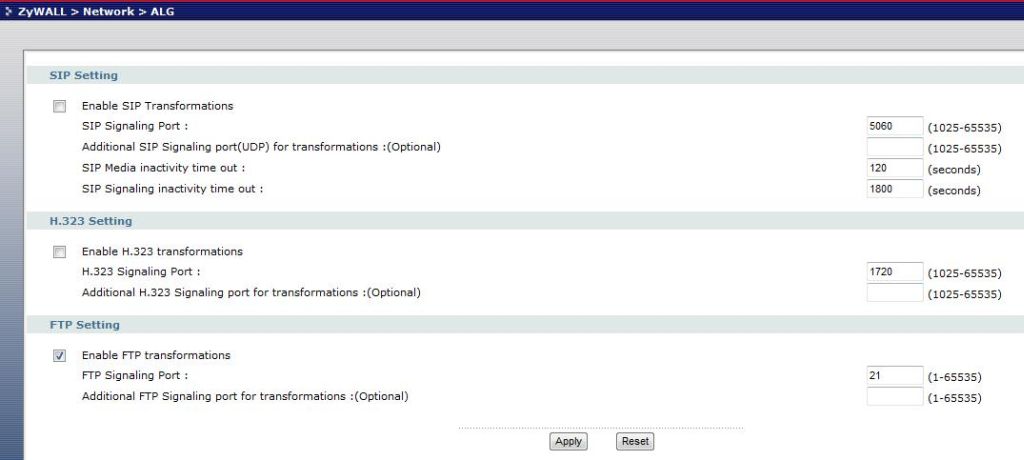
Figure 9: ALG controls
A transformation is essentially changing the information in the application header to use the device’s WAN IP address instead of the originating device’s LAN IP address. For example, if you’re running a SIP device behind the USG100, that device will have a private IP address. That private IP address will be used in the Layer 5 SIP header within the packets sent to a SIP server over the Internet. An example SIP header address will be in the form of [email protected]:5060.
The USG100 will NAT the packets sent from your SIP device to that SIP server. This means the private IP address in the Layer 3 packet header from your SIP device will be changed to the public IP address of the USG100’s WAN interface. Enabling SIP transformations means the USG100 will inspect SIP packets and change the private IP address to the USG100’s public IP address in the Layer 5 SIP header to match the IP address used in the Layer 3 packet header.
I was able to verify the USG100’s SIP transformation capability, using a VoIP phone connected to public VoIP provider. Since I also work for that VoIP provider, I could inspect the SIP registration on our SIP server to see if the SIP headers showed the private IP address on my phone, or had been changed via the USG100’s SIP transformation to the public IP address of the USG100’s WAN interface.
I’ve changed the data below to not publicize my IP address or phone numbers. But the Before and After shows the USG100’s SIP transformation works. In the line below titled Before, you can see the IP address is a private IP address. This was the address in our SIP server with the USG100’s SIP transformation disabled. In the line below titled After, you can see the IP address is a public IP address. This was the address in our SIP server with the USG100’s SIP transformation enabled.
Before: 4145551234@192.168.3.100:5060
After:4145551234@67.240.30.159:5060
The second network application management function on the USG100 is called AppPatrol, or Application Patrol. AppPatrol is a licensed feature on the USG100 that provides the ability to centrally manage applications run over your network. As with the AV and IDP solutions, the USG100 AppPatrol is in-house to Zyxel.
Applications recognized by the USG100 AppPatrol feature include 14 different instant messenger services, 13 different Peer to Peer applications, H323 and SIP signaling for VoIP, 2 streaming application (RTSP and Winamp), plus 5 of the more common network applications including IRC, HTTP, FTP, POP3 and SMTP.
With AppPatrol enabled, the USG100 can control bandwidth utilization by application, block applications, prioritize traffic from specific applications (such as VoIP), and produce real time utilization graphs per application.
To test this function, I set up a rule to drop FTP traffic originating from the LAN1 interface and terminating to the LAN2 interface. I configured my rule to log FTP activity as well. As shown below, the USG100 successfully detected the FTP application traffic and dropped it, performing as expected.
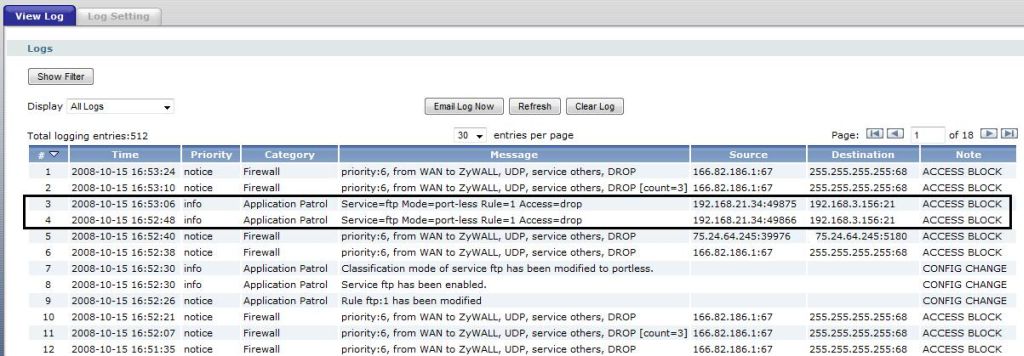
Figure 10: AppPatrol in action
Performance, Pricing and Closing Thoughts
The UTM features on the USG100 have a price, both in throughput and dollars. Inspecting packets and filtering traffic will slow down the router’s throughput, some features more than others. Fortunately, each of the features can be individually enabled or disabled, which gave me the ability to test each feature’s impact on throughput.
For the data in Table 1, I used Jperf to measure throughput, with a TCP window size of 16.0 kBytes and a 10 second test length. I started with all security features off, then measured throughput with only one feature on at a time. With seven different features, it would be nearly impossible to test all the permutations, so I didn’t even try. But I did test throughput with all features on, as shown in the last row.
| Mode |
Throughput (Mbps) |
||
|---|---|---|---|
| WAN-LAN | LAN-WAN | LAN1-LAN2 | |
| All Off | 104 | 96 | 101 |
| Firewall Only | 83 | 82 | 81 |
| AppPatrol Only | 18 | 17 | 17 |
| AV Only | 55 | 51 | 55 |
| IDP Only | 21 | 50 | 20 |
| ADP Only | 57 | 58 | 56 |
| CF Only | 96 | 89 | 92 |
| AS Only | 102 | 96 | 101 |
| All On | 16 | 17 | 16 |
Table 1: Throughput vs. mode
As shown, throughput is over 100 Mbps without any traffic filters. However, enabling the Firewall knocks throughput down to 82 Mbps. Running Anti-Virus filtering will drop throughput down to 51-55 Mbps, and turning on all UTM features reduces network throughput to 16-17 Mbps.
Based on a couple of trial combinations, it seems that the slowest individual feature sets the throughput for combinations of features. For example, enabling the Firewall, AV, CF and AS produced throughput of about 49 Mbps, which is just below the throughput value of the AV feature alone.
Notice that IDP filtering drops throughput to 20-21 Mbps on WAN-LAN and LAN1-LAN2, but LAN-WAN throughput was 50 Mbps. This was due to using the default IDP rule, which only filters traffic terminating on a LAN interface. This points out that performance may be improved by ensuring your filtering rules are only applied to specific interfaces.
Obviously, throughput suffers when using all the UTM features, which makes me wonder if the device has a powerful enough processor and enough RAM. The four minute reboot times I mentioned in Part 1 also make me suspect that it could be somewhat underpowered.
Recapping the pricing from Part 1, as I write this, the USG100 can be found on-line for as low as $456. (Just scroll down to see the shopping box for current pricing.) A one year subscription for Anti-Virus and IDP runs $166.10, and a one year subscription for all UTM features, including AV, IDP, CF and AppPatrol is $246.95.
It’s important to note that I couldn’t crash this device. In over a month of testing and use on my network, I turned on and off every single feature on this appliance numerous times. I plugged and unplugged devices, added and deleted profiles, changed IP addresses and subnets, etc. Not once did it crash or require a power cycle, and I consider myself uniquely talented at causing devices to freeze! Based on my testing of other UTM devices, that is a strong plus for the USG100.
With the ability to enable and disable security features as desired, and customize them to apply to individual network needs, the Zyxel USG100 is a powerful and highly flexible UTM appliance. If you’re looking for a single device at the core of your small network for providing Internet access, managing internal networking, and enforcing network security, I think the USG100 is a solid choice.