

Introduction
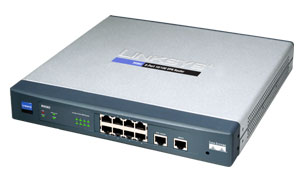
| At a Glance | |
|---|---|
| Product | Linksys 10/100 8-Port VPN Router (RV082) |
| Summary | Dual-WAN router with built-in 8 port switch and 50 tunnel IPsec endpoint |
| Pros | • Excellent price vs. value • Very high IPsec tunnel throughput |
| Cons | • Limited flexibility in setting DHCP server subnet mask |
The Linksys 10/100 8-Port VPN Router is an extension of the popular Linksys router line, but adds some higher-end features that make it suitable for bigger tasks than just hooking up your home to the Internet. Like most any router, it lets multiple computers in your office share an Internet connection, but two things set the RV082 apart from your standard router:
As its name indicates, the RV082 supports VPN functions. Sure, most Linksys routers support VPN pass-through, where a virtual private networking tunnel slips through the router on its way into the network, but the Linksys RV082 also allows VPN tunnels to be terminated on the router itself.
This eliminates the need to have a dedicated box elsewhere in the network to handle the termination of the VPN tunnels. More importantly it means that traffic terminated at the router gets the benefit of being checked at the firewall instead of going right through it. If a VPN tunnel terminates inside the network, the traffic has already gone through the firewall without being checked. Not a problem if you have complete trust in the system on the other side of the tunnel, but most of us security folks are just not the trusting type. I prefer to have all inbound traffic checked at the firewall before it gets inside my network.
The RV082 supports up to 50-simultanious encrypted tunnels through the Internet, allowing up to 50 remote offices or traveling users to securely connect from off-site. This number, 50 VPN tunnels, is pretty impressive for a device in its price category, since most VPN/firewalls usually provide support for only 10 users before you have to buy additional VPN licenses.
Another interesting feature is that the RV082 lets you connect a second Internet line as a backup to insure that you’re never disconnected from your vital link to the Internet. Should one link fail, the other link is capable of keeping you hooked to the net. Of course this assumes that you have something like a cable modem and a DSL connection or two of each.
As useful as that is, the RV082 has another surprise up its sleeve, which is that it can also use both Internet ports at the same time, and let the router balance the traffic. The RV082 may not be particularly intelligent as a load balancer, but you can enter some basic numbers about how much bandwidth you want to use as a watermark and if the bandwidth exceeds that number the next connection goes out on the alternate link. Not exactly the 16-flavors of load balancing you’d get with a BigIP or an Alteon, but not a bad idea for a device with a street price around $275 (as of this writing).
To top it off, the Linksys RV082 also has a stateful packet inspection firewall to help protect network against intruders. Stateful inspection means that the firewall “looks” to see what connections have been opened from the inside of the network to the Internet, and if there is an open connection associated with the packet that has just arrived then it will be allowed through, otherwise it will be dropped. The firewall can also be configured to filter internal users’ access to the Internet.
OK, enough with the introductions, let’s see how easy it is to set up and operate.
Setup
Typically the Linksys RV082 sits between a cable or DSL modem and is the perimeter device between you and the Internet (Figure 1). The Linksys comes with a small fold-out booklet that steps you through plugging in the cable modem or DSL modem to the Internet port and plugging a laptop or PC to the LAN ports. There were about a half-dozen steps to get set up, and there is a basic wizard to walk you through the process if you need a little prompting and guidance.
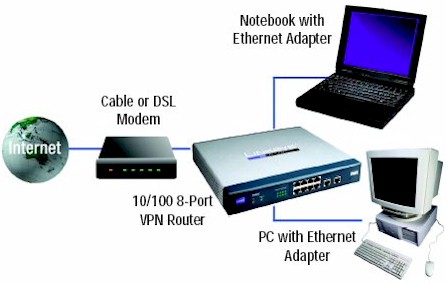
Figure 1: RV802 setup
Once everything is plugged in and turned on you can view a status screen that lets you know that things are working. As Figure 2 below shows, we have one PC plugged into port 1 of the LAN, which received a dynamic IP in the 192.168 range and our DSL connection is plugged into WAN port 1. The Linksys router set itself up as the gateway from the LAN to the Internet and has an IP address of 192.168.1.1.
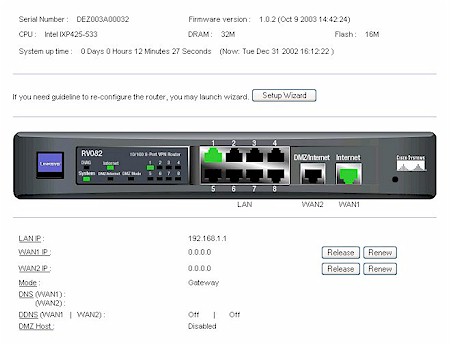
Figure 2: Status screen
Before I got too far, I decided to upgrade the firmware. The instructions were straight forward: download the upgrade; Select the firmware upgrade; and then click a button on the screen to apply the upgrade. There wasn’t much in the way of feedback to reassure me that I had done the right thing, just the browser’s progress bar at the bottom. Sure enough, when the progress bar of my browser reached the finish the browser refreshed and told me that I should wait about 45 seconds while the router reboots. After rebooting, I was pleasantly surprised that the router remembered my Internet configuration (PPPoE) and the login name and password I had entered during the initial setup. As soon as the RV082 finished booting I was able to continue browsing from another window with no changes required.
From the standpoint of securing the router from unauthorized administration the RV082 is just average. There is an administrator account, but there is no way to change the default name for the administrator account: admin. You can change the admin password but there is no password hint, so you better remember it or write it down somewhere where you (and only you) will be able to find it later. Don’t leave the password blank or else all the users on your network will be able to access the router simply by entering “admin” into the password field.
Setup – Adding a Computer to the Network
Having had good luck thus far, I plugged a Lindows OS Linux machine into one of the unused 10/100 Ethernet ports on the front of the unit. Right before this, the Lindows box had been happily working away on another network and already had a dynamic IP address for that network. To my pleasant surprise, as soon as I plugged the Lindows box into the Linksys it dynamically picked up the new address given to it by the Linksys from its DHCP pool of address (Figure 3). Seconds later I was browsing the Internet with no configuration changes. Who said Linux has to be hard?
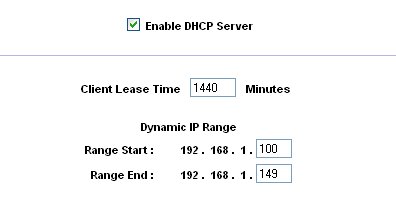
Figure 3: DHCP Server controls
Because I already have network devices assigned to the range of 10.0.0.x I decided to change the Ethernet address of the Linksys gateway. This would allow those devices to make use of the Linksys as the gateway to the Internet without having to change each device I already have on the network to a 192.168 address. Figure 4 shows that the DHCP auto-magically obliges and sets the range for DHCP leases to match the range I am using for the device itself.
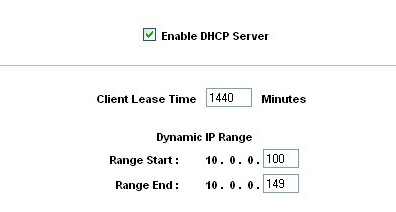
Figure 4: DHCP range follows base address change
The problem is that the subnet mask does not match 255.0.0.0, which is the subnet on the rest of my devices already assigned to the 10.0.0.x network. The Linksys insists on assigning a subnet mask that starts with 255.255.255.x (Figure 5).
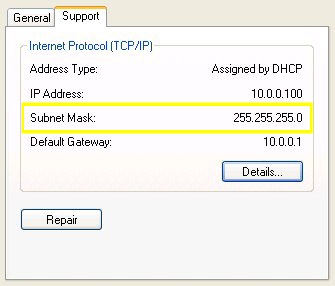
Figure 5: Subnet mask set to 255.255.255.0
To fix this problem with the subnet mask I would need to be able to change the subnet mask on the Linksys router. However the Linksys provides only a drop-down box with pre-set subnet masks (Figure 6). There is no way to type in the proper subnet mask, such as 255.0.0.0, to go with a 10.0.0.1 device IP. I hope Linksys will understand that while having pre-filled subnet masks is good for most users, many users will want to be able to set their own subnet mask – and should be allowed to do so.
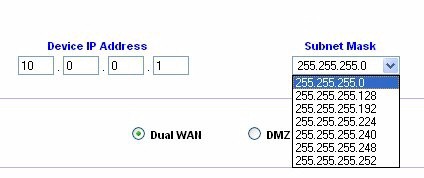
Figure 6: Preset subnet masks
DMZ and Dual WAN
A more minor oddity has to do with how you deactivate router’s use of the DMZ (Demilitarized Zone) private address port once it has been assigned to a DMZ host : Linksys asks that you enter in the DMZ Private Address space the value of zero (0). The use of zero (0) to deactivate the settings seems a bit kludged, since my first instinct would be that I’ve just opened up the entire subnet to be completely exposed. A radio button or a check box showing activate or deactivate would have been more appropriate.
Not to confuse things, but there is also a WAN port that has the name DMZ / Internet. This is the port used for either the second cable modem (or DSL modem) or may be used as a public DMZ. The public DMZ is not the same thing as the DMZ private address. The DMZ / Internet port logically exists between the local network LAN ports and the Internet port. If you are not using the DMZ Internet port for a second connection to the Internet, you can stage servers on the DMZ that are more exposed than the PC on your LAN. Typically servers in the DMZ these would be providing public services, such mail or FTP. Using the DMZ / Internet port on the RV082 router the servers connected to the DMZ Internet port are publicly accessible, but they are protected from attacks such as SYN Flooding and Ping of Death.
If you are not planning on hosting public servers, such as an FTP server the DMZ Internet port can be used to provide dual WAN connections. Using the DMZ / Internet port for a second connection to the Internet means you give up the public DMZ function on that port, but you gain Linksys’ Dual-WAN capability. Dual-WAN can work in two modes: Smart Link Backup or Load Balance.
If Smart Link Backup is selected, you only need to choose which WAN port is the primary and then the other will be the backup. If you lose your connection to the Internet on your primary the backup takes over. This is considered active / passive, since the backup sits idle and does no work unless the primary link fails.
If Load Balance is selected, there will be two main choices: By Traffic – Intelligent Balancer (Auto) and user defined. In Load Balance mode, first, choose the Max. Bandwidth of Upstream (64K/128K/256K/384K/512K/1024K/1.5M/2M/2.5M or above) and Downstream (512K/1024K/1.5M/2M/2.5M or above) for WAN1 and WAN2. I recommend you run a speed test first using one of the many bandwidth testing sites available on the Internet so that you will put in realistic numbers. Wishful numbers won’t increase your actual bandwidth.
The other option is Intelligent Balancer (Auto), which will automatically compute the maximum bandwidth of WAN1 and WAN2 by using Weighted Round Robin to balance the loading. If the upstream / downstream bandwidth demands are in excess of a threshold (30%, 40%, 50%, 60%, 70%, 80%, 90%), the Linksys will bring up the second link. When the activity subsides, a time-out occurs (None/10min/20min/30min/40min/50min/60min), and the second link will be terminated.
Firewall Controls
We’ve already covered some of the aspects of the firewall, such as it using stateful packet inspection. The firewall controls (Figure 7) are typical of most firewalls in its class, and is nearly identical to what is found elsewhere in the Linksys router line. From the Firewall Tab you can create and modify Network Access Rules to evaluate the network traffic’s Source IP address, Destination IP address, and IP protocol type to decide if the IP traffic is allowed to pass through the firewall.
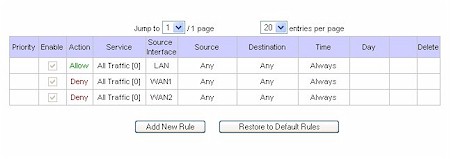
Figure 7: Firewall Network Access Rules
Using custom rules (Figure 8), it is possible to disable all firewall protection or block all access to the Internet, so use extreme care when creating or deleting network access rules.
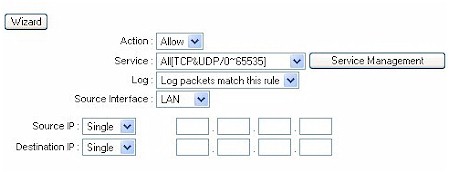
Figure 8: Defining a Custom Rule
The router has a few default rules in place when you first set it up. You won’t actually see these rules when you view the firewall tab, but they are there:
- All traffic from the LAN to the WAN is allowed.
- All traffic from the WAN to the LAN is denied.
- All traffic from the LAN to the DMZ is allowed.
- All traffic from the DMZ to the LAN is denied.
- All traffic from the WAN to the DMZ is allowed.
- All traffic from the DMZ to the WAN is allowed.
Custom rules that are created override the default rules shown above, but there are four additional default rules that will be always active, and custom rules will never override these four rules:
- HTTP service from LAN side to RV082 is always allowed. (That way you don’t accidentally cut off the ability to manage the router.)
- DHCP service from LAN side is always allowed. (This only applies if you have DHCP turned on. You can disable DHCP and it will still be allowed, it just won’t be on.)
- DNS service from LAN side is always allowed. (Because if you turn it off, its really hard to get to sites like www.smallnetbuilder.com.)
- Ping service from LAN side to RV082 is always allowed. (Ping is useful for diagnosing network problems.)
Besides the default rules, all configured network access rules are listed in the table, and the rules are order dependent, so a rule that sits above another rule gets executed first. When the firewall has checked all the rules, the default rules apply as rules of last resort.
Something rare for a firewall in this price point is the ability to create custom services (Figure 9). Standard services are pre-defined, such as HTTP on port 80, FTP on ports 20 and 21. These can be selected from a drop down box. But if you have something that is not on the list, you can create it yourself, such as adding a rule for MySQL traffic, which uses port 3306. It is not on the drop down list, but you can add a custom service by specifying the port.
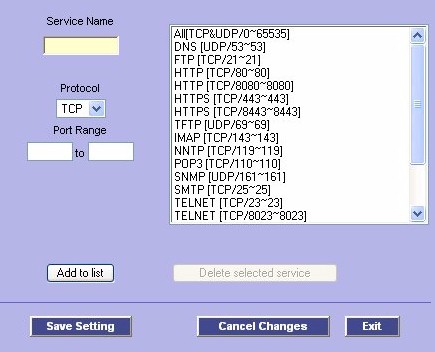
Figure 9: Defining a Custom Service
Additionally, firewall rules can be set to be active only during certain times of the day or on certain days of the week (Figure 10). This allows you to restrict access to and from your network by specific protocols or sites during the time periods these rules are active, such as blocking the ports used by P2P from 8-6 Monday – Friday, but not on weekends.
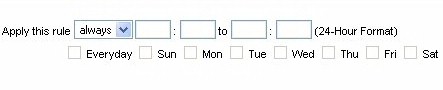
Figure 10: Firewall rule scheduler
Logging and Other Features
Once you’ve created the firewall rules you can log the traffic to give you a better idea how effective the rules are. This router can even send the logs to a syslog server (Figure 11). Again, not bad at this price point.
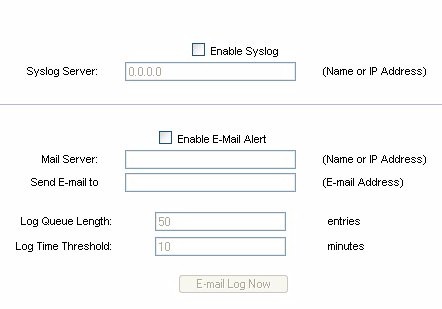
Figure 11: Syslog and email alert settings
I also like how the Linksys RV082 has some basic (OK, very basic) intrusion detection capabilities as part of its alert logging capability.
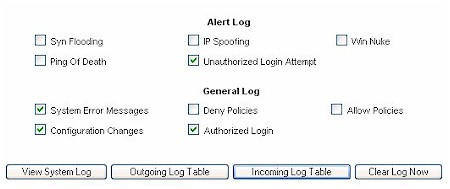
Figure 12: Controlling what’s logged
The system logs that are not sent to an external syslog server will be logged locally.
Firewall rules are usually used to keep any of the bad stuff out on the web from getting into your network, but sometimes we ourselves invite the dark-side into our network. To help fortify your willpower (or those who can’t be trusted to use their own good judgment), the Linksys RV082 provides basic content filtering of those sites on your Forbidden Domains list (Figure 13).

Figure 13: Forbidden Domains
The results are straight forward – no access to the site. When the site is blocked it just appears as if the site is down, and you only get the typical message “cannot find server – this page can not be displayed”. There is nothing that specifically tells you that this site was blocked due to a policy violation which could leave you scratching your head wondering if the site is indeed down if you forgot that you put it in your Forbidden Domains list.
Another neat feature is the support for DDNS (Dynamic DNS), which allows you to assign a fixed domain name to a dynamic WAN IP address. Using DDNS you can host your own Web, FTP or other type of TCP/IP server in your LAN even though your ISP did not provide you a fixed IP with your cable modem or DSL account. Once you have a domain address (such as yourowndomain.com )linked to a DDNS service people can find the gateway to your LAN just as they would find any other place on the web; by using the domain name (just as www.linksys.com gets you to the Linksys website, saving you from having to remember an IP address).
The trick is that because your ISP keeps changing your IP address you’ve got to have a service that updates the DNS servers on the Internet, telling them what the latest IP address is they need to know in order to get to yourowndomain.com. For that you use a client that tests your connection and reports back to a DDNS service what the latest IP address is. The service then makes the association between your IP address and the domain name you are using.

Figure 14: Dynamic DNS provider options
DDNS support within the Linksys RV082 only consists of two options: use DynDNS.org’s service or keep it disabled (Figure 14). I opted for using DynDNS and moved one of my existing domains to their service. DynDNS did a great job with the move and I am happy with their level of service. DynDNS also provides links to dozens of dynamic DNS clients; from free to paid, from Unix to Windows.
Routing Performance
Under the hood, the Linksys RV082 is equipped with a 533 MHz INTEL XScale IXP425 processor, 32MB of DRAM and 16MB of flash memory. Its 20Mbps or so routing performance is decent, but by no means best-of-breed for current generation routers.
I also decided to run some performance tests of the RV082’s gigabit switch (Table 1) using IXIA’s Chariot 5.0 and Intel Pro 1000 MT adaptors on both endpoint machines. I baselined the setup using an Asante Gigabit switch, which showed that the gigabit copper network was running at 203.7 Mbps average (266.6 Mbps max). The baselining was done to determine the maximum I could expect to transmit and receive over ethernet between my two end-points. I wanted to make sure that any numbers I derive are a result of the Linksys RV082 and not as a result of my Ethernet network.
The numbers also highlight that the theoretical maximum of 1000 Mbps is just that, theoretical, with the actual throughput being about 25% of the rated speed for the gigabit cards and the intervening Asante switch. For the baseline test my response time averaged 0.003 seconds. As a second point of reference I ran the same test, this time through a 3COM SuperStack gigabit switch. Here the throughput was 247 Mbps (266.6 Mbps max). With the 3COM switch the response time also averaged 0.003 seconds.
Finally, I ran both endpoints through the RV082’s LAN switch. Seeing that the Linksys is a 10/100 device, a throughput of 81.6 Mbps is pretty solid, though lower than the Intel 460T, which is a dedicated 10/100 switch. The response time was 0.009, not as fast as we saw with the through the gigabit switches, but matching the Intel 10/100. Figures 19 and 20 show Chariot plots of the RV082’s switch throughput and response time.
| Device | Throughput (Average) Mbps | Throughput (Max) Mbps | Response Time (sec) |
|---|---|---|---|
| Asante GX5-800P (10/100/1000) |
203.7
|
266.6
|
0.003
|
| 3COM SuperStack 3 (10/100/1000) |
247
|
266.6
|
0.003
|
| Intel Express 460T (10/100) |
87.4
|
88.9
|
0.009
|
| Linksys RV082 (10/100) |
81.6
|
88.9
|
0.009
|
|
Table 1: Gigabit performance comparison
|
|||
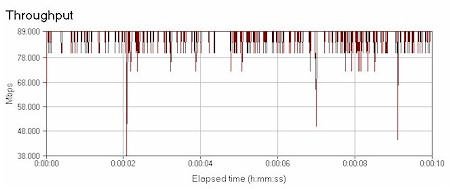
Figure 19: Switch throughput
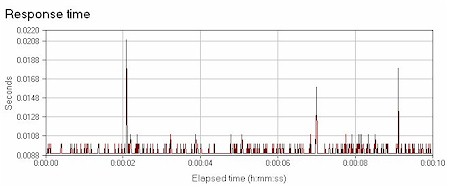
Figure 20: Switch response time
Routing Performance Test Results
| Test Description | Transfer Rate (Mbps) | Response Time (msec) | UDP stream | |
|---|---|---|---|---|
| Throughput (kbps) | Lost data (%) | |||
| WAN – LAN | 19.8 | 3 (avg) 7 (max) |
499 | 0 |
| LAN – WAN | 22.2 | 1 (avg) 6 (max) |
499 | 0 |
| Firmware Version | 1.0.11 (Jan 16 2004) | |||
VPN
As I’ve noted above, the RV082 is capable of two types of VPN’s: point-to-point and mobile client (Figure 15). Both types are supported using the IPSec standard.
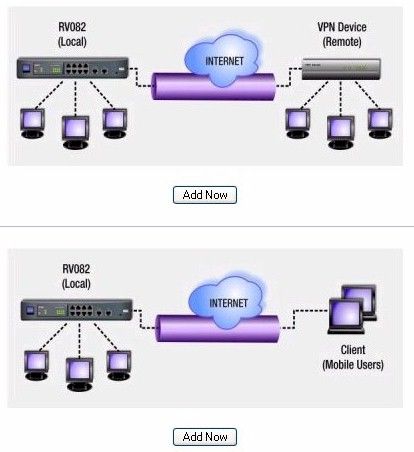
Figure 15: VPN Type selection
A point-to-point VPN assumes that you’ve got another router somewhere that acts as one end of the VPN tunnel, such as at a main office, and the other end of the VPN tunnel is at the remote office (or at home if you are a telecommuter). When you connect through the VPN’s encrypted tunnel, you create your own private channel between the two routers that are at each end of the tunnel. Traffic that travels through that encrypted tunnel is protected from eavesdropping, even though you are using the public Internet.
A mobile client VPN works pretty much the same way, except one end of the VPN is the router and the other end is created using software running on a laptop or PC. The traffic is encrypted and is also protected from eavesdropping. And while the RV082 can support mobile client VPN’s, its BYOC, that is, bring your own client. Linksys doesn’t provide mobile user clients with the router. Popular clients are made by Cisco and Nortel, among others.
Creating VPN links are not for the newbs, and I don’t have the bandwidth to write a tutorial on the joys of IPSec. At the risk of repeating myself, for a device in this pricepoint to be able to do 50 IPSec tunnels is little short of amazing. As you can see below, the firewall keeps track of the number of tunnels and the types of tunnels in use (gateway-to-gateway and mobile user).

Figure 16: VPN Tunnel summary
Figure 17 shows what the gateway-to-gateway setup screen looks like. You can choose multiple types of authentication to augment the security model (IP plus domain name, IP plus email address and dynamic IP versions with domain name or email address).
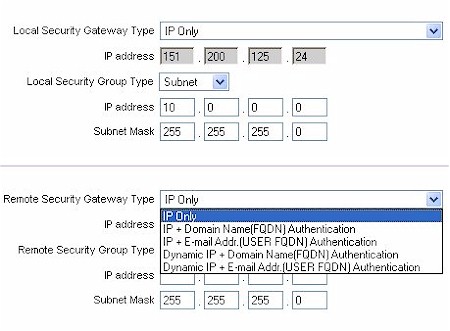
Figure 17: Gateway to Gateway setup
VPN, Continued
The Authentication mentioned above should not be confused with the packet authentication used by IPSec (Figure 18). The Linksys supports both IKE with preshared key (automatic) and manual keying mode. DH supports group 1, 2 & 5. Phase 1 encryption supports DES and 3DES. Phase 1 authentication supports MD5 and SHA1.
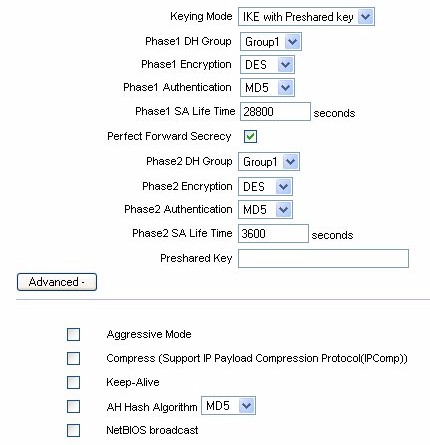
Figure 18: Tunnel Authentication and Encryption controls
In the advanced section of IPSec setup you will notice that Aggressive Mode is supported in addition to Main Mode. There is also an option to allow NetBIOS broadcast to pass through the VPN tunnel. By default the RV082 blocks these broadcasts.
The bottom line is that the Linksys does a fair job at simplifying a setup that is just as complicated on VPN routers costing thousands of dollars more.
VPN Performance
VPN tunnel throughput was based on using the RV082 in a point-to-point configuration, with the RV082 serving as one end-point and a NetScreen 5XP as the other end-point. Natively, the 5XP is capable of 13 Mbps 3DES VPN performance, whereas the RV082 has no published specifications, though I am working with NetScreen to secure a copy of their IXIA VPN testing results.
I can say that the RV082 uses a VPN co-processor and was able to sustain everything that the NetScreen 5XP could throw at it, right up to the NetScreen’s 13Mbps limit. I then switched to a NetScreen 5GT, which is capable of XP is capable of 20Mbps 3DES VPN performance, and again the RV082 was able to handle everything the NetScreen could provide, right up to 20Mbps limit of the NetScreen.
Conclusion
Before I get to my conclusion, let’s just take one more look at this beast:

Mmmmm. OK, judgment time.
I like this router. The price : value ratio is excellent. It performs like a champ, has loads of features, and its price is very reasonable for what you get.
While I would like to see some of the quirks fixed, like not being able to set the subnet mask to what I want, but this is relatively minor compared to what the Linksys RV082 gets right. The router is easy to set up. The firewall’s custom rules are flexible. The support for VPN termination is a plus. And having the rudimentary load balancing / failover is the icing on the cake. The RV082 may be overkill for Joe six-pack, but is just the thing for power users who want big features but don’t want to pay for big iron.