

Introduction
Update 4/2/2007: Corrected wrong info on iTunes playback.
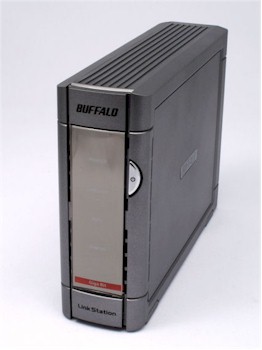
| At a Glance | |
|---|---|
| Product | Buffalo Technology LinkStation Live (HS-DH250GL) |
| Summary | Single SATA drive NAS with built-in DLNA UPnP multimedia server. |
| Pros | • FTP, DLNA and UPnP AV servers • Built-in backup to other LinkStations, TeraStations or attached USB storage • Gigabit Ethernet with 4K and 8K Jumbo frames supported |
| Cons | • Poorer performance than LinkStation Pro which is built on the same hardware platform • No FTP server logging • No support for SMTP authentication for emailing logs • Conflicts between PCast and DLNA servers made picture viewing difficult |
Last fall, we reviewed Buffalo Technology’s LinkStation Pro and concluded that while it offered great performance and took advantage of its gigabit Ethernet port, it lacked media serving capabilities. Buffalo addressed this concern in January at CES when it announced its new series of LinkStation Live products.
Replacing the LinkStation Home consumer NASes, the LinkStation Live series, available in 250GB, 320GB, 500GB and 750GB capacities, is built on the identical hardware platform as the LinkStation Pro. But instead of Active Directory support, the LinkStation Live contains a DLNA-certified streaming media server and USB print server.
If you compare the LinkStation Live with the LinkStation Pro, you’ll discover that the cases are virtually identical, with Buffalo changing only the color scheme. The case of the LinkStation Live has an attractive gray finish, compared to the black case on the “Pro”.
The four front panel LEDs indicate power, link/activity, info and error status. As a matter of personal preference, I prefer individual disk activity and LAN activity indicators such as found on the DLink DNS-323, but for a home-based NAS, a single LED suffices.
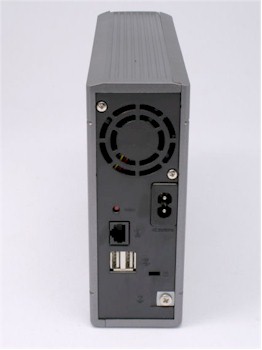
Figure 1: LinkStation Live Rear View
On the rear panel of the LinkStation Live (Figure 1), you’ll find a gigabit auto sensing Ethernet port, two USB 2.0 ports, a power connector, hardware reset button and opening for the single fan. In comparison to the DLink DNS-323, the fan on the LinkStation Live is significantly quieter, although in fairness, the DLink has to move more air to cool its two drives. Buffalo deserves kudos for including a security lock slot on the back panel. In a small office where physical security could be an issue, the ability to lock down your NAS with a notebook cable is a nice feature.
It’s not too difficult to open the LinkStation Live, though there’s really no reason that you’d ever need to. I popped it open to see if the layout and components were the same as found in the LinkStation Pro.
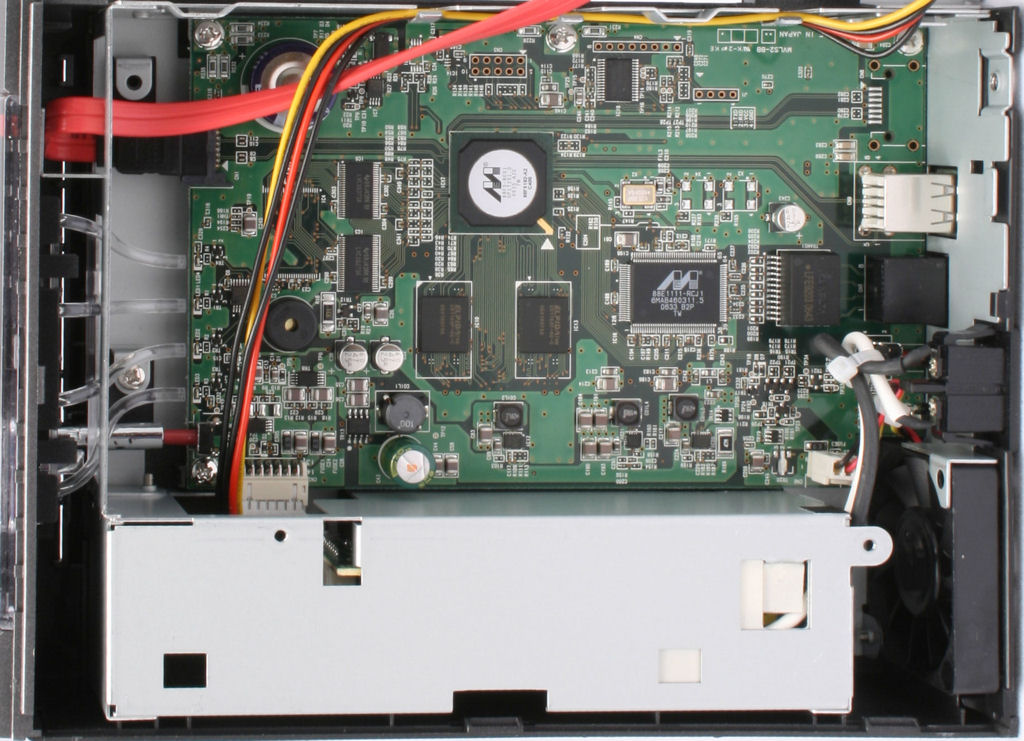
Figure 2: LinkStation Live Circuit Board
A close inspection (Figure 2) showed that the LinkStation Live is built on the same Marvell Orion 400 MHz 88F4182 Media Vault Processor and the same Marvell 88E1111 gigabit Ethernet controller as found in the LinkStation Pro. I especially like the embedded power supply, which makes for a much neater installation than units that use “wall warts” or in-line external power supplies.
The LinkStation Live also uses the identical Western Digital 7200 RPM SATA drive found on the Pro (our test sample came with a 250 GB drive). As with the Pro, there’s adequate slack in the cable that allows you to lay the drive next to the case while still connected (Figure 3).
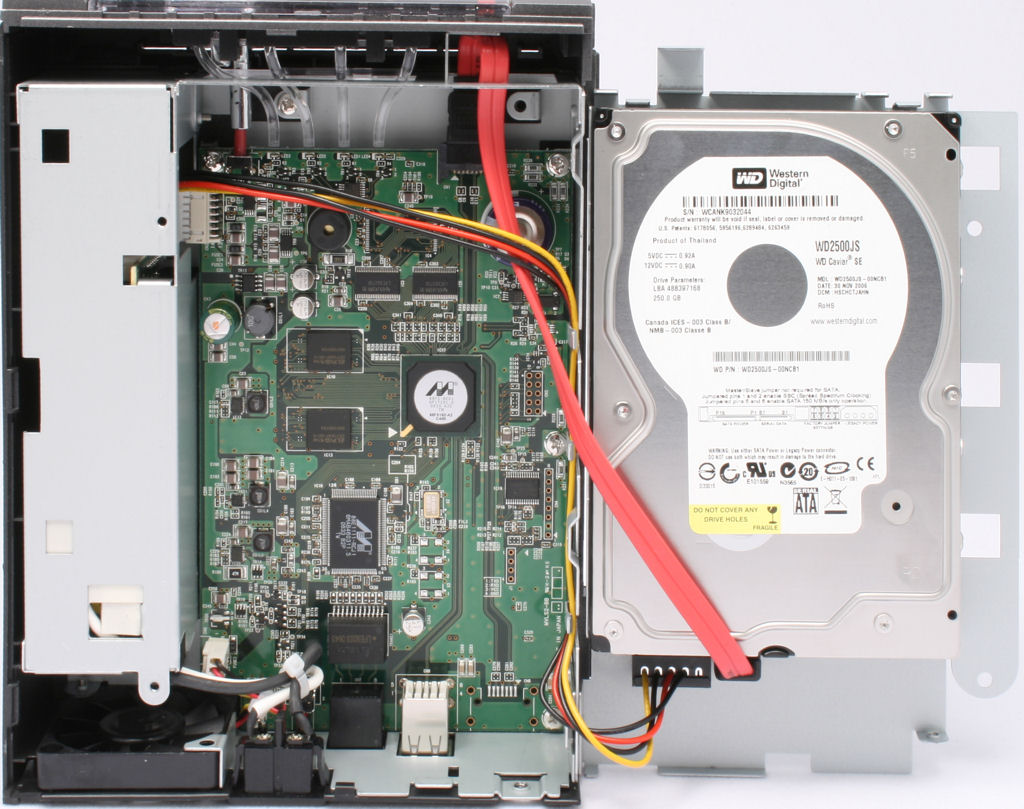
Figure 3: LinkStation Live Interior View
 Check out the slideshow for an admin interface tour.
Setup
For most home users, setup of the LinkStation Live will be a simple process. By default, the LinkStation Live ships with a preconfigured share named “share” and with user/group security disabled. You also get a CD that includes a setup and discovery utility that walks you through the initial configuration of the Live. The illustrated four step process guides you through connecting the power cord, network cables and finally, discovering the LinkStation Live on your local network.
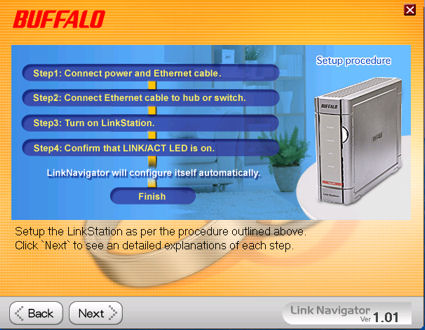
Figure 4: LinkStation Live Setup Wizard
During my testing, I found a “discovery” problem with the utility. It failed to find the LinkStation Live even though I could browse and find it through Windows Explorer. Buffalo has since posted a revised utility (Version 1.01) that appears to have fixed the discovery problem.
After discovering and configuring the LinkStation Live, the setup wizard installs a small utility (Windows only) called NAS Navigator. This handy utility shows the current IP address of your LinkStation Live and the amount of space in use. You can also view all of the shares on the LinkStation Live or automatically map a drive to the default share. Browser Management launches your default browser and takes you to the web-based management home page of the LinkStation Live.
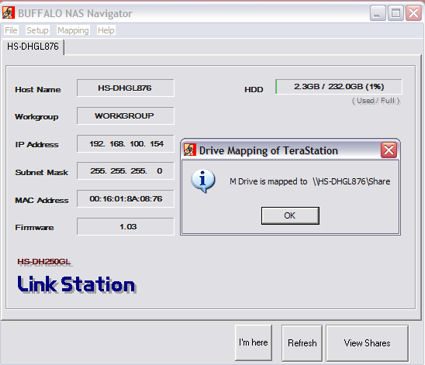
Figure 5: NAS Navigator utility
The user interface on the LinkStation Live mirrors the revamped and improved UI first introduced on the LinkStation Pro. Since the menu structure is very similar to the previously reviewed LinkStation Pro, you can check that review for details. I’ll just focus on the differences here, which mainly deal with the built-in print and media servers.
Check out the slideshow for an admin interface tour.
Print and Media Servers
The print server is a feature on the LinkStation Live that is not included on the LinkStation Pro. The only option is enable or disable. When enabled, USB printers plugged into one of the LinkStation Live’s USB ports appear as a shared printer on the network.
It is interesting to note that the LinkStation Live’s packaging prominently features its built-in DLNA server, yet the admin menu entry is labeled PCast. Actually, PCast is Buffalo’s own multimedia server that runs concurrently with Mediabolic’s DLNA-certified media server.
When media serving is enabled, you can stream supported content to other DLNA-certified media players. Actually, any media player that supports the UPnP AV protocol will also work. Configuration is simple. When you click on PCast, it launches your browser to port 8080 on the LinkStation Live and connects with the Mediabolic configuration page (Figure 6).
All you have to do is click enable and configure the media folder to point to the share that contains your multimedia files. You can also enable multimedia for attached USB drives. Optionally, you can restrict DLNA access by MAC address and set a PCast password.
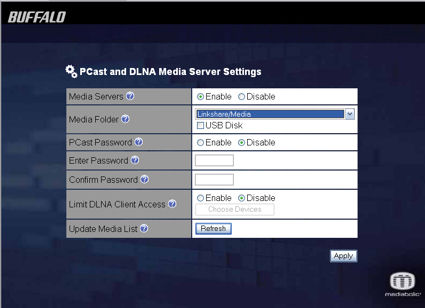
Figure 6: PCast and DLNA server setup
I tested the media server two ways. First, the server claims to serve content to iTunes 7.x clients. Indeed, the music in a subfolder defined as the media folder in the screen above was accessible by iTunes. It appears as shared music just below the iTunes Store (Figure 7).
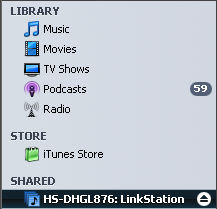
Figure 7: Music Served by the LinkStation Live DLNA server is accessible by ITunes
I also tested using a Buffalo LinkTheater Wireless A&G media player, with mixed results. Music played as expected, and it appears that the ID3 tags were properly processed, as Genre, Artists and Album categories, as well as “All Music” lists were properly enumerated. Of course, if I had tried to play music purchased through iTunes via the LinkStation Live / LinkTheater combination, it would not have played. This isn’t unique to Buffalo, but is the case with any product that doesn’t have an iTunes client somewhere in the playback loop.
For video, the key issue is supported file types, as it is with most players. WMV files played fine, but I was disappointed that the video formats I use most frequently were not supported. I tried AVI files generated by a Samsung camera (MPEG), AVI files generated by my Canon SD550 and MP4 files that I play on my iPod, but none played. I think this problem is more due to the LinkTheater than the LinkStation, but it was disappointing nonetheless.
Finally, I copied a number of subdirectories full of vacation photos from a recent trip, and unfortunately, none of them were enumerated under the “All Pictures” menu selection. The only images under the "All Pictures" menu were the album artwork images from the music folders! I had to navigate through the Album entry and then through the directory structure to get to my photos. Buffalo is aware of this problem and explained that it is due to an interaction between the PCast and DLNA servers.
Performance and Conclusions
We have recently revamped our popular NAS performance charts. The new charts are now much more interactive and let you choose up to six products to compare for performance vs. filesize on numerous tests. Check out the description of the new features here. I generated the performance charts below using the new NAS chart tools.
Overall, I was disappointed in the performance of the LinkStation Live—especially when compared to the LinkStation Pro. I also found this quite surprising considering that the two models are built on virtually the identical hardware platform. I contacted Buffalo Technology, and they, too, were very surprised and had expected the performance of the “Live” to be approximately the same as the “Pro”.
In fairness to Buffalo, we received an engineering sample built just before production started, so it’s possible that the performance of the production “Live” models will more closely match the performance of the Pro. When Buffalo sends a production sample, we’ll rerun the tests and update the performance charts as necessary.
For the purposes of this comparison, I included the LinkStation Pro (red line), LinkStation Live (blue line) and the older Gigabit LinkStation (green line). I included the 100 Mbps and 1000 Mbps read/write tests, but encourage you to use the new interactive charting feature to explore and compare other test results and products.
The charts below clearly tell an interesting story. The LinkStation Pro, near the top of the NAS performance charts, clearly outperformed the LinkStation Live in every test. And, in all tests but one, the LinkStation Live outperformed its predecessor, the Gigabit LinkStation.
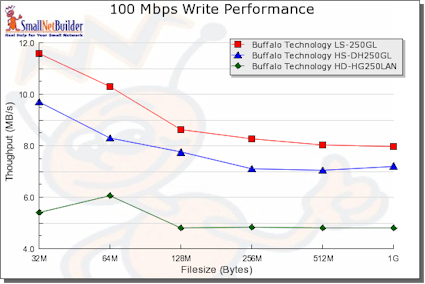
Figure 8: 100 Mbps Write Performance Comparison
At the 32MB file size with a 100 Mbps Ethernet connection, the LinkStation Pro appeared to be bound by the throughput of 100 Mbps Ethernet. Still the Pro outperformed the Live by almost 20%. The difference is even more noticeable when you compare the 32MB file size write performance at 100 Mbps and 1000 Mbps. The LinkStation Pro was almost twice as fast as the LinkStation Live.
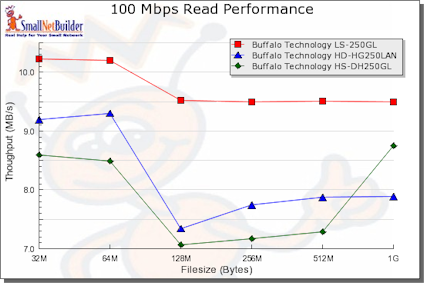
Figure 9: 100 Mbps Read Performance Comparison
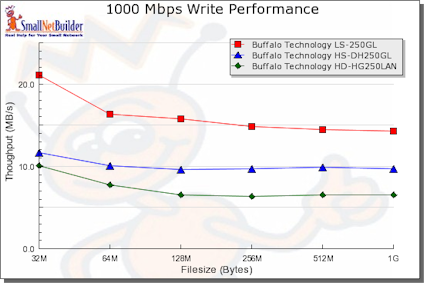
Figure 10: 1000 Mbps Write Performance Comparison
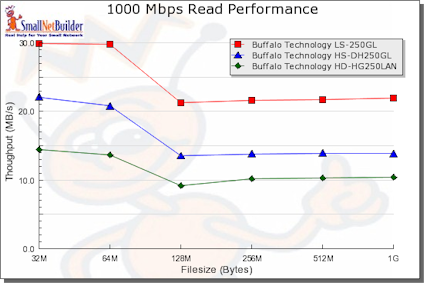
Figure 11: 1000 Mbps Read Performance Comparison
Performance is only one criterion for selecting a NAS for your home or small office. Often, product functions will have more weight in making your purchase decision. In practical terms, the measured performance of our test LinkStation Live, though not as speedy as its “Pro” sibling, is fast enough for most home networks—especially if you haven’t upgraded to gigabit Ethernet.
But Buffalo has decided to create separate product lines to serve consumer and business NAS needs. So you’ll have to choose between "business" features and home features, which comes down to choosing whether or not you want the media and print serving that comes with the LinkStation Live or the Active Directory support of the LinkStation Pro.
We hope Buffalo gets us a production LinkStation Live so that we can make sure that it really does have the same performance of its "Pro" sibling. And we also hope new firmware will soon be released to resolve the collision between the Pcast and Mediabolic servers that messes up photo index creation. In the meantime, if you can do without media and print serving and want guaranteed high performance, your best bet is to go for the "Pro" until this product fully becomes "Live".
Check out the slideshow for an admin interface tour.