

Introduction
14 Feb 2008: Switch supports up to 9K Jumbo Frames
26 Nov 2007: Added info on Atheros chipset on Pg 2
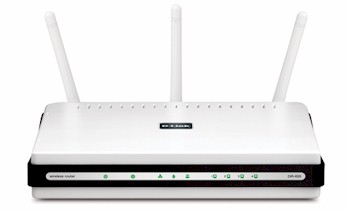
| At a Glance | |
|---|---|
| Product | D-Link Xtreme N Gigabit Router (DIR-655) D-Link Xtreme N Notebook Adapter (DWA-652) |
| Summary | One of the first Wi-Fi Certified 802.11n Draft 2.0 routers and cards based on Atheros xSpaN silicon |
| Pros | • Gigabit WAN and LAN with excellent routing speed • Most simultaneous sessions of any router tested • Automatic QoS for Internet uplink and WLAN • Tries not to stomp on neighboring WLANs |
| Cons | • 2.4 GHz band only • Wireless throughput tends to vary widely over time • Does not statically fall back to 20 MHz channel for 11b/g neighbors |
Rarely have I received so many requests for a product review as I have for the D-Link DIR-655. This is most likely due to its position at the top of our Router Charts, with its impressive 200+ MHz routing speed. However, in keeping with my policy of not reviewing draft 802.11n products, I have held off on its review.
But with the Wi-Fi Certification process underway, I’m reluctantly going to begin review of Draft 11n products. And since the DIR-655 was the first draft 11n product to post Draft 2.0 firmware and driver updates, and one of the first out of the Wi-Fi Certification gate, what better place to start?
The 655 is housed in an unassuming compact white plastic enclosure that’s intended to sit horizontally on your desktop, although it has screw mounting slots in case you wish to wall mount it. Its size belies the power within however, showing, that at least in this case, size doesn’t matter.
The front panel has the usual status lights shown in Figure 1 below, all of which are blue and backlight (very) small icons that indicate their functions. The lights are bright enough, but the icons are so small that they blur into undistinguishable blobs from most any distance that you’re likely to view them. The lights are also monochromatic, so you don’t get any indication of the link speed for any of the ports.
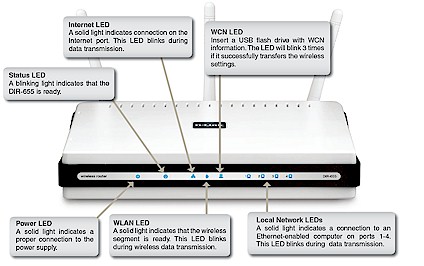
Figure 1: DIR-655 Front Panel
Connectors on the rear panel (Figure 2) include four 10/100/1000 LAN ports, one 10/100/1000 WAN port and power jack. All ports are auto MDI / MDI-X which means they’ll figure out how to connect to whatever you plug into them. There’s also a reset-to-factory-defaults switch but no switch to change the 655 between its Routing and "Bridge" (AP) modes, which is available in the web-based admin interface.
Update 14 Feb 2008: The switch supports up to 9K Jumbo Frames
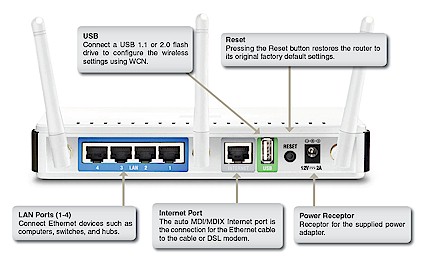
Figure 2: DIR-655 Rear Panel
Don’t get too excited about that USB port, since it’s just there to support the flash-key based Windows Connect Now (WCN) method, which hopefully will fade to black now that the industry has agreed upon Wi-Fi Protected Setup. Note that all three antennas use RP-SMA connectors for easy upgrade.
Internal details
Figure 3 is a shot of the 655 with its top cover removed. All of the interesting stuff is tucked under the RF shield to the right of the photo, which didn’t come off easily so I left it in place. A bit of Googling, however, revealed the processor to be the Ubicom StreamEngine 5160. The switch is, of course 10/100/1000 and provided by a Vitesse VSC7385. The design also has 16 MB of RAM but I couldn’t find the amount of Flash used.
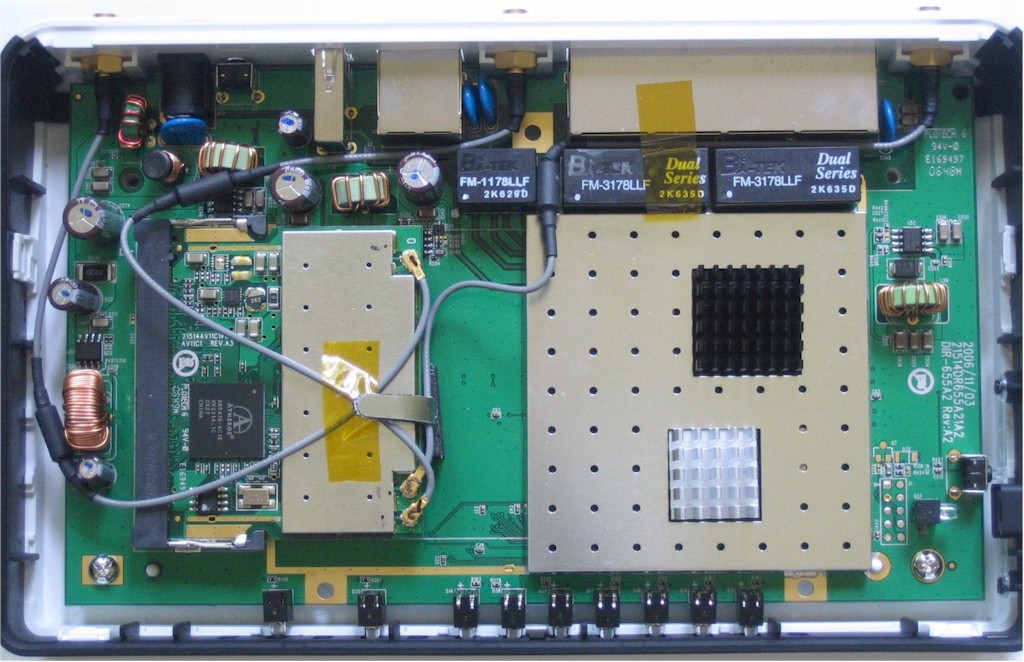
Figure 4: Main board top
The mini-PCI radio module to the left is an Atheros AR5BMB71 reference design based on one of the xSpan AR5008 series chipsets. Unfortunately, the FCC photo in Figure 5 doesn’t provide enough detail to tell which one.
Update 11/26/2007: This X-bit labs review identifies the Atheros chips used in the DIR-655 and DWA-652 as the AR5416 Baseband / MAC and AR2133 3T3R 2.4 GHz radio.
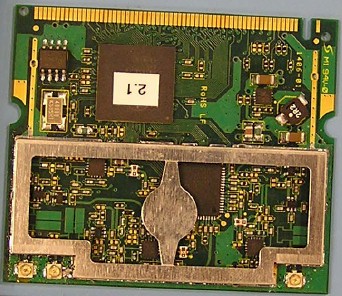
Figure 5: Router mini-PCI radio module
Figure 6 shows the board of the 655’s companion DWA-652 Notebook Adapter. You can make out the AR5416 MAC/Baseband chip, but, unfortunately again, not the radio chip.
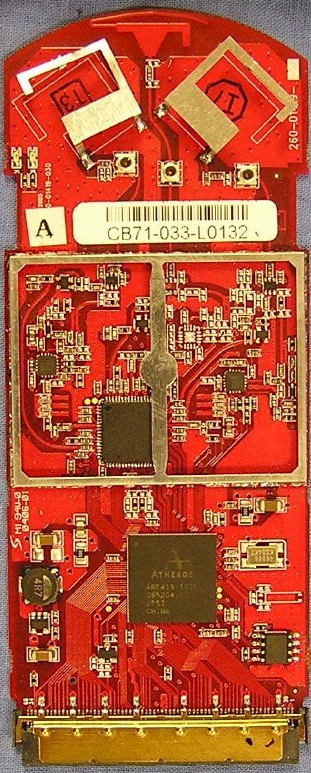
Figure 6: CardBus board
Routing Features
The 655’s feature set is similar to that of its other Ubicom-based routers including the DGL-4300 that I previously reviewed. So I’ll just summarize the key features here and you can check the slideshow for other screenshots. Or use D-Link’s online emulator to explore the entire 655 admin interface.
NOTE: The emulator is still at firmware version 1.02, while this review is based on the version 1.03 and 1.04, Draft 2.0 firmware.
 Check out the slideshow for a router admin interface tour.
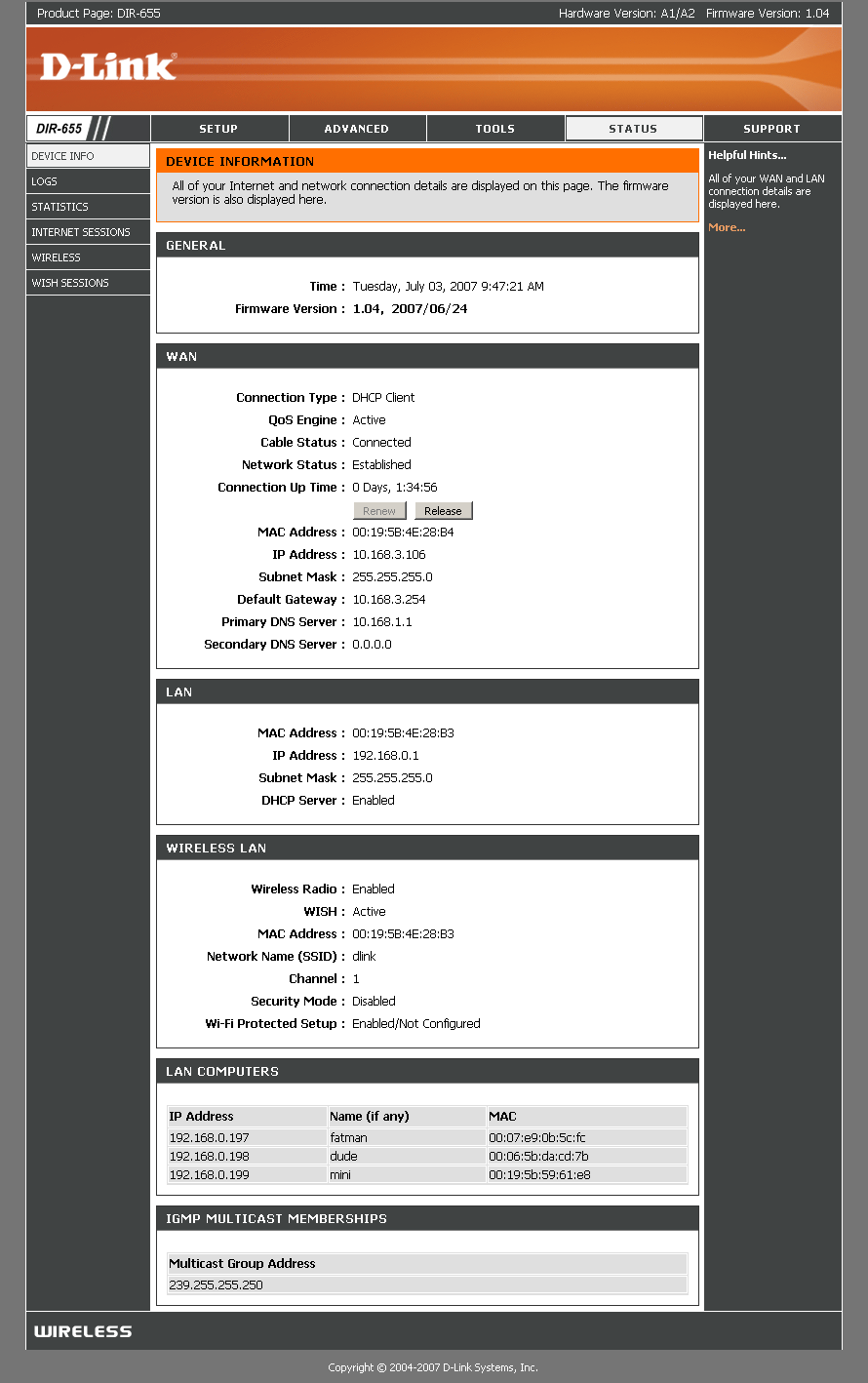
Figure 7: Status > Device Info page
Router and Bridge (AP) mode – Radio buttons on the Setup > Network Settings page make it easy to use the router as an AP. "Bridge" mode disables the DHCP server and requires that you set a static IP address for the 655.
WAN Support – Types handled include Static, Dynamic, PPPoE, PPTP, L2TP and BigPond. All modes support MAC address spoofing and setting MTU.
Firewall – In addition to being quite speedy, the 655’s router firewall is pretty full-featured. All port forwarding and filtering features can be scheduled, with schedules applied on a rule-by-rule basis. Single port, port range and triggered port range forwarding methods are all there.
MAC address filtering (Network Filter) applies to both wired and wireless clients. But Access Controls may take a bit of getting used to. You define Access Control rules for each machine separately and can block all or some web access and/or just log web access. You can’t copy rules to ease the pain of setup, but you can define a rule for all machines that don’t have a specific policy set.
I messed up when I first tried the "block some access" option, which works with the Website Filter feature. I assumed that the 40 entries allowed were for domains to be blocked. But instead, enabling the "block some" option blocks all domains except those entered in the Website Filter list. A bit counter-intuitive, but once I got it configured correctly, the feature worked fine and wasn’t able to be bypassed by using a site’s IP address.
If you want to block more than just web access, you can also set up filters to block access to specific IP addresses and/or ports. You also can filter all inbound traffic for eight IP address ranges and tweak the ways that the router handles UDP and TCP sessions.
Firewall Settings provide a range of options that allow detailed control of traffic flow through the router. There are options here that I’ve never seen on routers in this class, but fortunately, the online Help actually has understandable explanations of the various options. And finally, for you advanced types, you can enter up to 32 static routes.
Dynamic DNS clients – Clients for various Dyndns.org options and D-Link’s DLinkDDNS.com service (also provided by Dyndns.org) are supported.
QoS – Since I tested Ubicom’s technology when I reviewed the D-Link DGL-4300 and Hawking HBB1 Broadband Booster and found it to work, I didn’t repeat that testing for the 655. Suffice it to say that it works very well and you don’t have to think much about it at all.
Logging and Reporting – Log messages are clearly written in plain English, with separate categories and levels. But you need to be careful when setting the View Levels, since the required reboot will clear the log. On a more positive note, logging to a syslog server is supported and the emailed alerts and logs feature worked fine when I tested it with my ISP’s SMTP server that requires user and password authentication.
Even with all of the above routerly goodness, however, there are still a few omissions:
Secure remote access – Remote access is HTTP only, but you can apply the inbound traffic filters and set the port number.
Admin idle timeout adjust – One of my personal annoyances. The timeout appears to be fixed at around 5 minutes.
No separate Traffic Log – Although the log messages are clearly written in plain English, the handling of traffic logging is disappointing. Traffic log entries don’t have a separate category, so you’ll have to wade through the other Info category messages.
Routing Performance
D-Link said that the 655’s latest firmware incorporated changes to increase the number of simultaneous sessions—a factor of much interest to P2P fans. So I once again put the 655 through our suite of router tests, with the results shown in Table 1.
| Test Description | Throughput – (Mbps) |
|---|---|
| WAN – LAN |
231
|
| LAN – WAN |
245
|
| Total Simultaneous |
254
|
| Firmware Version |
1.04
|
Table 1: Routing throughput
These throughput numbers dropped a bit from what I achieved with 1.02 firmware, but they are still impressive, putting the 655 in the #1 spot for WAN to LAN throughput and #2 for LAN to WAN and total simultaneous throughput, right behind the Linksys RVS4000. Use the Router Charts to see how the 655 stacks up against other routers.
Figure 8 shows what the throughput variation looks like on the simultaneous routing test.
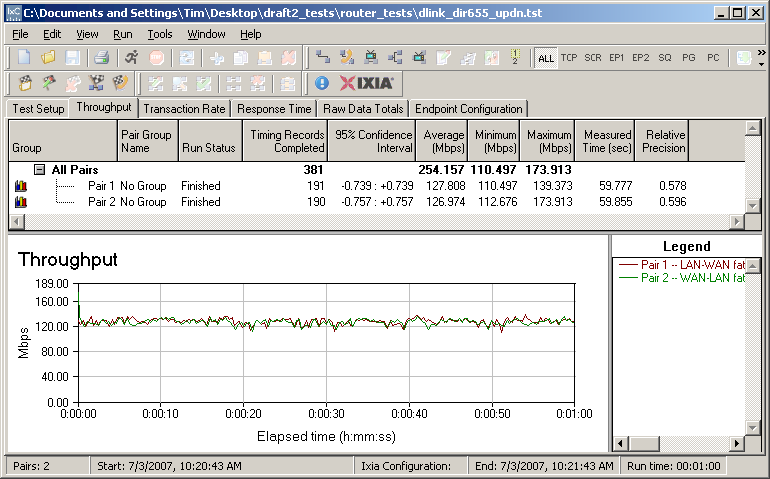
Figure 8: DIR-655 simultaneous throughput test results
Even more impressive was that the 655 did indeed live up to D-Link’s claims for simultaneous session handling. When Ixia recently generously upgraded my version of IxChariot to 6.40, they also increased the number of pairs from 180 to 200. I found that the 655 handled the 200 simultaneous sessions with ease and probably could have done more if I had the ability to try it! This is a first for any wired or wireless routers that I’ve tested.
Note that all testing was done with the QoS engine features disabled, but with SPI enabled. I encountered none of the SPI-related slowdowns that I encountered with the Linksys RVS4000.
Wireless Features
The key thing to understand about the DIR-655, and any Draft 11n Wi-Fi Certified product, is that it must default to operating with a 20 MHz channel bandwidth in the 2.4 GHz band. That default is intended to make draft 11n products play nice with legacy 11b/g products.
This doesn’t mean that you won’t be able to set draft 11n products to operate with a 40 MHz channel bandwidth in the 2.4 GHz band. In fact, the 655 allows this via its Auto 20/40 Channel Width setting. But other products, such as Apple’s AirPort Extreme Base Station, may choose to lock out 40 MHz operation in 2.4 GHz entirely.
This stopgap measure still leaves plenty of room for manufacturers to produce products that operate in odd and low-performance ways over the next year or so until the 11n spec is finalized. So don’t expect even Wi-Fi Certified draft 11n products to be trouble-free. See my blog post on this if you want more info.
The 655’s main wireless configuration screen is shown in Figure 9 and reached via the Manual Wireless Network Setup button on the Setup > Wireless Settings screen. Modes supported include the Mixed 11b,g,n (default), b, g and n only and mixed b/n and g/n.
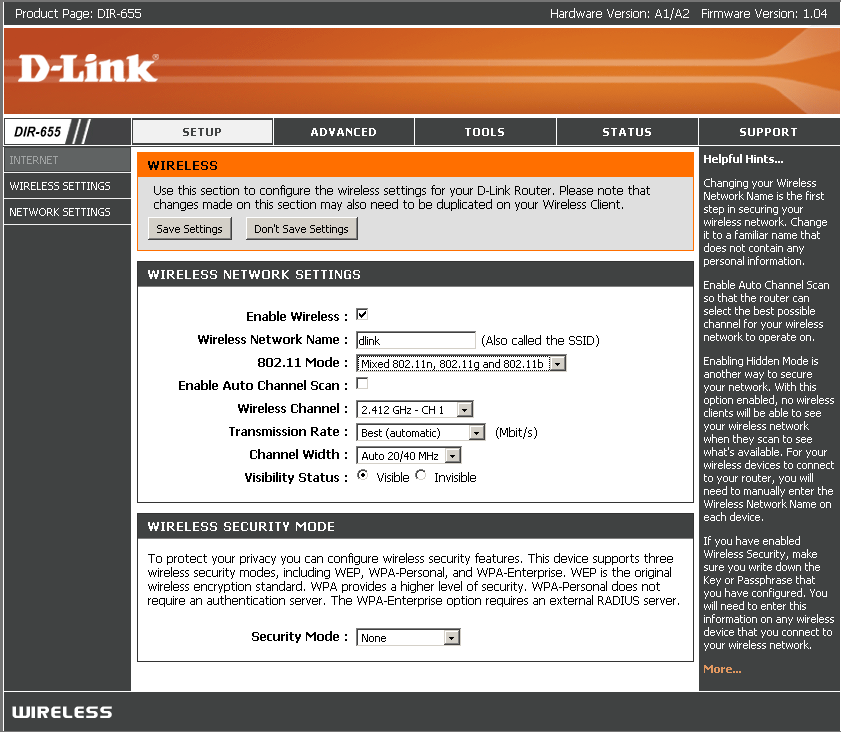
Figure 10: Wireless Setup
The Enable Auto Channel Scan "automatically finds the channel with least interference" according to the online help and it seemed to work the few times I used it, at least in 20 MHz mode. You can also disable it as I did and manually set the channel. But note that the user interface does not indicate the extension channel used in 40 MHz channel mode, which I found somewhat misleading.
Tip: The 40 MHz mode Extension channel is always located four channels away from the Primary Channel. So if the primary channel is set to 1, the Extension channel will be set to 5. Note that for higher Primary channels, the Extension will be below the Primary.
The Transmission Rate selector offers a dizzying array of transmit rates for b, g and draft 11n rates, the latter indicated by the MCS NN labels. These Modulation and Coding Schemes are defined in the Enhanced Wireless Consortium‘s (remember them?) PHY spec, which can still be downloaded (PDF) from the EWC website.
The Setup > Wireless Setting screen also holds buttons for the Add Wireless Device and Wireless Network Setup wizards. They’re not very wizzy, since the former only deals with devices supporting Wi-Fi Protected Setup (WPS) and the latter produces only the relatively unhelpful screen shown in Figure 11.
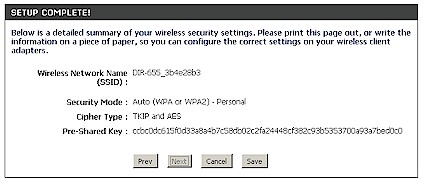
Figure 11: Wireless Network Setup Wizard result
I couldn’t test the Add Wireless Device wizard, since the DWA-652’s Draft 2.0 compliant driver works only with Windows Zero Configuration, which doesn’t support WPS. But then again, neither does the client program that comes with the DWA-652 card—the Cardbus companion to the 655. If you do have a card or device that supports WPS, however, the 655 can allegedly handle both PIN and Push Button methods.
The Wi-Fi Protected Setup screen shown in Figure 12, provides a few more options, such as locking wireless security settings and changing the PIN that is used with one of the WPS methods.

Figure 12: Wi-Fi Protected Setup screen
Wireless Features – more
The Advanced Wireless settings (Figure 13) are generally more understandable than some of the options exposed by the Buffalo Nfiniti Dual-Band router. You get High / Medium / Low Transmit Power settings and the usual set of tweaks for Beacon Period, RTS and Fragmentation Thresholds and DTIM Interval.
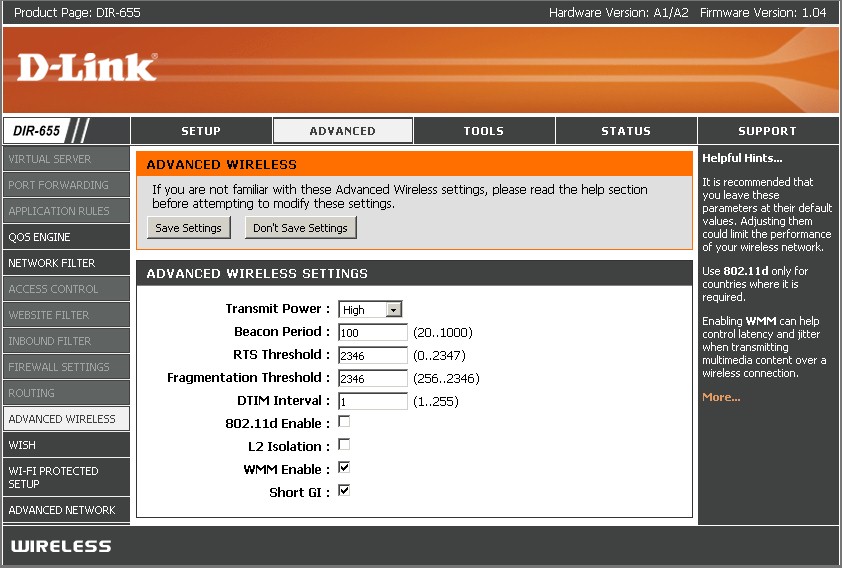
Figure 13: Advanced Wireless settings
It’s nice to see the L2 Isolation control, which keeps wireless clients from being able to communicate with each other (default disabled). The simple WMM Enable control (default enabled) is interesting to see, given all of the Ubicom intelligent QoS capability built into the 655. But ya can’t get Wi-Fi Certified without supporting WMM, so there it is. Someday, I have to see if WMM really does anything useful.
The last option, Short GI, is enabled by default and used to set the time that the receiver waits for RF reflections to settle out before sampling data. The D-Link help offers the following as guidance in setting this feature:
Using a short (400ns) guard interval can increase throughput. However, it can also increase error rate in some installations, due to increased sensitivity to radio-frequency reflections. Select the option that works best for your installation.
I left this in its default for all of my testing and didn’t notice any problems that could be attributed to it.
Note that if you set the 802.11 mode to 802.11g only or mixed 11g / n, then an Extra Wireless Protection checkbox will appear that controls the protection mechanism for 802.11b WLANs that is part of the 802.11g spec.
In addition to the WMM support mentioned above, the 655 supports Ubicom’s WISH (Wireless Intelligent Stream Handling) technology, which according to Ubicom "automatically and continuously looks for media streams on the wireless link and ensures that they are transmitted at the appropriate priority". Put another way, WISH applies the same automatic prioritization technology that the 655 applies to upstream Internet traffic, to traffic between the 655 and wireless clients. However, WISH won’t work miracles, or create bandwidth. So if you’re trying to run an HD stream over a 10 Mbps wireless connection, WISH isn’t going to keep you from getting a choppy and unwatchable picture.
Finally, note that D-Link has taken the typical wireless MAC Address Filtering and applied it to both wireless and wired connections. The Network Filter feature can be set to allow or deny listed clients and provides pick lists of any clients that have obtained addresses from the 655’s DHCP server. Note that this feature does not work when the 655 is in "Bridge" (AP) mode. So, in that case, you give up any MAC address filtering.
Wireless Performance
Starting with my last draft 11n review of the Buffalo nFiniti Dual-Band router, I have switched over to using Azimuth’s ACE 400NB Channel Emulator for all wireless testing. The current wireless test procedures using the Azimuth system are described here.
A D-Link DWA-652 Cardbus card was inserted into a Fujitsu P7120 Lifebook (1.2 GHz Intel Pentium M, 504 MB) notebook running WinXP Pro SP2 with all the latest updates. I upgraded to the 6.03.85 "Draft 2.0" driver and used Windows Zero Config since D-Link said its Client Utility should not be used with the latest driver.
The router was upgraded to 1.03 "Draft 2.0" firmware and I left all factory Advanced Wireless default settings in place. Other pertinent settings were as follows:
* Bridge mode
* Mixed 11n,g,b (default)
* Channel 1
* Xmit rate: Best (default)
* Channel Width: Auto 20/40 (Changed from default)
* No security
* WISH disabled
* Xmit power High (default)
Maximum Throughput
To start, I did some close range open-air IxChariot runs to look at maximum performance and throughput variation. This also gave me some baselines to check the Azimuth results against. Figures 14 and 15 show up and downlink throughput respectively using Auto 20/40 MHz mode.
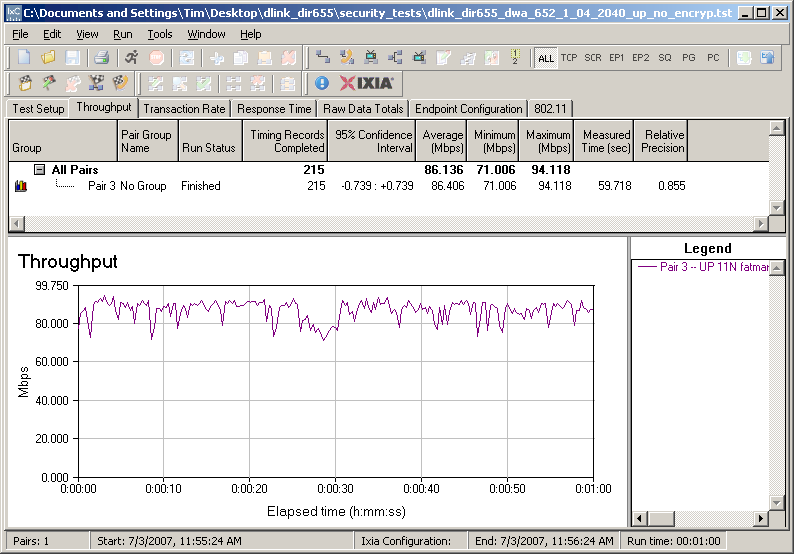

Figure 14: Uplink throughput – Auto 20/40MHz mode
The runs were done with the router and card about 10 feet apart in open air sitting in my lab with no other networks in range. Note that I originally had the AP and STA about 3 feet apart, but had high throughput variation. Moving the two further apart settled the variation down, although it looks like there is still something going on that is keeping the throughput from being nice and steady.
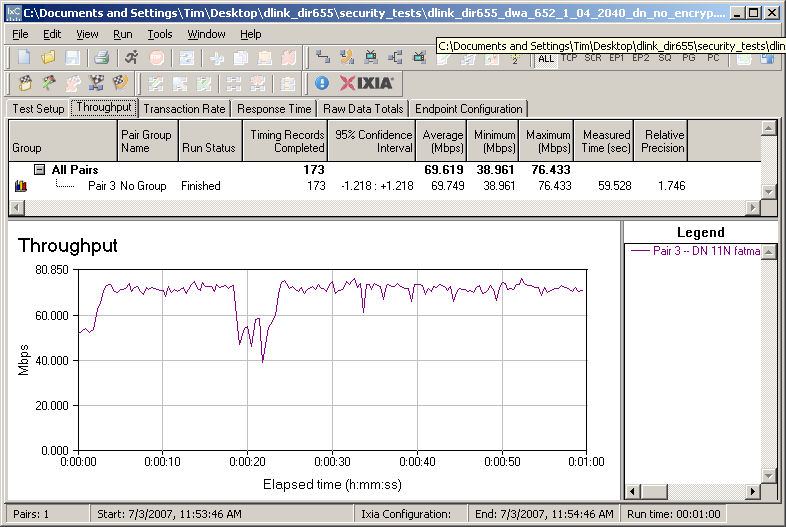
Figure 15: Downlink throughput – Auto 20/40MHz mode
Since the Windows Zero Config utility reported a steady 300 Mbps link rate no matter what was going on, I had to resort to spectrum analysis to determine whether the test pair was using 20 or 40 MHz channel mode. I first tried the MetaGeek Wi-Spy 2.4x that I recently tested, but it doesn’t have a max signal mode, which didn’t let me see if/when the test pair changed channel width. So I switched over to the Cognio Spectrum Expert, which I reviewed a few years back in the form of the AirMagnet Spectrum Analyzer. It quickly revealed that the test pair was using Channels 1 and 5 as expected.
However, the default mode for the 655 is to use the more legacy-friendly 20 MHz mode. So figures 16 and 17 show up and downlink IxChariot runs in that mode, which would be more representative of "out of the box" performance.
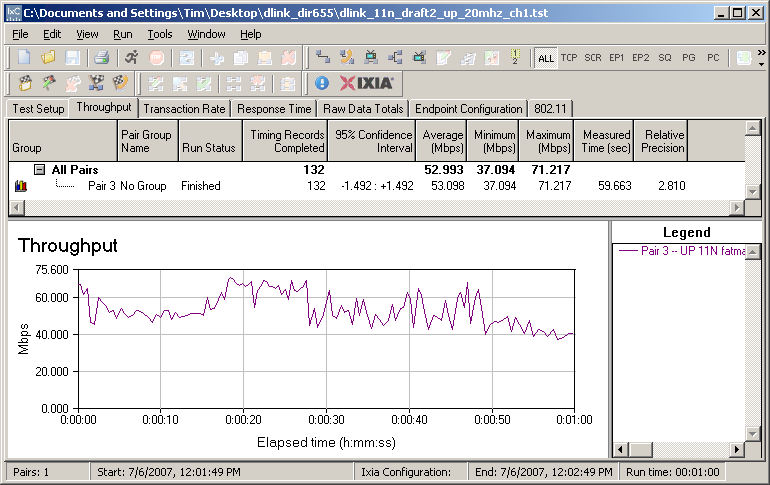
Figure 16: Uplink throughput – 20 MHz default mode
The 20 MHz mode has the expected lower throughput, but also appears to have more throughput variation. But during my testing I saw similar variation using Auto 20/40 MHz mode, so the phenomenon isn’t unique to 20 MHz.
Taking the averages from the IxChariot plots, it looks like the 20 MHz mode uplink was around 40% lower and downlink was 70% lower (due to its higher variation).
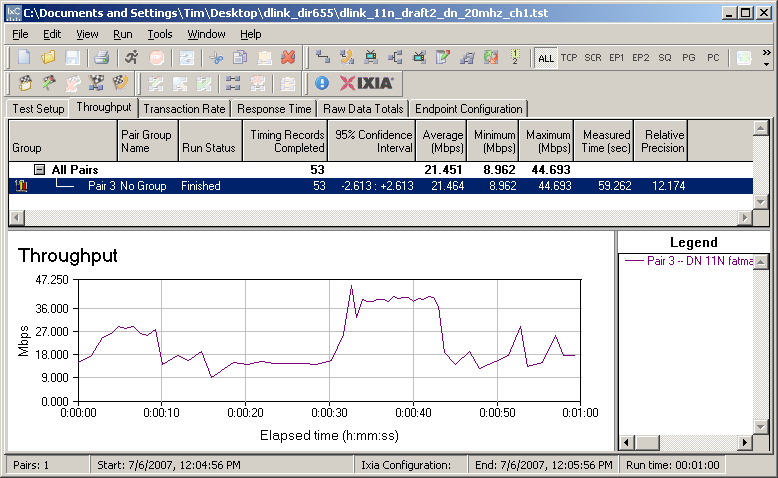
Figure 17: Downlink throughput – 20 MHz default mode
Security mode throughput
The 655 supports a full range of wireless security options including WEP 64/128, WPA and WPA2. "Personal" (PSK) and "Enterprise" (RADIUS) versions of both WPA and WPA2 are supported with TKIP, AES or both ciphers used. Figure 18 shows uplink throughput for unencrypted, WEP 128, WPA-PSK/TKIP and WPA2-PSK/AES modes taken in Auto 20/40 MHz mode.
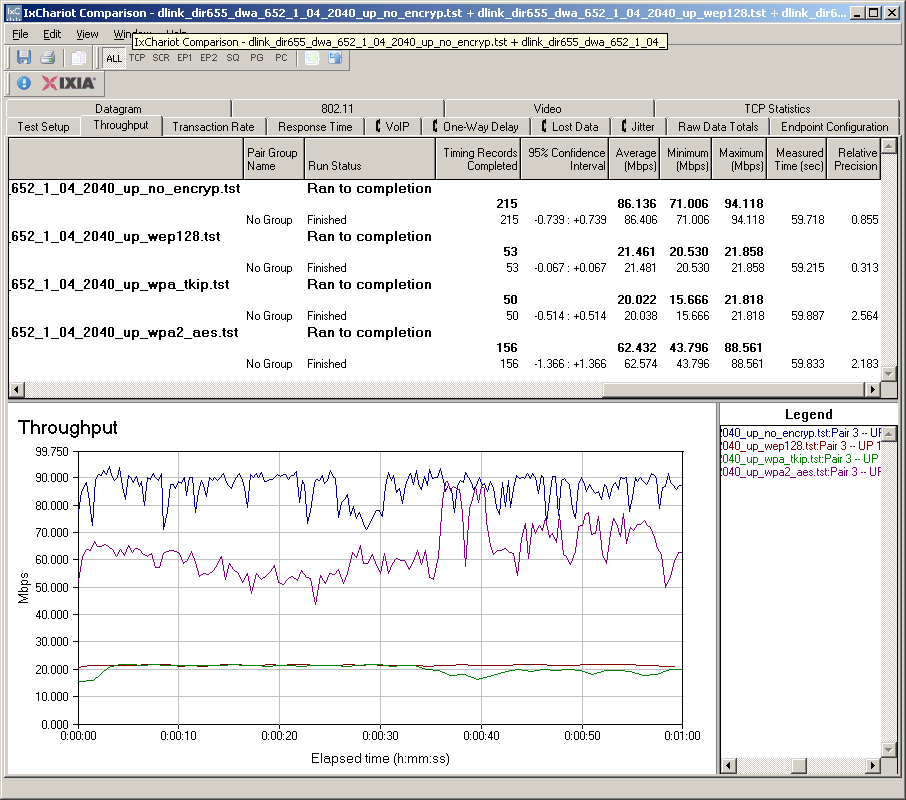
Figure 18: Security mode throughput comparison – uplink
I had no problem connecting in any of these modes, but you can see that you’ll pay almost a 30% throughput penalty using WPA2/AES, which provides the best performance option. It’s unfortunate that if you opt for WPA/TKIP that you’ll get whacked with about an 80% throughput reduction—the same as for WEP128.
The notes in D-Link’s admin interface recommend WPA2 only, i.e. AES cipher for best performance and my measurements show why. The config page also displays this note if you choose WEP:
If you choose the WEP security option this device will ONLY operate in Legacy Wireless mode (802.11B/G). This means you will NOT get 11N performance due to the fact that WEP is not supported by Draft 11N specification.
So consider yourself warned! I also tested the security modes in downlink and achieved similar results. The main difference was less of a throughput loss (~10%) from no encryption to WPA2/AES. But this was primarily due to lower average unencrypted throughput of around 70 Mbps vs. 86 Mbps for uplink.
Throughput vs. Path Loss
I used the Azimuth ACE to plot throughput vs path loss curves for uplink and downlink and 20/40 Auto and 20 MHz modes, with the results shown in Figure 19.
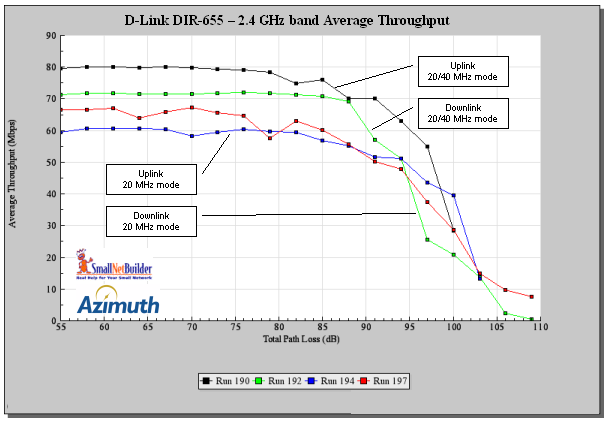
Figure 19: Throughput vs. Path Loss – both modes
In general, the DIR-655 and DWA-652 seem to be well-behaved over range. The 80 Mbps or so of best-case uplink throughput isn’t the highest I’ve seen. But more importantly, connectivity is maintained out to 100 dB of path loss. And for both 20/40 and 20 MHz modes, the downlink connection is maintained out to 109 dB, which is comparable to what I saw with the Buffalo nFiniti Dual Band.
Mixed STAs
There have been a few product announcements recently that hint that manufacturers may be suggesting that you maintain your old 11b/g wireless LANs when you upgrade to draft 11n gear. The brief testing I did connecting both draft 11n and 11g STAs to the 655 seems to indicate that that might be a good way to go.
I set up a second notebook with the good ol’ original rev Linksys WPC54G 11b/g card (Broadcom chipset) that I have in my test arsenal. Both it and the D-Link DWA-652 were associated with the 655, which I left in Auto 20/40 mode. I set up two IxChariot throughput.scr streams, alternating the STA that got on the air first.
Figure 20 shows how uplink throughput was shared when the 11n pair started first, while Figure 21 shows the 11g pair starting first.
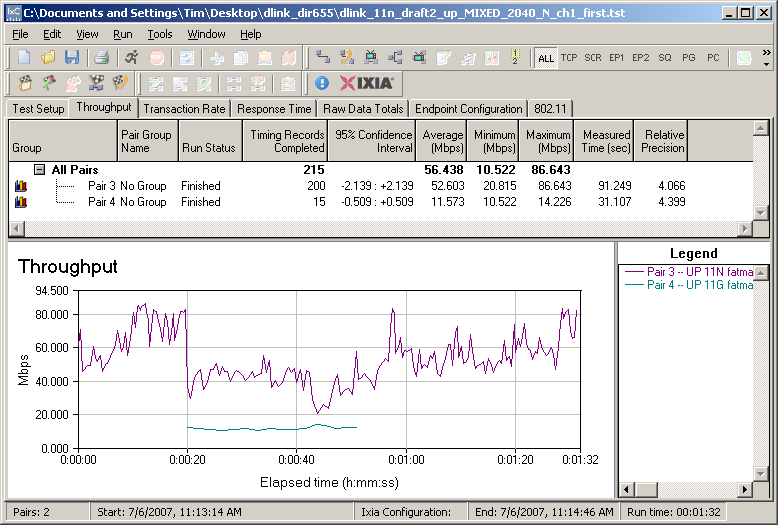
Figure 20: Mixed 11n, 11g STAs – Uplink, N starts first
I confirmed with the Cognio Spectrum Expert that the 655 and DWA-652 operated with a 40 MHz channel whenever they were on the air, regardless of which pair started first. So it appears that Atheros has worked out whatever magic it needs to ensure that the 11g STA gets some airtime while the 11n STA operates with a 40 MHz channel.
But you can see that best-case 11g throughput is knocked down to about 10 Mbps from its normal 22 Mbps or so (seen Figure 21). But the 11n pair also takes a throughput hit, which looks to be about in the same 50% ballpark as the 11g.
I’m not sure what’s causing the high throughput variation in Figure 20. But since I saw it on and off during my testing, I don’t attribute it particularly to the mixed STAs.
I also ran these tests in downlink and saw similar behavior, but with the 11n pair throughput reduced to around 20 Mbps while it had to share the air.
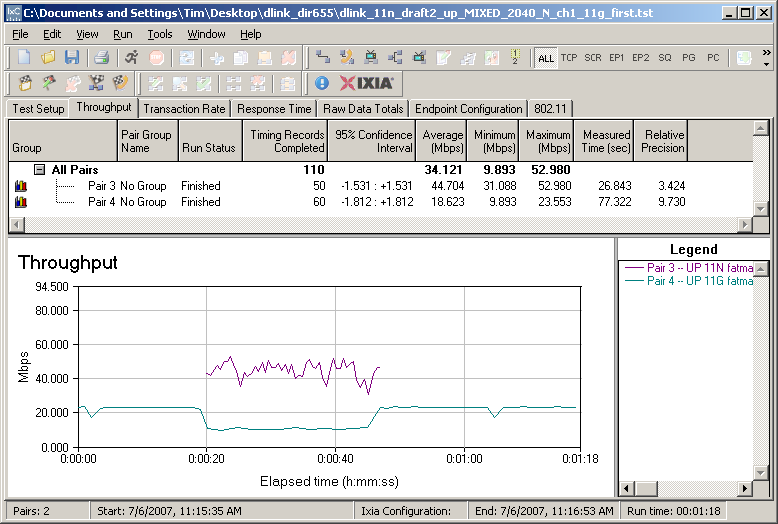
Figure 21: Mixed 11n, 11g STAs – Uplink, G starts first
Legacy Neighbor WLAN Tests
The main reason that I stopped reviewing draft 11n products was their ability to interfere with neighboring legacy wireless LANs. Since draft 11n products could use a 40 MHz wide swath of bandwidth, which occupies two out of the three available non-overlapping channels, a legacy WLAN operating on Channel 6 wouldn’t have a chance.
Draft 2.0 includes the Clear Channel Assessment (CCA) mechanism, which is supposed to scan for legacy traffic on "nearby" channels and shift down to using a 20 MHz wide channel if it is detected. I expected to see the 655 shift down to using a 20 MHz channel and stay there when it detected legacy transmissions on the channels it was using. But after some back and forth with both D-Link and Atheros, I learned that CCA is a bit more complicated than I initially thought.
It turns out that CCA works differently depending on whether legacy traffic is detected on the primary or extension 40 MHz mode channels. If traffic is detected on the primary channel, then the AP will arbitrate for air time using techniques that can be understood by legacy APs and STAs and can use the full 40 MHz channel when using its allocated air time.
But if an 11n AP detects legacy traffic in the extension channel, then it is supposed to drop back to using only 20 MHz mode for 30 minutes. The reasoning is that since the legacy products are on a different channel, the 11n AP can’t reach it to arbitrate for air time, so must drop back to using only 20 MHz of bandwidth. Otherwise, the draft 11n AP can essentially knock the neighboring legacy wireless LAN off the air, as I saw when testing initial draft 11n products.
Well, long story short, I never saw the 655 shift back to using a 20 MHz channel and stay there when set to Auto 20/40 mode—not even for 30 seconds, let alone 30 minutes—when it encountered a legacy STA on its extension channel.
Legacy Neighbor WLAN Tests – more
To test the behavior, the 655 was set to its "Bridge" (AP) mode, Auto 20/40 mode and Channel 1 with no encryption. This made Channel 1 the primary channel and Channel 5 the extension.
I then set up a second wireless LAN using a Linksys WRT54G router (original rev) and WPC54G CardBus card. The WRT54G had most recent firmware and was set to its default Mixed mode and Channel 5—the extension channel. I also operated it as an AP and connected it to the same switch that the 655 was connected to.
I then set up two IxChariot throughput.scr scripts to drive traffic to both 11n and 11g test pairs. I tested both uplink and downlink traffic and alternated between having the 11n and 11g WLANs start first. (If you need a diagram of the test setup, this one showing a similar test setup should give you the basic idea.) I also used the Cognio Spectrum Expert to monitor spectrum use.
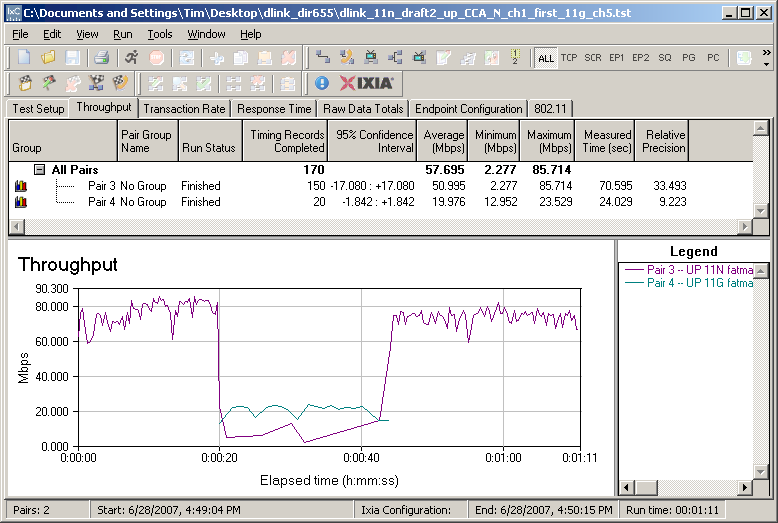
Figure 22: CCA Test – Uplink, N starts first
Figures 22 and 23 show the uplink results, with very different behavior depending on who got on-air first. When the 655 and DWA-652 were running first, they definitely stopped using the 40 MHz channel as soon as the legacy WLAN started transmitting.
But as Figure 22 shows, they were too accomodating to the neighboring 11g WLAN. From the Cognio’s spectrum display, it appeared that the D-Link pair were erratically transmitting. This is also shown by the fact that the 11g pair is achieving its normal ~20 Mbps throughput. Once the 11g WLAN stopped, however, you can also see that the D-Link pair resumed 40 MHz operation.
Figure 23, showing the Linksys pair transmitting first, shows the D-Link pair does better, but with high throughput variation. Other runs using the same test setup, however, showed erratic behavior more similar to Figure 22.
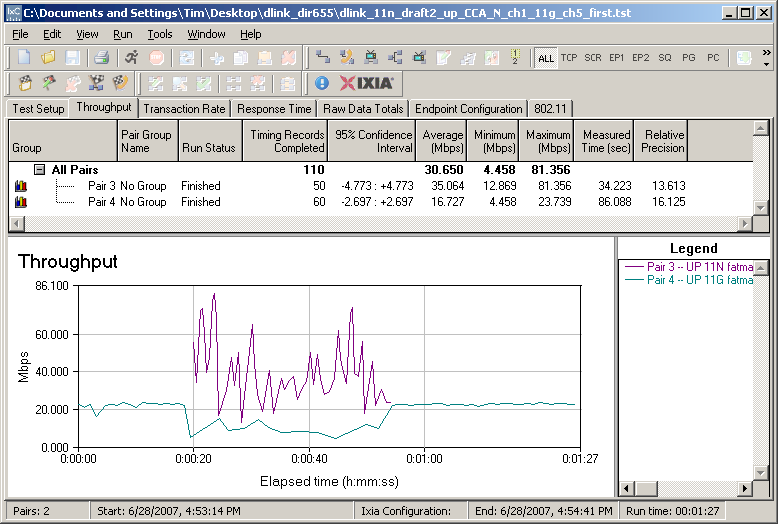
Figure 23: CCA Test – Uplink, G starts first
Figures 24 and 25 show the tests repeated, but running downlink.
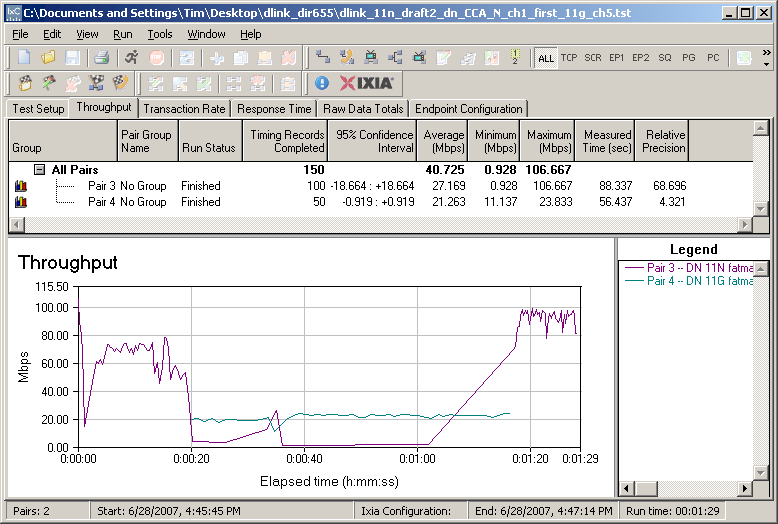
Figure 24: CCA Test – Downlink, N starts first
The behavior is pretty much the same as for uplink, with the 11n gear taking it on the chin when a neighboring WLAN goes on-air in its extension channel. So the conclusion for this experiment is that this implementation of CCA virtually shuts down the draft 11n WLAN when legacy traffic is detected in the 11n WLAN’s extension channel.
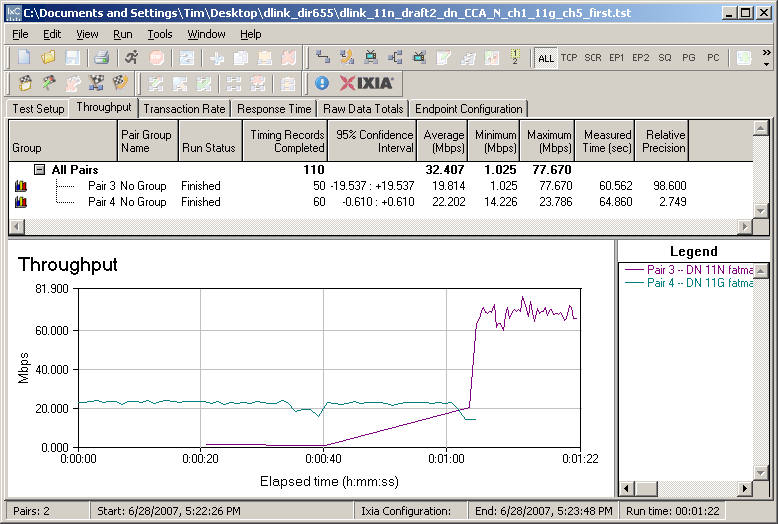
Figure 25: CCA Test – Downlink, G starts first
Closing Thoughts
My previous review of the Buffalo dual-band nFiniti said to wait until the Wi-Fi certification program is in place and Draft 2.0 compliant products are available. Now that both are here and D-Link has taken the time and spent the money to achieve Wi-Fi Certification, it’s time for me to change my tune.
I’m actually going to recommend the DIR-655. Why?
- At around $125 street, the DIR-655’s price premium isn’t too exhorbitant.
- Gigabit Ethernet WAN and LAN ports
- The routing section is first-rate, with excellent throughput, record-setting simultaneous session handling and Ubicom’s automatic QoS on both wired and wireless connections
- A full range of wireless security options, including both "Personal" and "Enterprise" WPA/WPA2 and ability to handle mixed WPA/WPA2 TKIP/AES clients
- Good handling of my test case using mixed 11n/ 11g STAs
- While it doesn’t have the highest-available wireless throughput, the DIR-655 / DWA-652 combination has a well-behaved throughput vs. path loss curve operating in both 40 and 20 MHz channel modes out to at least 100 dB of path loss.
But even with all those pluses, I still would not be giving the go-ahead for the 655 if it were not for how it handles legacy neighboring wireless LANs. The 655 is the first draft 11n product that I’ve seen that appears to implement the do-no-harm approach incorporated into Draft 2.0.
While its fallback to 20 MHz channel operation appears to be only dynamic, i.e. while the neighboring WLAN is actually on-air, the 655 appears to go out of its way to make sure it doesn’t step on a neighboring legacy WLAN operating in its 40 MHz extension channel. And when the neighboring WLAN is on its primary 40 MHz channel, the 655 appears to use normal 802.11 mechanisms to compete for on-air time.
Although I’d expect the CCA mechanism to be tweaked to implement better 11n operation, the initial approach errs in the correct direction. Remember, however, 40 MHz or 20/40 MHz testing isn’t included as part of Wi-Fi Certification, so not all products will operate this way.
Put it all together, and the DIR-655 presents a compelling reason to make the move to draft 11n if you’re happy with a single-band solution.