

Introduction
| At a Glance | |
|---|---|
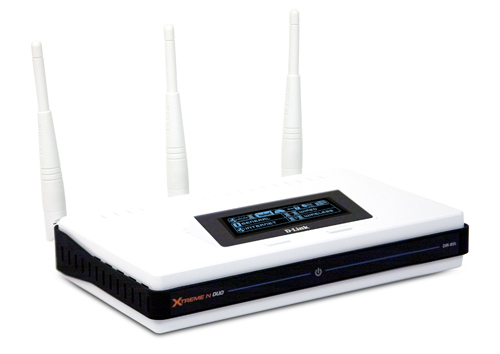
| Product | D-Link Xtreme N Duo Wireless Media Router (DIR-855) |
| Summary | Dual-band dual radio Wi-Fi Certified 802.11n Draft 2.0 router based on Atheros XSPAN silicon |
| Pros | • Two radios for simultaneous dual-band operation • Gigabit WAN and LAN with > 300 Mbps routing speed • High simultaneous sessions • Automatic QoS for Internet uplink and WLAN |
| Cons | • Expensive • Lacks of matching adapter holds back performance |
Finally, the review that dual-band draft 11n fanboys and girls have been waiting for: D-Link’s DIR-855. Since the 855 uses the same main board as its DGL-4500 dual-band single-radio sibling, please go over to that review if you need details on the 855’s feature set. I’m going to cover only the differences here—which are in the wireless configuration—and concentrate on how it performed.
Hardware Differences
As I’ve said before, the 855 is the DGL-4500 loaded up with two radio boards instead of one. So it has the same OLED front panel, same rear panel connectors and same feature set. The only difference is that the 855’s case and antennas are white, to better appeal to homebodies (vs. black for gamers).
Unlike the Linksys WRT350N [reviewed] and WRT600N [reviewed], the USB port on the back isn’t used to attach a drive for sharing a USB drive or printer to your LAN. It’s just there to support the flash-key based Windows Connect Now (WCN) auto-configuration method. Note that all three antennas use RP-SMA connectors for easy upgrade, if you can find dual-band antennas!
Figure 1 shows the 855’s main board and Figure 2, the 4500’s. There actually is a difference, hidden under one of the 855’s heatsinks. The 855 uses a Ubicom IP5170, clocked at 350 MHz, while the 4500 uses a Ubicom IP5160, clocked at 275 MHz. You’ll see the difference that this makes in routing throughput shortly.
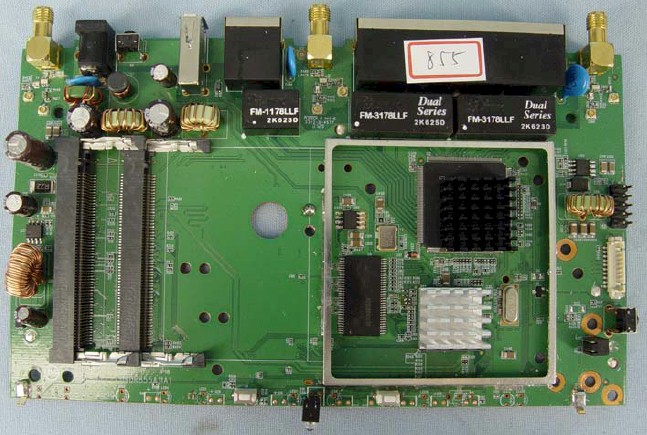
Figure 1: DIR-855 main board
The gigabit switch however, is a Realtek RTL8356, instead of the Vitesse VSC7385 used on the DIR-655. The Realtek switch chip supports up to 9K jumbo frames, and I found that it handled 4K jumbo frames just fine. D-Link still doesn’t spec jumbo frame support.
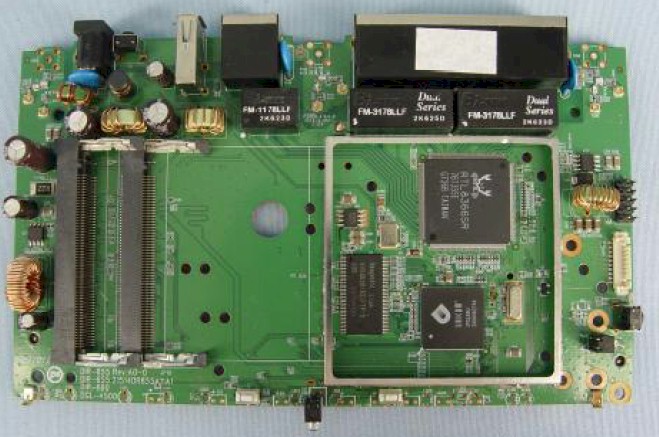
Figure 2: DGL-4500 main board
Although both radios use Atheros XSPAN chipsets, they are not the same board. The 2.4 GHz radio (Figure 3) uses the Atheros XSPAN AR5008 chipset, with AR5416 Baseband/MAC and AR2133 3 Tx, 3 Rx, single-band 2.4 GHz chips.
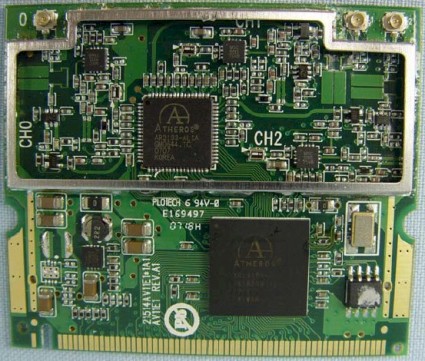
Figure 3: 2.4 GHz radio board
The 5 GHz radio (Figure 4) is the same one used on the DGL-4500. It uses the same AR5416 Baseband/MAC, but the AR5133 3 Tx, 3 Rx, dual-band 2.4/5GHz radio, instead of the AR2133.
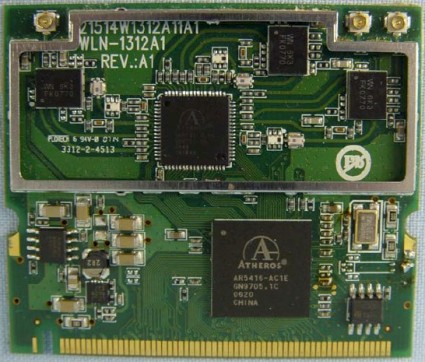
Figure 4: 5 GHz radio board
 Note: The 855 hardware is now on its second revision (A2), which, according to D-Link, will be the flavor that hits retail late this month. My review unit was the original A1, since D-Link didn’t have any A2’s on hand.
As near as I can tell from the FCC ID pictures, the difference is that the A2 radios use newer Atheros AR9001AP-3NX2 chipsets. Both radio boards use an AR9160 two dual-band 3×3 MIMO MAC/Baseband chip. The 2.4 GHz radio board uses an AR9103 3T3R 2.4 GHz radio and the 5 GHz board uses an AR9106 2.4/5 GHz 3T3R radio.
Feature Differences
The 855’s feature set is the same as the 4500’s with the exception of wireless configuration, which handles two radios instead of one. D-Link doesn’t have an emulator up for the 855, but you can use the 4500 emulator to explore everything else in the admin interface.
Figure 5 shows the main Wireless Settings screen, which conveniently contains both 2.4 and 5 GHz radio controls. Like the 4500, the user interface does not indicate the extension channel used in 40 MHz channel mode, which I think it should.
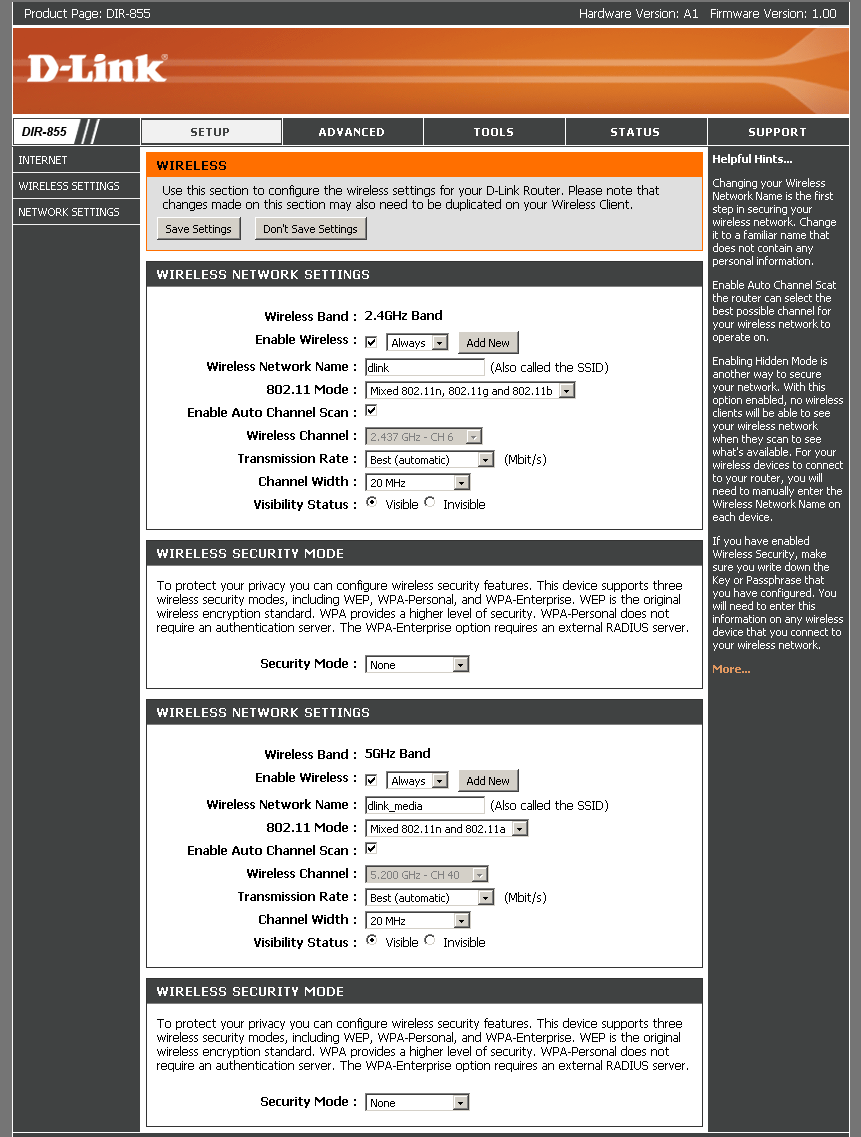
Figure 5: Wireless configuration
The 855 continues the 4500’s welcome feature of being able to enable/disable wireless on a schedule. This is nice touch to help keep your network secure during off-hours.
I thought it interesting that the 5 GHz radio defaulted to the 20 MHz channel width instead of the faster Auto 20/40, even though it didn’t have to. The 2.4 GHz radio properly defaulted to 20 MHz channel width, as all Draft 2.0 802.11n Wi-Fi Certified products should.
Note that channels in the 5 GHz Lower (36, 40, 44, 48) and Upper (149, 153, 157, 161, 165) bands are available, whether or not you choose the Auto Channel Scan Wireless Channel option.
The 802.11 Mode selector provides just about all the options you would need to solve compatibility problems with "legacy" 802.11b/g clients. For 2.4 GHz you get:
- Mixed 802.11n, 802.11g and 802.11b (default)
- Mixed 802.11n and 802.11g
- Mixed 802.11n and 802.11b
- Mixed 802.11g and 802.11b
- 802.11n only
- 802.11g only
- 802.11b only
and for 5 GHz you get:
- Mixed 802.11n and 802.11a (default)
- 802.11n only
- 802.11a only
The Basic Wireless settings screen also provides access to Wireless Security settings, which include a full suite of WEP, WPA and WPA2 settings, with both "Personal" (PSK) and "Enterprise" (RADIUS) WPA/WPA2 modes. Security can, of course, be set separately for each radio.
I did a quick WPS pushbutton session check with D-Link’s DWA-160 Xtreme N Dual Band USB Adapter—D-Link’s only dual-band adapter. I carefully reset the router to defaults, which is important to get a good initial security setup (see Wi-Fi Protected Setup (WPS) Need To Know).
I was able to get a Push-button WPS session to successfully complete with a WPA/TKIP secured connection to the 2.4GHz radio, even though both router and client support WPA2 / AES. I tried to get a WPS connection to the 5 GHz radio, but was unsuccessful. This could be due to the fact that both radios are set to the same SSID ("dlink" plus the last four LAN / WLAN MAC address characters).
Figure 6 shows the Advanced Wireless controls, which are no different from the 4500’s. The WLAN partition only prevents wireless client-to-client communication. Unfortunately, there is no control to prevent wireless clients from communicating with wired LAN clients, as I found on D-Link’s DAP-1522 [reviewed].
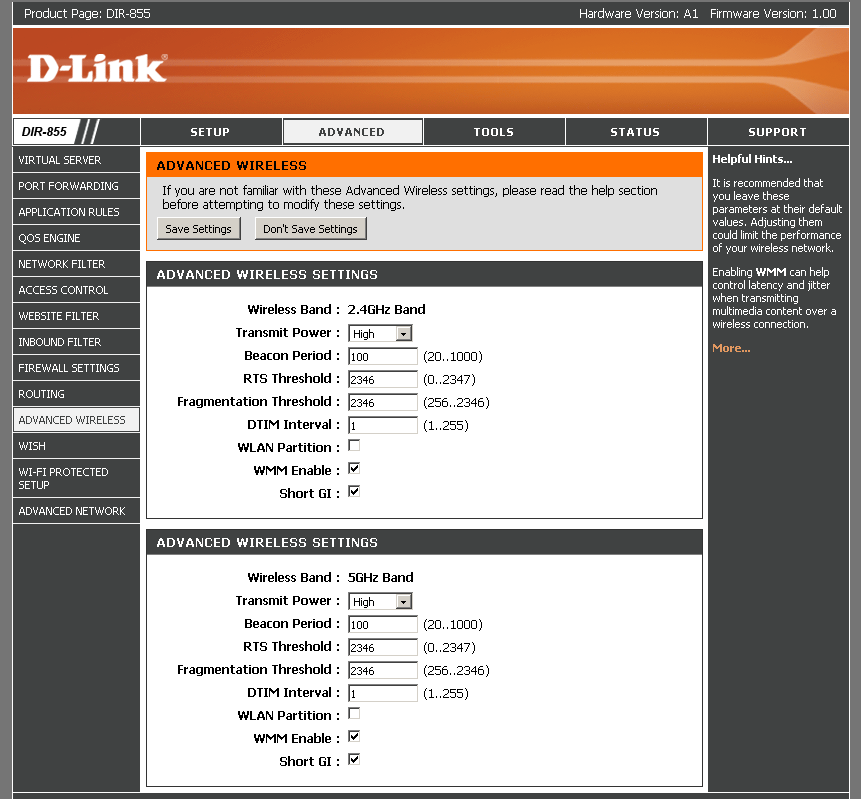
Figure 6: Advanced wireless configuration
Routing Performance
I put the 855 through our suite of router tests, with the results shown in Table 1 along with the DGL-4500 for comparison.
| Test Description | DIR-855 Throughput – (Mbps) |
DGL-4500 Throughput – (Mbps) |
|---|---|---|
| WAN – LAN |
332
|
242
|
| LAN – WAN |
340
|
244
|
| Total Simultaneous |
337
|
256
|
| Maximum Simultaneous Connections | 200 | 200 |
| Firmware Version |
1.00
|
1.02
|
Table 1: Routing throughput
The speedier Ubicom IP5170 processor results in an additional 100 Mbps of routing throughput over the DGL-4500’s. Remember that my Maximum Simultaneous Connection test is limited to a maximum of 200 connections.
Figure 7 shows a composite of WAN to LAN, LAN to WAN and simultaneous up/down IxChariot throughput tests. Throughput is nice and steady and evenly balanced between upload and download. Note that I disabled the QoS Engine and SPI to run the router tests.
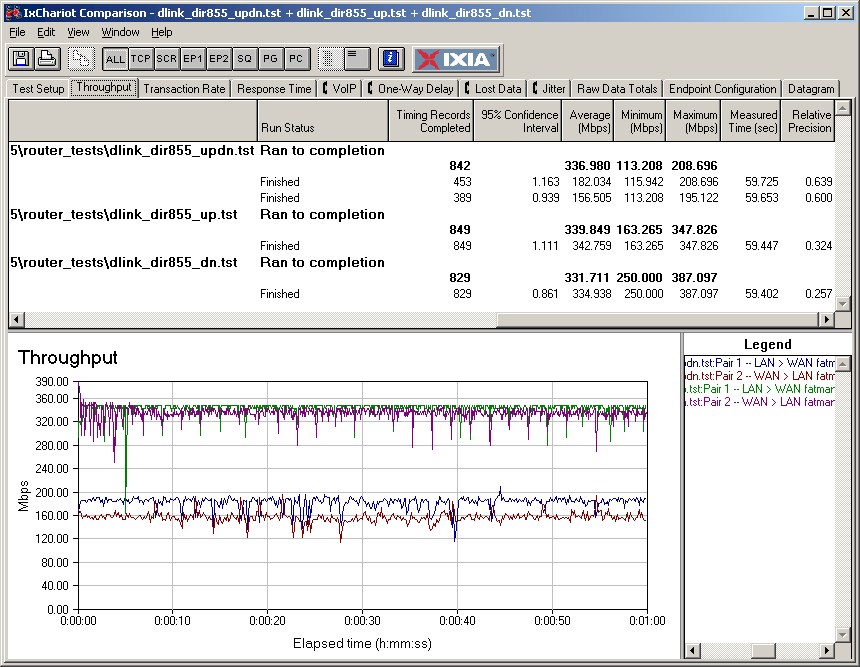
Figure 7: DIR-855 routing throughput test results
Use the Router Charts to see how the 855 stacks up against other routers.
Wireless Performance – 2.4 GHz
I tested the 855 using our wireless test procedures, which use both open-air testing and Azimuth’s ACE 400NB Channel Emulator. I started testing the 855 by running open-air IxChariot tests in my lab with the router and notebook containing the DWA-160 Xtreme N Dual Band USB Adapter that D-Link sent along, about 10 feet away from each other in the same room. No other networks were active. But when I saw the results in Figure 8, I had to switch into detective mode.
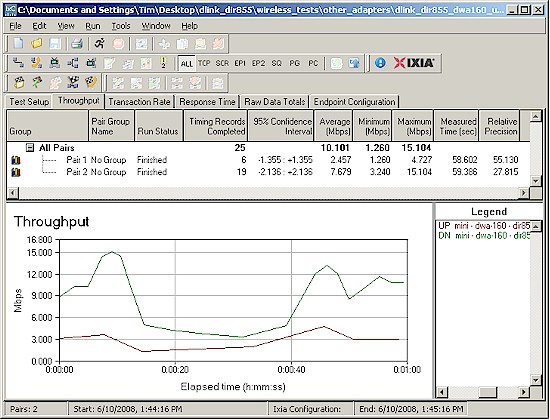
Figure 8: 2.4 GHz, 20 MHz mode wireless throughput w/ DWA-160
Long story short, the 855 was fine and the problem was the DWA-160’s driver. D-Link said it is working on an updated driver, but I didn’t want to hold up the review. So I tried both a Linksys WPC600N Dual-band Notebook card and Netgear WNDA3100 dual-band USB adapter, which both turned in proper performance.
I settled on using the Netgear adapter for the remainder of my testing because it is essentially a copy of the DWA-160, using the same Atheros AR9170 MAC/BB and AR9104 Dual-band 2×2 MIMO radio.
The WNDA3100 USB adapter was inserted into a Fujitsu P7120 Lifebook (1.2 GHz Intel Pentium M, 504 MB) notebook running WinXP Pro SP2 with all the latest updates. I used the latest 3.0.0.102 driver and Netgear Smart Wireless 1.3.0.3 utility during testing.
The router had 1.00 firmware and I left all factory default settings in place, except to set Channel 1 for 2.4 GHz tests and Channel 36 for 5 GHz tests. I left WISH enabled (which is the default).
Figure 9 shows a composite IxChariot plot of 2.4 GHz band wireless uplink, downlink and simultaneous up and downlink tests in the default 20 MHz channel bandwidth mode. The best 1 minute average of 56 Mbps was found running simultaneous up and downlink. Similar to other Atheros-based products that I have tested, throughput seems to ramp up at the start of the test. Speed seems to bounce around a bit, too.
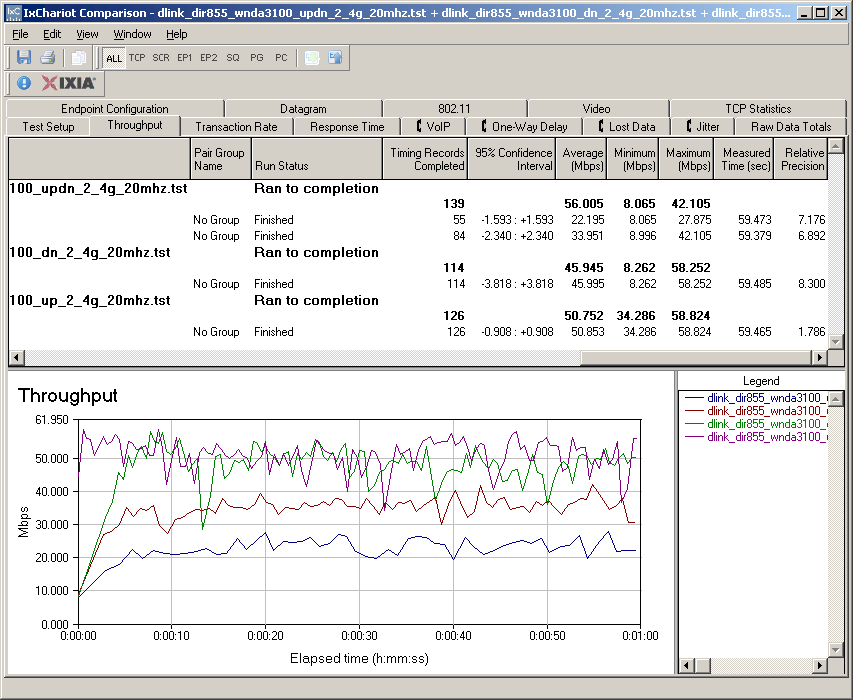

Figure 9: Up and downlink throughput – 2.4 GHz band, 20 MHz bandwidth
I repeated the tests switching to Auto 20/40 mode and used a Cognio Spectrum Expert to confirm that Channels 1 and 5 were used with the Channel Width control set to Auto 20/40 MHz. The plot is here, where you can see improved average speeds of just shy of 80 Mbps up/down, 68 Mbps down and 66 Mbps up.
Since not everyone is a fan of the throughput vs. path loss method, I did a quick walk around to my five test locations. With a 2.4 GHz, 20 MHz mode connection, Location 3 speed dropped into the mid-teens and down below 1 Mbps in my difficult Locations 4 and 5. (The Location 5 connection was very tenuous).
Wireless Performance – 5 GHz
Figure 10 shows test results for the 5 GHz, 20 MHz mode. Average 1 minute throughput is 55 / 56 Mbps, about the same as with 2.4 GHz.
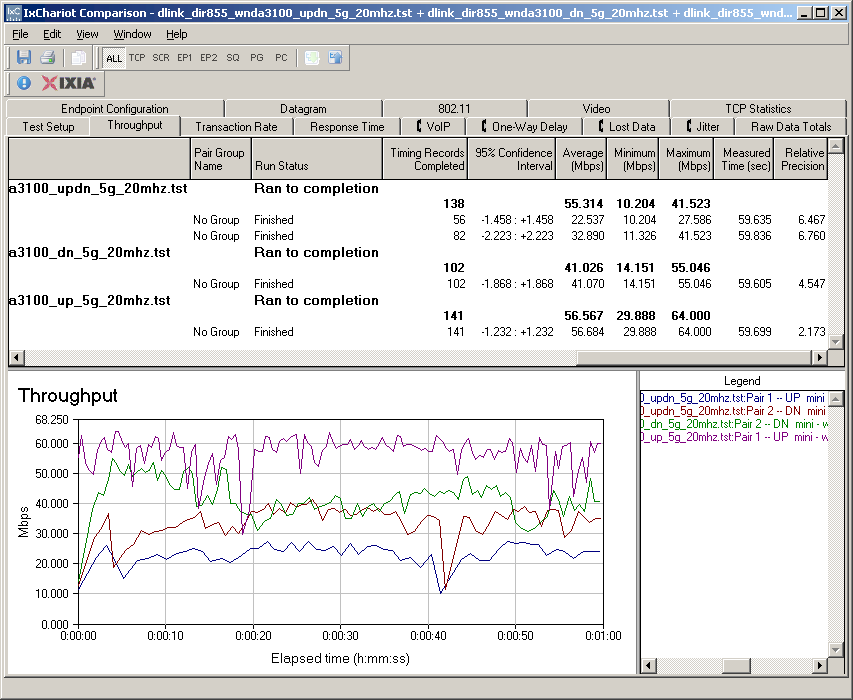
Figure 10: Up and downlink throughput – 5 GHz band, 20 MHz bandwidth
The 5 GHz, Auto 20/40 MHz mode plot is here, where you can see the highest throughputs obtained for the 855: 91 Mbps up/down; 79 Mbps down; and 77 Mbps up. Note the severe mismatch between up and downlink when running simultaneously in both directions.
The walk-around test using the 5 GHz radio didn’t set any records. While throughput came in around 35 Mbps down and 25 Mbps up in Location 3, I wasn’t able to even connect in Locations 4 and 5.
Security mode throughput
Since the 855 is Atheros-based, I expected at least a 50% throughput reduction when using either WEP or WPA/TKIP wireless security. And that is what I found (Figure 11).
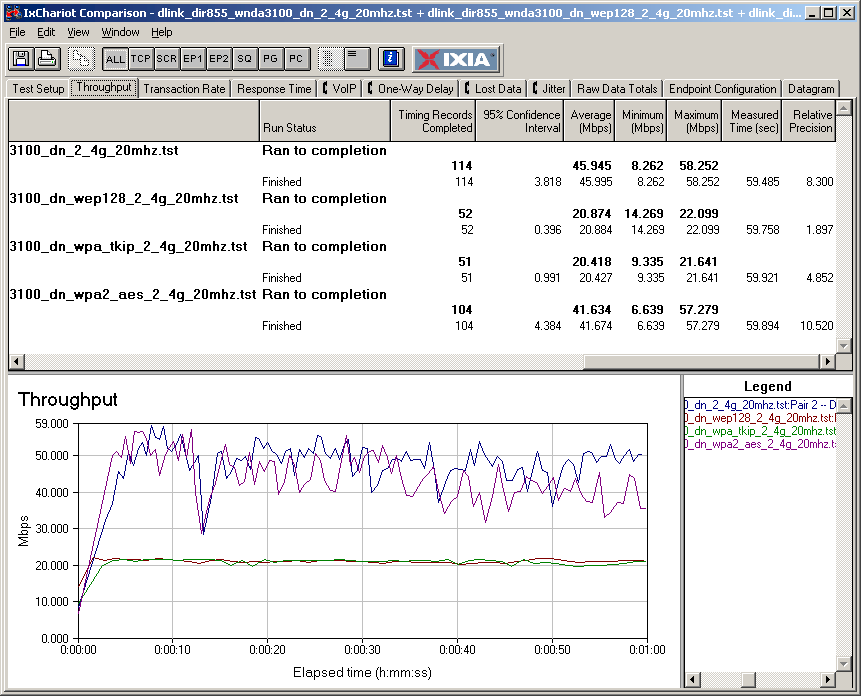
Figure 11: Security mode throughput comparison – 2.4 GHz downlink
Mixed STAs, Neighboring Legacy WLANs
I checked performance with a mix of draft 11n and 11g clients (STAs) in the DGL-4500 review, so didn’t repeat those tests here. As a reminder, the tests showed the behavior that I’ve come to expect: the 11g STA gets knocked down to around 6 Mbps and the 11n STA gets its throughput cut by around half.
Since I’ve already looked at how the Atheros XSPAN chipset behaves when encountering a "legacy" (802.11b or g) WLAN operating in its 40 MHz mode extension channel, I didn’t check it this time. As a reminder, the Atheros seems to be a bit more "legacy" friendly than other chipsets since it doesn’t completely knock the 11g WLAN off the air, like products based on other chipsets do.
Throughput vs. Path Loss
NOTE: We don’t refer to "range" in these plots, but instead use the more accurate "Path Loss". For an explanation, see the How we Test Wireless article.
Figure 12 was generated using the Compare Benchmarks tool of our Wireless Charts and shows up and downlink performance in 20 and 40 MHz channel modes in the 2.4 GHz band. There is a good throughput boost from 40 MHz mode at stronger signal levels. But the downlink curves in both 20 and 40 MHz modes end a bit earlier than uplink, indicating perhaps a slightly shorter range for downlink.
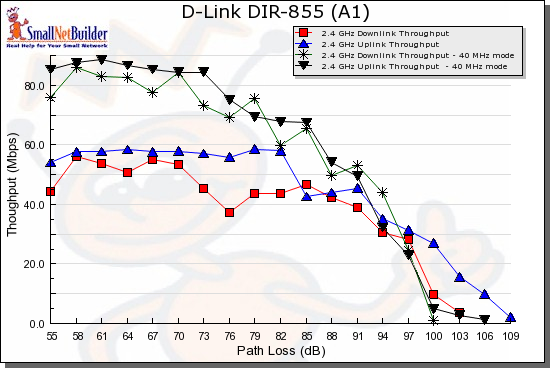
Figure 12: Throughput vs. Path Loss – 2.4 GHz
Figure 13 shows the curves in the 5 GHz band. Even though you can’t directly compare 2.4 and 5 GHz results, it’s clear that the DIR-855 follows the pattern set by many other dual-band draft 11n products with curves that end much earlier than the 2.4 GHz plots. This indicates a shorter range, which was confirmed by my walk-around tests.
But other than the shorter range, the 2.4 and 5 GHz throughput performance is very similar.
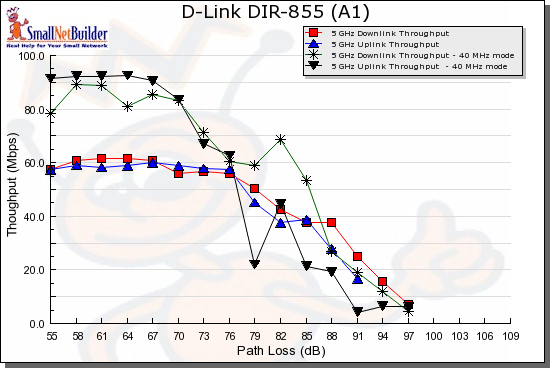
Figure 13: Throughput vs. Path Loss – 5 GHz
Throughput vs. Path Loss – D-Link Comparison
Since D-Link has three dual-band AP/router options, I thought I’d first compare them. Figure 14 shows 2.4 GHz, 20 MHz downlink plots for the 855, DGL-4500 and DAP-1522. It’s surprising to see the 855 have significantly lower throughput than the 4500, especially since both are using the same mini-PCI radio.
But I think the answer lies in the clients used for the tests. The DGL-4500 was tested with the D-Link DWA-652, which is a Cardbus card using a single-band 2.4 GHz 3T3R (3 transmit, 3 receive) radio. The 855 was tested with the Netgear WNDA3100, which is a dual-band USB 2.0 adapter using a 2T2R radio. I suspect that using 3T3R radios on both AP and STA is the reason for the 4500’s higher performance.
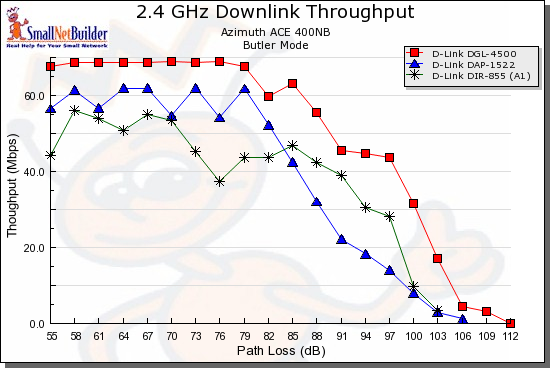
Figure 14: D-Link dual-band comparison – 2.4GHz, 20 MHz, downlink
What’s more interesting, however, is that the Ralink-based DAP-1522 has higher throughput than the 855 at stronger signal levels, even with 2T2R radios on both ends! But the same isn’t true for uplink. Figure 15 shows the 855 doing better than the DAP-1522, thoughput the path loss range.
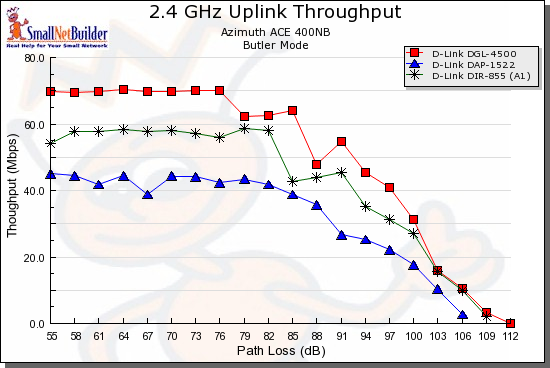
Figure 15: D-Link dual-band comparison – 2.4GHz, 20 MHz, uplink
A similar pattern is found when we compare 2.4 GHz, 40 MHz mode performance. [Downlink plot] [Uplink plot]
Switching to 5 GHz, the 4500 is held back by its odd performance at stronger signal levels, which I theorized was due to some incompatibility between the Atheros-based 4500 and the Broadcom-based Linksys WPC600N dual-band card, which I used for the 4500’s 5 GHz testing. But once signal levels start falling off, the two have similar performance.
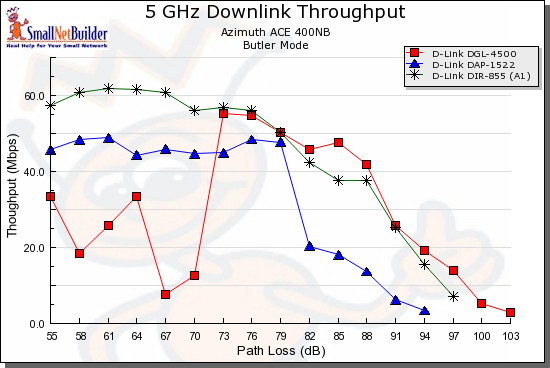
Figure 16: D-Link dual-band comparison – 5 GHz, 20 MHz, downlink
For uplink, the 4500 does better, including staying connected longer. I attribute this to the WPC600N’s 3T3R radio.
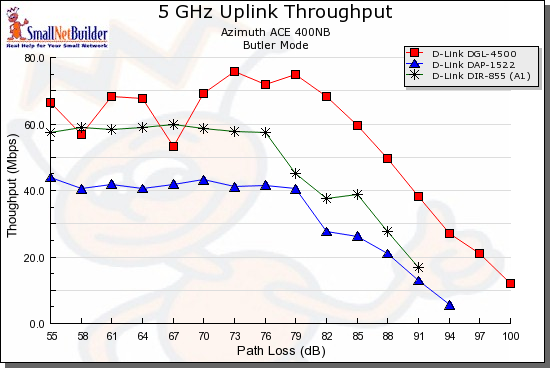
Figure 17: D-Link dual-band comparison – 5 GHz, 20 MHz, uplink
Similar results are found with 5 GHz, 40 MHz mode performance. [Downlink plot] [Uplink plot]
Use the Wireless Charts to generate other comparisons or dig deeper into these.
Throughput vs. Path Loss – Competitive Comparison
Now comes the face-off that you’ve been waiting for, the only dual-band, dual-radio draft 11n routers available: the 855 vs. Linksys’ WRT600N. (I didn’t include the Buffalo Nfiniti Dual-band router, since Buffalo is still out of the WLAN market until it comes to some sort of agreement with CSIRO.)
Once again, we have the 3T3R Linksys WPC600N client providing some advantage over the 2T2R Netgear WNDA3100 client used with the 855. For both downlink (Figure 18) and uplink (Figure 19), the WPC600N provides significantly more throughput under high signal levels.
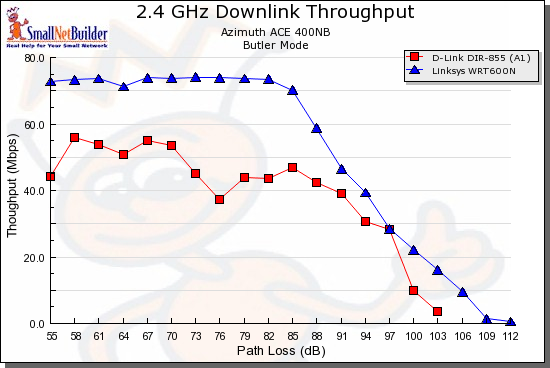
Figure 18: Competitive dual-band comparison – 2.4GHz, 20 MHz, downlink
The WRT600N / WPC600N combo also stays connected longer running downlink, but not running uplink (Figure 19).
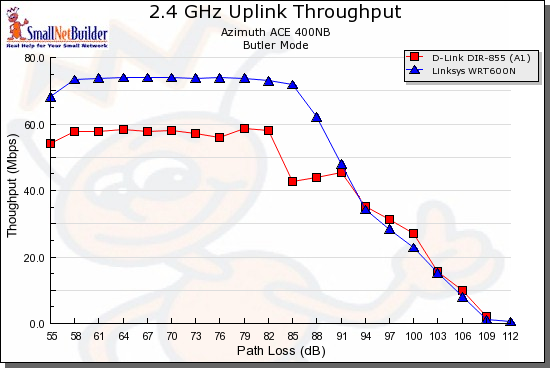
Figure 19: Competitive dual-band comparison – 2.4GHz, 20 MHz, uplink
The 40 MHz mode provides more throughput boost to the 855 than to the WRT600N, so the throughput gap grows smaller running downlink. The 40 MHz mode uplink comparison shows just about equal performance between the two products.
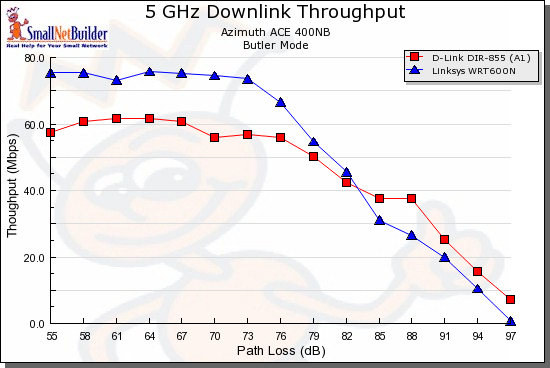
Figure 20: Competitive dual-band comparison – 5 GHz, 20 MHz, downlink
In the 5 GHz band, the 600N once again turns in higher speeds with strong signal levels, both down (Figure 20) and uplink (Figure 21).
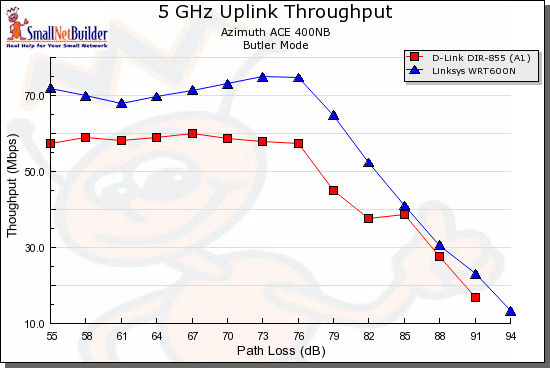
Figure 21: Competitive dual-band comparison – 5 GHz, 20 MHz, uplink
The 5 GHz, 40 MHz mode once again provides more throughput boost to the 855 than to the WRT600N, so the throughput gap grows smaller running downlink. The 5 GHz, 40 MHz mode uplink comparison, however shows a faster falloff in throughput for the 855.
Use the Wireless Charts to generate other comparisons or dig deeper into these.
Closing Thoughts
The main thing that the DIR-855 has going for it is a solid, fast routing section that is based on Ubicom’s impressive IP5170 SoC. That, coupled with a gigabit switch that supports up to 9K jumbo frames and even a gigabit WAN port for those who think that matters.
The wireless, however, is another matter. It’s no so much that the two Atheros-based radios aren’t good performers, than it is the lack of a client that can hold up its end of the deal. It’s bad enough that it took so long for D-Link to come out with its DWA-160 dual-band client. But its current driver makes the 855 (and probably other routers) run at 802.11b speeds at 2.4 GHz and the 2T2R radio is a mismatch with the 855’s 3T3R radios, preventing it from reaching competitive top speeds.
The bottom line is that there isn’t anything in the 855 that makes it worth the $100 premium over Linksys’ WRT600N, which seems to be the simultaneous dual-band draft 11n choice right now. Unless D-Link wants to sit on a pile of inventory, they need to match or beat Linksys’ price and get the product on the shelves! As I write this, the word is “end of June”, but we’ll just have to see what happens.
 Check out the slideshow