

Introduction
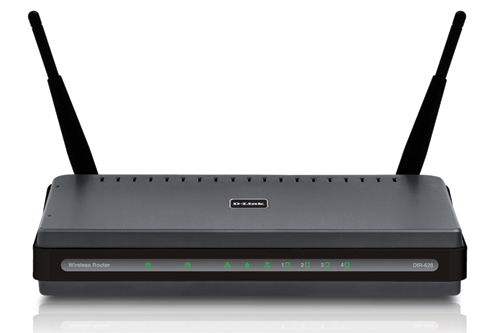
| At a Glance | |
|---|---|
| Product | D-Link RangeBooster N Dual Band Router Review (DIR-628) |
| Summary | Dual-band single radio Wi-Fi Certified 802.11n Draft 2.0 router based on Atheros XSPAN silicon. Basically, a cost-reduced version of the DGL-4500. |
| Pros | • Inexpensive access to 5 GHz band • Street priced below $100 • Automatic QoS for Internet uplink |
| Cons | • High wireless throughput variation • 100 Mbps LAN • Bi-directional routing performance |
It appears that D-Link has decided to aggressively pursue the sub-$100 dual-band draft 802.11n market by tweaking basic product platforms. The recently introduced the DAP-1522 Bridge / AP [reviewed] is essentially a cost-reduced version of its DAP-1555, primarily through the susbstitution of a Ralink processor and wireless chipset in the DAP-1522 for the Ubicom SoC and Atheros radio in the DAP-1555.
Similarly, the DIR-628 is meant to serve as a lower-cost alternative to D-Link’s DGL-4500 Xtreme N Gaming Router [reviewed]. But the DIR-628 takes a different approach to reduce cost.
First, the flashy, but non-essential OLED display is replaced by the good ol’ array of LEDs that you see on most other products. Then, a 10/100 switch is substituted for the 4500’s gigabit. Next, the 628 stays with a Ubicom SoC, but substitutes a Ubicom IP5100, running at 200 MHz for the 4500’s IP5160, which is clocked at 275 MHz. And finally, the same Atheros-based radio is used, but with only two antennas connected instead of three.
Inside Details
Figure 1 is taken from the FCC ID docs and shows the 628 disassembled into its primary components. I’m surprised to see the radio on a separate mini-PCI board, considering the cost sensitivity of the design.

Figure 1: DIR-628 inside
Figure 2 is a close-up of the board in my test sample, since the FCC ID photo was so fuzzy. The Ubicom IP5100U has a heatsink on it, but you can see the Marvell 88E6060 6 port 10/100 switch. There is a single chip providing 16 MB of RAM and a 4 MB Spansion flash chip on the bottom of the board.

Figure 2: DIR-628 main board
D-Link opted to stay with an older Atheros XSPAN AR5008 chipset, with AR5416 Baseband/MAC and AR5133 3 Tx, 3 Rx, dual-band chip. The FCC photo in Figure 3 shows a third miniature antenna connector. But if you look closely at the larger version of Figure 2, you see that the connector hasn’t been loaded since only two antennas are used.
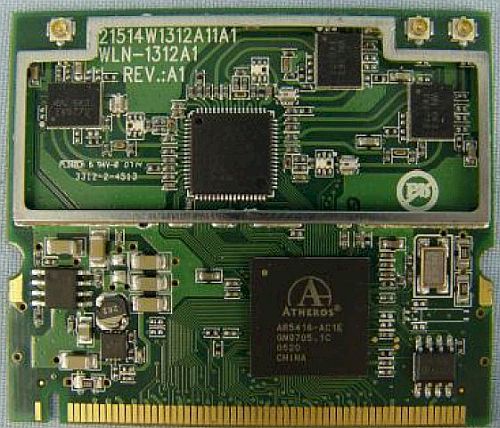
Figure 3: DIR-628 dual-band radio board
Feature Differences
The 628’s feature set is the same as the 4500’s with a few exceptions. You can use the 628 emulator to fully explore the features.
Figure 4 shows the main Wireless Settings screen, which has a radio button to switch the radio between the 2.4 GHz (default) and 5 GHz bands.
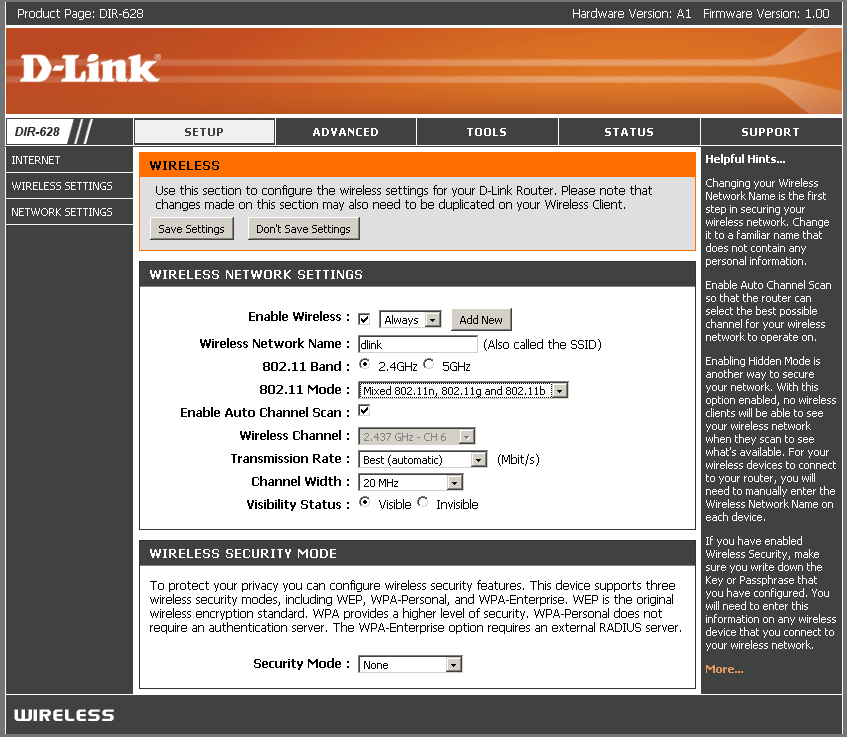
Figure 4: Wireless configuration
The 628 properly defaults to a 20 MHz channel width in 2.4 GHz, but does the same when switched to 5 GHz, even though it doesn’t have to. Note that channels in the 5 GHz Lower (36, 40, 44, 48) and Upper (149, 153, 157, 161, 165) bands are available, whether or not you choose the Auto Channel Scan Wireless Channel option.
The 802.11 Mode selector provides just about all the options you would need to solve compatibility problems with "legacy" 802.11b/g clients. For 2.4 GHz you get:
- Mixed 802.11n, 802.11g and 802.11b (default)
- Mixed 802.11n and 802.11g
- Mixed 802.11n and 802.11b
- Mixed 802.11g and 802.11b
- 802.11n only
- 802.11g only
- 802.11b only
and for 5 GHz you get:
- Mixed 802.11n and 802.11a (default)
- 802.11n only
- 802.11a only
Security options are the same, which include a full suite of WEP, WPA and WPA2 settings, with both "Personal" (PSK) and "Enterprise" (RADIUS) WPA/WPA2 modes. Security settings stay the same when you switch between bands.
I did a quick WPS pushbutton session check with the Netgear WNDA3100 dual-band USB adapter that I used instead of D-Link’s DWA-160 dual-band USB adapter. (D-Link still hasn’t released updated drivers to fix the terrible 2.4 GHz performance that I found during my DIR-855 testing.) Netgear’s client application doesn’t make its WPS feature obvious, since you don’t see the client WPS "button" until you actually try to make a connection.
My first WPS session attempt ended with the Netgear client reporting a WPA2-PSK connection. But while the client and 628 were associated, the client couldn’t get an IP address from the 628. This was probably because a check of the 628’s wireless security settings showed a setting of WPA only and TKIP. The second WPS run at least had the Netgear client reporting a WPA-PSK connection. But again, the client wasn’t able to get an IP from the 628.
Figure 5 shows the Advanced Wireless controls, which are the same as found on the DGL-4500 (and DIR-855). But a check of the left hand menu bar shows that the WISH link present on other products is missing from the 628. WISH (Wireless Intelligent Stream Handling) is Ubicom’s automatic QoS applied to wireless connections. I have never explored whether it really helps wireless multimedia performance, so can’t say whether this is a significant deletion.
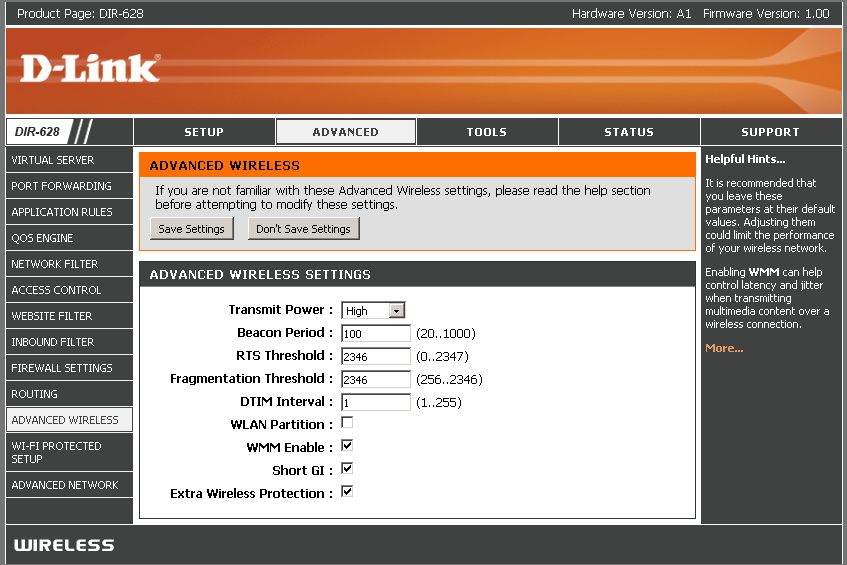
Figure 5: Advanced wireless configuration
One other note is the Extra Wireless Protection checkbox shown in Figure 5. According to the online help, this is supposed to be shown only when the wireless mode is set to 802.11ng only. But I found it exposed when I changed to the 5 GHz band. This is a bug since this setting is supposed to prevent problems with 2.4 GHz 802.11b networks!
Routing Performance
I put the 628 through our suite of router tests, with the results shown in Table 1 along with the DGL-4500 for comparison.
| Test Description | DIR-628 Throughput – (Mbps) |
DGL-4500 Throughput – (Mbps) |
|---|---|---|
| WAN – LAN |
88.2
|
242
|
| LAN – WAN |
85.6
|
244
|
| Total Simultaneous |
74.2
|
256
|
| Maximum Simultaneous Connections | 32 | 200 |
| Firmware Version |
1.00
|
1.02
|
Table 1: Routing throughput
The 628 is slower than the 4500 due both to its less powerful CPU but also its 10/100 Mbps Ethernet vs. the 4500’s gigabit. But its throughput is plenty speedy for any Internet service that it will be connected to.
Figure 6 shows a composite of WAN to LAN, LAN to WAN and simultaneous up/down IxChariot throughput tests. Note that I disabled the QoS Engine and SPI to run the router tests.
You can see unidirectional throughput of almost 90 Mbps in each direction. But bi-directional testing left me scratching my head. My first simultaneous up and downlink test showed throughput shared evenly in each direction. But when I started to run the maximum simultaneous connection test, I wasn’t getting very high numbers.
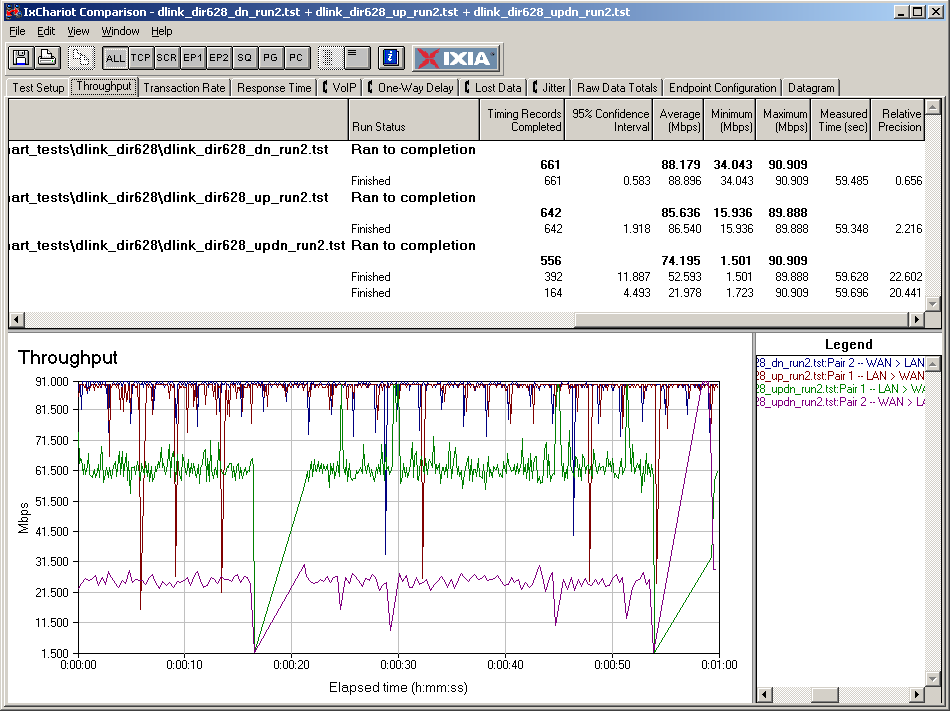
Figure 6: DIR-628 routing throughput
So I reran the bidirectional tests and found the mismatch between up and downlink throughput shown in the lower traces in Figure 6. I ran and reran the tests using different computers, power cycling the router and even changing switch ports. I even ran a throughput check directly between the two computers used in the tests, plugging both into the 628’s switch, and found nice even throughput sharing between receive and transmit. But, try as I might, I could not reproduce the initial results.
But, as I did when testing the Linksys WRT54G2, I tried reducing the IxChariot send rate from its UNLIMITED default to 40 Mbps and found it restored the even throughput sharing. So it looks like there may be something wonky with buffer management somewhere.
The erratic throughput that resulted from running heavy traffic loads in both directions was reflected in the relatively poor maximum simultaneous connection showing of only 32 connections. I suspect if the bidirectional throughput issue were fixed that this test result would also improve.
Use the Router Charts to see how the 628 stacks up against other routers.
Wireless Performance
As I noted in the Linksys WRT54G2 review, I am back to using open-air tests to measure wireless performance. But I have tweaked the methodology slightly, adding a sixth test location. The new test method is described in this article. New Wireless Charts incorporating the new test method are on the way, but in the meantime, I’ll have to rely on manually-generated comparison plots.
As mentioned earlier, testing was done using a Netgear WNDA3100 dual-band USB adapter inserted into a Fujitsu P7120 Lifebook (1.2 GHz Intel Pentium M, 504 MB) notebook running WinXP Pro SP2 with all the latest updates. I used the latest 3.0.0.102 driver and Netgear Smart Wireless 1.3.0.3 utility during testing.
The router had 1.00 firmware and I left all factory default settings in place, except to set Channel 1 for 2.4 GHz tests and Channel 36 for 5 GHz tests.
The 628’s radio is essentially the same as the DGL-4500’s, except only two antennas are connected. So I’ll cut to the chase with two graphics that summarize most of the wireless performance story.
Figure 7 shows a composite of downlink throughput tests made at the six new test locations in the four wireless modes: 2.4 GHz, 20 MHz channel; 2.4 GHz, Auto 20/40; 5 GHz, 20 MHz channel; and 5 GHz, Auto 20/40. Each column represents the average throughput from a one minute test.
Unlike the Azimuth results, you can compare the 2.4 and 5 GHz results, since the open-air tests properly reflect the propagation and attenuation differences between the two bands.
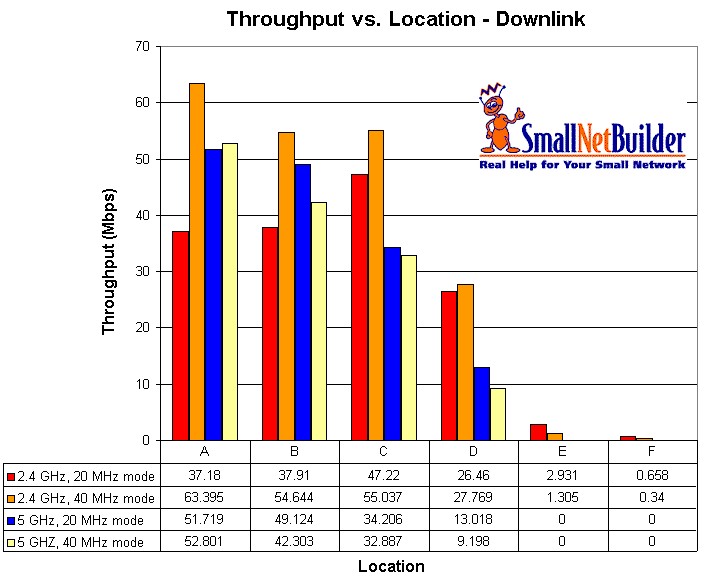
Figure 7: DIR-628 wireless performance summary – downlink
The downlink results show suprisingly low throughput for 2.4 GHz / 20 MHz operation. So we need to turn to the IxChariot plots to see why. Figure 8 shows that even though the Location A throughput is around 50 Mbps, the high variation pushes the average down to around 37 Mbps. The same high variation is found running uplink [click for image], which also pushes down the average result.
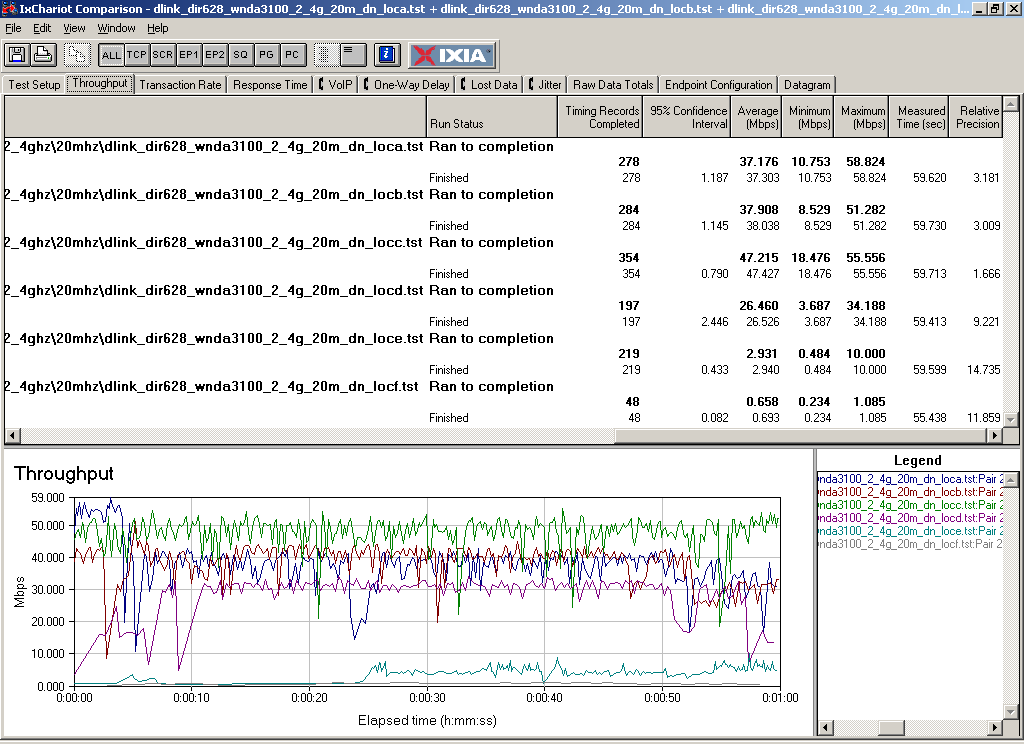
Figure 8: DIR-628 wireless throughput detail – downlink
Figure 9 pulls together all of the uplink average test results, which appear to follow a similar pattern. Note that as with downlink, the "0" results in locations E and F for the 5 GHz band indicate a failure to connect.
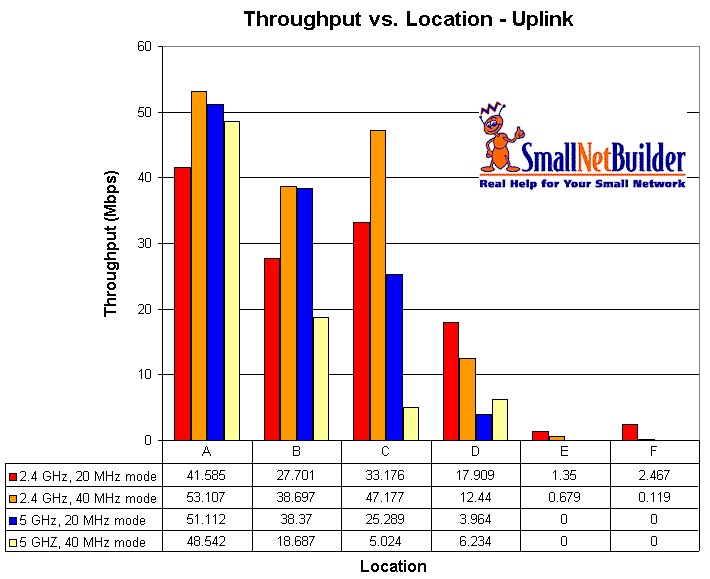
Figure 9: DIR-628 wireless performance summary – uplink
To save space, I’m not going to go through the IxChariot plots for each test. But the slideshow has all the plots along with commentary.
Since I have tested this Atheros radio a few times now in previous D-Link products, I didn’t run a check for wireless security mode throughput. Expect to get the same 50%+ throughput reduction if you choose WEP or WPA/TKIP security.
Mixed mode and neighboring wireless LAN performance will also be the same as we have seen before. Here’s a link to the DGL-4500 review, which has the details if you need ’em.
 Check out the slideshow for more wireless test details
Closing Thoughts
I applaud D-Link in its efforts to make dual-band draft 11n routers more affordable. Unfortunately, it seems that the DIR-628’s high wireless throughput variation prevents it from reliably delivering the blazing throughput people have been programmed (by the manufacturers) to expect from draft 11n products.
But the good news is that there is now a more affordable way for people with too many neighboring 2.4 GHz neighbors to move to the more spacious (9 non-overlapping channels vs. 3), quieter 5 GHz band. However, the reduced range of such a move might send them right back to taking their chances in 2.4 GHz and the 628 right back to the store.