

Introduction
| At a Glance | |
|---|---|
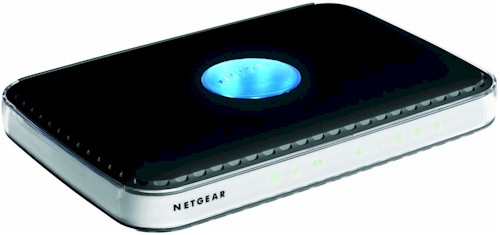
| Product | NETGEAR RangeMax Dual Band Wireless-N Router (WNDR3300) |
| Summary | Low-cost dual-band two-radio hybrid 802.11b/g / draft 802.11n router |
| Pros | • Street priced below $100 • Internet uplink QoS • Wireless repeating |
| Cons | • Shorter than average 5 GHz range • Unstable 2.4 GHz 11n • 100 Mbps LAN |
I have been holding off on reviewing NETGEAR’s entry into the sub-$100 dual-band draft 802.11n router race, waiting for Netgear to release its firmware fix for the WNDR3300’s low wireless throughput with the 11n radio switched to the 2.4 GHz band [related article].
Well, V1.0.23 was released last week and I retested both the first sample that NETGEAR sent as well as a second sample that was supposed to have lower noise coupling (which was causing the lower throughput). To cut to the chase, I found that the new firmware slightly improved the draft N radio’s throughput when set to the 2.4 GHz band. But I also found that, in general, the draft 11n radio set to 2.4 GHz was too unstable for reliable use.
Inside Details
Figure 1 is taken from the FCC ID docs and shows the 3300’s board, with its unique two-radio draft 11n / 802.11b/g approach.
The all-Broadcom design uses a BCM4704 processor, 16 MB of RAM and 4 MB of flash. The 10/100 WAN and LAN ports are handled via a BCM5325 switch which is Auto MDI/X.
A BCM4321 Baseband/MAC and BCM2055 2.4/5 GHz Intensi-fi draft 11n transceiver make up the dual-band 11n radio. The second radio is provided by a BCM4318 single chip 802.11b/g chip. Each radio has its own printed-circuit "metamaterial" antennas; three for the draft 802.11n radio and two for the 802.11b/g.
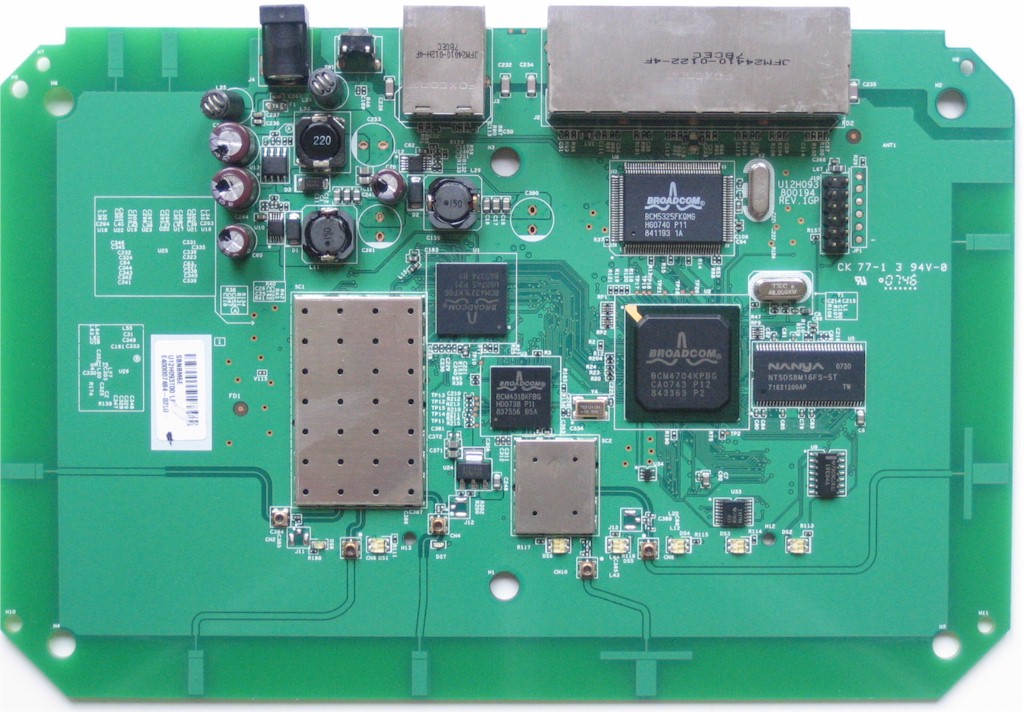
Figure 1: WNDR3300 board
Routing Features
The 3300’s feature set is essentially the same as that of Netgear’s other wireless routers. Figure 2 shows the Basic Settings page where you set the Internet connection type.
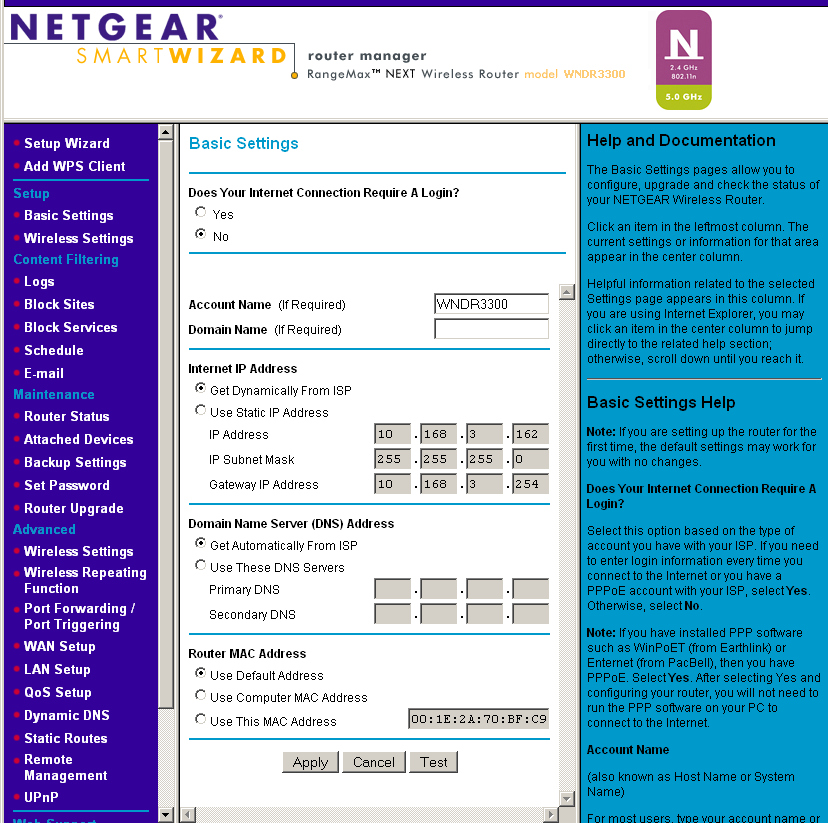
Figure 2: Basic Settings
I’ll just summarize the routing features in this list:
WAN Support – Types handled include Static and Dynamic IP, Other (static and dynamic IP), PPTP (static and dynamic IP) and BigPond. There is no specific PPPoE setting, so you might be better off using the Setup Wizard to set up your WAN connection. WAN MTU is set separately from the connection type (WAN Setup page) and applies to all WAN options. WAN port MAC address spoofing is supported only for Static and Dynamic connection types.
Firewall – The SPI+NAT firewall is pretty basic, although you can disable SPI. Both port forwarding and triggered port forwarding are supported. You get a rather short pick list of services in the Port Forwarding add screen, but you can specify the port numbers and protocols directly for both the outbound trigger port and inbound port range.
Ports can also be opened automatically via UPnP NAT Traversal (enabled by default), but at least you can log into the admin interface and see the automatically opened ports in the UPnP Portmap table. A single DMZ IP is also supported and you can disable the SPI portion of the firewall.
The WAN Setup page holds the SPI Firewall Disable (default unchecked), DMZ, Respond to Ping on Internet Port and MTU settings. There is also a NAT Filtering option (default "Secured") that has a fuzzy explanation in the online help.
The Block Services (outbound port filters) can be applied to all, one or a range of IP addresses, but not MAC addresses. They also can be controlled by a single rudimentary schedule (checkboxes for days of the week and one set of start / stop times).
The Block Sites feature is keyword-based and applies to web traffic only. My quick testing revealed some odd behavior such as partially rendering a web page for a site that I accessed via IP address that was blocked by a keyword. The logs also showed DOS attack: FIN Scan from the blocked site. You get an attention-grabbing red and black "Web Site Blocked by NETGEAR Firewall" page when you trigger the block and the ability to have one "trusted" IP address that can bypass any blocking.
Dynamic DNS clients – Only Dyndns.org is supported
Logging and Reporting – Logging seems mainly focused on logging web traffic. Everything goes into one log, with no filtering provided. You can clear or email the log, but there is no syslog or SNMP trap support. Email authentication has been added and worked for my ISP, but there is no Test email button or ability to handle SMTP servers using secure connections or specify an alternate SMTP port.
Other features – The DHCP server can be disabled and allows IP address reservation by MAC address. RIP direction and version (1, 2B, 2M) can be controlled and static routes set.
QoS: Simple four-level priority-based QoS for upload (Internet-bound) traffic has been added. You can specify the uplink bandwidth (there is a " Check for current Internet Uplink bandwidth" button, but it’s greyed out). Priority can be set by Ethernet port, client MAC address or application port. There are 27 pre-built QoS Policies for applications or you can define your own rules.
What’s not here:
No Router / AP mode switch – If you already have a router and just want to use the wireless section on the 3300, see this article.
Secure remote access – Remote access is HTTP only, but you can limit access by IP address range and set the port number.
Admin idle timeout adjust – One of my personal annoyances. The timeout seemed even shorter than the usual 5 minutes.
No reboot button – The only way to get the router to reboot is to power cycle it.
Routing Performance
I put the 3300 through our suite of router tests, with the results summarized in Table 1.
| Test Description | Throughput – (Mbps) |
|---|---|
| WAN – LAN |
89.8
|
| LAN – WAN |
88.4
|
| Total Simultaneous |
100.5
|
| Maximum Simultaneous Connections | 124 |
| Firmware Version |
1.0.23
|
Table 1: Routing throughput
Unidirectional routing throughput tops out at just under 90 Mbps. But simultaneous bi-directional throughput is right at 100 Mbps. Maximum Simultaneous sessions measured only 124, about par for the course for current Broadcom-based routers.
Figure 3 shows the composite WAN to LAN, LAN to WAN and simultaneous up/down IxChariot throughput tests. Throughput is generally smooth, with only occasional short dropouts.
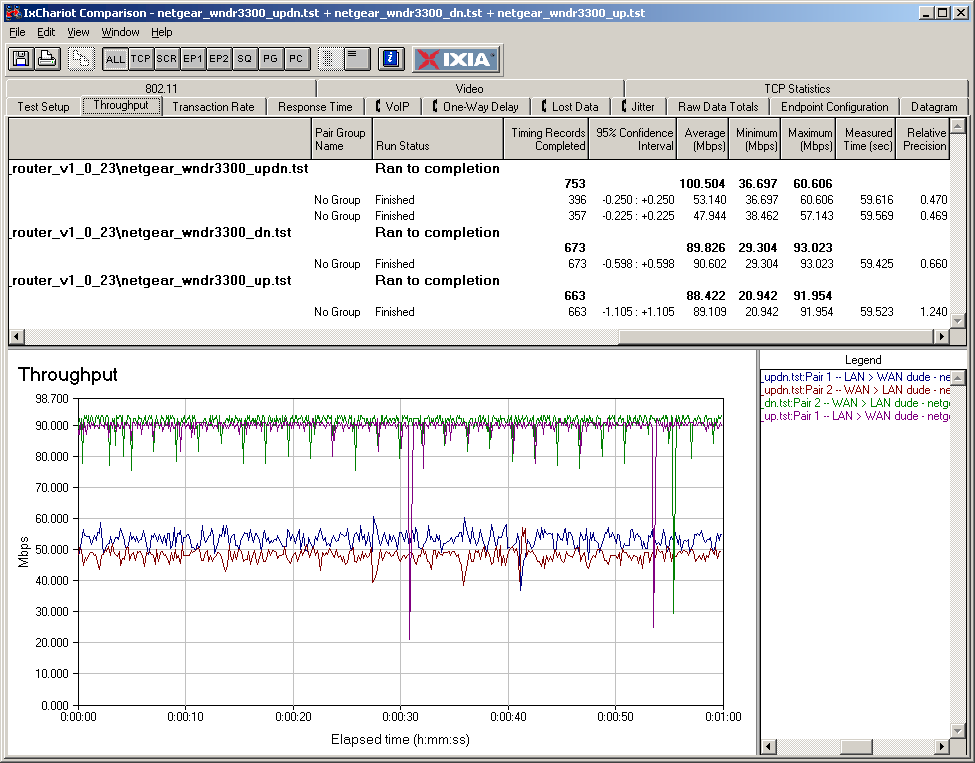
Figure 3: WNDR3300 Routing throughput
As usual, I put the LAN client in DMZ in order to get the IxChariot WAN > LAN tests to complete. But I initially didn’t disable SPI. I found, however, that the IxChariot traffic was being seen as a DoS attack during the Maximum Simultaneous Connections tests and being blocked. So I disabled SPI to finish running the tests.
Use the Router Charts to see how the 3300 stacks up against other routers.
Wireless Features
Figure 4 shows the main Wireless Settings screen, which controls both radios via the Mode selector.
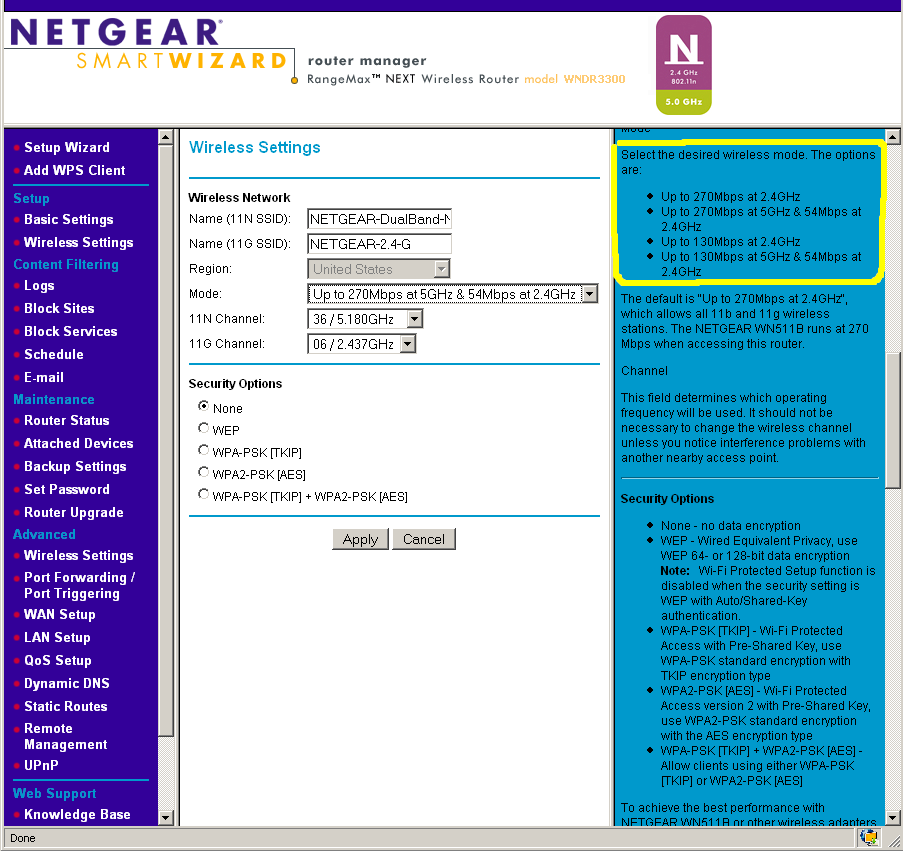
Figure 4: Wireless configuration
Available modes are:
- Up to 270Mbps at 2.4GHz
- Up to 270Mbps at 5GHz & 54Mbps at 2.4GHz (default)
- Up to 130Mbps at 2.4GHz
- Up to 130Mbps at 5GHz & 54Mbps at 2.4GHz
Since there is only one draft 11n radio, simultaneous coverage in the 5 GHz and 2.4 GHz bands uses the draft 11n radio in 5 GHz and the 11b/g radio in 2.4 GHz. If you want draft 11n in 2.4 GHz, the 11b/g radio is disabled and you have a single-band draft 11n router.
Note that channels in the 5 GHz Lower (36, 40, 44, 48) and Upper (149, 153, 157, 161) bands are available. But the 11 N Channel selector allows choosing only channels 36, 44, 149 and 157 in the default 270 Mbps (channel bonded) mode.
Security options include WEP and WPA / TKIP and WPA2/ AES modes as well as an auto WPA/WPA2 mode. But only WPA/2 "Personal" (PSK) modes are supported. The 3300 also supports Wi-Fi Protected Setup (WPS) and I ran a few WPS pushbutton sessions using the Netgear WNDA3100 dual-band USB adapter.
Contrary to my earlier observation, I found that Netgear’s client application does support WPS. But you don’t see the client WPS "button" until you actually try to make a connection. Each attempt that I ran (after resetting the router to factory defaults), looked like a successful WPA-PSK connection was established, with the Netgear client application even showing that it was associated to the 3300. But each time, the session ended without the client able to lease an IP address via DHCP from the router, so the connection failed.
Figure 5 shows the Advanced Wireless controls, which are pretty sparse and don’t include transmit power control. Note that the radio disable is here and applies to both radios.
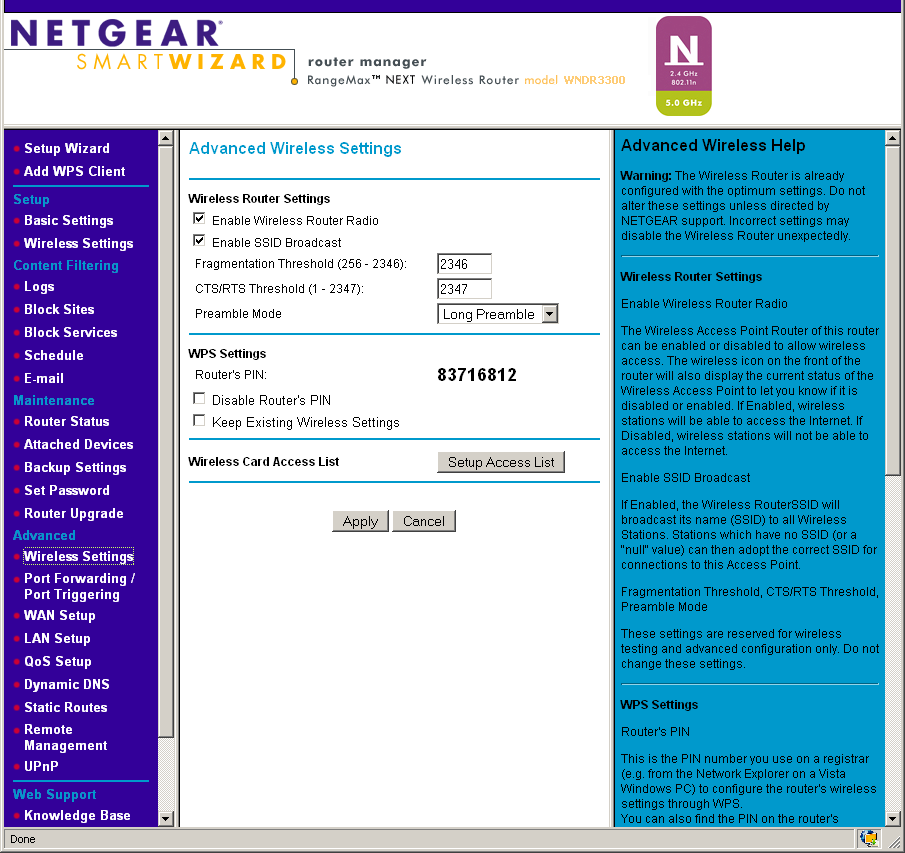
Figure 5: Advanced wireless configuration
The 3300’s Wireless Repeating function was added in the V1.0.23 firmware. It works on the draft 11n radio only and I didn’t try it. If it works, this makes the 3300 the only currently-available draft 11n router to support wireless repeating.
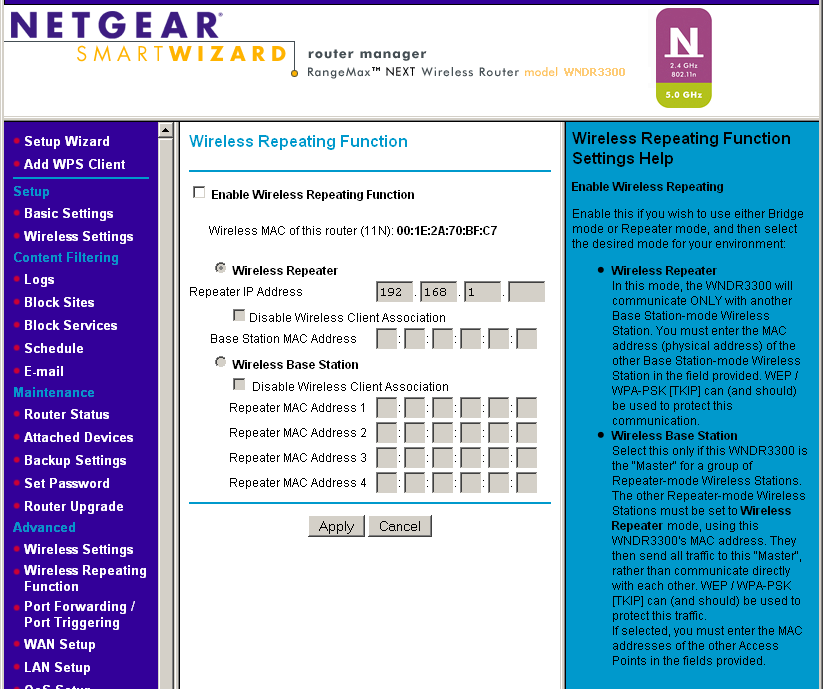
Figure 6: Wireless repeating
Wireless Performance
I used the new open air test method described here to put the 3300 through its wireless paces. Testing was done using a Netgear WNDA3100 dual-band USB adapter inserted into a Fujitsu P7120 Lifebook (1.2 GHz Intel Pentium M, 504 MB) notebook running WinXP Pro SP2 with all the latest updates. I used the latest 3.0.0.102 driver and Win XP’s built-in Wireless Zero Config client during testing. The router was upgraded to v1.0.23 firmware and I left all factory default settings in place, except to set Channel 1 for 2.4 GHz tests and Channel 36 for 5 GHz tests.
Figure 7 shows a composite of downlink throughput tests made at the six new test locations in five wireless modes: 2.4 GHz w/ 11g radio; 2.4 GHz, 20 MHz channel (Up to 130 Mbps setting); 2.4 GHz, 40 MHz channel (Up to 270 Mbps setting); 5 GHz, 20 MHz channel; and 5 GHz, 40 MHz channel. Each column represents the average throughput from a one minute test.
Note that you can compare the 2.4 and 5 GHz results, since the open-air tests properly reflect the propagation and attenuation differences between the two bands.
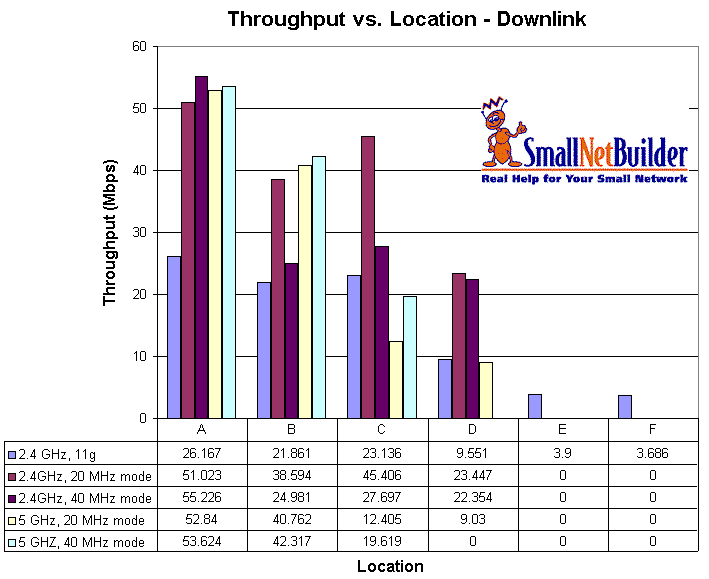
Figure 7: WNDR3300 wireless performance summary – downlink
Only the 11g radio (the default for 2.4 GHz) reached all six test locations running downlink. But the larger issue is that the draft 11n radio does not provide much of a throughput boost in either 2.4 or 5 GHz in 40 MHz mode. The reason is shown in Figure 8.
Basically, high throughput variation holds down the average throughput when running in channel-bonded mode. Figure 8 shows the draft 11n radio set to 5GHz, "Up to 270 Mbps" mode running downlink. If you look at the Location C results (loc_c plot) you see a maximum throughput of 51.724 Mbps, but an average of 27.697 Mbps—about half.
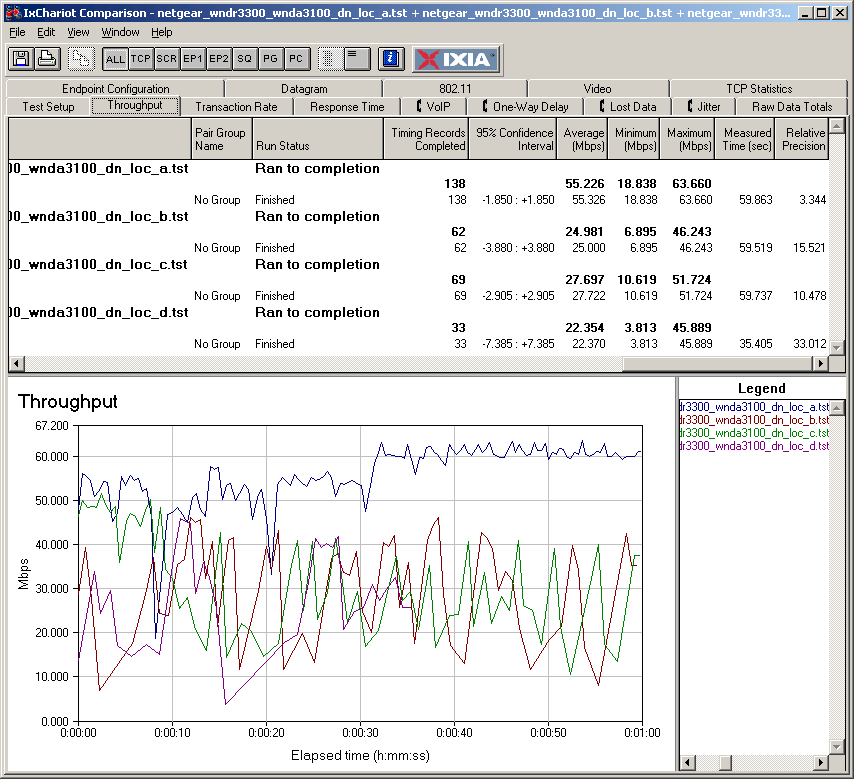
Figure 8:Wireless throughput detail – 2.4 GHz draft 11n 40 MHz channel downlink
Figure 9 pulls together all of the uplink average test results, which show disappointingly low throughput across the board, except for the 11b/g radio. Not only are all values lower than their downlink counterparts, with the exception of Location A, 2.4 GHz, 40 MHz mode. But when the draft 11n radio was put into 5 GHz "Up to 270 Mbps" mode (40 MHz mode in the chart), it failed to even connect in Location D, i.e. it had even shorter range.
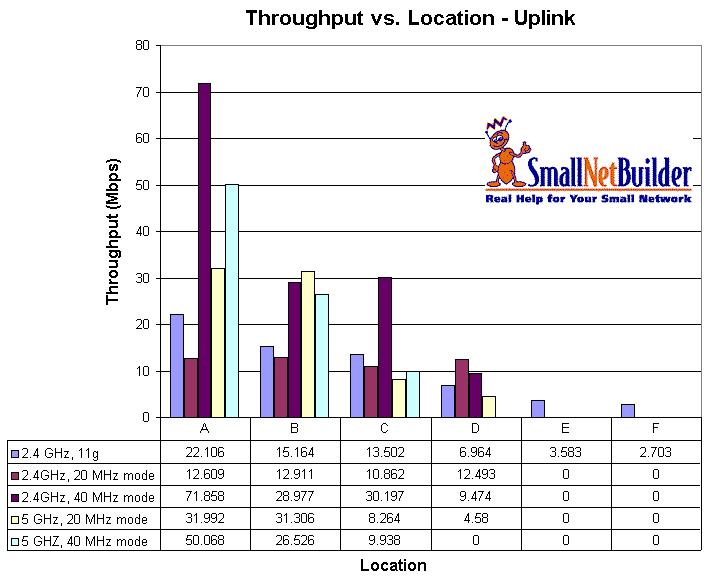
Figure 9: WNDR3300 wireless performance summary – uplink
To save space, I’m not going to go through the IxChariot plots for each test. But the slideshow has all the plots along with commentary.
Since the charts don’t show it, I have to comment on my experience using the draft 11n radio set to 2.4 GHz. I normally can just move my notebook to each test location and as long as the client is associated, just start the IxChariot test. But when running the tests on the draft 11n radio set to the 2.4 GHz band, I had to struggle to run the tests.
For just about every test other than at Location A, I had to futz with the connection in order to successfully start the IxChariot tests. It usually took some combination of running a ping back to the router and/or a Windows connection "Repair". Since I had a lot of tests to run, you can imagine that this got real annoying, real fast.
Note that I did not have this trouble with the radio switched to the 5 GHz band, or the 11g radio at all. My conclusion is that while the new firmware has helped draft 11n 2.4 GHz performance, there still ain’t something right with the radio in that mode.
Wireless Performance – more
Moving on, although I knew what I would find, I ran a wireless security mode throughput check anyway. Figure 10 shows that average throughput gets a 33 to 45% hit when using either WEP or WPA/TKIP, but is essentially unchanged for WPA2/AES.
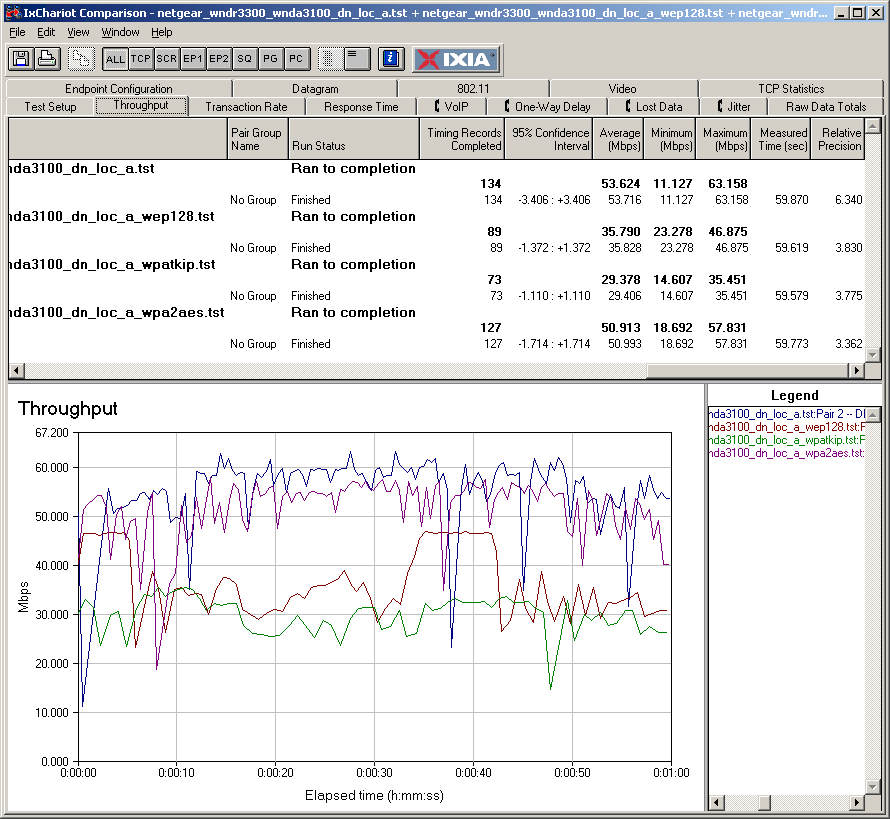
Figure 10: Wireless security throughput comparison – 5 GHz, 40 MHz mode, downlink
By contrast, throughput doesn’t measurably change in any of the wireless security modes when you’re using the 11b/g radio. You can see that plot here.
Since the 3300 uses an 11b/g radio by default in the 2.4 GHz band, it won’t interfere with neighboring wireless LANs any more than a normal 11b/g router. But if you choose to use the 3300 in the 2.4 GHz band and in the "Up to 270 Mbps" channel-bonded mode—and I don’t know why you would, given the flaky performance in that mode—then it will tromp on neighboring WLANs like other draft 11n routers.
If you are going to run a mixed WLAN, with legacy 11 b/g and 2.4 GHz draft 11n clients, be warned that the draft 11n clients should act just like 11 b/g clients since that’s the radio that they will be operating on.
 Check out the slideshow for more wireless test details
Closing Thoughts
I have to give Netgear credit for its unique approach to driving down the cost of dual-band draft 11n routers. It seemed like they were really at the head of the low-cost dual-band pack when the 3300 was announced at CES in January. But here we are in July and more dual-band competition has appeared, including multiple options below $100, although with single, not dual, radios.
In the end, what Netgear has produced is technically not a dual-band, dual-radio draft 11n router. Instead, it’s a two radio 11 b/g, draft 11n hybrid that ends up doing a poor job on the draft 11n side in both 2.4 and 5 GHz bands and a good job only as an 802.11b/g router. I think Netgear should chalk this one up as a "learning experience" and get busy on a real dual-band router, or two… and soon!