

Introduction
Update 10/24/2008: Added Stress Test
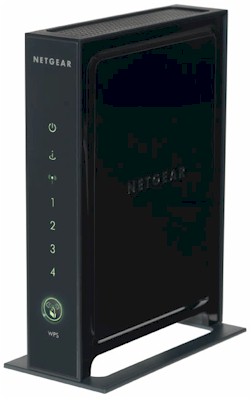
| At a Glance | |
|---|---|
| Product | NETGEAR Wireless-N Router (WNR2000) NETGEAR Netgear RangeMax Wireless-N USB 2.0 Adapter (WN111V2) |
| Summary | Low-cost single-band draft 802.11n router based on Atheros XSPAN |
| Pros | • Street price around $70 • Uplink QoS • 100 Mbps wire speed routing • Decent wireless range |
| Cons | • Not as cheap as other entry-level draft 11n products • Unbalanced up and downlink throughput • Unusually low WEP and WPA/TKIP downlink speed |
NETGEAR missed the Cheap Draft 802.11n Router Roundup because it didn’t have a two-antenna product in the $50-$70 price range. Sure, it had the aging WNR834B, which was close in price and had three vs. two antennas. But I had already reviewed it, so didn’t include it in the round-up.
Well, NETGEAR now has a new entry-level single-band draft 802.11n router—the WNR2000. So let’s take a look and see if it’s a better alternative for a cheap draft 11n router.
Internal Details
The FCC ID doc photos are very fuzzy and don’t really show the component details. And since the product has heatsinks on the switch and CPU/Mac/Baseband chips (a good thing!) I had to make some guesses about the 2000’s components.
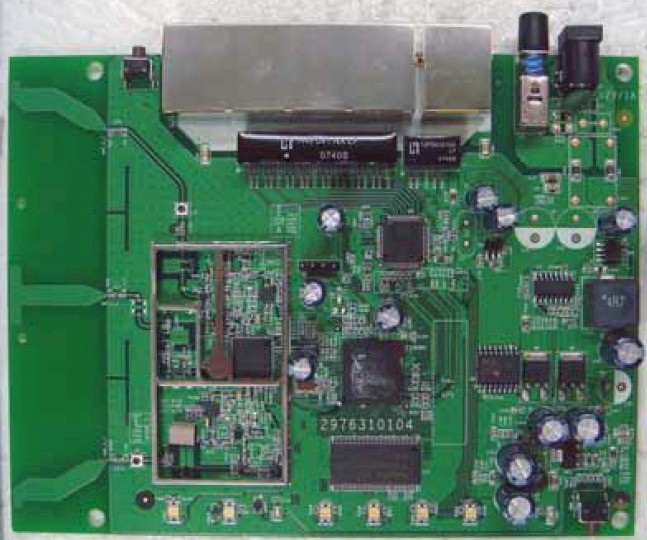
Figure 1: WNR2000 board
Unlike the original WNR834B, the 2000 is based on Atheros’ AR9100AP chipset. It features a combined CPU/MAC/BaseBand SoC, radio chip and separate switch. I can’t tell whether the radio chip in Figure 2 is the AR9102 2.4 GHz 2×2 radio or AR9103 2.4 GHz 3×3 radio. This is further complicated by presence of the three “metamaterial” antennas.
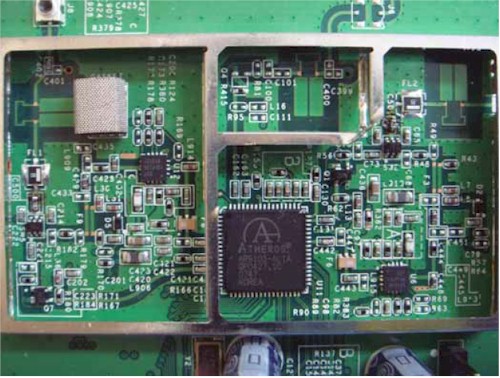
Figure 2: WNR2000 radio detail
But NETGEAR was kind enough to tell me that the radio is the 3×3 AR9103 and the CPU/MAC/Baseband the AR9132. The 10/100 switch is an Atheros AR8216 6 port 10/100 and I could clearly tell from looking at the board that there is 32 MB of RAM and 4 MB of flash.
NETGEAR sent along a WN111V2 RangeMax Wireless-N USB 2.0 Adapter as the companion adapter. The original WN111 used a Marvell “TopDog” draft 11n chipset (Figure 3), comprised of an 88W8060 2.4 GHz transceiver and 88W8362 MAC/BB.
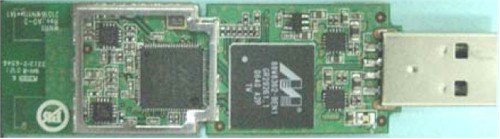
Figure 3: WN111 V1 radio detail
But the V2 uses an Atheros 9001 USB chipset, made up of an AR9170 MAC/BB and AR9101 1×2 MIMO Single-band 2.4 GHz Radio.
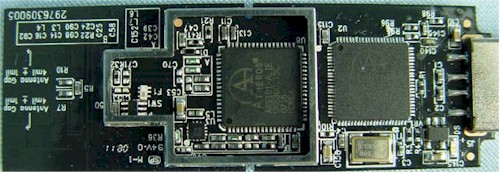
Figure 4: WN111 V2 radio detail
I think this is a better choice, since I have found that it’s still best to stay with the same chipset manufacturer for AP and client for best performance.
Routing Features
The 2000’s feature set doesn’t stray from the standard NETGEAR set, as you can tell from the Basic Settings page in Figure 5.
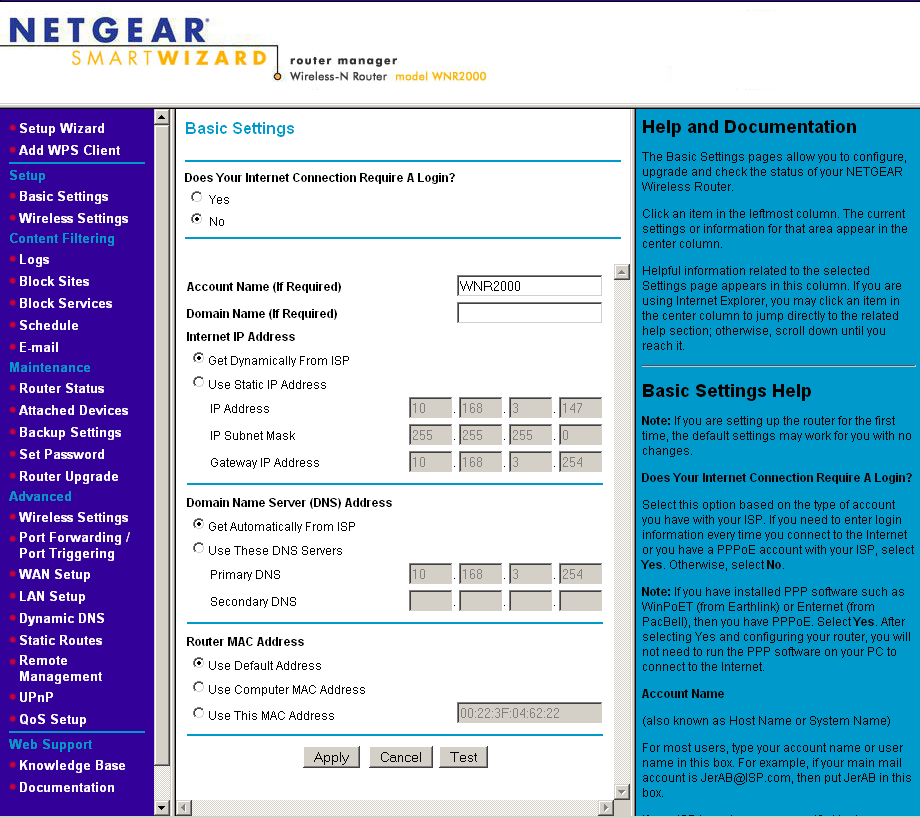
Figure 5: Basic Settings
So I’ll once again just summarize the routing features, which are very similar to what I found in the last NETGEAR router that I looked at, the WNDR3300:
WAN Support – Types handled include Static and Dynamic IP, Other (static and dynamic IP), PPTP (static and dynamic IP) and BigPond. There is no specific PPPoE setting, so you might be better off using the Setup Wizard to set up your WAN connection. WAN MTU is set separately from the connection type (WAN Setup page) and applies to all WAN options. WAN port MAC address spoofing is supported only for Static and Dynamic connection types.
Firewall – The SPI+NAT firewall is pretty basic, although you can disable SPI. Both port forwarding and triggered port forwarding are supported. You get a rather short pick list of services in the Port Forwarding add screen, but you can specify the port numbers and protocols directly for both the outbound trigger port and inbound port range.
Ports can also be opened automatically via UPnP NAT Traversal (enabled by default), but at least you can log into the admin interface and see the automatically opened ports in the UPnP Portmap table. (I noticed entries for TCP and UDP ports 16584 listed here, which were opened by Skype.) A single DMZ IP is also supported and you can disable the SPI portion of the firewall.
The WAN Setup page holds the SPI Firewall Disable (default unchecked), DMZ, Respond to Ping on Internet Port and MTU settings. There is also a NAT Filtering option (default “Secured”) that has a fuzzy explanation in the online help.
The Block Services (outbound port filters) can be applied to all, one or a range of IP addresses, but not MAC addresses. They also can be controlled by a single rudimentary schedule (checkboxes for days of the week and one set of start / stop times).
The Block Sites feature is keyword-based and applies to web traffic only. You get an attention-grabbing red and black “Web Site Blocked by NETGEAR Firewall” page when you trigger the block and the ability to have one “trusted” IP address that can bypass any blocking.
Dynamic DNS clients – Only Dyndns.org is supported
Logging and Reporting – Logging seems mainly focused on logging web traffic. Everything goes into one log, with no filtering provided. You can clear or email the log, but there is no syslog or SNMP trap support. Email authentication has been added and worked for my ISP, but there is no Test email button or ability to handle SMTP servers using secure connections or specify an alternate SMTP port.
Other features – The DHCP server can be disabled and allows IP address reservation by MAC address. RIP direction and version (1, 2B, 2M) can be controlled and static routes set.
QoS: Simple four-level priority-based QoS for upload (Internet-bound) traffic has been added. You can specify the uplink bandwidth, or use the “Check for current Internet Uplink bandwidth” button. I tried this and got values much higher than the 400 Kbps or so that my ISP provides. It’s possible, however, that the test got confused by the multiple NAT routers between the 2000 and my Internet connection. On the other hand, routers with Ubicom’s StreamEngine auto QoS don’t have the problem.
QoS priority can be set by Ethernet port, client MAC address or application port. There are 18 pre-built QoS Policies for applications or you can define your own rules.
What’s not here:
No Router / AP mode switch – If you already have a router and just want to use the wireless section on the 3300, see this article.
Secure remote access – Remote access is HTTP only, but you can limit access by IP address range and set the port number.
Admin idle timeout adjust – One of my continuing personal annoyances with NETGEAR’s routers. The timeout seemed to be about one minute!
No reboot button – The only way to get the router to reboot is to power cycle it.
Routing Performance
I put the 2000 through our suite of router tests, with the results summarized in Table 1.
| Test Description | Throughput – (Mbps) |
|---|---|
| WAN – LAN |
92.5
|
| LAN – WAN |
91.4
|
| Total Simultaneous |
126.8
|
| Maximum Simultaneous Connections | 200 |
| Firmware Version |
1.1.3.9NA
|
Table 1: Routing throughput
Unidirectional routing throughput tops out at just over 90 Mbps and simultaneous bi-directional throughput comes in at 127 Mbps. Maximum Simultaneous sessions came in at the 200 maximum that we can measure.
Figure 6 shows the composite WAN to LAN, LAN to WAN and simultaneous up/down IxChariot throughput tests. Throughput is very steady, with the periodic downticks primarily due the test method.
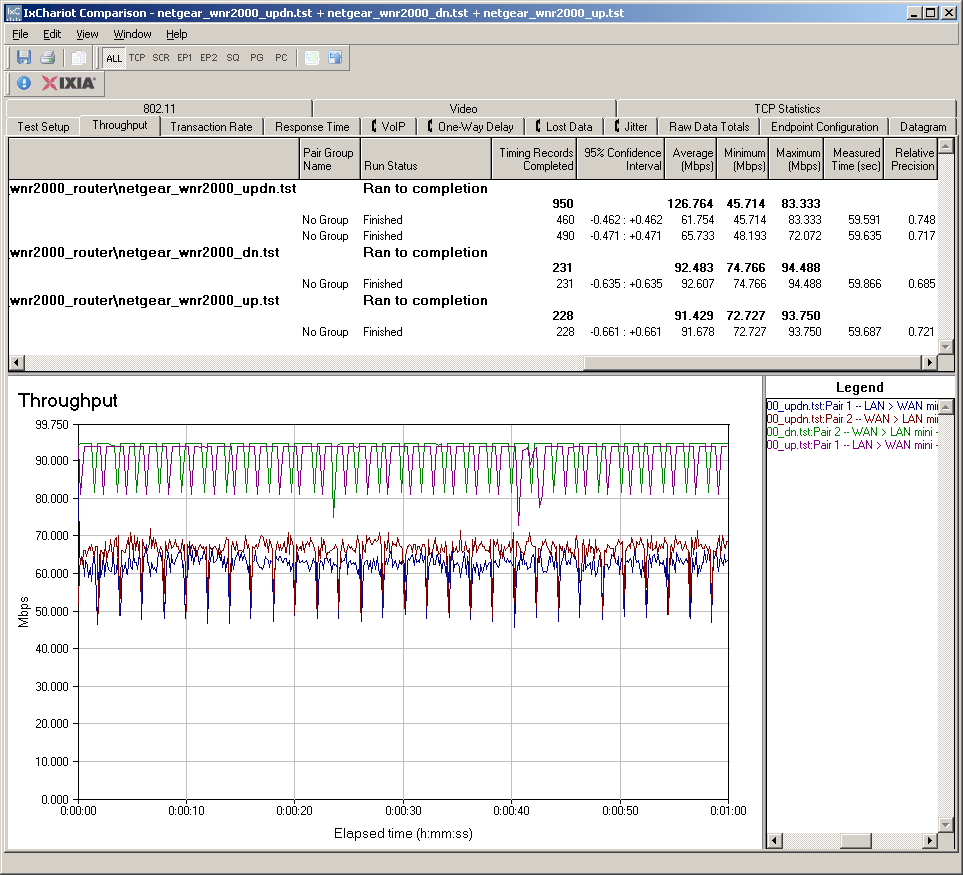
Figure 6: WNR2000 Routing throughput
In all, I judge the 2000’s routing section to be pretty solid. Use the Router Charts to see how the WNR2000 stacks up against other routers.
Wireless Features
Figure 7 shows the main Wireless Settings screen. The controls are pretty simple— just SSID, Channel and Mode. Note that there are no references to 802.11b, g or N. Just three speed ranges. The ranges are explained in the help text that I have highlighted.
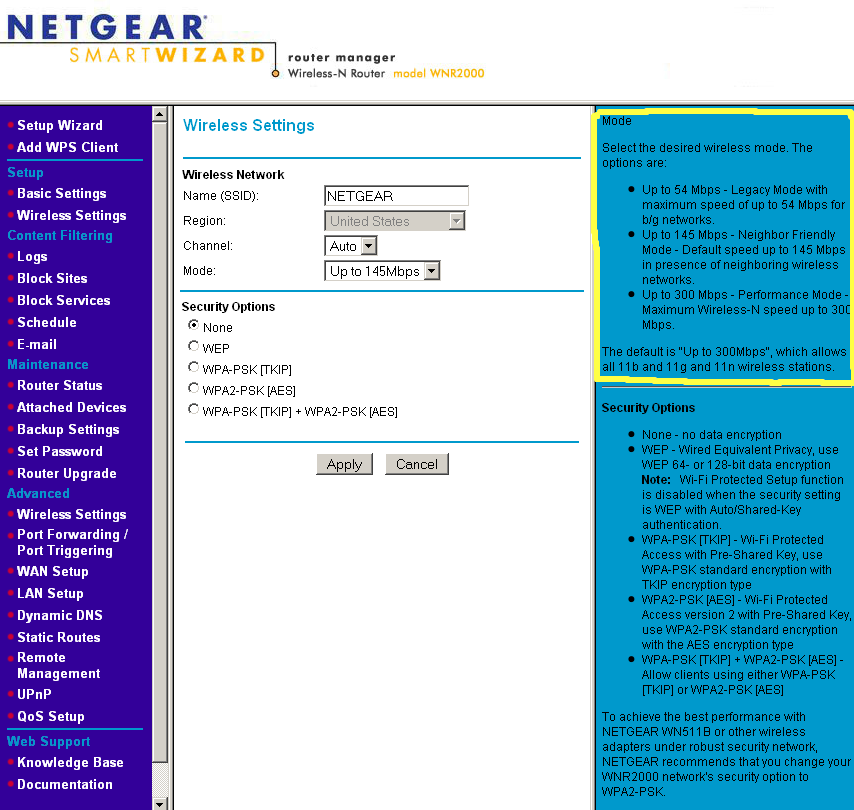
Figure 7: Wireless configuration
Available modes are:
- Up to 54 Mbps
- Up to 145 Mbps (default)
- Up to 300 Mbps
Security options include WEP and WPA / TKIP and WPA2/ AES modes as well as an auto WPA/WPA2 mode. But only WPA/2 “Personal” (PSK) modes are supported. The 2000 also supports Wi-Fi Protected Setup (WPS) and I ran a few successful WPS pushbutton sessions using the Netgear WN111V2 dual-band USB adapter. The mode resulting from the WPS session was reported as auto WPA/WPA2 TKIP/AES, so I’m not sure of the exact security level.
Figure 8 shows the minimal Advanced Wireless options, which don’t include transmit power control. Note that the radio disable is here and isn’t schedulable like on D-Link’s routers. Note that the 2000 has neither an AP mode nor does it support WDS bridging/repeating.
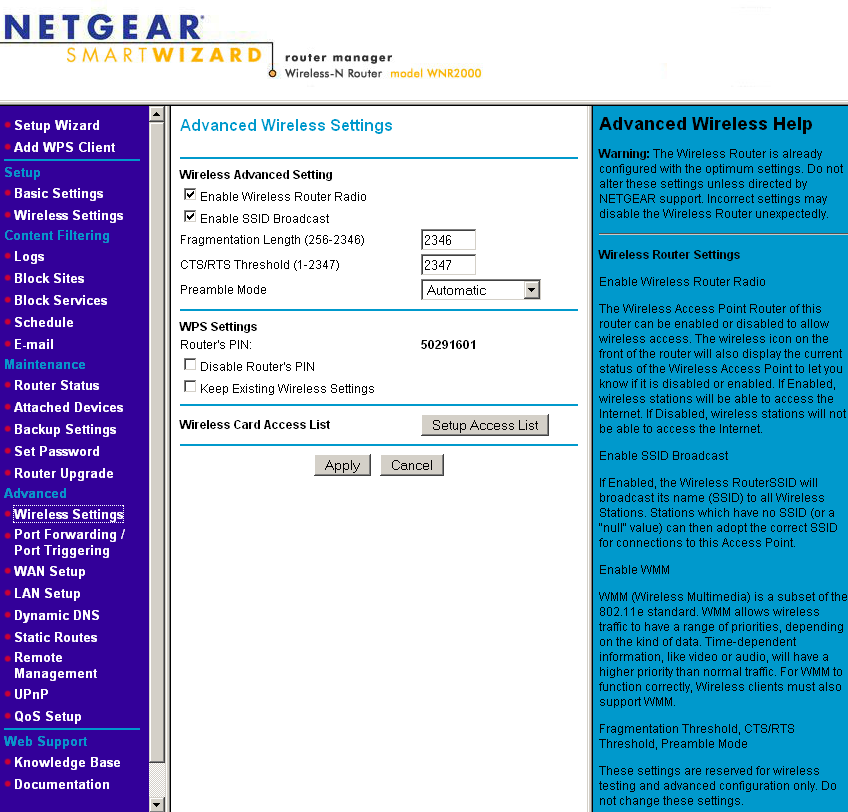
Figure 8: Advanced wireless configuration
Wireless Performance
I initially got pretty excited while testing the 2000, since it was able to connect and pass traffic in all six of my test locations in both the 20 MHz channel and channel-bonded 40 MHz channel modes! But after going back and reviewing my open air test method data, I see that this feat is not a first.
At any rate, I think it’s worthy of note that this was done with a product with fixed position, internal antennas and a USB client adapter. I frequently see negative comments that generally attribute poor performance to both these types of products in the SNB Forums and elsewhere. So I hope these results will help dispell these generalizations.
I tested using the open air test method described here using a NETGEAR WN111v2 USB adapter inserted into a Fujitsu P7120 Lifebook (1.2 GHz Intel Pentium M, 504 MB) notebook running WinXP Pro SP2 with all the latest updates. I used the latest 3.0.0.117 driver and NETGEAR’s version 1.0.0.7 wireless utility during testing. The router was upgraded to V1.1.3.9NA firmware and I left all factory default settings in place, except to set Channel 1 for 2.4 GHz tests.
Figure 9 shows a composite of downlink throughput tests made at the six test locations in both wireless modes: Up to 145 Mbps; and Up to 300 Mbps. Each column represents the average throughput from a one minute test.
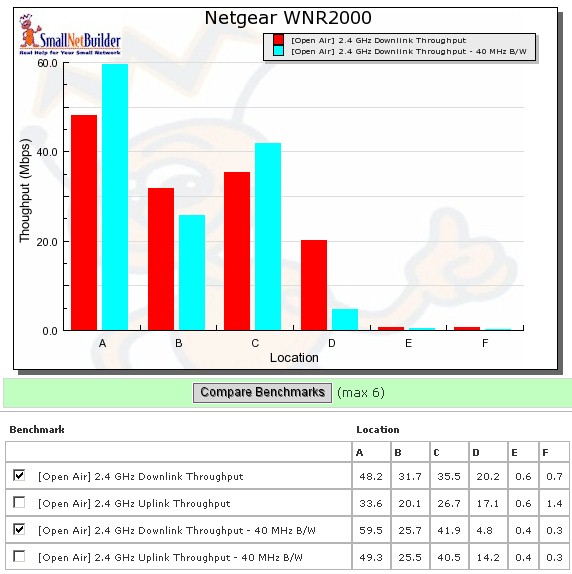
Figure 9: WNR2000 wireless benchmark summary – downlink
As noted earlier, the combination of WNR2000 and WN111V2 reached all six test locations in both 20 and 40 MHz channel modes. The highest downlink throughput of 59.5 Mbps achieved was in Location A (10′, same room).
Figure 10 shows a composite of IxChariot plots for all 20 MHz mode downlink tests. While there is throughput variation, it’s not as bad as other products that I have tested. Still, it has the effect of reducing average throughput. The 40 MHz mode downlink plot is here if you’d like to look. It looks pretty similar, but with more variation in the Location A test.
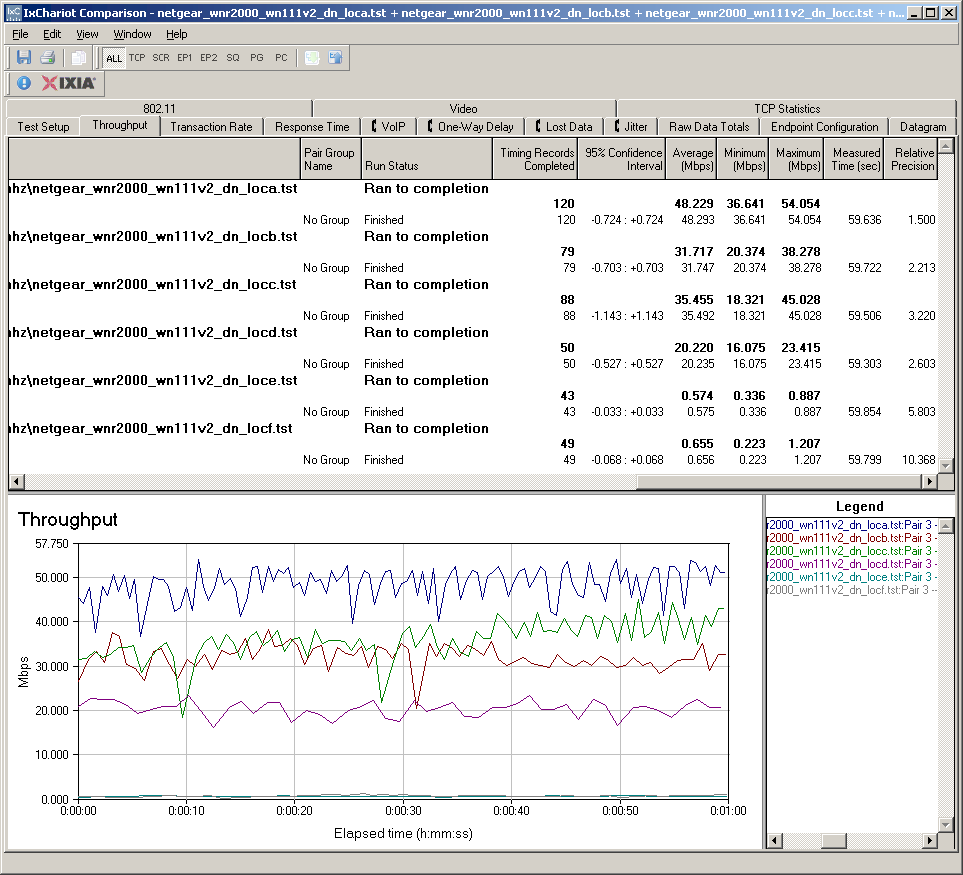
Figure 10:Wireless throughput detail – 2.4 GHz, 20 MHz channel downlink
Figure 11 pulls together all of the uplink average test results, which generally run lower than downlink speeds. Using 40 MHz mode in uplink seems to help in Locations A, B and C, but doesn’t do much in Locations D, E and F.
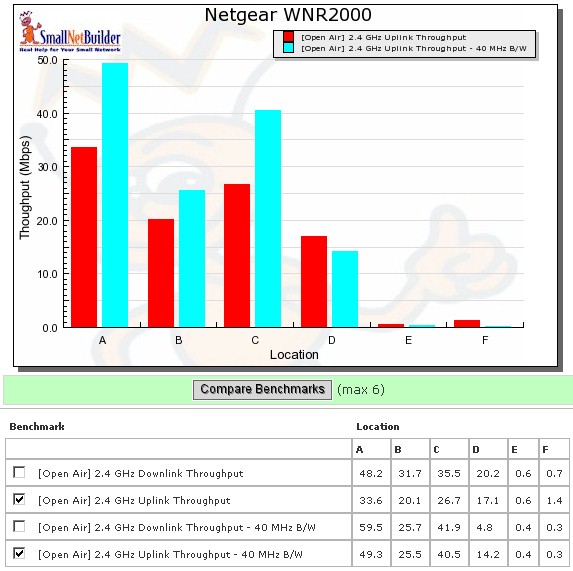
Figure 11: WNR2000 wireless benchmark summary – uplink
To save space, I’m not going to show the IxChariot plots for uplink. But you can click these links to view large plots for 20 MHz mode and 40 MHz mode.
Wireless Security Performance
I ran my usual test to check for throughput in WEP 128, WPA/TKIP and WPA2/AES modes. Figure 12 shows the downlink results for tests run in Location A in the default Up to 145 Mbps mode.
The reduction in WEP and WPA/TKIP speeds seem higher than usual, but I think that is largely due to high throughput variation. I will note that the WN111V2 adapter did not report a 54 Mbps link rate during any of the tests, which would indicate a switch to 802.11g mode.
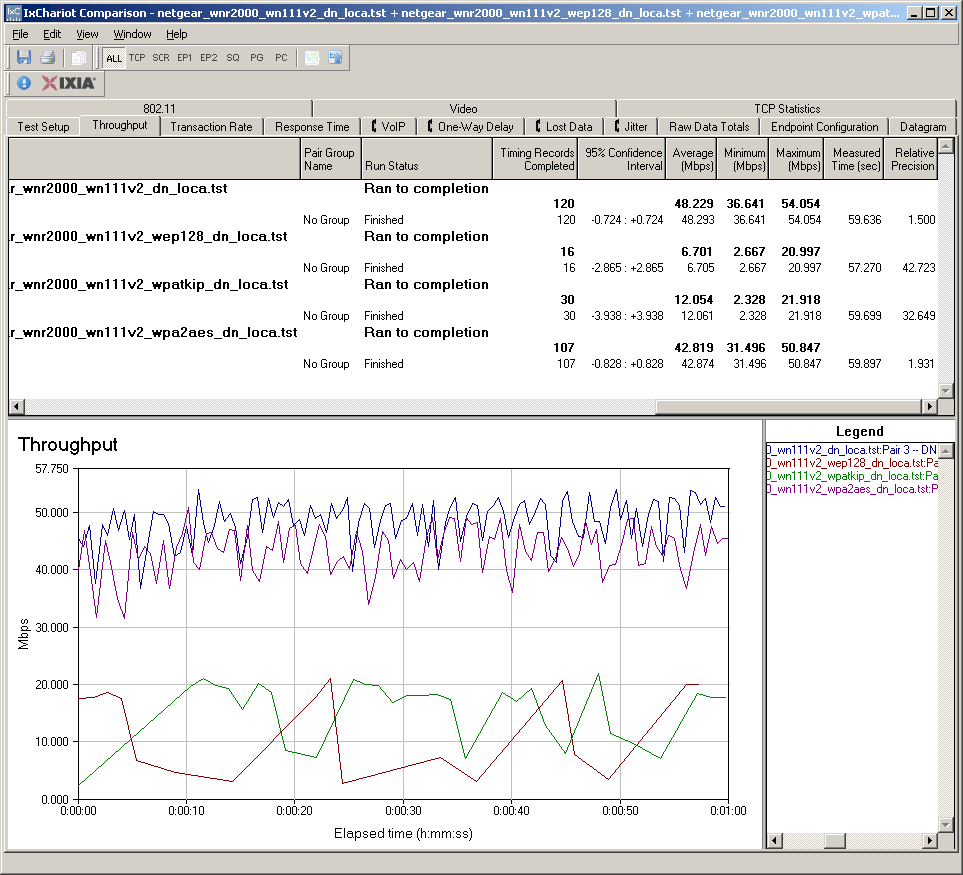
Figure 12: Wireless security tests – 20 MHz mode, downlink
Throughput reduction was lower running uplink as shown in Figure 13. But throughput variation was higher for no security and WPA2/AES modes, but less for WEP and WPA/TKIP.
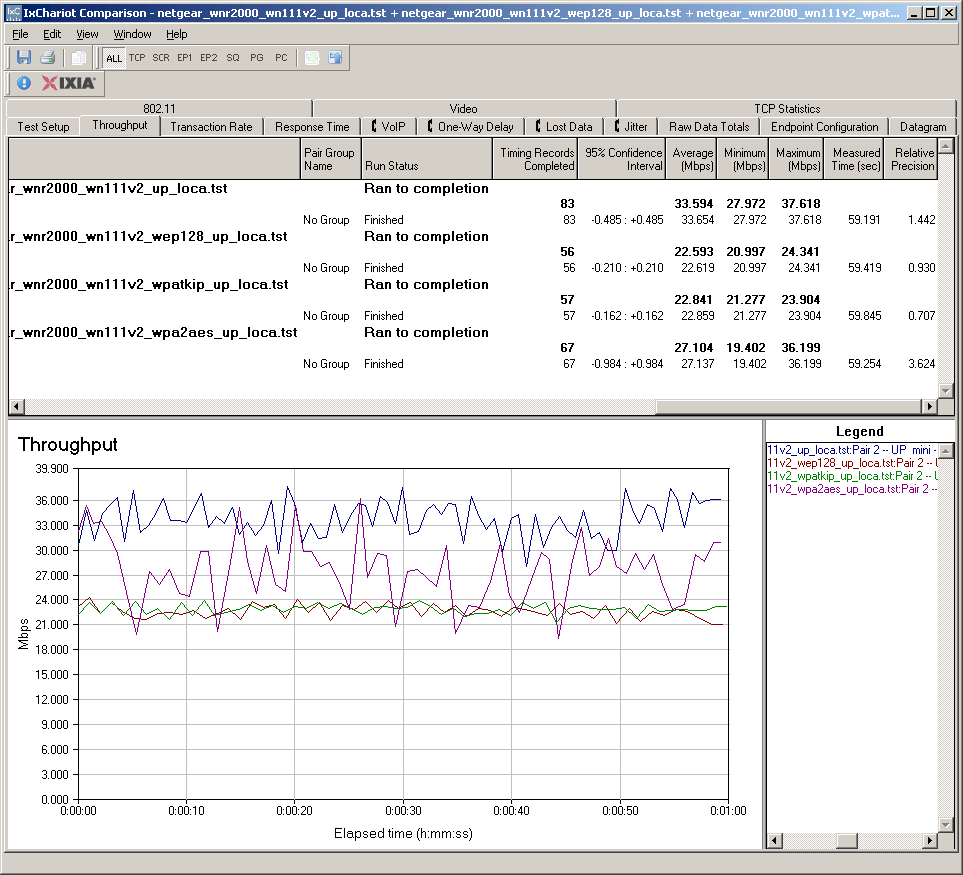
Figure 13: Wireless security tests – 20 MHz mode, uplink
The downlink performance in WPA/TKIP is a cause for concern, since it’s common to have to accomodate products that don’t support WPA2/AES. I would hope that the performance can be improved via future firmware. But in the meantime, if you need to run WPA/TKIP, you might want to choose another product.
Wireless Performance – Competitive Comparison
Since I tested the products in the Cheap Draft 802.11n Router Roundup using the Azimuth method, you won’t find them in the Wireless Chart Open Air benchmarks. But fortunately, I ran Location A open air tests for all products. So I can at least provide a comparison of best-case performance of the WNR2000 against the other "cheap" routers.
| Location A Wireless Performance (Open Air, Same Room, 10 ft.) | |||||||
| NETGEAR WNR2000 | Belkin F5D8233-4 |
D-Link DIR-615 |
D-Link DIR-625 |
Linksys WRT150N |
Linksys WRT160N |
Trendnet TEW-632BRP |
|
| Downlink – 20 MHz b/w (Mbps) | 48 | 82 | 56 | 59 | 49 | 58 | 46 |
| Downlink – 40 MHz b/w (Mbps) | 60 | 83 | 61 | 69 | 57 | 62 | 56 |
| Uplink – 20 MHz b/w (Mbps) | 34 | 80 | 34 | 55 | 49 | 53 | 46 |
| Uplink – 40 MHz b/w (Mbps) | 49 | 73 | 63 | 63 | 64 | 66 | 68 |
Table 1:"Cheap" draft 11n router throughput comparison
For at least "best case" performance, the Ralink-based Belkin N Wireless Router clearly is the winner. The WNR2000 falls somewhere in the middle, except for coming in last in 40MHz mode uplink with only 49 Mbps.
Since the Cheap roundup, Linksys came out with the WRT110 "RangePlus" router, which like the Belkin, uses a Ralink chipset (but a less-expensive 1T2R version). As explained in the review, Linksys doesn’t call the WRT110 a draft 11n router. But data for that product is in the Wireless Chart Open Air benchmarks, so let’s quickly compare it to the WNR2000.
Figure 14 shows downlink throughput in the default 20 MHz mode. The two products are generally evenly matched.
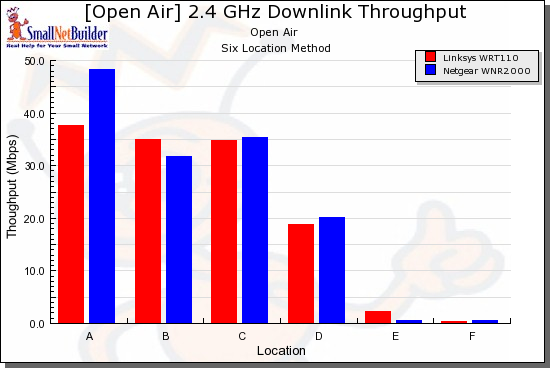
Figure 14: Wireless competitive comparison – 20MHz mode, down
Figure 15 shows uplink throughput, where the WRT110 clearly takes the lead. But it’s possible that the Linksys’ edge comes from the WPC100, which uses an Atheros 3×3 draft 11n design. Go figure!
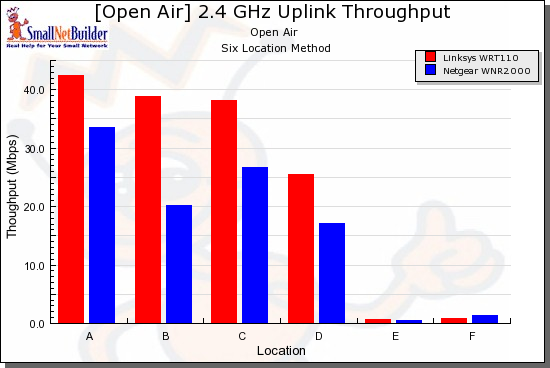
Figure 15: Wireless competitive comparison – 20MHz mode, up
The upshot of all of this is that the WNR2000 might do better, especially for uplink, if a different client is used, preferably one with a 2T2R or 3T3R design.
Use the Wireless Charts to generate other comparisons.
Mixed STAs
It has been awhile since I ran checks of performance with mixed 11g and draft 11n clients and good/bad neighbor behavior. In the DIR-655 review, I found that Atheros’ draft 11n chipsets seemed to have reasonable bandwidth sharing with mixed clients and that it was a "good neighbor"—almost too good—when it encountered a neighboring wireless LAN operating in its 40 MHz mode extension channel.
You can take a look at the DIR-655 review for the details and background of these tests. I’ll just quickly present the results. Let’s start with mixed clients (STAs or Stations, for short).
Figure 16 shows how a notebook with an Atheros AR5001X+ based 11g adapter and another notebook with the WN111V2 behave when associated with the WNR2000.
With both running downlink and the 2000 set to 40MHz channel mode, you can see in Figure 16 that the 11g client throughput drops from ~ 20 to 14 Mbps, while the WN111V2 comes on the air running at an even lower throughput. This plot shows similar behavior when the 11n client starts first.
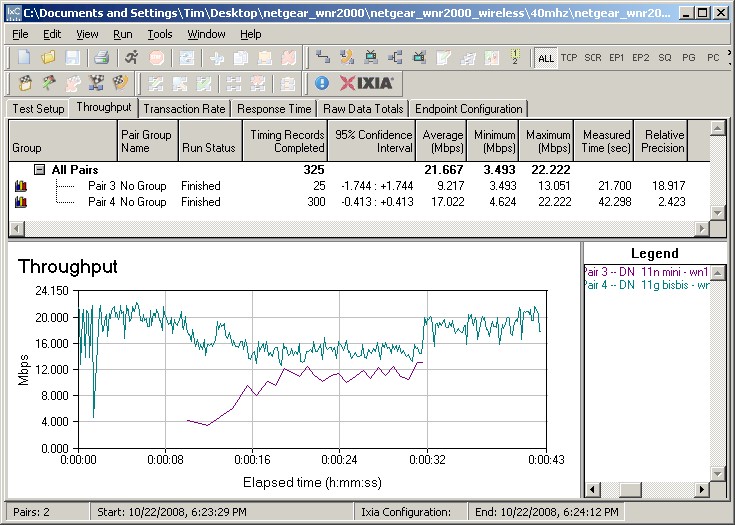
Figure 16: Mixed 11n, 11g STAs – Downlink, G starts first
For uplink, the WN111V2 gets a little more aggressive and runs faster than the 11g client. But, unlike some other products that I’ve seen, it doesn’t knock the 11g client totally off the air (Figure 17). This plot shows similar behavior when the 11g client starts first.
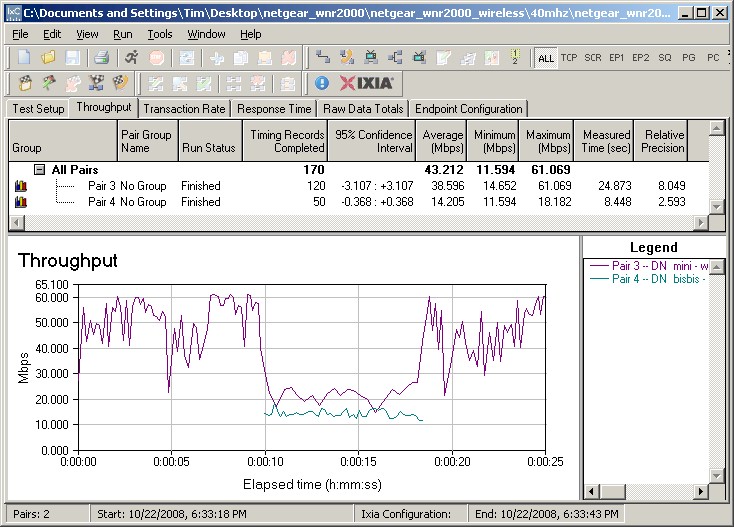
Figure 17: Mixed 11n, 11g STAs – Uplink, N starts first
"Good Neighbor" check
Figure 18 shows that the WNR2000 defers to the neighboring "legacy" 802.11g wireless LAN when it detects activity on that LAN, which is operating in the WNR2000’s 40 MHz mode "extension" channel. (I set the WNR2000 to Channel 1, so its extension channel was four channels away, i.e. Channel 5). The WNR2000 seems to overcompensate, however, letting the 11g WLAN have more than its share of airtime.
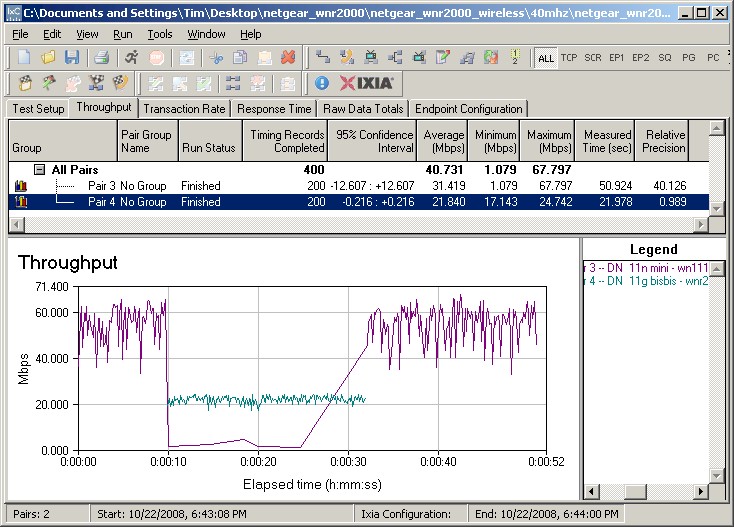
Figure 18: "Good Neighbor" check – Downlink, 11n first
But when the 11g WLAN starts first, the 11n WLAN seems to battle for equal airtime (Figure 19).
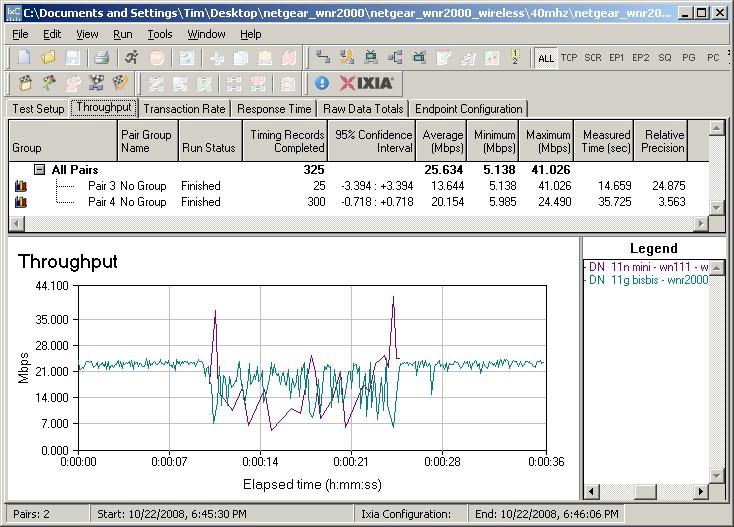
Figure 19: "Good Neighbor" check – Downlink, 11g first
The uplink plots with 11n first and 11g first show the 11g WLAN getting most of the air time.
So it appears that Atheros continues to do a good job, if not a bit too good, in sharing bandwidth in mixed draft 11n/11g WLANs and being a good neighbor to legacy WLANs.
Stress Test
Updated 10/24/2008: Added Stress Test
Because of the reports of flaky behavior in draft 11n products, I have started to do some stress testing on them. For the WNR2000, I just fired up IxChariot and ran a four hour test with the throughput script running simultaneously up and downlink.
Or at least I tried to run a four hour test. The first time I ran it, it ran for about an hour and 15 minutes, the second time, just under an hour and the third time for an hour and 8 minutes. For all three cases, it looked like the client and AP lost contact.
I’m not sure why this happened, but it shouldn’t. In contrast, the dual-band D-Link DIR-825, with two radios ran for up to five hours without a problem.
Closing Thoughts
With the WNR2000, NETGEAR now has two draft 11n products at the same MSRP and street pricepoint; it and the Broadcom-based WNR834BV2. Both have essentially the same feature set, so I asked NETGEAR what the difference was. The response was basically that the two products are aimed at different retail channels (although you can find both online at the same etailers). I also asked whether the WNR834B was going to be discontinued after current supplies ran out, but NETGEAR responded with a "no comment".
Setting aside NETGEAR’s product positioning, how does the WNR2000 stack up as an entry level draft 11n router? On the plus side, it reached all of my test locations in both 20 and 40 MHz channel modes and it has a solid routing section with 100 Mbps wire speed and high simultaneous session handling. And if you’re ok with NETGEAR’s routing feature set, then the WNR2000 won’t disappoint.
But the downside is that the WNR2000 (and WNR834B, for that matter) aren’t particularly aggressively priced. Some of the routers in the Cheap Draft 802.11n Router Roundup can now be had for around $50, while the lowest price for the NETGEARs is closer to $70. And although the WNR2000’s wireless performance is better than some of the dual-band products that I’ve been looking at lately, its uplink performance, in particular, is nothing to write home about.
Bottom line is that if you’re a NETGEAR fan and are looking for an inexpensive draft 11n router, then you might want to give the WNR2000 a try. But if you don’t have a brand preference, there are better options available.