

Introduction
Updated 7/16/2008: Clarified Wi-Fi Certification issue
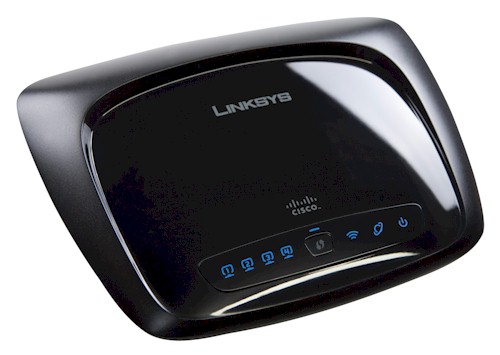
| At a Glance | |
|---|---|
| Product | Linksys RangePlus Wireless Router (WRT110) |
| Summary | Single radio 2.4 Ghz draft 11n router in disguise using Ralink chipset |
| Pros | • Good routing performance • Good wireless performance |
| Cons | • Defaults to unfriendly neighbor 40 MHz channel B/W • Can’t set channel in Auto 20/40 mode • 10/100 switch • WPA/TKIP mode has problems • Needs draft 802.11n clients to get performance boost |
Between Linksys’ "Wireless-G" (802.11b/g) and "Wireless-N" (draft 802.11n) product lines is its "RangePlus" line, consisting of the original WRT100 and its replacement, the WRT110. The 110 will also replace the WRT54GS "SpeedBooster" router (once stock is exhausted), which was Linksys / Broadcom’s answer to Atheros’ Super-G throughput enhancement technology for 802.11g.
Internal Details
As I have discussed in earlier articles here and here, the RangePlus routers use Ralink’s RT2700 "MIMO" chipset, which has been Wi-Fi Certified for 802.11n Draft 2.0. But neither of the RangePlus routers nor their companion WPC100 card have been Draft 2.0 11n certified, which gives Linksys some leeway in their implementation.
Figure 1 shows the FCC photo of the 110’s board. The design uses a Ralink 1T2R (1 Transmit, 2 Receive) "MIMO" design incorporating a RT2720L 1T2R Transceiver and RT2780. I couldn’t find any information on the RT2780. But since there is no other CPU on the board, I’ll assume it handles both general CPU and MAC / Baseband duties.
An ICplus IP175C provides the 4 port auto MDI/X 10/100 LAN switch and WAN port. A look at the actual WRT110 revealed that it has 16 MB of RAM and 4 MB of flash.
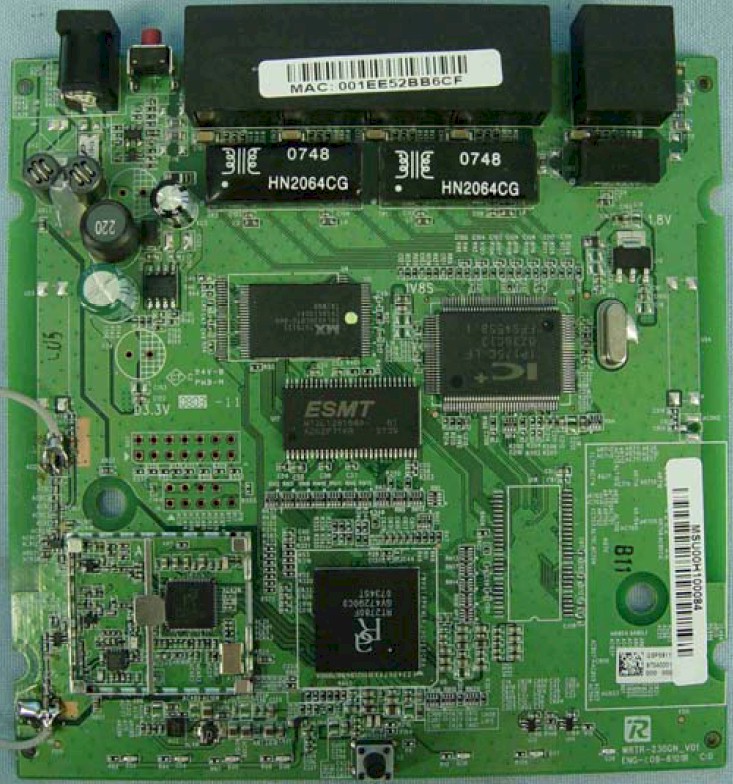
Figure 1: Linksys WRT110 board
Linksys didn’t go with Ralink for its companion WPC100 card, however. Instead the card (Figure 2) uses Atheros’ draft 11n AR5416 BB/MAC and AR2133 3×3 MIMO 2.4 GHz radio. It’s an odd matchup—a 3T3R client with a 1T2R access point—but that’s what it is.
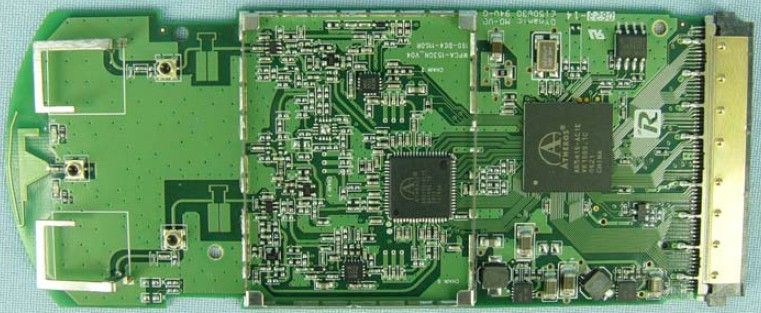
Figure 2: WPC100 board
Features
The 110’s feature set is the same as Linksys’ other routers, with the exception of the wireless setup screens.
Here’s a summary of key routing features:
- Support for DHCP, Static IP, PPPoE, PPTP, L2TP and Telstra Cable Internet connection types
- Built-in dynamic DNS client for DynDNS.com and TZO.com
- Router mode switches off NAT routing for use in multi-router networks
- Scheduled Internet Access feature for outbound port-based service blocking
- Web filtering for four URLs and six keywords per policy
- Forwarding for 10 port ranges and 10 triggered port ranges
- Four level priority-based upstream QoS for two MAC addresses, eight application ports and two MAC addresses (two levels only)
- Optional HTTPs management access
- Incoming and Outgoing Traffic logging
If you need details on Linksys’ admin interface, check the WRT54G2 review and its slideshow.
The Basic Wireless Settings screen defaults to the Wi-Fi Protected Setup version, but Figure 3 shows the alternate Manual screen. You’ll note that the Radio Band setting defaults to the neighbor-unfriendly Auto – 20/40 MHz Channel mode, which reveals the product’s true draft 11n nature. This is kosher since the product isn’t Wi-Fi Draft 2.0 certified, but I think it’s a poor choice.
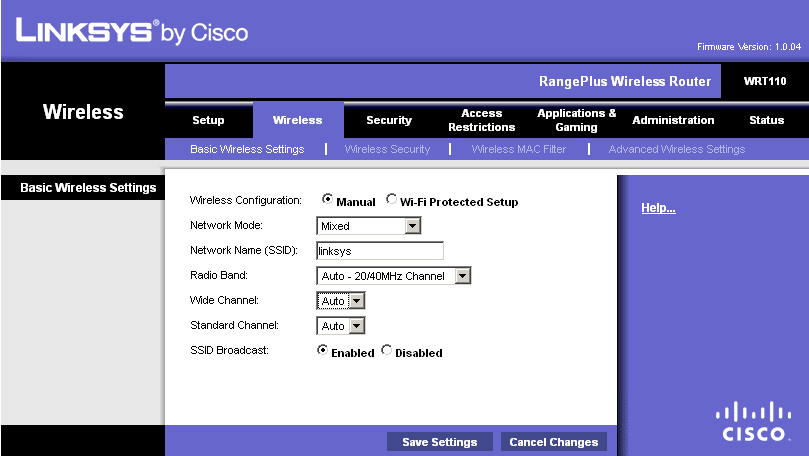
Figure 3: Basic Wireless settings
I was surprised to find in this mode, however, that neither the Standard nor Wide Channel settings can be changed from their Auto defaults. In other words, the only way you can set the 110 to use a specific channel is to change to "legacy" friendly Standard – 20 MHz Channel mode—another poor design choice. The Network Modes available in addition to the Mixed default are: BG-Mixed; Wireless-G only; Wireless-B only; Wireless-N only; and Disabled.
I didn’t test WPS because the WPC100 client doesn’t support it. The only Linksys adapters that currently support WPS are still the WGA600N Dual-Band Wireless-N Gaming Adapter and the WUSB600N Dual-Band Wireless-N USB Network Adapter.
The Advanced Wireless settings also belie the 110’s true nature via the N Transmission Rate selector. The maximum rate of 130 Mbps is due to the single transmit stream.
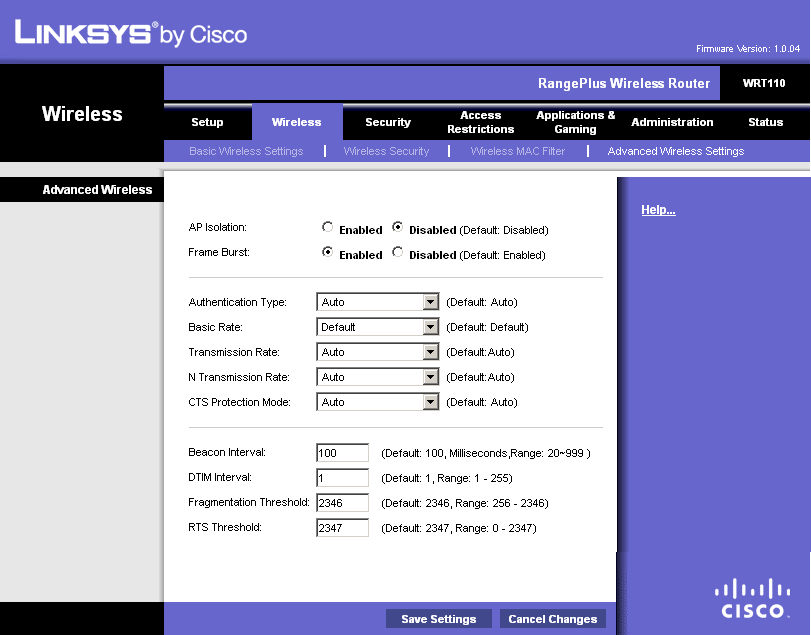
Figure 4: Advanced wireless configuration
Note that there is no transmit power control and no ability to keep wireless and wired clients from talking to each other. The AP Isolation control prevents only wireless client-to-client communication.
Routing Performance
Routing performance for the 110 using our standard test method is summarized in Table 1. It measured around 83 Mbps in the WAN to LAN and LAN to WAN tests. But total throughput dropped to 78 Mbps, due to the high variation shown in Figure 5. Although it’s hard to see in the composite plot, throughput was nice and steady when running the unidirectional tests.
| Test Description | WRT110 Throughput – (Mbps) |
|---|---|
| WAN – LAN |
83.3
|
| LAN – WAN |
84.5
|
| Total Simultaneous |
78.1
|
| Maximum Simultaneous Connections | 136 |
| Firmware Version |
1.0.04
|
Table 1: Routing throughput
The Maximum Simultaneous Connections test of 136 connections is actually pretty good for a Linksys router. By comparison, the low-cost WRT150N and WRT160N two-antenna draft 11n routers, using Broadcom CPUs, have similar throughput, but support only 80 and 96 Maximum Simultaneous connections, respectively.
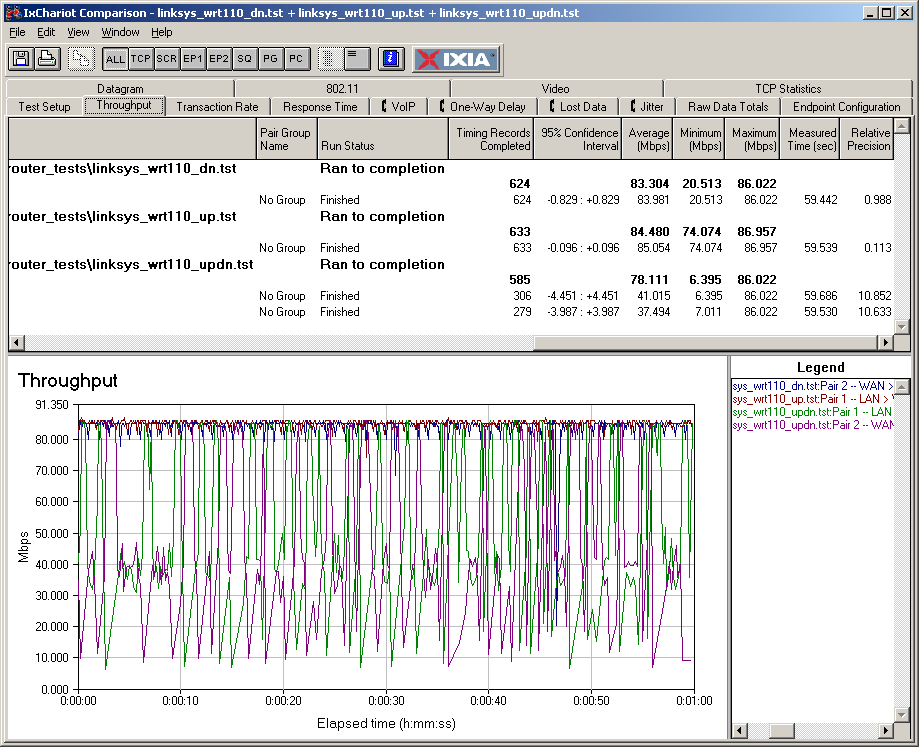
Figure 5: WRT110 Routing throughput composite plot
Use the Router Charts to see how the 110 stacks up against other routers.
Wireless Performance
I used the new open air test method described here to test the 110’s wireless performance. Testing was done using a Linksys WPC100 Cardbus adapter inserted into a Fujitsu P7120 Lifebook (1.2 GHz Intel Pentium M, 504 MB) notebook running WinXP Pro SP2 with all the latest updates. I used the latest Win XP SP2 6.0.3.120 driver and Win XP’s built-in Wireless Zero Config client during testing. The router was upgraded to 1.0.04 firmware and I left all factory default settings in place, except to set Channel 1 for the 20 MHz mode tests.
Figure 6 shows a composite of up and downlink throughput tests made at the six test locations in two wireless modes: 2.4 GHz, 20 MHz channel; and 2.4 GHz, Auto 20/40 MHz channel. Each column represents the average throughput from a one minute test.
You can see best-case (Location A) throughput just shy of 40 Mbps in the 20 MHz mode and just over 60 Mbps in Auto 20/40. I confirmed that two channels (1 and 5) were being used in this mode using a Cognio Spectrum Expert spectrum analyzer.
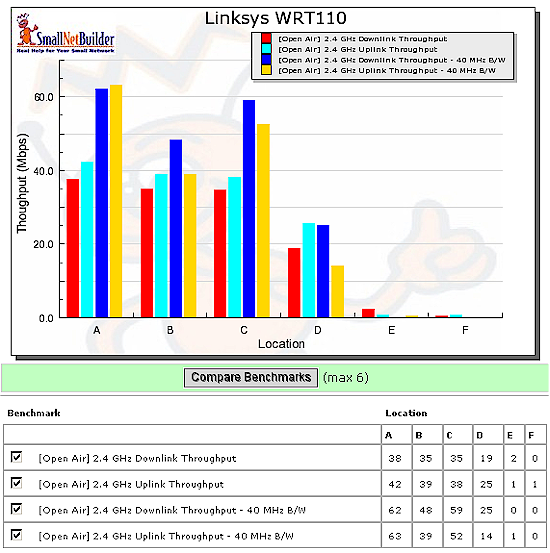
Figure 6: WRT110 wireless performance summary
Figure 7 shows a composite of the actual IxChariot test results running downlink in the Auto 20/40 mode. You can see that the WRT110 and WPC100 actually did work in Location E. But the throughput was so low, the result rounded down to zero.
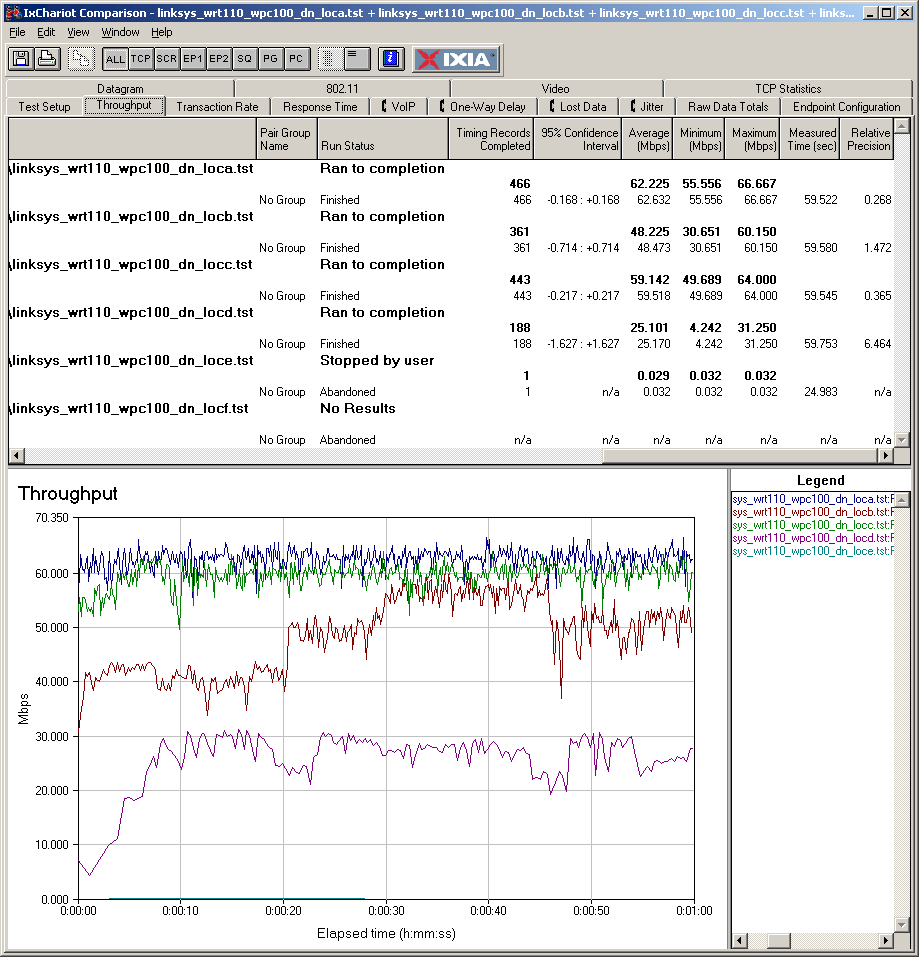
Figure 7: Six location wireless throughput – downlink
Throughput is generally well-behaved with some evidence of rate-shifting in Location B (the rising "stair steps"). I should note that the Windows XP Network Connection status reported a steady 130 Mbps link speed in Auto 20/40 mode and 65 Mbps in 20 MHz mode. But the plots say that the client driver isn’t reporting the actual link rate in use. Uplink behavior was similar, as you can see in this plot.
I also tested for throughput reduction with wireless security set to WEP, WPA/TKIP and WPA2/AES and found a fallback to 54 mode in WEP, with subsequent throughput reduction. Figure 8 shows downlink results; uplink behaved similarly. There is no result for WPA/TKIP because while the WPC100 and WRT110 would associate, the card was unable to complete a DHCP IP lease after multiple attempts.
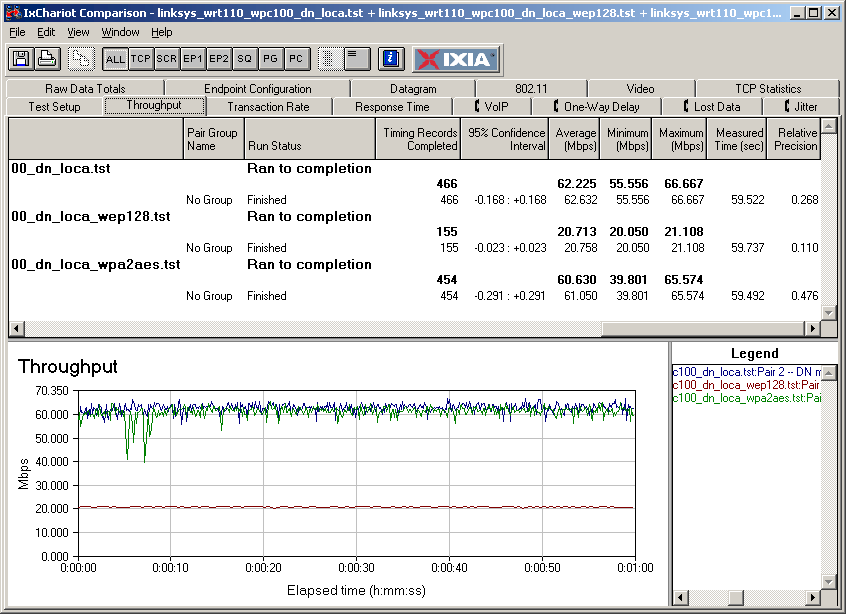
Figure 8: Wireless security mode throughput comparison – Auto 20/40 downlink
Wireless Performance – Mixed Mode
Since Linksys has the 110 in a class by itself, i.e. not "Wireless-G" and not "Wireless-N", I thought I’d see how it handled a mix of "Range Plus" and straight 802.11g clients. Figure 9 shows the 110 set to its default Auto 20/40 mode and running downlink, with the 11g client starting first.
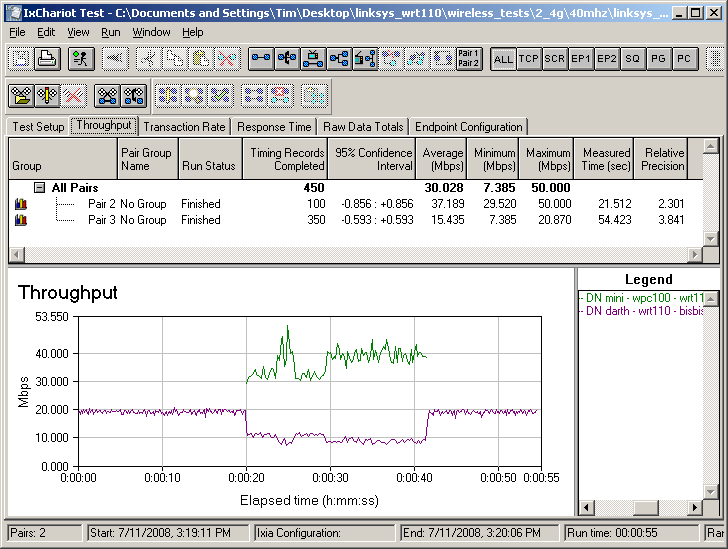
Figure 9: Mixed clients
Resulting performance is very similar to a mix of draft 11n and 11g clients on a draft 11n router. The 11g client’s throughput gets cut in half and the WPC110’s speed is reduced by about 33%. I saw basically the same results running uplink or when starting the WPC110 first.
Neighboring WLAN
I also set up my neighboring WLAN test, on the off chance that the combination of Ralink 1T2R radio in the WRT110 might be friendlier to nearby "legacy" 802.11b/g wireless LANs than draft 11n routers are (actually, aren’t), even though the 110 defaults to Auto 20/40 MHz mode.
I made sure that the 110 was using Channels 1 and 5 (via spectrum analyzer) and set up the 11g "neighbor" WLAN, consisting of a Linksys WRT54G and notebook with an Atheros Super-G client on the extension Channel 5.
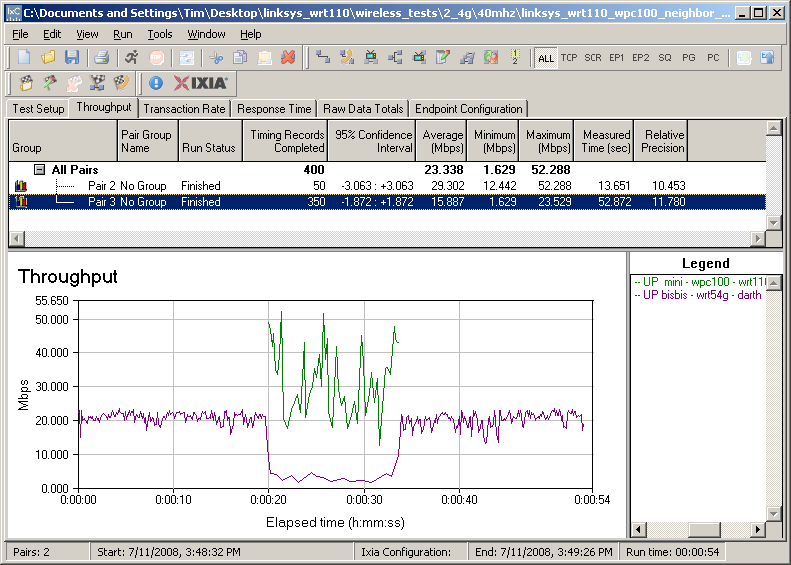
Figure 10: Neighboring WLAN test
Figure 10 shows the results running uplink with the 11g neighbor started first. Throughput is knocked down to around 5 Mbps when the WRT110 / WPC100 pair start running, but recovers back to 20 Mbps once they stop. I monitored the spectrum during the test and saw that the WRT110 / WPC100 pair used a 40 MHz channel while they were on the air.
Closing Thoughts
I suppose Linksys’ marketing folks have to earn their salaries. But I wish that they—and their colleagues at every other consumer networking company—would stop relabeling technology purely for product positioning and competitive differentiation.
Although it’s questionable whether technology using a single transmit stream can qualify as "MIMO", or draft 802.11n for that matter, the WRT110 is really another cut at making an inexpensive draft 802.11n router. And since the "RangePlus" WPC100 card uses the same 3T3R draft 802.11n chipset that I’ve seen in many of the draft 11n routers and cards that have hit the SmallNetBuilder test bench, calling it something other than draft 11n is really getting too creative.
But let’s say that despite its problems with WPA/TKIP and inability to use both 40 MHz bandwidth and a channel of your choice, you are trying to decide between the 110 and Linksys’ other routers. How to choose? I went back through my reviews and pulled together Table 1 of Linksys’ various flavors of single-band wireless routers.
| Product Type | Maximum Throughput (Mbps) |
Model | Price Range | |
|---|---|---|---|---|
| 20 MHz B/W | 40 MHz B/W | |||
| 802.11g | ~ 20 | N/A | WRT54G2 | $45-$70 |
| Range Plus | ~ 40 | ~ 60 | WRT110 | $50-$94 |
| Draft 11n – Two Antenna | ~ 60 | ~ 77 | WRT160N | $68-$102 |
| Draft 11n – Three Antenna | ~ 70 | ~ 94 | WRT350N | $129-$180 |
| Not tested |
Not tested |
WRT310N | $91-$130 | |
Table 1: Linksys Product Line Comparison
Keep in mind that price is constantly changing and that the WRT350N is being replaced by the WRT310N, which is closer to $100. The table shows that from a price and performance viewpoint, the WRT110 does fall between the WRT54G2 (plain 11g) and its entry-level two-antenna draft 11n WRT160N. (Ah, the magic of marketing!)
The chart also shows that for not a lot more money ($5 – $10 if you shop carefully), the RangePlus can double your wireless throughput, if you use what is really a 3T3R draft 11n wireless client. But if you’re going to do that, why not spend $10 more and get a real two-antenna draft 11n router?
It seems to me that the "RangePlus" line—at least the router side—is a false economy. Saving $10 or so compared to a low-end draft 11n router is peanuts compared to what you need to spend to upgrade to the draft 11n clients that you’ll need to get any benefit from the WRT110.
At least the good news is that the WPC100N is a real 3T3R Draft 11n notebook card (essentially, a clone of the D-Link DWA-652, which sells for about $10 more). So if you choose to buy the WPC100, you’ll be buying something that will play nicely with draft 11n gear, and vice versa for draft 11n cards and the WRT110.
In the end, the WRT110 is an odd duck that sure quacks and walks like a low-end draft 11n router.