

Introduction
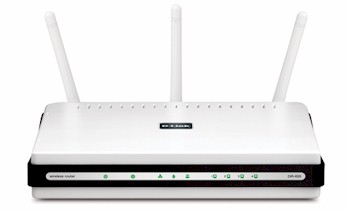
| At a Glance | |
|---|---|
| Product | D-Link Xtreme N Gigabit Router (DIR-655 A4) |
| Summary | Market-leading single-band draft 802.11n router |
| Pros | • Gigabit WAN and LAN with excellent routing speed • Automatic QoS for Internet uplink and WLAN • USB device sharing |
| Cons | • USB device sharing is one Windows client at a time |
Our review of the original DIR-655 is one of our most-viewed wireless router reviews, befitting its status as one of the most successful draft 802.11n routers. Since its original release, D-Link has continued to enhance the product, adding 9K jumbo frame support awhile back for its gigabit Ethernet switch and more recently adding its SharePort USB-sharing feature (see this part of the DIR-825 review for the quick poop on SharePort).
The other thing that D-Link has done is rework the 655’s innards, mainly with an eye for manufacturing cost reduction. The current revision is A4 and the natural question is whether D-Link has sacrificed performance along with reducing cost.
Figure 1 is a shot of the original 655 with its top cover removed. It used a mini-PCI radio and nice metal heatsinks on the Ubicom 5160U SoC and Vitesse VSC7385 Gigabit Ethernet switch. 16 MB of RAM and 4 MB of flash made up the rest of the design.
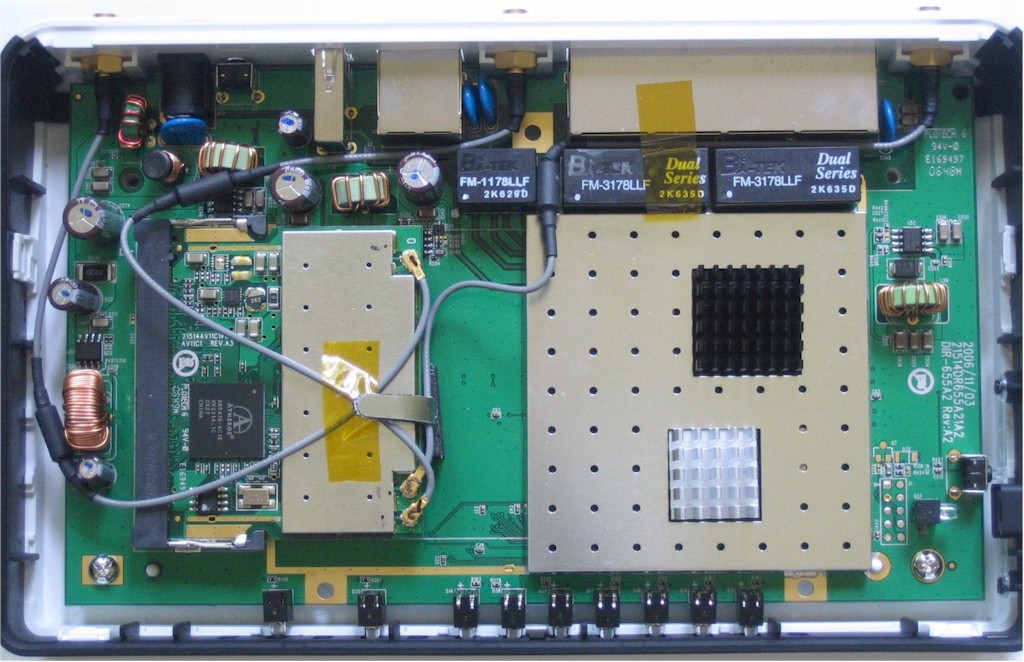
Figure 1: DIR-655 original inside view
The mini-PCI radio module was an Atheros AR5BMB71 reference design using an AR5416 Baseband / MAC and AR2133 3T3R 2.4 GHz radio.
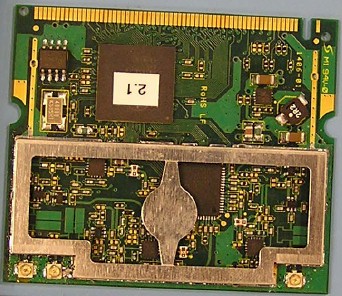
Figure 2: Original mini-PCI radio module
Figure 3 shows the A4 version board. The radio has been integrated into the main board and uses a more recent Atheros chipset consisting of and Atheros AR9160 BB/MAC and AR9103 2.4 GHz 3×3 MIMO radio. I removed the ceramic heatsink pads and confirmed that the Ubicom IP5160U was still used as the router SoC. Lifting the pad on the larger device, however, showed that a Realtek RTL8366SR Gigabit switch was now used instead of the Vitesse device.
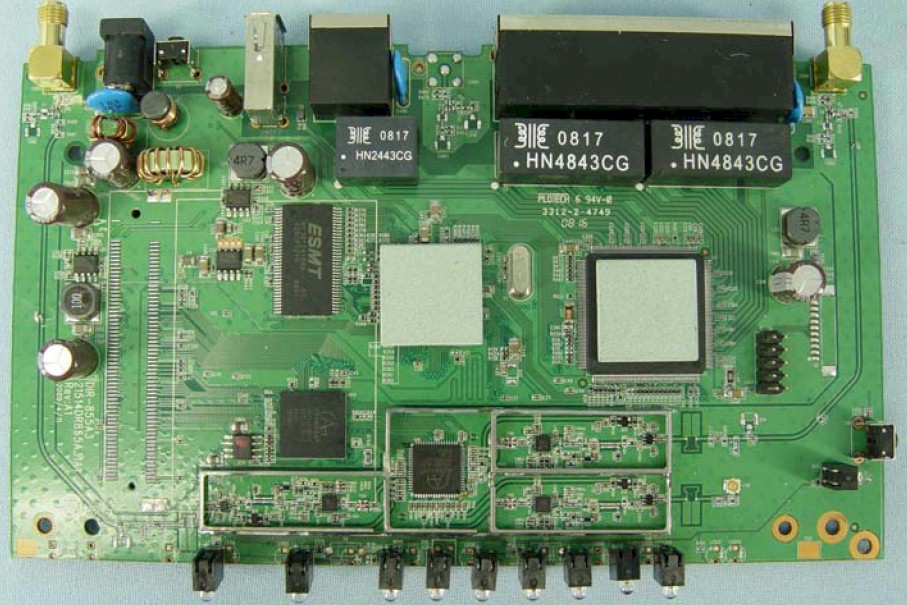
Figure 3: DIR-655 A4 board
I’m not going to review features, since little has changed. You can peruse the admin interface via the online emulator if you like or read the original review.
Routing Performance
Table 1 shows a slight improvement in routing performance, probably due more to the newer firmware than any hardware changes.
| Test Description | A4 Throughput – (Mbps) | Original Throughput – (Mbps) |
|---|---|---|
| WAN – LAN |
257
|
231
|
| LAN – WAN |
272
|
245
|
| Total Simultaneous |
269
|
254
|
| Max. Connections |
22,172
|
200
|
| Firmware Version |
1.21
|
1.04
|
Table 1: Routing throughput
Figure 4 shows what the throughput variation looks like for the WAN to LAN, LAN to WAN and simultaneous routing throughput tests.
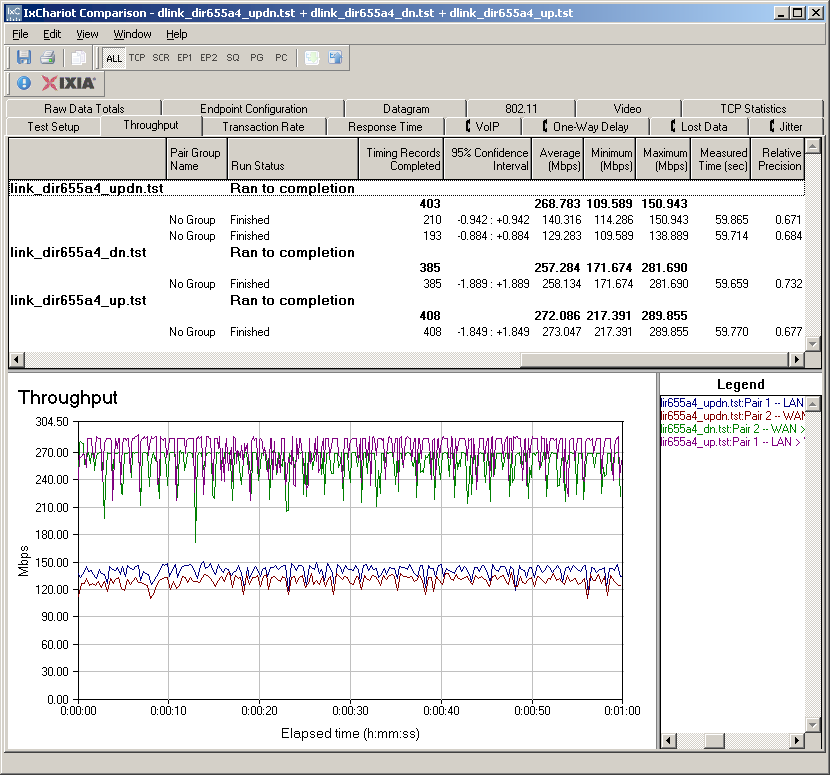
Figure 4: DIR-655 A4 routing throughput
Wireless Performance
Starting with this review, I am now using a standard test client for all wireless LAN testing, instead of using a "manufacturer-recommended" client with each router. I am doing this because:
- Most people go shopping for routers, not clients
- Many people don’t buy "matched" clients to go with their routers, especially since most notebooks come with built-in wireless adapters
- Using different clients introduced another variable into the performance equation
After a search that included the criteria described in A Good Draft 11n Client is Hard To Find, and input from a helpful reader, I settled on the Intel Wi-Fi Link 5300 AGN mini-PCIe card as the new SNB standard wireless test client. Unlike Intel’s 4965AGN mini PCIe draft 802.11n adapter, the 5300 allows 40 MHz channel operation in 2.4 GHz (although it is disabled by default). It also meets the other selection criteria including dual-band and WPS support.
It turns out that it also has a feature that wasn’t on my original selection list: three stream operation. So when the 450 Mbps routers introduced by D-Link and TRENDnet at this year’s CES ship later this year, I’ll be ready for them.
The router had 1.21 firmware and I left all factory default settings in place, except for setting Channel 1. On the Intel client side, I left all defaults in place except for enabling throughput enhancement (packet bursting). This article describes the entire wireless test setup.
Figure 5 shows the summary of up and downlink tests in all six test locations and with the default 20 MHz and "Auto" (40 MHz) channel bandwidth modes.
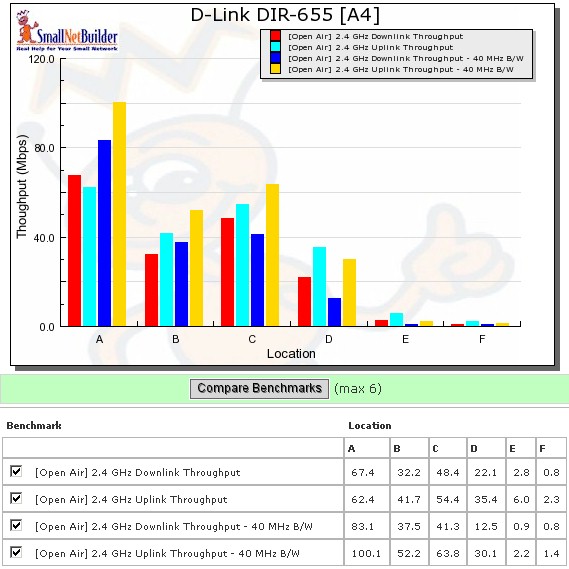
Figure 5: Six location wireless throughput summary
The good news is that the 655 reached all six locations, including my notoriously-difficult locations E and F. But the Intel client could have played an important part in this performance, which is one of the reasons that I have switched to a standard test client. Throughput in those locations, however, tended toward the barely-usable, measuring just under 3 Mbps best-case.
The highest throughput was 100 Mbps, measured running uplink with a 40 MHz channel bandwidth. This is a significant boost from the 62 Mbps running uplink with a 20 MHz channel. Best case downlink was 83 Mbps, again with a 40 MHz channel.
Figure 6 shows the summary plot of IxChariot tests for downlink tests with a 20 MHz channel width. We once again see the high throughput variation that seems to be baked into the draft 802.11n cake.
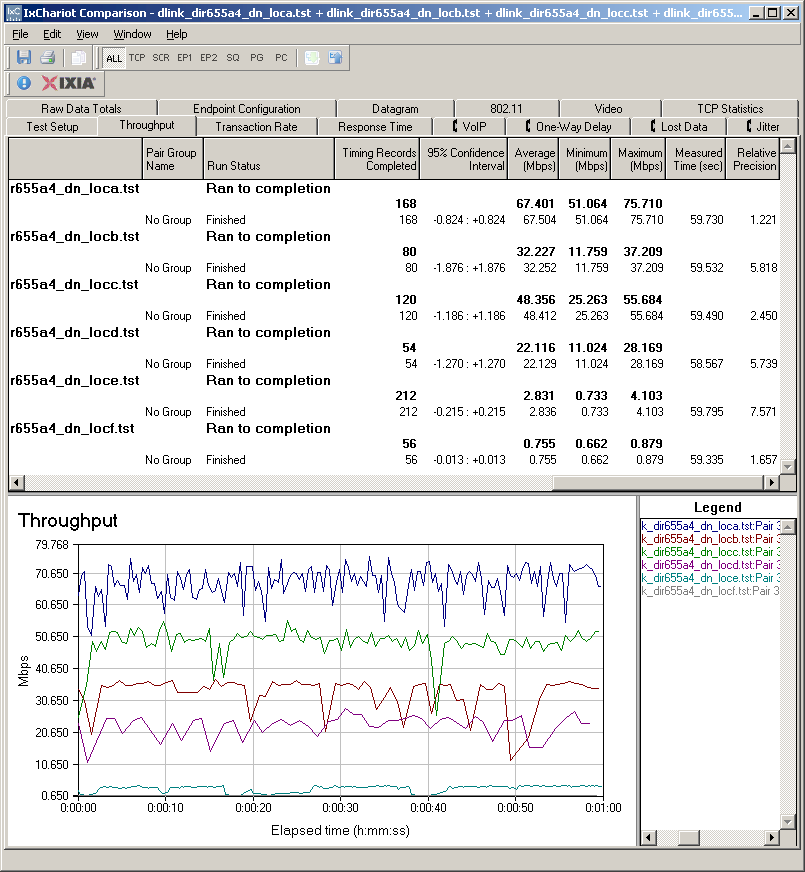
Figure 6: Wireless throughput summary – downlink, 20 MHz channel
Figure 7 shows the uplink summary for 20 MHz channel width, where variation seems a bit lower.
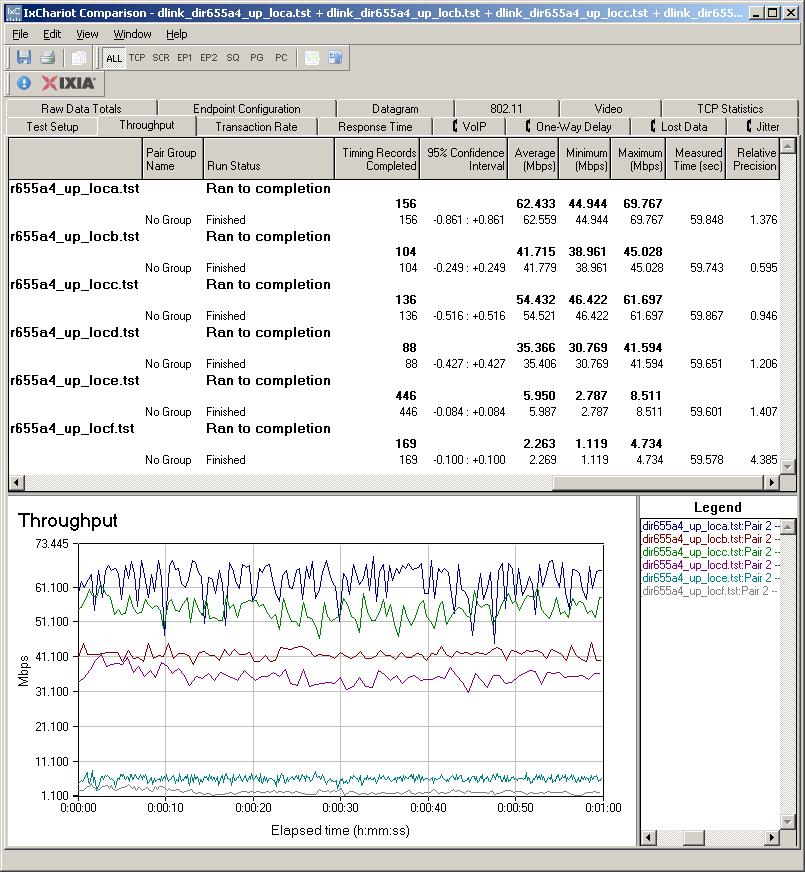
Figure 7: Wireless throughput summary – uplink, 20 MHz channel
Click these links for 40 MHz channel downlink and uplink plots.
There was a bit of a surprise checking the wireless security mode throughput, with slightly over 30% reduction running downlink with WPA2/AES (Figure 8).
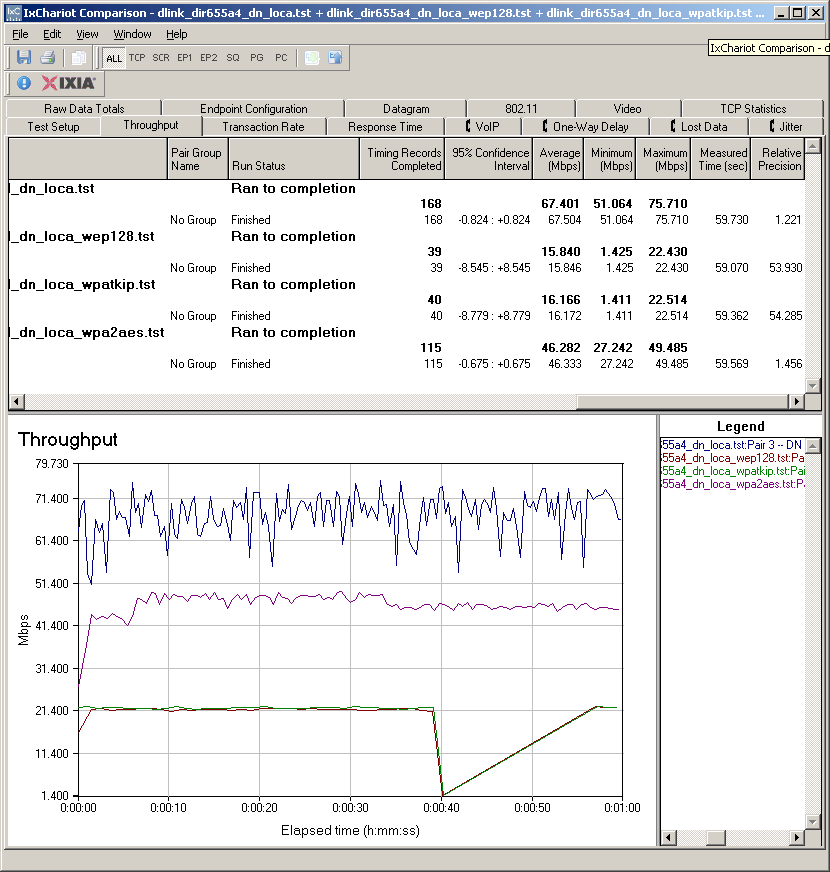
Figure 8: Wireless security throughput – downlink, 20 MHz channel
The uplink test (Figure 9), however, showed no loss when using WPA2/AES. Both directions show the usual drop to 802.11g speeds when using either WEP or WPA/TKIP security.
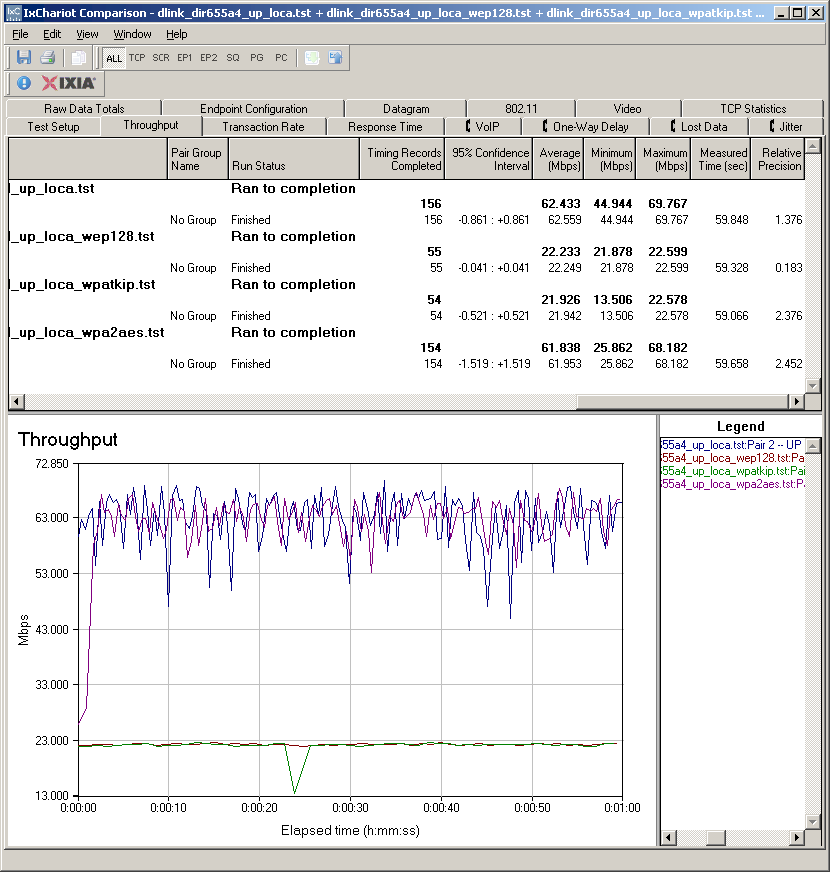
Figure 9: Wireless security throughput – uplink, 20 MHz channel
I’m still building up my database of wireless performance using the six location open air tests. And I don’t have open air results for the original DIR-655. So I picked the D-Link dual-band DIR-825 and Belkin N+ to run a Wireless Chart comparison.
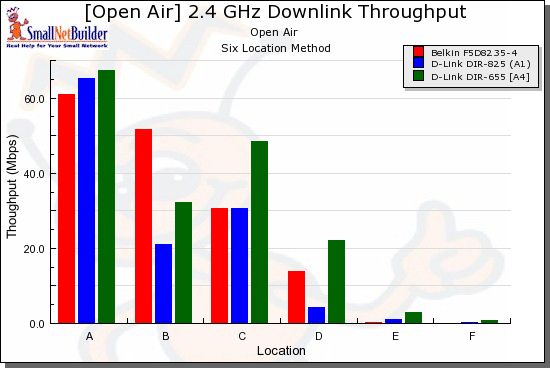
Figure 10: Wireless comparison – downlink, 20 MHz channel
Once again, none of the products is the consistent winner in each test location. Although the combination of DIR-655 A4 and the Intel 5300 client was the only one to go the distance, literally, in all six locations, up and downlink. You’ll find similar results for the 40 MHz channel bandwidth tests. Just hit the Wireless Charts and see for yourself.
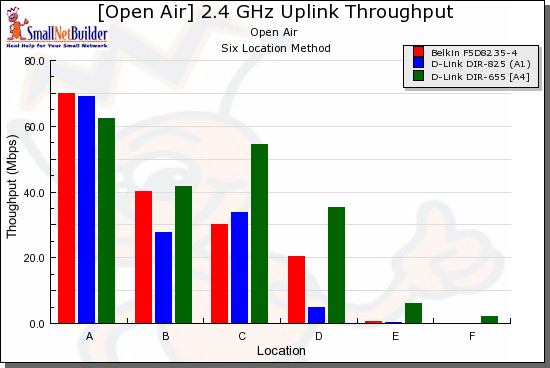
Figure 11: Wireless comparison – uplink, 20 MHz channel
Closing Thoughts
The upshot of all this is that the DIR-655 A4 looks like it hasn’t sacrificed performance with its cost-reduced design that enables a street price of around $100 and D-Link to presumably still make money. Its good wireless performance, stable operation, gigabit switch, high routing throughput and automatic uplink QoS continue to make it the go-to draft 802.11n router.