

| At a glance | |
|---|---|
| Product | NETGEAR CENTRIA (WNDR4700) [Website] |
| Summary | Storage-centric Atheros-based “N900″ abgn router with user-installable 3.5” internal drive, dual USB 3.0 ports and SD card slot. |
| Pros | • Supports WDS and AP modes • Dual USB 3.0 ports • SD card slot • User-installable SATA drive |
| Cons | • Uneven wireless performance • No network activity indicators • Much slower storage writes than reads • Native internal drive format slower than NTFS |
Typical Price: $135 Buy From Amazon
Overview
Updated 10/4/2012 – Added fan noise comment and links to final review
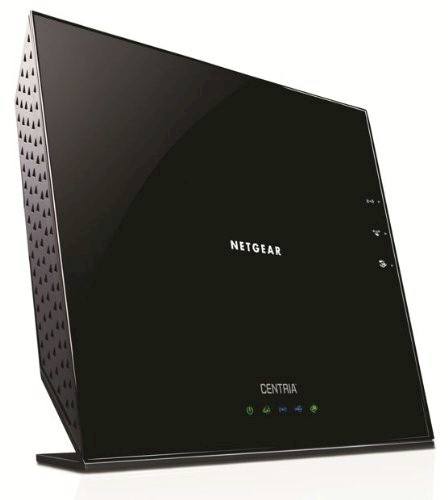
NETGEAR introduced the WNDR4700 Media Storage Router at CES back in January. Apparently, the marketing gurus thought it needed a sexier name before being sent out into the world to do marketshare battle. So it’s now simply known as NETGEAR CENTRIA. (The NETGEAR marketing folks like their ALL CAPS, too, it seems.)
Since there has been a lot of interest in this product, I’m breaking the review into two parts. This First Look provides an overview of the product and internal details. It also covers wired routing and storage performance test results. The second article covers wireless performance and adds in some stress testing, for good measure.
The CENTRIA is a simultaneous dual-band three-stream N router, which is more commonly marketed as an "N900". This is because it can support client link rates up to 450 Mbps on both radios simultaneously if the radios are set to Auto 20/40 mode (NETGEAR calls this Up to 450 Mbps mode) and there are no competing networks in range on the 2.4 GHz band.
CENTRIA comes in two flavors—the WNDR4700 without an internal drive installed and the WNDR4720 with a 2 TB drive installed. The FCC ID internal photos show both WD Green (WD20EARX) and Seagate Barracuda (ST2000DM001) drives, which I’m guessing are what NETGEAR uses in the diskful CENTRIA version.
CENTRIA’s physical design shares a lot with NETGEAR’s R6300 draft 11ac router, measuring around 10 inches wide and a bit over 8 inches tall. The CENTRIA is a bit deeper than the R6300 (3.3" vs. 3.0"), however, to leave space for the full-sized 3.5" SATA drive it can store internally.
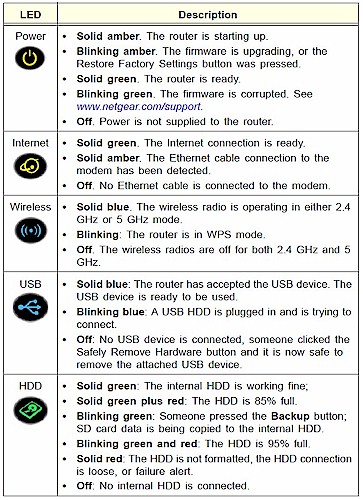
There are only Power, Internet, Wireless and USB and HDD status indicators on the front panel and no link or activity indicators for wired network traffic on either the front panel or rear panel switch ports. This move to no network activity indicators may increase the CENTRIA’s WAF, but it is no help when it comes time to debug network problems.
CENTRIA rear view of ports and buttons
All ports are 10/100/1000 Mbps and there are two USB 3.0 ports–one on the rear and the other on the right side. And if you still don’t have enough storage options, NETGEAR has also included an SD card slot. This should prove handy for quick digicam backups and moving media files to Android tablets and phones.
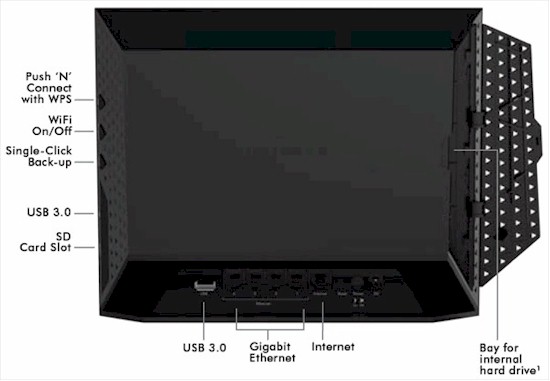
CENTRIA rear view of ports and buttons
Also like the R6300, CENTRIA is intended to sit on a table on its non-removable base with all Ethernet jacks on the bottom edge so that there is no danger of the router being pulled over by cable weight. The recessed area is still fairly narrow and fat-fingered folks may wrestle a bit with cable insertion and extraction.
As there was when the R6300 first shipped, there is no user manual for the CENTRIA as I write this. There is an install guide, however, which should tide you over until NETGEAR posts the UM.
NETGEAR is sticking with the "Genie" admin GUI first seen last fall on the WNDR3800. The screenshot below shows the Advanced Home page that, with the addition of Guest Network Status boxes, has sprouted scroll bars. I really wish NETGEAR would stop doing this and let us scroll the browser window to get to stuff that doesn’t fit on a broswer page.
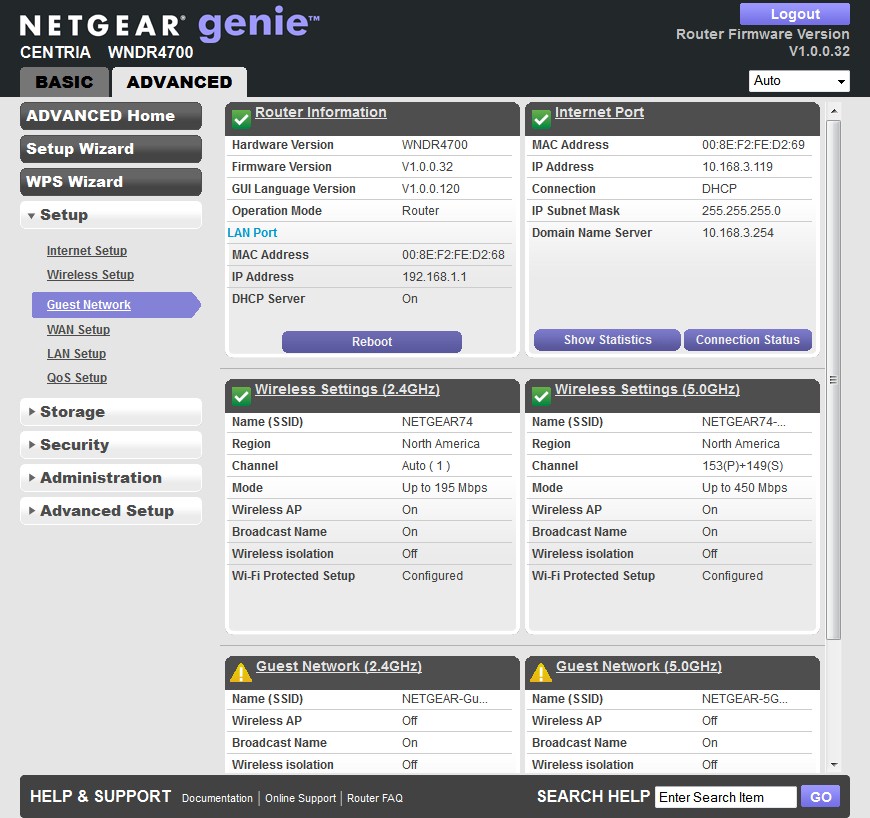
Advanced Home
The screenshot shows the defaults that the router came up with, except that I let it upgrade from the V1.0.0.28 initial release factory firmware to the V1.0.0.32 shown. I was alerted to.32 by the CENTRIA’s automatic update feature; the CENTRIA support page is still showing only V1.0.0.28.
I’m not going to review the CENTRIA’s routing features, since they are standard NETGEAR Genie. If you need a walkthrough on the Genie feature set, Craig’s feature review of the WNDR3800 should give you what you need.
Inside
The confidentiality hold on the CENTRIA’s FCC internal photos has expired, so I didn’t have to open the review unit obtained from Amazon. Table 1 shows that aside from the processor, the WNDR4700 has a lot in common with two other recently-issued "N900" routers, WD’s My Net N900 and D-Link’s DIR-857.
| NETGEAR CENTRIA | WD My Net N900 | DIR-857 | |
|---|---|---|---|
| CPU | Applied Micro APM82181-SKE10001 | Ubicom IP8260U | Ubicom IP8000AU |
| Switch | Atheros AR8327N | Atheros AR8327N (x2) | Atheros AR8327N |
| RAM | 256 MB | 256 MB | 512 MB |
| Flash | 128 MB | 16 MB | 16 MB |
| 2.4 GHz Radio | – Atheros AR9380 dual-band 3-stream 11n SoC – Unidentified manf. power amp (x3) |
– Atheros AR9381 single-band 3-stream 11n SoC – 6976691A205 (manufacturer unknown) 2.4 GHz power amps (x3) |
– Atheros AR9380 dual-band 3-stream 11n SoC – Unidentified manf. power amp (x3) |
| 5 GHz radio | – Atheros AR9380 dual-band 3-stream 11n SoC (guess) – Unidentified manf. power amp (x3) |
– Atheros AR9380 dual-band 3-stream 11n SoC – Skyworks/SiGe SE2595L Dual Band 802.11n Wireless LAN Front End (x3) |
– Atheros AR9380 dual-band 3-stream 11n SoC – Unidentified manf. power amp (x3) |
Table 1: NETGEAR CENTRIA component summary and comparison
This is the first sighting I’ve had of an Applied Micro processor in a router. I have seen the APM82181 once before, however, in the WD My Book Live.
The photo below shows the view with the back removed from the router. The 2.4 GHz radio and antennas are on the left and the 5 GHz on the right.
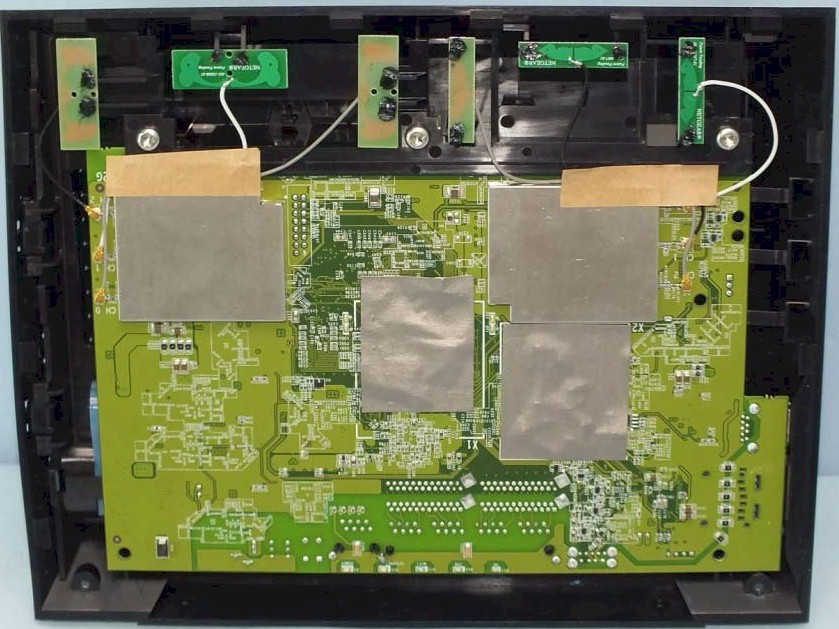
CENTRIA Internal view
Removing the board reveals the mini-blower that quietly keeps things cool. The criss-crossed area is where the hard drive fits.
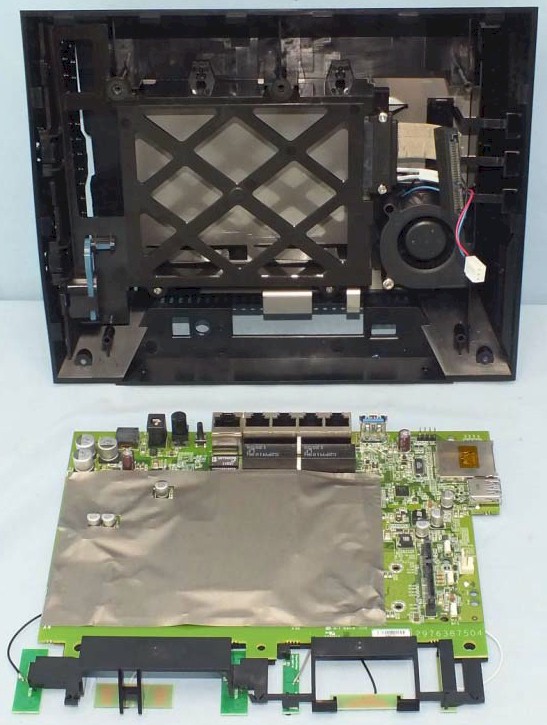
CENTRIA Internal view – board removed
With the shields removed, the components come into view. The FCC internal photos has nice close-ups of most of the components, except for the 5 GHz radio. So I’m guesssing that it’s an Atheros AR9380, since the AR9381 is 2.4 GHz only.
One thing I failed to point out in previous reviews is that the "N" on the AR8327N switch means it supports line rate NAT (Network Address Translation). So that’s the "hardware NAT" I keep seeing references to! Unlike on some other products, there is no control to turn hardware NAT on and off.
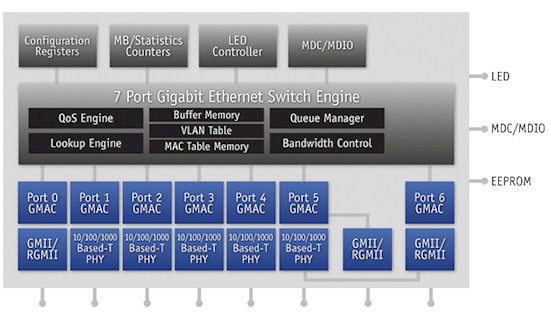
QCA AR8327N switch block diagram
Something that might matter to some prospective purchasers is the CENTRIA’s power consumption. I measured 16W while running the performance tests and 14W while idle using a relatively power-efficient WD Red drive. It would have been nice if NETGEAR had provided an idle drive spindown setting to save power, but there is none.
Updated 10/4/2012
T/he only time I heard the blower you saw in the photos above, even during storage testing, was when it spun up during initial boot.
I’ve noticed that the router’s blower has gotten more noticeable over the week that the Centria has been powered on. I can now clearly hear it in my quiet home office, over the sound of the other quiet fans in my home office. (Note that the Centria is sitting on a desk and my desktop machine is on a low equipment rack about four inches off the floor.) And this is without a hard drive installed.
This noise probably won’t bother you if the router is sitting in a family room or den. But if it’s in a bedroom, it could be annoying.
Routing Performance
Routing performance for the WNDR4700 using our standard test method and freshly-updated V1.0.0.32 firmware is summarized in Table 2 along with its draft 11ac predecessor, the R6300. You would think the Applied Micro CPU had enough oomph to beat the Broadcom BCM4706 in the R6300. But I suspect the APM processor has a greater portion of its CPU cycles dedicated to beefing up storage performance.
One thing Torrent and gaming fans will be happy to see is that NETGEAR finally has produced a router that handles more than 4K simultaneous connections. The error message thrown when the test program hit the 29,173 connection point indicated that the program collided with a Win 7 in-use port instead of detecting that the router wouldn’t open another connection. So this means that the CENTRIA can handle even more than the test result shown. But isn’t 29,000+ enough anyway?
| Test Description | WNDR4700 | R6300 |
|---|---|---|
| WAN – LAN | 547 Mbps | 783 Mbps |
| LAN – WAN | 499 Mbps | 829 Mbps |
| Total Simultaneous | 572 Mbps | 808 Mbps |
| Maximum Simultaneous Connections | 29173 | 4096 |
| Firmware Version | V1.0.0.32 | V1.0.0.68_1.0.16 |
Table 2: Routing throughput
The IxChariot plot for the routing tests shows very stable throughput that was evenly matched in the simultaneous up/down test. I don’t have an explanation for the glitch in the uplink run, which kept appearing when I re-tried the test a few times.
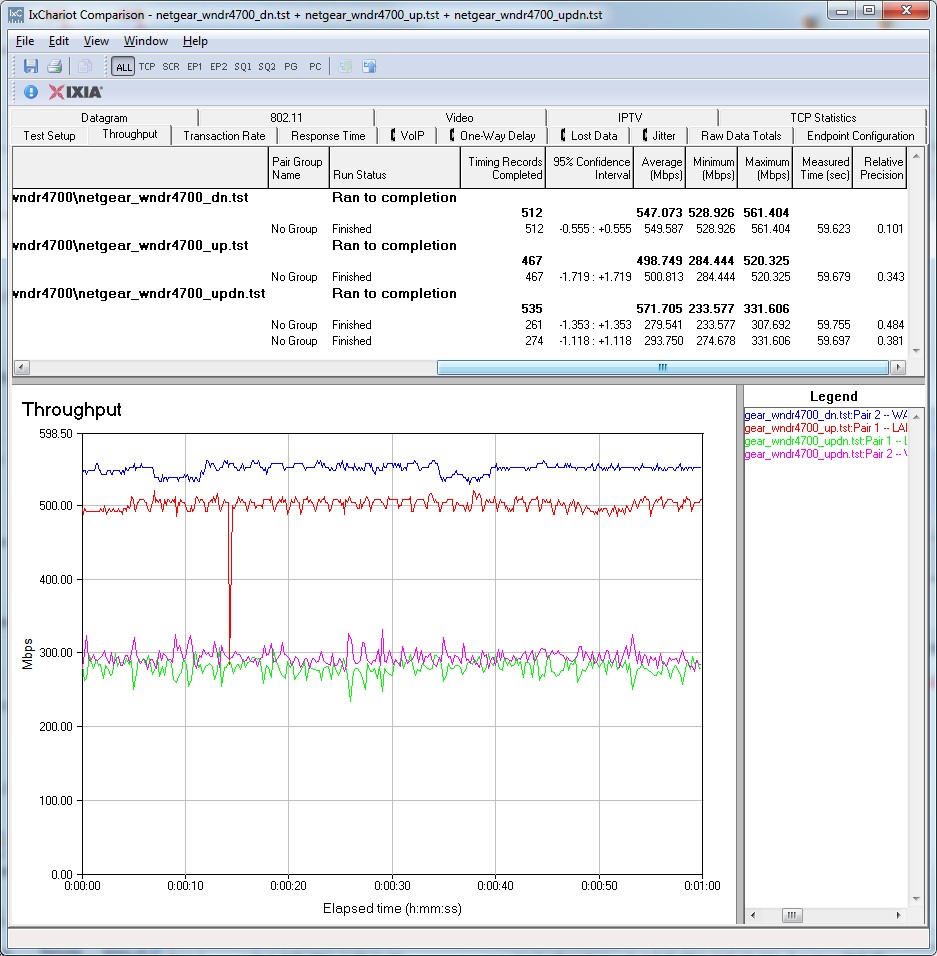
CENTRIA Routing throughput IxChariot plot summary
Storage Performance
Since storage is key to the CENTRIA’s pitch, I prioritized running storage tests over wireless. NETGEAR doesn’t have an approved drive list in its CENTRIA FAQ, so I inserted a 3 TB WD Red drive (WD30EFRX). I had the router format the drive, which it does using EXT4 according to the FAQ. If I had inserted a pre-formatted drive, it could have been formatted NTFS, FAT16, FAT32, EXT2, EXT3, Ext4, HFS+, and HFS+ Journal.
I noticed that the Advanced Storage settings showed only 2 TB of the drive’s 3 TB was available (screenshot below). This drive had previously been used for our Thecus N5550 review, so had been formatted EXT4 in a RAID 5 array. The CENTRIA FAQ mention that its formatter supports only one partition, so maybe that’s what was going on.
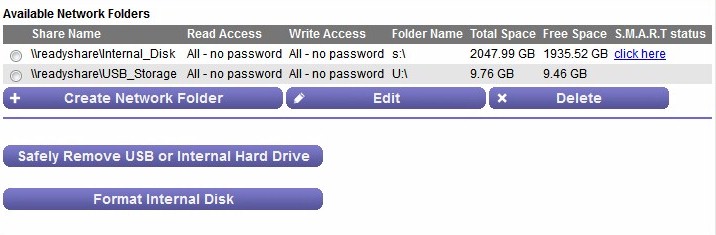
Initial 3 TB drive format results
So I attached the drive to a Win 7 system and tried formatting it there. Initially, the Windows Disk Management utility would create only a 2 TB partition. But after some research, I used the Convert to GPT disk option that let Win 7 format the entire drive in NTFS. When I reinserted that drive into the CENTRIA and then ran the internal formatter, I got the result shown below. The screenshot also shows the USB drive I had attached for testing.
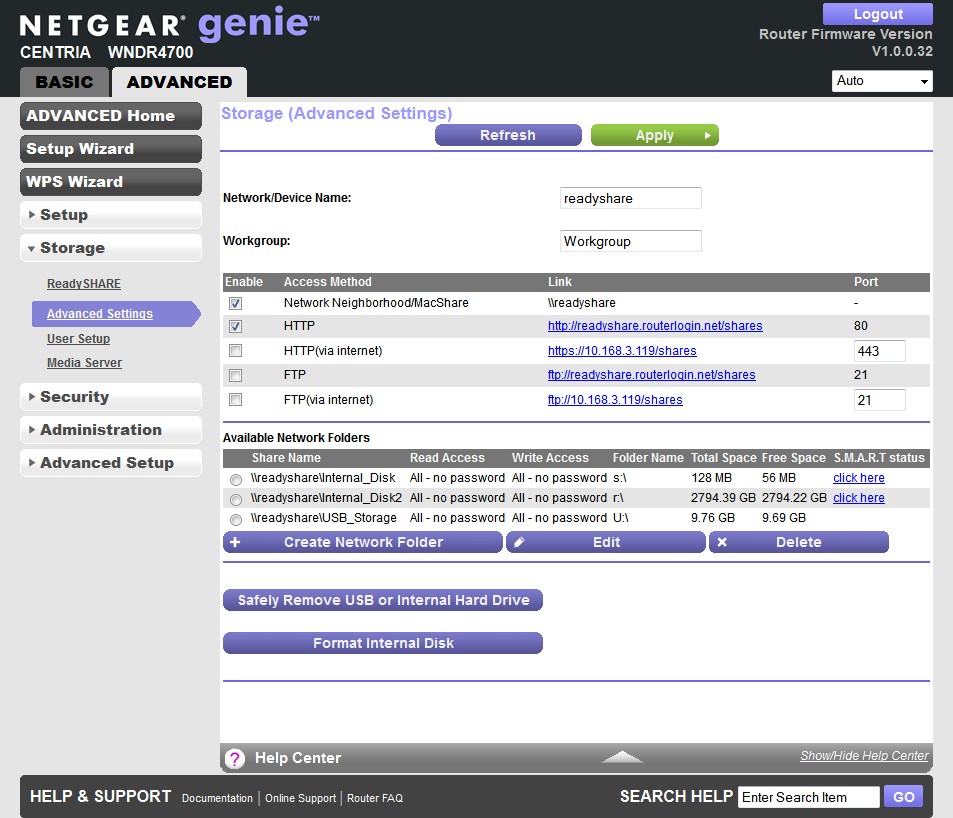
Advanced Storage Settings
Given the internal drive and (relatively) beefy CPU, I decided to run the full NAS test suite on the CENTRIA. Note that this was done with no wireless traffic running and only occasional web browsing and email downloading while the test was running.
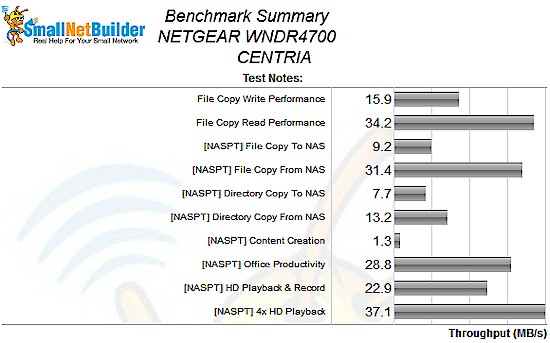
NETGEAR CENTRIA NAS Benchmark summary
The most notable result in the benchmark summary above is the difference between read and write performance. This pattern was consistent with both the Windows File Copy and Intel NASPT File Copy methods, but the actual values measured were different. With Windows Filecopy, the 16 MB/s write speed was about half the 34 MB/s read. But the difference with NASPT was much greater yielding 9 MB/s write vs. 31 MB/s read.
Filtering the NAS Charts to show single-drive products only, ranked the CENTRIA third from bottom. The good news is that is outperformed a couple of actual NASes!
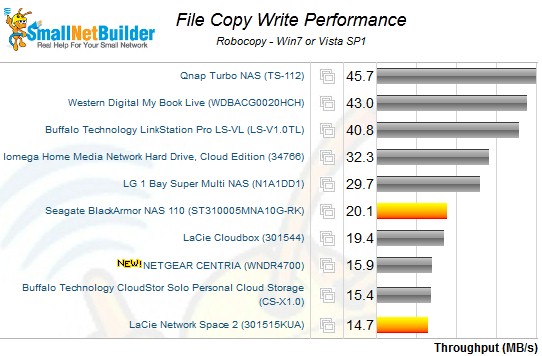
File copy write – single drive products
The CENTRIA lands in the same spot for read, but with slightly different ranking.
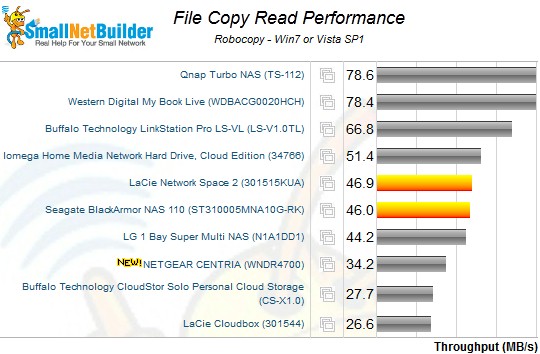
File copy read – single drive products
Since some users will want to load up on storage, I also tested performance using our new standard USB 3.0 and eSATA test drive, a Startech USB 3.0 eSATA to SATA Hard Drive Docking Station (SATDOCKU3SEF) containing a WD Velociraptor WD3000HLFS 300 GB drive.
This time, I ran Windows File Copy test only with the drive formatted both in FAT32 and NTFS, with very surprising results!
| Format | NETGEAR CENTRIA |
WD MyNet N900 |
Linksys E4200V2 / EA4500 |
D-Link DIR-857 (USB 3.0) |
|---|---|---|---|---|
| FAT32 Write (MBytes/s) | 17.4 | 12.9 | 9.8 | 13.9 |
| FAT32 Read (MBytes/s) | 32.9 | 21.72 | 21.6 | 30.9 |
| NTFS Write (MBytes/s) | 31.6 | 20.78 | 20.1 | 7.7 |
| NTFS Read (MBytes/s) | 61.3 | 21.34 | 22.2 | 16.1 |
Table 3: File copy throughput
Using an NTFS-formatted USB 3.0 connected drive, the CENTRIA did even better than with the internal EXT4-formatted SATA drive! Write speed still tended to be about half of read, but I measured a best case throughput of 61 MB/s for read!
This got me thinking, so I once again pulled the drive from the CENTRIA, formatted it NTFS on my Win 7 system, moved it back to the CENTRIA and reran the NAS Benchmarks. The results are shown in Table 4 along with the original results with the native EXT4-formatted drive.
| Format | Native format (EXT4) |
NTFS |
|---|---|---|
| File Copy Write | 15.9 | 33.4 |
| File Copy Read | 34.2 | 68.4 |
| [NASPT] File Copy Write | 9.2 | 32.1 |
| [NASPT] File Copy Read | 31.4 | 70.5 |
| [NASPT] Directory Copy To | 7.7 | 8.7 |
| [NASPT] Directory Copy From | 13.2 | 18.7 |
| [NASPT] Content Creation | 1.3 | 3.6 |
| [NASPT] Office Productivity | 28.8 | 36.7 |
| [NASPT] HD Playback & Record | 22.9 | 43.8 |
| [NASPT] 4X HD Playback | 37.1 | 67.6 |
Table 4: NAS Benchmarks – EXT4 vs. NTFS format (MB/s)
If you compare these new results to the single-drive NAS rankings shown above, the CENTRIA now outranks even more older NASes and even the relatively-new Iomega Home Media Network Hard Drive, Cloud Edition. Based on these results, NETGEAR should rethink its decision to format the internal drive EXT4!
Closing Thoughts
There will be those who will be disappointed that the CENTRIA doesn’t appear at the top of the router throughput charts. But with 500+ Mbps of up and downlink performance there aren’t that many connections that would disqualify it. And its ability to handle more than 4K simultaneous sessions will remove that black mark from download and gaming fans’ checklists.
The CENTRIA’s pitch is to be "the center of your digital home" by providing file storage, media serving and "high-performance" wireless routing. If you format your drives NTFS, the CENTRIA looks like it’s a decent alternative to buying a low-end single-drive NAS and it certainly has enough routing horsepower to handle most Internet connections. Come back for Part 2, where we’ll see if the CENTRIA can hit a trifecta by providing competitive wireless performance.