

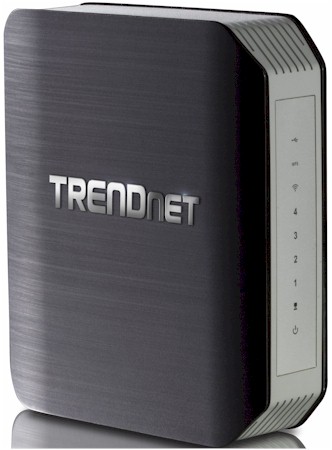
| At a glance | |
|---|---|
| Product | TRENDnet AC1750 Dual Band Wireless Router (TEW-812DRUv2) [Website] |
| Summary | Updated model with 2nd generation Broadcom based AC1750 router with single USB 3.0 port and redesigned admin GUI |
| Pros | • USB 3.0 port • Nicer looking admin GUI than V1 |
| Cons | • USB 3.0 port doesn’t really help • Not much difference in performance vs. V1 |
Typical Price: $45 Buy From Amazon
Overview
My review of TRENDnet’s belated first attempt at its TEW-812DRU flagship AC router concluded there were just too many negatives to recommend it. Perhaps they agreed, since they now have a second version that they asked us to take for a spin. Unfortunately, the new version is not much of an improvement over the old.
On the surface, the V2 looks almost identical to the first version. The only difference is a vertical USB 3.0 port in the same spot as the horizontal USB 2.0 port on the V1.
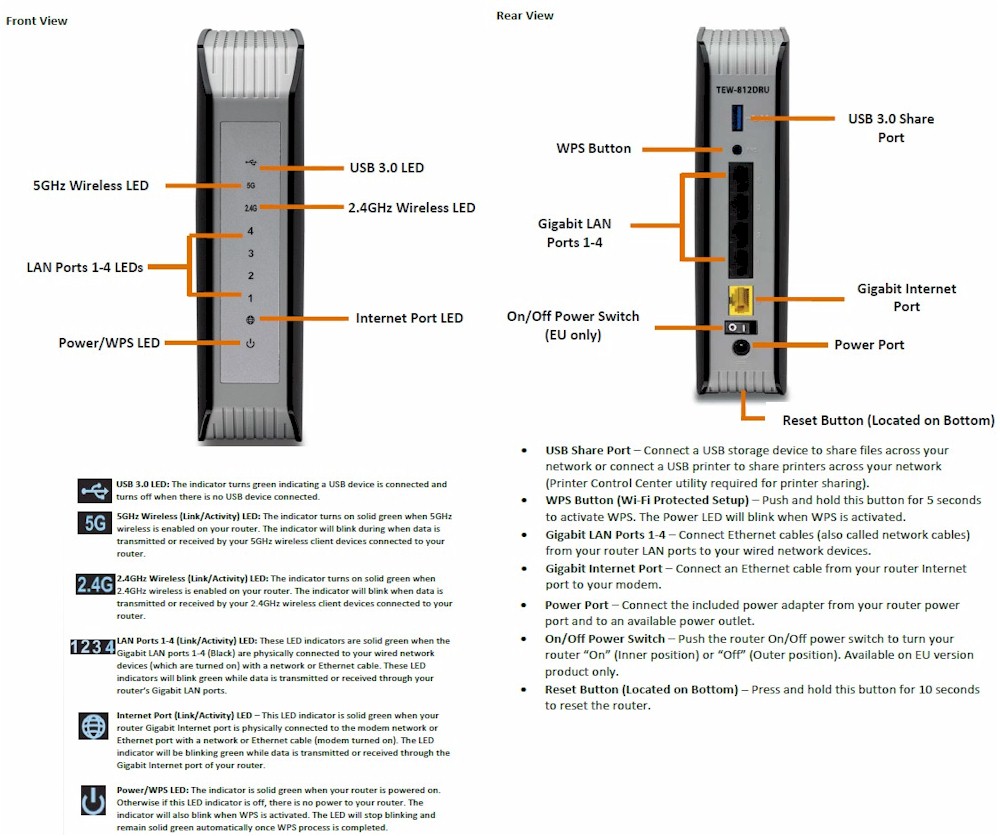
TRENDnet TEW-812DRUV2 front and rear panel callouts
Inside
For the V2, TRENDnet stuck with Broadcom and moved up to its second-generation BCM4708A0 communications processor SoC.
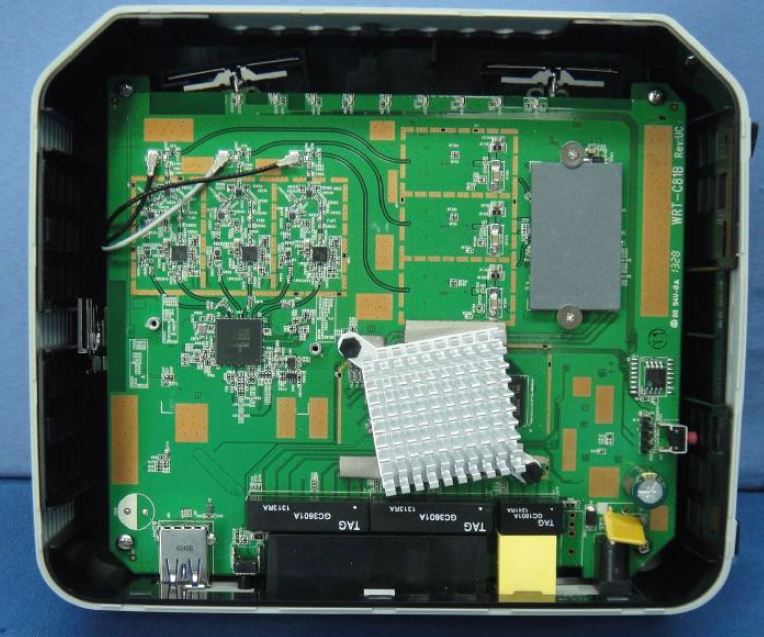
TRENDnet TEW-812DRUV2 inside
Comparing the V2 inside photo to the V1’s below, you can see a good deal of simplification, which should yield lower manufacturing cost. This time, TRENDnet has both the 2.4 and 5 GHz radios integrated directly into the main board. A change from six single-band antennas to three dual-band antennas is also worth noting.
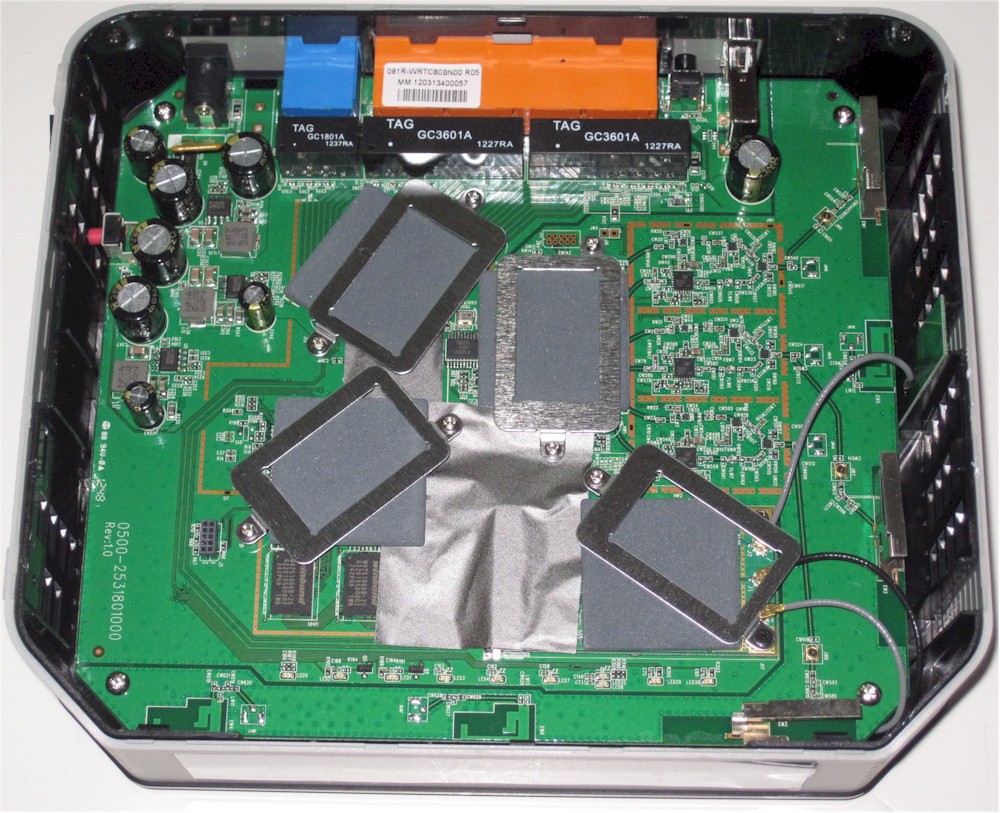
TRENDnet TEW-812DRU inside
Table 1 shows the key components for both V2 and V1. Note the reduction in both RAM and flash for V2.
| TRENDnet TEW-812DRUV2 | TRENDnet TEW-812DRUV1 | |
|---|---|---|
| CPU | Broadcom BCM4708A0 | Broadcom BCM4706 |
| Switch | In BCM4708A0 | Broadcom BCM53125 |
| RAM | 64 MB | 128 MB |
| Flash | 8 MB | 128 MB |
| 2.4 GHz Radio | – BCM4331 – SiGe 2605L 2.4 GHz Power Amp (x3) |
– BCM4331 – SiGE SE2594L Dual Band 802.11a/b/g/n Wireless LAN Front End (x3) |
| 5 GHz radio | – Broadcom BCM4360 – Skyworks SE5003L1 5 GHz Power Amp (x3) |
– Broadcom BCM4360 – Skyworks SE5003L 5 GHz, 23dBm Power Amp w/ Power Detector (x3) |
Table 1: Router component summary and comparison
Features
The V2’s feature set is the same as V1’s. But the admin interface has been gussied up a bit and split into Basic and Advanced levels. The Status page you land at upon login shown below is much prettier. You can’t click on anything in the right side, however. All menu selection is done via the left-side menu bar.
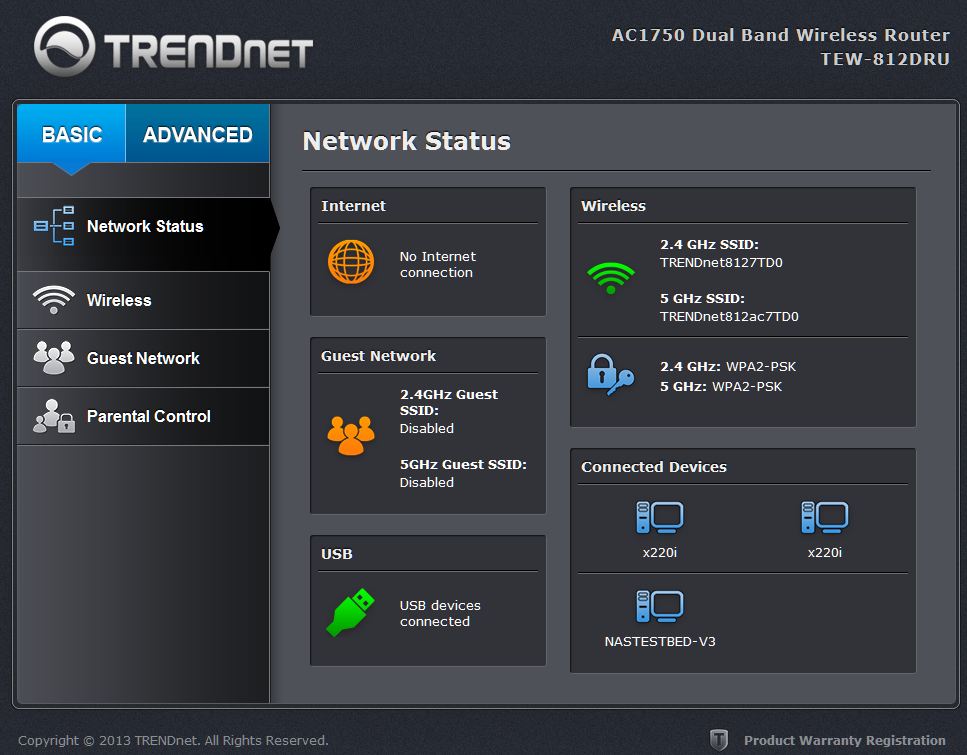
TRENDnet TEW-812DRUV2 Status
The V1 review covers the feature set nicely, so I won’t repeat that here. For more info, use the emulator and download the user manual.
Storage Performance
I ran Windows filecopy tests using the standard NAS testbed to the 812DRUV2 with our USB standard drive (Startech USB 3.0 eSATA to SATA Hard Drive Docking Station (SATDOCKU3SEF) containing a WD Velociraptor WD3000HLFS 300 GB drive) formatted in FAT32 and NTFS.
| TEW-812DRUV2 | TEW-812DRUV1 | D-Link DIR-868L | Buffalo WZR-1750DHP |
|
|---|---|---|---|---|
| FAT32 Write (MBytes/s) | 8.1 | 5.0 | 16 | 21 |
| FAT32 Read (MBytes/s) | 17.2 | 6.4 | 27 | 38 |
| NTFS Write (MBytes/s) | 4.8 | 2.2 | 11.5 | N/A |
| NTFS Read (MBytes/s) | 12.1 | 5.5 | 13.8 | N/A |
Table 2: File copy throughput
Table 2 pulls in the V1 and two other AC1750 class routers with USB 3.0 ports. It shows the V2’s file copy performance has definitely improved for both NTFS and FAT32 formated drives. But, except for NTFS read, it doesn’t really produce the performance that other vendors can coax from the same Broadcom SoC.
Routing Performance
Routing performance for the 812DRUV2 using our standard test method is summarized in Table 3 beside the V1’s numbers. The V2’s results are mixed, with lower unidirectional throughput, but much-improved bidirectional (simultaneous). Maximum simultaneous connection handling has also gotten a nice bump up from the V1’s 8K limit.
| Test Description | TEW-812DRUV2 | TEW-812DRUV1 |
|---|---|---|
| WAN – LAN Throughput – (Mbps) | 563 | 817 |
| LAN – WAN Throughput – (Mbps) | 712 | 851 |
| Total Simultaneous Throughput – (Mbps) | 722 | 467 |
| Maximum Simultaneous Connections | 14,989 | 8,192 |
| Firmware Version |
2.0.2.0, Oct 18, 2013
|
1.0.8.0
|
Table 4: Routing throughput
The IxChariot composite plot for the unidirectional tests shows steady throughput for the most part, with upward jumps in the uplink plot and periodic significant dips for downlink.
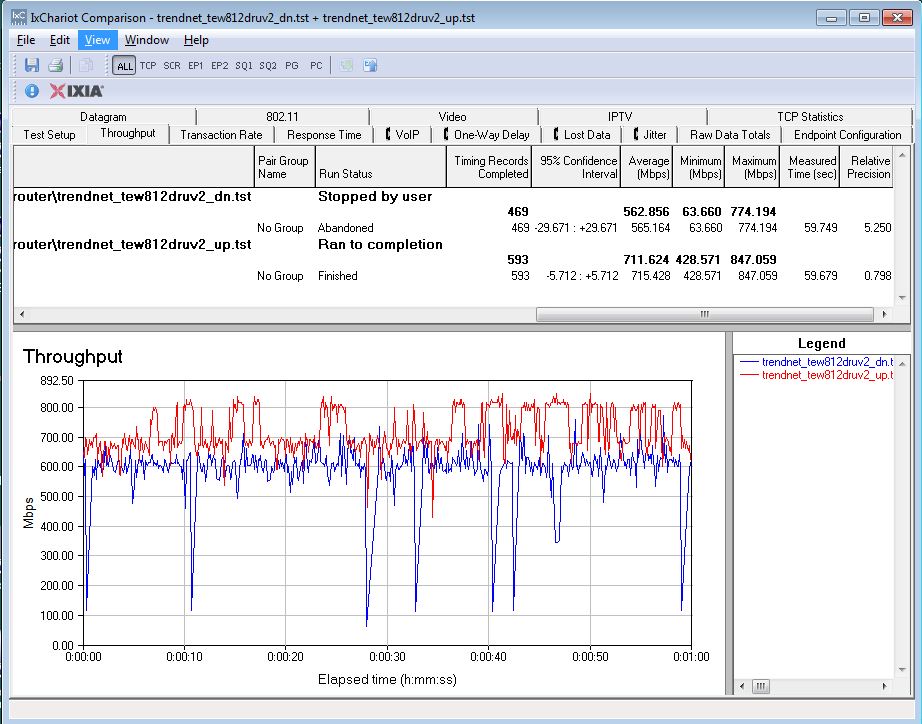
TRENDnet TEW-812DRUV2 unidirectional routing throughput
The simultaneous up and downlink plot below shows a definite preference for uplink traffic when heavily loaded.
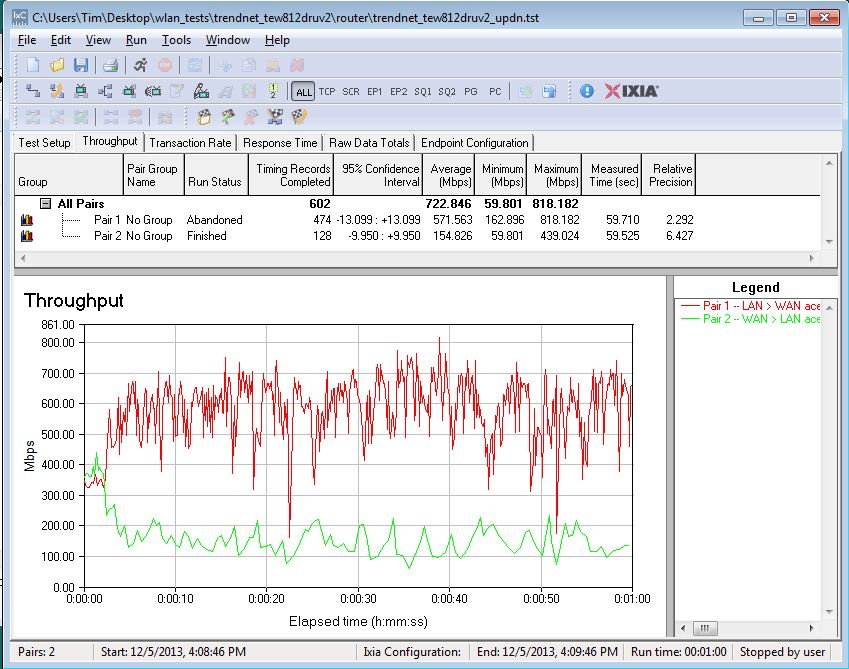
TRENDnet TEW-812DRUV2 bidirectional routing throughput
Wireless Performance
Like the V1, the 812DRUV2 is not Wi-Fi Certified. It defaulted Auto channel and 20 MHz B/W mode on 2.4 GHz and 80 MHz mode on 5 GHz upon power-up. The router comes with different 2.4 and 5 GHz SSIDs set, so you’ll be able to connect to your desired band without having to change router settings.
I had better luck running the 40 MHz Coexistence and Fat channel intolerant tests, than I had with the V1, but neither passed. In both cases, the router continued to operate in 40 MHz mode.
The WPS test failed to prompt to initiate either a WPS PIN or pushbutton WPS session when I selected either of the SSIDs with a Win 7 notebook.
For throughput testing, all tests were run using our standard wireless test process with 2.0.2.0, Oct 18, 2013 version firmware loaded. The router was first reset to factory defaults, then Channel 6 and 20 MHz B/W mode was set for 2.4 GHz and Channel 153 and 80 MHz B/W mode was set for 5 GHz. The router was positioned 8″ from the chamber antennas in all test positions. The 0° position had the front side of the router facing the chamber antennas.
The Benchmark Summary below shows the average of throughput measurements made in all test locations. If you filter the 2.4 GHz downlink chart for AC1750 routers, you’ll find both the V1 and V2 near the bottom of the chart. You’ll also find the same for 2.4 GHz uplink. In fact, the only time the V2 moves up significantly from the cellar is for 5 GHz uplink, where it rises to fifth position from the bottom.
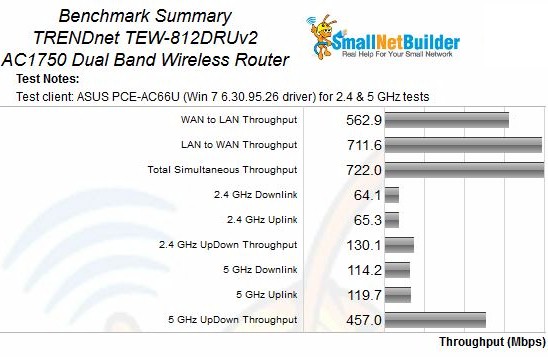
Benchmark Summary
Wireless Performance – Comparative
I kept the wireless performance profile comparison simple, choosing just the original TEW-812DRU and the top-ranked ASUS RT-AC66U.
2.4 GHz downlink shows a slower start for the V2, then improvement in the teen attenuation values. A plateau in the 27 to 39 dB range lets it stay above the V1 as signal levels drop and also stay connected until the 57 dB attenuation test. Aside from its characteristic dip in the lower attenuation value range, the ASUS’ throughput stays significantly above both versions of the TEW-812DRU from 27 dB upward.
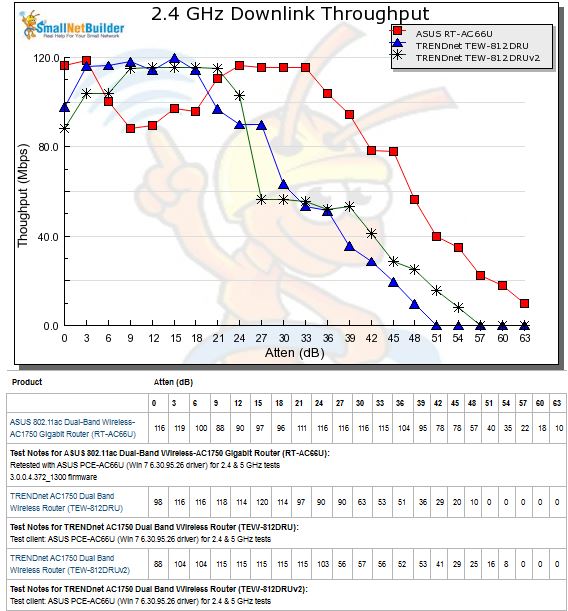
2.4 GHz Downlink Throughput vs. Attenuation
The 2.4 GHz uplink plot shows both the V1 and V2 more well-behaved and a definite advantage for the V2. But both are easily once again outperformed by the ASUS.
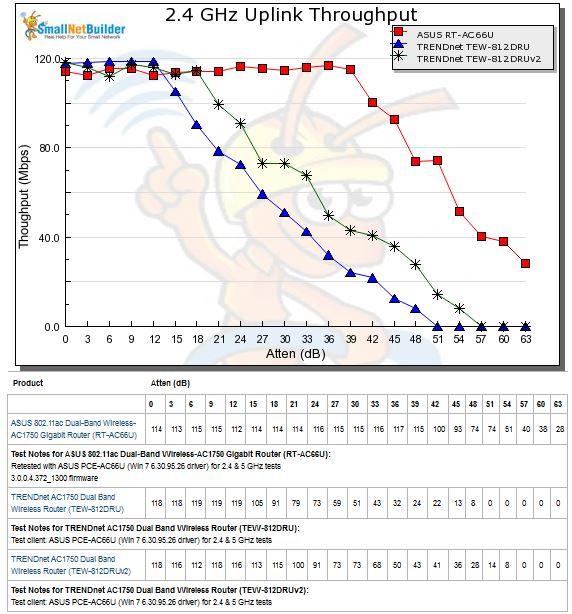
2.4 GHz Uplink Throughput vs. Attenuation
The 5 GHz downlink profile shows all three products’ throughput starting to drop almost immediately as attenuation ramps up. The V2, however, stays below the V1 for most of its run, popping into the lead only for the last three test points.
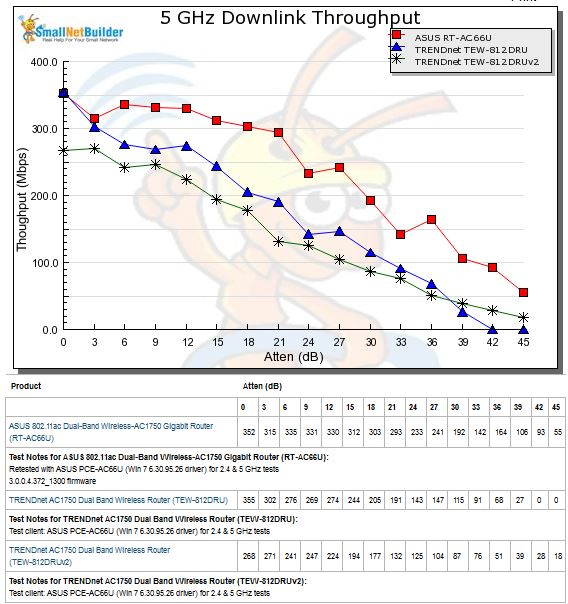
5 GHz Downlink Throughput vs. Attenuation
The same trend is also seen in the 5 GHz uplink profile, except the V2 moves above the V1’s throughput two tests earlier.
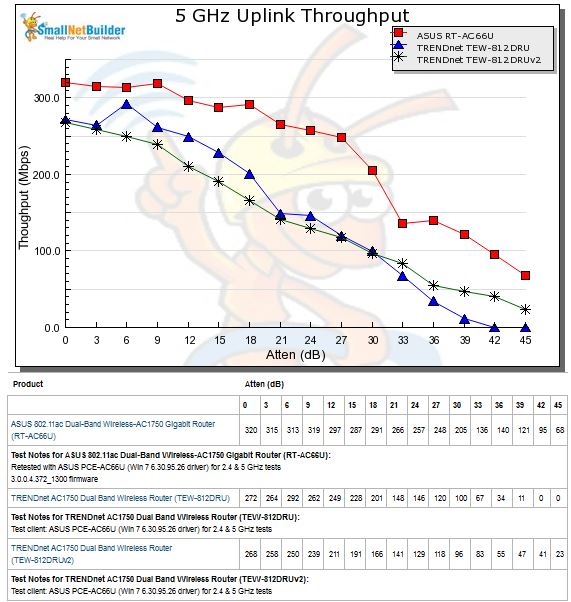
5 GHz Uplink Throughput vs. Attenuation
Closing Thoughts
The Router Ranker Performance Summary shows the V2 ranked eighth among AC1750 class routers, right above the original TEW-812DRU in the ninth rank slot. The only sub-rank where the V1 does better than the V2 is for Maximum Wireless throughput, where its 5 GHz up and downlink maximums outpace the V2’s.
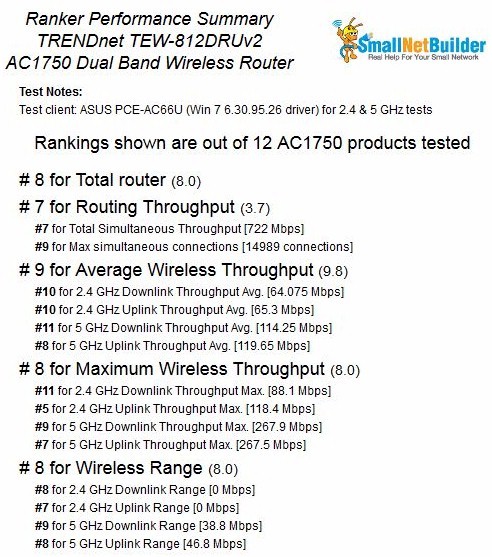
TRENDnet TEW-812DRUV2 Router Ranking Summary
In all, there really isn’t much to recommend the TEW-812DRUV2 over the V1, not that you’ll have much choice. The V2 will phase in automatically as V1 inventory is sold off. The only way you’ll be able to tell what you are getting online is to look for a USB 3.0 port reference in the product description. But given that descriptions often don’t accurately describe the product you get, you might end up with a V1 anyway. TRENDnet tells me that most of the V1’s should be gone by the end of January 2014.
So if you really think the TEW-812DRUV2 is the AC1750 class router for you, you might want to wait until then if you’re buying online. But check the Router Ranker before you buy. Prices continue to move around and there are better performing AC1750 routers for about the same or less.