

Introduction
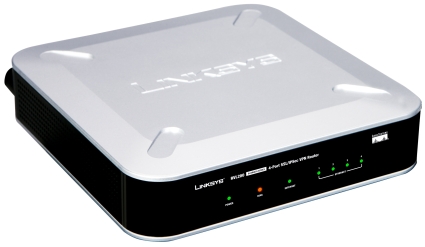
| At a Glance | |
|---|---|
| Product | Linksys 4-Port SSL/IPSec VPN Router (RVL200) |
| Summary | 10/100 VPN router supporting one site-to-site IPSec and five SSL tunnels |
| Pros | • SSL VPN connectivity • Stability • VLAN 802.1q trunk capability • Multiple QoS options |
| Cons | • VLAN DHCP server inconsistency • 10/100 instead of gigabit • Documentation and menu confusion |
I’m looking at the Linksys RVL200 in this review, my first chance to look at SSL VPN technology. I’ve done quite a few reviews of other VPN endpoint routers, with a consistent theme being the difficulty of getting IPsec VPN Clients to work.
The Linksys RVL200 addresses this problem by using a technology that requires no client-side configuration, minimal configuration on the router and works with most major operating systems, including Vista, XP, Linux, and Mac OS.
On the surface, the RVL200 appears to be similar to other 4-port VPN gateway routers. It has capabilities like WAN support for Cable and DSL services, Firewall and NAT functions, DHCP server, Dynamic DNS, a configurable DMZ, and basic logging.
Physically, the router is very lightweight, and can be wall mounted, laid flat, or placed vertically with the included plastic stands. It looks like Linksys gave the RVL200 the same housing used with the RVS4000, reviewed back in April.
However, a closer look reveals functions that differentiate the RVL200, in particular SSL VPN and VLAN support, as well as an array of QoS options. Internally, these functions are run through a Cavium CN225 Processor tuned for VPN functionality, mated to 64MB DRAM and 16MB Flash.
 Check out the slide show for internal photos and admin page screenshots.
Not counting the menu pages for the summary, wizard page, and a support page with buttons that bring up Linksys’ web support and the manual, there are over 48 pages of configuration options for the RVL200. Those pages include Setup, DHCP, System and Port Management, QoS, Firewall, VPN, and SNMP/Logging configurations.
The focus of this review will be to dive into the more unique features of the RVL200 and explore their use and performance. It’s great to see new functions offered in a small network product, but more importantly, they need to work! Let’s take a look.
VPN
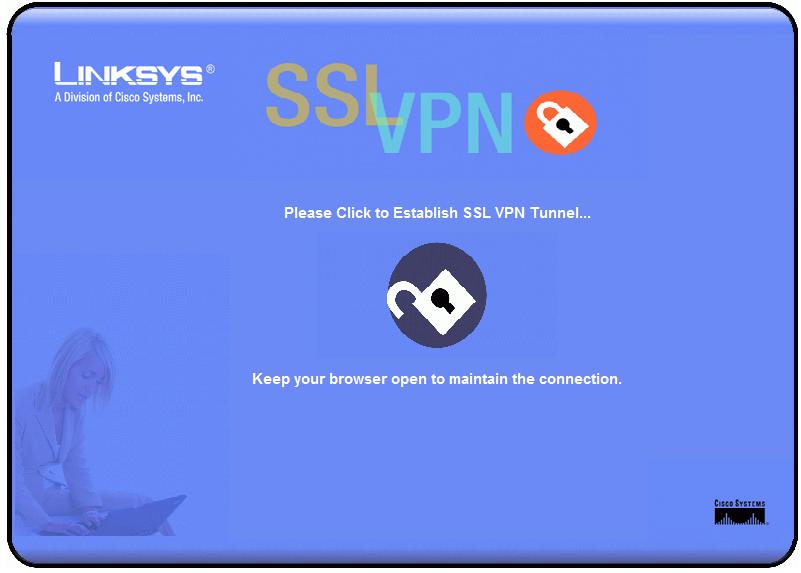
Figure 1: Router SSL connection screen
VPN support is becoming more common in small network routers, as well it should. This standardized technology is very useful for securely extending a network across the Internet to mobile employees or to remote offices, or for the home user wanting to securely access devices on their network from afar.
VPNs come in Client-Gateway and Gateway-to-Gateway forms. Client-Gateway VPNs are most useful for remote access to a network for mobile or work-from-home employees, while Gateway-to-Gateway VPNs are useful for connecting physical offices over the Internet.
The RVL200 supports both VPN tunnel types, with capacity for five SSL Client-to-Gateway tunnels and one IPSec Gateway-to-Gateway tunnel. What makes the RVL200 unique is the use of SSL VPN technology for Client-Gateway tunneling instead of IPSec or PPTP.
Other Linksys VPN routers such as the RV042 and RVS4000 use Linksys’ IPSec-based QuickVPN client software to ease the pain of setting up Client-to-Gateway tunnels. The RVL200 has eschewed the QuickVPN software for the newer SSL VPN technology.
VPN Overview and Setup
To review, IPSec provides authentication and encryption of data streams over IP networks to prevent unauthorized parties from accessing and reading private data. In terms of the OSI model, IPSec works at the same layer as IP addressing, which is Layer 3, the network layer, to encrypt and encapsulate data streams so they can be securely transmitted to the intended party.
Surfing to a website with a URL that starts with https uses another security protocol called SSL, or Secure Sockets Layer technology. SSL is frequently used for secure web sites to validate identities. A web server using SSL identifies itself to the receiver through the transmission of a certificate, which the receiver can verify through a public certificate authority. In the event the certificate is not recognized, an error message such as in Figure 2, below, will be presented, warning that the website may not be secure.
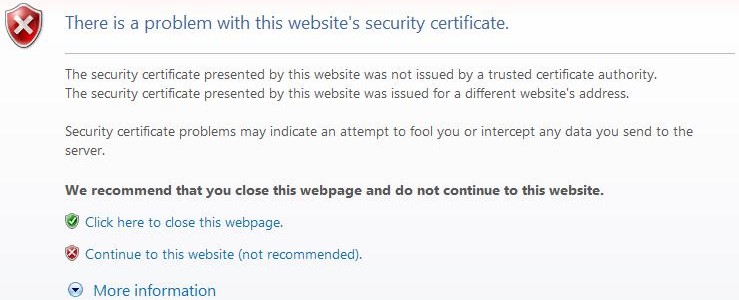
Figure 2: Certificate error message
SSL works at the same layer as TCP and UDP, which is Layer 4, the transport layer. As such, it utilizes port 443 instead of the common port 80 used for most web traffic. An SSL VPN utilizes the same technology as SSL websites, but takes it one step further and enables secure network access for a remote client.
The differences between an IPSec VPN client and an SSL VPN client become clear at setup. Configuring an IPSec VPN client involves the installation of a client application and selection of the correct options for key exchange, encryption, shared keys, as well as various options for tunnel initiation and keep-alive on client PCs and the router.
Configuring an SSL VPN client involves creating a valid user ID and password on the router, making sure a few options in the remote PC’s browser are enabled, and allowing the installation of a simple applet on the remote PC at the first login. No client application needs to be installed or configured on the remote user PCs!
From my own experience, installation and configuration of IPSec VPN Client applications can be a hassle. Not all IPSec VPN Clients support Vista and there are usually multiple and sometimes confusing options to configure. The PC’s firewall also must be aware of the application and the task of adding another application and rebooting is a pain and uses up more disk space.
An SSL VPN is OS and platform agnostic, and requires no installation CD or large application to be downloaded. This means that SSL VPN connectivity can be extended to XP, Vista, Mac OS, and Linux PCs, using common browsers such as Internet Explorer (IE), Netscape, Safari, or Firefox. For IE, an ActiveX applet is used to enable the Virtual Passage VPN interface. For other browsers, a Java applet is used.
Setting up an SSL VPN connection on my Vista laptop using IE was easy following Linksys’ directions in the manual. First, I added a username and password to the SSL VPN – User Management submenu on the RVL200. Second, I made sure SSL, scripting, and automatic cookie handling were enabled in the IE-Internet Options-Advanced menus of my laptop. I also added the URL of my Dynamic DNS address to the trusted sites list within IE on my laptop. A static WAN IP could also be added to the trusted sites list.
I then fired up my browser to my Dynamic DNS URL (https://mydomain.com), logged in with the username and password, clicked OK to allow the installation of the Virtual Passage ActiveX applet, and I was connected! A small icon in my system tray indicated the connection was up, and clicking on it provided the status of the connection shown in Figure 3.
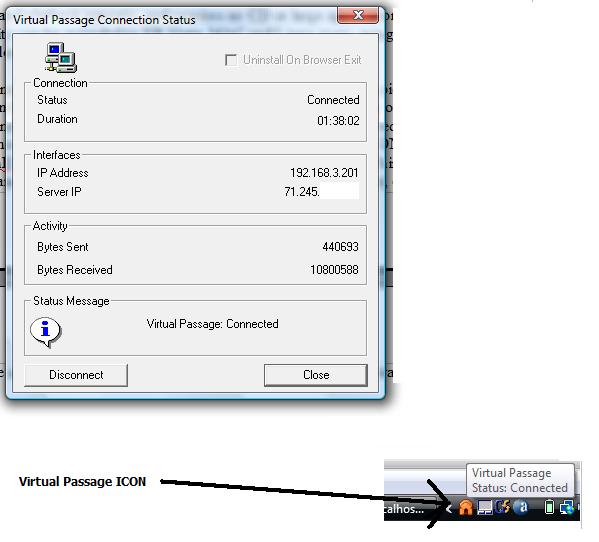
Figure 3: Virtual Passage status and icon
As shown in Figure 3, the Virtual Passage connection has issued an IP address of 192.168.3.201 to my laptop and shows I am connected. Working remotely, I was able to access all elements of my LAN with IP addresses in the 192.168.3.0 /24 subnet. For example, the LAN IP of my printer is 192.168.3.112, which I was able to access over this SSL VPN. Indeed, I could access all my LAN devices, including a NAS, the web utilities of a VOIP ATA and Smart Switch, as well as Remote Desktop to a Windows PC and SSH to a Linux PC.
To validate another browser operation, I installed Firefox 2.0.0.11 on my Vista laptop, and repeated the above steps. Functionality and simplicity was the same. I didn’t even customize options on Firefox, it simply worked.
Disconnecting from the VPN was just as easy. For IE 7, the browser window to the RVL (shown in Figure 1) needs to stay open to keep the VPN connection up. Closing this window tears down the connection, and the Virtual Passage icon disappears.
For Firefox (Figure 3a), I didn’t have to keep the browser window open. I was able to close the Firefox SSL VPN window and verify the VPN connection was up through a simple ping. Disconnecting the VPN connection established through Firefox was accomplished by right-clicking on the Virtual Passage icon and selecting Disconnect.
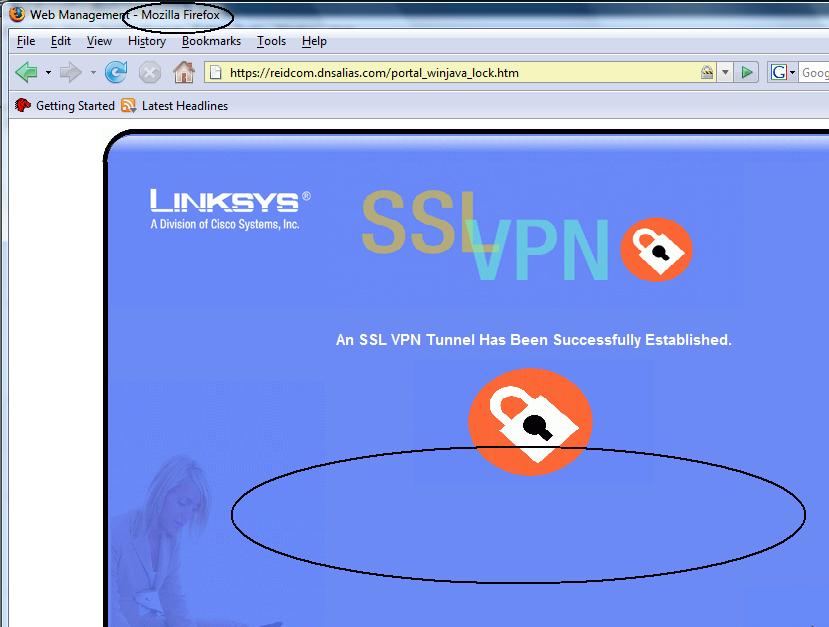
Figure 3a: Firefox connection screen
VPN Client and Tunnels
Two things became apparent regarding the value of the SSL VPN client. First, it was easy! I didn’t have to configure my PC’s firewall or invest a lot of effort to get up and running. I found the setup to be only slightly more time consuming than a PPTP connection, which is built into XP and Vista. For an administrator of employee PCs, this simplicity can be a real blessing.
Second, SSL works at locations where IPSec doesn’t. Many public websites disable VPN Pass-Through, a problem I have encountered at several public Internet sites, including my local library. I have never been able to get a PPTP or IPSec connection to my lab network from my library.
However, SSL VPNs use port 443, which is commonly open in most firewalls. Using the SSL VPN with the RVL200, I was able to access my lab network from my local library as well as from multiple locations over 1000 miles away while on a business trip. The point of VPNs is remote access, so there is value in a technology that can be used from the greatest amount of remote locations.
In addition to Client-to-Gateway VPNs, the RVL200 supports a single Gateway-to-Gateway VPN tunnel using IPSec technology. Since the RVL is designed as a satellite office device, it only supports a single Gateway-to-Gateway VPN tunnel. Gateway-to-Gateway VPN tunnel configurations were as straightforward as with the Linksys RV042, and equally stable.
I had no problem setting up a VPN tunnel between the RVL200 and a remote SonicWALL router using 3DES, AES-128, and AES-256 bit encryption. I set up all three tunnels and let them run for more than 24 hours each, with no failures. Latency over the Gateway-to-Gateway VPN tunnel was equivalent to the RV042.
A useful display in the System Summary screen shows the status of the VPN tunnels. As shown in Figure 4, my test RVL is running a Gateway-to-Gateway VPN tunnel and a Client-to-Gateway tunnel simultaneously.

Figure 4: VPN status in the System Summary screen
A neat detail the Linksys manual points out is how to manipulate the Windows route table to access devices on the far end of the Gateway-to-Gateway VPN tunnel via the Client-to-Gateway tunnel. Take a look at the graphic below. It depicts a remote PC able to access the LAN on the RVL200 and the LAN on the far end of the Gateway-to-Gateway tunnel.
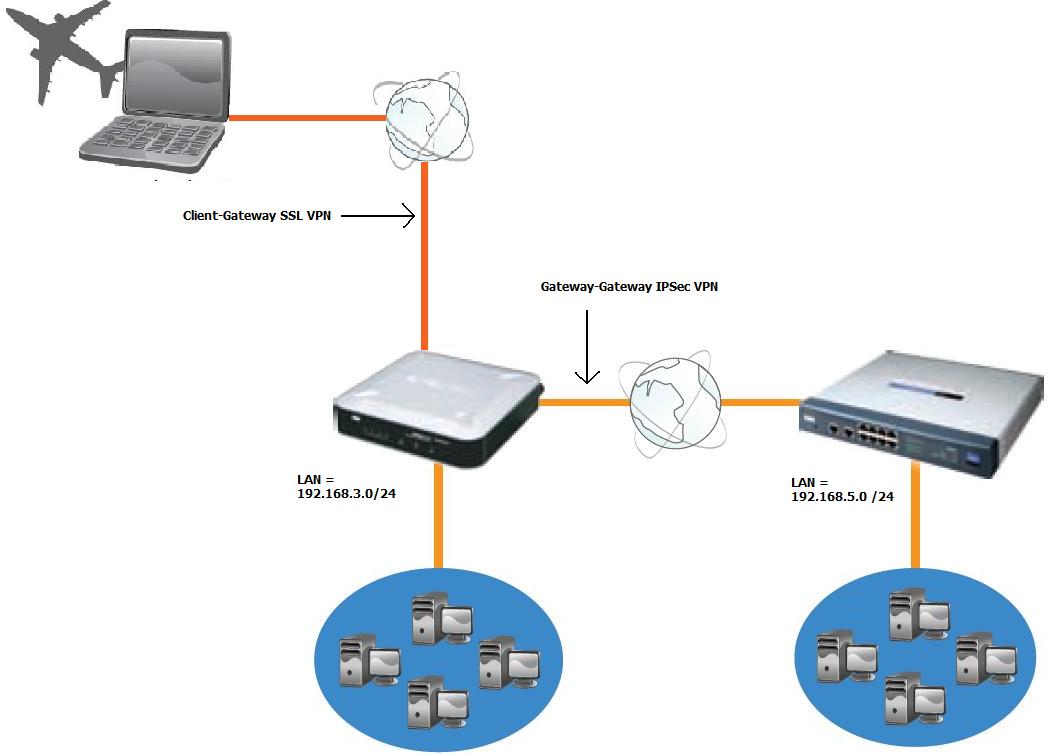
Figure 5: Diagram showing device access though a Client-Gateway and Gateway-to-Gateway tunnel
My lab LAN on the left is 192.168.3.0/24, which is connected to a second LAN on the right using 192.168.5.0 /24 over a Gateway-to-Gateway tunnel. Simply adding the statement of route add 192.168.5.0 mask 255.255.255.0 192.168.3.200 at the Windows command line on my laptop made both LANs remotely accessible over the SSL VPN client.
The output of the DOS command netstat -r in Figure 6 shows the route table in my PC. Notice the circled entry routing the network 192.168.5.0 /24 to the next hop interface of 192.168.3.200, which is the IP address of the RVL200 VPN interface.
Note that the added route is not permanent. However, if I needed it to be, I could use the -p option of the route command.
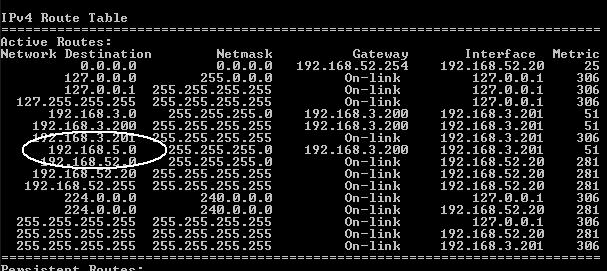
Figure 6: Results of the netstat -r command
VLANs
For a device designed to support a small network, the RVL200 has VLAN functionality that could support a much larger network, with capability to support 253 devices over 16 VLANs. The RVL200 has options to support not only port-based VLAN capability, but also logical VLAN separation and 802.1q trunking.
Logical VLAN separation means using separate subnets for each VLAN. We posted a How To article earlier this year on creating VLANs using port-based technology to separate devices in the same subnet. The RVL200 allows separate subnets for each VLAN, assigning an IP in each subnet as a virtual LAN interface, and routing between each subnet.
Other recently tested routers support multiple subnets on the LAN interface, but allow Layer 2 broadcasts to propagate across subnets. The RVL200 VLAN capability allows multiple subnets on the LAN interface, but does not allow Layer 2 broadcasts to propagate across subnets.
For VLAN configuration, the RVL200 supports three port modes called Trunk, General, and Access. Trunk port mode utilizes the 802.1q VLAN standard to tag all frames, except those from VLAN1, with a VLAN identifier. This mode is useful on ports connecting the RVL200 and a smart switch that supports 802.1q trunking. General port mode allows ports to be members of multiple VLANs, while Access port mode is useful to configure ports as a member of a single VLAN.
Configuring VLANs is done by adding the numerical VLANs, either individually or by range. Once the VLAN numbers are added, a name can be added and ports can be assigned using the radio buttons shown in Figure 7.
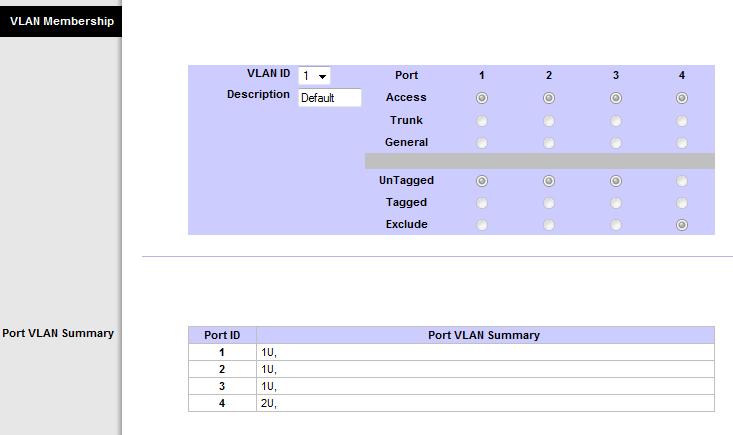
Figure 7: VLAN membership configuration
The RVL200 DHCP server also has configuration options to automatically assign IP addresses in different subnets based on VLAN. This feature is useful, as it makes having multiple VLANs with different subnets more manageable. Take a look at Figure 8 below. I’ve configured the RVL to use 192.168.3.0 /24 for VLAN1 and 192.168.1.0 /24 for VLAN2.
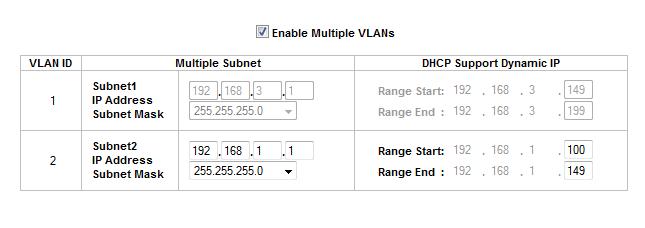
Figure 8: VLAN DHCP configuration with multiple subnets
I had some intermittent performance on this feature. Initially, the DHCP server didn’t provide IP addresses to clients on ports assigned to VLANs other than VLAN1. However, after some trial and error and without changing the configuration, the DHCP server on VLAN2 started working. I’m never comfortable when things don’t perform as expected and then start working without explanation. But I was glad to see this feature work.
To net out the VLAN capabilities, the RVL200 provides full VLAN separation at both Layer 2 and Layer 3, with Layer 2 broadcasts being confined to each VLAN.
QoS
In a perfect world, a network has twice the amount of bandwidth it can use. In the real world, we have to optimize our networks to make the most of the available bandwidth. Many network devices support Quality of Service (QoS) configurations to prioritize traffic flows and give preference to delay and drop sensitive packets.
The Linksys RVL200 has two options for managing bandwidth utilization, plus the ability to prioritize traffic queues based on Class of Service (CoS) and Differentiated Services Code Point (DSCP) markings.
To begin, I configured the upstream and downstream bandwidth of my ISP connection and chose a bandwidth management scheme based on Rate Control or Prioritization. Rate Control allows for defining a minimum and maximum amount of bandwidth, assigning that bandwidth to a specific traffic type based on TCP/UDP port and IP address, and then specifying whether to apply it to an incoming or outgoing data flow.
Prioritization is accomplished by assigning High or Low to a specific traffic type, by direction. A selection of High priority will allocate 60% of the bandwidth to that traffic, while a selection of Low priority will allocate 10% of the bandwidth to that traffic. The Linksys manual indicates traffic can also be assigned a priority of Medium, but that option wasn’t available in the drop-down, as shown in Figure 9.
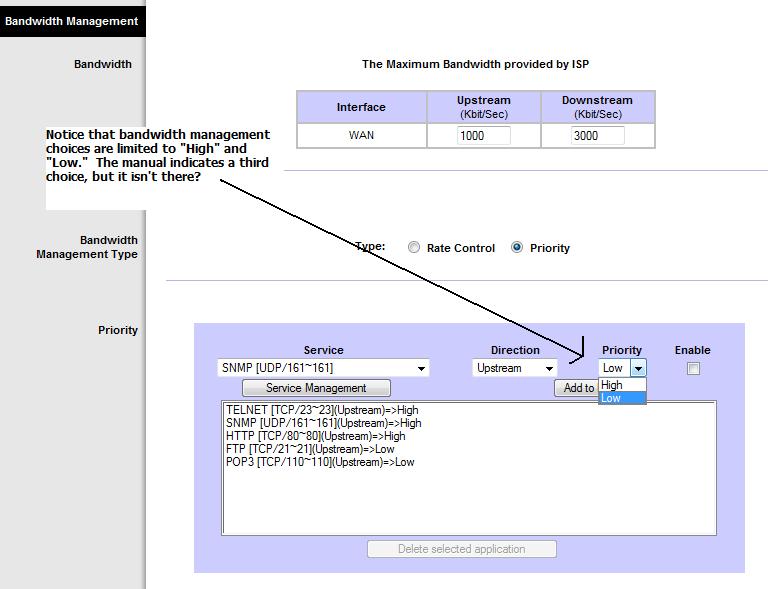
Figure 9: Bandwidth management and QoS settings
QoS – more
Once bandwidth has been allocated to specific flows, traffic queue weighting can be enabled based on the CoS or DSCP markings. Traffic queuing occurs when there are bursts or extended amounts of traffic exceeding the router’s throughput. This excess traffic is then held in buffers (queues) until it can be sent, or dropped if the buffer is full. Weighting options then come into play by determining which buffers/queues get to transmit packets first.
Enabling QoS by selecting Basic in the QoS mode and defining which markings are trusted on which ports allows the router to apply traffic weighting. The options are to trust the CoS or DSCP markings received from various ports, or overwrite them and assign a default value on untrusted ports.
The RVL has default mappings of CoS and DSCP values to Queues 1,2,3,4 based on standard QoS priorities, which can be adjusted. CoS values 0-7 can be mapped to Queues 1-4 as desired. DSCP values 0-63 can also be mapped to Queues 1-4 as desired. In most cases, the defaults should be fine.
There are also options to select whether Queues 1-4 are serviced using Strict Prioritization or Weighted Round Robin (WRR). Strict Prioritization means traffic in Queue 4 will be sent before traffic in Queue 3, which will be sent before traffic in Queue 2, leaving traffic in Queue 1 to be sent last. WRR will service all Queues in a weighted manner, allocating 53%-27%-13%-7% of transmission capability to Queues 4-3-2-1, respectively. Strict Prioritization is useful when there is traffic on the network where queuing delay or packet loss is absolutely unacceptable. The advantage of WRR is it allows for prioritizing sensitive traffic without starving lower priority flows, a condition that can occur in Strict Prioritization.
The bottom line is the Linksys RVL200 has the ability to manage traffic at very granular levels, which is a good thing. I just wish the QoS menus were a little easier to use. It seems the menu jumps from high-level options to low-level options and back, making it challenging to properly configure.
Additional Features
Dynamic DNS is very useful for WAN links with dynamic IP addresses. I find using Dynamic DNS simplifies VPN connections. Many routers support Dynamic DNS; I mention it here as the RVL200 supports only DynDNS.org for automatically updating a Domain to a dynamic IP address.
A useful troubleshooting tool on the RVL is the Port Mirroring feature. The feature creates a virtual hub, so to speak, by allowing a device on one port to capture packets being sent or received on another port.
For example, in Figure 10, I’ve configured the RVL200 to mirror packets from port 1 to port 2. With my laptop connected to port 2 and using a packet capture software tool like Wireshark, I can now run packet traces on all traffic going through port 1.
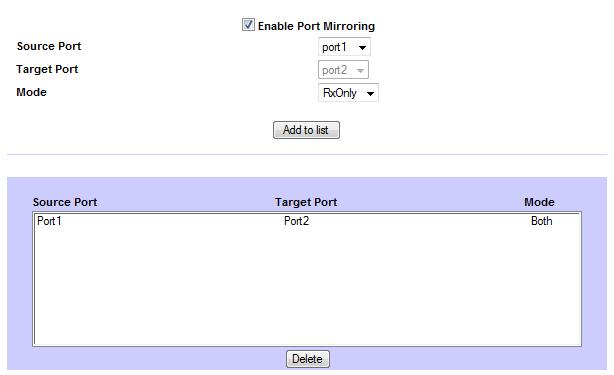
Figure 10: Configuring port mirroring
The RVL also supports SNMP v1-v3 network monitoring, which can be useful for collecting performance statistics and network alarm information. If used as a satellite office router, the RVL200 can be added to your network SNMP monitoring system at the home office.
Performance
From a performance standpoint, the RVL200’s network throughput is steady. As shown in the IxChariot plot in Figure 11, throughput is pretty level for both WAN>LAN and LAN>WAN, producing a total average throughput of nearly 39 Mbps, without any significant peaks or drop-offs.
In comparison, we measured descending throughput levels and a cyclical WAN>LAN throughput pattern on the RV042 (see slideshow). In addition, our experience with the RVS4000 (see review) throughput was very unbalanced, with an extremely high upload capability of 516Mbps, but only 14Mbps download. This makes the RVL200 the most well behaved of these three Linksys products in terms of network throughput.
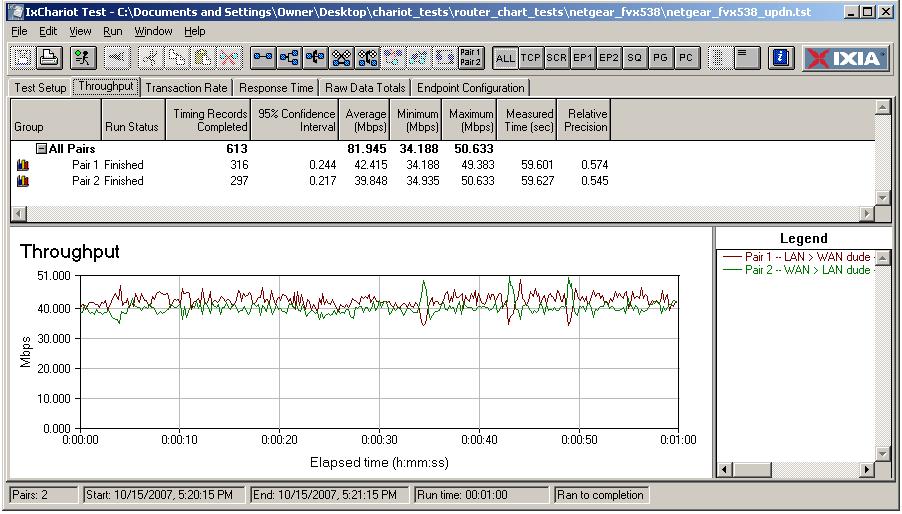
Figure 11: IxChariot chart showing throughput performance
Performance – more
Figure 12 shows the SSL VPN throughput performance, with maximum throughput approaching 5 Mbps. It appears the RVL limits outbound (LAN>WAN) traffic when there is an inbound (WAN>LAN) tunnel established, as depicted by the drop in outbound traffic at the 5 second point on the X-axis.
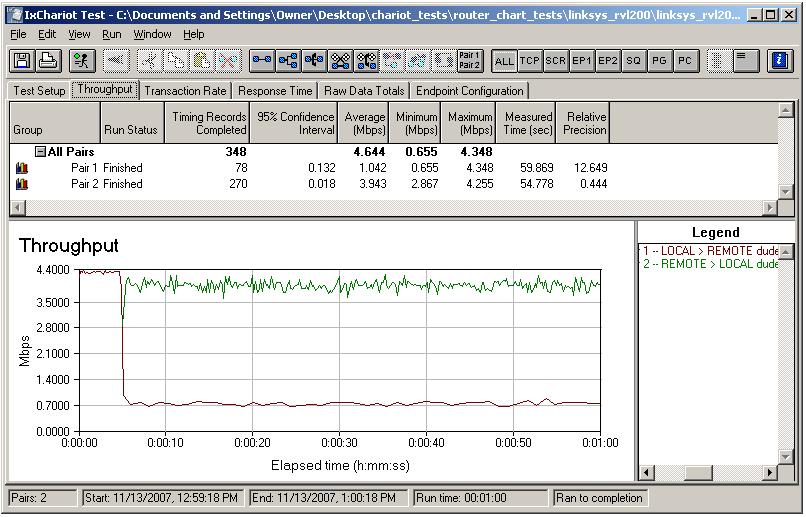
Figure 12: IxChariot chart showing throughput SSL VPN performance
Table 1 shows the routing throughput levels of these four routers. The RVL200 doesn’t have the horsepower of the RV042, or even the ZyXEL Zywall 2 Plus reviewed last December. However, for a satellite office with a Cable or DSL connection, the RVL200’s throughput is sufficient.
| Product | WAN-LAN | LAN-WAN | Total Throughput (Mbps) |
|---|---|---|---|
| Linksys RV042 | 54 | 80 | 59 |
| ZyXEL Zywall 2 Plus | 55 | 55 | 50 |
| Linksys RVL200 | 37 | 39 | 39 |
| NETGEAR FVS124G | 13 | 12 | 12 |
Table 1: Router throughput comparison
Closing Thoughts
Overall, I liked the RVL200’s implementation of SSL VPN technology. SSL VPN technology appears to be a promising solution for all those frustrated small network administrators supporting remote users with tricky VPN software client applications. I’m tempted to say that SSL VPN configurations are easy enough for non-technical end users, but I’ll leave that up to you.
Linksys is targeting the RVL200 at the small business market, grouping this product with its other small business-grade router / VPN products. With online pricing as I write this as low as $148, the RVL200 is in the same neighborhood as Linksys’ RV042 ($146) and NETGEAR’s FVS124G ($140) and ZyXEL Zywall 2 Plus ($147).
However, both the RV042 and FVS124G are dual-WAN routers, with capacity to run significantly more Gateway-to-Gateway and Client-to-Gateway tunnels. The ZyXEL Zywall 2 Plus supports only two VPN tunnels and limited client VPN capability. None of these three products utilizes SSL VPN technology, however.
Having tested IPSec VPN clients from SonicWALL, NETGEAR, Linksys, and D-Link, I can confidently say that Linksys’ SSL feature was the easiest to configure and implement. In fact, I found an SSL VPN to be just as easy as PPTP VPNs, with the advantage of IPSec levels of encryption. And don’t forget the advantages of OS independence and ability to work from locations where IPsec and PPTP traffic is blocked.
But I’d like to see Linksys combine the strengths of the RVL200, RVS4000, and RV042 into a single product. In my opinion, an SSL VPN router with gigabit LAN ports, dual WAN connections and multiple Gateway-to-Gateway tunnel capacity would be a very cool product.
The RVL200 has some shortcomings, notably the VLAN DHCP flakiness and errors in the menus and documentation. But on the plus side, the router was stable throughout my testing, without one lockup or freeze. I hope that firmware updates can resolve the problems.
All things considered, I was impressed by SSL VPN technology and its simplification of client VPN setup. I’d say the RVL200 gives Linksys a pretty good hand in the small business router game.
Check out the slide show for internal photos and admin page screenshots.