

Introduction

Linksys has been working on its Linksys EasyLink Advisor (LELA) networking setup and management tool for almost two years now. But it seems to be having a rough birthing and needs to learn some installation etiquette.
LELA is, according to Linksys, a "free application that provides and easy way to setup, view, manage, and repair your network". I’ve looked at it only briefly, but it appears to be similar in form and function to Network Magic [reviewed]. I’m sure there are other features, which we’ll cover when we do a more complete review after the product settles down a bit.
LELA first shipped in August 2006 with the WRT54GS Wireless-G Broadband Router with SpeedBooster. But with the shift to draft 802.11n products, Linksys pulled LELA support for the older products and shifted the focus of a revamped LELA to its WRT160N and WRT310N.
Linksys has asked me to review LELA since early this year and, in fact, I took a quick look at it while testing the WRT160N for the Cheap Draft 802.11n Router Roundup. But the installation process that was supposed to run from the CD that came with the router didn’t work, so I told Linksys that I would give it another look once they got the install bugs sorted out.
In the intervening months, Linksys has reworked the installation process and added support for the WRT54G2 and WRT110, in addition to the WRT160N and WRT310N. Since I’m currently testing the WRT54G2, I decided to take another quick look at LELA.
Once again, however, I got bogged down in the installation process, where I stumbled onto a bug that installs an automatic update service, which then downloads and installs LELA, even though I did not agree to the installer’s License Agreement and then quit the installer. Details follow.
The Stealth Install
When I loaded the Setup Wizard CD (marked Ver 1.0.00) that came with the WRT54G2, the splash screen in Figure 1 appeared and I clicked Start Setup.
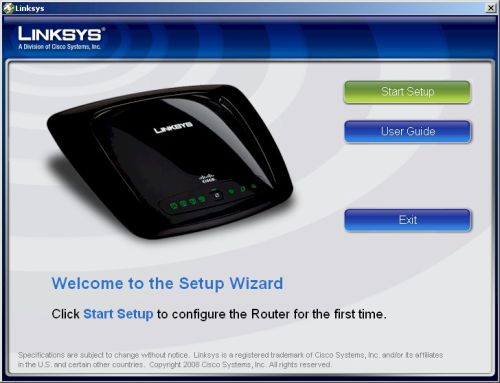
Figure 1: WRT54G2 Setup Wizard Splash Screen
After a Welcome Screen that provides a language selection dropdown, I clicked the Next button and was taken to the License Agreement screen, (which displayed 4.6.7334.1 in the lower left corner of the window) shown in Figure 2.
The first time through, I checked the "I accept" box and stepped all the way through a typical installation wizard, which appeared to run entirely from the CD. But at no point was there any mention of LELA. Not a confirmation box for installation, nor a pop-up informing me of an install.
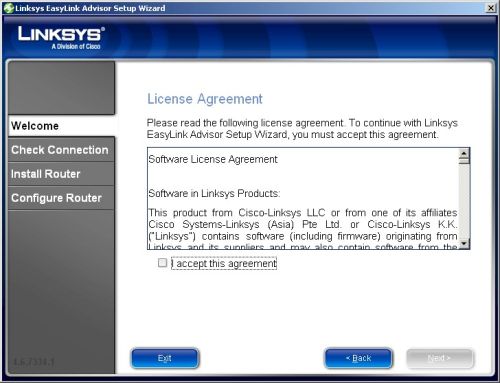
Figure 2: License Agreement screen
As I poked around looking for signs of LELA, I noticed the lights on the router and my LAN switch blinking furiously. Something, it appeared, was being downloaded to the PC that I had run the install CD on.
After a brief exploration, I found LinksysUpdater.exe running in the Windows Task Manager (Figure 3).
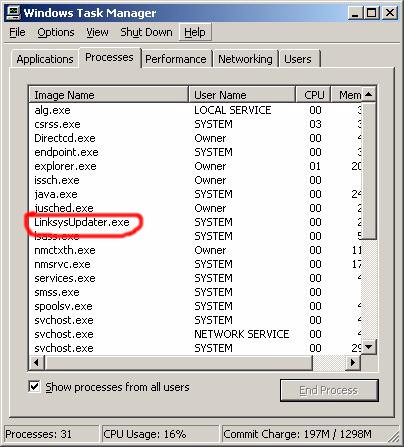
Figure 3: The LinksysUpdater service running
Hmmm. When did I ask for that to be installed? I navigated over to C:\Program Files and found a Linksys folder and a Linksys Updater subfolder, which contained bin, conf, lib and log subfolders. When I opened the agent.log file in the log folder, I found out what the LinksysUpdater.exe service had been up to.
It had phoned into the mother ship (located at https://update.linksys.com/cds/update) and provided my computer’s IP and MAC addresses, Host Name, OS Name and version and Country. There were other fields sent, including CPU speed, vendor, name and family as well as my Service Provider, but they were all blank.The server then responded with the download of LELA version 3.0.8122.29, which wasn’t installed until I rebooted.
Disinviting LELA
Needless to say, I was not pleased about this, so I uninstalled LELA and the Linksys Updater and deleted the folders left after uninstallation. I then contacted Linksys and let them know what I had found and that this stealth behavior was completely unacceptable.
After a short investigation (overnight), my Linksys contact called to say that I had found a bug. He offered assurance that what I found "was a mistake and that we had no intention of doing anything without customer consent".
He also relayed word from the technical team working on the bug that they had "completely turned off the Update Agent for now until we complete and test the build of a new agent we can deploy that does not install LELA without first specifically asking the customer if they want it".
I have confirmed that the Linksys Updater currently no longer downloads LELA. But the bug that installs the Linksys Updater application without warning or consent is still present on CDs with products in the field.
Fortunately, the bug is simple to avoid. Just don’t run the Setup Wizard CD! But if you do want to run the wizard and not install the Linksys Updater, here’s what you do:
1) Just run through the wizard, including checking the "I accept" on the License Agreement page.
2) When you get to the final Better Together screen, click the Windows Close Window (X) box, not the Close button. Figure 4 shows the do’s and don’ts.
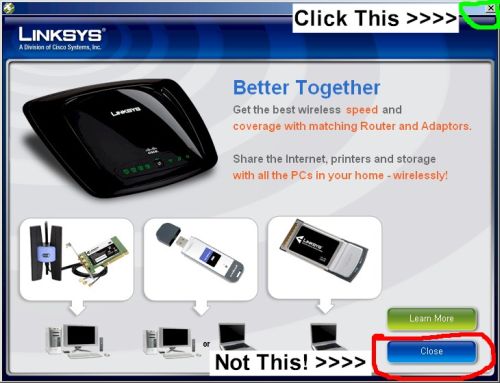
Figure 4: How to prevent the Linksys Updater Install
If you click the Close button by mistake, the Linksys Updater service will still silently install and run (it automatically launches during boot). But I have confirmed that it will currently not download LELA, as Linksys has indicated.
If you’re like me and don’t want the Linksys Updater process running, just use the Windows Add or Remove Programs Control Panel and remove it as shown in Figure 5.
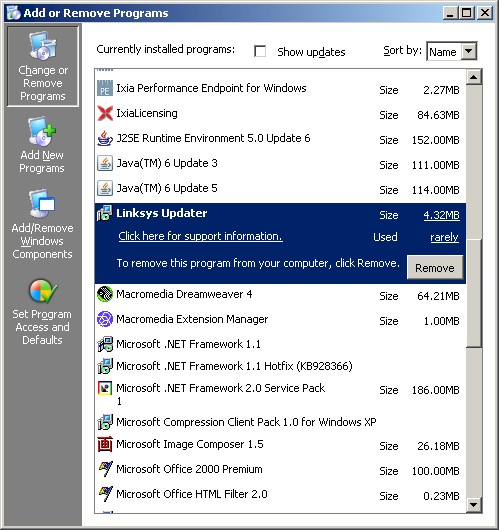
Figure 5: Uninstalling the Linksys Updater
If you do want LELA, and don’t want to wait until Linksys fixes the updater, you can manually download it by hitting this page.
Linksys has not said when it will have a new updater that properly asks permission before downloading and installing LELA (or anything else for that matter). But they are working on it. They have made no commitment, however, to changing the Wizard CD so that it asks permission to install the Linksys Updater itself.
LELA may be "like having a Linksys expert in your home helping you to get the most out of your home network". But I prefer to invite guests into my home, don’t you?