

Introduction
7/7/2008: RAM size corrected
| At a Glance | |
|---|---|
| Product | Buffalo LinkStation Mini (LS-WS1.0TGL/R1) |
| Summary | Very small, expensive, dual drive SATA NAS with support for RAID 0, 1. Available in 500GB and 1 TB models |
| Pros | • Gigabit LAN with jumbo frame support • No fan, very quiet • Superset of LinkStation family features |
| Cons | • Expensive • Single USB port • No logging • Serviceability |
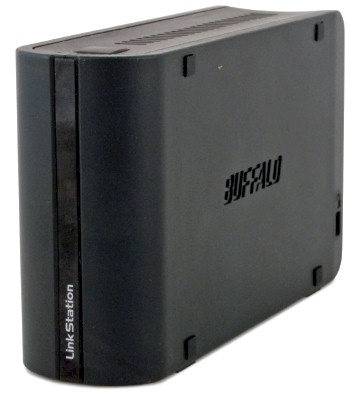
Take a Buffalo LinkStation Pro Duo, shrink it by using 2.5" notebook drives into a palm-sized format, add media and USB print servers, improve the performance and double the price. And there, in a nutshell, is Buffalo’s LinkStation Mini.
Feature Summary
Since, other than its size, the Mini breaks no new ground for Buffalo NASes, I won’t be spending much time on the feature set. The Comparison Chart below (Figure 1) will let you match it up against its other LinkStation siblings. (I had to do some editing on this chart, since the one up on Buffalo’s website doesn’t properly reflect all the Mini’s features.)
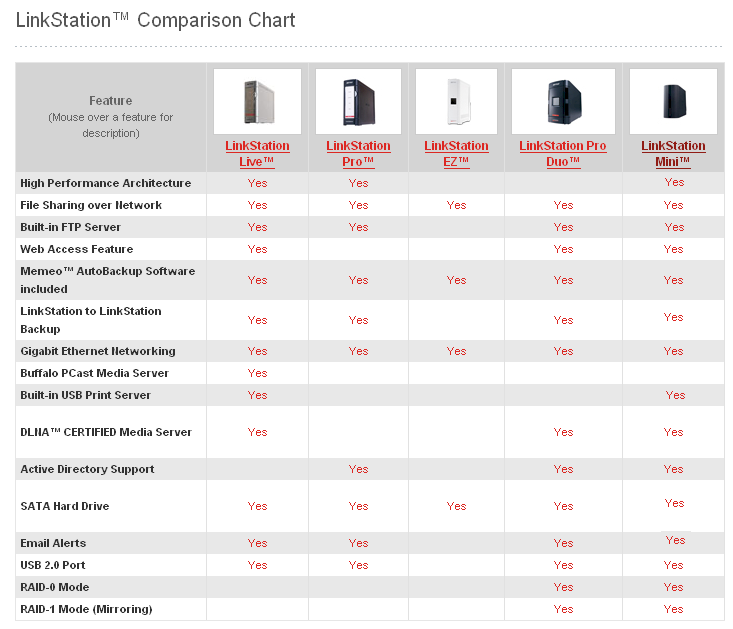
Figure 1: LinkStation Family Feature Comparison
I have gathered most of the key admin screens with descriptions into the slideshow. And you can go into more detail by reading through the Pro Duo, Pro and Live reviews.
But a quick glance at the chart shows that the Mini is actually the most full-featured of all the LinkStations. So perhaps Buffalo is rethinking its separate "Pro" and "Live" product line approach.
There are a few things worthy of note in the feature department:
- iTunes and PCast servers – It appears that Buffalo has integrated Packet Video’s PVConnect server, which is based on TwonkyVision’s server (Packet Video acquired TwonkyVision in 2006). According to this PVConnect page: "PVConnect works with hundreds of Universal Plug-and-Play (UPnP) devices, and also adapts to non-DLNA devices such as Xbox 360™ and Sony PlayStation® Portable. PVConnect also integrates with popular services such as iTunes®".
I tested the iTunes compatibility and found that the Mini did, in fact, appear in the iTunes browser.
The older, Buffalo-proprietary "PCast" server is not integrated into the Mini. - The Feature button at the top front of the Mini currently does nothing. According to Buffalo the button is for " future feature additions that will be delivered via firmware update".
- RAID 1 error handling – The main reason that you use RAID 1 is so that your data stays available in the event one of the two drives goes belly up. But the Mini defaults to automatically shutting down when a disk error is detected!
Since I couldn’t open the drive to force a failure, I didn’t get to test this feature or whether disabling it really did work. But I find it a very odd choice for a RAID 1 product! - There are still no logs to be found and there is no secure HTTPS admin access.
- Although there is only one USB 2.0 port, you can attach a hub to add both a USB printer and external storage. I found that only one external USB flash drive would be recognized, however.
Inside Details
7/7/2008: RAM size corrected
The "Cons" in the At a Glance box up above include "Serviceability", which means, in part, that I couldn’t get the little sucker opened up to take my usual inside shots! So I had to resort to guesses and this thread over at NAS Central.org’s Buffalo forum for the following component information.
Basically, the design is similar to the Buffalo Duo’s, using a Marvell Orion processor and 128 MB of RAM. Drives in the 1 TB model are two 500 GB Hitachi Travelstar 5K500 (HTS545050KTA300) 2.5" SATA 8MB 5400RPM, which are XFS formatted.
The Mini draws 10W and is virtually silent in operation. The only power down feature supported is an "Auto" mode that requires Buffalo’s NAS Navigator client to be running on a Windows PC. When the Off / On / Auto switch on the Mini is set to Auto, it will power down when the PC running the NAS Navigator client is shut off.
 See the slideshow for an admin interface tour
Performance
Figures 2 and 3 show a comparison of all Write and Read benchmark tests respectively for the Mini. It’s interesting that the performance for RAID 0 and 1 modes is pretty much the same (once you get beyond the cache effects in smaller filesizes) until you get to the gigabit plus 4k jumbo frame plots. This leads to the conclusion that the LAN speed is the limiting factor for 100 Mbps and 1000 Mbps non-jumbo write performance.
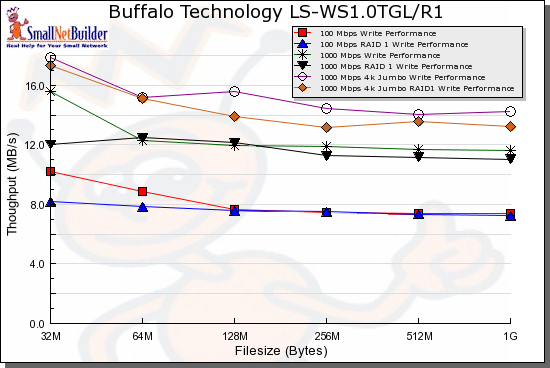
Figure 2: Write benchmark comparison
The read curves are also interesting in that they show RAID 1 performance that is higher than RAID 0!
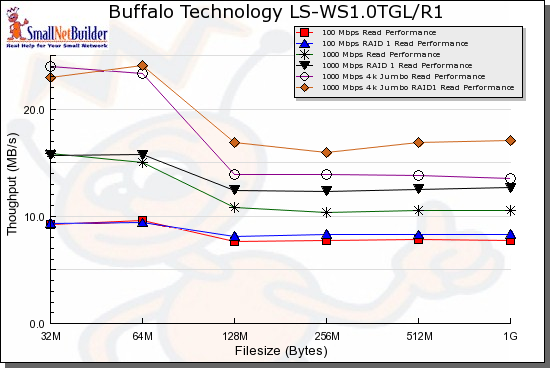
Figure 3: Read benchmark comparison
As I set up to run the iozone-based tests, I was expecting to see lower performance than the Pro Duo, mainly due to the Mini’s use of 2.5" notebook drives running at 5400 RPM, vs. the 3.5", 7200 RPM drives in the Duo. Boy, was I wrong!
Figures 4 and 5 show the Mini compared to a few comparable dual-drive NASes: the Buffalo Pro Duo, Netgear ReadyNAS Duo and D-Link DNS-323. While the Mini (the LS-WS1.0TGL in the plots) lags behind the Netgear and D-Link products, it clearly turns in much better performance then the Buffalo Pro Duo!
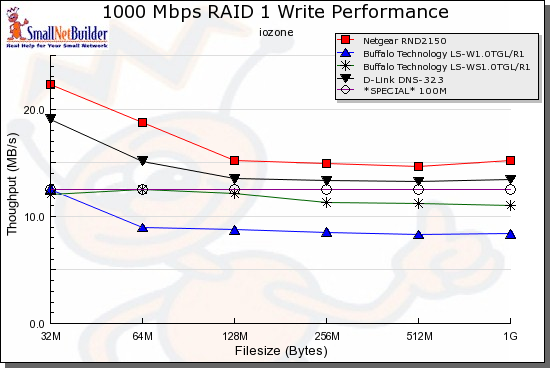
Figure 4: RAID 1 Write performance comparison – 1000 Mbps LAN
Things are a bit different for reads, however. The Mini actually outperforms all the other products at 256 MB file sizes and larger. At lower filesizes, however, the ReadyNAS Duo outdistances the pack by a much wider margin.
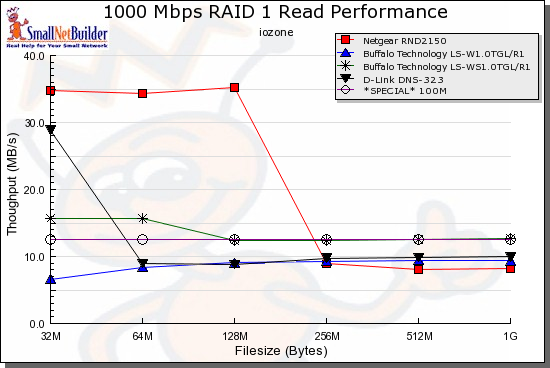
Figure 5: RAID 1 Read performance comparison – 1000 Mbps LAN
Closing Thoughts
Buffalo was clearly going for the "Wow!" factor with the Mini, and on that count, they have succeeded. There are a lot of features and performance packed into a very small package that’s just so darned cute, too! I’m glad to see Buffalo move in a more competitive direction with the Mini by providing an improvement in performance and a consolidation of features previously spread between its "Live" and "Pro" lines.
If you’re trying to decide between the Mini and Buffalo’s Pro Duo, the clear choice is the Mini for both performance and features…if price is no object. But given that the Mini is roughly 2X the cost of the Duo, and not the most fully-featured dual-drive NAS around, you might want to explore other options.
Because once you get past the emotional response, you realize that the 1 TB Mini is a very expensive 500 GB RAID 1 NAS with good, but not jaw-dropping, performance and feature set. You could pick up a 500 GB Netgear ReadyNAS Duo for around $380, add a second Seagate ST3500630AS 500 GB drive for around $90 and still be about $130 ahead of the $600+ 1 TB Mini. Although the ReadyNAS Duo isn’t as small as the Mini, it’s smaller than virtually every other dual-drive NAS and has more features and better performance than the Mini.
Or you could decide to be beguiled by the Mini’s charms and just decide to take home the best LinkStation that Buffalo has produced in a long time.