

Introduction
The ol’ review queue has filled up with products, so the Fast NAS experimentation has moved to the back burner for a bit. But with a little prodding from the Forums crew, I decided to take a quick look to see what sort of performance that iSCSI can bring to the table.
iSCSI is a protocol that allows clients (initiators) to send SCSI commands to SCSI storage devices (targets) via a TCP/IP network connection. iSCSI’s main use is to build Storage Area Networks (SAN) using Ethernet-based networks instead of dedicated connections such as Fiber Channel. iSCSI drives appear to an operating system as locally mounted drives.
An opportunity came in the form of the Sans Digital MN4L+B that I spent a much of this week testing. It’s based on an Intel Pentium M and its performance runs neck and neck with the QNAP TS 509 Pro that reader Dennis Wood has been having so much fun with.
The MN4L+ (I’ll dispense with the "B" since that just indicates the black case version) has both iSCSI initiator and target modes built in along with its high SMB/CIFS performance. So I decided to use the Windows iSCSI initiator to run some iozone tests on the MN4L+ as an iSCSI target.
Windows iSCSI Initiator
I started with Vista, since it has the initiator built right in. But I also ended up downloading and installing the initiator on the copy of XP that is dual-booted on the same machine, which I have been using as the Fast NAS test system. Keep in mind that this system has 512 MB of memory, which causes performance improvement due to caching to fall off sooner.
Figure 1 shows the Windows iSCSI Initiator Properties Control Panel. I didn’t mess with changing the Node name, since you must follow a particular convention.
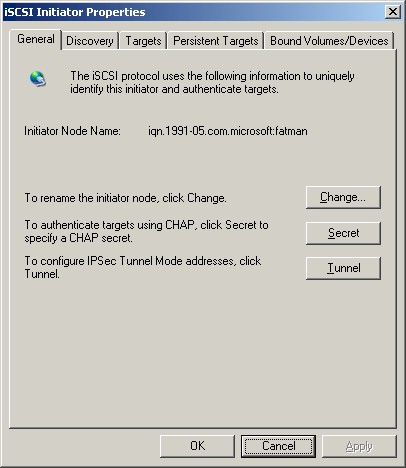
Figure 1: Windows iSCSI Initiator – General
I first made sure that iSCSI target support was enabled on the MN4L+ and that an iSCSI volume was created. I then moved to the Discovery tab (Figure 2) and entered the MN4L+’s IP address. I was a bit puzzled that there was no connection confirmation, so I wondered whether I had actually connected. But I later learned, when I tried to enter an IP address that did not have a valid target, that the Add Target Portal window just stays up and you eventually get an error message in that case.
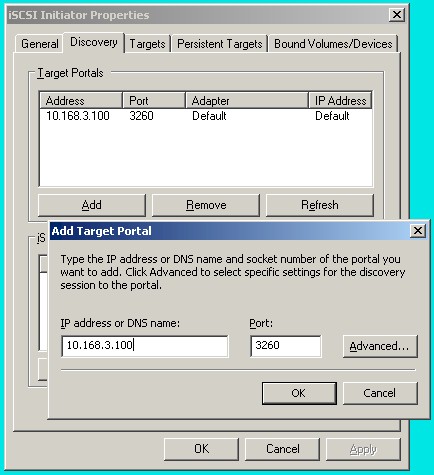
Figure 2: Windows iSCSI Initiator – Discovery
Clicking on the Advanced button brings up the Advanced Settings window (Figure 3), which contains logon options, including settings for CHAP authentication for secured targets.
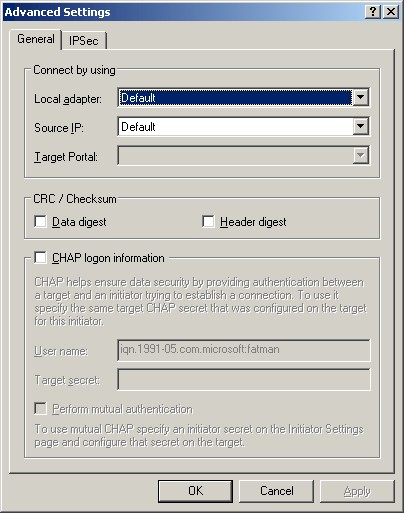
Figure 3: Windows iSCSI Initiator – Advanced Settings – General
The Advanced Settings – IPsec tab (Figure 4) allows the use of a secure IPsec tunnel secured with a Pre-shared Key for both authentication and data transfer for those targets that support it.
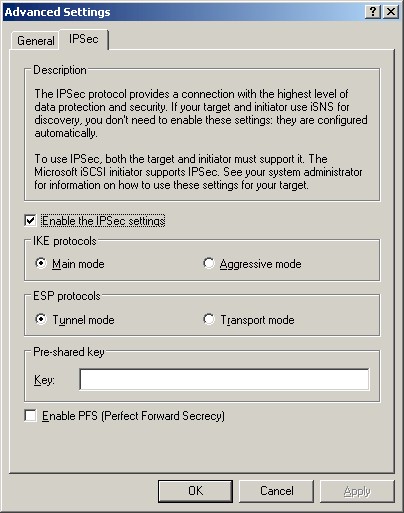
Figure 4: Windows iSCSI Initiator – Advanced Settings – IPsec
Windows iSCSI – more
Once you are connected, you just move to the Targets tab, which should show available targets with an Inactive status, since you have not yet logged in. A click on the Log On button brings up another small window, where you can optionally enable automatic connection restoration at boot time. The multi-path options allows for using redundant network connections to ensure availability.
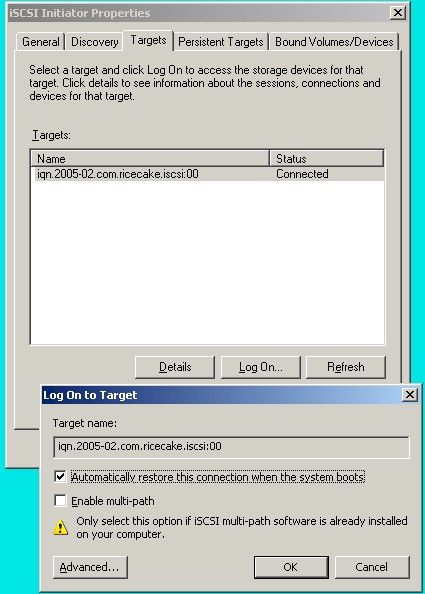
Figure 5: Windows iSCSI Initiator – Target logon
Sharp-eyed readers will notice the different target name in Figure 5. The "ricecake" refers to Youngzsoft’s iSCSI Cake (CCDisk), an iSCSI Target app for Windows 2000/XP/2003 and Vista. The full version costs $199, but the download supports 10 users for 15 days. It was very easy to use and worked the first time and is a good way to experiment with iSCSI without having to purchase an iSCSI NAS.
After I clicked the OK button, I opened My Computer but didn’t see a new drive mounted. So I opened up the MMC Disk Management utility. Figure 6 shows the status of the mounted iSCSI volume after I jumped through two more hoops.
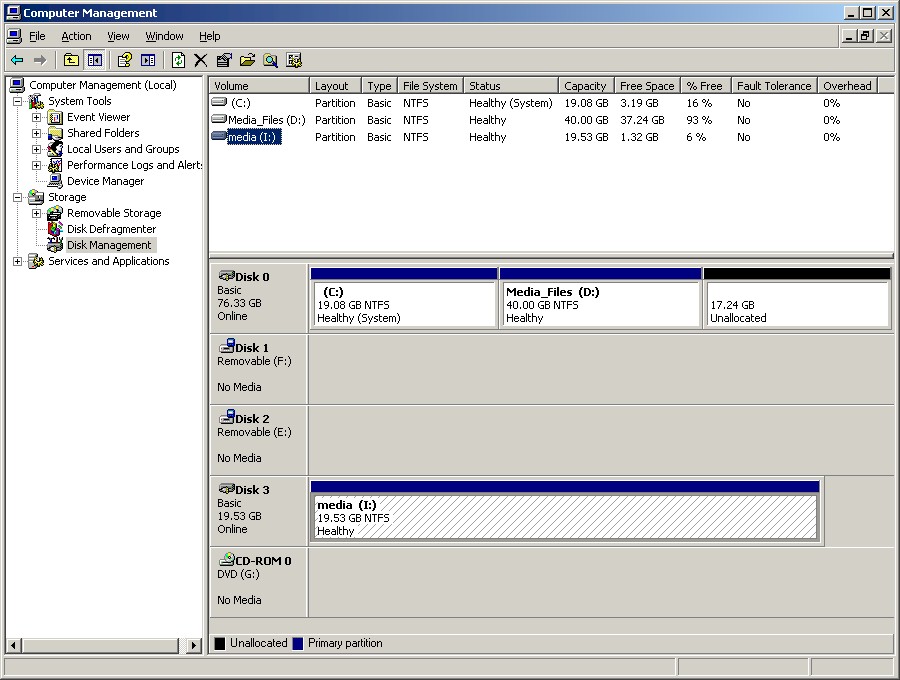
Figure 6: Disk Management
I first had to initialize the drive (right-click on the drive name / icon and select "Initialize disk") and then format it in NTFS, since the MN4L+ didn’t provide that option. Once I did that, I was good to go and the drive now appeared in My Computer.
In the case of the iSCSI Cake, I had chosen my other computer’s D drive as the iSCSI target. So as soon as I logged into it, the drive appeared ready for use in My Computer.
Testing
I used the new iozone machine described earlier that has been used for all other testing in this series (Core 2 Duo E4400, 512 MB DDR2 667 RAM, onboard Intel 82566DM-2 PCIe Ethernet). The MN4L+ had four 1TB drives configured in a RAID 5 array and the iozone client and NAS were connected via gigabit Ethernet with no jumbo frames.
Figures 7 and 8 show comparisons of write and read performance of four iozone test runs:
- iozone running under Vista SP1; MN4L+ connected via iSCSI
- iozone running under Vista SP1; MN4L+ connected via SMB/CIFS
- iozone running under XP SP2; MN4L+ connected via iSCSI and Windows iSCSI Initiator
- iozone running under XP SP2; MN4L+ connected via SMB/CIFS
There are a few things of interest here. The first is that XP was significantly faster than Vista for smaller filesizes for both write and reads. But the two OSes swapped positions at the 32 MB filesize for writes, but never for reads.
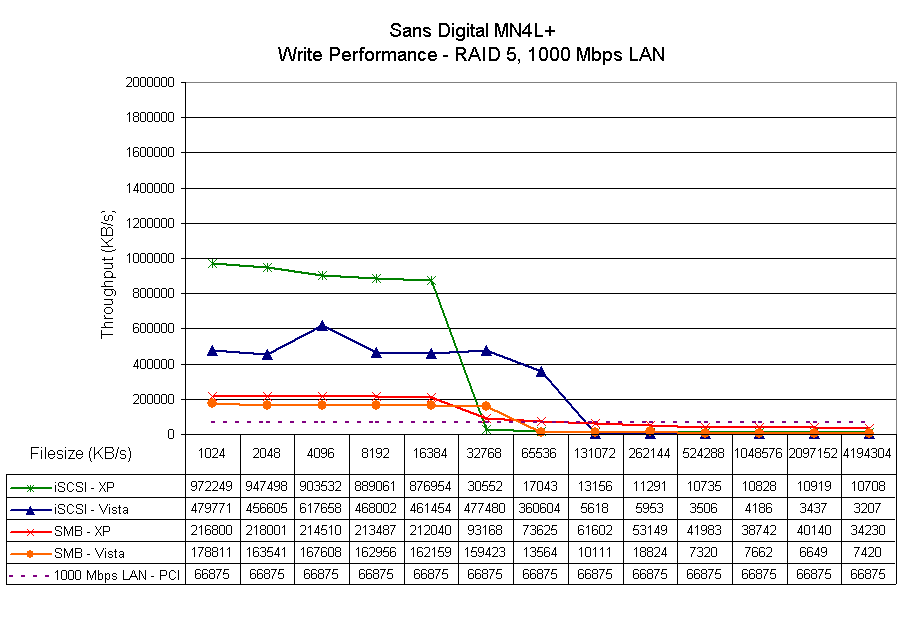
Figure 7: iSCSI, SMB/CIFS write performance comparison
The other interesting thing is that the improved performance disappears as the filesize being transferred approaches client RAM size. Keep in mind that the MN4L+ has 2 GB of memory, so it’s clear that the performance falloff is a client-side effect.
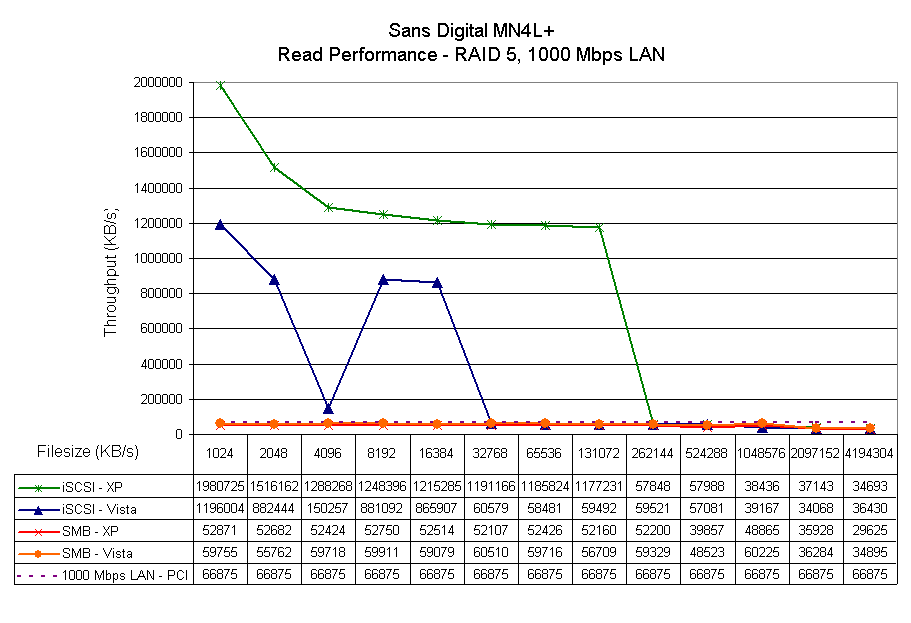
Figure 8: iSCSI, SMB/CIFS read performance comparison
Since it’s impossible to see what’s going on in the larger filesizes, I reduced the Y axis scale by a factor of 10 so that we could look at performance differences in Figures 9 and 10.
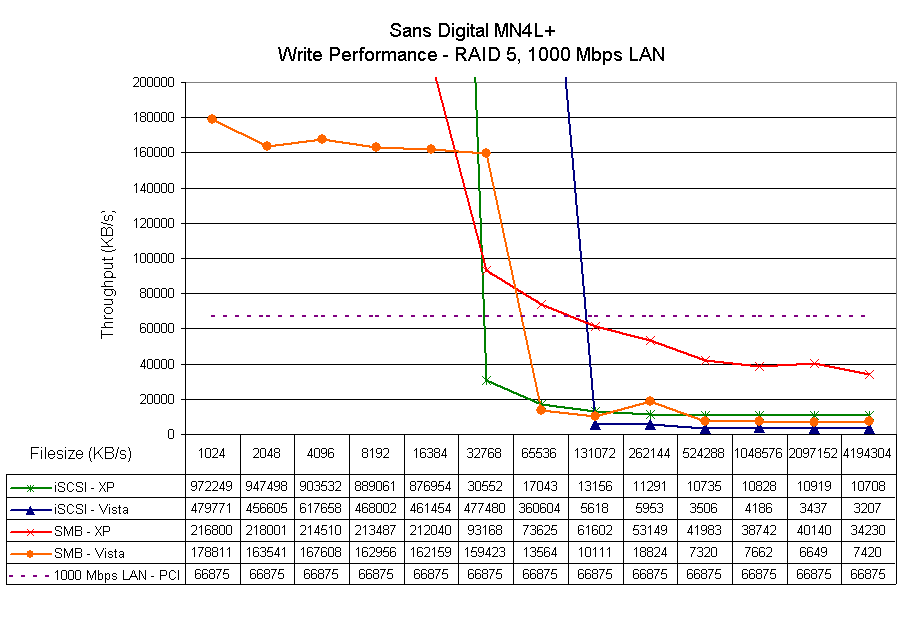
Figure 9: iSCSI, SMB/CIFS write performance comparison – expanded
It’s interesting that XP with SMB transfers maintains a much higher level of performance for writes than all the other combinations, with iSCSI under Vista turning in the lowest performance for file sizes 128 MB and above.
That combination doesn’t have an edge for reads, however. For file sizes 256 MB and above, SMB under Vista seems to provide a slight advantage.
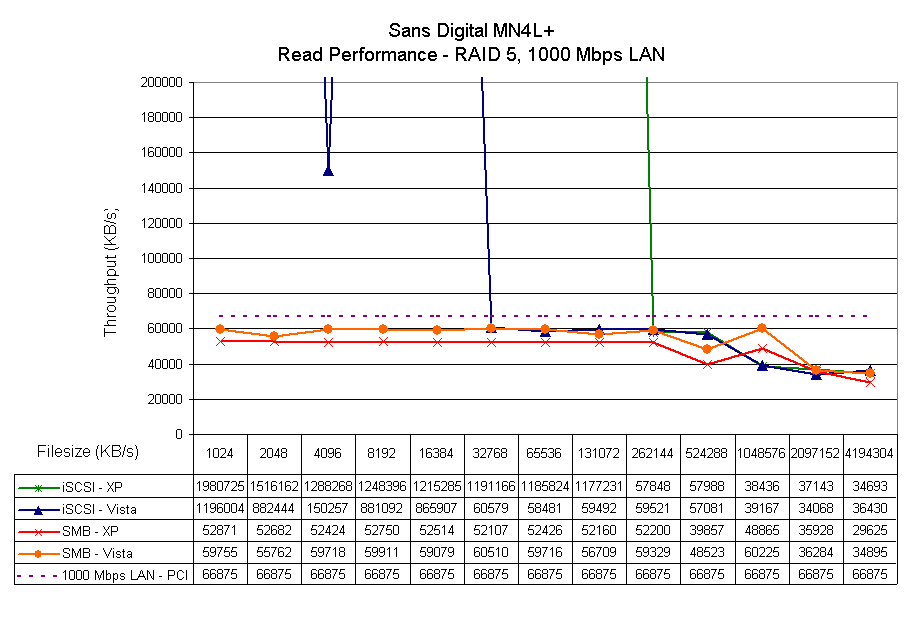
Figure 10: iSCSI, SMB/CIFS read performance comparison – expanded
As a sanity check, I decided to do some timed drag-and-drop file copies using Vista. I copied a 2.4 GB folder that had a couple of ripped 1 GB VOB files and two other small files. The two machines used were Core 2 Duo iozone machine described earlier and a Win XP SP2 2.4GHz P4 , 512 MB machine running the iSCSI Cake Target software with default settings. The results are summarized in Table 1.
| Mode | Write | Read | ||
|---|---|---|---|---|
| iSCSI | 694 s | 3 MB/s | 74 s | 32 MB/s |
| SMB/CIFS | 407 s | 6 MB/s | 82 s | 29 MB/s |
Table 1: Drag-and-drop filecopy results
Although these results don’t match the iozone results exactly, they do track in a relative sense. They confirm that for large files at least, SMB beats iSCSI handily, while for reads, not so much.
Closing Thoughts
I am not an expert on iSCSI (nor do I play one on TV) and I have only scratched the surface of a very broad subject in this short experiment. But if you’re looking for a quick and dirty way to improve file transfer performance in your small network, iSCSI doesn’t look like it will do the trick.
However, since Microsoft has made it easy on the initiator end and iSCSI Cake gives you 15 days to play for free, why not try it for yourself and let me know how you make out over in the Forums?