

Introduction
Updated 3/16/2009: Added LinkStation Live CHL in Performance Section
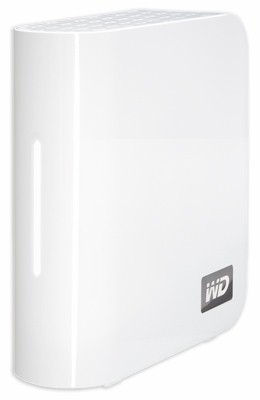
| At a Glance | |
|---|---|
| Product | Western Digital MyBook World "White Bar" (WDH1NC10000N) |
| Summary | Much faster version of WD’s best-selling single-drive NAS with media serving and more |
| Pros | • 3 to 5 X faster than the original MBW • Low Power consumption • Very good performance vs. price |
| Cons | • Only one USB port • Problematic USB drive formatting • Can’t schedule USB backups |
Spring is a time of rebirth and it seems that some NAS makers are taking the season to heart. I recently looked at Buffalo’s successful revamping of its LinkStation Pro, which includes significantly improved performance. This time, it’s Western Digital’s popular MyBook World single-drive NAS.
The original MyBookWorld has always been a puzzle. It has been a top-seller—at least if Pricegrabber’s "By Popularity" view can be trusted—but also one of the slowest NASes available. This seems to contradict my view (and that of many SmallNetBuilder readers) that high performance is an important NAS spec.
But despite WD’s ability to sell a lot of pretty slow MBWs, there was someone in WD that believed that they needed to raise their game. Because, like the LinkStation Pro XHL, the new MBW features a 2 to 1 improvement in performance.
WD has not renamed the new MBW, since it has discontinued the original model that featured two concentric blue rings on its front panel. But the two new versions, which I’ll refer to as "White Bar" (since that is the most identifiable feature) have been given new part numbers: WDH1NC10000 for the 1 TB version; and WDH1NC20000 for the 2 TB. WD sent the 1 TB version. (The old version part numbers all start with WDG1NC, so I suppose I could alternatively refer to the new models as the "H" series", but I think "White Bar" is snappier.)
The White Bar’s glossy white enclosure is similar in size and design to the old model and it still has only a single USB 2.0 port on the rear panel (Figure 1). With the change from the blue rings to white bar, the power switch has been moved to the rear.
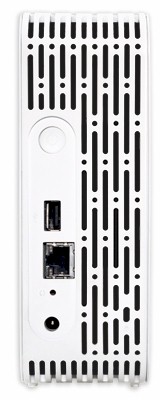
Figure 1: Rear panel
The XHL draws only 9 W when active and 5W when drive "standby" occurs after "two to seven minutes", according to the User Guide. You can only enable / disable the standby feature; you can’t change the time. There is no fan, so the White Bar runs very quietly, with only occasional muted drive noise.
Internal Details
Getting the White Bar open was relatively easy once I discovered the two plastic tabs under the front two rubber feet. You need a bit of dexterity (and perhaps another pair of hands) to depress each tab and gently pry the case apart from the front edge.
Figure 2 shows the 1 TB WD Caviar "Green" (WD10EADS) drive, which is mounted on a sheet metal frame that is isolated from the plastic case by four rubber mounts. Since the Caviar "Green" also comes in a 2 TB flavor, I assume that’s what is in the 2 TB version of the White Bar.
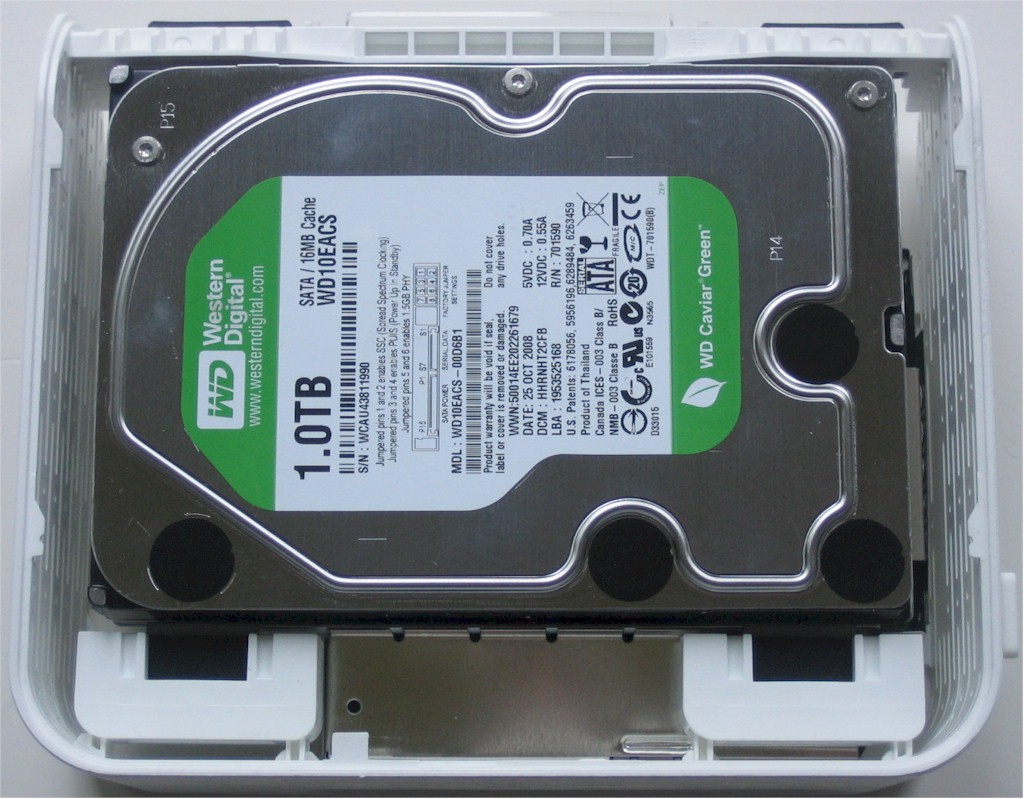
Figure 2: Inside view – drive side
Figure 3 shows the opposite side, revealing a spot for a fan that was apparently not needed and the board encased in a metal shield.
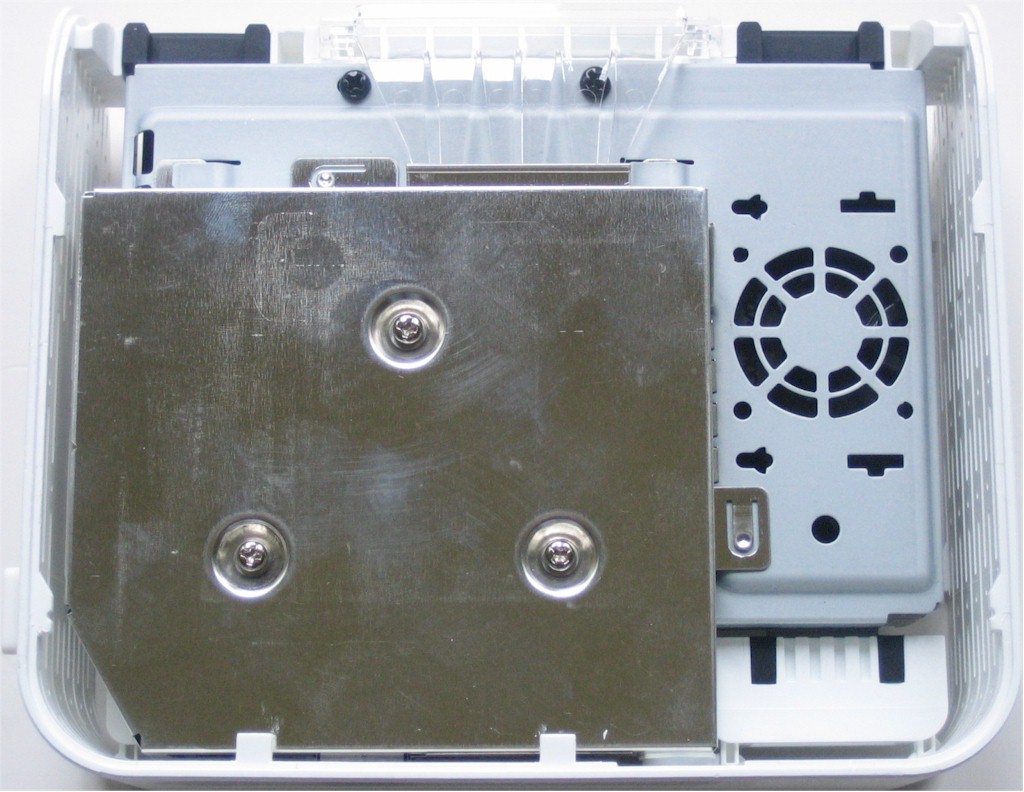
Figure 3: Inside view – board side
Figure 4 shows the board after being detached from the drive (the SATA power / data connector is on the right) and removed from the shield. Instead of the Marvell "Kirkwood" processor used in the Buffalo XHL, WD has chosen to stay with Oxford Semiconductor (acquired by PLX Technology at the start of 2009).

Figure 4: WD MBW "white bar" board
The Oxford OXE810DSE is a dual-channel version of the OXE810SE used in the Iomega Home Media Network Hard Drive. Both Oxford devices include an 367 MHz ARM926EJ-S processor with 32 Kbyte caches & MMU and 128 Kbyte of on-chip SRAM. The only difference between them is that the 810DSE includes a second SATA port and a RAID controller supporting span, RAID 0 and 1.
This choice of the dual-port controller is a bit odd, given that the board has no room for a second SATA connector. But I’m sure WD must have a good reason, since I’m sure that the dual-port chip costs more than the single-port version.
Rounding our the design is only 128 MB of DDR2 RAM and an LSI ET1011C2 Gigabit Ethernet transceiver, which supports up to 9K jumbo frames. RAM size is significantly increased from the 32 MB in the original MBW and is also more than the 64 MB in the Iomega HMNHD. But it’s half the 256 MB in the new Buffalo LinkStation Pro XHL. There is no flash on the board, so the OS must be on a drive partition.
Features
Aside from RAID, the White Bar has more in common with the WD ShareSpace than the original MBW. This means that you now get both iTunes and UPnP AV / DLNA media serving and support for NFS and AFP (the ShareSpace did not support AFP when we reviewed it). In fact, you can use the ShareSpace slideshow (except for the RAID configuration screens) to explore the White Bar’s admin interface. Figure 5 shows the White Bar’s Network > Services page, displaying NFS and AFP support.
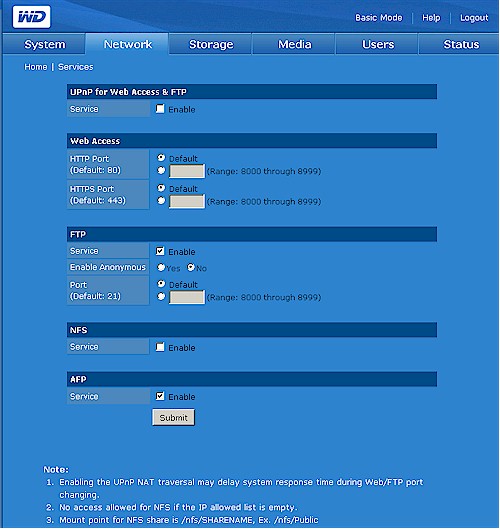
Figure 5: Services page
Here is a quick feature summary:
- NFS, AFP, SMB/CIFS network filesystems
- User-authenticated and anonymous FTP
- User and group level permissions
- HTTP and HTTPS web administration
- Backup from and to USB-attached drive
- iTunes and UPnP AV / DLNA (TwonkyMedia) server
- HTTP and FTP Download manager (no Torrents)
- Email alerts
- Remote access to shares via MioNet Web service
Although the new features are a welcome improvement, the White Bar still doesn’t support BitTorrent downloading, nor USB print serving. There is also no photo serving, nor LAMP support for running a web server, as you’ll find on higher-priced QNAP and Synology products. And you won’t find browser-based media players, like those on the Linksys MediaHub or new HP MediaSmart. But if you’re looking for something at the MyBook World’s price-point, you’re probably prepared to forego those kinds of features anyway.
But many people do buy NASes for backup, and the MBW White Bar has a mixed story there. On a positive note, it supports read and write to an attached USB drive formatted with FAT, NTFS or its native HFS filesystem. But the backups are not schedulable, so can’t provide regular unattended backup.
There is also no built-in ability to back up to a networked share, or even another WD NAS. Nor is there any online or "cloud" backup like the HP MediaSmart’s backup to Amazon S3 or the NETGEAR ReadyNAS Pro’s recently-added ReadyNAS Vault service using ElephantDrive.
The other backup change is that WD is now bundling 5 licences of Memeo Backup (rebranded as WD Anywhere Backup) instead of EMC’s Retrospect, perhaps as a result of EMC now also owning competitor Iomega. You can’t use this program to back up the MBW itself, however, even if you map its shares as drives.
In Use
As noted earlier, using the MBW White Bar is more like driving the WD ShareSpace than the now-defunct original MBW. Browsing the admin pages is rather sluggish, however, even without using HTTPS.
I fired up iTunes, which showed a MyBookWorld entry along with the iTunes server running on my ReadyNAS NV+ in the itunes Shared section. But when I dragged a few folders of music over to the MBW Public/Shared Music folder, it didn’t appear in iTunes. I had to browse to the MBW’s Media > iTunes page, set the Check for new music every selector to 5 minutes and wait for the MBW to build the iTunes library file. Once the music showed up in iTunes, I had no problems playing it.
Figure 6 shows another change from the ShareSpace—the addition of a UPnP AV / DLNA media server.
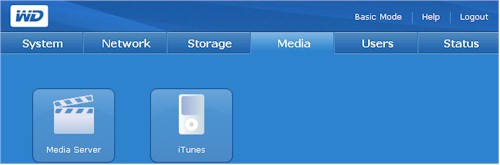
Figure 6: Media services
Clicking the Media Server icon reveals the Media Server as the highly-regarded and widely-used TwonkyMedia server (Figure 7).
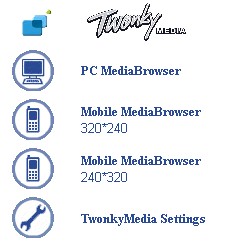
Figure 7: Media Server landing page
I also checked out the MioNet Remote Access and found that it’s the same (at least as far as I could tell) as the last time I looked at it on the ShareSpace. I was surprised to find the ShareSpace’s shares still showing, but greyed-out. I couldn’t find any way to delete them, however, so I guess they’ll live on in cyberspace forever (or as long as MioNet lasts).
Performance
I put the MBW White Bar through our new test process after upgrading it to 01.00.10 firmware. Upgrading was painless, by the way, done entirely in the browser without having to first download a file, then upload it to execute the upgrade. Tests were run with 100 Mbps, 1000 Mbps and 1000 Mbps with 4k jumbo LAN connections.
Continuing with my resolution to test NAS backup, I connected the Iomega UltraMax Pro Desktop Hard Drive configured in RAID 0 for maximum performance. I then copied the 4.35 GB ripped DVD test folder that I use in the NAS Chart Vista SP1 file copy tests to one of the MBW’s shares.
I should say that I copied the test folder after first trying unsuccessfully to format the drive using the format feature (Figure 8, left icon, right is safely remove drive). You don’t get a choice of formats, but the User Guide says "When formatting a USB hard drive, only one partition is created and the partition is formatted as FAT32". This means that you are stuck with a file size limit of 4 GB if you let the MBW do the formatting.
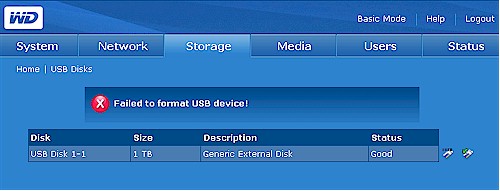
Figure 8: USB drive format failure
However, after multiple formatting failures, I gave up on having the MBW format the drive and instead formatted it with NTFS using a Windows XP SP3 system. I suspected, however, that the NTFS format would result in abysmally slow backup performance and I was right—1.47 MB/s in my test. I suspect that formatting with HFS+ would yield the best performance and even FAT32 would be faster. But I didn’t test either of these since I didn’t have HFS+ or large-drive FAT32 formatting capability handy.
Figure 9 presents a summary of the benchmark tests run for the MBW White Bar, with only the 1000 Mbps and 1000 Mbps + 4K jumbo frame results plotted. Cache effects are evident for write file sizes below 256 MB. Once you hit 512 MB file sizes and higher, however, there is no boost due to jumbo frames and read speeds run about 2X write.
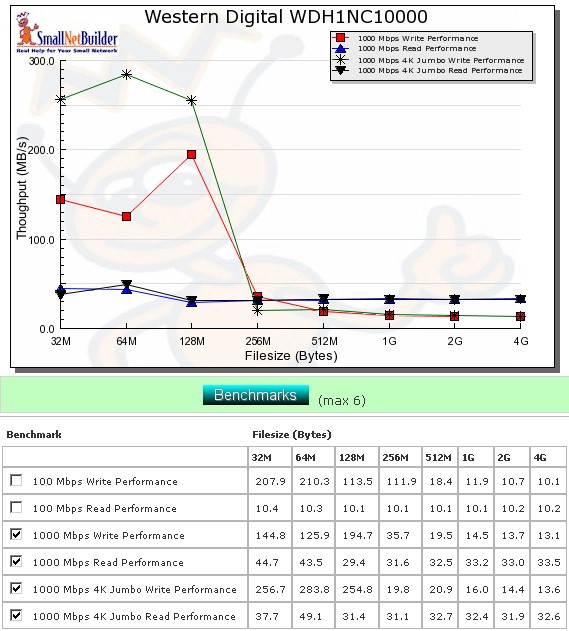
Figure 9: Performance benchmark summary
Write performance averaged over the 32 MB to 4 GB file sizes comes in at 70.2 and 110 MB/s for 1000 Mbps and 1000 Mbps + 4K jumbo connections respectively, results that are obviously influenced by the cache effects mentioned above.
Read speeds averaged a more realistic 35.2 and 34.9 MB/s for 1000 Mbps and 1000 Mbps + 4K jumbo connections. This ranks the MWB White Bar in the #2 slot for 1000 Mbps read when you filter the NAS Chart for just single drive NASes.
The MBW White Bar didn’t do as well for writes in the Vista SP1 filecopy testing, measuring only 12.8 MB/s, which is closer to the iozone results for larger file sizes. Read speed was better, however, at 31.5 MB/s.
Performance – Competitive
Moving on to a competitive comparison, Figure 10 shows the MBW’s read performance with a 1000 Mbps LAN connection vs. the Buffalo "Pro" XHL, Iomega Home Media Network Hard Drive (HMNHD), original MyBook World and the WD ShareSpace.
As expected, Figure 10 shows the Buffalo XHL turning in the fastest read performance, with the MBW White Bar in close pursuit and the Iomega HMNHD not far behind it. I’m not surprised to see the original MBW at the bottom of the pack, but was a bit surprised at the ShareSpace was only a little more than half as fast as the MBW White Bar.
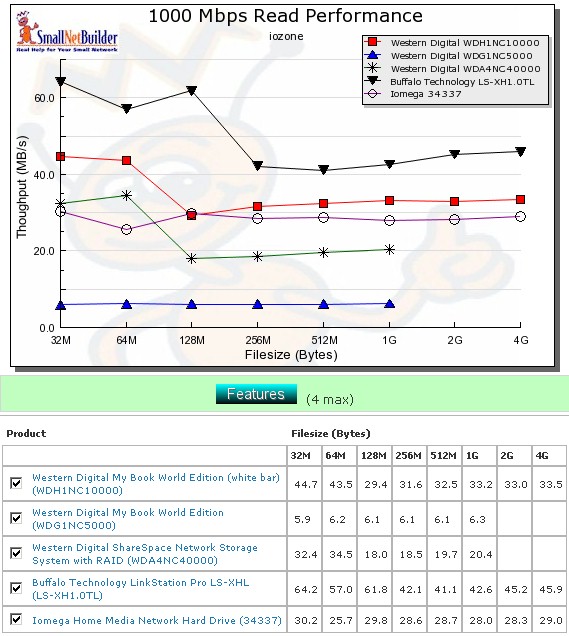
Figure 10: Competitive read comparison – 1000 Mbps LAN
Figure 11 compares the write performance, which is compressed by the cached performance of the Iomega HMNHD and the MBW White Bar up to the 256 MB file size point. So concentrate on the results in the table from 512 MB to 4 GB. The Buffalo XHL still comes in at twice as fast as both the MBW White Bar and Iomega HMNHD and the White Bar writes 3X faster than the original MBW.
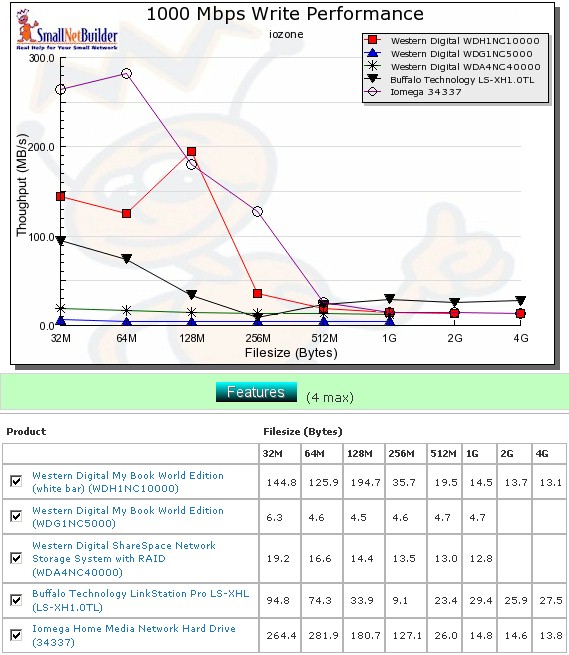
Figure 11: Competitive write comparison – 1000 Mbps LAN
Updated 3/16/2009
WD told me that they see the 1 TB versioin of Buffalo’s LinkStation Live CHL as the MBW White Bar’s competition, given that they both have $229 MSRP’s vs. the 1 TB Pro’s $299 MSRP. So here are some quick comparison plots of the MBW White Bar, LinkStation Pro XHL and LinkStation Live CHL.
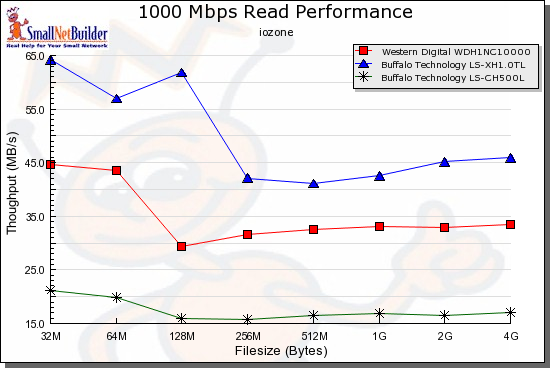
Figure 12: Competitive read comparison w/ LinkStation Live CHL – 1000 Mbps LAN
The MBW White Bar clearly outperforms the LinkStation Live CHL about 2X for reads, but is fairly well-matched but maintaining a slight lead for writes.
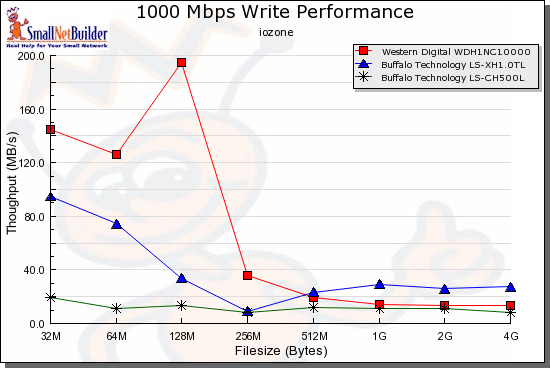
Figure 13: Competitive write comparison w/ LinkStation Live CHL – 1000 Mbps LAN
Closing Thoughts
I’m very happy to see Western Digital finally show that it can bring some of the performance focus that it has with its hard drive design to its NASes. Although the MBW isn’t the fastest, baddest NAS on the planet, it ranks right up with the new generation of large-capacity single-drive NASes exemplified by it, Buffalo’s LinkStation Pro XHL and Iomega’s HMNHD.
Between the three, I’d pay a bit more and go with the Buffalo, mainly due to its ability to perform unattended backups either to an attached USB drive or another networked Buffalo NAS. It’s also the best performer of the group.
But if you liked the original MyBook World and are looking to step up to a roomier version, the "White Bar" will give you just what you want along with a significant boost in performance and even throw in media and iTunes servers to make a good deal even sweeter.