

Introduction
Updated 11/11/2008: MacOS version of Storage Manager is available.
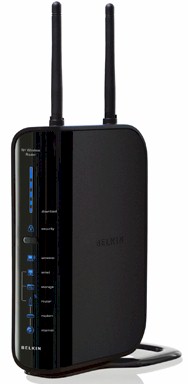
| At a Glance | |
|---|---|
| Product | – Belkin N+ Wireless Router (F5D8235-4) – Belkin N+ Wireless USB Network Adapter (F5D8055 v1) |
| Summary | Single-band Draft 2.0 802.11n router with gigabit switch based on Ralink chipset |
| Pros | • Gigabit switch supports Jumbo Frames • Guest access w/ captive web portal and AP modes • Network sharing of USB flash or hard drive |
| Cons | • Basic routing feature set • No control of file sharing feature • Very slow file sharing |
Belkin is in the process of revamping at least the lower end of its draft 11n router line, which includes the Belkin N and N+ Wireless routers. I looked at the Belkin N as part of our Cheap Draft 802.11n Router Roundup. It actually did pretty well, but I couldn’t give it top ranking because I couldn’t attach it to the Azimuth test system that was used to test all the other products in the roundup. The “N” has since received a packaging makeover so that it looks similar to the N+, which is the focus of this review.
Like the “N”, the N+ is a two-antenna router based on Ralink silicon (more shortly). But where the “N” has 10/100 WAN and LAN ports, the N+’s WAN and four switched LAN ports are gigabit. The N+ also has a USB port that will make a USB flash or hard drive available as a networked share.
Figure 1 shows the N+ front panel, which skips the fancy graphic display found on Belkin’s top-of-the-line N1 Vision router [reviewed]. Instead you get the series of backlit blue icons that are used across the board in the revamped router line.
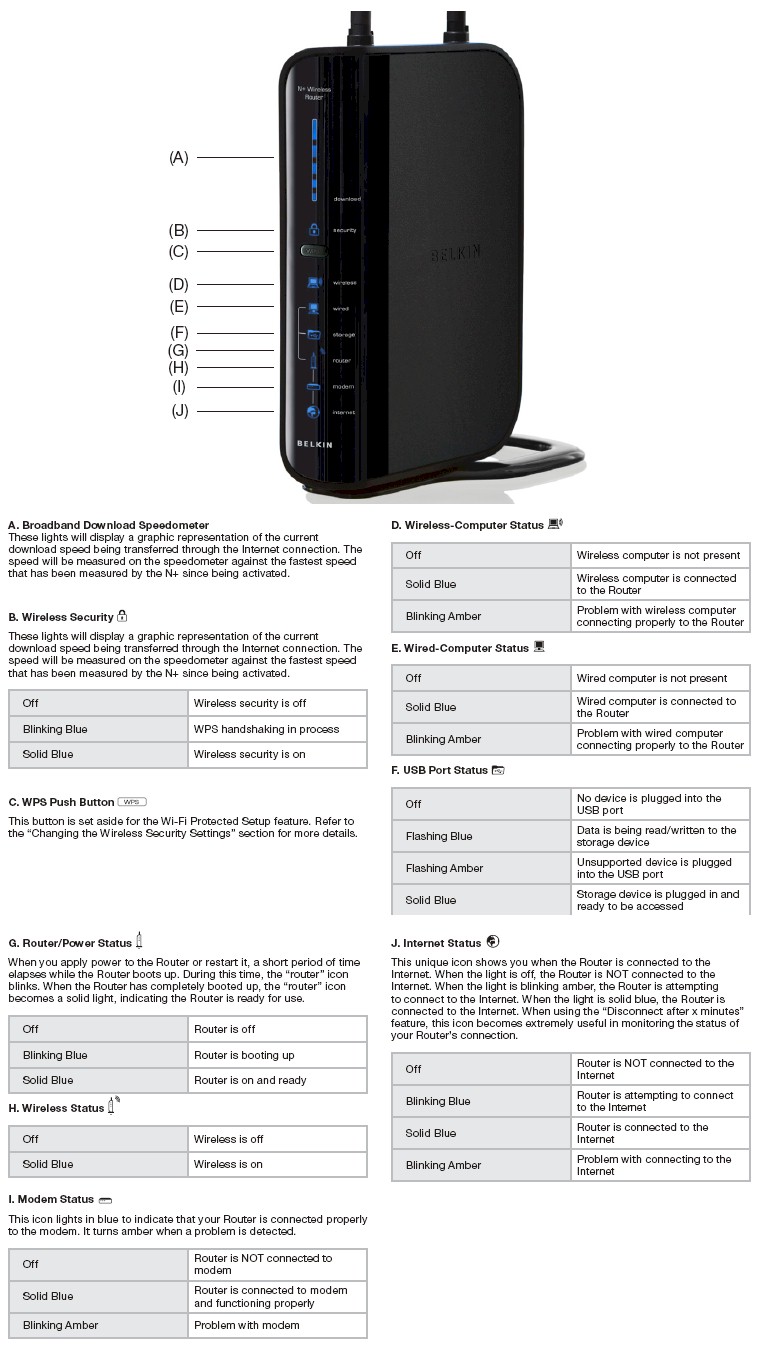
Figure 1: N+ Front Panel
The only nod to gimmickry is the “Broadband Download Speedometer” bar display that sits at the top of the front panel. I didn’t find the speedometer that useful and would much rather have the Wired and Wireless Computer Status lights blink to indicate network activity.
The rear panel layout (Figure 2) doesn’t have link/activity indicators on each of the auto MDI / MDI-X 10/100/1000 Ethernet ports, either.
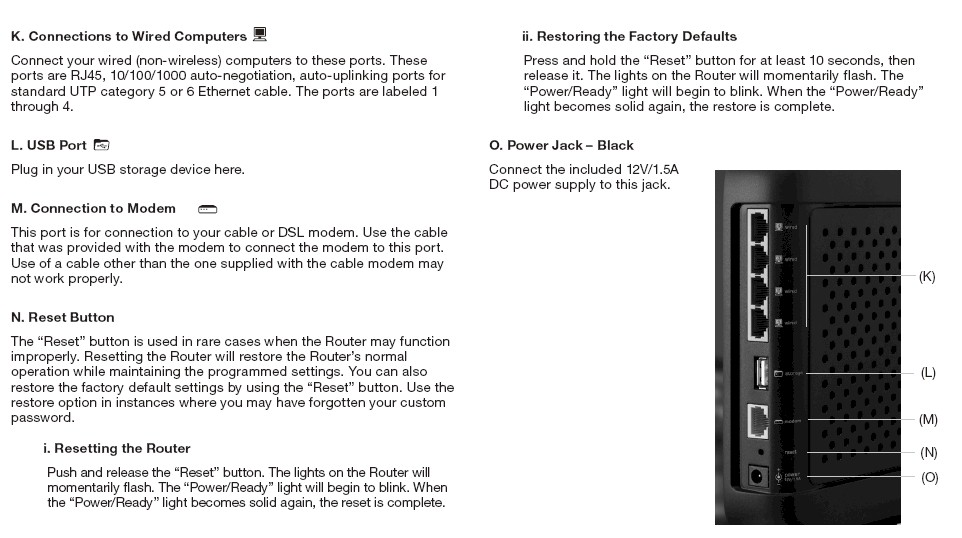
Figure 2: N+ Rear Panel
If you like to wall-mount your router, then you’ll need to build a little wall-mounted shelf for the N+. There are no screw mounting slots and I couldn’t remove the base without fear of breaking it off. Also note that the antennas are external and moveable, but not upgradeable.
Internal details
Figure 3 is a shot of the N+ main board. Like the Belkin N, the N+ uses Ralink’s RT2880 Processor / MAC / BB SoC combined with a Ralink RT2820 2T3R 2.4 GHz Transceiver. The WAN and LAN ports are provided by a Realtek RTL8366SR gigabit switch.
Even though Belkin doesn’t spec jumbo frame support, I ran a quick test on the switch and found that it passed 4K jumbo frames. (The switch chip is spec’d up to 9K frames.) I don’t know for sure what the chip at the upper left in the photo is, but my guess is that it’s a USB interface.
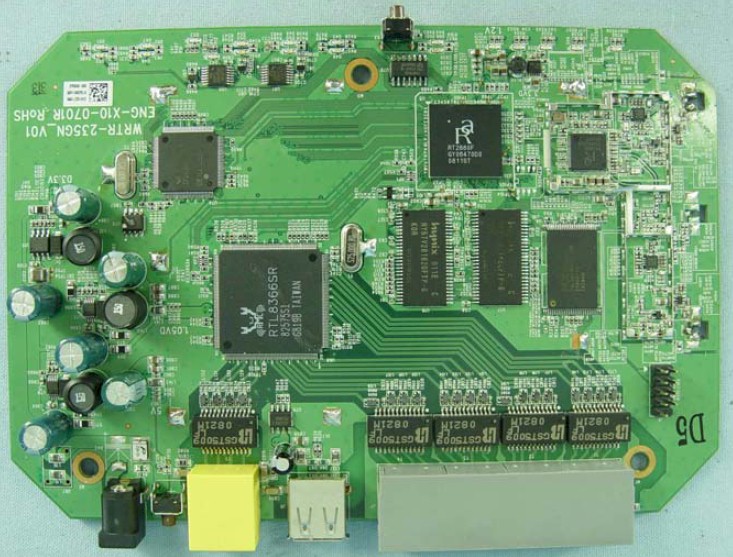
Figure 3: N+ Main board
I partially opened the cover to get a better view of the components, but found that the FCC ID photo (Figure 4) really did represent production product. The big ol’ foil shield isn’t very pretty, but is probably providing some RF shielding for the Realtek switch and some cheap heat sinking, too!
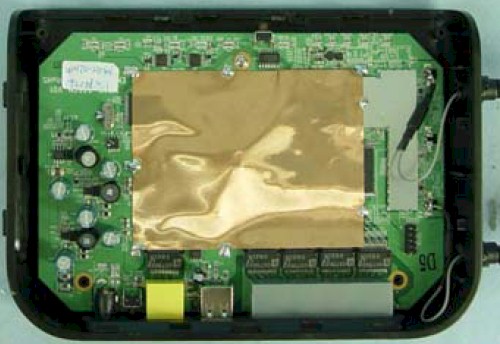
Figure 4: N+ Main board w/ shield
Figure 5 shows the companion Belkin N+ Wireless USB Network Adapter (F5D8055 v1) board that Belkin sent along for the ride. This FCC photo very clearly shows a Ralink RT2870 USB BB/MAC and the same RT2820 Transceiver used in the router.
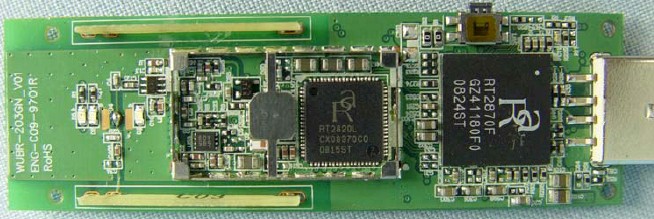
Figure 5: N+ Wireless USB Adapter board
Routing Features and Performance
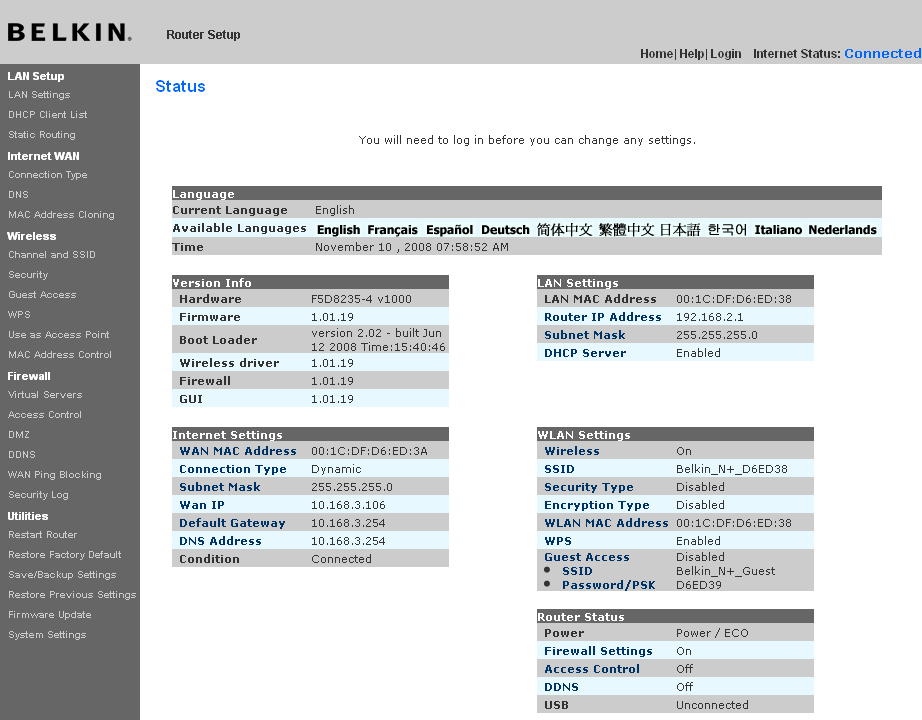
Figure 6: N+ Status Page
The N+ doesn’t bring anything new to Belkin’s routing feature set. Here’s the quick rundown of the routing feature set:
- DHCP, Static, PPPoE, PPTP, L2TP, Telstra BigPond and Multi-PPPoE WAN types
- Built-in Dynamic DNS client for DynDNS
- WAN ping blocking (default enabled)
- Single port and Port Range forwarding
- Simple schedulable outbound port filtering
- Remote management enable with single IP restriction and port setting
- System and firewall logging
- UPnP (default enabled)
- MAC address access control for wired clients
Missing are useful things like:
- Firewall controls like SPI disable and Proxy, Java, ActiveX and Cookie blocking
- IPsec, PPTP and L2TP VPN passthrough enable/disables
- Triggered port forwarding
- DHCP reservations
- HTTPS admin access
- Bandwidth control / QoS for Internet traffic
- Parental controls
- Syslog support and traffic logging
Not much else to say, other than I’d like to see Belkin add some of the features from the “missing item” list some day.
Storage Manager
Updated 11/11/2008: MacOS version of Storage Manager is available.
The Plus joins the Linksys WRT350N and WRT610N as one of the few draft 11n routers to support network sharing of a USB flash or hard drive. In the Plus’ case, however, the feature is very basic; so basic that you won’t find any controls for it in the Plus’ admin pages.
All you do is plug a FAT, FAT32 or NTFS formatted USB flash or hard drive into the Plus’ single USB port. (You actually can plug in a USB hub and share up to four drives, being careful not to draw more than 500 mA of juice from the Plus’ USB port.)
To access the share, you either install the Storage Manager tray application (Windows and MacOS versions come on the dual-mode CD), which just automatically creates a mapped drive. Or you can open a Run box and enter \\192.168.2.1 to access the share.
As with the Linksys routers, the Plus’ file sharing is pretty slow, with read and non-cached writes measuring around 2 MB/s, even with a gigabit Ethernet client. I’ll note that the Storage light on the Plus’ front panel is the only light that flashes to indicate activity!
Routing Performance
I tested routing performance using our standard router tests. All tests were done with the client in DMZ to accomodate IxChariot’s finickyness with SPI+NAT firewalls. The results are summarized in Table 1 below.
| Test Description | N+ Throughput (Mbps) |
N Throughput (Mbps) |
|---|---|---|
| WAN – LAN |
125.5
|
66.4 |
| LAN – WAN |
131.5
|
87.4 |
| Total Simultaneous |
128.7
|
80.4 |
| Maximum Simultaneous Connections | 200 | 128 |
| Firmware Version |
1.01.19
|
4.00.02 |
Table 1: Routing performance summary
I added the routing throughput numbers for the N for comparison, and there certainly is a difference! With a total simultaneous throughput of 129 Mbps, the N+ is 60% faster than the N and also maxed out our 200 connection limit on the Maximum Simultaneous Connection test.
Figure 6 shows a composite of WAN to LAN, LAN to WAN and simultaneous up/down IxChariot routing throughput tests. Throughput is generally well-behaved, except for the occasional dropouts and spikes.
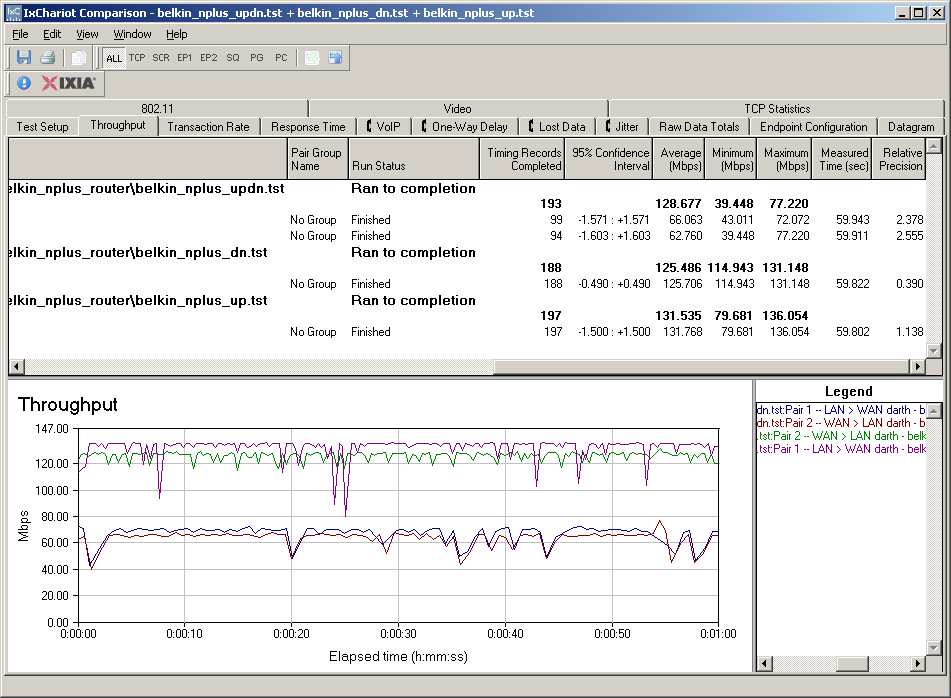
Figure 6: N+ routing performance
Wireless Features
The Plus’ wireless settings are the same as those on the N and N1 Vision with the Channel and SSID page containing all controls except wireless security. The Plus properly defaults to legacy-friendly 20 MHz channel mode and has a unique SSID that includes the last six characters of its MAC address.
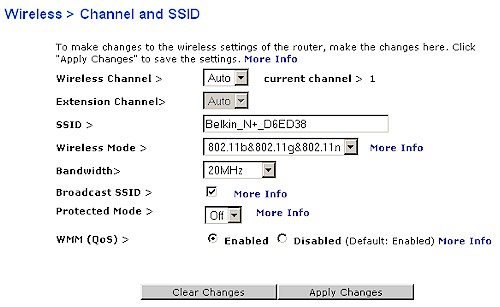
Figure 6: N+ Wireless Channel and SSID settings
Channel selection defaults to Auto, or you can set the channel with the Wireless Channel dropdown. The Extension Channel control is carried over from the N1 Vision. It is properly grayed-out in 20 MHz only Bandwidth mode and active only when the 20/40 MHz mode is selected. But when your Wireless Channel selection allows it, it lets you choose between two extension channels.
For example, if the Wireless Channel is set to 1, then there is only one choice, i.e. 5, for the Extension Channel, which is always four channels away from the Wireless (Primary) channel. But if the Wireless Channel is 6, then you can choose Channel 2 or 10 as the Extension.
Wireless modes supported are 802.11b&802.11g&802.11n (default), 802.11g&802.11b, 802.11n only and Off. You can also turn the radio off on schedule using the ECO Mode controls found on the System Settings page (Figure 7).
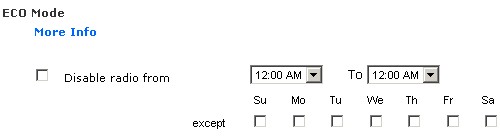
Figure 7: ECO mode radio disable
Another handy feature is the Use as Access Point option, which saves the hassle of moving LAN cables and disabling the DHCP server to use the Plus’ wireless with an existing router. You just enable the option and enter an unused IP address (and subnet mask) outside your existing router’s DHCP server range. You can continue to use the switch ports, too, which will be automatically uplinked.
Wireless Security options include WEP and the PSK (Personal) forms of WPA, WPA2 and a mixed WPA/WPA2 mode. Wi-Fi Protected Setup (WPS) is also supported in the Plus and in the Plus USB adapter. Multiple attempts at a push-button WPS session reported success with the router ending up in WPA-PSK/WPA2-PSK TKIP/AES mode. But the client couldn’t successfully lease an IP address from the Plus.
The N+ includes the Guest Access feature found on the N1 Vision, but it has morphed a bit.
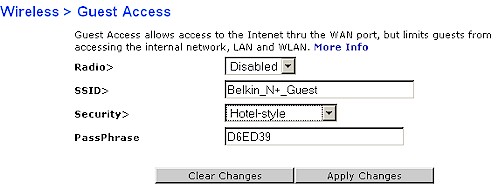
Figure 8: N+ Guest Access
Guest Access now provides two options for accessing a WLAN separated from both wired and wireless LAN clients that has its own SSID. The Hotel-style option is a password-protected captive web portal. Anyone associating with its SSID has to open a web browser and enter the case-sensitive password that has been set. (I tried entering a blank passphrase and was prompted to enter a password.) The second mode secures the separate SSID with WPA/WPA2 TKIP/AES PSK. Note that the Guest connection also doesn’t provide access to the router admin screens.
The second feature is the Vision’s support for Wi-Fi Protected Setup (WPS). Figure 8 shows that both PIN and PBC methods are supported along with manual configuration information for clients that don’t support WPS. Unfortunately, that includes Belkin’s N1 Wireless Notebook Card, which I had to set up manually.
As with other Belkin wireless routers, there is no “Advanced” wireless screen. So you won’t find controls for:
- Transmit rate
- Transmit power
- Base advertised rate
- Client isolation (wireless-to-wireless)
- WDS bridging / repeating
- Frame bursting
- RTS threshold / Beacon, DTM interval
Wireless Performance
I tested using the open air test method described here using a Belkin N+ Wireless USB Network Adapter (F5D8055 v1) inserted into a Fujitsu P7120 Lifebook (1.2 GHz Intel Pentium M, 504 MB) notebook running WinXP Pro SP2 with all the latest updates. I used the latest 1.2.1.0 driver and Belkin’s 3.0.0.12 wireless utility during testing. I left all factory default settings in place, except to set Channel 1 for 2.4 GHz tests.
Figure 9 shows a composite of downlink throughput tests made at the six test locations in the 20 MHz and 20/40 MHz bandwidth modes.. Each column represents the average throughput from a one minute test. Best case downlink throughput in the 20 MHz mode was 61 Mbps and 84 Mbps in 20/40 MHz mode.
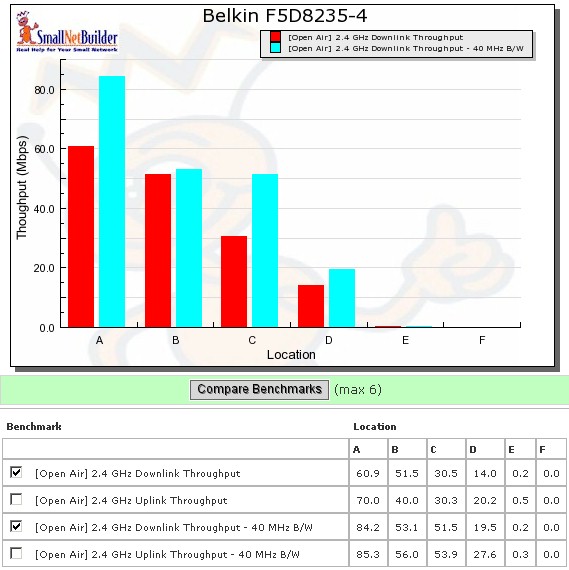
Figure 9: Belkin N+ wireless benchmark summary – downlink
The table in Figure 9 shows 0 for Location F, but the Belkin USB adapter in fact was able to associate to the Plus in that spot. However, there wasn’t enough reliable throughput to either successfully ping or to run a complete test. Actually, I was able to get 0.016 Mbps of throughput running uplink in Location F in 20 MHz mode. But since I round to one decimal point, the chart shows 0.
Figure 10 shows a composite of IxChariot plots for all 20 MHz mode downlink tests. Best case uplink throughput in the 20 MHz mode was 70 Mbps and 85 Mbps in 20/40 MHz mode. Throughput variation seems to calm down a bit with lower signal level. But note the ramp-up in throughput at the beginning of each run. The 40 MHz mode downlink plot is here and shows much more variation in the Location A test.
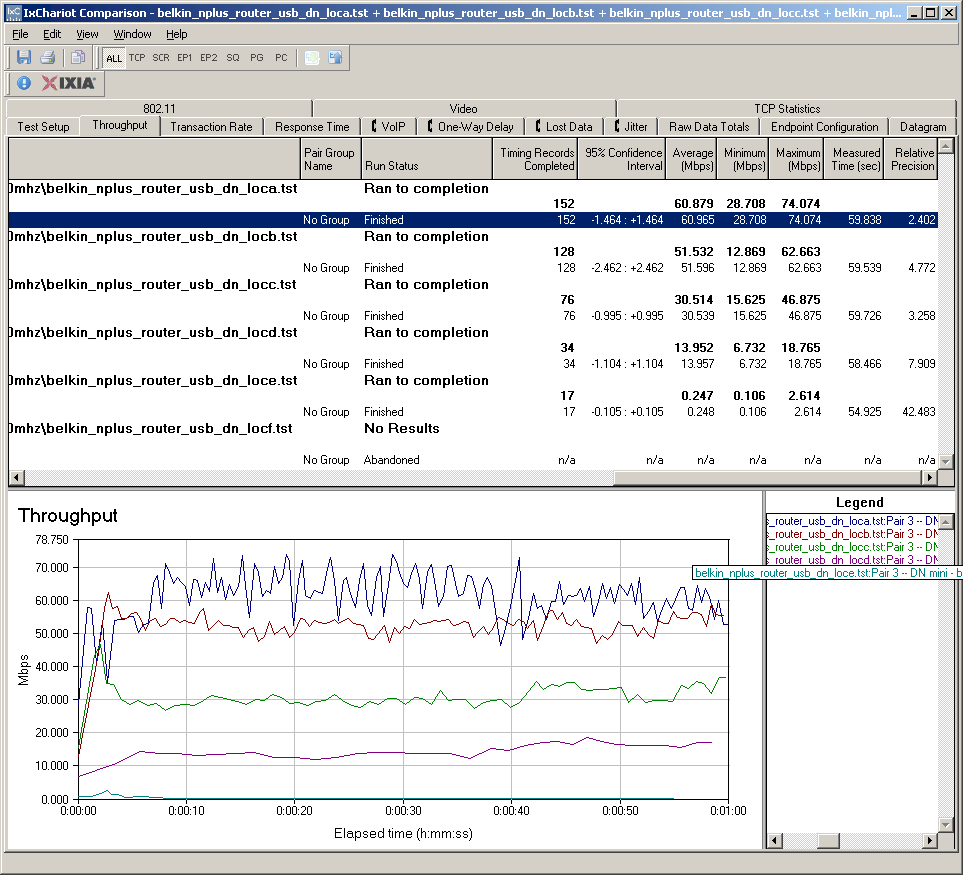
Figure 10:Wireless throughput detail – 2.4 GHz, 20 MHz channel downlink
Figure 11 pulls together all of the uplink average test results, which are reasonably well matched to downlink speeds. As with downlink, using 40 MHz mode in uplink provides an effective throughput boost in the stronger signal test locations A through D.
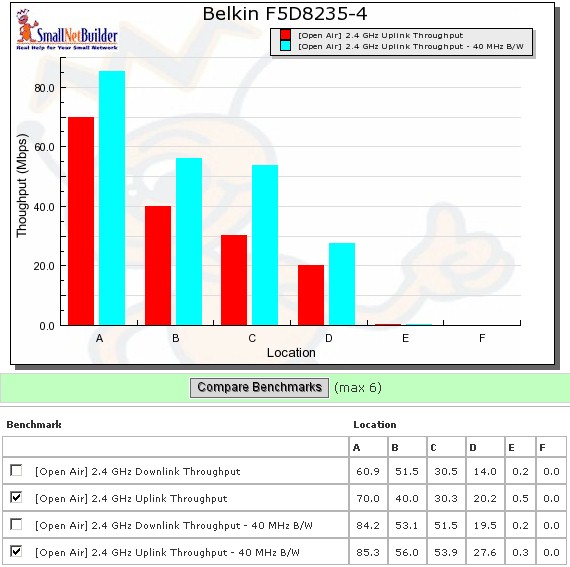
Figure 11: Belkin N+ wireless benchmark summary – uplink
To save space, I’m not going to show the IxChariot plots for uplink. But you can click these links to view large plots for 20 MHz mode and 40 MHz mode.
Wireless Security Performance
I checked for throughput loss in WEP 128, WPA/TKIP and WPA2/AES modes. Unlike products based on other draft 802.11n chipsets, Ralink-based draft 11n products have shown no appreciable throughput loss when run in WEP or WPA/TKIP modes. But the Plus (at least when run with the N+ USB adapter) looks like an exception to that rule.
Figure 12 shows the downlink results for security mode tests run in Location A in the default 20 MHz bandwidth mode. While there is more than 80% drop in throughput when run in WEP 128 mode, WPA/TKIP mode shows a less than 10% loss.
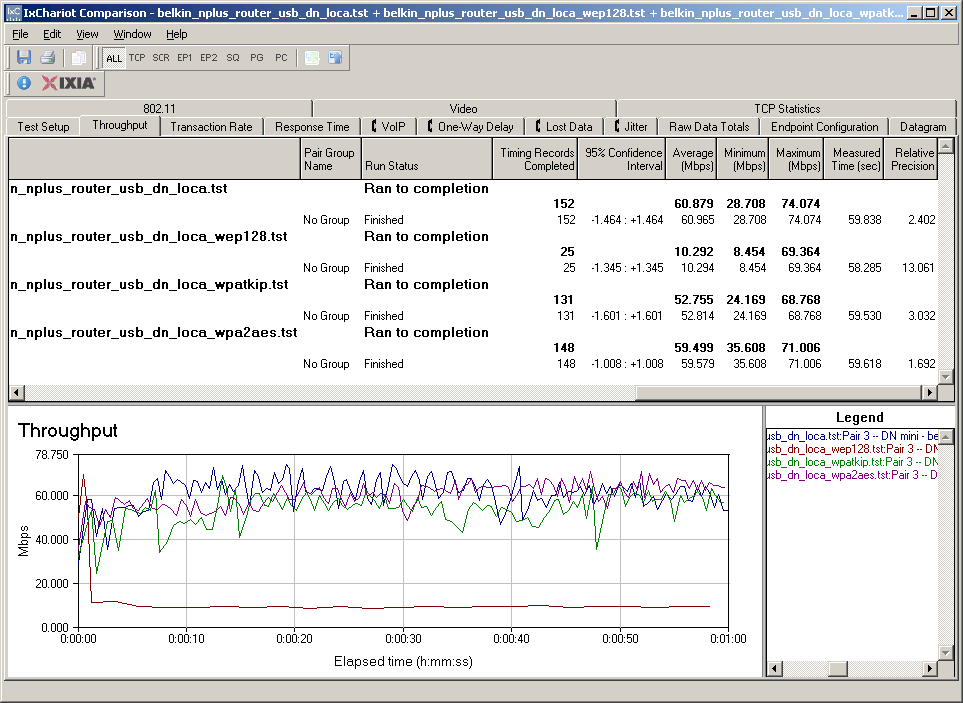
Figure 12: Wireless security tests – 20 MHz mode, downlink
But the uplink results are also different than what I usually see from Ralink-based products. This time there is a 60 – 70% loss in both WEP and WPA/TKIP modes.
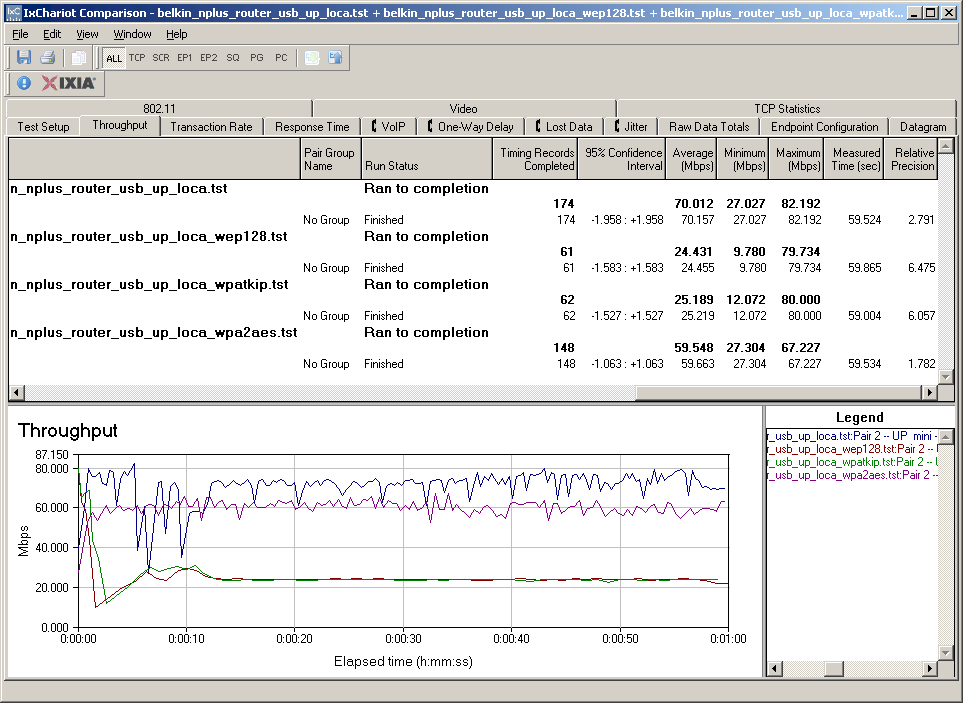
Figure 13: Wireless security tests – 20 MHz mode, uplink
While this is disappointing, it just puts the N+ on par with most other draft 802.11n products.
Wireless Performance – Competitive Comparison
I created a comparison table of best-case open-air throughput for a collection of entry level draft 11n routers for the NETGEAR WNR2000 review. The other products were tested in the Cheap Draft 802.11n Router Roundup. The highest results are highlighted in green, while the lowest are in red.
| Location A Wireless Performance (Open Air, Same Room, 10 ft.) | ||||||
| Belkin N+ | Belkin N |
D-Link DIR-615 |
D-Link DIR-625 |
NETGEAR WNR2000 |
Linksys WRT160N |
|
| Downlink – 20 MHz b/w (Mbps) | 61 | 82 | 56 | 59 | 48 | 58 |
| Downlink – 40 MHz b/w (Mbps) | 84 | 83 | 61 | 69 | 60 | 62 |
| Uplink – 20 MHz b/w (Mbps) | 70 | 80 | 34 | 55 | 34 | 53 |
| Uplink – 40 MHz b/w (Mbps) | 85 | 73 | 63 | 63 | 49 | 66 |
Table 1:Entry-level draft 11n router throughput comparison
For at least "best case" performance, the Belkin N+ and N share the best results honors, while the lowest performer is consistently the NETGEAR WNR2000.
The database of wireless routers with open air test results is growing. So I can also compare the Plus against the NETGEAR WNR2000 in all six test locations. I’m also including the Linksys "RangePlus" WRT110, in the comparison shown in Figure 14, even though Linksys doesn’t call if a draft 11n router.
The Plus does pretty well in the stronger-signal Locations A-C. But as signal level falls off, so does the Plus’ throughput.
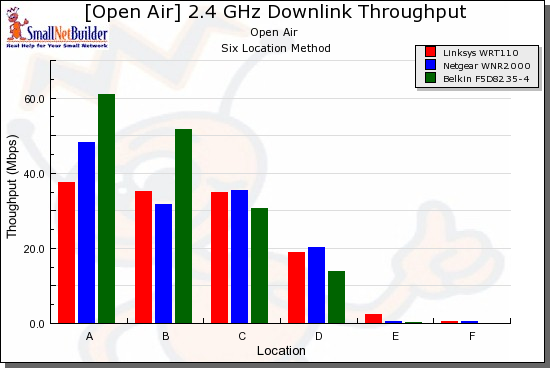
Figure 14: Wireless competitive comparison – 20MHz mode, down
Figure 15 shows uplink throughput, where the Plus starts out with almost 2X the throughput of its competitors. But it quickly loses the advantage as signal level drops.
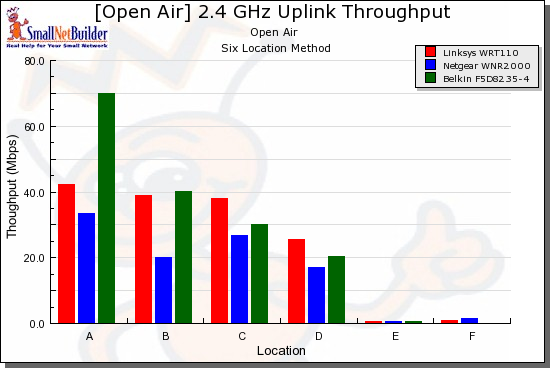
Figure 15: Wireless competitive comparison – 20MHz mode, up
40 MHz bandwidth mode shows a similar pattern, which you can see in the downlink and uplink comparison plots.
Use the Wireless Charts to generate other comparisons.
Closing Thoughts
In all, the Belkin N+ is a nice little draft 11n router with a unique combination of features. But at around $110 as I write this, it’s really too expensive to be called an "entry level" draft 11n router, which is generally how I classify two-antenna draft 11n routers.
For actually less money, you can currently pick up a D-Link DIR-655, Linksys WRT350N (while supplies last) or Linksys WRT310N, all of which have gigabit switches. Of the three, the WRT350N is the only other that can share a USB drive. But file sharing performance is so slow, I don’t think that is worth influencing your selection.
The Plus’ key differentiator is its captive-portal guest access, which can be quite handy for small offices, cafes, B&B’s and other hospitality uses. None of the other products have it and maybe that (plus the gigabit ports) is why Belkin has priced the Plus relatively high.
If Belkin had included a radio with better range and street-priced around $70 – $80, then the Plus would get a real thumbs up. But as it is, it’s really a pay-your-money-and-make-your choice proposition and, unfortunately, that’s what you’ll have to do.