

Introduction
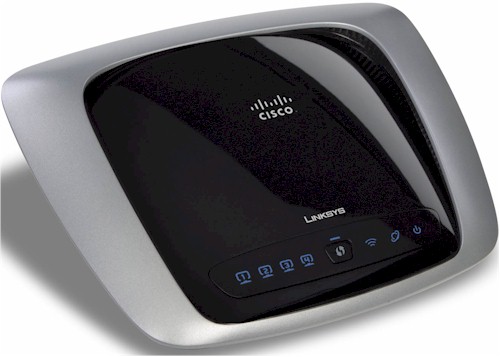
| At a Glance | |
|---|---|
| Product | Linksys Dual-Band Wireless-N Gigabit Router (WRT320N) |
| Summary | Broadcom-based single-radio, dual-band 802.11n Draft 2.0 router with 10/100/1000 switch. |
| Pros | • Good routing performance • Good wireless performance • High 5 GHz speed |
| Cons | • Can’t set channel in Auto mode • 5 GHz range shorter than 2.4 GHz • No jumbo frame support |
The WRT320N fills out Cisco’s portfolio of Linksys draft 11n routers with a dual-band, single radio offering that has a Gigabit switch. Even though it is designed with low manufacturing cost in mind, street pricing is comparatively high.
Internal Details
The 320N’s construction details were covered as part of the look at the WRT400N and WET610N. It’s a Broadcom-based design, so I would expect it to perform more like WRT610N than the newer and less expensive Atheros-based WRT400N.
But the designs are significantly different, with the 320N using a Broadcom BCM4717 Intensi-fi XLR 802.11n (2.4/5 GHz) Router System-on-Chip to really drive down cost (Figure 1) vs. the 610N’s dual-radio design with two copies of BCM4321 BB/MAC and BCM2055 dual-band radio devices (Figure 2).

Figure 1: WRT320N inside
Both products are three-antenna designs, with all antennas located internally and non-upgradeable. They might use different gigabit switches, however. I was not able to remove the heatsink on the WRT610N, but I did on the 320N and found a Broadcom BCM53115. Even though the device supports up to 9K jumbo frames, my testing showed that they don’t appear to be enabled. RAM complement is different, too, with 32 MB for the 320N vs. 64 MB for the 610N.
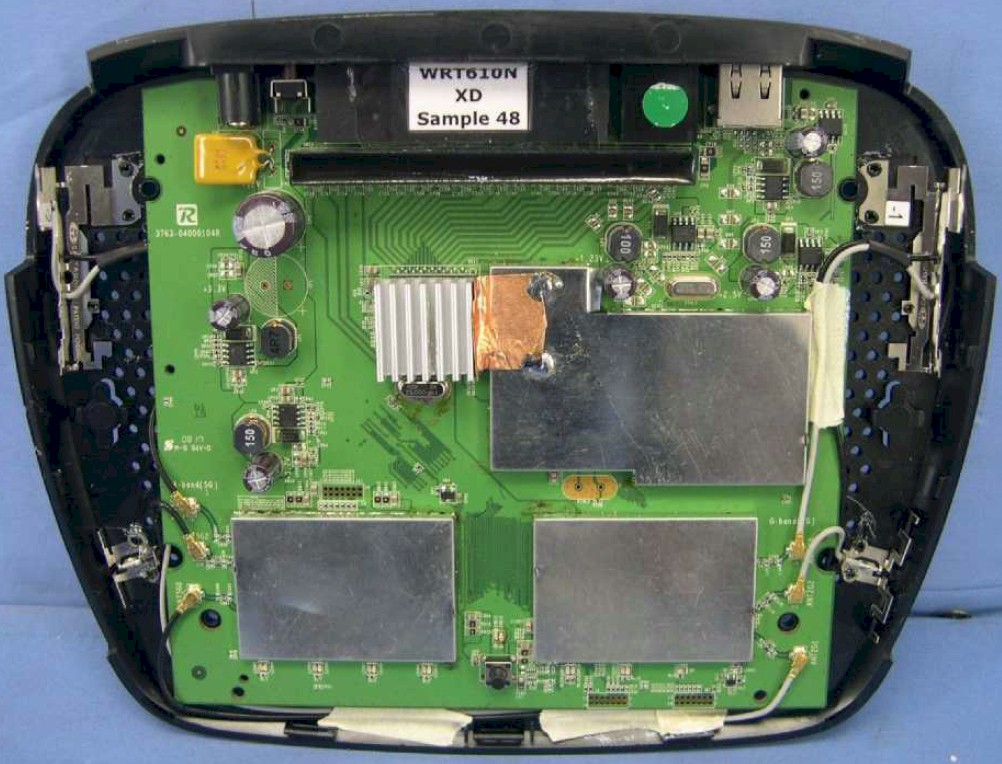
Figure 2: WRT610N inside view
Routing Features
The 320N implements the standard Linksys router feature set that includes:
- DHCP, Static, PPPoE, PPTP, L2TP, Telstra Cable WAN types
- Built-in Dynamic DNS clients for TZO and DynDNS
- Static and dynamic routing
- SPI firewall disable, multicast, WAN ping and IDENT filtering and Proxy, Java, ActiveX and Cooking blocking
- IPsec, PPTP and L2TP VPN passthrough (enabled by default)
- Single port forwarding and Port Range forwarding and triggered ports
- HTTPS admin access, remote management (HTTP / HTTPS) enable with IP range restriction and port setting
- Logging with support for Linksys Logviewer recording
- Access Restrictions with 10 deny or allow-based policies, each with its own list of clients and day/time schedule
- Uplink (LAN to WAN) only QoS with High, Medium, Normal or Low Priority that can be applied to specific applications (divided into Application, Online Game and Voice Device groups), physical switch ports or specific MAC addresses.
- WMM (Wireless MultiMedia) (enabled by default)
If you need further details, check the WRT600N review and its slideshow.
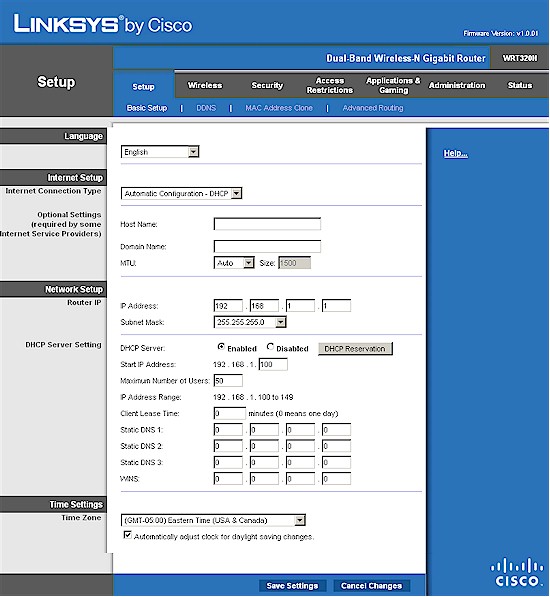
Figure 3: WRT320N Basic setup page
Routing Performance
Routing performance for the 320N using our standard test method is summarized in Table 1, along with the 610N’s test results for comparison. WAN to LAN measured 145.1 Mbps, while LAN to WAN came in at 165.5 Mbps. Since neither is anywhere near Gigabit speed, it’s obvious that the processors are the limiting factor for routing speed.
Both the 320N and 610N maxed out the Maximum Simultaneous Connections test at 200 connections.
| Test Description | WRT320N Throughput – (Mbps) |
WRT610N Throughput – (Mbps) |
|---|---|---|
| WAN – LAN |
145.1
|
136
|
| LAN – WAN |
165.5
|
157
|
| Total Simultaneous |
159.0
|
143
|
| Maximum Simultaneous Connections | 200 | 200 |
| Firmware Version |
1.0.01
|
1.000.00 B17
|
Table 1: Routing throughput
Figure 4 is a composite plot of the three routing tests, which shows nice, steady routing throughput. Use the Router Charts to see how the 320N stacks up against other routers.
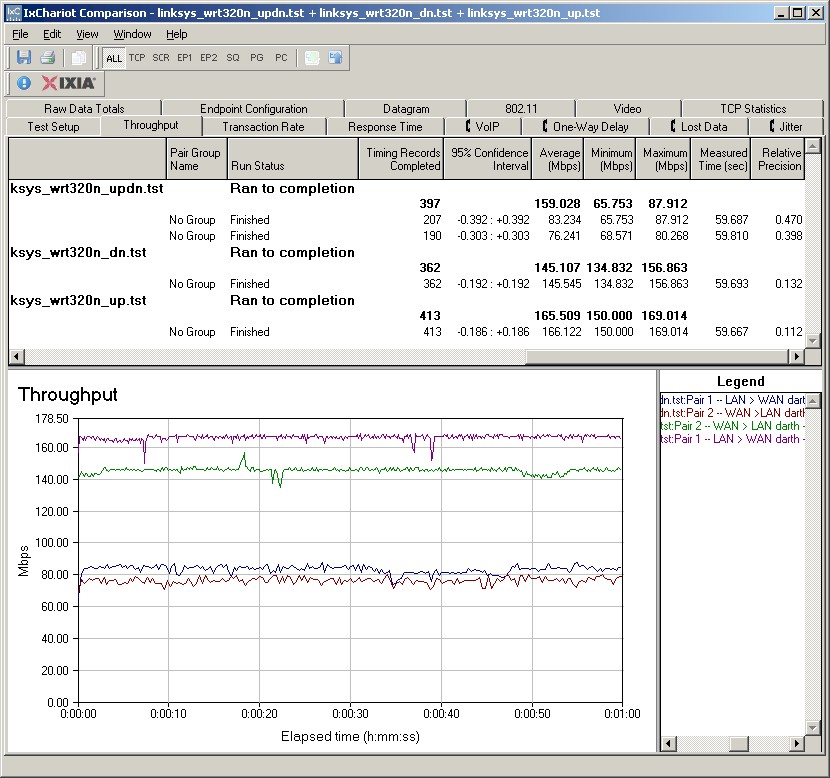
Figure 4: WRT320N Routing throughput composite plot
Wireless Features
As with its routing features, the 320N’s wireless features are Linksys standard. Figure 5 shows the Basic Wireless settings once you switch from the default Wi-Fi Protected Setup (WPS) mode to the Manual setting mode. With a single radio, you must choose between the 2.4 GHz and 5 GHz bands.
Network Modes for the 5 GHz radio include Disabled, Mixed (default), Wireless-A only and Wireless-N only Network Modes, while the 2.4 GHz radio shows Disabled, Mixed (default), BG-Mixed, Wireless-B only, Wireless-G only and Wireless-N only.
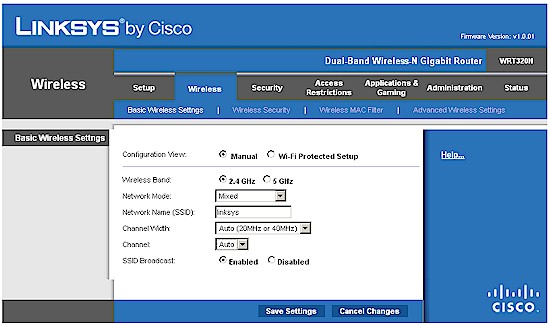
Figure 5: Basic wireless settings
Channel and Channel Width selection is simple. You can select channels only when in 20 MHz only Channel Width mode. When the Auto (20 or 40 MHz) Channel Width mode is selected, the channel selector is greyed-out in the 5 GHz band and forced to Auto in 2.4 GHz. The 5 GHz radio can be set to channels 36, 40, 44, 48, 149, 153, 157 and 161.
I successfully made a WPA2 / AES connection to the 320N using the WPS PIN method supported by my standard Intel 5300 AGN WiFi Link test client using the Intel PROSet Wireless Connection Utility (version 12.2.0.0).
Figure 6 shows the Advanced Wireless Settings that include Transmit Rate and AP Isolation, which keeps wireless clients from communicating with each other, but not Power settings. Note that the Frame Burst control missing from the 400N is back.
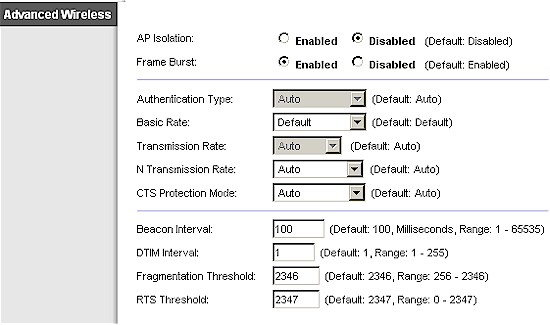
Figure 6: Advanced Wireless Settings
Wireless Performance
I used the open air test method described here to test the 320N’s wireless performance. Testing was done using the SNB standard wireless test client, an Intel Wi-Fi Link 5300 AGN mini-PCIe card and 12.2.0.11 driver in a Dell Mini 12 running WinXP Home SP3. I left all client-side defaults in place except for enabling throughput enhancement (packet bursting).
The router had the latest 1.0.01 firmware and all factory default settings in place, except setting channel 1 for the 2.4 GHz mode tests and channel 36 for the 5 GHz tests.
Figure 7 shows a composite of downlink throughput tests made at the six test locations in four wireless modes: 2.4 GHz, 20 MHz channel; 2.4 GHz, 40 MHz channel; 5 GHz, 20 MHz channel; and 5 GHz, 40 MHz channel. Each column represents the average throughput from a one minute test. Best case downlink throughput of 85 Mbps was measured using a 40 MHz channel in the 5 GHz band.
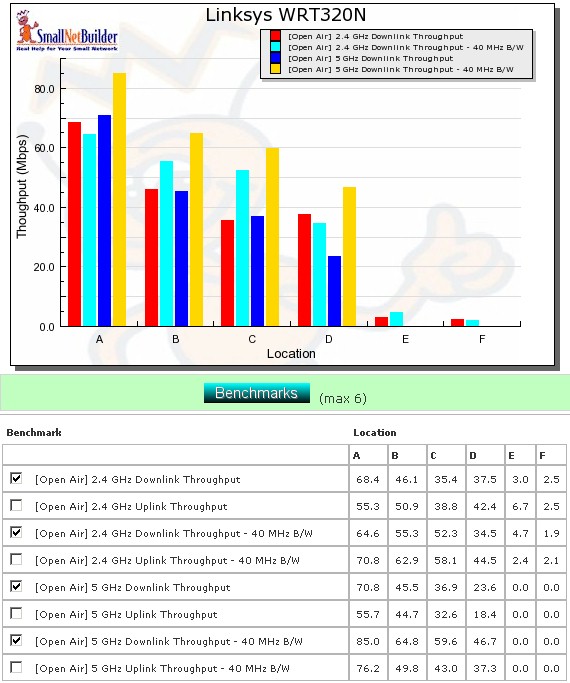
Figure 7: Six location downlink throughput summary
As is typical with all dual-band draft 11n routers tested to date, I wasn’t able to connect to the 320N in Locations E and F in 5 GHz using either a 20 or 40 MHz channel. Speeds in the 2.4 GHz band were low, but usable in Location E and F.
Figure 8 shows a composite of the actual IxChariot test results running downlink 2.4 GHz w/ 20 MHz channel. Throughput variation is typical of that seen in other Broadcom-based products and higher than I saw with the WRT400N, mainly because of the periodic large negative spikes.
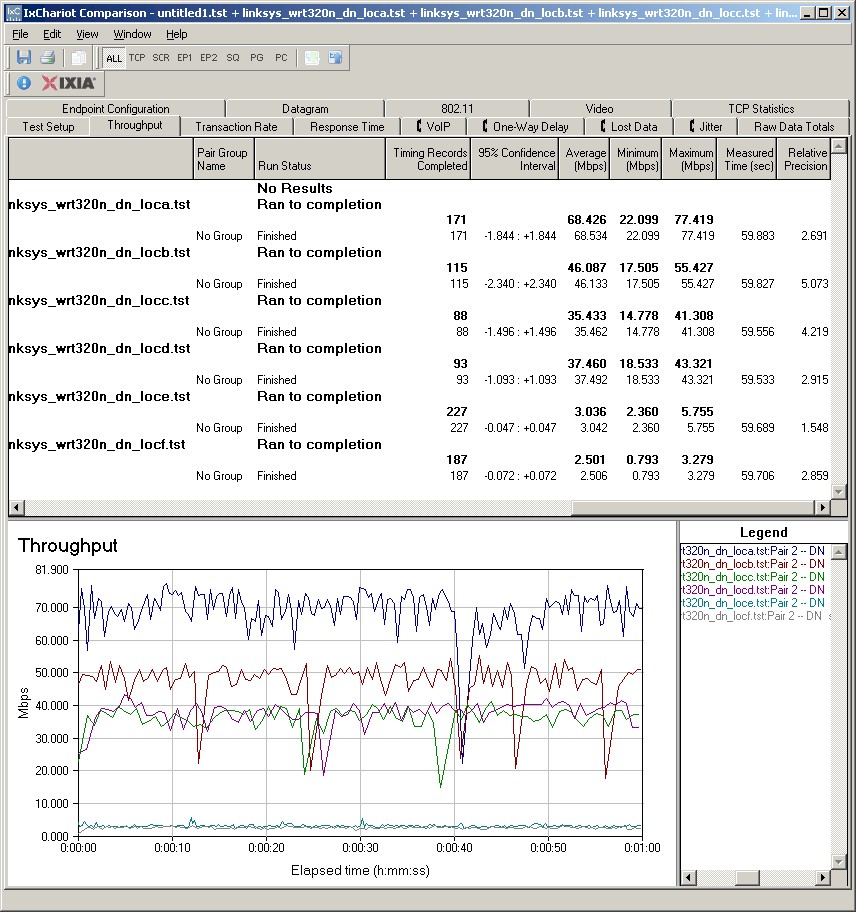
Figure 8: Six location wireless throughput – 2.4 GHz, 20 MHz channel, downlink
Figure 9 shows the six location plot for the uplink direction, with best case uplink throughput of 76.2 Mbps measured using a 40 MHz channel in the 5 GHz band at Location A.
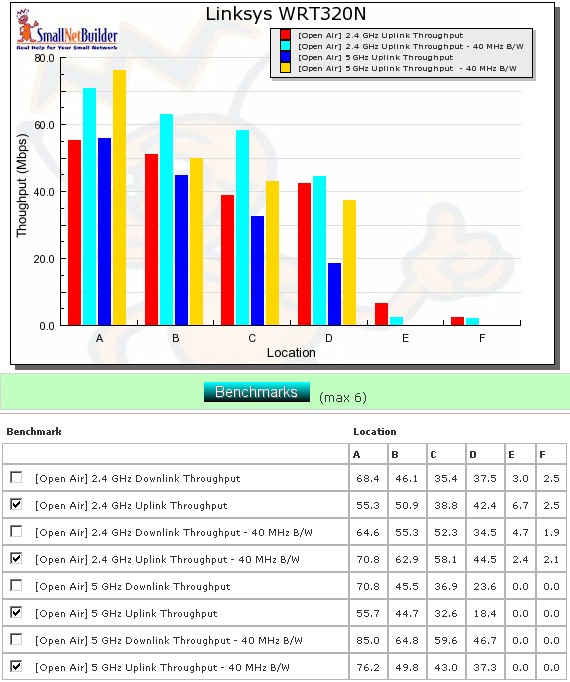
Figure 9: Six location uplink summary
The IxChariot uplink plot is similar to the downlink, showing moderately high variation.
Wireless Security
I tested for throughput reduction with wireless security set to WEP, WPA/TKIP and WPA2/AES and found a 60% penalty in WEP and WPA/TKIP (Figure 10). I also measured a 12% reduction when using WPA2 / AES.
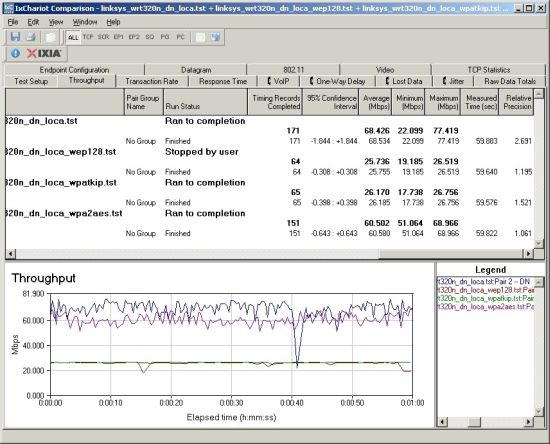
Figure 10: Security mode comparison – 2.4 GHz, 20 MHz channel, downlink
Wireless Performance – Competitive Comparison
I chose the top three best-performing dual-band routers to compare with the WRT320N, i.e. the WRT610N, WRT400N and D-Link DIR-628.
Figure 11 shows that the 320N is the leader only in Location A, with 68.4 Mbps. In looking at the rest of the throughput vs. location plots, however, it doesn’t look like the 320N is a consistent winner. So I’ll use comparison tables to ease the burden of finding the best of the group.
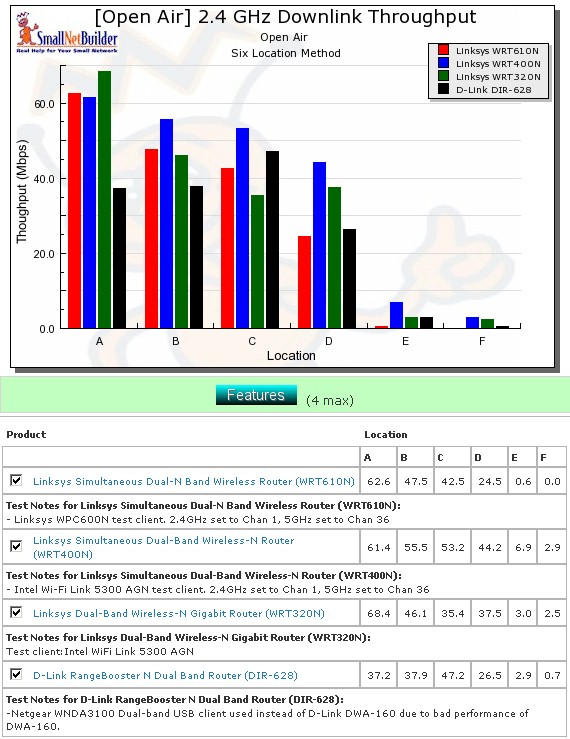
Figure 10: Competitive comparison – 2.4 GHz, 20 MHz channel, downlink
Table 2 summarizes the highest downlink throughput product in each location for the four combinations of bands and modes tested and Table 3 compares uplink results. The chart was generated by going through the six-location comparison plots and putting an X in the product’s box that had the highest throughput for each test. If values are within 0.5 Mbps of each other, they each get an "X".
| Product | 2.4GHz /20 | 2.4GHz / 40 | 5GHz / 20 | 5GHz / 40 | ||||||||||||||||||||
|---|---|---|---|---|---|---|---|---|---|---|---|---|---|---|---|---|---|---|---|---|---|---|---|---|
| A | B | C | D | E | F | A | B | C | D | E | F | A | B | C | D | E | F | A | B | C | D | E | F | |
| Linksys WRT610N | X | X | ||||||||||||||||||||||
| Linksys WRT400N | X | X | X | X | X | X | X | X | X | X | X | |||||||||||||
| Linksys WRT320N | X | X | X | X | X | X | X | X | ||||||||||||||||
| D-Link DIR-628 | ||||||||||||||||||||||||
Table 2: Best downlink throughput summary
Adding up the checkmarks for each product shows that the WRT400N is the clear overall winner for both down and uplink in the 2.4 GHz band. But the 320N beats the crowd in 5 GHz, particularly running downlink.
| Product | 2.4GHz /20 | 2.4GHz / 40 | 5GHz / 20 | 5GHz / 40 | ||||||||||||||||||||
|---|---|---|---|---|---|---|---|---|---|---|---|---|---|---|---|---|---|---|---|---|---|---|---|---|
| A | B | C | D | E | F | A | B | C | D | E | F | A | B | C | D | E | F | A | B | C | D | E | F | |
| Linksys WRT610N | X | X | X | X | X | X | ||||||||||||||||||
| Linksys WRT400N | X | X | X | X | X | X | X | X | X | X | X | |||||||||||||
| Linksys WRT320N | X | X | X | X | ||||||||||||||||||||
| D-Link DIR-628 | ||||||||||||||||||||||||
Table 3: Best uplink throughput summary
Closing Thoughts
The WRT320N is Cisco’s attempt to lower the price of stepping up to a dual-band draft 11n router that includes a desirable Gigabit Ethernet switch by using a single, switchable radio and driving down parts count. Unfortunately, with the lowest current street price of $110, they haven’t made it a good enough deal.
For only around $20 more, you can get the WRT400N, which allows simultaneous operation in both 2.4 and 5 GHz and was a better overall wireless performer in our tests. My advice is to give up on the Gigabit switch in favor of simultaneous dual-band and better wireless performance. Cheap gigabit switches are easy to find. Good, (relatively) cheap, simultaneous dual-band draft 802.11n routers are not.