

Introduction
Updated 6/19/2009: WAN DHCP problem and 802.11b support
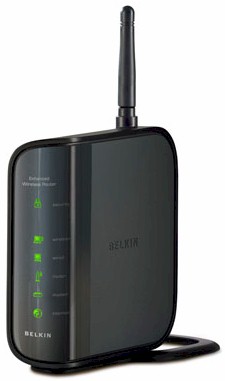
| At a Glance | |
|---|---|
| Product | – Belkin N150 Wireless Router (F6D4230-4 v2) – Belkin N150 Wireless USB Network Adapter (F6D4050 v2) |
| Summary | Single stream Ralink-based router and matching USB adapter built with draft 802.11n 1×1 chipsets but Wi-Fi Certified only for 802.11b/g |
| Pros | • None come to mind |
| Cons | • Basic routing feature set • Not guaranteed to work with draft 802.11n clients • Awful wireless uplink throughput stability • High download routing throughput variation • Trouble with dynamic WAN IP connection |
I have been writing about pseudo-draft 11n routers since Cisco came out with its now-discontinued Linksys WRT100 and its WRT110 replacement. The basic premise of these products is to take single-stream draft 802.11n hardware that currently can’t be Wi-Fi Certified for Draft 802.11n and promote it as 802.11b/g compliant (and usually b/g Wi-Fi Certified). (This latest exercise in consumer misdirection is described in more detail in Buyers Beware! Single Stream Draft 802.11n Products Bring Back Spec Spin.)
The rub comes when manufacturers also promote these products as providing some sort of enhanced performance over 802.11b/g. First, they provide no performance enhancement when used with 802.11b/g clients, since they must fall back to standard b/g protocols when communicating with those clients. But more importantly, since single-stream routers are not recognized in the 802.11n specification and the Wi-Fi Alliance currently won’t certify them (or single-stream draft 11n clients), they are not guaranteed to work with Certified draft 802.11n clients.
NETGEAR has also jumped on the "N150" bandwagon with its WNR1000, but is not selling a companion N150 client card. D-Link has a "Wireless 150" router (the DIR-600) "coming soon", but also doesn’t have a companion adapter. I expect Cisco to eventually also jump on the bandwagon with some sort of single-stream router, although they probably will use a different marketing term because, well, they’re Cisco.
Belkin, however, has decided to boldly go where no one else will and has both its N150 Wireless Router and companion N150 USB adapter on store shelves. So even though I do not approve of any of these "G plus", "N minus" or whatever you want to call them Frankenrouters, I decided to get Belkin’s version in for review to see how it performs with regular 802.11g and draft 11n products.
No Guarantee
I asked Belkin what its policy is regarding interoperabilty of the N150 with draft 802.11n Certified products and got this response (bolding mine):
"What is Belkin’s policy regarding interoperability of N150 products with draft 802.11n Certified products?
• N150 is interoperable with all Belkin N products at N150 speeds. N150 is certified for interoperability with other WiFi-certified products at 11g speeds.
Is N150 interoperable with competitors’ 802.11n products?
• N150 is certified by WiFi to be interoperable with other WiFi b/g products, at 802.11g speeds; this includes competitor products with the WiFi b/g certification.
As there is no WiFi certification program for 1×1 N, we cannot guarantee that competitors’ products are interoperable with N150 at N150 speeds. For best results, we recommend that our customers buy Belkin ‘s N150 Enhanced Wireless USB Network Adapter."
So with the warnings out of the way, let’s get to the review. Figure 1 shows the N150’s no-frills front panel, with only the series of backlit icons used in Belkin’s revamped router line. Note that none of the icons blink to indicate activity.
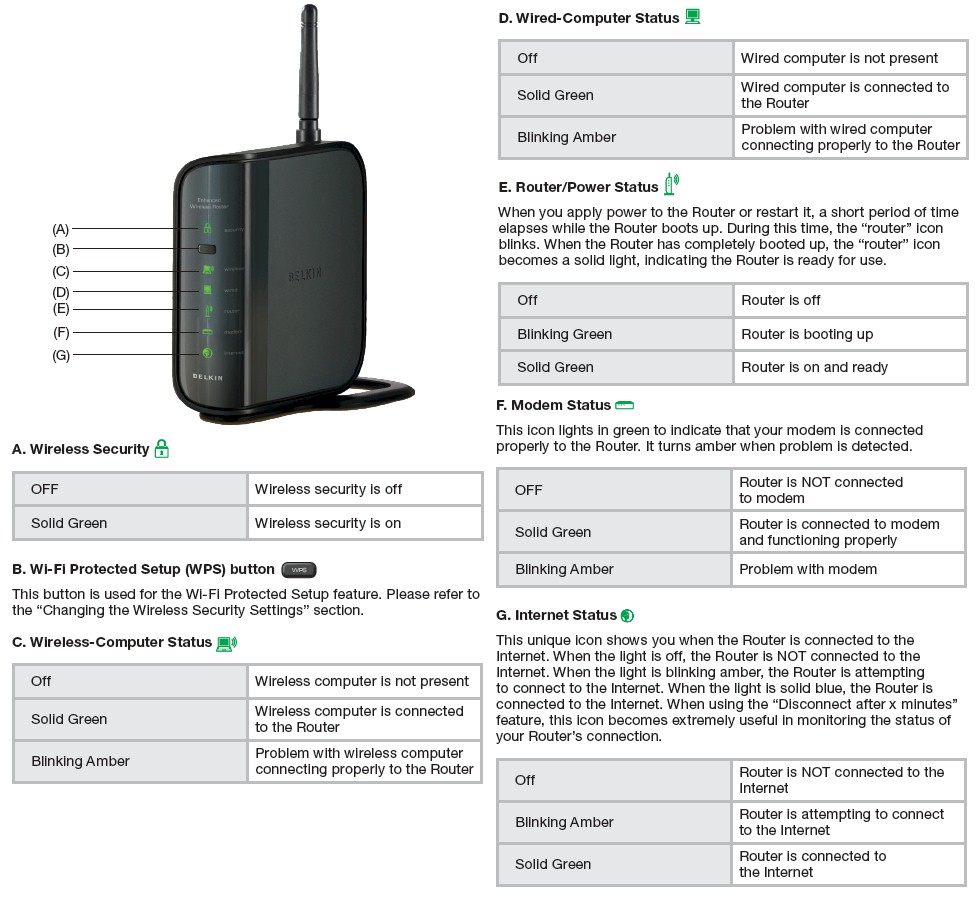
Figure 1: N150 Front Panel
The rear panel layout (Figure 2) doesn’t have link/activity indicators on each of the auto MDI / MDI-X 10/100/1000 Ethernet ports, either.
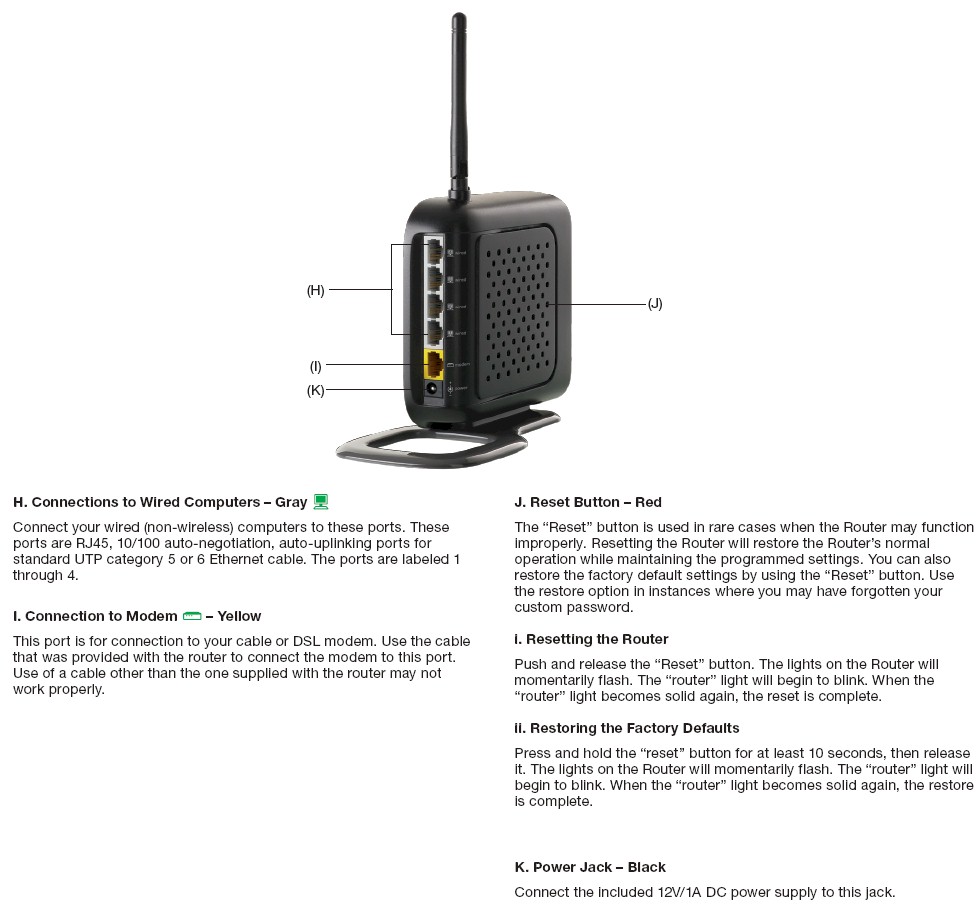
Figure 2: N150 Back Panel
If you like to wall-mount your router, then you’ll need to build a little wall-mounted shelf for the N150. There are no screw mounting slots and I couldn’t remove the base without fear of breaking it off. Also note that the single antenna is external and moveable, but not upgradeable.
Internal details
Figure 3 is a shot of the N150’s main board. It uses Ralink’s RT3050 1×1 802.11n Router/AP SoC combined with 2 MB of flash and 8 MB of RAM. The RT3050 includes a four-port 10/100 switch, 10/100 Ethernet WAN port and 2.4 GHz transceiver / MAC / BB. Since the radio is in the RT3050, I’m guessing the device hidden under the shield is an RF amplifier.
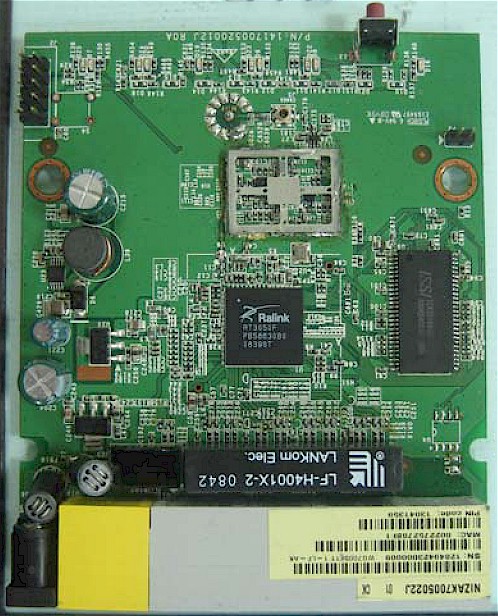
Figure 3: N150 Main board
Figure 4 shows the companion Belkin N150 Wireless USB Network Adapter (F6D4050 v2) board. I made a composite of the top and bottom views of the board to show the mini RF connector on the bottom side. You can’t tell from the photo, but a closeup photo in the FCC ID file shows a Ralink RT3070 single-chip USB 2.4 GHz 802.11n1x1 radio used.
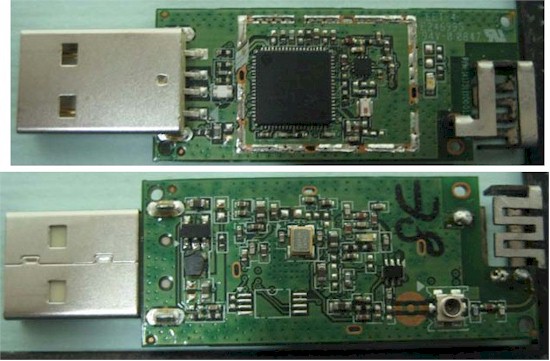
Figure 4: N150 Wireless USB Adapter board
Routing Features
Figure 5 shows the N150’s Status page, which is just like you see on Belkin’s other wireless routers.
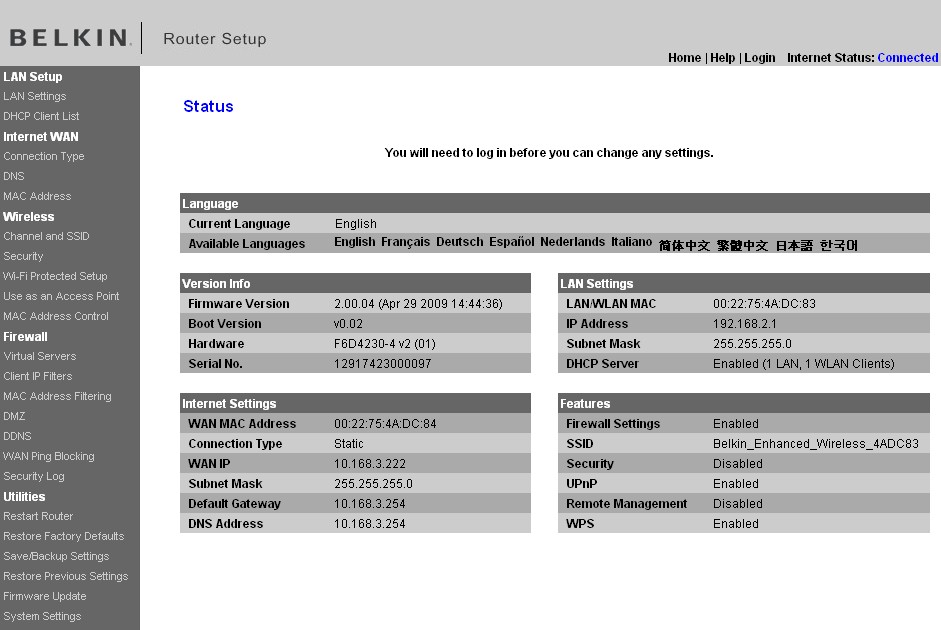
Figure 5: N150 Status Page
If you look carefully you’ll see the Internet Settings Connection Type set to Static. I had to resort to this setting when the N150 refused to pick up WAN IP information via DHCP (Dynamic WAN connection type) from the D-Link DIR-655 A4 that I use as my primary router. I haven’t had WAN DHCP lease problems with a router in years, but it appears that I have found them in the N150. I told Belkin about the problem, but didn’t hear anything back.
Updated 6/19/2009
Belkin has reported that they have duplicated the WAN dynamic IP lease problem and are working on a solution.
As with all of Belkin’s routers, the N150 has very basic routing features:
- DHCP, Static, PPPoE, PPTP, L2TP, Telstra BigPond/OptusNet Cable WAN types
- Built-in Dynamic DNS client for DynDNS
- WAN ping blocking (default enabled)
- Single port and Port Range forwarding
- Simple schedulable outbound port filtering
- Remote management enable with single IP restriction and port setting
- System and firewall logging
- UPnP (default enabled)
- MAC address access control for wired clients
Missing are useful things like:
- Firewall controls like SPI disable and Proxy, Java, ActiveX and Cookie blocking
- IPsec, PPTP and L2TP VPN passthrough enable/disables
- Triggered port forwarding
- DHCP reservations
- HTTPS admin access
- Bandwidth control / QoS for Internet traffic
- Parental controls
- Syslog support and traffic logging
Routing Performance
I tested routing performance using our standard router tests. All tests were done with the client in DMZ. The results are summarized in Table 1 below.
| Test Description | N150 Throughput (Mbps) |
|---|---|
| WAN – LAN |
50.5
|
| LAN – WAN |
92
|
| Total Simultaneous |
97.9
|
| Maximum Simultaneous Connections | 48 |
| Firmware Version |
2.00.04
|
Table 1: Routing performance summary
The reason for the low WAN > LAN performance is shown in the IxChariot plots in Figure 6. All that bouncing around comes from the WAN to LAN test, which shows the lousiest routing throughput performance that I have seen in a very long time. It’s a shame, too, since upstream performance is nice and smooth at around 92 Mbps.
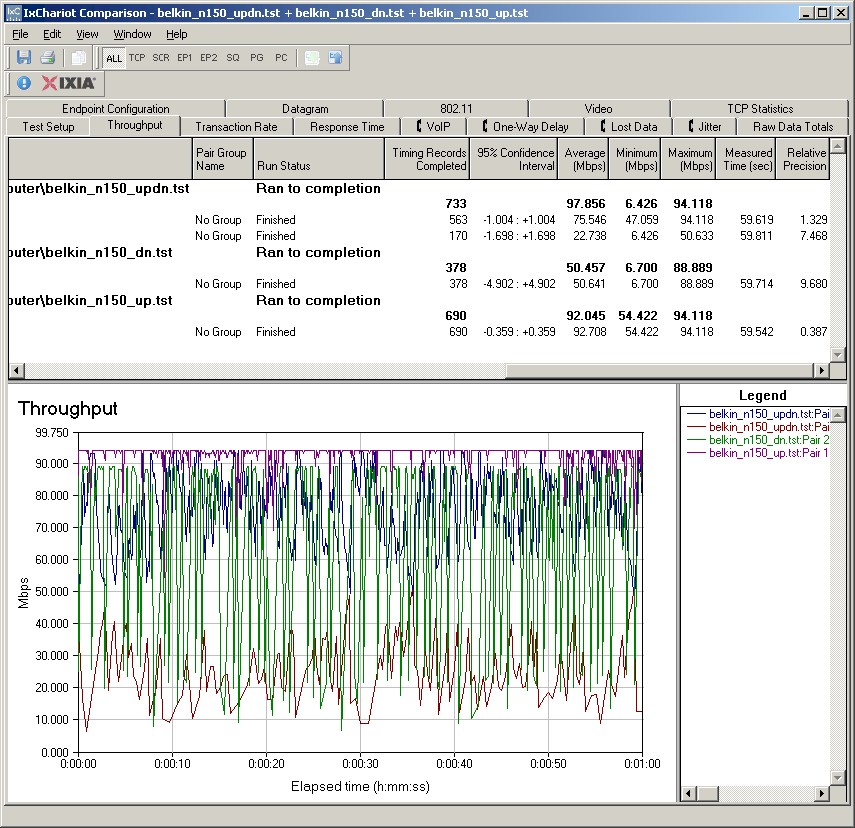
Figure 6: N150 routing performance
When both up and download tests are run simultaneously, the numbers show average throughput of 75 Mbps up, but 23 Mbps down. Simultaneous sessions maxed out at 48, again, the worst I have seen in awhile. This is clearly not a router to be used with high-speed fiber connections.
Wireless Features
The N150’s wireless settings (Figure 7) include Bandwidth and Extension Channel settings that are due to the draft 11n innards. Unlike the N+, there is no Auto channel setting.
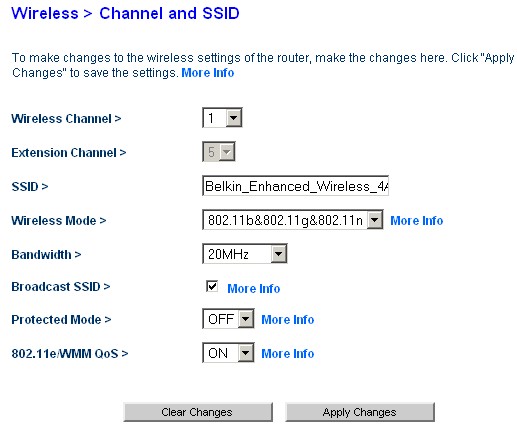
Figure 7: N150 Wireless Channel and SSID settings
Wireless modes supported are 802.11b&802.11g&802.11n (default), 802.11g, 1×1 802.11n and Off. Note that 802.11b appears to be supported only in the default b/g/n mode.
Updated 6/19/2009
Belkin reports that 802.11b is supported in the 802.11g mode.
The N150 includes a Use as Access Point option, which saves the hassle of moving LAN cables and disabling the DHCP server to use the Plus’ wireless with an existing router. You just enable the option and enter an unused IP address (and subnet mask) outside your existing router’s DHCP server range. You can continue to use the switch ports, too, which will be automatically uplinked.
Wireless Security options include WEP and the PSK (Personal) forms of WPA, WPA2 and a mixed WPA/WPA2 mode. Wi-Fi Protected Setup (WPS) is also supported. A push-button WPS session connecting the N150 USB adapter and using its client utility successfully resulted in WPA-PSK TKIP connection on the first try, although I would have preferred WPA2 / AES.
The N150 does not include the Guest Access feature found on the N+ and N1 Vision. You also won’t find controls for:
- Transmit rate
- Transmit power
- Base advertised rate
- Client isolation (wireless-to-wireless)
- WDS bridging / repeating
- Frame bursting
- RTS threshold / Beacon, DTM interval
Wireless Performance
Before I get to the test results, let me first explain the wireless "speed" that you’ll see reported by Windows Wireless Network Connection properties. 802.11n has eight parameters that determine the maximum PHY rate. These are boiled down into 33 combinations that are referenced by their MCS (Modulation and Coding Scheme) index.
I have excerpted the single-stream portion of the MCS index table in Figure 8 and highlighted the two speeds that I saw reported by Windows with the N150 router Bandwidth mode set to 20 MHz and 20/40 MHz. Note that the highest rate is not 150 Mbps! In fact, the highest possible single-stream rate is 157.5 Mbps in 40 MHz mode and 72 2/9 in 20 MHz mode.
But, judging from the maximum link rates that I saw reported, it doesn’t appear that MCS index 7 is supported in the N150 products. So I can’t verify the Link Rate spec of "Up to 150Mbps in 40MHz Channel Mode Bandwidth 20 MHz & 20/40 MHz auto" posted on Belkin’s web page.
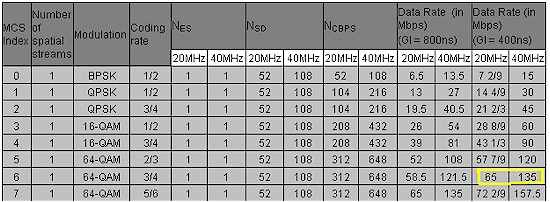
Figure 8: MCS index table (courtesy Agilent Technologies)
Of course, as SmallNetBuilder readers well know, the "Speed" reported by Windows bears little relation to the actual throughput delivered. So let’s see what testing revealed.
I tested using the open air test method described here and performed three full test runs. I first used the Belkin N150 Wireless USB Network Adapter (F6D4050 v2), testing both 20 and 40 MHz bandwidth modes. The card was inserted into a Dell Mini 12 running WinXP Home SP3 and used the 2.00.05 driver release.
I then switched to my standard test client, an Intel Wi-Fi Link 5300 AGN mini-PCIe card and 12.2.0.11 driver inside the Dell Mini 12 running WinXP Home SP3. I first performed test runs with the adapter Draft 11n mode and throughput enhancement enabled with both 20 and 40 MHz bandwidth modes set in the router. I then disabled the Intel client’s draft 11n mode, essentially converting it into an 802.11b/g client, and ran tests with the router set to 20 MHz mode.
I left the router set to its 802.11b&802.11g&802.11n (default) Wireless mode, since that’s what most users would do. I also set the router to Channel 1 for all tests.
Let’s first look at IxChariot plots of wireless runs made with the Belkin N150 adapter. Figure 9 shows the runs made in 20 MHz mode, downlink. The Location B trace (third one down) is uniformly low so its low average is not due to high variation.
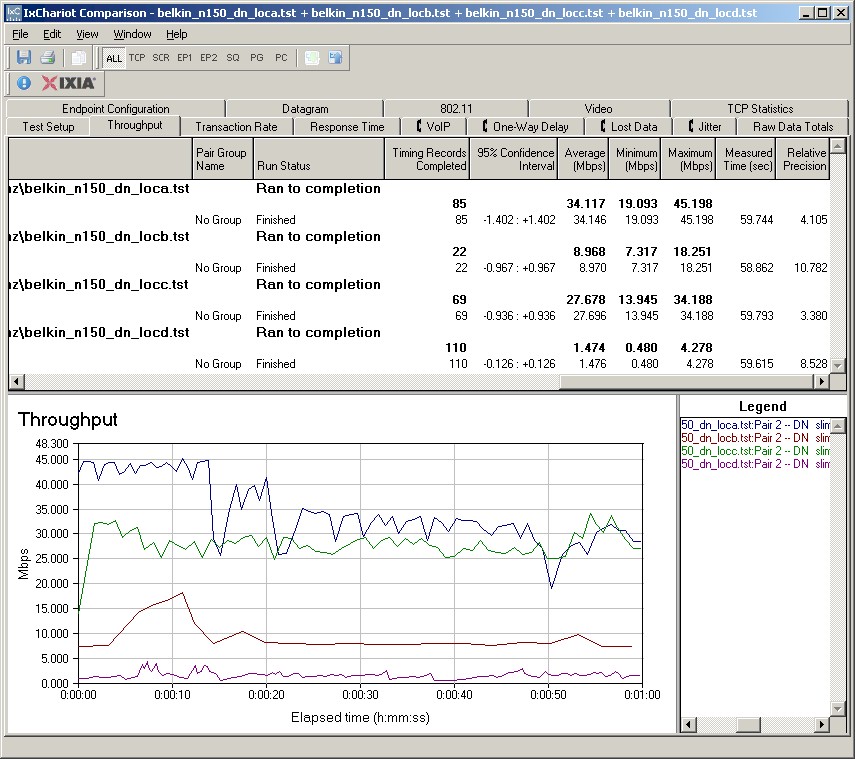
Figure 9: Wireless throughput – N150 USB adapter, 20 MHz mode, downlink
The 20 MHz mode uplink runs shown in Figure 10 are another story entirely, with very high variation. Forget trying to stream even standard-def video over this connection!
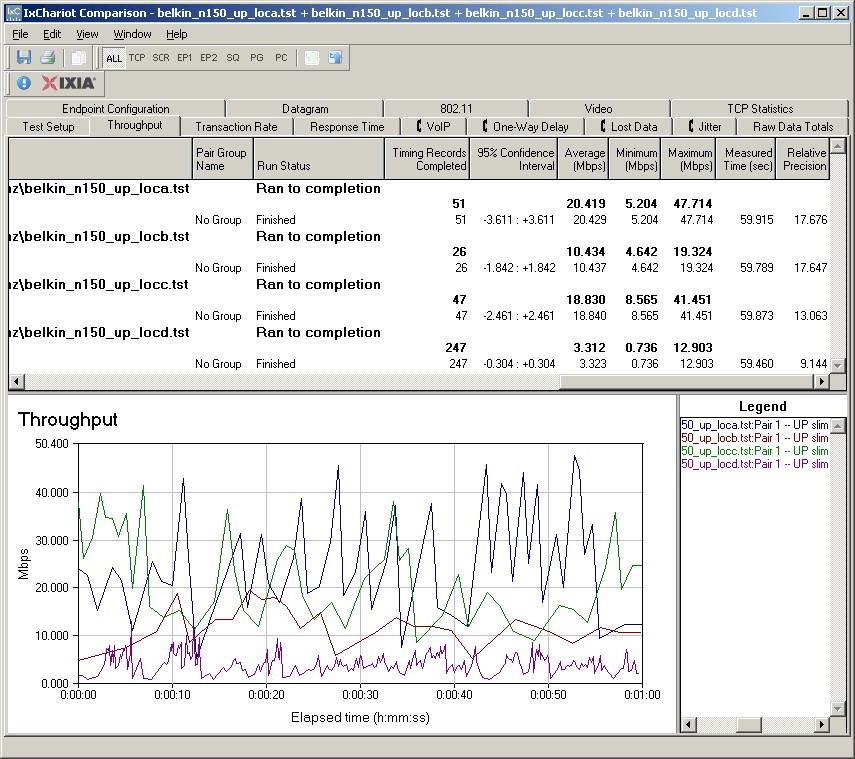
Figure 10: Wireless throughput – N150 USB adapter, 20 MHz mode, uplink
I’m not going to show the other plots, but you can view them via the links below. You’ll see that the high uplink variation appears to be baked into the router, since it is also seen when the Intel 5300 is used as a client. The high uplink variation even is seen when the Intel 5300 is connected as an 802.11g client.
- Belkin N150 USB – 40 MHz, downlink
- Belkin N150 USB – 40 MHz, uplink
- Intel 5300 (N mode) – 20 MHz, downlink
- Intel 5300 (N mode) – 20 MHz, uplink
- Intel 5300 (N mode) – 40 MHz, downlink
- Intel 5300 (N mode) – 40 MHz, uplink
- Intel 5300 (g mode) – 20 MHz, downlink
- Intel 5300 (g mode) – 20 MHz, uplink
To make it easier to compare the performance of the three client flavors, I created bar charts. Figure 11 compares the three clients running downlink with the router set to 20 MHz mode. Note that neither the Belkin nor Intel N mode client connect in Locations E and F, which is pretty poor performance. Only the Intel client when switched to G mode was able to connect and run the tests in Locations E and F. I would have tested the Belkin N150 adapter in G mode, but it doesn’t provide a control to disable N mode.
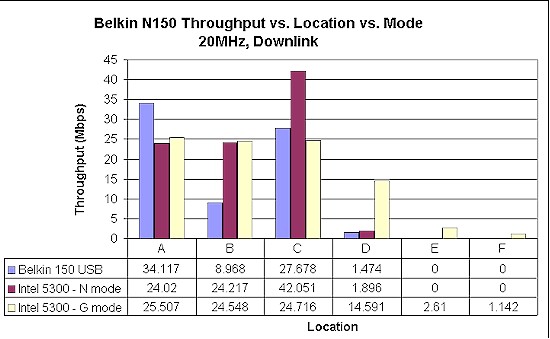
Figure 11: Belkin N150 client throughput comparison – 20 MHz, downlink
With all of that wiggly throughput, you would expect relatively low uplink throughput from the Belkin N150 client. But the average throughput shown in Figure 12 isn’t as bad as I expected. Shows you what sins can be hidden by looking only at average throughput!
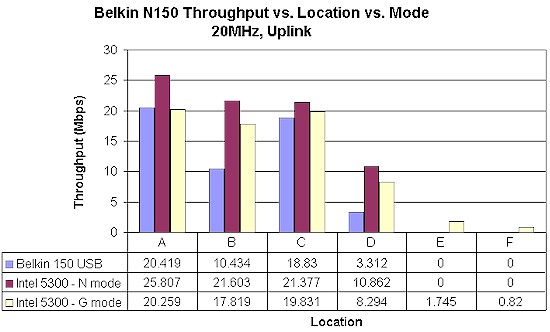
Figure 12: Belkin N150 client throughput comparison – 20 MHz, uplink
This data shows that with a best case downlink speed of 34 Mbps and uplink of 20 Mbps, you’re not getting a huge speed boost from the "matched" N150 router and client. And you’re certainly not getting a range boost, since I couldn’t connect either draft 11n adapter in even 20 MHz bandwidth mode in locations E and F.
Wireless Performance – 40 MHz
Figures 13 and 14 compare down and uplink performance with the router set to 40 MHz bandwidth mode for the Belkin and Intel clients. Since 802.11g doesn’t have a 40 MHz bandwidth mode, there is no data for the Intel 5300 set to G mode.
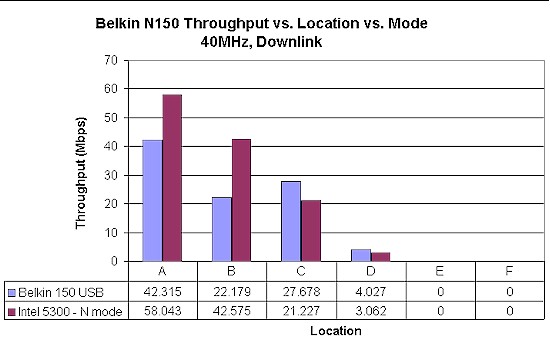
Figure 13: Belkin N150 client throughput comparison – 40 MHz, downlink
Switching to the 40 MHz channel bonding mode bumps downlink throughput up to 42 Mbps for the N150 client, but doesn’t really do anything for uplink. The Intel 5300 client does much better, pretty much doubling its best-case speed for both down and uplink.
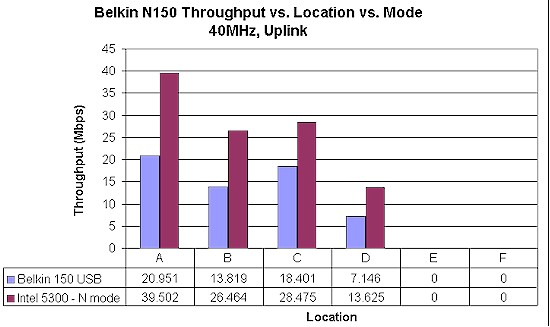
Figure 14: Belkin N150 client throughput comparison – 40 MHz, uplink
Wireless Security Performance
Figure 15 shows the downlink results for security mode tests run in Location A in the default 20 MHz bandwidth mode. It’s difficult to see a difference, especially since the reference throughput without encryption is the lowest value (it just happened to come out that way on the test run).
But the "tell" is that the link rate did not switch from 65 Mbps to the 54 Mbps maximum 11g rate when WEP or WPA/TKIP were engaged. So, as near as I can tell, the N150 behaves like other Ralink-based products and maintains draft 11n throughput (or at least link rates) when WEP or WPA/TKIP are used.
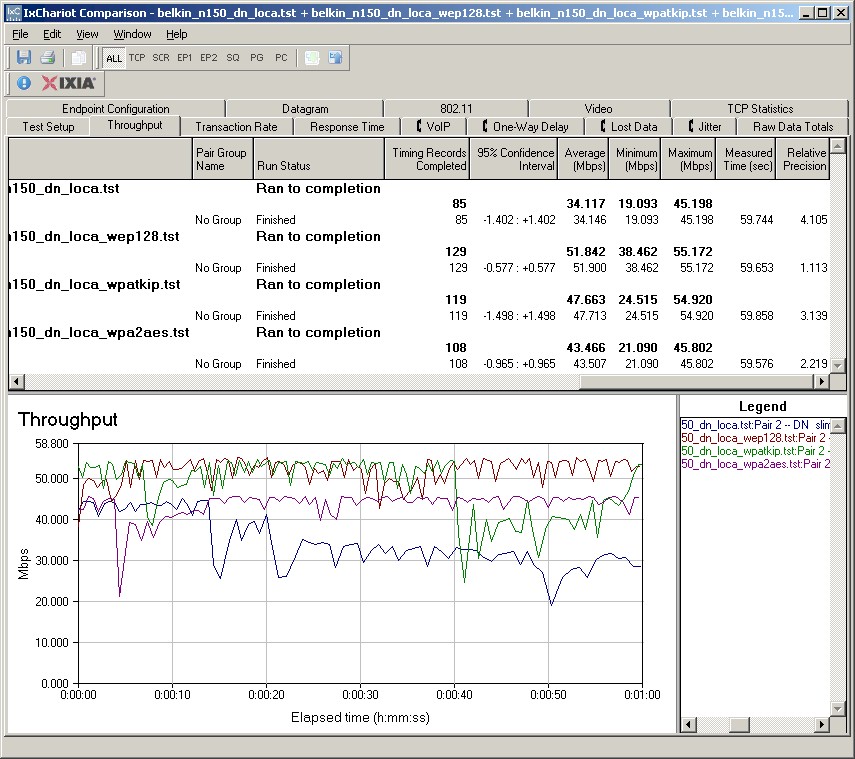
Figure 15: Wireless security tests – 20 MHz mode, downlink
I recently learned that the ability of Ralink draft 11n chipsets to maintain draft 11n speeds when using WEP and WPA/TKIP security is actually contrary to the 802.11n spec and Wi-Fi Certification requirements. Support for WEP is optional in 802.11n and 11n rates are not supposed to be used when TKIP is selected.
The fact that there are Ralink-based products in the field that support high 11n rates when WEP and WPA/TKIP are enabled that are still draft 11n Wi-Fi Certified is due to a hole in the Certification test suite (that I am told is in the process of, or has been closed).
Of course, since the N150 router and adapter are Certified only for 802.11b/g and not for draft 11n, manufacturers can do what they like when using draft 11n link rates.
Wireless Performance – Competitive Comparison
For a competitive comparison, I pulled together the first "pseudo-N" router, the Linksys WRT110, a standard 11g router, the Linksys WRT54G2 and an inexpensive draft 11n router, the Belkin N+.
Figure 16 shows that the Belkin N+ standard draft 11n router (paired with its "matching" N+ USB client), had the highest throughput, but dropped behind the Linksys WRT110 as signal levels dropped.
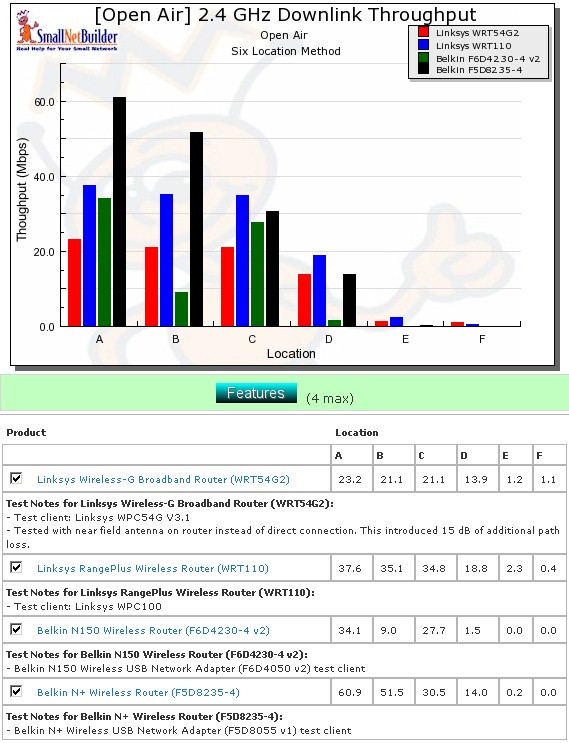
Figure 16: Wireless competitive comparison – 20MHz mode, down
Rather than go through each chart, I have pulled a summary of the results into tables. Table 2 summarizes the highest downlink throughput product in each location for the two modes tested and Table 3 compares uplink results. The charts were generated by going through the six-location comparison plots and putting an X in the product’s box that had the highest throughput for each test. If values are within 0.5 Mbps of each other, they each get an "X". If all results are 0, then no box gets an "X".
| Product | 2.4GHz /20 | 2.4GHz / 40 | ||||||||||
|---|---|---|---|---|---|---|---|---|---|---|---|---|
| A | B | C | D | E | F | A | B | C | D | E | F | |
| Linksys WRT54G2 | X | N/A | N/A | N/A | N/A | N/A | N/A | |||||
| Linksys WRT110 | X | X | X | X | X | |||||||
| Belkin N150 | ||||||||||||
| Belkin N+ | X | X | X | X | X | |||||||
Table 2: Best downlink throughput summary
Adding up the checkmarks for downlink reveals a tie for the Linksys WRT110 and Belkin N+. But for uplink, the N+ is the clear winner and also the overall winner for both up and downlink.
| Product | 2.4GHz /20 | 2.4GHz / 40 | ||||||||||
|---|---|---|---|---|---|---|---|---|---|---|---|---|
| A | B | C | D | E | F | A | B | C | D | E | F | |
| Linksys WRT54G2 | X | X | N/A | N/A | N/A | N/A | N/A | N/A | ||||
| Linksys WRT110 | X | X | X | |||||||||
| Belkin N150 | ||||||||||||
| Belkin N+ | X | X | X | X | X | X | ||||||
Table 3: Best uplink throughput summary
It’s interesting to note that the 11g product—the WRT54G2—managed to garner three bests, while the N150 had none!
Use the Wireless Charts to generate other comparisons.
Closing Thoughts
As I stated, I was not a fan of single-stream routers going into the review. And now I have actual performance data to back up my assertion that single stream draft 11n routers are a lousy deal for consumers.
Manufacturers tell me that single-stream draft 11n routers are a better deal for wireless networking buyers because they cost less than Certified dual-stream draft 11n routers, but still provide a performance boost when used with draft 11n clients. The pitch is basically: Why buy a (stinky old) 11g router, when for the same cost, you can have a (shiny new) router that works fine with your old stuff (11g) and even better with your new stuff (draft 11n)?
The main problem with the pitch, at least in the case of the Belkin N150, is that the product is only 802.11b/g Certified and Belkin will only guarantee interoperability with other Wi-Fi Certified products at those speeds. The only way Belkin will stand behind its claims of improved speed is if you use their N150 USB client. So while you might not have a problem getting your draft 11n client to link at single-stream N rates with the N150, if you run into problems, you’re on your own.
Another problem is that the pitch ignores the issue of performance degradation with mixed draft 11n / 11b/g clients. The N150 client uses draft 11n technology, so will knock the throughput of any 11b/g clients down by more than half when both are simultaneously active.
Here’s the effect in action with a mix of the N150 and Intel 2915ABG clients for downlink and uplink. In each case the Intel client throughput is drastically reduced when the N150 client is running. To me, this really puts a crimp in the value of using single-stream technology as a bridge between legacy 11b/g and draft 11n.
The last problem with the pitch is that you can get Wi-Fi Certified dual-stream draft 11n routers for even less than the N150’s current $45 street price. A quick Pricegrabber search turned up the D-Link DIR-615 for $38 from multiple vendors. And if you’re willing to go with refurbished, on-the-way-to-being-discontinued products and/or hunt for rebates, you can get down to the $40 – $50 range with a handful of other products like the Linksys WRT160N, TRENDnet TEW-632BRP and others. While these might not be my top picks for draft 11n routers, they are Wi-Fi Certified and certainly better performers both for routing and wireless than the N150.
But even if you don’t agree with my stick-with-draft 11n-Certified-products-if-you-want-draft 11n-performance approach, consider the N150 on its own merits (or lack thereof). Given its high variation in routing download throughput, high wireless uplink throughput variation, WAN DHCP lease problems, low simultaneous routing sessions and basic routing and wireless features, there are simply much better choices available.