

Introduction
| At a Glance | |
|---|---|
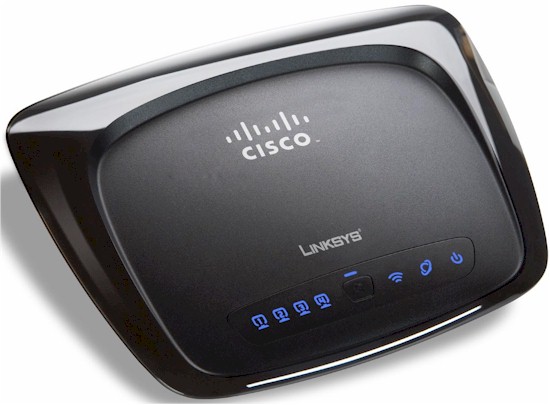
| Product | Linksys By Cisco Wireless-N Home Router (WRT120N) |
| Summary | 802.11b/g router built with Atheros Align single-stream (1×1) draft 802.11n chipset |
| Pros | • 90 Mbps routing speed |
| Cons | • Not Draft 802.11n Certified • Only guaranteed to support 54 Mbps link rate with draft 11n clients • Low throughput and/or high variation with some draft 11n clients |
If you’ve been following along, you know that I’m not a fan of the emerging crop of routers using single-stream draft 802.11n technology. If you haven’t, then take a few minutes to read Buyers Beware! Single Stream Draft 802.11n Products Bring Back Spec Spin for some general background and Three Things You Should Know About The Linksys WRT120N for my specific criticisms of the misleading marketing that Cisco is doing with the WRT120N.
For those of you who are in a rush, here are the three bullets from the latter article:
- It’s not Draft 802.11n Certified
- It supports only a maximum 150 Mbps Link Rate (actually 65 Mbps with out-of-the-box defaults)
- You don’t really save that much vs. a real draft 11n router
My real beef with Cisco is that they are marketing the WRT120N as a "Wireless-N" router. This is the same naming they use with their draft 802.11n compliant and Wi-Fi Certified products, which the WRT120N is not. And to add to the confusion, the 120N recycles the product name (Wireless-N Home Router) from the now-defunct WRT150N, which was a Wi-Fi Certified draft 11n router.
But even worse, the PDF spec sheet downloadable from the product webpage said that the WRT120N complied with the draft 802.11n standard (Figure 1).
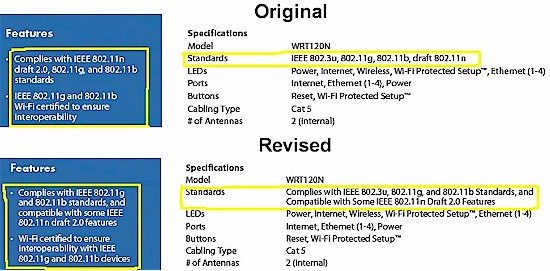
Figure 1: WRT120N spec change
Cisco changed the data sheet just a few days ago as shown above, however, when I pointed out that the 802.11n spec requires that draft 802.11n APs support two spatial streams (which is why single-stream APs / routers can’t be draft 802.11n certified).
But I hope that Cisco will also address my request to either rename the router to incorporate the "150" nomenclature that is used by Belkin (N150 Wireless Router), D-Link (DIR-600 Wireless 150 Router) and NETGEAR (WNR1000 N150 / RangeMax 150 Wireless Router) in their single-stream products, or to use the RangePlus-n branding used for the single-stream WRT110.
I’ll step off my soapbox now and get on with the review. Figure 2 shows the WRT120N’s front panel, which uses the series of backlit icons seen in other current Linksys routers. There is also a Wi-Fi Protected Setup (WPS) pushbutton for quickly setting up a secure connection with a wireless client that supports WPS.
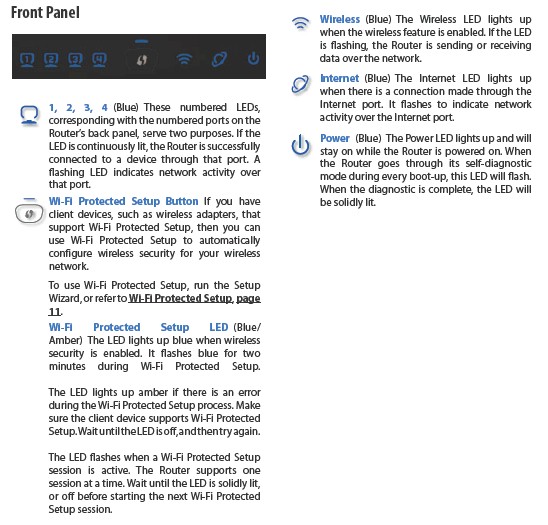
Figure 2: WRT120N Front Panel
The rear panel layout (Figure 3) is pretty standard, too. There are wall-mount screw slots on the bottom panel.
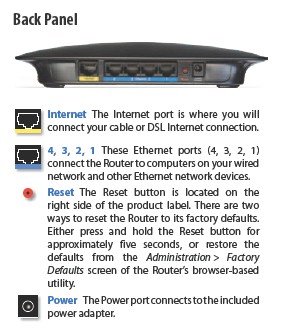
Figure 3: WRT120N Back Panel
Internal Details
Figure 4 is my own photo of the WRT120N’s main board, which I took because the FCC ID photos didn’t let me see all the components. Where Belkin went with Ralink for its N150 router, Cisco has tapped Atheros and produced the first product that I have seen using their Align single-stream chipset.
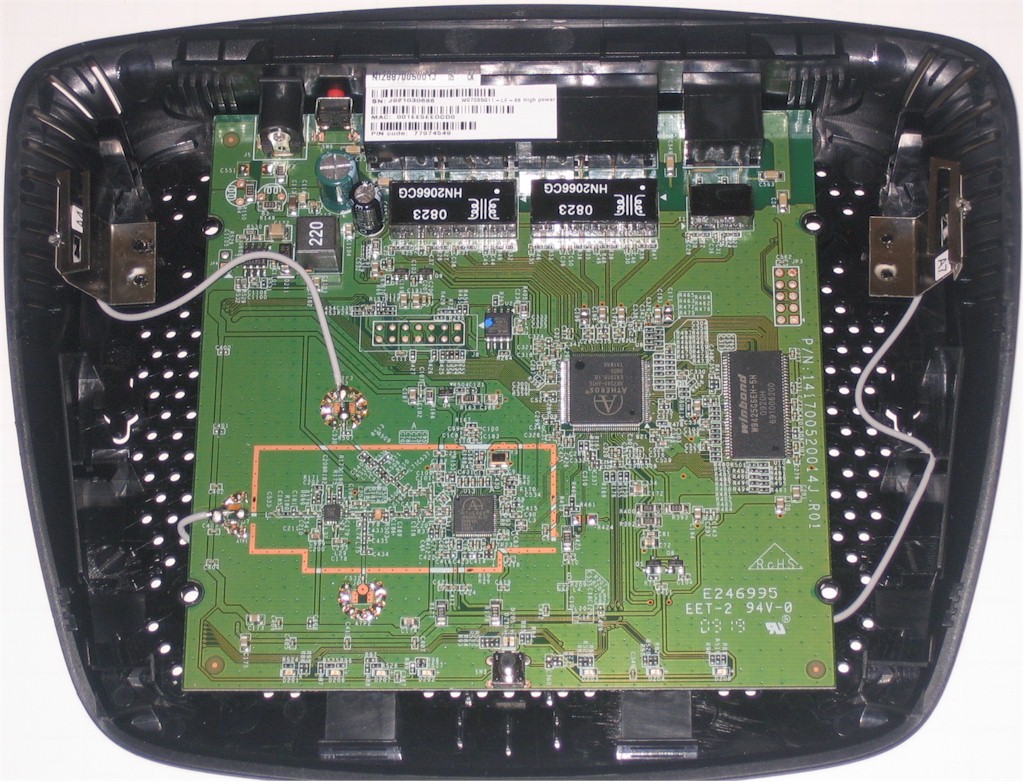
Figure 4: WRT120N Main board
Specifically, the large chip is an AR7240 network processor SoC which includes a 5-port 10/100 Ethernet switch. Its MIPS32 24K processor core is clocked at 400 MHz and has a 16 bit DDR2 memory interface.
The smaller device surrounded by a solder footprint for an RF shield that apparently wasn’t needed is an AR9285 single-stream N MAC/BB/radio. 2 MB of flash and 32 MB of RAM finish up the design.
You might notice that even though the radio has a single transmit channel, there are two antennas. When I asked Atheros about this, they said the dual antennas are used to support antenna diversity for receive, just like most 802.11b/g products.
Routing Features
The 120N implements the standard Linksys router feature set that includes:
- DHCP, Static, PPPoE, PPTP, L2TP, Telstra Cable WAN types
- Built-in Dynamic DNS clients for TZO and DynDNS
- Static and dynamic routing
- SPI firewall disable, multicast, WAN ping and IDENT filtering and Proxy, Java, ActiveX and Cooking blocking
- IPsec, PPTP and L2TP VPN passthrough (enabled by default)
- Single port forwarding and Port Range forwarding and triggered ports
- HTTPS admin access, remote management (HTTP / HTTPS) enable with IP range restriction and port setting
- Logging with support for Linksys Logviewer recording
- Access Restrictions with 10 deny or allow-based policies, each with its own list of clients and day/time schedule
- Uplink (LAN to WAN) only QoS with High, Medium, Normal or Low Priority that can be applied to specific applications (divided into Application, Online Game and Voice Device groups), physical switch ports or specific MAC addresses.
- WMM (Wireless MultiMedia) (enabled by default)
It does not have a USB port for Cisco’s Storage Link USB NAS feature. If you need further functional details, check the WRT600N review and its slideshow.
Routing Performance
I tested routing performance using our standard router tests. All tests were done with the client in DMZ. The results are summarized in Table 1 below.
| Test Description | WRT120N Throughput (Mbps) |
|---|---|
| WAN – LAN |
92.5
|
| LAN – WAN |
94.1
|
| Total Simultaneous |
151.8
|
| Maximum Simultaneous Connections | 160 |
| Firmware Version |
1.0.02
|
Table 1: Routing performance summary
The IxChariot composite plot in Figure 5 shows nice steady routing, that makes pretty good use of the 10/100 Mbps WAN and switched LAN ports with 92 – 94 Mbps in each direction. Simultaneous throughput is a bit over 150 Mbps, showing that the Atheros AR7240 SoC has enough poop to handle Gigabit ports.
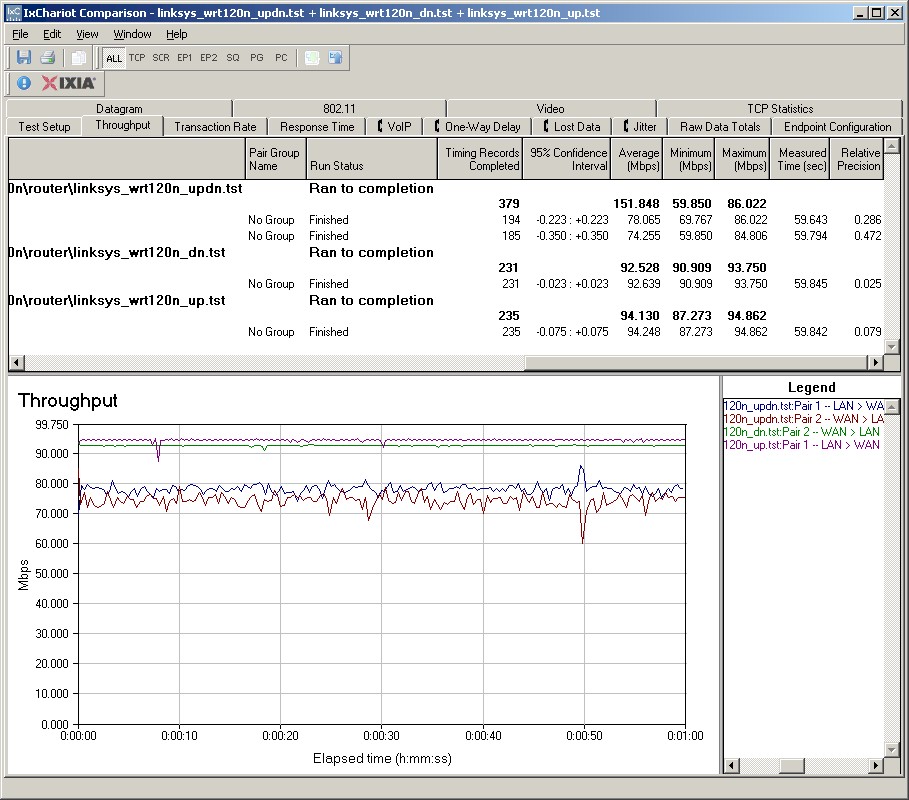
Figure 5: WRT120N routing performance
Try as I might, however, I couldn’t get the router to max out the Simultaneous Connection test and only managed to get 160 connections.
Wireless Features
The 120N’s wireless controls are also Linksys standard. Figure 6 shows the Basic Wireless settings once you switch from the default Wi-Fi Protected Setup (WPS) mode to the Manual setting mode. Network Modes are Disabled, Mixed (default), BG-Mixed, Wireless-B only, Wireless-G only and Wireless-N only.
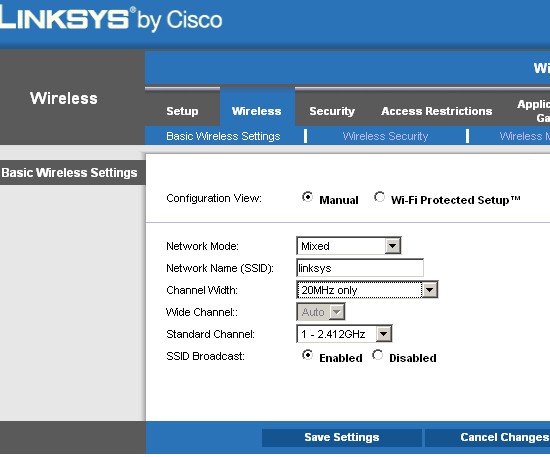
Figure 6: Basic wireless settings
You can select channels only when in 20 MHz only or 40 MHz only Channel Width modes. When the Auto (20 or 40 MHz) Channel Width mode is chosen, the channel selector is forced to Auto.
I successfully made a WPA2 / AES connection to the 120N using the WPS PIN method supported by my standard Intel 5300 AGN WiFi Link test client using the Intel PROSet Wireless Connection Utility (version 12.4.0.0).
Figure 7 shows the Advanced Wireless Settings that include Transmit Rate and AP Isolation, which keeps wireless clients from communicating with each other. I almost reused the Advanced Wireless screenshot from the recent WRT160NL review. But the 120N has a Frame Burst control (enabled by default) that the 160NL doesn’t. Neither, however, allows you to set the transmit power level.
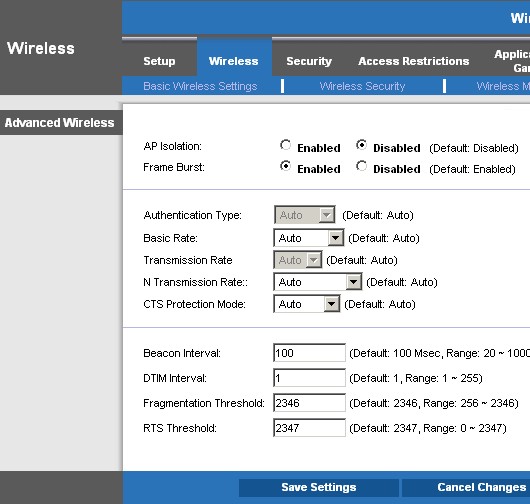
Figure 7: Advanced Wireless Settings
Wireless Performance
As I explained in the Belkin N150 review, the maximum link rate that a draft 802.11n client or adapter using single-stream N will report is 65 Mbps with the 120N in its out-of-the-box configuration. This what you’ll see displayed in Windows’ Network Connection Properties or any client utility that reports the client link rate.
You only get the 150 Mbps shown in the Speed icon on the side of the product box (Figure 8), when you set the router to the spectrum-hogging 40 MHz bandwidth mode.
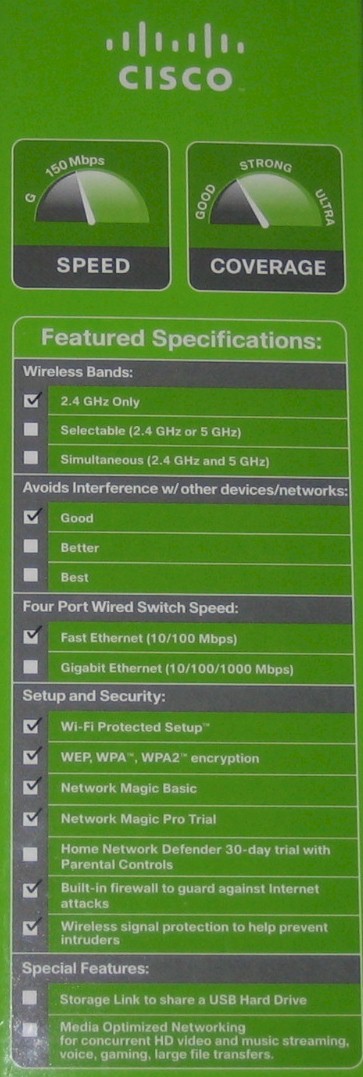
Figure 8: Speed and Coverage Icons
Note that this is the only place that there is any reference to the 150 Mbps connect speed limitation of the 120N—or any speed reference, for that matter. When I asked Cisco why these handy icons were not displayed on the 120N’s web page or on the data sheet, they said only that they "don’t show these on any of the products".
I tested using the open air test method described here and performed two full test runs, plus other spot testing. I used my standard test client, an Intel Wi-Fi Link 5300 AGN mini-PCIe card and 12.4.0.21 driver inside a Dell Mini 12 running WinXP Home SP3.
I first performed test runs with the adapter Draft 11n mode and throughput enhancement enabled with both 20 and 40 MHz bandwidth modes set in the router. I then disabled the Intel client’s draft 11n mode and throughput enhancement, essentially converting it into an 802.11b/g client. I then ran tests with the router set to 20 MHz and 40 MHz modes. Note that with an 802.11b/g adapter, it shouldn’t matter whether the router is set to 40 MHz mode, since the adapter doesn’t know how to speak that "language".
In all tests, I left the router set to its default Mixed Wireless mode, since that’s what most users would do. I also set the router to Channel 1 for all tests (Wide Channel 3 when switched to 40MHz only Channel Width).
Wireless Performance – more
Let’s first look at IxChariot plots of wireless runs made with the Intel 5300 AGN set to draft 11n mode. Figure 9 shows the runs made in 20 MHz mode, downlink. The curious thing here is that best case throughput of 41.1 Mbps was obtained in Location C, not in-room Location A.
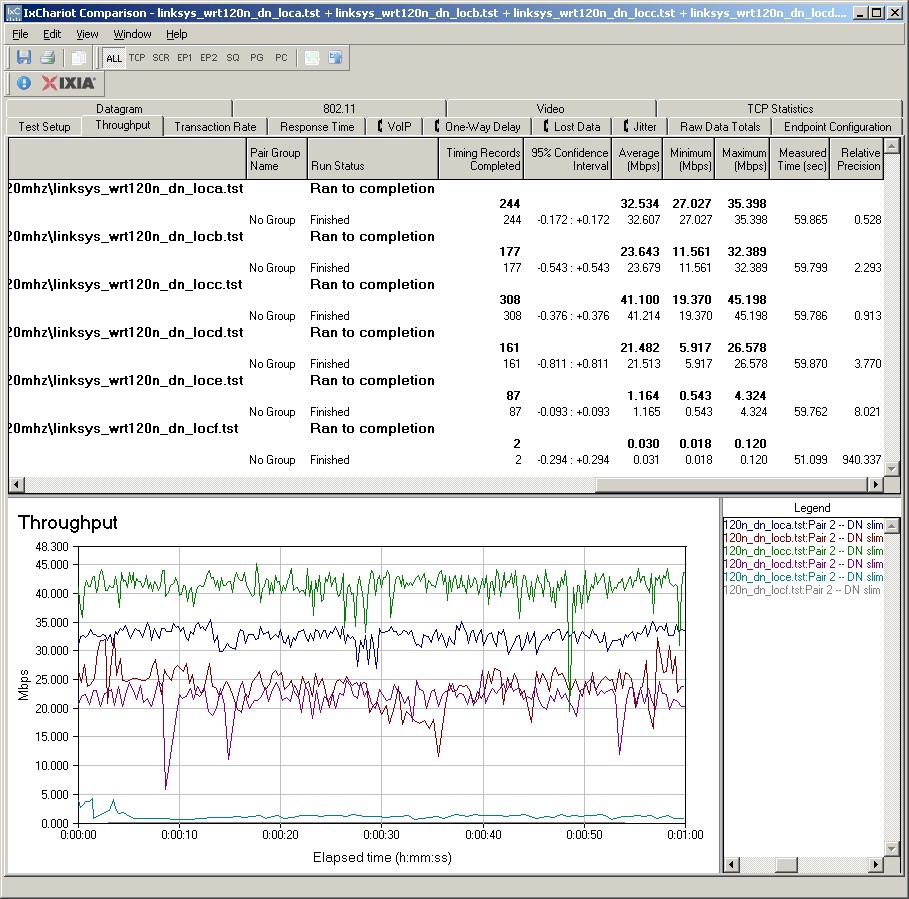
Figure 9: Wireless throughput – N client, 20 MHz mode, downlink
The 20 MHz mode uplink runs shown in Figure 10 also show odd behavior in Location A, with periods of low throughput below 10 Mbps alternating with speeds in the 40 Mbps range. This was not a one-time anomaly;I saw this behavior frequently during my testing.
Note that for both up and downlink, the Intel client was able to associate with the 120N and complete the test runs at lowest signal level Locations E and F, although at speeds too low to be practically useful.
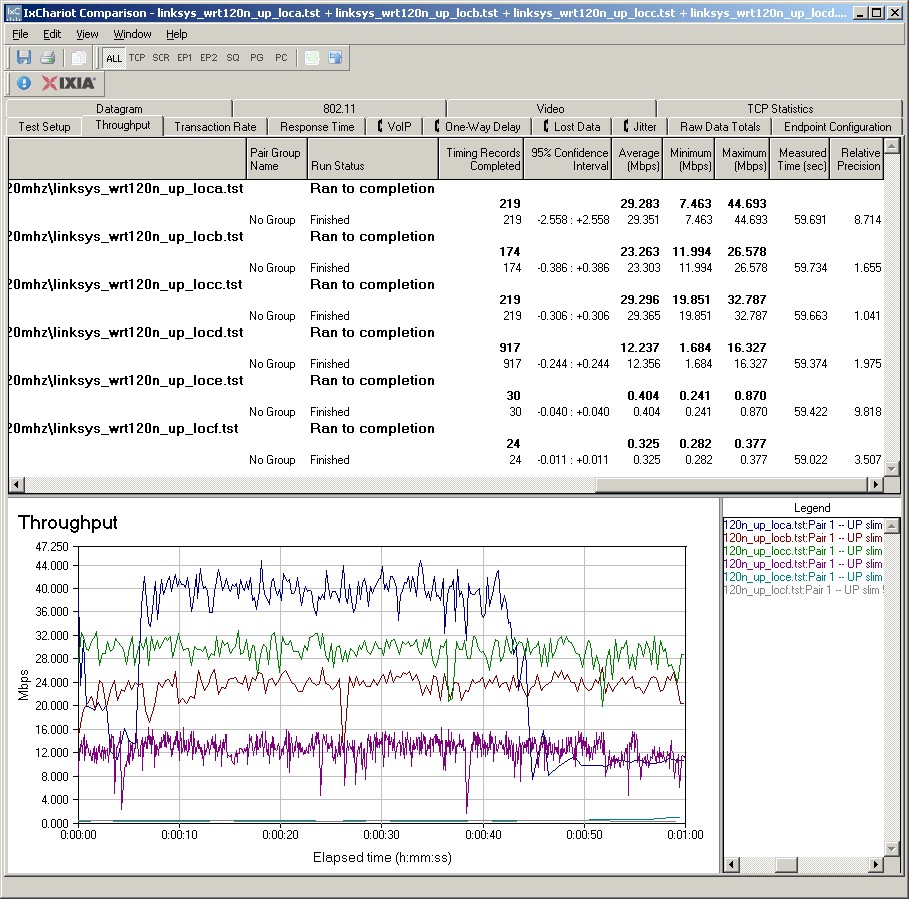
Figure 10: Wireless throughput – N client, 20 MHz mode, uplink
The 120N and Intel 5300 seemed somewhat better behaved in Location A when I forced the router to 40 MHz mode as shown in Figure 11. But the Location D trace still shows the high / low throughput cycling shown in Figure 10. Note the best case throughput of 66.857 Mbps in Location A.
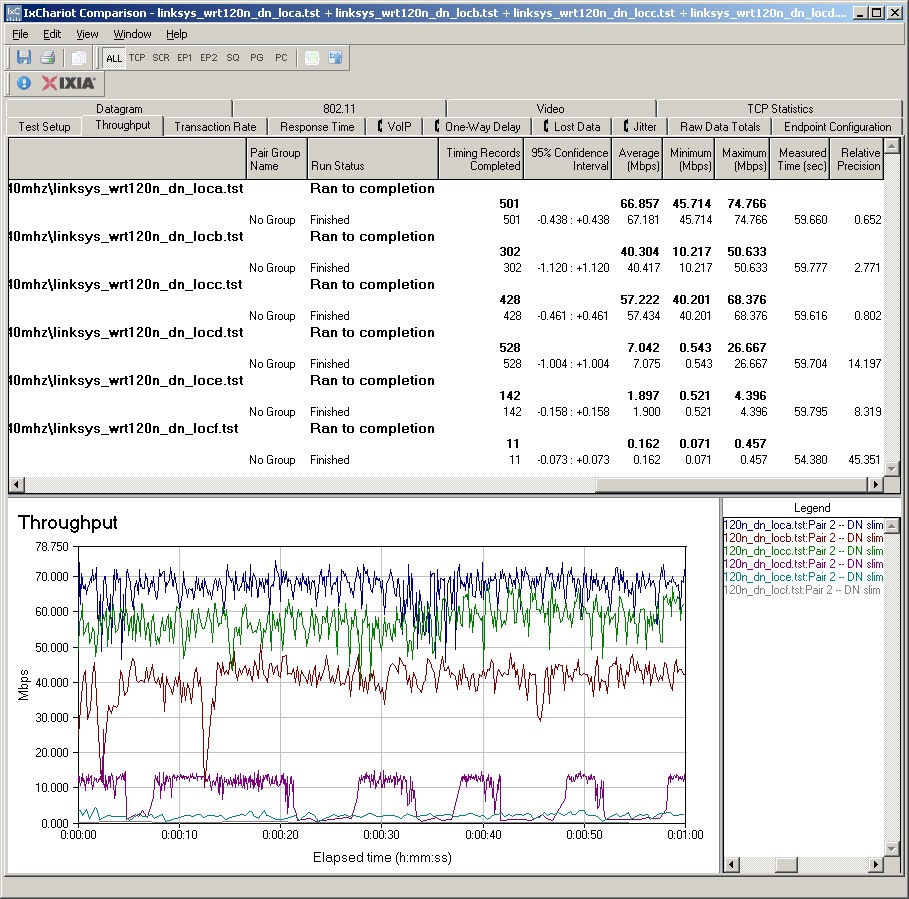
Figure 11: Wireless throughput – N client, 40 MHz mode, downlink
This is also seen to a lesser extent for Location D in the 40 MHz mode uplink plot.
It’s perfectly possible that the wonkyness is due to something in the Intel 5300 adapter’s driver vs. the 120N. So I tried another notebook that has an Intel Wi-Fi Link 5100 AGN mini-PCIe card in it. It didn’t seem to do much better, as shown in the simultaneous up / downlink plot shown in Figure 12.

Figure 12: Wireless throughput – Intel 5100 client, 20 Mhz mode, up and downlink
Wireless Performance – 11g client
As noted earlier, I also repeated the six location tests with the Intel 5300 AGN set to act as an 802.11g adapter. Figure 13 shows a composite IxChariot plot of the six test location runs, where we once again see high throughput variation in the lower signal test locations.
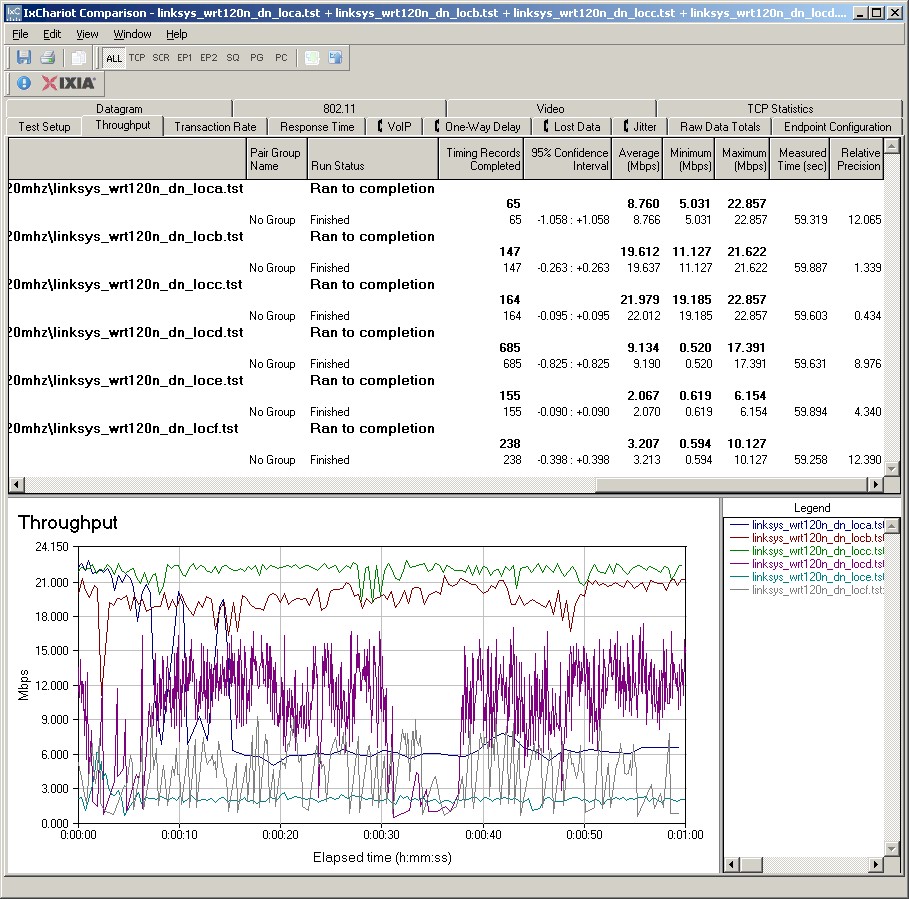
Figure 13: Wireless throughput – G client, router 20 MHz mode, downlink
Location D has the highest variation, followed by Location F. The good news is that average throughput in Locations E and F has gone from unusable with the adapter set to draft 11n mode, to 2-3 Mbps with the adapter set to 11g mode. This would be good enough to support web browsing and email and even probably audio streaming.
Uplink performance with the 11g mode adapter was much more well-behaved (Figure 14).
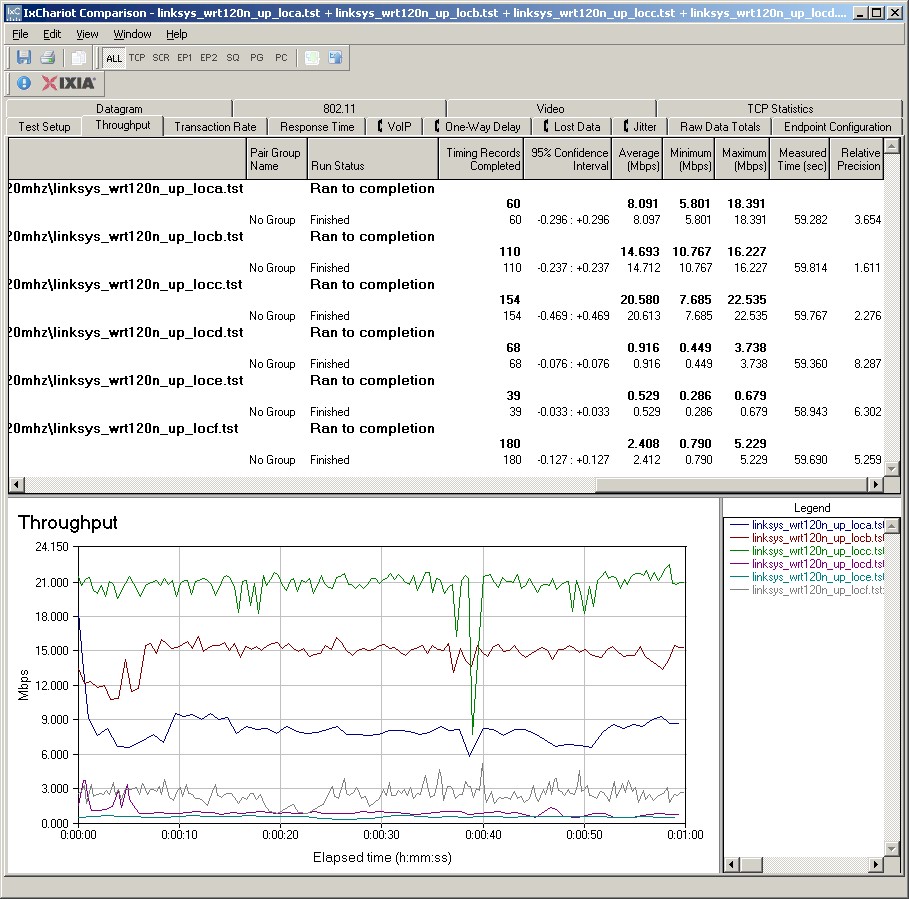
Figure 14: Wireless throughput – G client, router 20 MHz mode, uplink
For two last data points, I ran a quick Location A and D tests using another notebook, this time with an Intel 2915ABG mini-PCI card inside (this is not a draft 11n adapter). The composite trace in Figure 15 combines individual up and downlink runs with a third simultaneous up / downlink run in Location A. The downlink run starts out with high variation, but then settles down to a smoother, higher level. Uplink speed, however, retains high variation throughout the run.
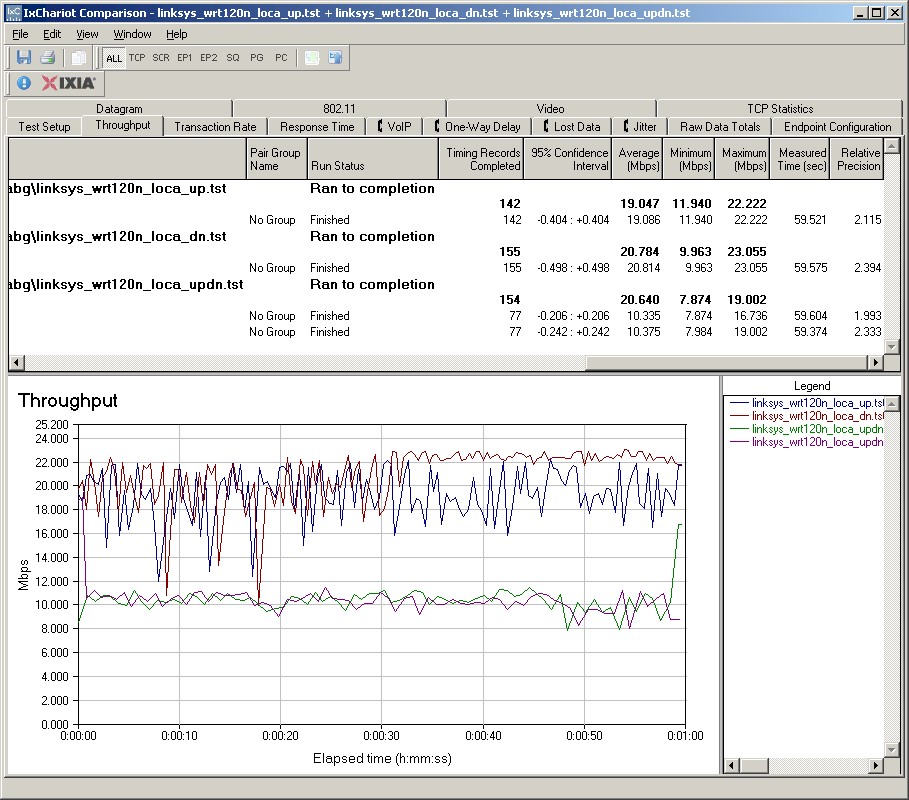
Figure 15: Wireless throughput – Intel 2915ABG client, router 20 MHz mode, Location A
The Location D plot in Figure 16 also shows some high uplink variation, but with 16 Mbps of average throughput over the 1 minute test.
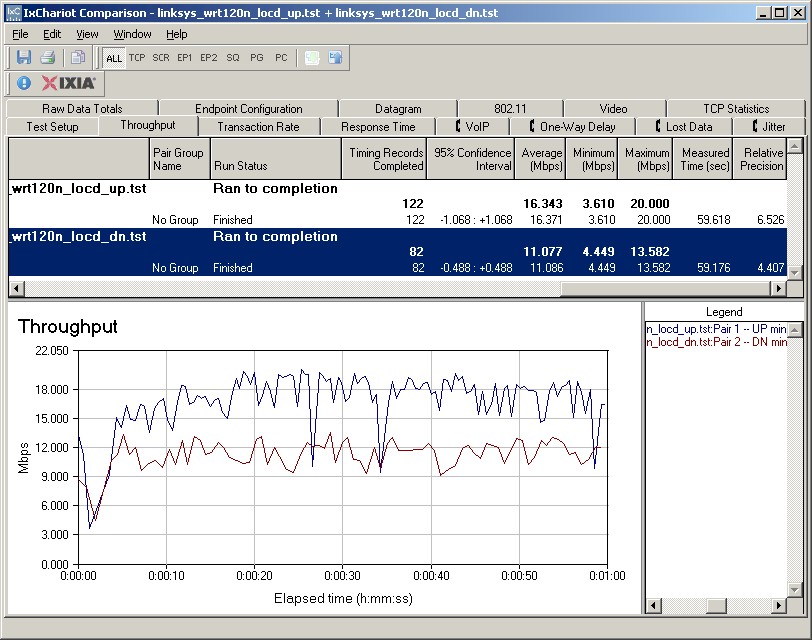
Figure 16: Wireless throughput – Intel 2915ABG client, router 20 MHz mode, Location D
Wireless Performance – Mode comparison
To make it easier to compare the performance of the N and G clients, I put together some bar charts. Figure 17 compares the Intel 5300 client running downlink with the router set to 20 MHz mode.
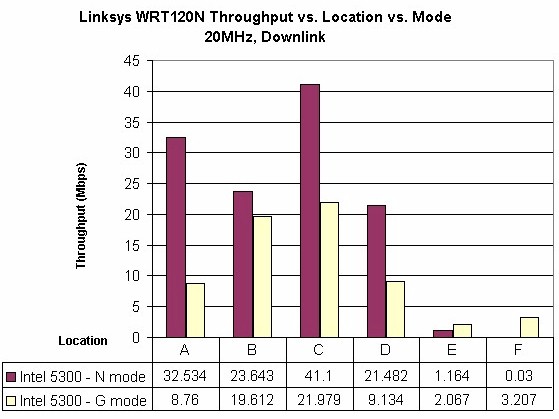
Figure 17: Linksys WRT120N client mode comparison – 20 MHz, downlink
As we have seen before, draft 11n beats 11g when signals are strong. But in weaker signal locations E and F, 11g does better. Even though draft 11n adapters are supposed to be smart enough to fall back to using 11g link rates, sometimes they just don’t seem to make the switch.
Figure 18 compares uplink speeds in 20 MHz mode. This time, speeds are very similar for draft 11n and 11g in Location E. But once again 11g beats draft 11n in Location F.
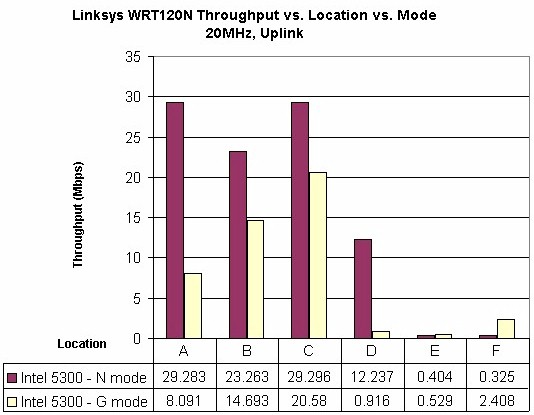
Figure 18: Linksys WRT120N client mode comparison – 20 MHz, uplink
Results are similar when the router is set to 40 MHz mode. Check the downlink and uplink plots if you want to see.
I was curious to see if there would be a difference with an 11g adapter with the router set to 20 or 40 MHz mode. Figures 19 and 20 would seem to indicate that there is.
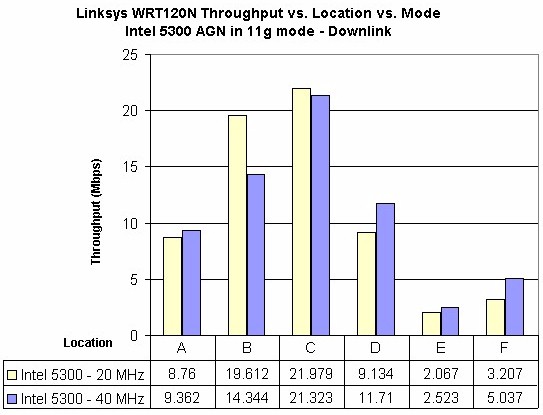
Figure 19: Intel 5300 client G mode – router 20 and 40 MHz modes, downlink
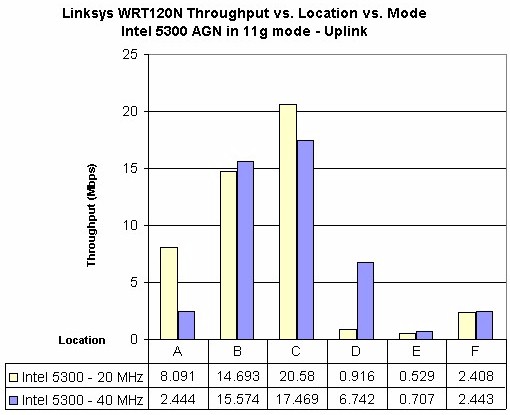
Figure 20: Intel 5300 client G mode – router 20 and 40 MHz modes, uplink
Wireless Security Performance
Draft 11n routers are supposed to switch to supporting only "non HT" (High Throughput) modes, i.e. 54 Mbps maximum, when using WEP or WPA / TKIP wireless security. So I ran tests using WEP 128, WPA / TKIP and WPA2 / AES with the Intel 5300 client with 11n mode and Throughput Enhancement enabled, and with both settings disabled to put the adapter in 11g mode.
Unlike the Ralink-based Belkin N150, the WRT120N properly connected to the Intel adapter at a maximum 54 Mbps rate when it was acting as a draft 11n adapter and WEP or WPA / TKIP were set. But checking for throughput degradation was difficult, because during the tests, the link rate seemed to want to hang around 18 Mbps, even though I was in the same room (Location A), reducing the test througput.
However, I observed the same behavior (using a lower link rate with lower speed resulting) when I switched the Intel adapter to act as an 11g client. So the throughput reduction isn’t because of any encryption overhead. It’s simply due to some unoptimized interaction between the WRT120N and the Intel adpater.
Wireless Performance – Mixed Clients
One thing I neglected to do in my test of the Belkin N150 was to see how it handled a mix of draft 11n and 11g clients. Since Certified draft 11n routers don’t do well with a mix of clients (throughput for both is severely reduced), I figured that routers using single-stream draft 11n would do no better. But this time, I thought it would be useful to see if a single-stream draft 11n router would do worse.
So I set up a test that connected my standard test notebook with the Intel 5300 AGN client in N mode and another notebook with an Intel 2915 ABG internal mini-PCI adapter to the 120N. The 11g adapter happened to be another Intel; I wasn’t intentionally making this an Intel-only client test. The WRT120N was set to 20 MHz bandwidth, Mixed mode.
I then ran four tests:
- Downlink, G client starting first
- Downlink, N client starting first
- Uplink, G client starting first
- Uplink, N client starting first
If you open all four plots, you’ll see that the draft 11n client has the lower average throughput in three of the four tests. That’s not to say that the 11g client just sails along with nice steady throughput, as shown in the uplink plot in Figure 21.
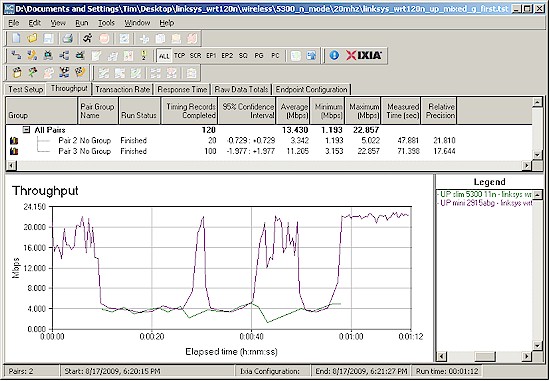
Figure 21: Mixed client reduced performance example
Throughput sharing among mixed b/g and draft 11n clients tends to vary significantly depending on the exact mix of clients and router, not to mention surrounding networks. But it seems that, at least for this test case, the draft 11n client took more of a throughput hit than I have seen with other mixed client testing.
Wireless Performance – Competitive Comparison
For a competitive comparison, I pulled together the first "pseudo-N" router, the Linksys WRT110 and the other single-stream router that I’ve tested so far, the Belkin N150.
As I have seen with every other wireless router, Figure 22 shows that the WRT120N isn’t the best performer in all test locations.
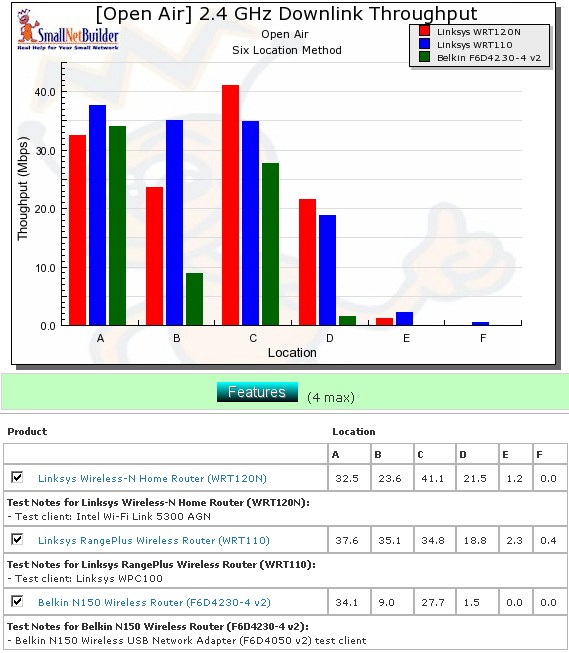
Figure 22: Wireless competitive comparison – 20MHz mode, down
So I’ll once again turn to my trusty throughput summary tables (Tables 2 and 3) to perform a more comprehensive comparison.
The tables are generated by going through each six-location comparison plots and putting the throughput value in the product’s box that had the highest throughput for each test. If throughput differs by 1 Mbps or less, then both products get the throughput entered.
| Product | 2.4GHz /20 | 2.4GHz / 40 | ||||||||||
|---|---|---|---|---|---|---|---|---|---|---|---|---|
| A | B | C | D | E | F | A | B | C | D | E | F | |
| Linksys WRT120N | 41.1 | 21.5 | 66.9 | 1.9 | 0.2 | |||||||
| Linksys WRT110 | 37.6 | 35.1 | 2.3 | 0.4 | 48.2 | 59.1 | 25.1 | |||||
| Belkin N150 | ||||||||||||
Table 2: Best downlink throughput summary
Table 2 shows that the WRT120N and WRT110 are essentially tied for downlink performance both in 20 and 40 MHz modes. But Table 3 shows the WRT110 the clear winner for uplink and so the overall winner. Not surprisingly, the Belkin N150 is the poorest performer of the group.
| Product | 2.4GHz /20 | 2.4GHz / 40 | ||||||||||
|---|---|---|---|---|---|---|---|---|---|---|---|---|
| A | B | C | D | E | F | A | B | C | D | E | F | |
| Linksys WRT120N | 0.4 | 0.3 | 39.3 | 13.9 | 0.7 | 1.0 | ||||||
| Linksys WRT110 | 42.4 | 38.9 | 38.2 | 25.5 | 0.8 | 0.9 | 63.3 | 38.9 | 52.4 | 14.0 | 0.5 | |
| Belkin N150 | ||||||||||||
Table 3: Best uplink throughput summary
But let’s see what happens if you spend a bit more money for a certified draft 802.11n router. I chose the D-Link DIR-655 [A4] since it’s a popular choice and good performer. I also wanted to include a draft 11n router that had also been tested with the Intel 5300AGN client, just to see if there was a pattern of bad performance using that adapter.
Figure 23 shows the four routers compared for 20 MHz mode downlink.
![Wireless competitive comparison w/ DIR-655 [A4] - 20MHz mode, down, down](/wp-content/uploads/2009/08/linksys_wrt120n_compete_w_dir655_20mhz_dn.jpg "Wireless competitive comparison w/ DIR-655 [A4] - 20MHz mode, down")
Figure 23: Wireless competitive comparison w/ DIR-655 [A4] – 20MHz mode, down
And once again, throughput comparison tables for down (Table 4) and uplink (Table 5).
| Product | 2.4GHz /20 | 2.4GHz / 40 | ||||||||||
|---|---|---|---|---|---|---|---|---|---|---|---|---|
| A | B | C | D | E | F | A | B | C | D | E | F | |
| Linksys WRT120N | 21.5 | 1.9 | 0.2 | |||||||||
| Linksys WRT110 | 35.1 | 2.3 | 0.4 | 48.2 | 59.1 | 25.1 | ||||||
| Belkin N150 | ||||||||||||
| D-Link DIR-655 [A4] | 67.4 | 48.4 | 22.1 | 2.8 | 0.8 | 83.1 | 0.9 | 0.8 | ||||
Table 4: Best downlink throughput summary – w/ DIR-655 [A4]
Table 4 shows that the downlink contest is between the DIR-655 [A4] and WRT110, with the 655 coming out ahead. Uplink is just no contest, with the 655 shutting out the other two products in all locations (except for a tie in Location F, 40 MHz mode).
| Product | 2.4GHz /20 | 2.4GHz / 40 | ||||||||||
|---|---|---|---|---|---|---|---|---|---|---|---|---|
| A | B | C | D | E | F | A | B | C | D | E | F | |
| Linksys WRT120N | 1.0 | |||||||||||
| Linksys WRT110 | ||||||||||||
| Belkin N150 | ||||||||||||
| D-Link DIR-655 [A4] | 62.4 | 41.7 | 54.4 | 35.4 | 6.0 | 2.3 | 100.1 | 52.2 | 63.8 | 30.1 | 2.2 | 1.4 |
Table 5: Best uplink throughput summary – w/ DIR-655 [A4]
It’s not surprising, to me at least, that the Certified draft 11n dual-stream router and card are the clear winners. But it’s nice to have the data to back up the assumption.
Use the Wireless Charts to generate other comparisons.
Closing Thoughts
Whether you call them RangePlus, RangePlus-n, N150, or (misleadingly) Wireless-N, the premise behind wireless routers using single-stream draft 11n chipsets is that they provide a lower-cost alternative to Certified draft 11n routers. But in the end, it’s a false economy.
Informed wireless buyers now know that you need separate WLANs for "legacy" 11b/g and draft 802.11n clients in order to have each not slow the other down. And if your older wireless gear doesn’t support WPA2/AES security, that’s an even stronger argument for not mixing the two client types if you want higher draft 11n speeds.
So if you already have a wireless LAN and are thinking to moving up to draft 11n, you need to add a second, draft 11n router, not replace the current 11b/g one, to get the highest speed from both your 802.11b/g and draft 11n clients. So why would you intentionally limit the performance of the dual-stream draft 11n clients that you’re going to buy, by using them with a single-stream router?
The $10 – $40 difference (depending on how carefully you shop and waiting for promotions and closeouts) between a single-stream "N" and real draft 11n router is minor, compared to the money you’ll be wasting for each draft 11n client you buy. Wasted, because you won’t be getting all of the higher speed that dual-stream, Wi-Fi Certified draft 11n can deliver.
In closing, you’re probably tired of my ranting about Cisco’s misleading marketing of the WRT120N as a "Wireless-N" product. But there two more points to make.
First, I must admit that my tests support Cisco’s claim that the 120N can provide "Double the speed of G when used with Wi-Fi Certified Draft 802.11n devices". But they also show that you don’t always get the 2X improvement and that in weak signal cases, 11g clients will actually provide higher throughput and more reliable connection.
And finally, there is the matter of exactly what Cisco is promising when it comes to the WRT120N’s performance. I asked Cisco the same question that I asked Belkin about its N150: "What is Cisco’s policy regarding the interoperability, including expected speeds, of the WRT120N with Certified draft 802.11n products?". Here is the response (bolding mine):
"The WRT120N is WiFi Certified to be interoperable with ALL other WiFi Certified wireless devices.
Draft N certified devices (and as of next month, N certified devices) are interoperable with B and G certified devices, and since this device is WiFi Certified as G, it is therefore interoperable with all WiFi Certified devices."
In case you missed it, Cisco didn’t directly answer the question regarding expected speeds. But if you read carefully, you’ll see that they are saying that the WRT120N is only certified to be interoperable at 802.11g speeds, i.e. 54 Mbps maximum link rate, even with Wi-Fi Certified Draft 11n devices.
On that basis alone, I just can’t recommend the not-certified-for-draft-802.11n WRT120N, no matter how Cisco tries to disguise it.