

Introduction
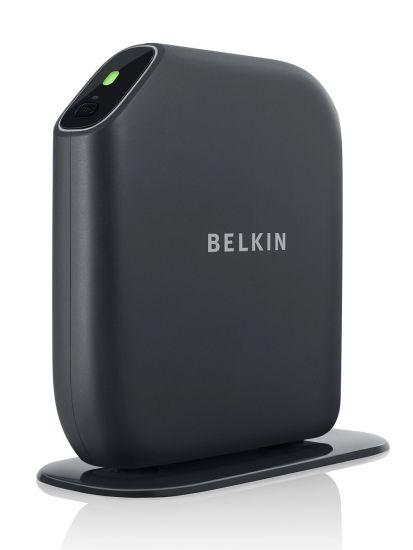
| At a Glance | |
|---|---|
| Product | Belkin Play Max Wireless Router (F7D4301) |
| Summary | Broadcom-based 2T2R dual-radio, dual-band 802.11n router w/ Gigabit WAN and LAN ports, USB drive file sharing and easy installation features. |
| Pros | • Simple to set up • Windows and Mac OS supported • 2 USB 2.0 ports for sharing storage or printer • Preconfigured wireless security & Guest network |
| Cons | • Jumbo frames not supported • Admin password can be left blank • No network activity indicators • Poorly documented applications • Most applications run on computer, not in router |
Wireless router manufacturers are finally starting to figure out that they have to simplify the consumer out-of-box setup experience to get their routers avoid a quick trip back to the store. Not everyone wants to spend countless hours getting something to work that should just plug in and go.
Cisco recently introduced their new line of Valet “hotspots”, including the M10 reviewed here, which successfully takes all of the complexity out of setting up a secure wireless network. Belkin also has a simple setup procedure, but has added bundled applications to up the ante and get you to look in their direction.
Tim highlighted the differences in the new Belkin routers in his article about the four new product introductions. To summarize briefly, the entry level Surf wireless router (F7D2301), priced at $49.99, is a basic four port “N” router. The Share router (F7D3302), at $79.99, adds in one USB port for print or storage sharing. Applications appropriate for shared resources, such as “Print Genie” and backup software are also included.
Priced at $99.99, the Play Wireless Router (F7D4302) is probably one of the least expensive dual band wireless routers with Gigabit Ethernet ports. It also features 2 USB 2.0 ports and a bundle of applications for multimedia enjoyment. At the top of the line, the $129.99 Play Max Wireless Router (F7D4301) adds in QoS capabilities and a BitTorrent application that can automatically download to attached USB storage.
The design for the new line is what I would call minimalist. There are only two indicators visible from the front of the router. The large LED shows if the router is connected (green) to the Internet or not connected (orange). Adjacent to the Internet LED is the WPS (Wi-Fi protected setup) button required in order to earn Wi-Fi certification. A small LED adjacent to the WPS button blinks only when the router is in WPS setup mode.
All members of the new line stand vertically with the base of the device pre-installed and screwed into the bottom of the router. A ventilation slot at the top of the router is there to keep things cool.
While you can awkwardly lay the router on its side, you can’t wall mount it. Most likely, Belkin made this design decision to guarantee the orientation of the antennas which they claim provide "3 dimensional" whole home coverage. Of course, the vertical orientation also helps to maximize convection cooling.
Figure 1 shows the rear of the Play Max. The yellow port is labeled Modem and each of the other Ethernet ports is labeled Wired. Each of the two USB 2.0 ports has an LED indicator to show if a USB device is connected. There’s also a reset button and a power connector.
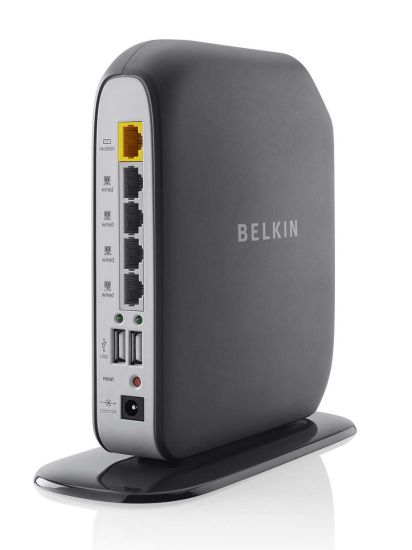
Figure 1: Belkin Play Max rear view
Conspicuous by their absence are indicators for Link / Speed / Activity on any of the Ethernet ports. Call me "old school", but I prefer port indicators, along with a wireless activity indicator – preferably on the front panel – to show me what’s going on. Even Cisco’s “mom-friendly” Valet hotspots have LAN / WAN / WLAN indicators. They sure help should you need to troubleshoot a problem. Still, perhaps for some consumers, maybe all they want / need is to know if their router is connected to the Internet.
On The Inside
Figure 2 shows the Play Max’ board. It uses a Broadcom BCM4718 Intensi-fi XLR 802.11n Simultaneous Dual-Band (2.4/5 GHz) Router System-on-Chip. This SOC combines the Baseband, MAC, CPU, dual band radio modules and USB support. The SOC appears to be providing only the 2.4 GHz functionality while a Broadcom BCM43224 Integrated 802.11a/b/g/n is used for the 5 GHz radio.
A Broadcom BCM53115 switch, found in many Gigabit-capable routers, provides the Gigabit WAN and LAN ports without jumbo frame support. 64 MB of RAM and 8 MB of flash round out the design.
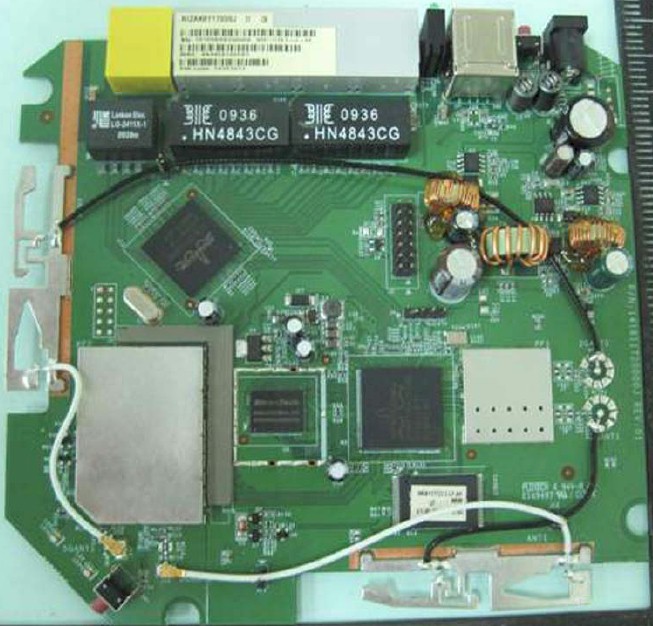
Figure 2: Belkin Play Max board
Since the Play seems to have the same hardware features as the Play Max (simultaneous dual-band N, Gigabit ports), but is $30 cheaper, let’s look inside that one, too. Figure 2a isn’t clear enough for IDing components.
But you can see that it’s not the same board as the Play Max. More detailed photos in the FCC ID doc show a Broadcom BCM5325 10/100 switch, with the same memory, flash and Broadcom BCM4718 / BCM43224 processor / radio combination. Belkin doesn’t exactly go out of its way to tell you that the Play doesn’t have Gigabit ports. That info doesn’t show up on the comparison page and you might miss it if you don’t look carefully on the individual product spec pages.
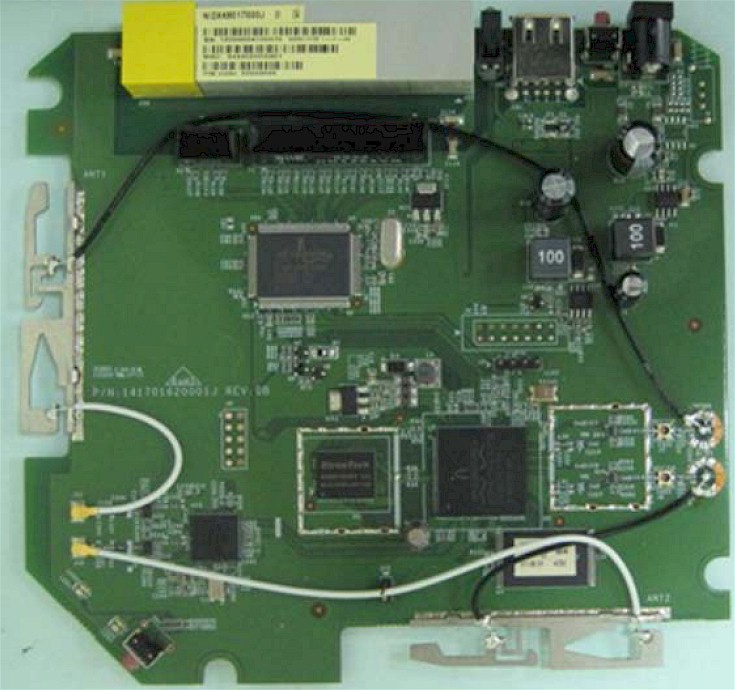
Figure 2a: Belkin Play board
Though I doubt that the Play Max’ lack of indicators would appeal to the “DD-WRT” crowd, the Play Max uses the same SOC and Gigabit chipset as the recently reviewed ASUS RT-N16. The ASUS boasts 128MB of RAM and 32MB of flash, but lacks 5 GHZ band support.
I personally use DD-WRT on the ASUS platform, so I’m assuming that it would probably also work on the Play Max. However, the smaller amount of memory might limit the Play Max to a smaller DD-WRT distribution. Since this router was just released, there’s no information available on it in the DD-WRT database – at least not yet. Hopefully, if DD-WRT ends up supporting the Play Max, they’ll include dual-band support.
Setup
Belkin has done a good job to help the customer with initial setup. The power supply cord and the supplied Ethernet cable are both clearly labeled. In fact, as shown in Figure 3, both cables are already plugged into the router. All you have to do is plug in the wall wart and plug the other end of the Ethernet cable into your DSL/Cable modem.
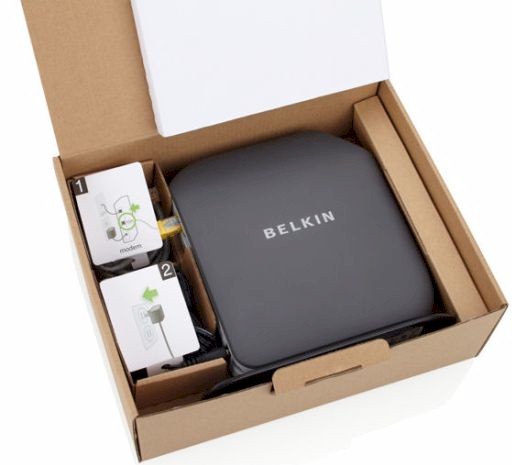
Figure 3: Power cord and Ethernet cable come plugged in
The setup utility is supplied on a CD that works both on the MacOS and Windows platforms. Of course, if you have a netbook, you’ll need to copy the installation files onto a USB key, or, if you have one, plug in a USB optical drive. Perhaps Belkin should consider Cisco’s approach and put the files on a USB key, at least for the top-of-line Play Max.
For my initial installation, I used my netbook and installed the software without a problem after transferring it to a USB key. The Play Max arrives pre-configured with different network names for the 2.4 and 5 GHz radios. My review unit was named Belkin.5567 and the 5 GHz network was named Belkin.5567_5GHz.
A secure guest network, in this case named Belkin.5567.guests, was also enabled by default on the 2.4 GHz band. (I’ll talk more about that later.) A unique pre-shared WPA key has also been assigned. This information is printed on a card that is attached to the side of the router. After you use this information to set up your router, you can store the card in a slot on the bottom of the router.
The setup utility first prompts for your country. After entering that, you are prompted for the network SSID and WPA key from the information card as shown in Figure 4.
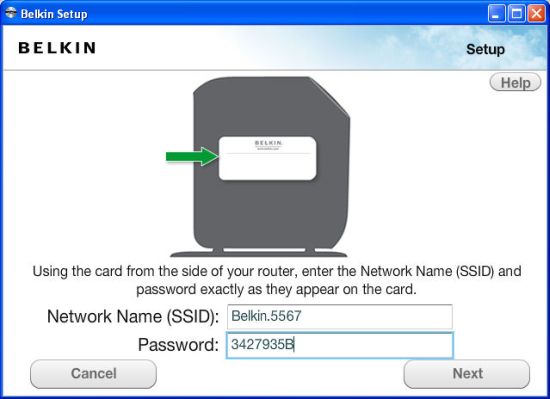
Figure 4: Wireless security info on side of router
A screen then appears informing you that it is attempting to communicate with the router, and advises that it could take a couple of minutes. Shortly thereafter, if all goes well, you are rewarded with a congratulations screen shown in Figure 5.
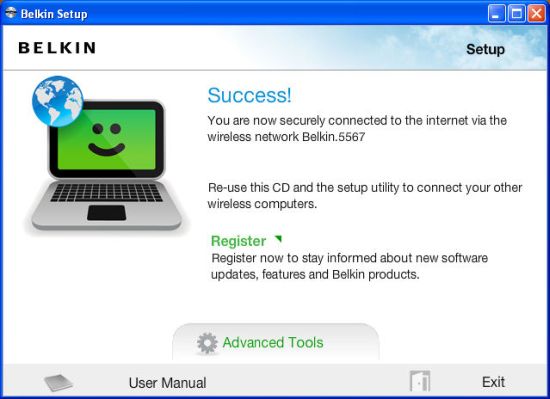
Figure 5: Basic setup completed
Clicking on Advanced Tools on the screen above takes you to the screen shown in Figure 6. Each of the entries is merely a direct link into a corresponding page in the web user interface.
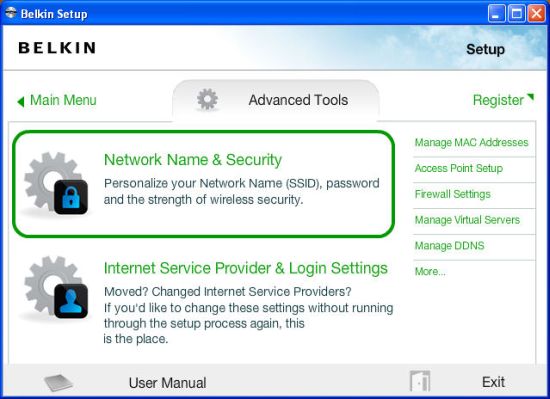
Figure 6: Advanced Tools provide direct links into the web UI
At this point, the basic router configuration has been completed, and an application that runs in the system tray (Figure 7) has been installed, along with the applications included with your particular model.
I’ll point out that although the wireless network is secured, the setup process does not require that the blank default router admin password be changed. Belkin should consider changing this long-standing tradition if they really want to ensure a secure installation.
By default, the LAN / secured WLAN network is 192.168.2.0/24. You can reach the router admin page by using the advanced setup menu above, by entering 192.168.2.1 into your browser, or typing http://router into your browser. All land you at the status page shown in Figure 7. Note, anyone on the subnet can view this page, as no password is required to see it. Only if you attempt to change any settings are you prompted for a password.
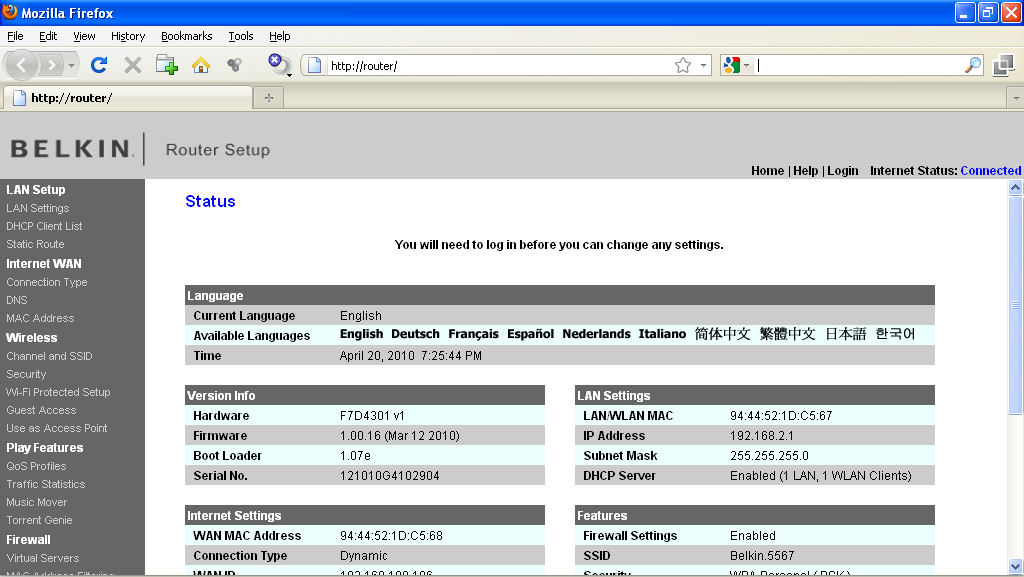
Figure 7: Belkin Play Max status page
Feature Tour
The menu structure is flat – none of the menu items have sub menus. The help link at the top of the each page takes you to a glossary. However, some pages have More Info links that take you to context sensitive browser-based help. Many of the menu items are standard on most routers, so I’ll discuss the ones that deserve special mention.
Wireless Settings
Figure 8 shows that the 2.4 and the 5 GHz bands can be configured individually. You can individually disable the radios via the Wireless Mode selector.
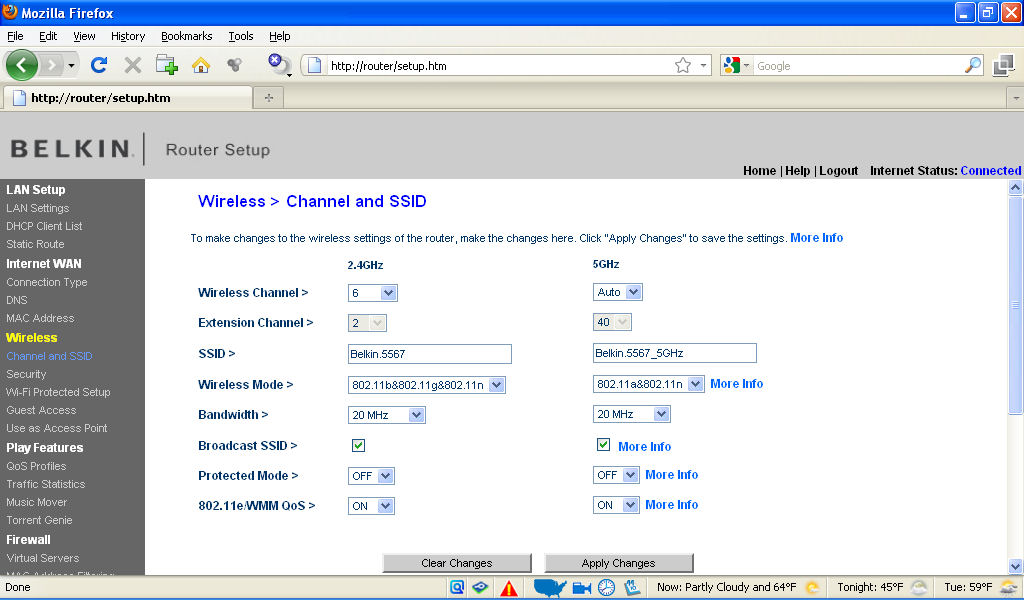
Figure 8: Channel and SSID settings
In addition 64/128 bit WEP, WPA and WPA2 wireless security modes are supported for each band, with default security and authentication set to WPA/WPA2. Enterprise mode (RADIUS) authentication is not supported.
Wi-Fi Protected Setup (WPS) is supported for standard PIN code, WPS pushbutton and manual configuration. But you must select the band that WPS uses, i.e. the router won’t run WPS on both bands simultaneously. Optionally, you can disable WPS entirely or just the WPS button on the router.
The Play Max supports a wireless guest network on the 2.4 GHz band only. This guest network operates on a different subnet (192.168.1.0/24) than the regular wired / WLAN network and you can’t change this subnet. The guest network doesn’t have access to the router admin page or to shared resources such as storage or printers attached to the router.
Figure 9 shows the various types of security you can enable including the traditional WEP, WPA / WPA2 or the so-called “café style” that intercepts your first web request and prompts you for a password.
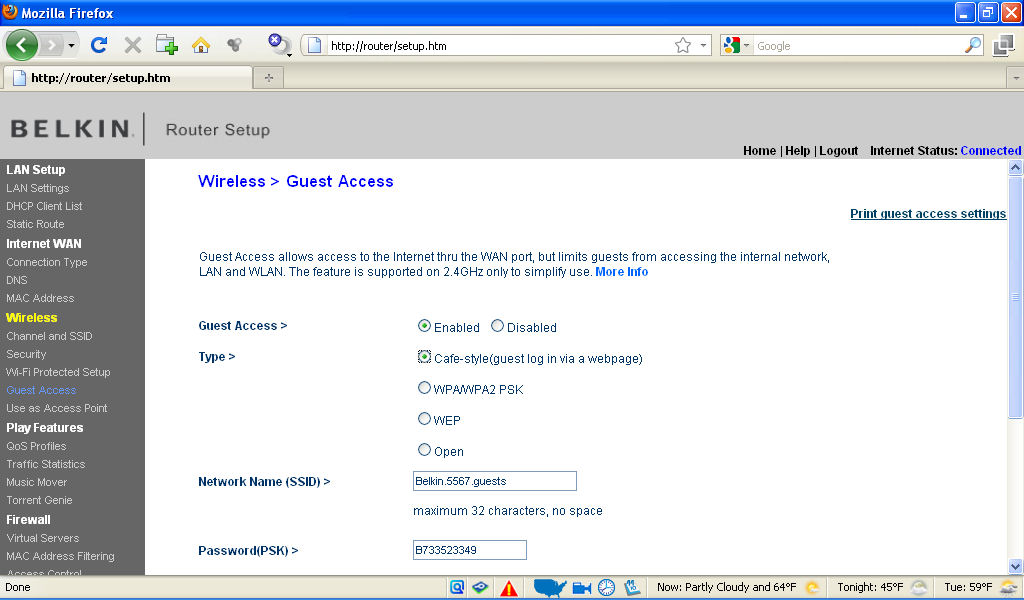
Figure 9: Wireless Guest Network configuration
I had some difficulty with the café style of authentication – my first web requests after connecting to the guest network often timed out and didn’t prompt me for a password. However, when I configured the guest network to use WPA / WPA2, I had no problems using the guest network to surf the web. Bottom line, if you are going to provide password protected guest access, you might as well enable WPA / WPA2 and provide your guest with the pre-shared key. The PSK for the guest network can be different than the one for your regular WLAN.
Under Wireless settings, you can also choose to use the Play Max as an access point rather than a router. Note that when you use this mode, you don’t have to change any connections or other settings, as you do when you manually convert a router to an AP.
Play Features
Under this menu, you have the option of configuring QoS settings, enabling the DLNA server, viewing traffic statistics, or viewing queued Torrent downloads. For QoS, you can create two different user profiles, or use the default profile that gives highest priority to voice applications, high priority for games, medium priority for video and normal priority for everything else. Note that the QoS settings apply to local and uplink to Internet traffic only. So they don’t do anything to control download bandwidth hogging.
The instruction manual provides little information about the Torrent Genie, which runs as a daemon on the router for unattended BitTorrent downloads. Setup, however, is via an app (Vuze) that runs on a computer.
Firewall
This menu has a firewall enable / disable. You can also set up port forwarding under the Virtual Server menu. You can create up to 20 virtual servers, and choose from a pre-populated list of 141 games/services. In addition, you can set up access control based on MAC addresses filtering, configure an IP address for the DMZ, and enable dynamic DNS (DDNS). Only one DDNS provider, DynDNS is supported.
Utilities
In this menu are utilities such as reboot router, restore to factory defaults, update firmware, save current configuration, etc. Under system settings, you can set the time zone / NTP server, enable automatic firmware update checks, enable/disable remote console access, set the admin password and enable/disable UPnP.
The Play Max has an ECO mode (Figure 10) that lets you dim the router LED and/or disable both radios on a schedule.
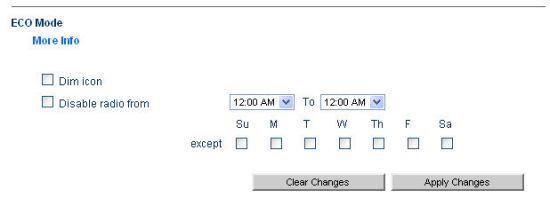
Figure 10: Eco Mode
Feature Tour – Bundled Software
A key differentiation of Belkin’s new wireless router line is the apps bundled with them. These programs run on Windows or Mac OS computers and most are available by right-clicking on the Belkin router monitor icon in your system tray. Figure 11 shows the apps bundled with the Play Max, which are a superset of the apps offered.
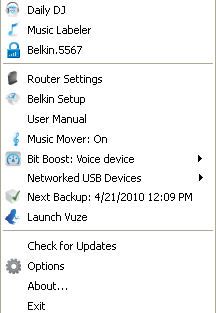
Figure 11: Applications available from the Router Monitor
The apps are a mix of third-party programs and features built into the router. Documentation on most of the apps is hard to come by, though. The User Manual contains only a mention of them, with no instructions on how to use each app.
So you’re left to search through Belkin’s Support site and any help files that you can find in the router or the apps themselves. Belkin doesn’t help much here, since a search for apps in the support site brought up only one result: How to set up Self Healing (Basic, Surf, Share, Play, Play Max). Entering each of the app names, however, did bring up more articles.
Self Healing
This app is accessed via the Self Healing link in the router admin screen. As described in the link above, all it does is run a wireless channel scan to see if there is a less active channel than the currently-selected one and "cleans routing tables". There’s no mention of any check to see if your actually connected to the Internet or any self-healing that takes place if you’re not.
Daily DJ
This application scans your iTunes or WMP library or directory of your choosing and profiles your music. It then creates daily playlists from those profiles. But the initial scan requires about 500 entries in order to create a playlist. Unfortunately, the netbook that I’m traveling with doesn’t have that many tracks. So while it profiled the songs that were on my computer, there weren’t enough to add a playlist to iTunes.
Music Labeler
This application tries to match your "unknown" music tracks with online databases. For this application, I imported some "unknown" tracks into iTunes and let the Music Labeler run. Figure 12 shows the results. It was able to clean up, i.e. properly identify, 25 tracks.
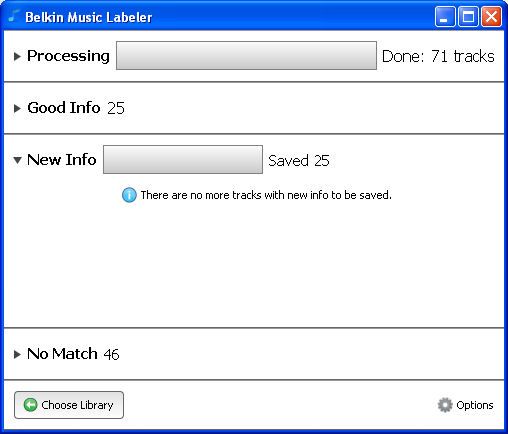
Figure 12: The Music Labeler was able to find matches for some of my unknown music
Music Mover
This app just allows you to select directories on the USB drives attached to the Play Max to be indexed for multimedia content that is served up by the Play Max’ built-in DLNA server. There is no actual "moving" of files done, i.e. the app doesn’t collect multimedia files into a central directory.
Figure 13 shows that there are two USB drives attached, and shows the directories I selected.
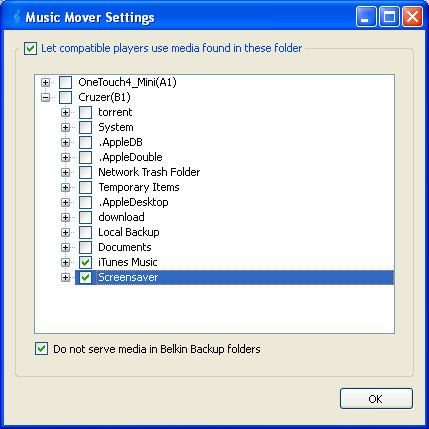
Figure 13: Music Mover Settings
Bit Boost
This isn’t much of an "app". It merely shows your currently-selected high priority application and serves as a desktop shortcut to the associated controls in the router. The default choice is voice. You can change it to video, games or the default setting. Prioritization is done for local and Internet upload traffic only. It won’t do anything to control download bandwidth hogs.
Launch Vuze
As part of the setup process, Vuze (formerly Azureus) is installed on your PC or Mac. The installed version is 4.4 – the same version as the free version that you can download from the Vuze website.
As with the free version, the version supplied by Belkin can be upgraded to Vuze plus for $24.95/year. The Plus version gives you the ability to burn DVDs, scans downloads for viruses, includes an upgraded Power search and is ad free.
Unfortunately, the Belkin instruction manual only tells you what Vuze is and doesn’t really help you figure out how to use it with your Play Max. One thing we do know from Belkin (because we asked) is that the Vuze app is used to enable Torrent downloading and manage your Torrent queue. But the actual downloading is done by the router itself, i.e. the Torrent Genie "app".
Networked USB devices
This option shows the USB devices connected to your Play Max router. By opening the USB Print and Storage Center, you can browse your currently-attached devices as shown in Figure 14.
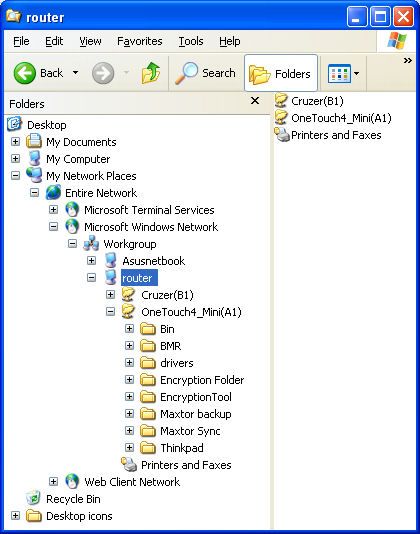
Figure 14: Attached shared resource
The Memory Safe tab provides access to an app that is a very rudimentary backup program that will back up selected folders to the storage device connected to the router. If you have more than one storage device, you can choose which one to use.
Figure 15 shows that, by default, all folders on your computer are selected for backup; you have to click on each folder to exclude it. Backup appears to run hourly and you can’t change this. Nor do you have control of whether the backup is full, incremental or differential. Each backup appears to be a full backup, which can eat up disk space pretty quickly! This seems to contradict the information in this Belkin support article that says the first backup is full and subsequent ones are incremental.
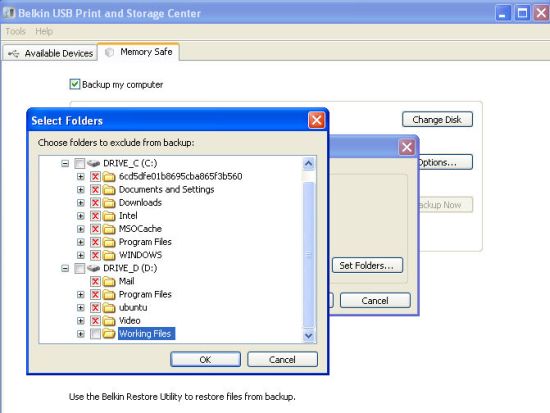
Figure 15: Backup folder exclusion
The Next Backup menu item shows the next time for your scheduled backup. If the drive is not available, it will show as disconnected.
Other items shown in Figure 11 are:
- Belkin.5567 shows your current connection to the router. If you are using a wired connection, this appears as “Unknown”
- Router Settings is a shortcut to the status page shown in Figure 7 above.
- Router Setup is a shortcut to Belkin’s user interface that provides access to Advanced Tools shown in Figure 6.
- User manual provides a link to the 39 page user manual that is installed on your disk when you run the setup program. The user manual focuses on setup and troubleshooting. But, as mentioned earlier, provides very little information beyond a description of the bundled applications.
The last app, Print Genie, doesn’t appear to be anything more than the printer installation wizards that are built into Windows or the Mac OS. Check it out yourself in the Belkin Support article.
Routing Performance
Testing and analysis by Tim Higgins
Table 1 summarizes the results of the Play Max’ routing tests, which were run with 1.00.16 firmware and our standard test procedure.
| Test Description | Throughput – (Mbps) |
|---|---|
| WAN – LAN | 84.3 |
| LAN – WAN | 90 |
| Total Simultaneous | 88 |
| Max. Connections | 8170 |
| Firmware Version | 1.00.16 |
Table 1: Routing throughput
Routing throughput measured 84 Mbps WAN to LAN, 90 Mbps LAN to WAN and 88 Mbps with both directions running simultaneously. Our new Maximum Simultaneous Connection test came in at 8,170, a bit lower than Cisco’s new Valet M10 router. But the number indicates a session table about 8K big.
Figure 16 shows the IxChariot aggregate plots for WAN to LAN, LAN to WAN and simultaneous routing throughput tests, all of which are nice and steady.
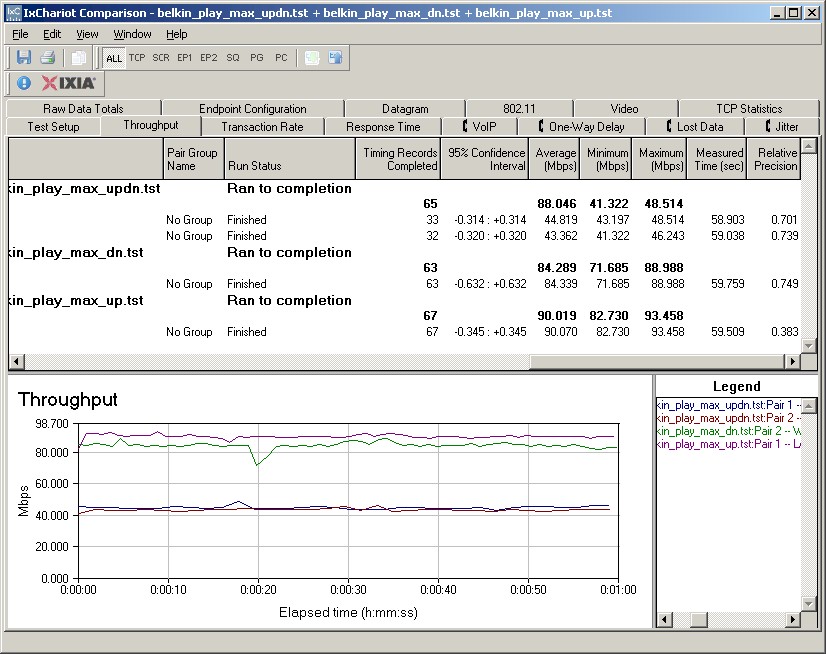
Figure 16: Belkin Play Max routing throughput
File Transfer Performance
File transfer speed to the shared USB drive using our Vista SP1 file copy test produced speeds of only around 3.5 MB/s for write and just shy of 4 MB/s for read, using both FAT and NTFS-formatted drives. This pales in comparison to the NETGEAR WNDR3700, which produced write and read speeds around 10 MB/s.
Wireless Performance
Testing and analysis by Tim Higgins
I used the open air test method described here to test the Play Max’ wireless performance. Testing was done using our standard wireless test client, an Intel Wi-Fi Link 5300 AGN mini-PCIe card in a Dell Mini 12 running WinXP Home SP3 and version 13.1.1.1 of the Intel drivers. I left all client-side defaults in place.
The router was loaded with version 1.00.16 firmware. All factory default settings were left in place, except setting channel 1 for the 2.4 GHz band and 36 for the 5 GHz band.
The Play Max properly defaulted to 20 MHz bandwidth mode in the 2.4 GHz band and also selected that mode for the 5 GHz radio. It also properly limited the link rate to 54 Mbps when I ran tests with WEP encryption. I wasn’t able to test WPA/TKIP link rate limiting because the router doesn’t have a WPA-only mode. I was able to successfully run a Wi-Fi Protected Setup (WPS) PIN connect test, which resulted in a WPA2/AES connection.
Figure 17 shows the IxChariot aggregate plot for all downlink tests using 20 MHz channel width. The other plots can be viewed via these links: uplink- 20 MHz BW; downlink 40 MHz BW; uplink 40 MHz BW.
In general, the Max’ wireless performance was a mixed bag. It didn’t produce the highest speeds in either the 2.4 or 5 GHz band that we’ve seen using a single direction test, with a best-case 89.9 Mbps at Location A in the 2.4 GHz band w/ 20 MHz bandwidth mode. 5 GHz performance was good, but not exceptional, and joined our failed-to-reach-test-Locations-E-and-F club.
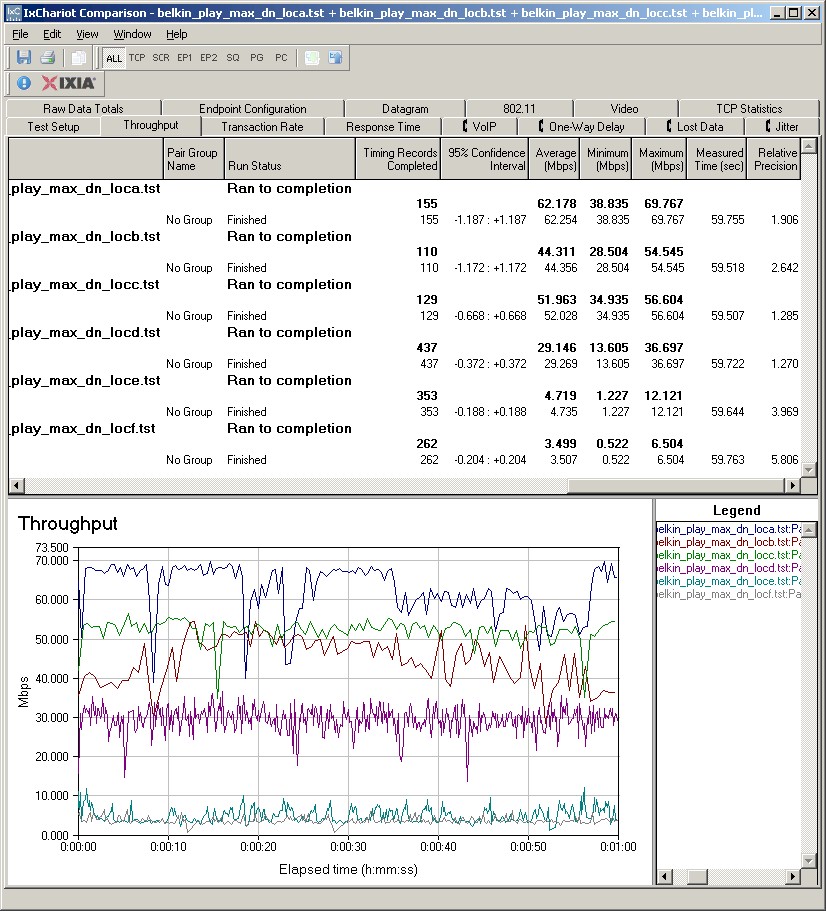
Figure 17: Belkin Play Max Wireless Throughput – 2.4 GHz, 20 MHz B/W downlink
One issue that could be holding the router back in the Wireless charts was the tendency of its link rate to get stuck at higher link rates in weaker signal locations, which produced lower throughput. For a few tests, we had to disconnect and re-associate the client and router in order to get better throughput.
On the plus side, however, we found that running simultaneous up and downlink tests produced 120 Mbps of total throughput (Location A, 2.4 GHz, 40 MHz B/W), indicating more bandwidth available to share with multiple clients.
Wireless Performance – Competitive
For a competitive comparison, I generated a Wireless Comparison Table for three simultaneous dual band N routers: Cisco / Linksys WRT400N, NETGEAR WNDR3700 and D-Link DIR-815 [B1]. Figure 18 shows that the Play Max wins only one of the four 2.4 GHz band tests, although it ties many times in individual locations tests.
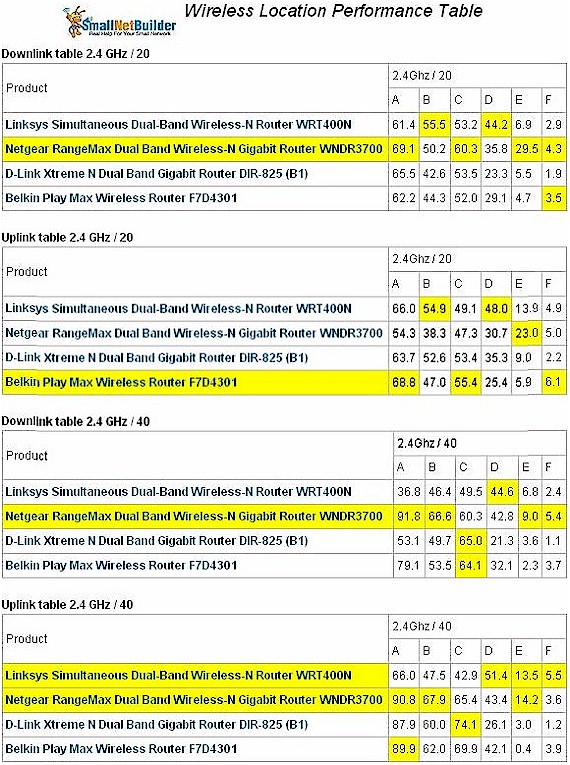
Figure 18: Wireless performance comparison – 2.4 GHz band
Figure 19 shows that the Play Max doesn’t win any of the four benchmarks, although it again ties other routers in many locations.
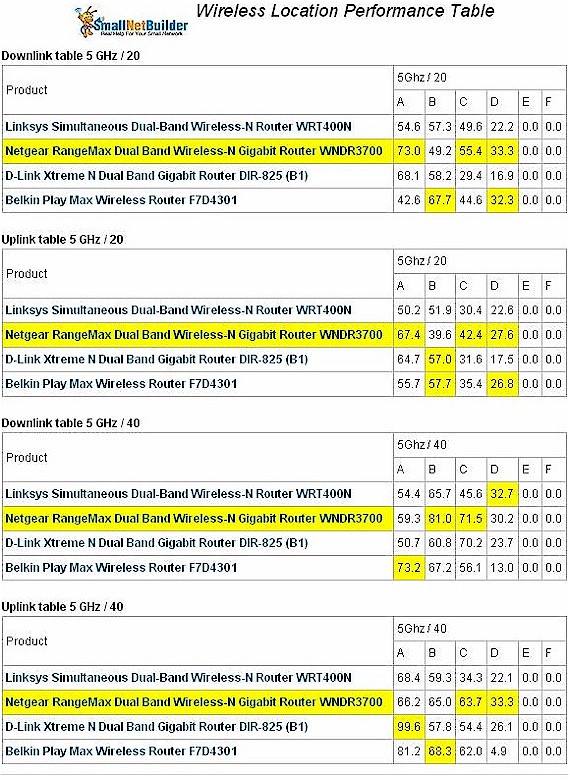
Figure 19: Wireless performance comparison – 5 GHz band
As I said, these results are a mixed bag. If Belkin can get its link rate adjust algorithms straightened out, I’m sure the rankings could improve.
Closing Thoughts
Both Cisco and Belkin have recently revamped their consumer N router lineups in hopes of rekindling interest in a product segment that has become both confusing for novices and boring for old hands.
Belkin’s main thrusts with its new N router lineup were to simplify selection and setup for consumers and offer unique features that buyers won’t be able to resist. In the end, I think they did a reasonable job on the first goal, but missed the second by a lot.
Although Belkin did a good job with ease of setup, Cisco’s new Cisco Connect software offered on its Valet and E series routers clearly has the edge. The USB key on the Valets works easily on netbooks and other notebooks that no longer have optical drives. And although you have to run it from a CD on the E series line, it still works the same, while skipping the Valet’s price premium.
While it’s nice to have cables already plugged in and a card that provides wireless security info that just has to be entered into a client, there still is plenty of opportunity for a newbie to screw up with Belkin’s process. With Cisco’s approach, the chances of failure are greatly reduced.
I prefer a router with network activity link / activity lights, while others may prefer Belkin’s more minimalist design that has only a few LEDs. I liked that you can choose different security settings for your guest wireless network. But was disappointed that the “café mode” didn’t work nearly as seamlessly as the guest network on the Cisco Valet M10 did.
The real disappointment is in Belkin’s apps, which I don’t think will win the hearts of consumers as much as Belkin hopes. Belkin did the right thing by covering both Windows and Mac OS platforms from the get-go. But the apps themselves are poorly documented and, at least in my experience, somewhat buggy, leaving a feeling more like you get from sifting through all the junk that comes loaded on new PCs than feeling good about spending the extra money to buy some nifty and useful features.
Though the Memory Safe backup did perform regular backups, they all seemed to be full backups, which when run hourly, could quickly exhaust your attached storage. So I wouldn’t use it on a regular basis. I might have used the Daily DJ. But iTunes’ Genius feature already does an adequate job in this department and I didn’t have to pay a thing for it. And although the Play Max includes a DLNA server, it doesn’t support iTunes serving, something I’d find more useful.
Since the Torrent Genie is one of key features that differentiate the $130 Play Max from its $100 Play sibling, I had expected more complete information on how to use it and how to tie it in with the supplied Vuze software. But it’s more an exercise left to the buyer, which once again, doesn’t impress.
Apps complaints aside, the Play Max at around $120 street, represents a good value for a simultaneous, dual-band router with Gigabit LAN and WAN ports. The comparable Cisco Gigabit dual-band router, the E3000, is street priced $30 higher at $150, as is the NETGEAR WNDR3700. But if you can live without built-in Torrent downloading (that I couldn’t figure out how to get working) and Gigabit ports, then get the Play instead, which is currently going for as low as $80 street!
