

| At a glance | |
|---|---|
| Product | Cisco Maximum Performance Wireless-N Router (Linksys E4200) [Website] |
| Summary | Broadcom-based dual-band, dual-radio N router with Gigabit ports, USB drive sharing / media serving and 5 GHz only three-stream support |
| Pros | • Chart-topping routing throughput • Gigabit ports • Guest WLAN supported in Web GUI • Stable and strong 2.4 GHz radio |
| Cons | • 2.4 GHz only guest access • No IPv6 support • No repeating / bridging • Slow USB storage sharing |
Typical Price: $150 Buy From Amazon
By dubbing its new top-of-line wireless router "Maximum Performance", Cisco is trying to send a not-so-subtle message that its Linksys E4200 is the new big dog in Wi-Fi town. Of course there are always Super, Ultra, Grande and even "Extra Special Good" left as superlatives for new routers to come. So don’t think there will never be a better performing router.
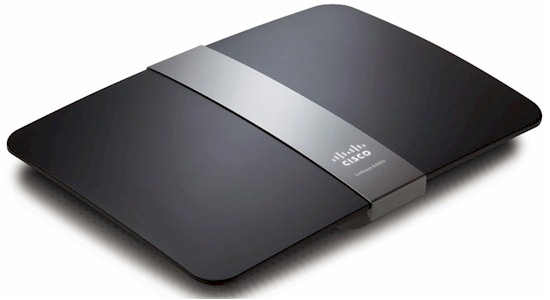
But there might not be a more attractive one. Cisco has taken sort of a "Danish modern" styling approach that looks like it came from Bang and Olufsen. Cisco definitely wants high WAF for the E4200 so that it doesn’t get hidden in a cabinet or basement furnace room.
There’s only one front panel light, a steadily-lit white backlit Cisco logo that blinks while booting or during a firmware update or Wi-Fi Protected Access session. All the other lights are on the back panel (Figure 1), i.e. link / activity for one Gigabit WAN and four switched Gigabit LAN ports. There are no wireless activity indicators at all.
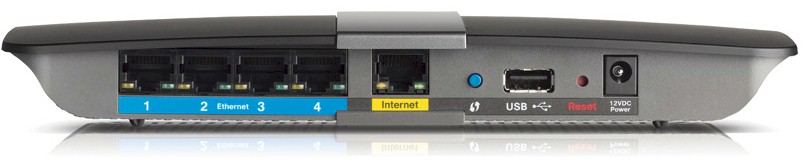
Figure 1: Linksys E4200 rear panel
Also on the back panel are one USB 2.0 port for drive sharing and media serving (but still can’t be used for printer sharing), Wi-Fi Protected Setup (WPS) pushbutton, recessed reset switch and power port.
Internal Details
Not surprisingly, Cisco has stuck with Broadcom for its latest and greatest creation. But the E4200 is not just another rebranding of the WRT610 V2 / E3000. Cisco has asked the FCC to block access to the internal photos and other documents until Jan 30. So I had to open up the review unit that Cisco sent.
Figure 2 shows the board with cover removed. Both radios have three antennas—5 GHz on the left and 2.4 GHz on the right. Many of the key components have shields over them. But you can see a Broadcom BCM4331 Single-Chip 802.11n Dual-Band 3×3 parked next to the 5 GHz shielded area. Also visible are Macronix MX25L12845E 16 MB flash and Hynix H5PS5162FFR 64 MB RAM devices. Note the BCM4331 is three-stream N capable.
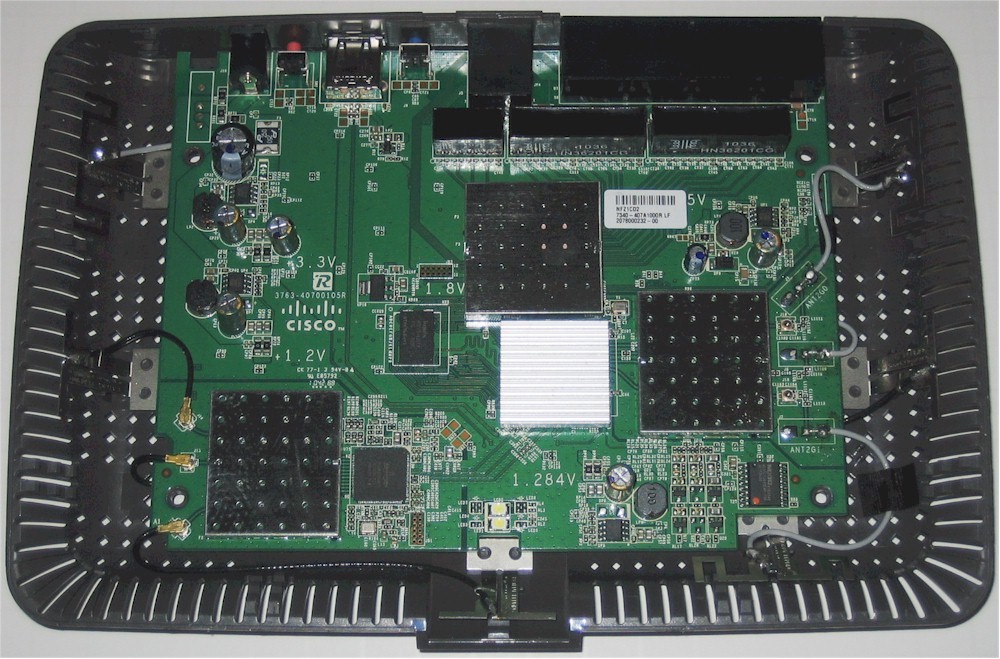
Figure 2: Linksys E4200 inside view
To get the rest of the component details, I had to remove three shields and one heatsink to reveal the view in Figure 3.
Under the heatsink was a Broadcom BCM4718 Intensi-fi XLR 802.11n Simultaneous Dual-Band (2.4/5 GHz) Router System-on-Chip, which serves as the main CPU and 2.4 GHz radio. This device is also used in the E3000 as CPU but as the 5 GHz radio.
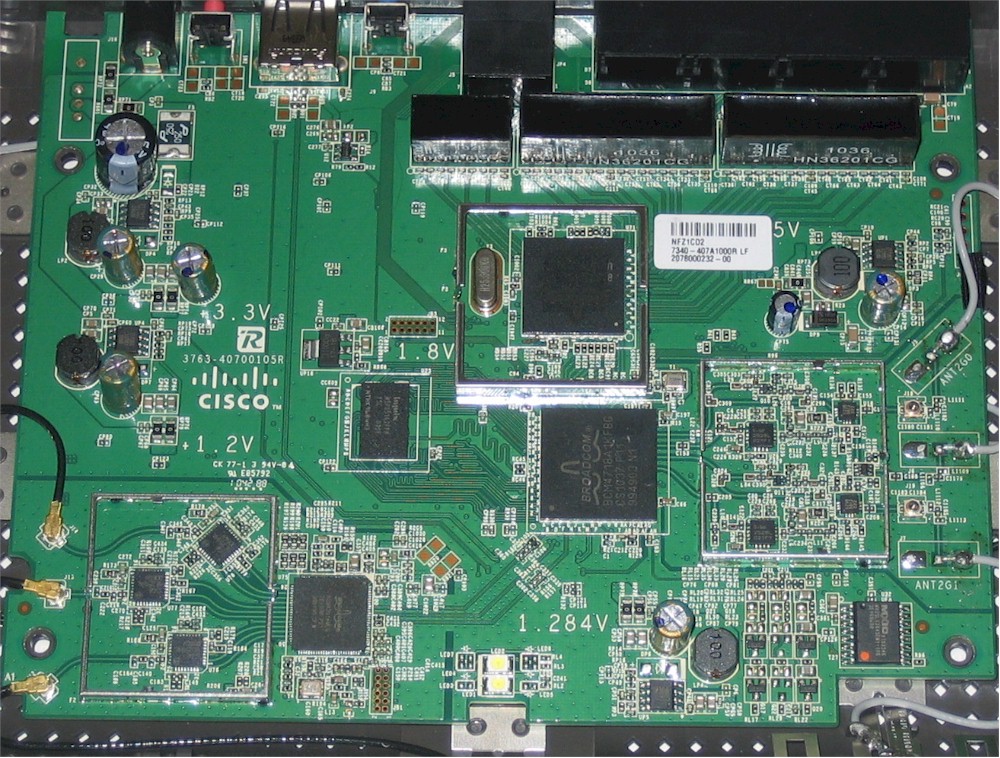
Figure 3: Linksys E4200 inside view – shields removed
Under the shield above the BCM4718 was a Broadcom BCM53115 Gigabit switch, again the same as used in the E3000. I’ve removed the thermal pad that couples the device to its shield cover to act as a heatsink for the switch.
The devices under the shields next to the two radios are RF amplifiers and switches, two SiGe 2528L 2.4 GHz power amps for 2.4 GHz and three SiGe SE2594L Dual Band 802.11a/b/g/n Wireless LAN front ends for 5 GHz. The use of only two power amps and BCM4718 for the 2.4 GHz radio says that it can’t be software-enabled for three-stream N; it’s two-stream only.
Figure 4 shows the E3000’s board for reference.
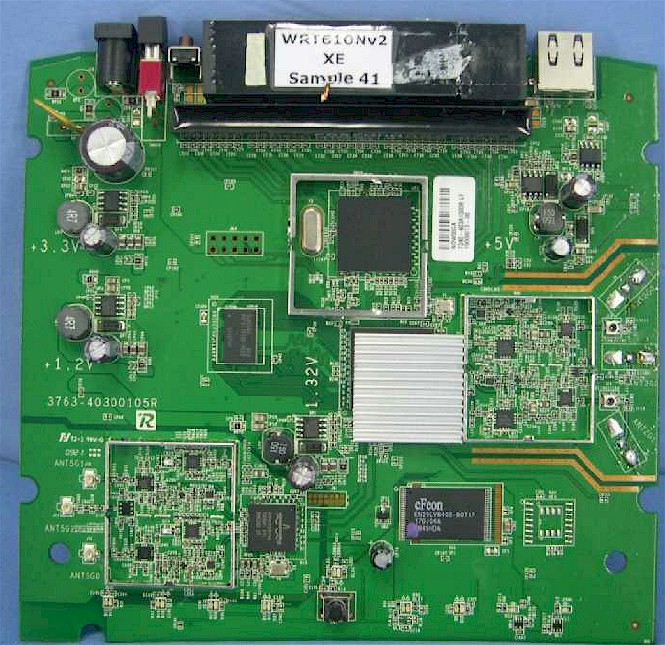
Figure 4: Linksys E3000 (and WRT610 V2) board
The E3000 component summary is:
– CPU: Broadcom BCM4718 @ 480 MHz
– Switch: Broadcom BCM53115
– RAM: 64 MB
– Flash: 8 MB
– 5 GHz: In BCM4718
– 2.4GHz: Broadcom BCM4322 Intensi-fi Single-Chip 802.11n Transceiver
Features
The E4200’s feature set is essentially unchanged from the E3000’s. You can find admin interface screenshots in the WRT600N review, or just download the user manual. Here’s a quick feature summary:
- DHCP, Static, PPPoE, PPTP, L2TP, Telstra Cable WAN types
- Built-in Dynamic DNS clients for TZO and DynDNS
- Static and dynamic routing
- SPI firewall disable, multicast, WAN ping and IDENT filtering and Proxy, Java, ActiveX and Cooking blocking
- IPsec, PPTP and L2TP VPN passthrough (enabled by default)
- Single port forwarding and Port Range forwarding with and without triggered ports
- HTTPS admin access, remote management (HTTP / HTTPS) enable with IP range restriction and port setting
- Incoming, outgoing, Security and DHCP onscreen log access with support for Linksys Logviewer recording
- Access Restrictions with 10 deny or allow-based policies, each with its own list of clients and day/time schedule
- Uplink (LAN to WAN) only QoS with High, Medium, Normal or Low Priority that can be applied to specific applications (divided into Application, Online Game and Voice Device groups), physical switch ports or specific MAC addresses.
- WMM (Wireless MultiMedia) (enabled by default)
- SMB/CIFS file sharing, FTP access and UPnP AV media serving from attached FAT, NTFS or HFS+ formatted drive
Although it’s not essential for now, at least in the US, the E4200 doesn’t support IPv6.
The E4200 comes with a CD that installs Cisco Connect. This setup and management software first appeared in the Valet models’ USB Easy Setup Key, but is now shipped on CD with all Linksys routers. Craig covered the Easy Setup / Cisco Connect features pretty well in the M10 review, so I won’t repeat them here.
In the E3000, you had to use Cisco Connect to access the wireless Guest Access and Parental control features. But in the E4200, you can get at both via the web interface. Figure 5 shows the Guest Access screen, which enables access for the 2.4 GHz radio only.
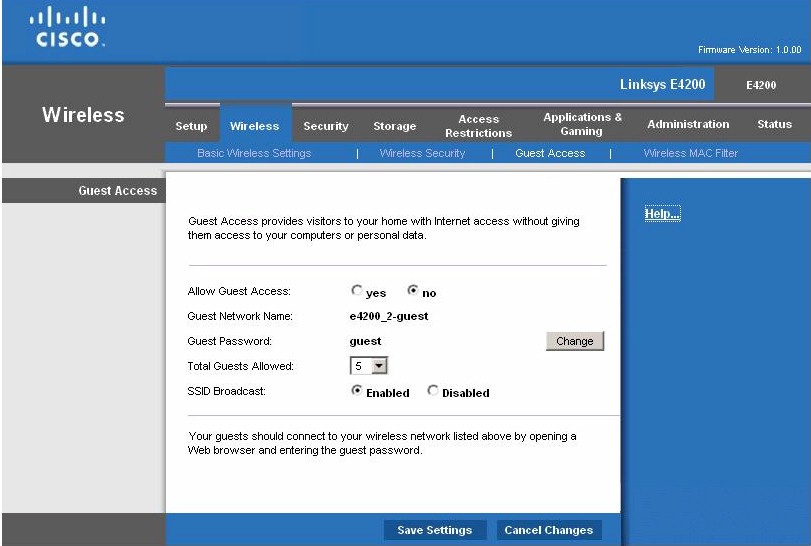
Figure 5: Wireless Guest access via browser
I also installed and checked Cisco Connect, but it has the same limitation. Guest access is Internet only and "guests" can’t see each other, either.
Parental Controls now can also be set from the browser. But it looks like Cisco has omitted the automatic age-specific web-filtering offered in the Valet series. The E4200’s Parental Controls only allow up to eight URLs to be blocked for up to five computers / devices along with setting Internet access windows (Figure 6).
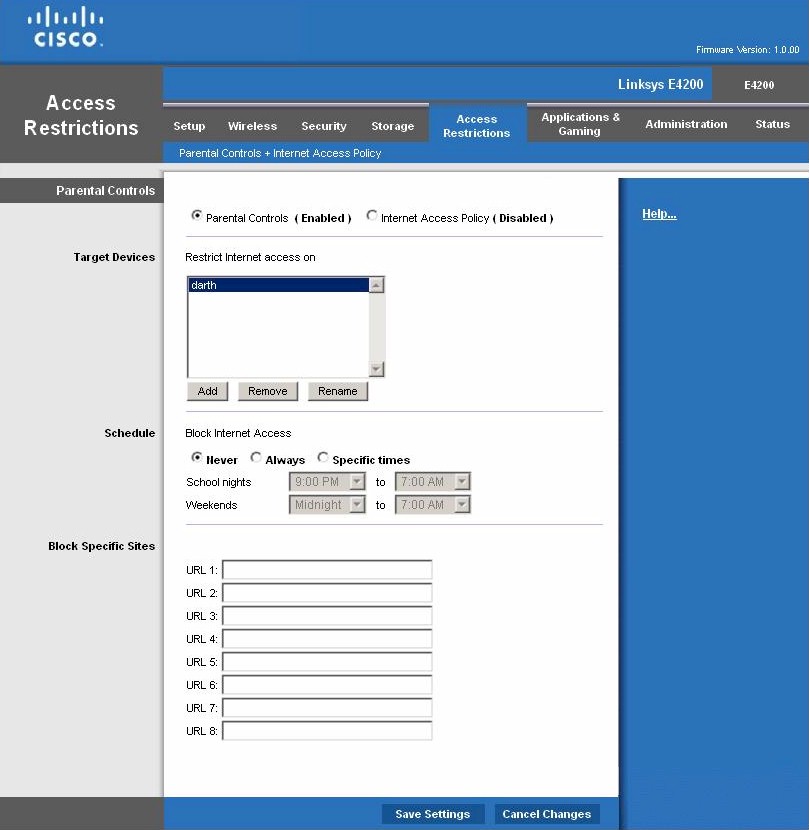
Figure 6: Parental Controls
If you need finer control, then you can switch to using the Internet Access Policy controls shown in Figure 7. This mode also allows you to set access times and URL blocking (only four URLs), but also enables blocking of specific web applications by port.
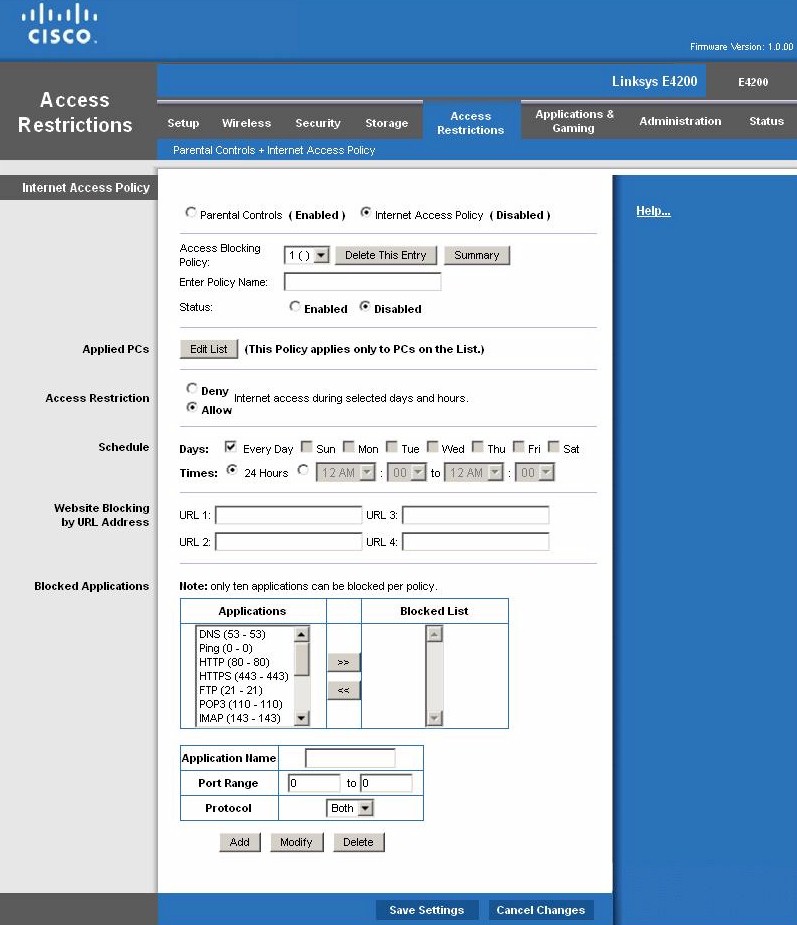
Figure 7: Internet Access Policy
Moving on to wireless features, the E4200 defaults to 20 MHz bandwidth mode for both the 2.4 and 5 GHz band radios and to using Wi-Fi Protected Setup (WPS) for automatic wireless setup. If you switch to manual mode, you’ll see the settings shown in Figure 8.
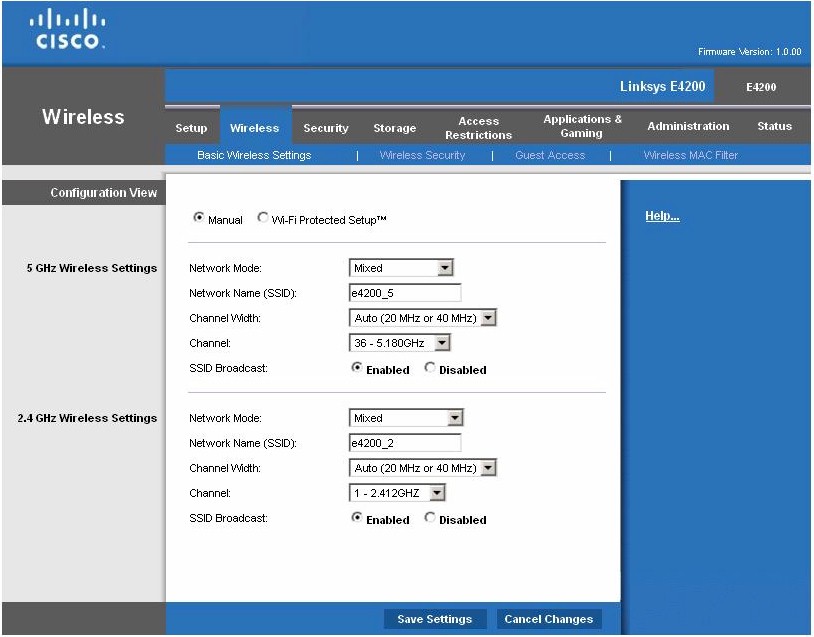
Figure 8: Basic Wireless settings
Other 5 GHz radio modes are A-only, N-only and disabled, while the G radio modes are B/G only, B only, G only, N only and disabled.
Channel selection defaults to automatic for both bands and Channel Width to 20 MHz only. Channel width can be set to Auto (20 / 40 MHz) or forced to 40 MHz for the 5 GHz radio, but only Auto (20 / 40 MHz) for 2.4 GHz.
If you don’t like the wireless controls seen here, that’s too bad. Apparently part of designing a "Maximum Performance" router includes not letting you futz with controls like those the E3000 provides (Figure 9).
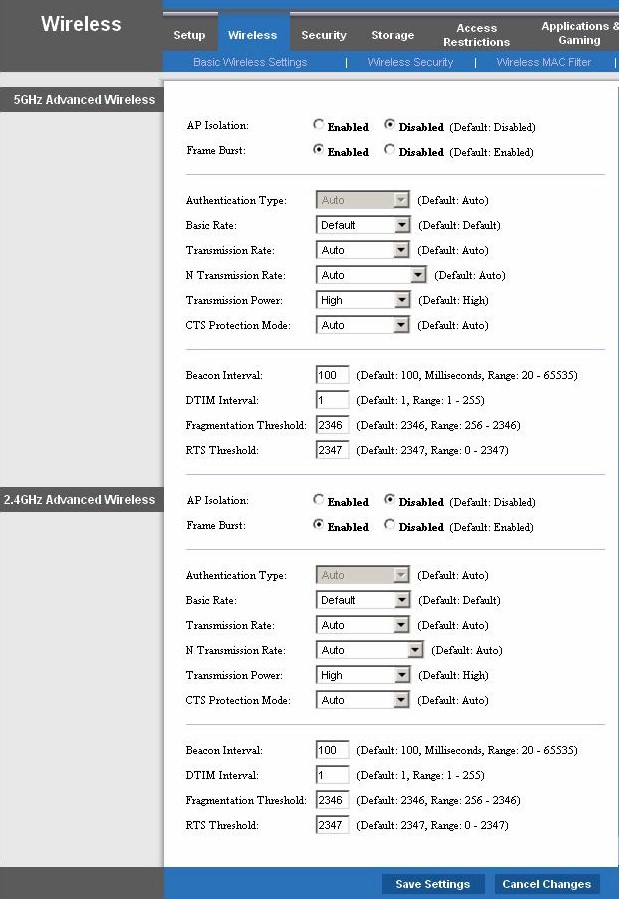
Figure 9: E3000 Advanced Wireless settings
Don’t go looking for WDS bridging / repeating, AP mode or scheduled wireless enable / disable, either. There is also not a physical radio on/off switch.
Storage
The Storage features are unchanged from the E3000, i.e. SMB file sharing, FTP and UPnP AV media serving. FAT32, NTFS, and HFS+ formatted drives are supported and there is a built-in FAT formatter. But if you’re looking for iTunes serving, Torrent downloader, AFP or Time Machine support, move on.
Figure 10 is the main disk management menu showing an attached FAT-formatted drive. Other screens allow you to create users and groups, set access permissions and create shares.
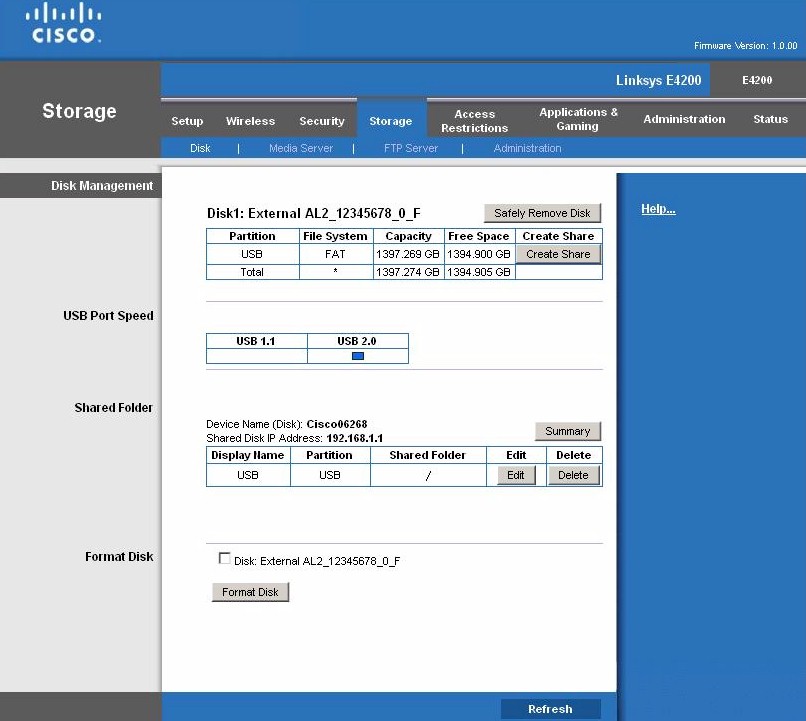
Figure 10: Storage Disk settings
Media server controls are very simple with only server naming and scan controls (folder select, scan time [2 (default), 6, 12, 24, 48 hours], manual scan and folder delete). A twonkymedia.db folder auto-created on the USB drive was a giveaway. But I couldn’t find general Twonkymedia server controls on either port 9000 or 9001.
I was able to successfully mount and test filecopy performance for both FAT and NTFS formatted drives. The Win 7 Filecopy windows shown in Figures 11 and 12 show speeds in the 5 to 7 MB/s range during the NFTS copy of a 1 GB file in a mixed filesize folder. Speeds for a FAT-formatted drive were similar.
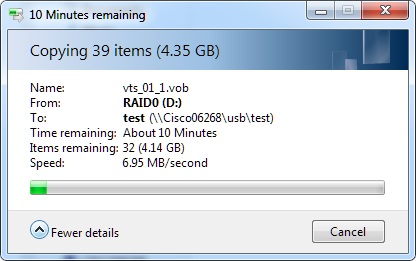
Figure 11: Filecopy speed to NTFS formatted USB drive
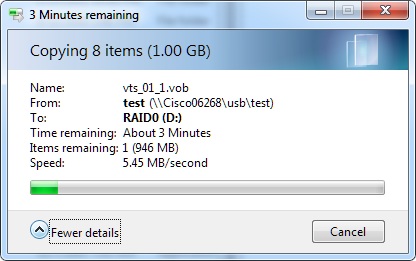
Figure 12: Filecopy speed from NTFS formatted USB drive
Routing Performance
Routing performance for the E4200 using our standard test method and 1.0.00 firmware is summarized in Table 1. Even though the E4200 is using the same BCM4718 as the E3000, the E4200’s routing performance has been goosed a bit.
| Test Description | E4200 Throughput – (Mbps) |
E3000 Throughput – (Mbps) |
|---|---|---|
| WAN – LAN |
687
|
218
|
| LAN – WAN |
689
|
249
|
| Total Simultaneous |
726
|
258
|
| Maximum Simultaneous Connections | 34,925 | 12,277 |
| Firmware Version |
1.0.00
|
1.0.00 B026
|
Table 1: Routing throughput
Routing throughput ranks among the top 5 and in some cases is more than 3X the E3000’s performance, including simultaneous sessions.
Figure 13 is a composite IxChariot plot of the three routing tests.
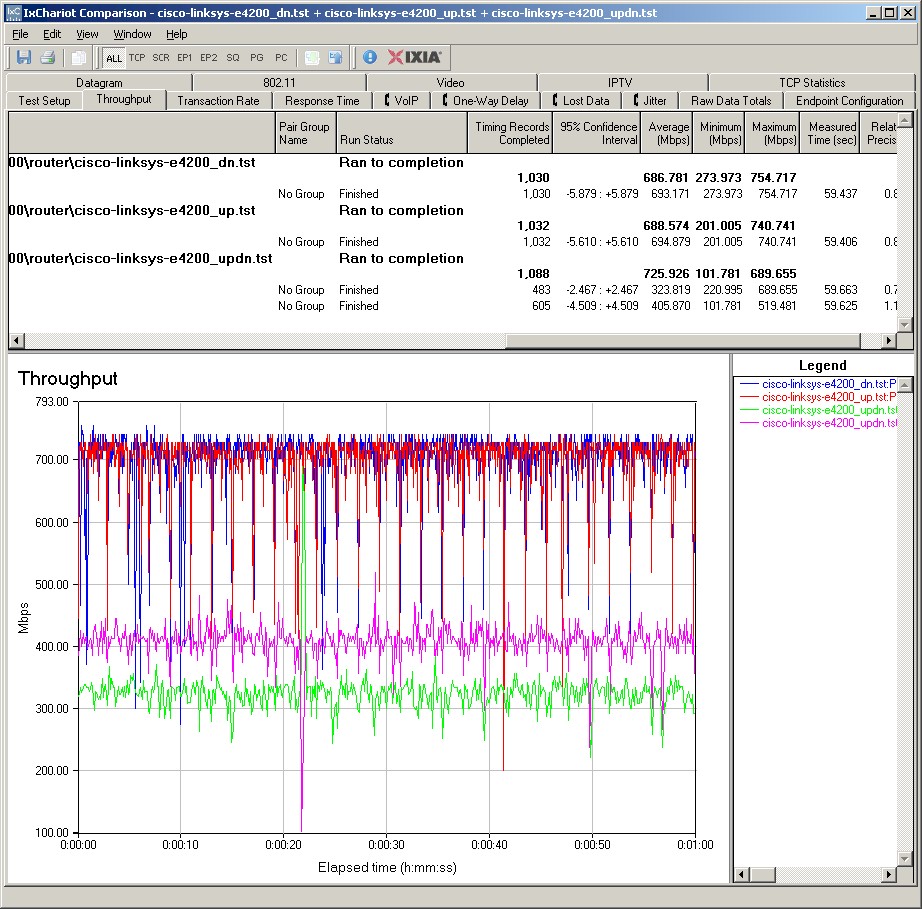
Figure 13: E4200 routing throughput
Use the Router Charts for more comparisons.
Wireless Performance – 2.4 GHz
I used our standard open air test method to test the E4200’s wireless performance. As usual, I set the 2.4 GHz radio to Channel 1 and the 5 GHz radio to Channel 36. I’ve recently changed to running performance tests using WPA2 / AES encryption instead of no encryption, because that’s how Wi-Fi gear should be secured today. So that’s how the E4200 was tested and I left all other router defaults in place.
The test client was an Intel Wi-Fi Link 5300 AGN mini-PCIe card. I used an Acer Aspire 1810T notebook running Win 7 Home Premium and Intel’s Win 7 13.4.0.9 driver for the Intel card, because I recently switched to that platform, again to more accurately reflect current usage patterns.
I skipped checking fallback to 54 Mbps link rates when using WEP 128 and WPA / TKIP because the E4200 is Wi-Fi Certified and their test suite confirms that. I did run a Wi-Fi Protected Setup (WPS) test using the PIN mode supported by Win 7. It completed successfully on the first try, setting up a WPA2 / AES connection.
Figure 14 shows the IxChariot aggregate plot for all 2.4 GHz band downlink tests using 20 MHz channel width. Throughput variation is moderately low and generally free of large, long dropouts. I also generally found downlink throughput higher than uplink in the 2.4 GHz band, but more evenly matched in 5 GHz.
Of particular note is the 20+ Mbps throughput in the weakest signal test locations E and F and 62 Mbps throughput in medium-low signal location D. I suspect this is why the folks posting over in the forums are seeing the E4200 outperform the WNDR3700 (more later).
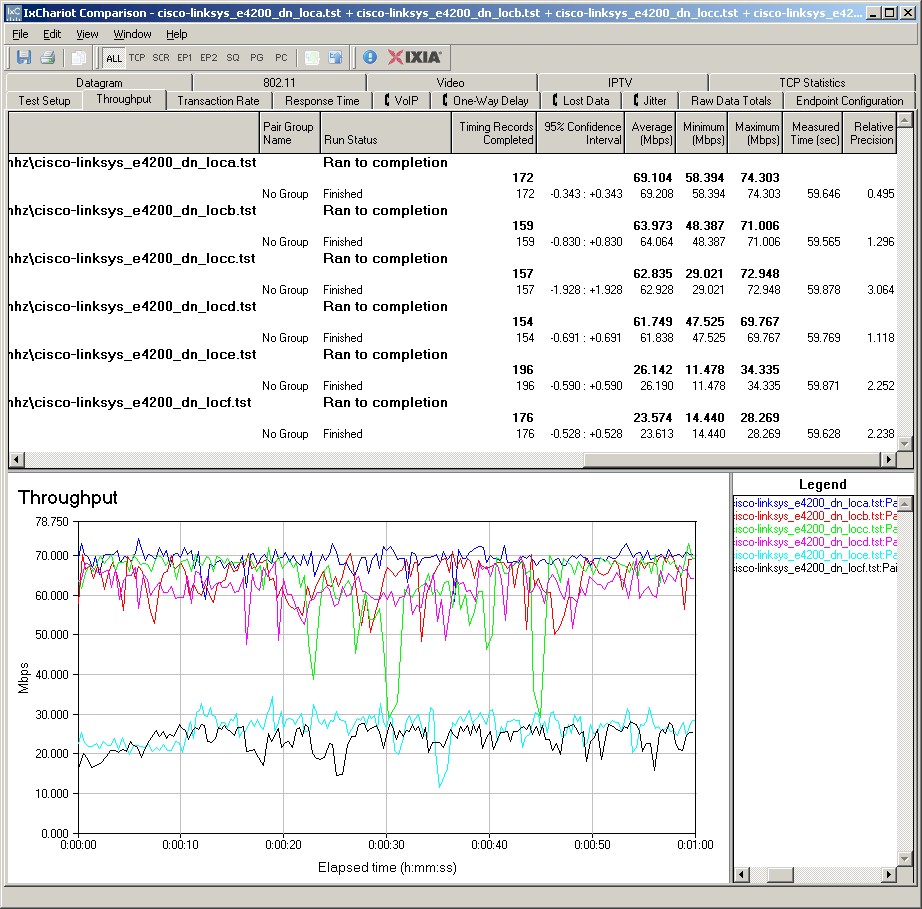
Figure 14: Cisco E4200 wireless throughput – 2.4 GHz, 20 MHz mode, downlink
Best case 2.4 GHz performance was 84 Mbps running downlink in 40 MHz bandwidth mode. I also measured a total 107 Mbps in 40 MHz mode running simultaneous up and downlink tests.
Here are links to other IxChariot wireless test plots if you’d like to explore further:
- 2.4 GHz / 20 MHz uplink
- 2.4 GHz / 20 MHz up and downlink
- 2.4 GHz / 40 MHz downlink
- 2.4 GHz / 40 MHz uplink
- 2.4 GHz / 40 MHz up and downlink
Wireless Performance – 5 GHz
Figure 15 shows the IxChariot aggregate plot for all 5 GHz band downlink tests using 20 MHz channel width. I was disappointed to find that, despite the use of discrete 5 GHz amplifiers, the E4200 could not provide a reliable connection in my dead zone locations E and F. Throughput variation is again moderately low and generally free of large, long dropouts.
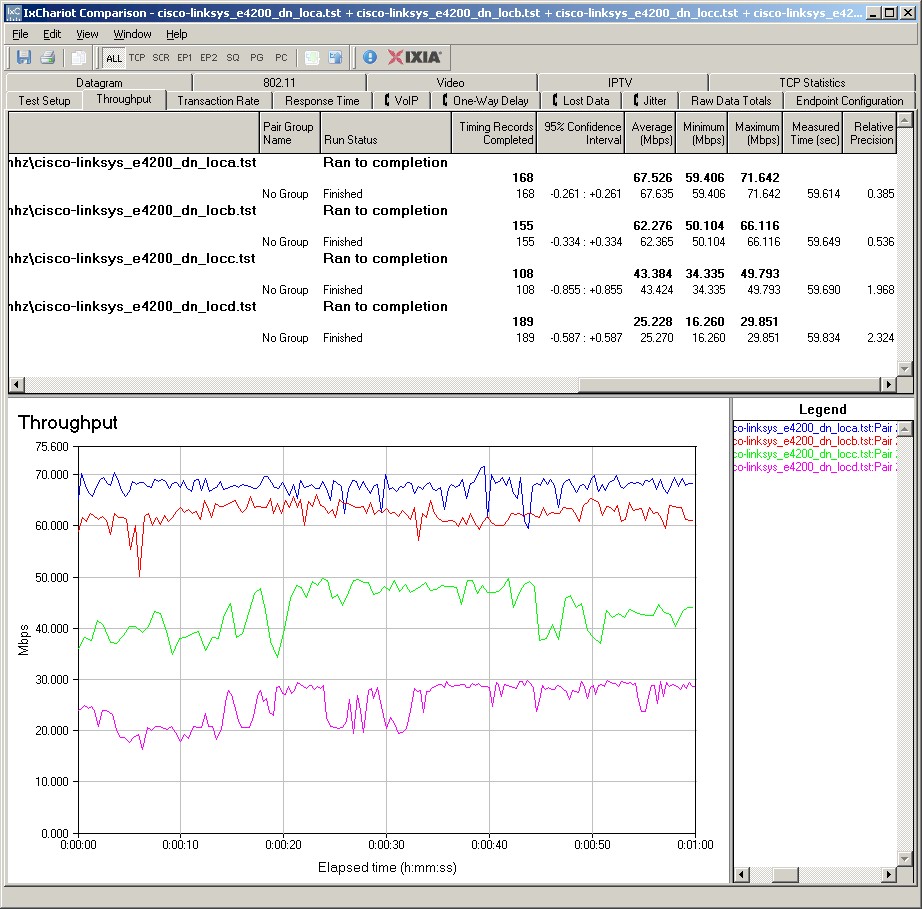
Figure 15: Cisco E4200 wireless throughput – 5 GHz, 20 MHz mode, downlink
Best case 5 GHz performance was 79 Mbps running downlink in 40 MHz bandwidth mode, slightly lower than with the 2.4 GHz radio. But I measured only 90 Mbps total throughput in 40 MHz mode running simultaneous up and downlink tests, significantly less than the 2.4 GHz side.
Here are links to other IxChariot wireless test plots if you’d like to explore further:
- 5 GHz / 20 MHz uplink
- 5 GHz / 20 MHz up and downlink
- 5 GHz / 40 MHz downlink
- 5 GHz / 40 MHz uplink
- 5 GHz / 40 MHz up and downlink
Wireless Competitive
For a competitive comparison, I generated a Performance table, selecting the E3000, NETGEAR WNDR3700 and WNDR3700v2. Figure 16 shows the 2.4 GHz comparison. The E4200 doesn’t win in each case. But if you look closely, you’ll see it wins where it counts most.
I’ve never felt that highest throughput was the true measure of a router’s worth. The high throughput game causes manufacturers to optimze designs around the wrong things and gives consumers false hope for good all-around performance.
Highest throughput is obtained only under strongest signal conditions, which usually means same or maybe next-room (with sheetrock wall) use. But if you have that setup, you’re better off using Ethernet if you’re trying to reliably stream high-def video.
No, the real measure of a good router can be found by looking at locations D, E and F, i.e. medium-low to low signal conditions. And except for a few cases, that is there the E4200 shines.
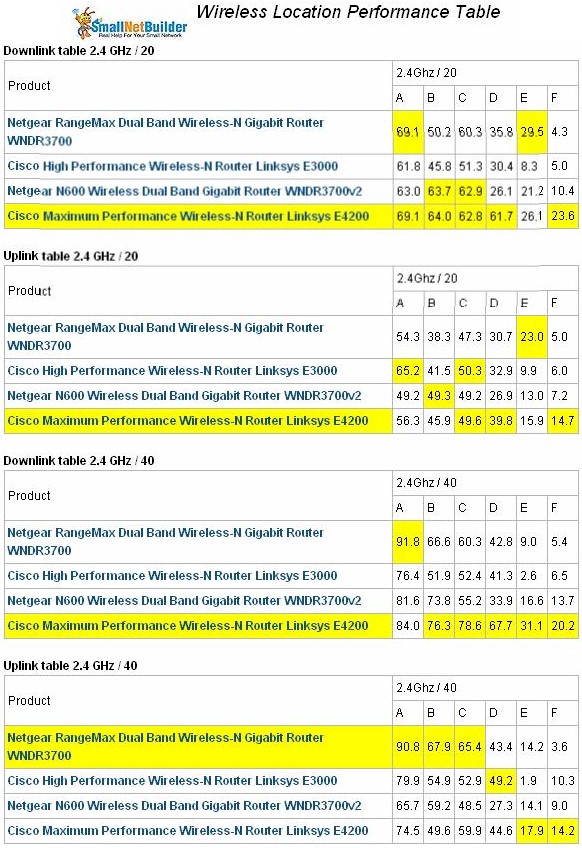
Figure 16: Wireless Competitive Comparison – 2.4 GHz
Figure 17 compares the same four routers in the 5 GHz band. Here the E4200 isn’t as dominant, especially when compared to the original NETGEAR WNDR3700. But you soon won’t be able to get that model and the v2 appears to have taken a step back in 5 GHz performance.
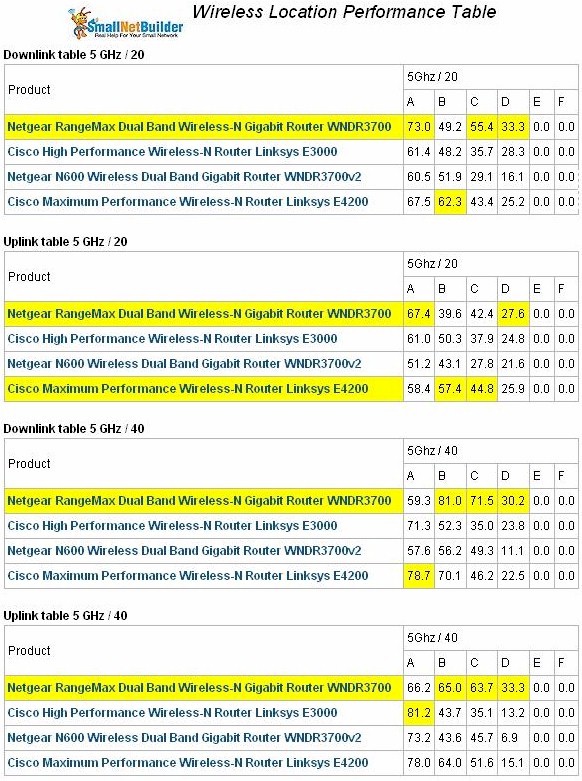
Figure 17: Wireless Competitive Comparison – 5 GHz
If you rerun the comparison chart omitting the original WNDR3700, then you see a very different story with the E4200 consistently beating the WNDR3700v2 in both bands, especially in the weaker signal location D.
Use the Wireless Charts to further compare and explore the E4200’s performance.
Please note that I plan to come back and run the Total Wireless Bandwidth and Stress Tests I ran in the WNDR3700 and E3000 reviews. But I wanted to get at least most of the important results posted without further delay.
Closing Thoughts
It looks like Cisco has come up with a winner in the E4200 and it’s is sure to kill off some demand for NETGEAR’s WNDR3700 and even Cisco’s own Linksys E3000, which I expect may start to be discounted in the coming months.
You’ll be paying top price ($180) during the next few months while Best Buy is the exclusive retailer outside Cisco’s own web store. Since you’ll pay the same price in both places and Cisco offers free overnight shipping and 90 day returns with full refund, you’d be crazy to buy it from BB.
The E4200 is by no means perfect and lacks a few of the WNDR3700’s features. And it seems to live up to its "Maximum Performance" moniker for 2.4 GHz performance. But if you’re hoping that the E4200 will extend your 5 GHz WLAN coverage, you may be disappointed. To judge for yourself, though, why not just order one from Cisco and give it a shot?