

Introduction
Updated 10/21/2010: Corrected component info and routing performance comment
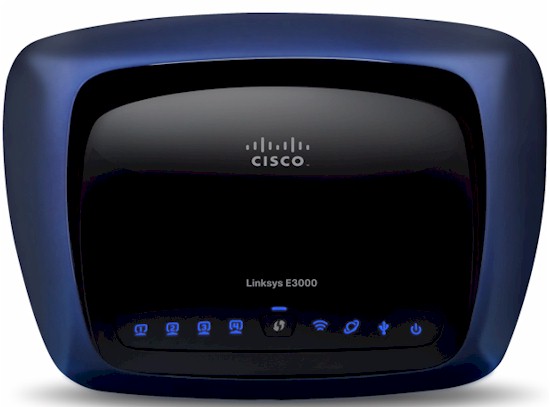
| At a Glance | |
|---|---|
| Product | Cisco Linksys E3000 High Performance Wireless-N Router (E3000) |
| Summary | Broadcom-based dual-band, dual-radio N router with Gigabit ports and USB drive sharing and media serving. Rebrand of Linksys WRT610N V2 |
| Pros | • > 200 Mbps routing throughput • Gigabit ports • Bundled easy setup utility that works well |
| Cons | • Jumbo frames not supported • No guest WLANs • No repeating / bridging • Slow USB storage sharing |
By now, you should know that Cisco has thrown out its entire consumer wireless line and replaced it with Valet and Linksys branded offerings. As I detailed in Inside Story: Linksys E-series and Cisco Valet, the “new” routers are all rebrands of the old line.
In the E3000’s case, it’s a WRT610N V2 with a new name and a bundle of the Cisco Connect (details here) easy installation software (on CD, not flash drive) thown in.
For those completely unfamiliar with Cisco’s top-of-line N router, it’s a dual-band simultaneous (two radio) design with Gigabit Ethernet ports and a USB port that can share a USB drive via SMB / CIFS or FTP. The USB Storage feature can also serve up media files via a UPnP AV (but not DLNA) media server.
Internal Details
The Inside Story article linked above has all the details you need on the innards of all Cisco’s new consumer offerings. I’m including the board shot below in Figure 1, which proves my WRT610NV2 clone point.

Figure 1: Linksys E3000 (and WRT610 V2) board
Updated 10/21/2010: Corrected component info
The component summary is:
– CPU: Broadcom BCM4705 Broadcom BCM4718 @ 480 MHz
– Switch: Broadcom BCM53115
– RAM: 64 MB
– Flash: 8 MB
– 5 GHz: In BCM4718
– 2.4GHz: Broadcom BCM4322 Intensi-fi Single-Chip 802.11n Transceiver
Features
The E3000’s feature set is essentially unchanged from the WRT610N and the WRT600N before it. You can find admin interface screenshots in the WRT600N review, or just download the user manual. Here’s a feature summary if you’re really in a hurry:
- DHCP, Static, PPPoE, PPTP, L2TP, Telstra Cable WAN types
- Built-in Dynamic DNS clients for TZO and DynDNS
- Static and dynamic routing
- SPI firewall disable, multicast, WAN ping and IDENT filtering and Proxy, Java, ActiveX and Cooking blocking
- IPsec, PPTP and L2TP VPN passthrough (enabled by default)
- Single port forwarding and Port Range forwarding and triggered ports
- HTTPS admin access, remote management (HTTP / HTTPS) enable with IP range restriction and port setting
- Incoming, outgoing, Security and DHCP onscreen log access with support for Linksys Logviewer recording
- Access Restrictions with 10 deny or allow-based policies, each with its own list of clients and day/time schedule
- Uplink (LAN to WAN) only QoS with High, Medium, Normal or Low Priority that can be applied to specific applications (divided into Application, Online Game and Voice Device groups), physical switch ports or specific MAC addresses.
- WMM (Wireless MultiMedia) (enabled by default)
- SMB/CIFS file sharing, FTP access and UPnP AV media serving from attached FAT-formatted drive
The last bullet bears a bit more coverage. The Storage features are described pretty well in the WRT600N review, so I won’t repeat them here. The one difference I found is that you can now set the Windows Workgroup name (default is Workgroup). I still could not get an NTFS-formatted drive to work and the Storage > Disk tab even reported its File System as *. I was able to mount, read and write to a FAT-formatted drive and got 5.7 MB/s write and 4.8 MB/s read.
Moving on to wireless features, the E3000 defaults to 20 MHz bandwidth mode for both the 2.4 and 5 GHz band radios and to using Wi-Fi Protected Setup (WPS) for automatic wireless setup. If you switch to manual mode, you’ll see the settings shown in Figure 2.
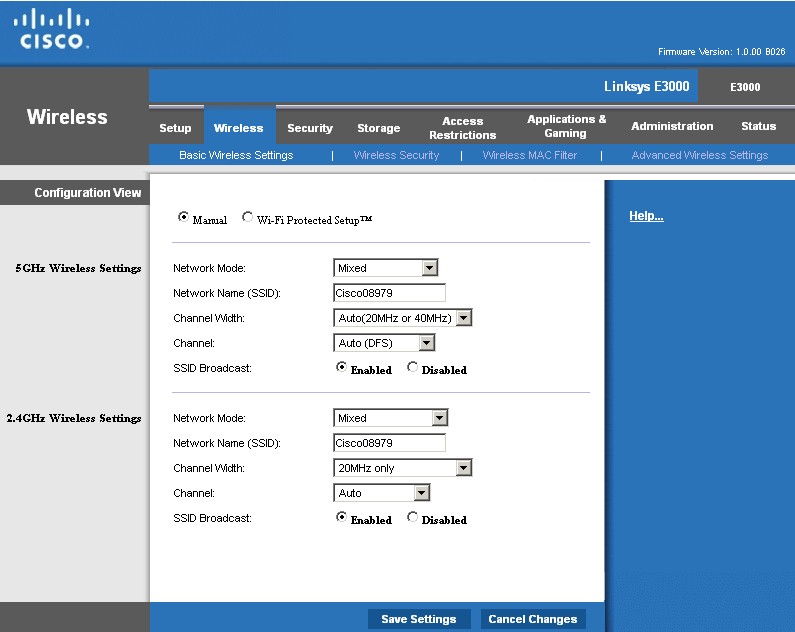
Figure 2: E3000 Wireless settings
Other 5 GHz radio modes are A-only, N-only and disabled, while the G radio modes are B/G only, B only, G only, N only and disabled. Figure 2 shows the Advanced wireless settings, which include Transmission rate and power control.
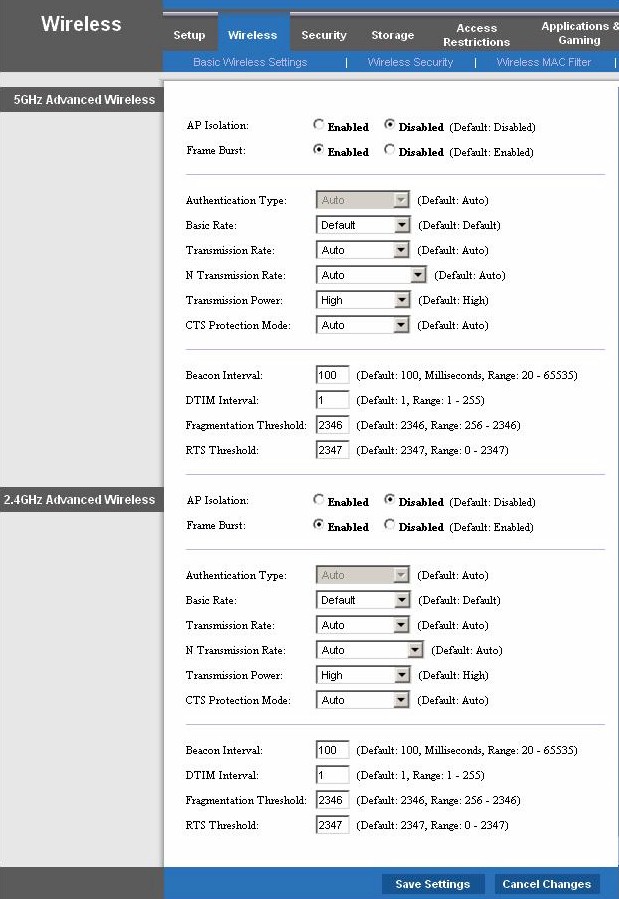
Figure 3: E3000 Advanced Wireless settings
Cisco hasn’t changed its consumer router wireless feature set in some time and it has fallen behind the competition. For a top-of-line router, the E3000 is missing key features that its competition has on much less expensive offerings, including guest network support, WDS bridging / repeating, AP mode and even something as simple as scheduled wireless enable / disable.
Routing Performance
Updated 10/21/2010: Corrected routing performance comment
Routing performance for the E3000 using our standard test method is summarized in Table 1, along with the 610N’s (V1) test results for comparison. Since the CPU is the same Broadcom BCM4705 for both routers, the E3000’s higher performance can only be attributed to improved routing firmware. The E3000’s higher routing throughput is probably due to its faster CPU. I don’t have a 610N V2 to test. But I’d imagine that its current firmware would provide similar performance.
| Test Description | E3000 Throughput – (Mbps) |
WRT610N (V1) Throughput – (Mbps) |
|---|---|---|
| WAN – LAN |
218
|
136
|
| LAN – WAN |
249
|
157
|
| Total Simultaneous |
258
|
143
|
| Maximum Simultaneous Connections | 12,277 | 200 |
| Firmware Version |
1.0.00 B026
|
1.000.00 B17
|
Table 1: Routing throughput
The Maximum Simultaneous Connections test of 200 connections for the 610N is the highest that I could measure with the old test technique. Again, I have no reason to believe that the 610N V2 wouldn’t achieve something similar to the E3000’s 12,000+ sessions, with current firmware.
Figure 4 is a composite plot of the three routing tests, which shows pretty steady throughput.
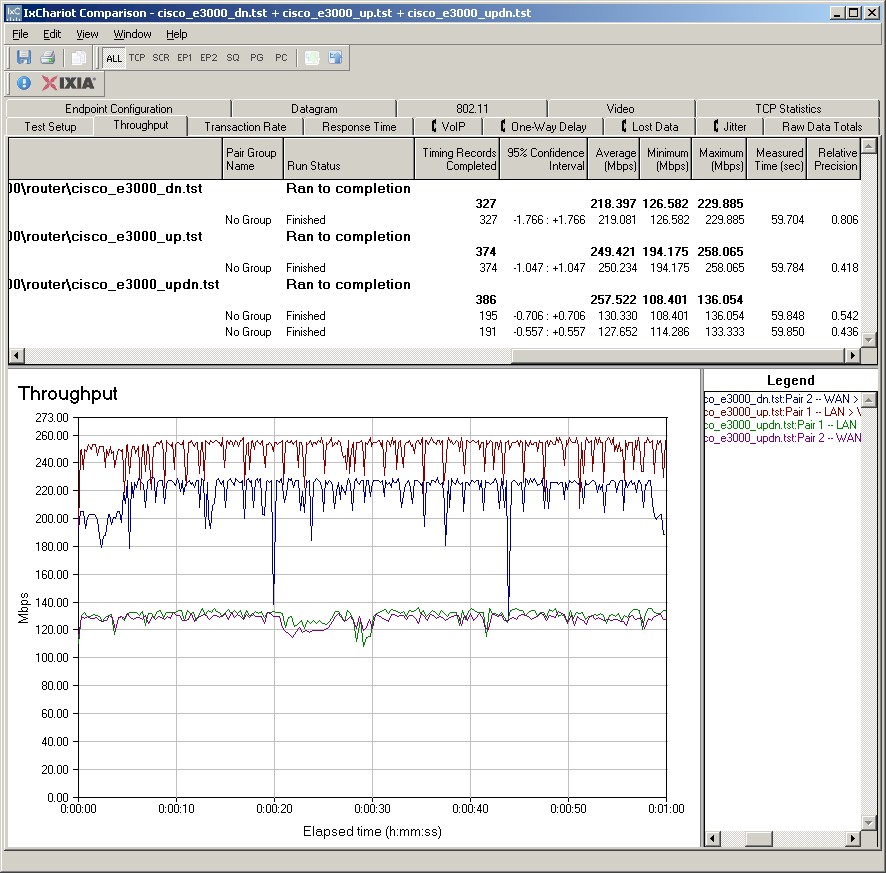
Figure 4: E3000 Routing throughput composite plot
Use the Router Charts to see how the E3000 stacks up against other routers.
Wireless Performance
I used our standard open air test method to test the E3000’s wireless performance. Testing was done using our standard wireless test client, an Intel Wi-Fi Link 5300 AGN mini-PCIe card in a Dell Mini 12 running WinXP Home SP3 and version 13.1.1.1 of the Intel drivers. I left all client-side defaults in place.
The E3000 was running with 1.0.00 B026 firmware. All factory default settings were left in place, except setting channel 1 for the 2.4 GHz band and 36 for the 5 GHz band. Starting with this review, I’ll be doing wireless performance testing with WPA2/AES encryption enabled, since that’s how we all should be running out wireless networks now, anyway. Since all N hardware has sufficient horsepower to handle this security without losing throughput, this change won’t affect performance.
I ran checks with WEP 128, WPA / TKIP and WPA2 / AES wireless security modes and found that the router properly limited link rates to 54 Mbps when using WEP and WPA / TKIP. I also ran a Wi-Fi Protected Setup (WPS) test using the PIN mode supported by the Intel client. It completed successfully on the first try, setting up a WPA2 / AES connection.
Figure 5 shows the IxChariot aggregate plot for all 2.4 GHz band downlink tests using 20 MHz channel width. Throughput variation actually seems lower than other recent products, with only an occasional large dropout.
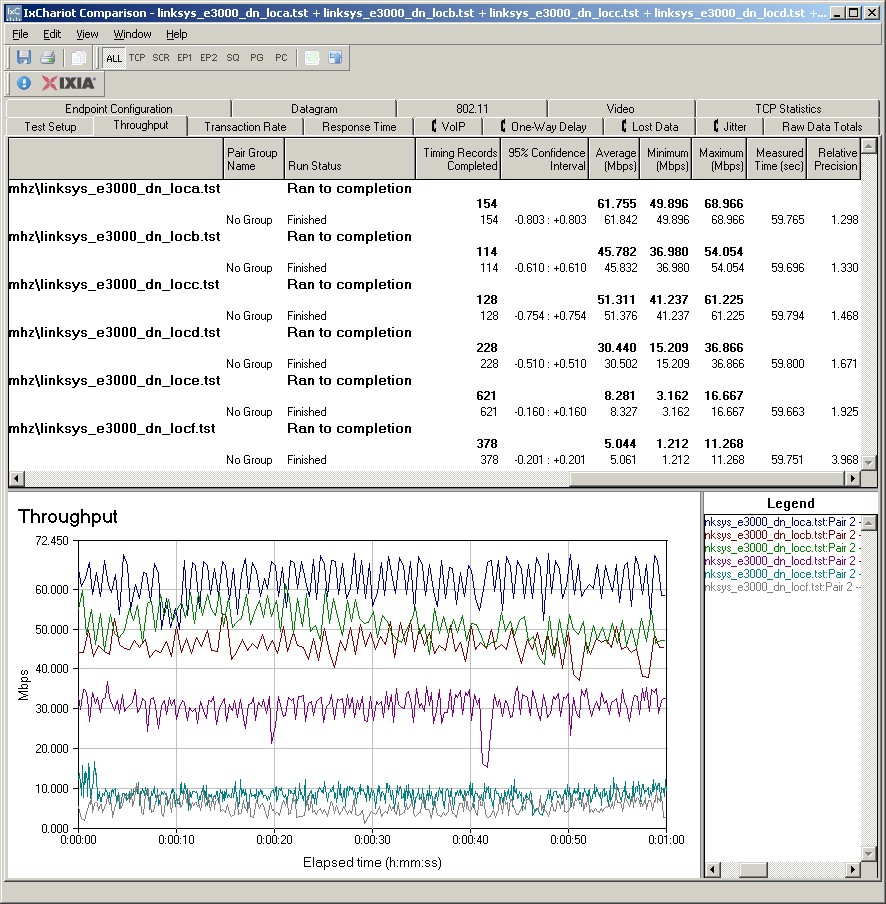
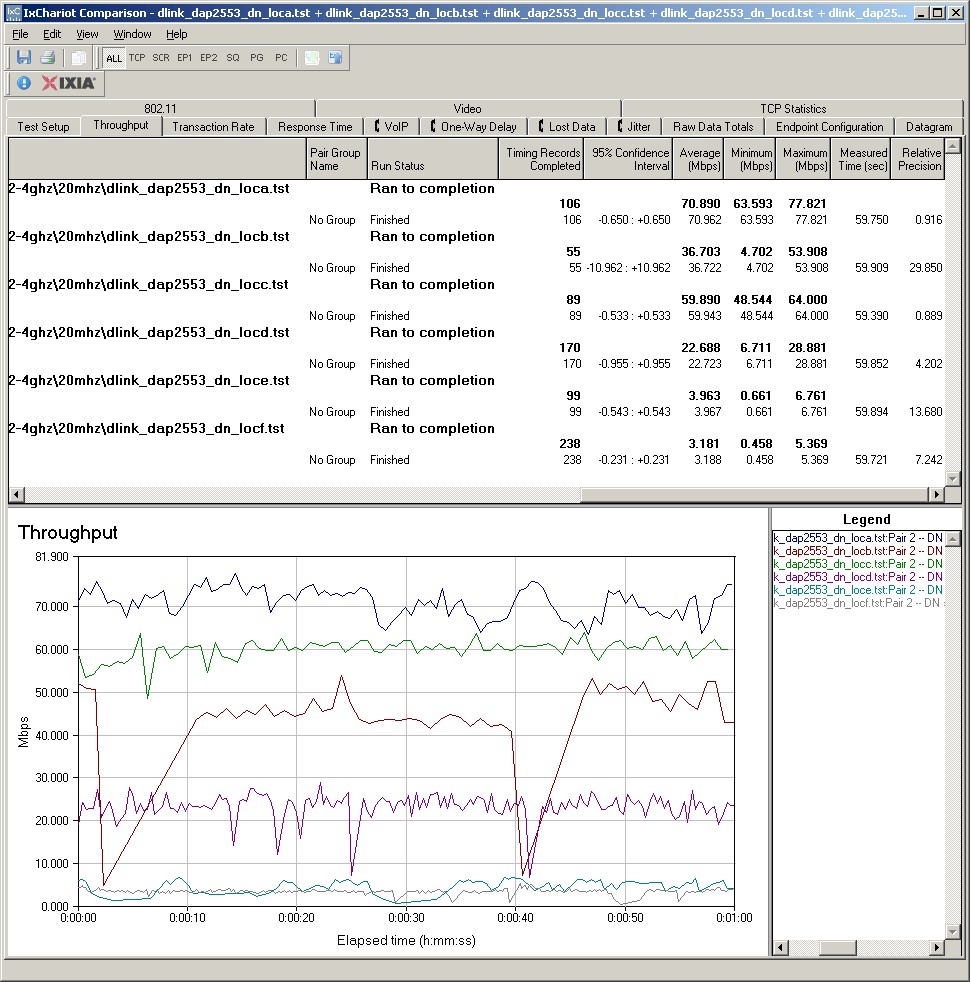
Figure 5: Cisco E3000 wireless throughput – 2.4 GHz, 20 MHz mode, downlink
The E3000’s 2.4 GHz performance was comparable to other N routers, with perhaps a bit higher throughput than typical in the difficult lower signal test locations E and F. Best case throughput of 79.9 Mbps was obtained in Location A, running uplink in 40 MHz mode. Other IxChariot plots can be viewed via these links: 2.4 GHz uplink- 20 MHz BW; 2.4 GHz downlink 40 MHz BW; 2.4 GHz uplink 40 MHz BW.
Figure 6 shows the IxChariot aggregate plot for all 5 GHz band downlink tests using 20 MHz channel width. As usual, there are no results for locations E and F because the Intel client couldn’t even detect the E3000’s signal.
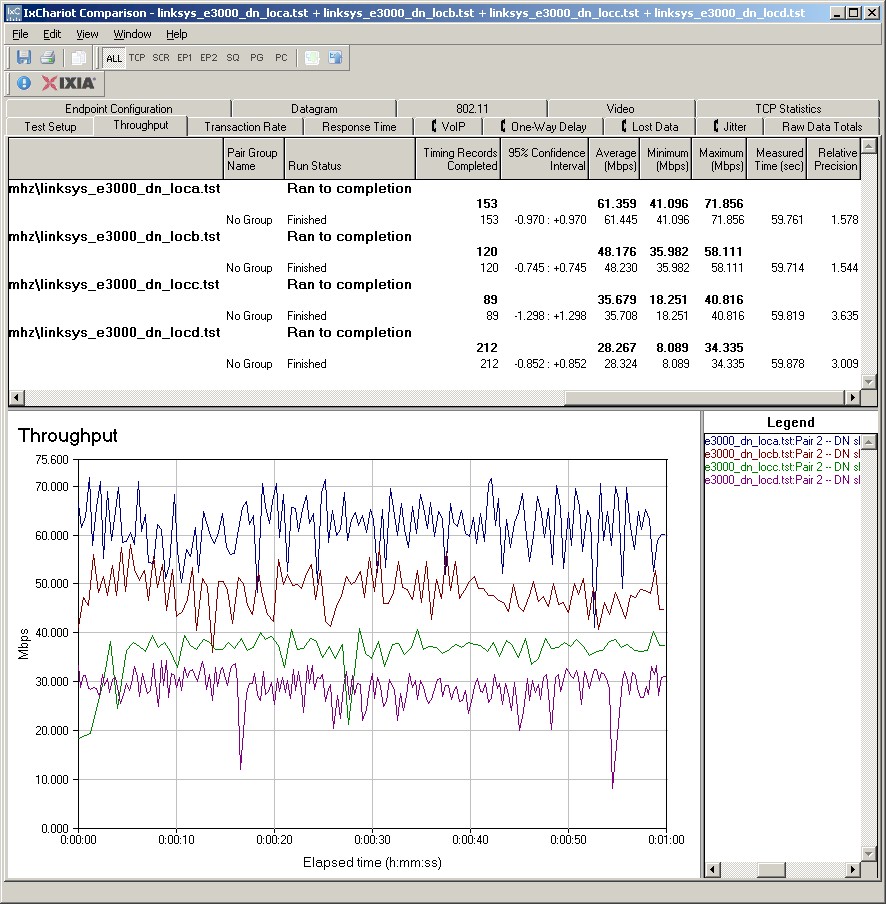
Figure 6: Cisco E3000 wireless throughput – 5 GHz, 20 MHz mode, downlink
Throughput variation appears to be higher than the 2.4 GHz radio’s and best case throughput of 82.1 Mbps was measured running uplink in 40 MHz mode. Other IxChariot plots can be viewed via these links: 5 GHz uplink- 20 MHz BW; 5 GHz downlink 40 MHz BW; 5 GHz uplink 40 MHz BW.
Wireless Competitive
For a competitive comparison, I generated a Performance table, selecting the WRT610N V1 and NETGEAR WNDR3700. I also included the dual-band, single radio WRT320N, since it is available as the Cisco Linksys E2000. Figure 7 summarizes the 2.4 GHz band results.
Keep in mind that the WRT610N is the only product in the comparison group to not be tested using the Intel 5300 client. Other reviews have shown that the Intel client has tended to help routers improve their performance in the weaker signal test locations E and F.
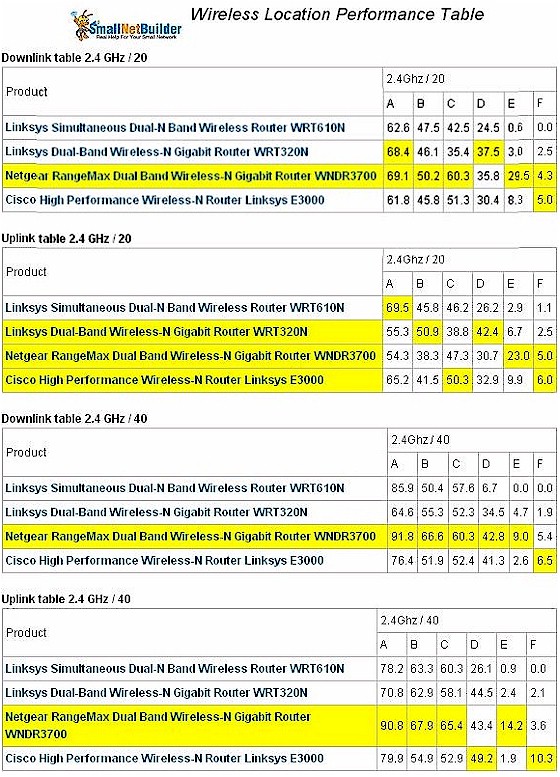
Figure 7: Wireless Competitive Comparison – 2.4 GHz
The chart clearly shows the NETGEAR WNDR3700 as the winner, except running uplink in 20 MHz bandwidth mode, where it’s a toss-up among everything except the WRT610N.
Figure 8 compares the same four routers in the 5 GHz band.
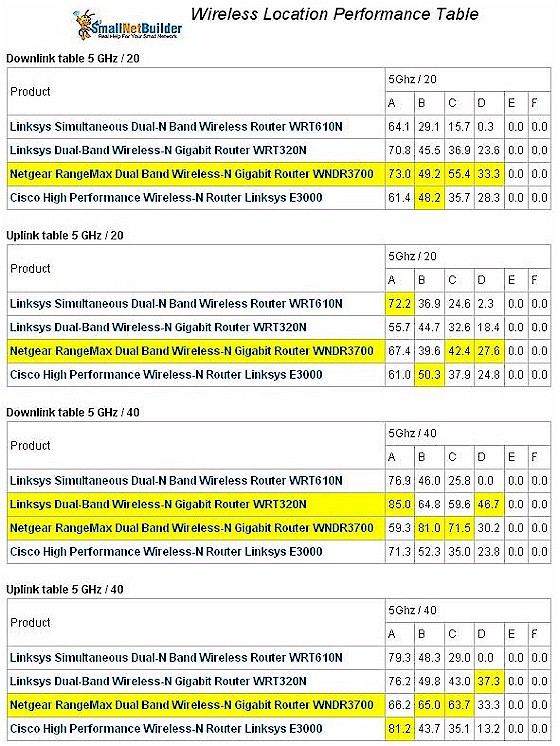
Figure 8: Wireless Competitive Comparison – 5 GHz
Even though it doesn’t always have the highest best case (Location A) throughput, the WNDR3700 tends to have higher throughput than the others in more test locations, especially under medium strength signal conditions.
Use the Wireless Charts to further compare and explore the E3000’s performance.
Total Wireless Bandwidth Test
I’ve noticed that N routers sometimes can produce more aggregate bandwidth using multiple connections than they can over a single connection. So I duplicated the test I ran on the WNDR3700, running multiple simultaneous IxChariot scripts on each radio to see if the E3000 behaved in a similar way.
Figure 9 shows the setup I used for this and the Stress test that follows below. The clients are not correctly identified in the Figure 9 (reused from an old review). The standard Intel 5300 AGN was used as the 2.4 GHz client and a NETGEAR WNDA3100v2 was the 5 GHz client.
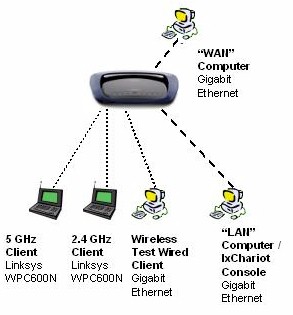
Figure 9: Max Bandwidth and Stress Test setup
Figure 10 shows a total of 190 Mbps of throughput with four streams running downlink on each radio using 40 MHz channel mode. The WNDR3700, by comparison produced 252 Mbps of aggregate throughput running a similar test. So while the E3000 can squeeze out more bandwidth when more wireless clients are added, the WNDR3700 once again comes out on top.
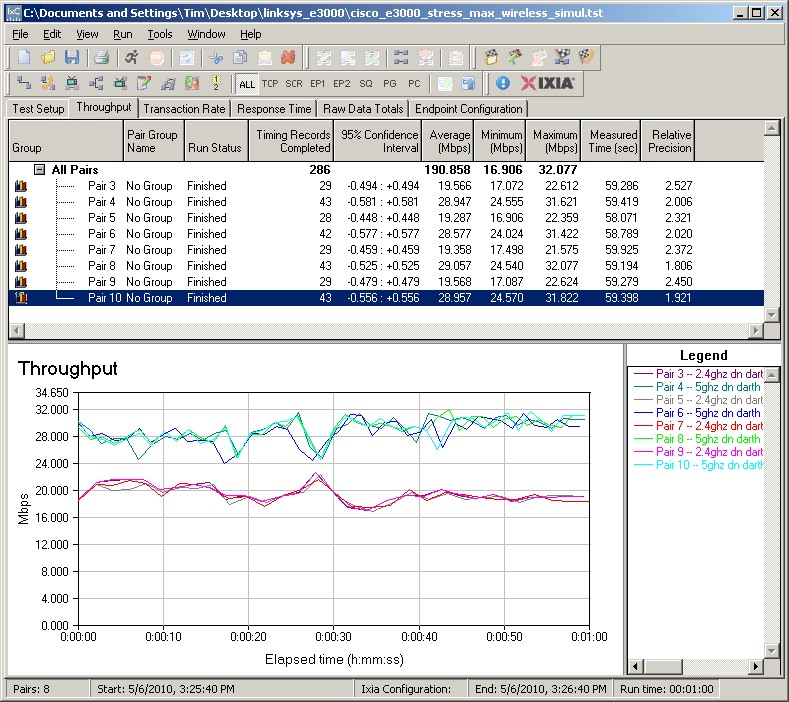
Figure 10: E3000 simultaneous 2.4 and 5 GHz, 20 MHz channel, downlink
Stress Test
For the last test, I ran a stress test that I’ve run on other routers, the WRT610N included, to see if wired and wireless bandwidth affect each other. The setup is the same as shown in Figure 9, but this time I ran only one stream each on the 2.4 and 5 GHz radios and added single LAN to WAN and WAN to LAN wired routing tests.
I first ran the tests with no bandwidth limits, i.e. blasting each stream as fast as it would go, which produced the results shown in Figure 11. The test starts the 2.4 GHz downlink stream first, then at 30 second intervals adds the 5 GHz wireless, wired LAN to WAN, then wired WAN to LAN streams. The wireless streams appear to share bandwidth fine, as you’d expect from the previous wireless maximum bandwidth test above.
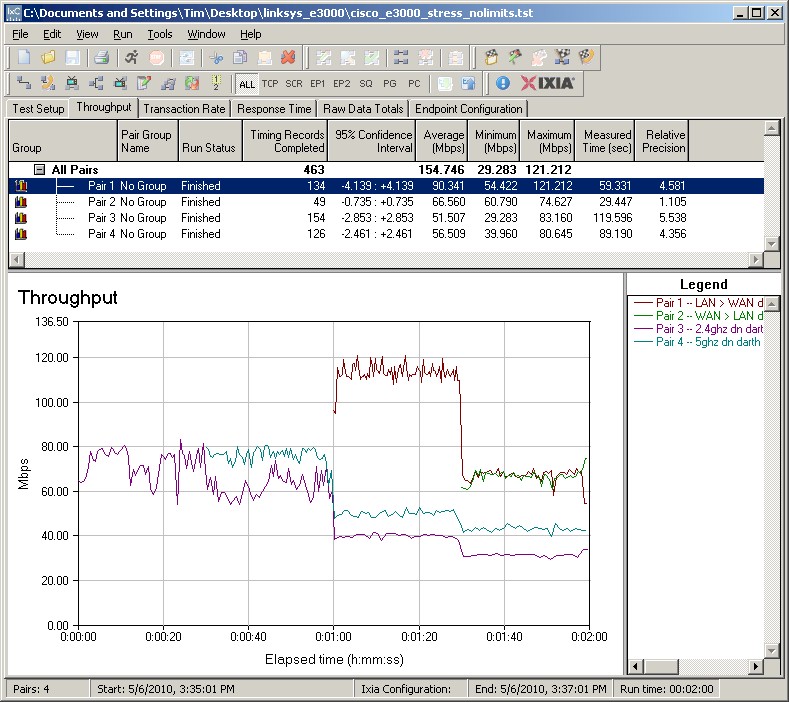
Figure 11: Simultaneous 2.4 and 5 GHz plus routing – full bandwidth
But as soon as the first wired routing stream starts, wireless bandwidth on both radios is knocked down significantly. When the second routing stream is added, wireless throughput ends up being reduced by more than 50%.
Since it’s unlikely that any router in a consumer setting would be connected to such a fast Internet connection, I re-ran the test, this time limiting the WAN > LAN speed to 50 Mbps and LAN > WAN to 5 Mbps, as you might have from a fiber-based ISP. Figure 12 shows what happened.
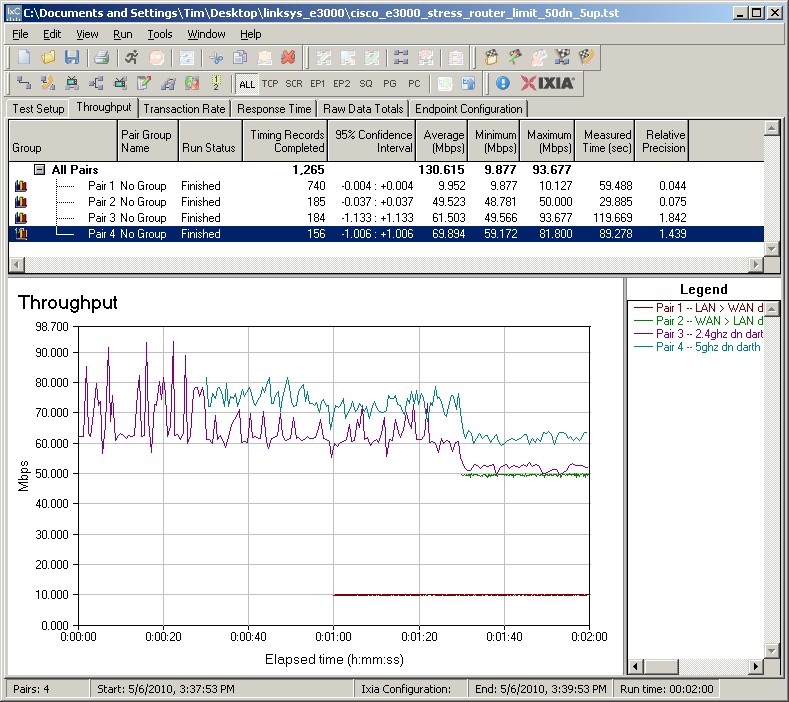
Figure 12: Simultaneous 2.4 and 5 GHz plus routing – routing bandwidth limits
When the 5 Mbps LAN to WAN traffic starts one minute into the test, both wireless streams seem unaffected. But when the 50 Mbps WAN to LAN traffic starts, both wireless streams get knocked down ~ 10 Mbps each.
So the lesson here is that the E3000 doesn’t have unlimited bandwidth, which should be no surprise. But it appears that unless you have a very busy LAN and a very fast Internet connection, you won’t run into the limits that I found.
Closing Thoughts
For everyone who has been asking for a test of the WRT610N V2, well, you finally have it, since the E3000 is the same product with a new name. While the E3000 is a decent router and I’m sure that Cisco will sell plenty of ’em, it isn’t as good as NETGEAR’s WNDR3700, which is still the best-performing dual-band simultaneous N router that I’ve tested so far.