

| At a glance | |
|---|---|
| Product | Linksys High Performance Dual-Band N Router (E3200) [Website] |
| Summary | Broadcom-based simultaneous dual-band N router with Gigabit ports, USB drive sharing and media serving support. |
| Pros | •Simultaneous dual band •Gigabit ports •USB drive sharing |
| Cons | •No WDS •Guest SSID on 2.4 GHz band only •Storage feature lacks UPnP / DLNA server |
Typical Price: $300 Buy From Amazon
Overview
The Linksys E3200 is one step below the top-of-line E4200. It’s aimed at folks who don’t care about three-stream N support and would rather have the extra cash. The only other thing you trade off vs. the E4200 is a UPnP / DLNA media server added to the USB drive-sharing feature.
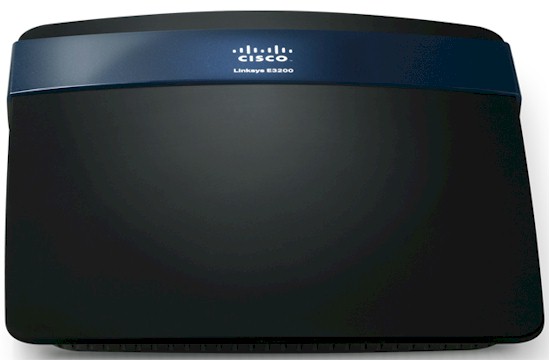
The E3200’s enclosure is more like its lower-priced siblings with a narrower footprint and colored logo accent band running across the router face. The beauty shot above and rear panel photo below show the indicator-free top face and Etherent link / activity LEDs built into the Gigabit WAN and LAN jacks.
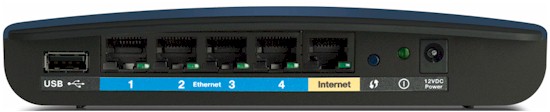
Cisco E3200 rear view
Inside
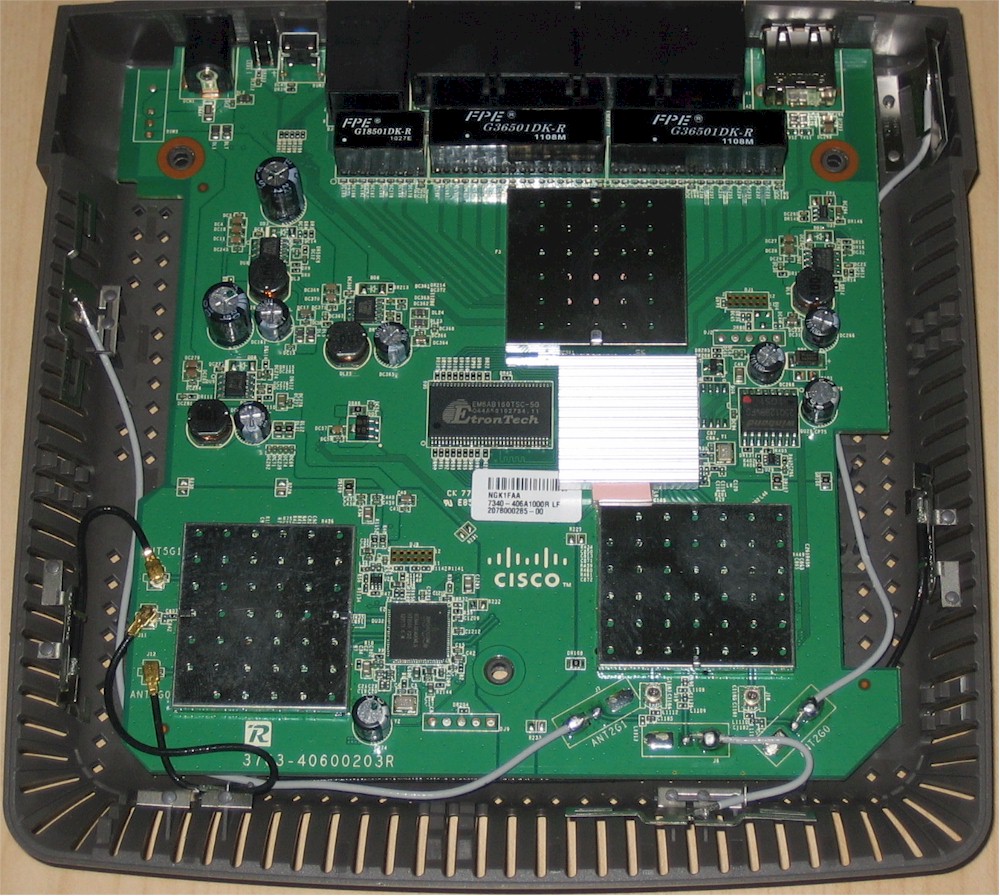
I opened up my review sample after testing was done and took the photo shown below. The 3200’s smaller footprint (compared to the 4200) made for a more compact, but similar layout.
Cisco E3200 inside view
I’ve listed the E3200’s key components, along with the E4200’s for comparison, in the table below.
| E3200 | E4200 | |
|---|---|---|
| CPU | Broadcom BCM47186 | Broadcom BCM4718 |
| Switch | Broadcom BCM53125 | Broadcom BCM53115 |
| RAM | 64 MB | 64 MB |
| Flash | 16 MB | 16 MB |
| 2.4 GHz Radio | – BB/MAC In BCM47186 – Microsemi LX 5535 2.4 GHz power amps (x2) |
– BB/MAC In BCM4718 – SiGe 2528L 2.4 GHz power amps (x2) |
| 5 GHz radio | – Broadcom BCM43236 – Microsemi LX 5530 5 GHz power amps (x2) |
– Broadcom BCM4331 – SiGe SE2594L Dual Band 802.11a/b/g/n Wireless LAN front ends (x3) |
Table 1: E3200 and E4200 component summary
Both routers are Broadcom-based and have 64 MB of RAM and 16 MB of flash. Like most other simultaneous dual-band routers, both use a single-chip router solution for one of the radios and main CPU. The E3200 uses a BCM47186 vs. BCM4718 on the E4200. And since the E3200 doesn’t support three-stream N on the 5 GHz radio, there are only two antennas for it vs. the E4200’s three.
Features
The E3200 supports the standard Linksys router feature set:
- DHCP, Static, PPPoE, PPTP, L2TP, Telstra Cable WAN types
- DHCP server with MAC address reservation
- Built-in Dynamic DNS clients for TZO and DynDNS
- Static and dynamic routing
- SPI firewall disable, multicast, WAN ping and IDENT filtering and Proxy, Java, ActiveX and Cooking blocking
- IPsec, PPTP and L2TP VPN passthrough (enabled by default)
- Single port forwarding and Port Range forwarding and triggered ports
- HTTPS admin access, remote management (HTTP / HTTPS) enable with IP range restriction and port setting
- Incoming, outgoing, Security and DHCP onscreen log access with support for Linksys Logviewer recording
- Access Restrictions with 10 deny or allow-based policies, each with its own list of clients and day/time schedule
- Uplink (LAN to WAN) only QoS with High, Medium, Normal or Low Priority that can be applied to specific applications (divided into Application, Online Game and Voice Device groups), physical switch ports or specific MAC addresses.
- WMM (Wireless MultiMedia) (enabled by default)
- Wireless Guest Access – Internet-only access with its own SSID, but no security except a common password for all guests and the ability to limit the number of guests from 1 to 10. 2.4 GHz band only
The 1.0.00 build 13 firmware I used for testing didn’t support IPv6. See the E4200 review if you need a bit more feature detail along with some screenshots.
First power-up of the router didn’t automatically result in Internet connection via a DHCP-style WAN link, so I fired up my browser, entered the 192.168.0.1 IP of the admin server and was presented with the screen shown below.
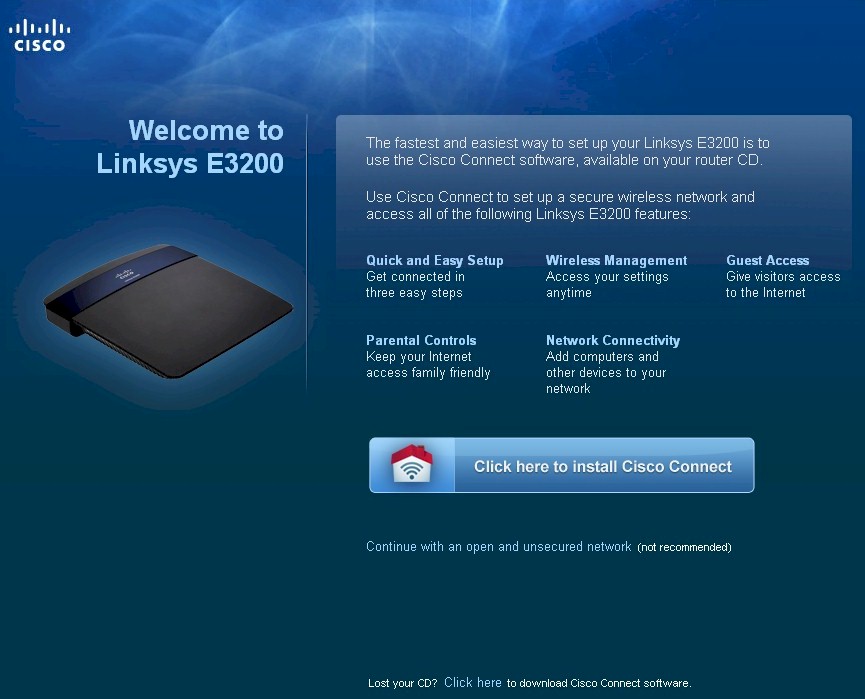
E3200 captive portal
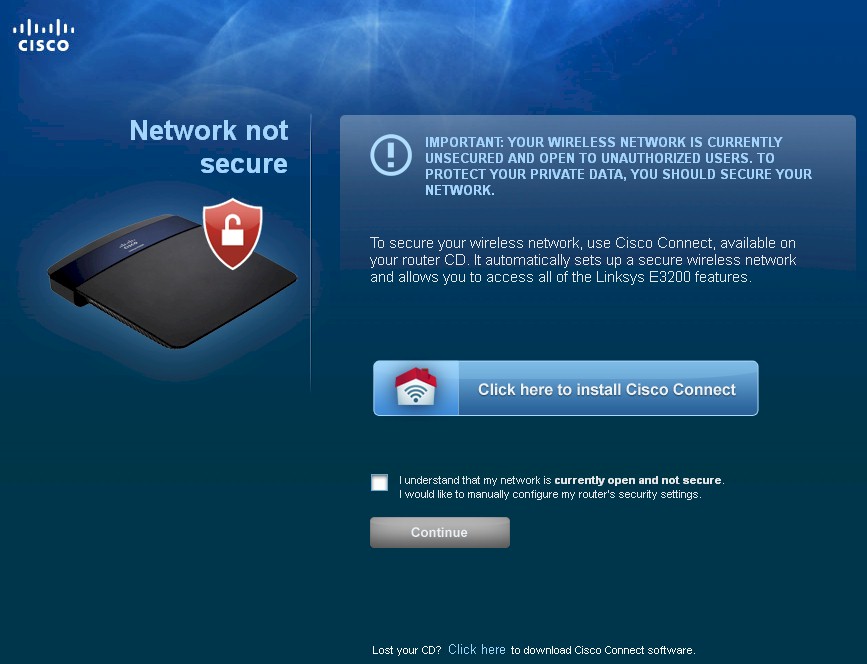
I’m not a Cisco Connect fan, so clicked the Continue with an open and unsecured network (not recommended) link and was shown the screen below.
E3200 security warning
Once I checked the box and clicked the Continue button, I was finally granted Internet access.
Routing Performance
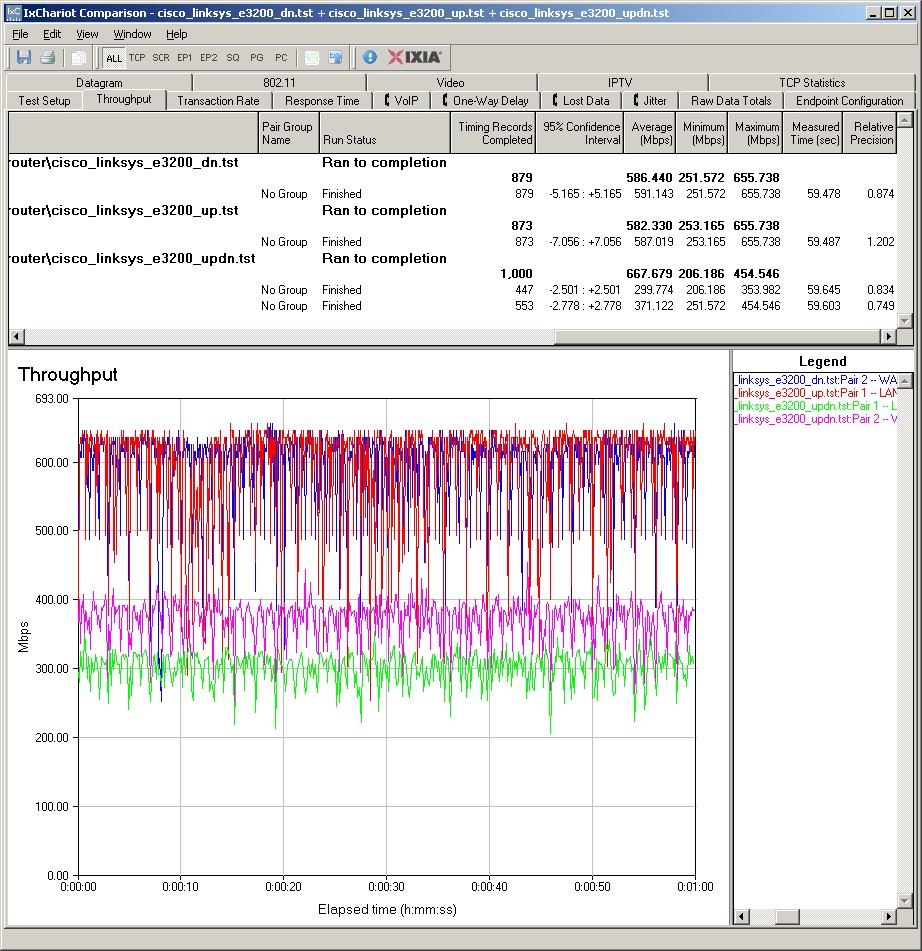
Routing throughput running the latest 1.0.00 build 13 firmware and our router test process measured 586 Mbps WAN to LAN, 582 Mbps LAN to WAN and 668 Mbps total with up and down tests running simultaneously. This is 50 – 100 Mbps lower than the E4200, but plenty for most Internet connections. The IxChariot composite plot below shows upload speed lower than download in the simultaneous routing test.
Maximum simultaneous connections were more different. The E3200 topped out at 12,277 connections, while the E4200 maxed out at our 34,925 test limit.
E3200 wired routing performance summary
Wireless Performance
The E3200 is Wi-Fi Certified and properly defaulted to 20 MHz bandwidth mode on the 2.4 GHz radio on power-up. The 5 GHz radio defaulted to Auto 20/40 mode. I successfully ran a Wi-Fi Protected Setup (WPS) session with my Win 7 client by entering the WPS code found on the E3200’s bottom label. The WPS session completed quickly and resulted in a WPA2/AES secured connection with the same WPA2 pre-shared key on both bands. All tests were run with this secured connection using our wireless test process.
NOTE: The E3200 defaults to both radios having the same SSID (cisco_e3200). So if you have a dual-band client and want to control the band you’re on, you’ll need to change one (or both) of the SSIDs.
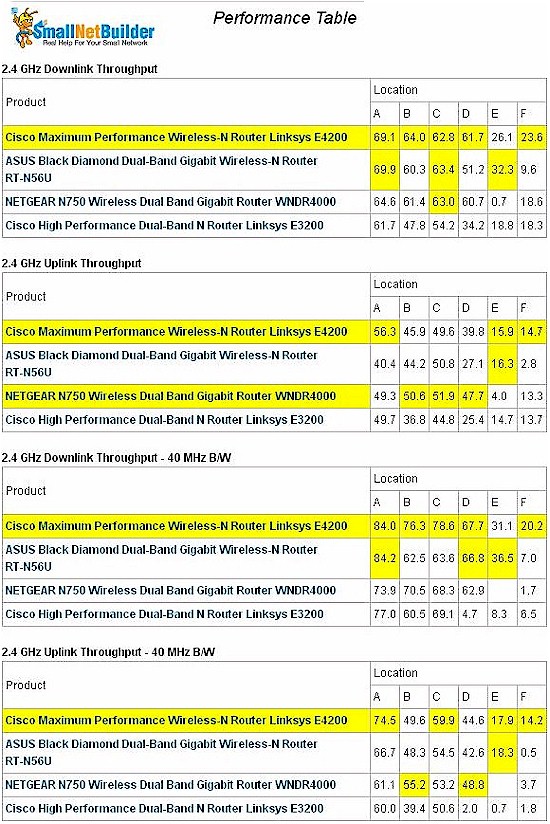
I ran 2.4 and 5 GHz Wireless Performance tables for the E3200 and other recent concurrent dual-band routers, i.e. the E4200, ASUS RT-N56U and NETGEAR WNDR4000. In the 2.4 GHz band, the E4200 appears to be the winner with higher overall throughput with strong, medium and low signal levels.
Of particular note is the drastic throughput reduction for the E3200 when using Auto 20/40 mode and lower signal levels. I’ve consistently said that running in 40 MHz mode can actually decrease performance under lower signal conditions. And the E3200 proves that point in spades! Running downlink yields average throughput around 5 Mbps in test locations D, E and F, while uplink is about half that.
For the E3200, highest 2.4 GHz throughput of 77 Mbps was measured using our wireless test process in Location A running uplink with the client set to Auto 20/40 mode. Running a simultaneous up and downlink test yielded 95 Mbps in the same location and condition. So running multiple clients will definitely get you higher total throughput.
Linksys E3200 Wireless Performance summary – 2.4 GHz
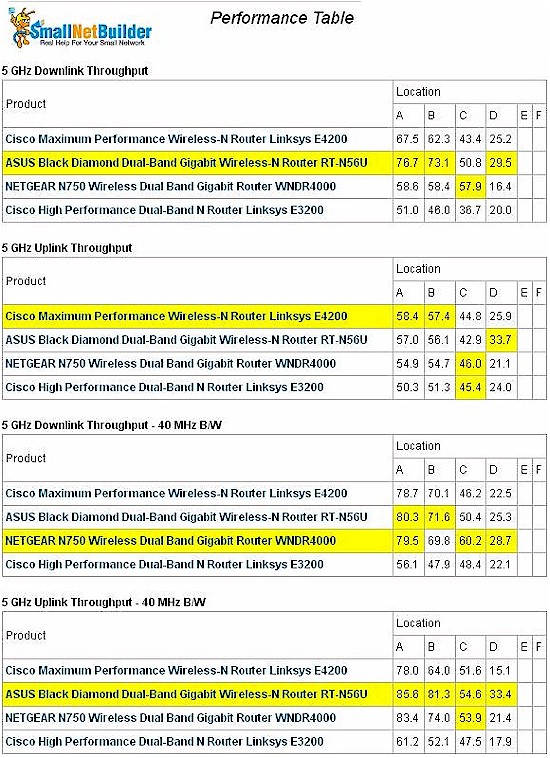
The E3200 uses separate Microsemi power amplifiers for both bands. But they didn’t seem to help 5 GHz band performance either. Except for a few strong signal points, I think you’d have a hard time seeing a speed or range difference among any of the compared products. At least the 5 GHz band didn’t exhibit the severe throughput reduction using 40 MHz mode that the 2.4 GHz band showed.
Highest E3200 5 GHz throughput of 61 Mbps was measured using our wireless test process in Location A running uplink with the client set to 40 MHz mode. The simultaneous up and downlink test yielded 83 Mbps in the same location and condition.
Linksys E3200 Wireless Performance summary – 5 GHz
Throughput stability wasn’t as good as I’ve seen in other Broadcom-based products, (downlink, 20 Mbps bandwidth mode). But at least I didn’t see any multi-second zero-level dropouts.
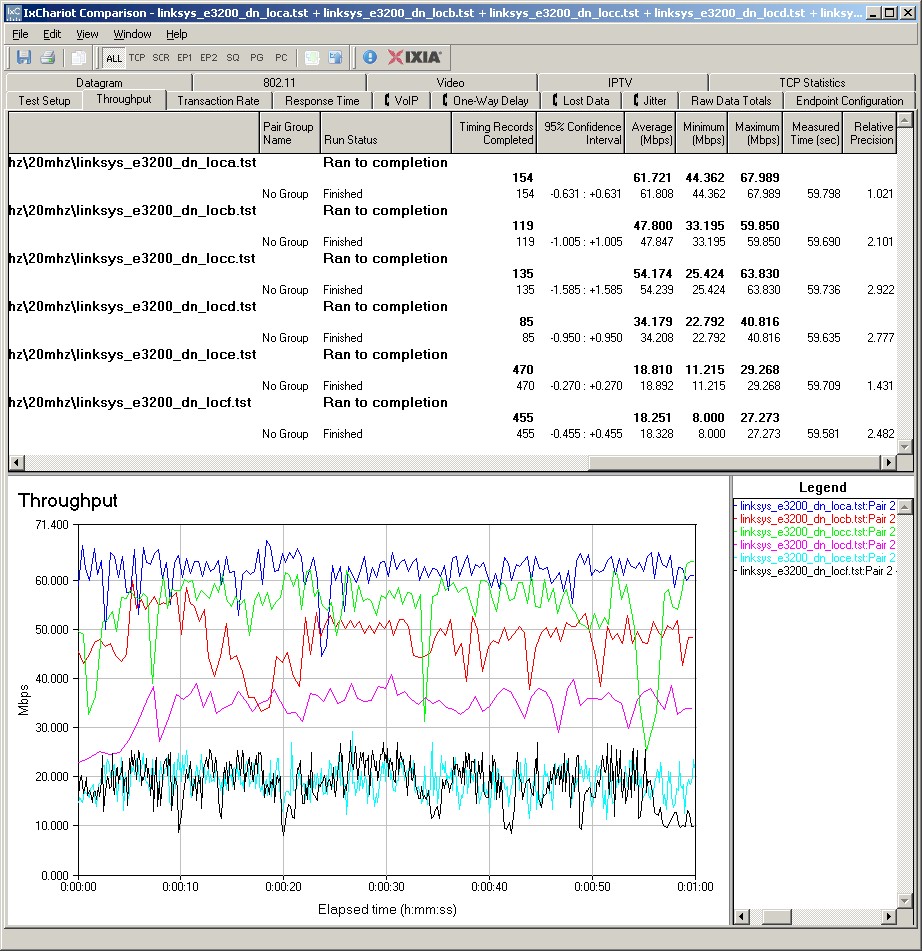
E3200 IxChariot plot – 2.4 GHz, 20 MHz, downlink
Here are links to the other wireless performance plots for your reference:
- 2.4 GHz / 20 MHz uplink
- 2.4 GHz / 20 MHz up and downlink
- 2.4 GHz / 40 MHz downlink
- 2.4 GHz / 40 MHz uplink
- 2.4 GHz / 40 MHz up and downlink
- 5 GHz / 20 MHz downlink
- 5 GHz / 20 MHz uplink
- 5 GHz / 20 MHz up and downlink
- 5 GHz / 40 MHz downlink
- 5 GHz / 40 MHz uplink
- 5 GHz / 40 MHz up and downlink
Closing Thoughts
I don’t know why, but Cisco is practially begging you to buy the E4200 instead of the E3200 by currently selling refurbished E4200’s from its online store for $120 with free ground shipping and 30 day no-hassle, full-price return policy. Or if you’re ok with the E3200’s feature set, you can get a refurb’d E3200 for only $80.
You can further explore and compare the E3200’s performance using the Router Chart and Router Finder.