

| At a glance | |
|---|---|
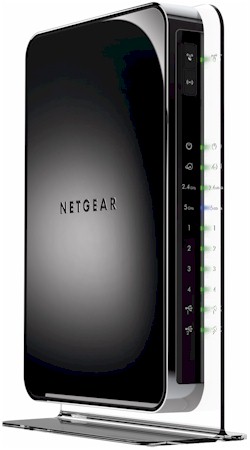
| Product | NETGEAR N900 Wireless Dual Band Gigabit Router (WNDR4500) [Website] |
| Summary | High performance dual-band, three-stream 802.11abgn router with bandwidth metering, external USB drive and printer sharing w/ UPnP AV / DLNA media server and completely new admin GUI. |
| Pros | • Revamped user interface • Many new features including printer sharing |
| Cons | • Fewer features than the WNDR3800 |
Typical Price: $220 Buy From Amazon
Overview
Updated 11/7/2011: Link to two stream retest
The WNDR4500 is probably the last of NETGEAR’s new router introductions for the year. Depending on how you look at it, it either pushes aside the WNDR4000 or WNDR3800 for top-router-dog spot in NETGEAR’s current lineup.
The table below, which I pulled from the WNDR3800 New to the Charts review, shows the current offerings, which may be one or two too many and drive some consumers into a brain freeze when it comes to choosing one.
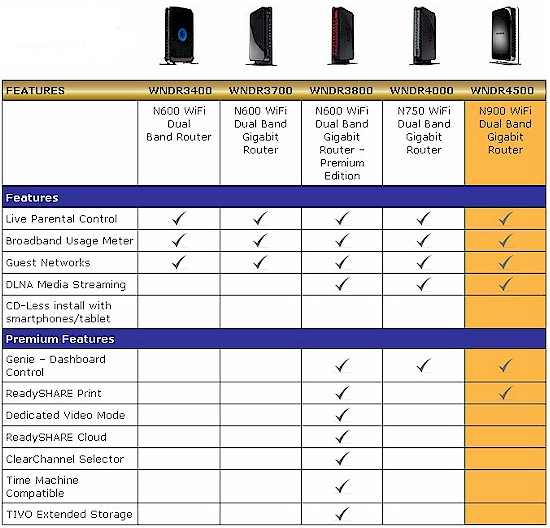
Figure 1: NETGEAR Top-End Router line
The first thing that stuck me about the 4500 was its weight and size. The router itself is a bit larger and heavier than any of its predecessors. Part of that weight comes from the clear plastic non-removable base that runs the entire length of the router. I suppose you could lay the router on its side, but, given the design, NETGEAR clearly doesn’t want you to.
However, a bigger contributor to the 4500’s box weight is the brick-style 12V @ 5A external power supply that you’d more expect to come packed with a NAS. Apparently, the technology that makes the 4500 tick has a significantly larger power appetite than your typical router.
The controls and ports are pretty standard for NETGEAR’s top-end WNDRs. The front panel gets both wireless on / off and WiFi Protected Setup (WPS) buttons and all the indicators you’d expect.
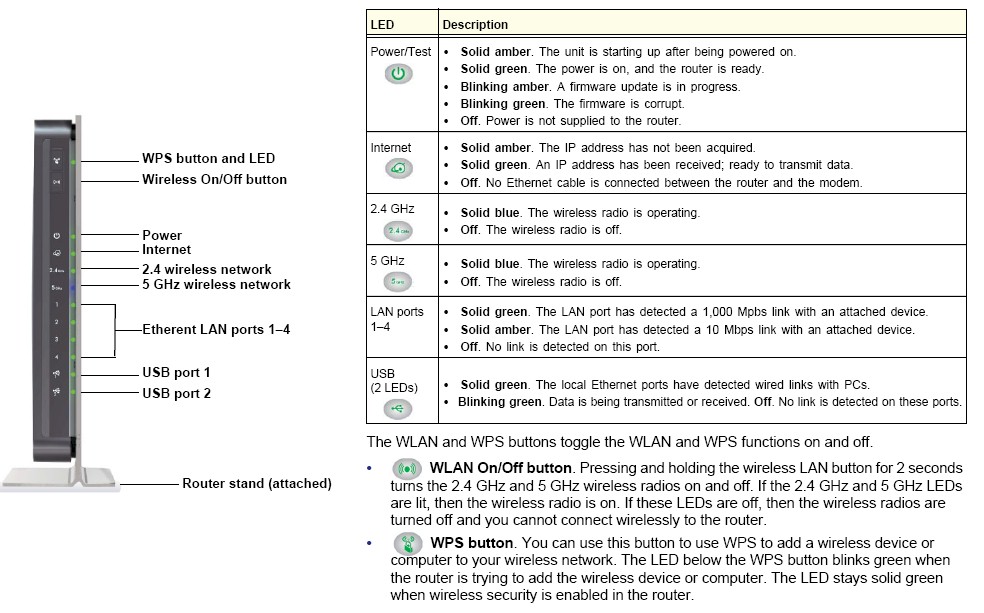
Figure 2: WNDR4500 front panel callouts
The main difference on the rear panel is two USB 2.0 ports vs. the usual one. So you can connect both a USB printer and USB drive to share, without having to juggle connections or deal with a USB hub.
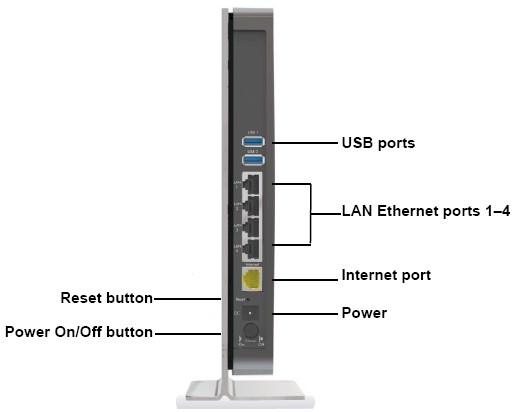
Figure 3: WNDR4500 back panel callouts
Inside
NETGEAR requested a 180 day block that went into effect at the end of July on most of the informative FCC docs. So after testing was complete, I opened up my review unit to see what I could see. I got as far as looking at the bottom view shown in Figure 4.
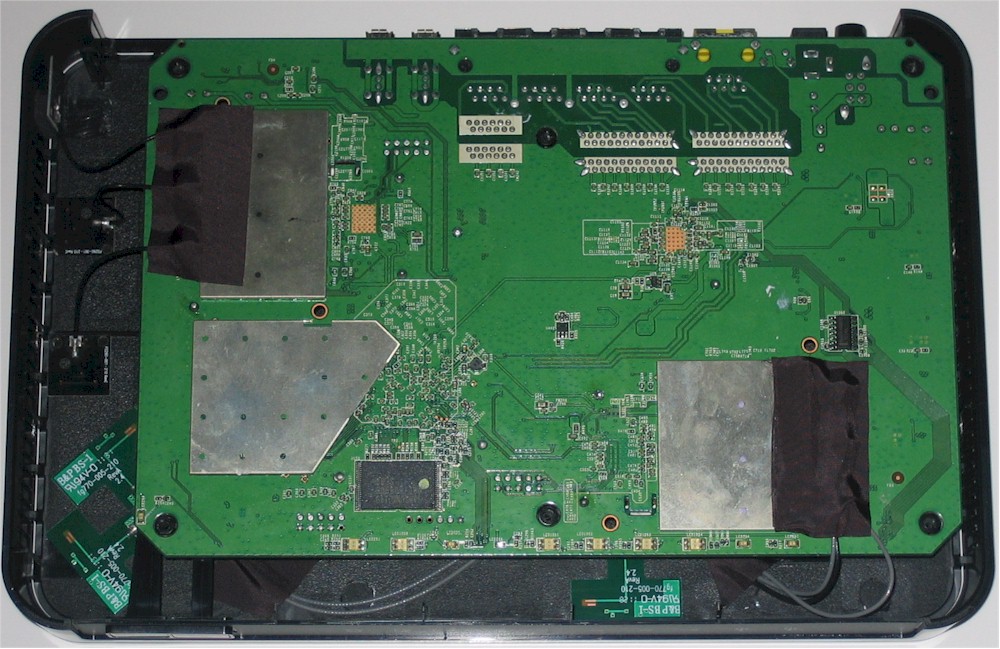
Figure 4: WNDR4500 inside
All six antennas (three each for each of two radios) are glued to the top and side of the top cover, making it difficult to flip the board over. I decided it wasn’t worth it, after a brief peek at the top side of the board revealed heatsinks on just about all the key components.
Some poking around turned up a post on the DD-WRT forum, saying the 4500 has a Broadcom BCM4718 chipset. But since that chipset supports only dual-stream N, that’s not likely.
Instead, two BCM4331 Single-Chip 802.11n Dual-Band 3×3 SoCs is my guess, which NETGEAR confirmed. They also said that external power amps and low-noise front-ends are also baked into the design to further tweak wireless performance.
NETGEAR told me that, instead of sharing one of the 4331’s CPUs for routing duties, a Broadcom BCM4706 is used, which is a 600 MHz MIPS32 74K Core processor. We also know, because it’s right on the 4500’s datasheet, that the 4500 has 128 MB each of RAM and flash.
I’ve assembled the comparison table below that has guesses only for the Gigabit switch.
| WNDR4500 | WNDR4000 | |
|---|---|---|
| CPU | Broadcom BCM4706 | Broadcom BCM4718 |
| Switch | Broadcom BCM53115 (?) | Broadcom BCM53115 (?) |
| RAM | 128 MB | 64 MB |
| Flash | 128 MB | 8 MB |
| 2.4 GHz Radio | – BCM4331 – 2.4 GHz power amps (x3) (?) |
– in BCM4718 – SiGE 2528L 2.4 GHz power amps (x2) |
| 5 GHz radio |
– Broadcom BCM4331 |
– Broadcom BCM4331 |
Table 1: WNDR4500 and WNDR4000 components
Features
You can think of the 4500 as a three-stream version of the WNDR3800, but with fewer features. The briefing material from NETGEAR positions the 3800 as a "lifestyle" option and the 4500 for "performance" buyers.
The table back in Figure 1 shows you won’t be able to use the 4500’s "ultimate USB storage performance" for your Apple Time Machine backups. Nor will you be able to remotely access it via the ReadyShare Cloud feature.
On a more positive note, you do get the new Genie interface that I first saw in the WNDR3800 and you also get its same IPv6 WAN connection features. Craig Ellison will be going through the 3800’s new features and interface in a review that will post later this week or early next and I’ll refer you there when it posts.
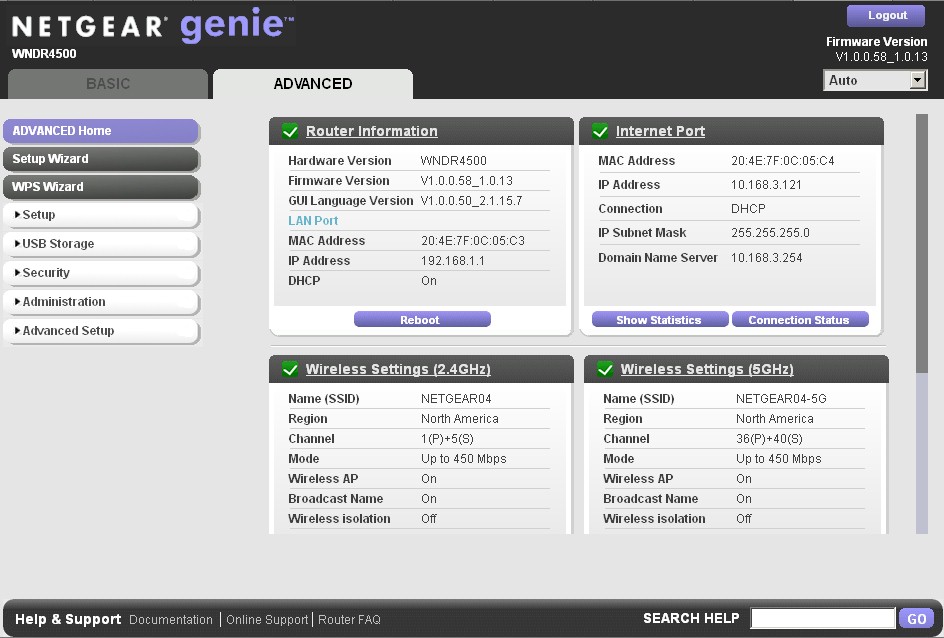
Figure 5: WNDR4500 Advanced Home
In the meantime, suffice it to say that all of NETGEAR’s traditional routing features have been carried to the 4500; they just have a new look. You can also download the user manual for more details.
Routing Performance
Routing performance for the 4500 using our standard test method is summarized in Table 2. Figure 6 shows the composite IxChariot plot for the three routing speed tests.
| Test Description | Throughput – (Mbps) |
|---|---|
| WAN – LAN | 768 |
| LAN – WAN | 832 |
| Total Simultaneous | 837 |
| Maximum Simultaneous Connections | 4096 |
| Firmware Version | V1.0.0.58_1.0.13 |
Table 2: Routing throughput
Fans of speedy routers will be happy to see that the 4500 ranks third in downlink throughput and second in uplink behind the ASUS RT-N56U "Black Diamond" that continues to be the most popular router among SmallNetBuilder readers. But NETGEAR must think that 4,096 simultaneous sessions is enough, because that’s all the 4500 supports.
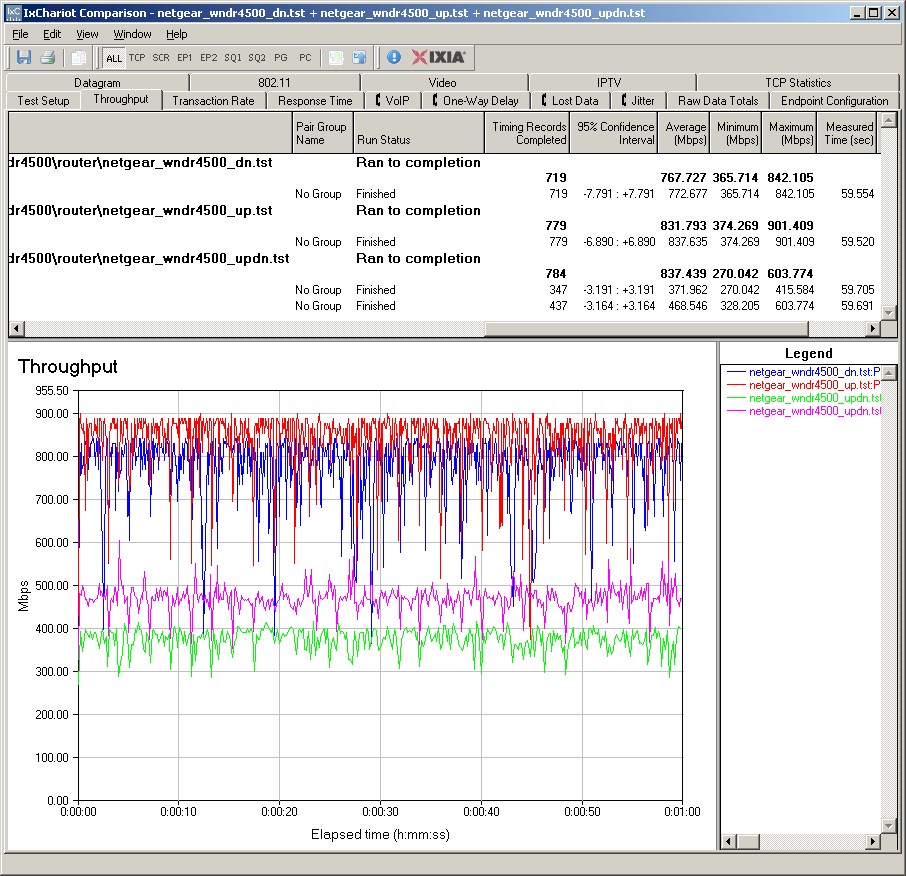
Figure 5: NETGEAR WNDR4500 routing throughput
Storage Performance
NETGEAR’s 4500 briefing material boasts of its "ultimate" USB storage performance. The material quotes 11.4 MB/s "read-write FAT32" and 8.1 MB/s "read-write NTFS", which it claims is about 3 and 1.5 times faster than an unspecified "750 Mbps Competitive Router".
I ran quick Windows filecopy tests using the standard NAS testbed to the WNDR4500 with my standard Iomega UltraMax Pro drive configured in RAID 0 and formatted in FAT32 and NTFS. I pulled results from NETGEAR’s other routers into Table 3.
| WNDR4500 | WNDR3800 | WNDR3700v2 | WNDR4000 | |
|---|---|---|---|---|
| FAT32 Write (MBytes/s) | 9.2 | 12.5 | 9.9 | 6.1 |
| FAT32 Read (MBytes/s) | 11.6 | 13.3 | 14.2 | 6.9 |
| NTFS Write (MBytes/s) | 6.7 | 4.3 | 3.0 | 4.6 |
| NTFS Read (MBytes/s) | 6.5 | 12.0 | 12.1 | 4.3 |
Table 3: NETGEAR router filecpy performance comparison
I got close enough to NETGEAR’s claimed 11.4 MB/s on the FAT32 read test to confirm the claim. But my results didn’t confirm NETGEAR’s for NTFS. The chart also shows that the 4500’s storage throughput isn’t really far-and-away better than other NETGEAR routers’.
Wireless Performance – Overview
With simultaneous dual-band routers that support three stream N, I make a total of eight test runs. That’s a lot of data to get lost in and I sometimes do. So I’m trying something new in this review by providing a summary of wireless performance first. Then if you want to dive into the details, you can hit the relevant sections.
The WNDR4500 is Wi-Fi Certified and properly defaulted to 20 MHz bandwidth mode ("Up to 217 Mbps" in NETGEAR-speak) on the 2.4 GHz radio on power-up. The 5 GHz band came up in 40 MHz mode or "Up to 450 Mbps" in NETGEAR lingo.
I was able to run a Wi-Fi Protected Setup (WPS) pushbutton session with a Win 7 client that resulted in a WPA2/AES secured connection to each radio. All tests were run with this secured connection using the four-location wireless test process.
First look at the Benchmark Summary in Figure 6. As we’ve seen with other three-stream router tests, the overall average difference between two and three stream operation isn’t that striking. That’s because three-stream N can only provide significantly higher throughput under very strong signal conditions (same room or next-room).
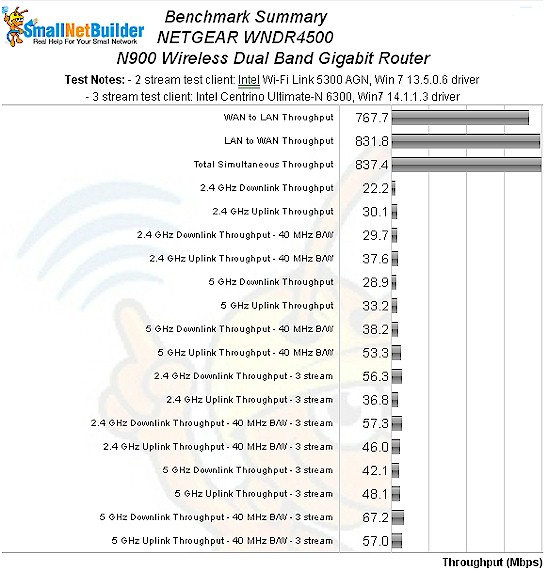
Figure 6: NETGEAR WNDR4500 benchmark summary
Diving a bit deeper, Table 4 brings together the highest wireless throughput measured out of all locations in the 20 MHz mode test runs. I’m not calling out the test locations where each best throughput was found. But most times it was in Location A, with an occasional Location C.
Note that the Dn/Up result is the test where I run simultaneous up and downlink tests in Location A. This is a good check to see if additional bandwidth is available via additional connections.
| Test Group | Max Dn (Mbps) | Max Up (Mbps) | Dn/Up (Mbps) |
|---|---|---|---|
| 2.4 GHz, 2 stream, 20 MHz | 32 | 46 | 35 |
| 2.4 GHz, 3 stream, 20 MHz | 80 | 63 | 99 |
| 5 GHz, 2 stream, 20 MHz | 35 | 44 | 45 |
| 5 GHz, 3 stream, 20 MHz | 66 | 67 | 86 |
Table 4: Highest Throughput, 20 MHz mode
The results here are not knock-your-socks-off good. On the contrary, the two stream 2.4 GHz downlink results are downright awful, putting the 4500 at the bottom of the Average 2.4 GHz Downlink chart when filtered to show only dual-band routers and fourth from the bottom when all tested routers are included.
You’ll see the reason for this if you look at the IxChariot plots for these tests, which show extremely high throughput variation that has a periodic oscillation. This problem seems to be limited to two-stream 2.4 GHz downlink performance in both 20 MHz and 40 MHz modes. Upstream and both directions in three-stream seem ok.
| Test Group | Max Dn (Mbps) | Max Up (Mbps) | Dn/Up (Mbps) |
|---|---|---|---|
| 2.4 GHz, 2 stream, 40 MHz | 48 | 64 | 53 |
| 2.4 GHz, 3 stream, 40 MHz | 90 | 82 | 122 |
| 5 GHz, 2 stream, 40 MHz | 40 | 71 | 56 |
| 5 GHz, 3 stream, 40 MHz | 86 | 85 | 129 |
Table 5: Highest Throughput, 40 MHz mode
Because they were so odd, I shared these results with NETGEAR before posting this review. After some quick overnight tests on their end, which included duplicating my two-stream test platform (an Acer Aspire 1810T with Intel 5300 card substituted for the factory Intel 5100), NETGEAR was able to confirm the problem and identify its source.
The problem is due to my use of the three stream Intel 5300 wireless module with only two antennas connected. When the router and client connect, they exchange information on the link rates each support. Since the 5300 is a three stream client, that’s what it reports and the router sets itself to a three stream link rate.
But when the router starts transmitting, the client can’t actually support three-stream link rates because it doesn’t have a third antenna connected. This results in low throughput. When the WNDR4500 sees the low throughput, it falls back to a two-stream rate and throughput then improves. The problem is that the router then switches back to a three-stream rate and the cycle starts again. NETGEAR has also checked with Intel, which also confirms this behavior.
NETGEAR is checking to see what the installed base of three stream N clients with only two antennas connected is. They believe it is low since Intel had the 5100 client as an alternative, which has only two antenna connections and supports only two-stream N. In fact, my Acer 1810T came with an Intel 5100 installed. Based on what they find, NETGEAR may change the WNDR4500’s firmware to fix the problem, or I may change my client and rerun the two-stream tests. Or maybe both. Stay tuned.
When operating with a fully-capable three-stream client the 4500 has better luck, with its best performance in the 5 GHz band running in 40 MHz mode. Although it’s a smaller competitive field, the 4500’s throughput in this area ranks it near the top of the half-dozen competitors. Still, if you’re expecting 100+ Mbps of throughput from paying the big bucks for this router, you’ll get it only in the aggregate when supporting multiple simultaneous clients.
Wireless Performance – 2.4 GHz Two Stream
To look at the four main test groups, a bit of competitive comparison helps. I chose the D-Link DIR-665 and TRENDnet TEW-692GR, but left out the 5th Generation Apple Airport Extreme because it doesn’t support 40 MHz mode in 2.4 GHz.
Figure 7 shows the wireless Performance Table for 2.4 GHz and 20 MHz mode. You can clearly see the terrible performance noted earlier running downlink. Uplink performance is more typical of what you should see.
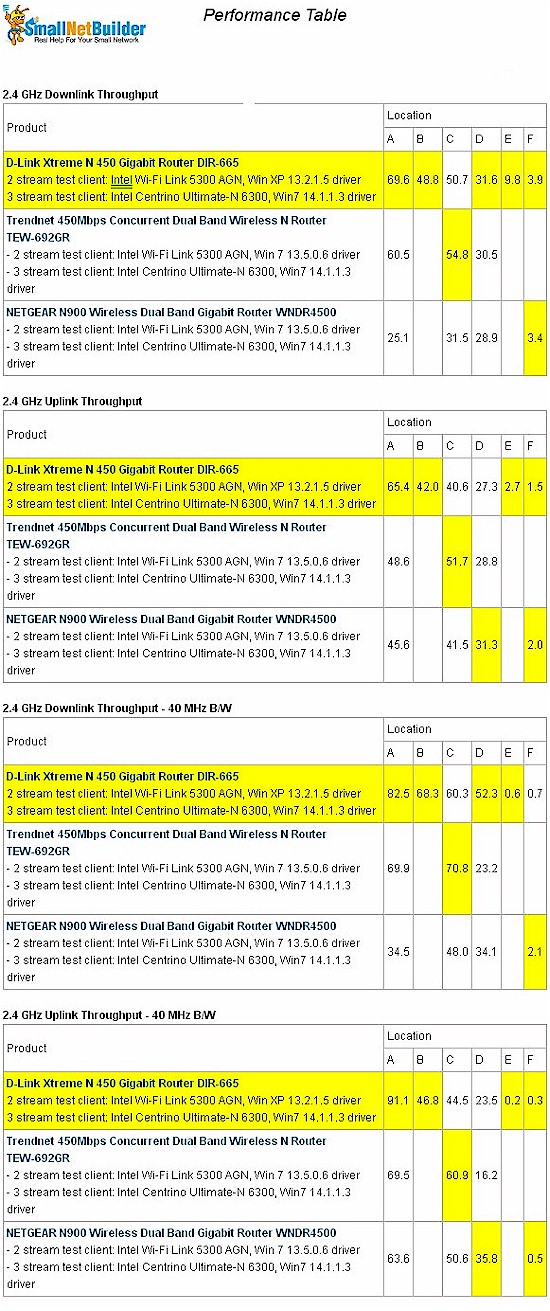
Figure 7: Wireless performance table – 2.4 GHz, 2 stream
Figure 8’s IxChariot plots summary clearly shows the very unstable throughput that is responsible for the 4500’s overall poor 2.4 GHz downlink performance in all locations except the weakest signal Location F.
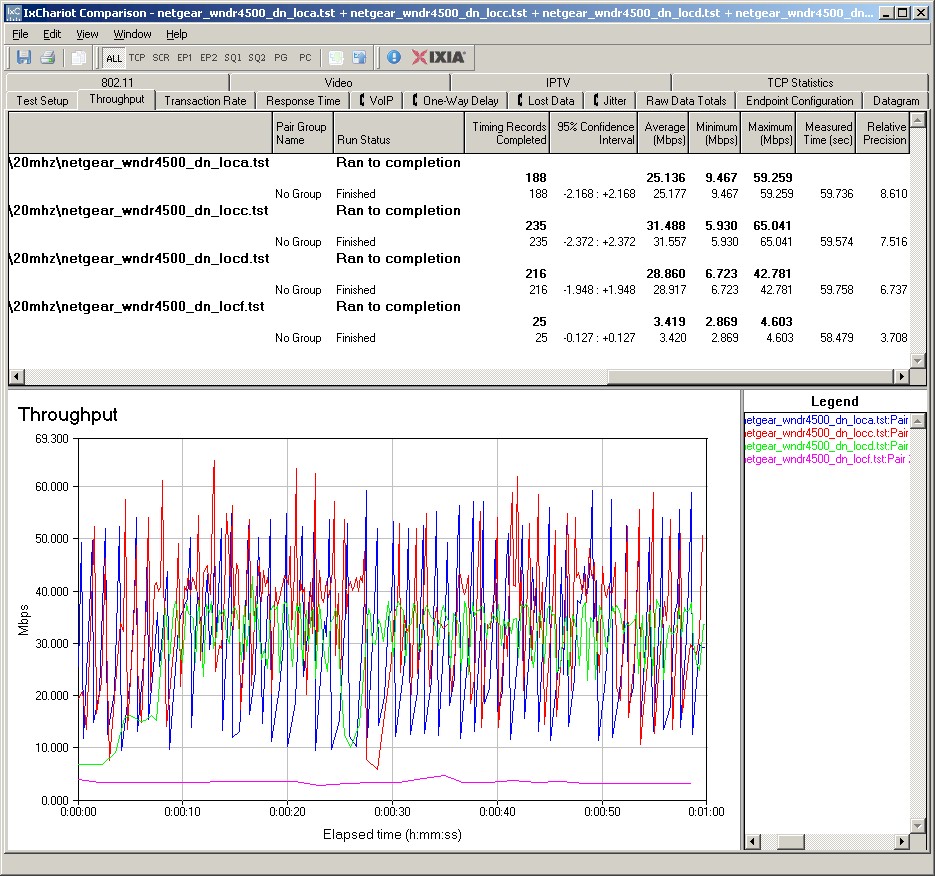
Figure 8: NETGEAR WNDR4500 IxChariot plot summary – 2.4 GHz, 20 MHz mode, downlink, 2 stream
Here are links to the other plots for your reference.
- 2.4 GHz / 20 MHz uplink
- 2.4 GHz / 20 MHz up and downlink
- 2.4 GHz / 40 MHz downlink
- 2.4 GHz / 40 MHz uplink
- 2.4 GHz / 40 MHz up and downlink
Wireless Performance – 2.4 GHz, Three Stream
Figure 9 shows the wireless Performance Table for 2.4 GHz using the Intel 6300 Ultimate N three-stream client. The 4500 clearly does better in three stream and particularly in medium-to-low signal Location D running downlink.
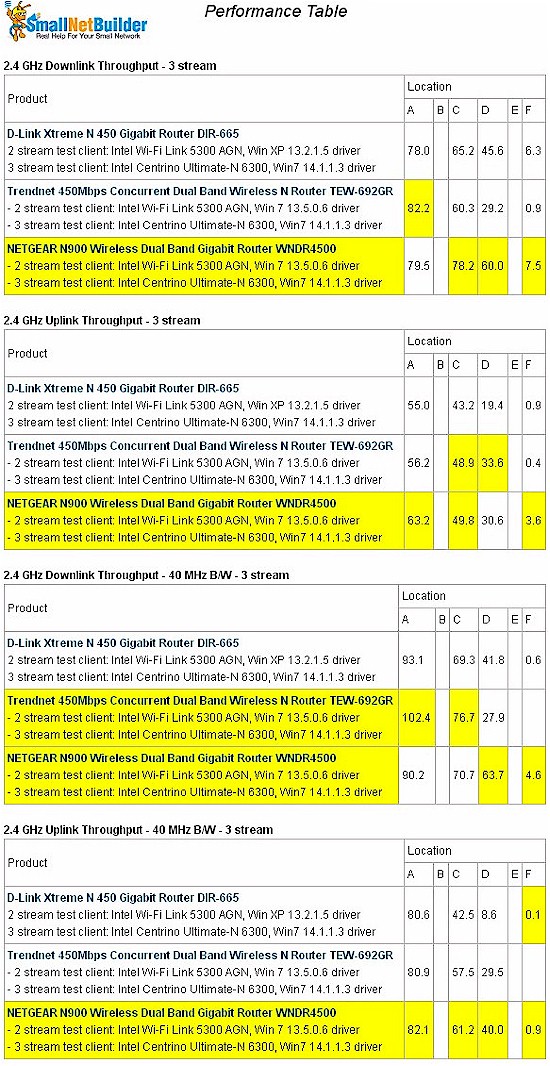
Figure 9: Wireless performance table – 2.4 GHz, 3 stream
Figure 10 shows the IxChariot plots for 20 MHz mode downlink in three-stream mode. The plots here are much better, with relatively low variation and only a few large, but brief, dropouts.
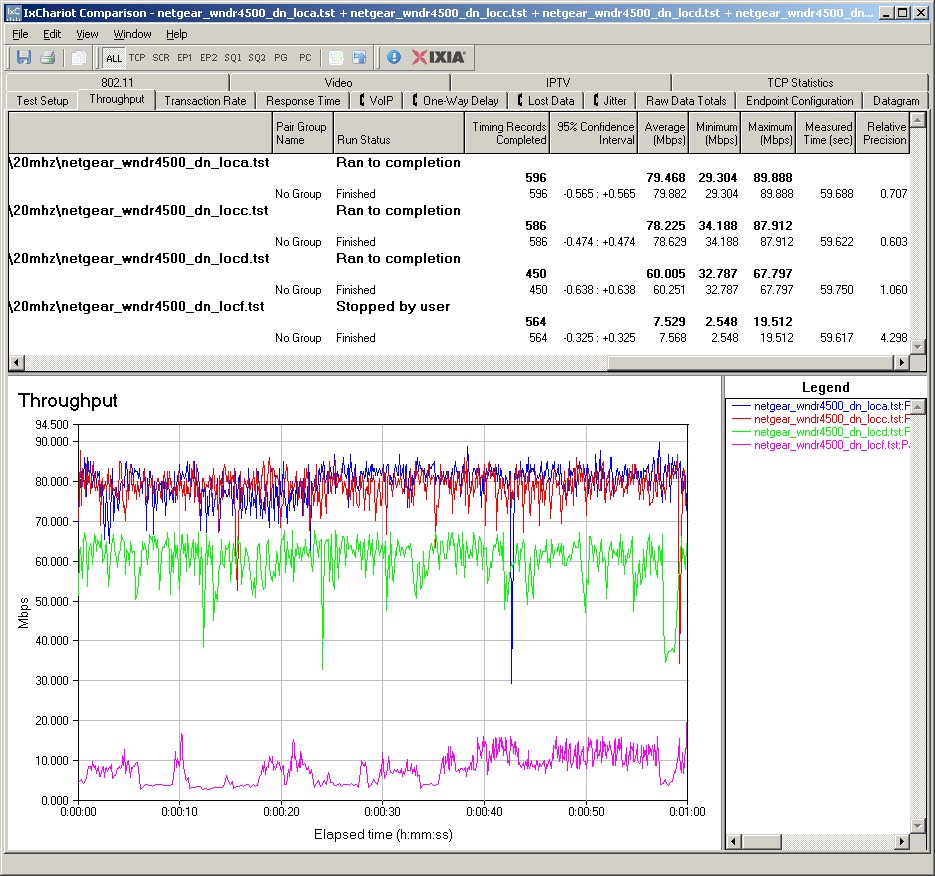
Figure 10: NETGEAR WNDR4500 IxChariot plot summary – 2.4 GHz, 20 MHz mode, downlink, 3 stream client
Here are links to the other plots for your reference.
- 2.4 GHz / 20 MHz uplink
- 2.4 GHz / 20 MHz up and downlink
- 2.4 GHz / 40 MHz downlink
- 2.4 GHz / 40 MHz uplink
- 2.4 GHz / 40 MHz up and downlink
Wireless Performance – 5 GHz, Two Stream
Figure 11 shows the wireless Performance Table for 5 GHz, using the Intel 5300 two-stream client. The 4500’s downstream performance isn’t anything to write home about, with the D-Link DIR-665 turning in the best overall performance of the group.
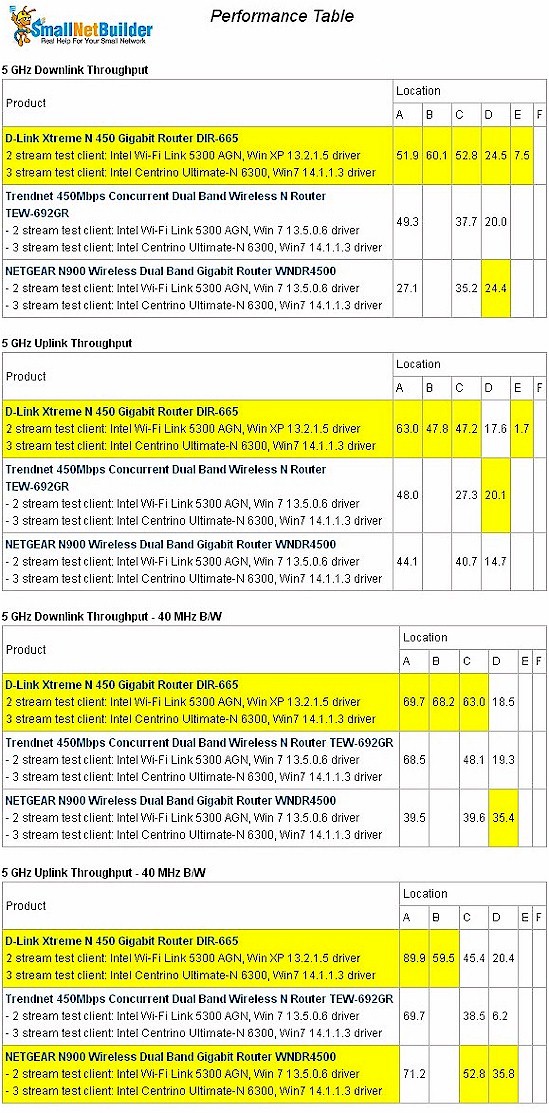
Figure 11: Wireless performance table – 5 GHz, 2 stream
Figure 12 shows the IxChariot plots for 5 GHz, 40 MHz mode downlink. That wonky oscillating throughput we saw earlier in the 2.4 GHz tests is back. Note also the ramp-up affect at the beginning of some test runs.
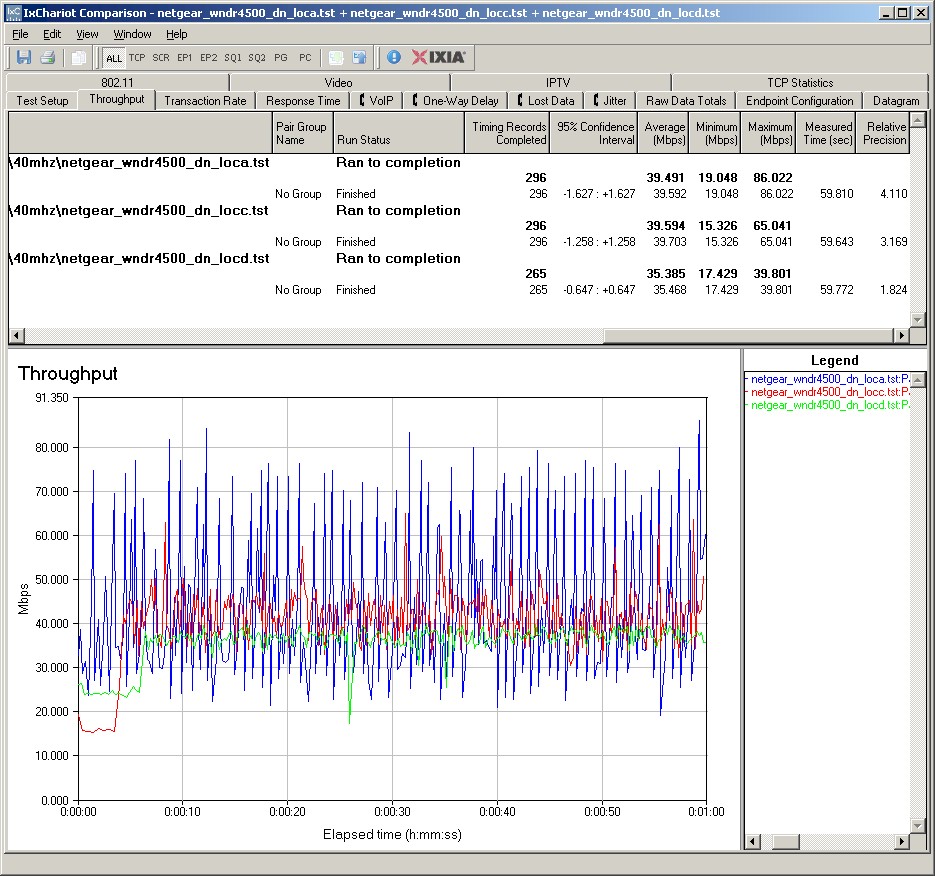
Figure 12: NETGEAR WNDR4500 IxChariot plot summary – 5 GHz, 40 MHz mode, downlink, 2 stream
Here are links to the other 5 GHz, 2 stream plots for your reference.
- 5 GHz / 20 MHz downlink
- 5 GHz / 20 MHz uplink
- 5 GHz / 20 MHz up and downlink
- 5 GHz / 40 MHz uplink
- 5 GHz / 40 MHz up and downlink
Wireless Performance – 5 GHz, Three Stream
We finally reach the last look at the 4500’s performance—5 GHz, three stream using the Intel 6300 client. Figure 13 shows the wireless Performance Table.
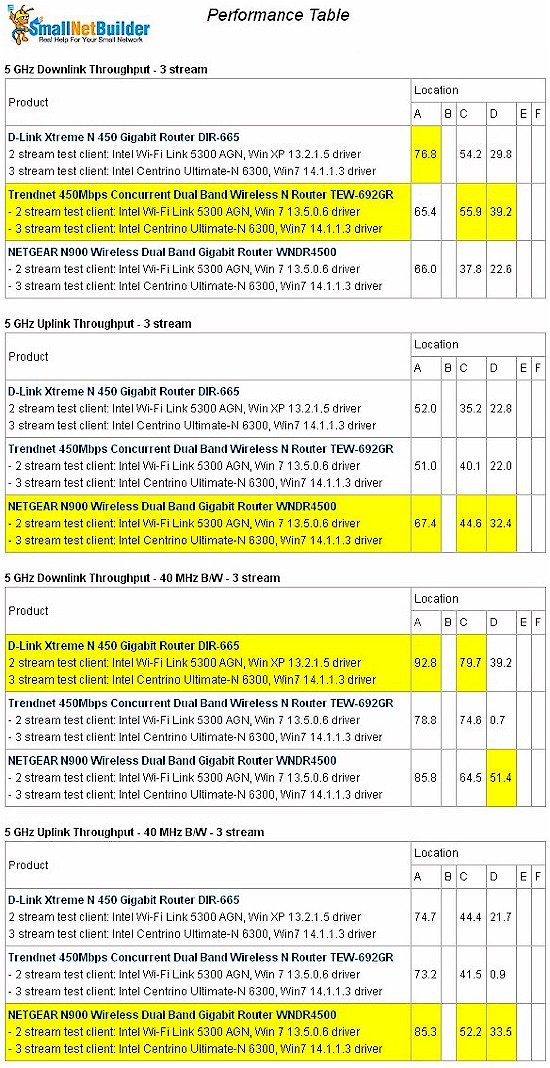
Figure 13: Wireless performance table – 5 GHz, 40 MHz mode, 3 stream
The 4500 clearly does better running uplink vs. down, but again is not a far-and-away winner.
Figure 14 shows the IxChariot plots for 40 MHz mode downlink with no sign of the throughput oscillation seen in the two-stream plots.
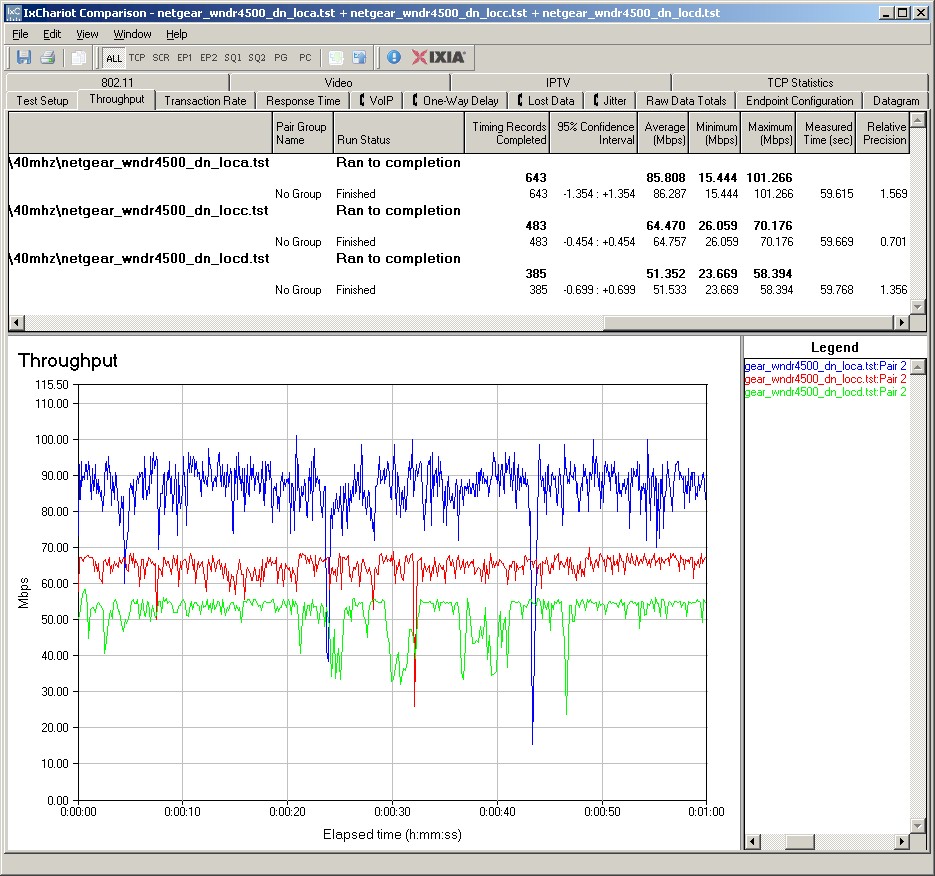
Figure 14: NETGEAR WNDR4500 IxChariot plot summary – 5 GHz, 40 MHz mode, downlink, 3 stream
Here are links to the other 5 GHz, 3 stream plots for your reference.
- 5 GHz / 20 MHz downlink
- 5 GHz / 20 MHz uplink
- 5 GHz / 20 MHz up and downlink
- 5 GHz / 40 MHz uplink
- 5 GHz / 40 MHz up and downlink
Closing Thoughts
I guess I’ll have to suspend judgement on the WNDR4500 for its performance with two-stream clients until the issue I discovered is resolved. In the meantime, I can judge it on its three-stream performance, where it performs better in 5 GHz than in 2.4.
Competitively, there are only two other routers I’ve tested that support three-stream N in both bands and in both 20 and 40 MHz mode: D-Link’s DIR-665 (Marvell-based) and TRENDnet’s TEW-692GR (Ralink based). In this small field, the WNDR4500 actually does pretty well.
But as I’ve seen with virtually every other router, the WNDR4500 isn’t a clear winner in all four benchmark suites. Despite the tuning and tweaking that NETGEAR has done, I didn’t get the sense that the 4500’s throughput vs. range performance is overwhelmingly better than the competition. But it’s not overwhelmingly worse, either.
NETGEAR has also thrown its own monkey wrench into your selection process by giving it a subset of the features of its less-expensive WNDR3800 sibling. If you’re paying top-dollar for a wireless router, why shouldn’t it have the best performance and feature set?
If you don’t need three-stream N, you can give the WNDR4500 a pass. If you’re set on a high-end NETGEAR router, the WNDR3800 would be your choice for features and the WNDR4000 for performance.