

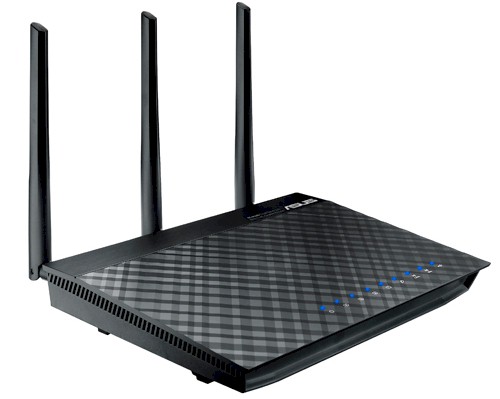
| At a glance | |
|---|---|
| Product | ASUS 802.11ac Dual-Band Wireless-AC1750 Gigabit Router (RT-AC66U) [Website] |
| Summary | Broadcom-based simultaneous dual-band three-stream Draft 2.0 802.11ac router with USB drive and printer sharing and PPTP VPN server. |
| Pros | • Capable of very high three-stream N throughput • Supports router, AP, media bridge and WDS bridging/repeating • A pair of them can provide superior 5 GHz range |
| Cons | • Firmware still a work in progress |
Typical Price: $52 Buy From Amazon
Introduction
Fans of ASUS’ RT-N66U "Dark Knight" router have been chomping at the bit to know whether its first draft 802.11ac offering is a better choice. So let me cut to the chase and say that that the RT-AC66U is not the successor to the N66 that you are hoping for.
It’s not that the AC66 is a bad router. It’s just that it doesn’t really provide enough benefit for most users (those with non-11ac devices) to outweigh the pain of its unstable firmware and higher price. Details, you say? Read on.
Physically, the AC66 is a dead ringer for its N66 sibling. If it were not for the labeling on the front and bottom panels, you would not be able to tell the difference between them. ASUS hasn’t endowed the AC with a slick name either. Too bad, since I think "Dark Helmet" is available…
The callout diagram below taken from the User Manual shows the indicators, ports, connectors and switches, which are item-by-item the same as on the N version.
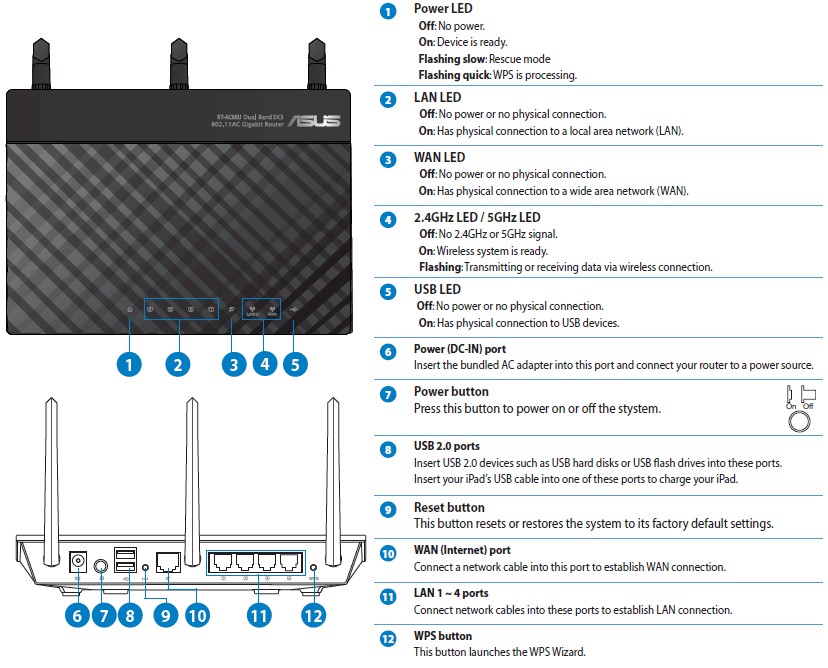
ASUS RT-AC66U panel callouts
As before, all ports are 10/100/1000 Mbps and there are two USB 2.0 ports for drive and printer sharing. A select number of USB WWAN modems are also supported that lets the router use 3G/4G networks as primary or backup internet sources.
ASUS seems to have a preference for 19V power supplies. The same diminutive wall-wart with its tiny connector plug used on the Dark Knight also powers the AC.
Inside
ASUS has delayed the release of internal photos, so I decided to open the AC up, even though I pretty much knew what was inside component-wise. Table 1 holds a summary of the AC66’s key components along with those of the two other draft AC routers I’ve reviewed so far, NETGEAR’s R6300 and Buffalo’s WZR-D1800H and WLI-H4-D1300 bridge.
All three use the same Broadcom BCM4706 CPU. At 256 MB, the AC66U has double the memory of the other two routers, but the same amount of flash. The same 7 port Broadcom Gigabit switch is used in the Buffalo router, but NETGEAR opted for a smarter version.
| ASUS RT-AC66U | NETGEAR R6300 | Buffalo WZR-D1800H / WLI-H4-D1300 |
|
|---|---|---|---|
| CPU | Broadcom BCM4706 | Broadcom BCM4706 | Broadcom BCM4706 |
| Switch | Broadcom BCM53125 | Broadcom BCM53115 | Broadcom BCM53125 |
| RAM | 256 MB | 128 MB | 128 MB |
| Flash | 128 MB | 128 MB | 128 MB |
| 2.4 GHz Radio | BCM4331 | – BCM4331 – SiGE SE2594L 802.11a/b/g/n WLAN Front End (x3) |
– BCM4331 – SiGE SE2594L (x3) |
| 5 GHz radio | – Broadcom BCM4360 – Skyworks SE5003L 5 GHz, 23dBm Power Amp w/ Power Detector (x3) |
– Broadcom BCM4360 – Skyworks SE5003L (x3) |
– Broadcom BCM4360 – Skyworks SE5003L (x3) |
Table 1: Component summary
The same Broadcom BCM4331/BCM4360 radio SoCs are used in all three products. But the ASUS is the only one of the three to use dual-band external antennas vs. six internal single-band. This means the external circuitry connecting the radio SoCs to the antennas is different. It looks like the Skyworks 5 GHz amplifiers made it into ASUS’ design. But the SiGE 2.4 GHz RF front-ends in the NETGEAR and Buffalo routers are replaced by other, discrete components.
The AC66 is as similar to the N66 on the inside as it is on the outside—at least the way it is constructed. The photo below shows the same full-width heatsink used on the N66 that is thermally coupled via thermal pads to two RF shielded compartments below it.
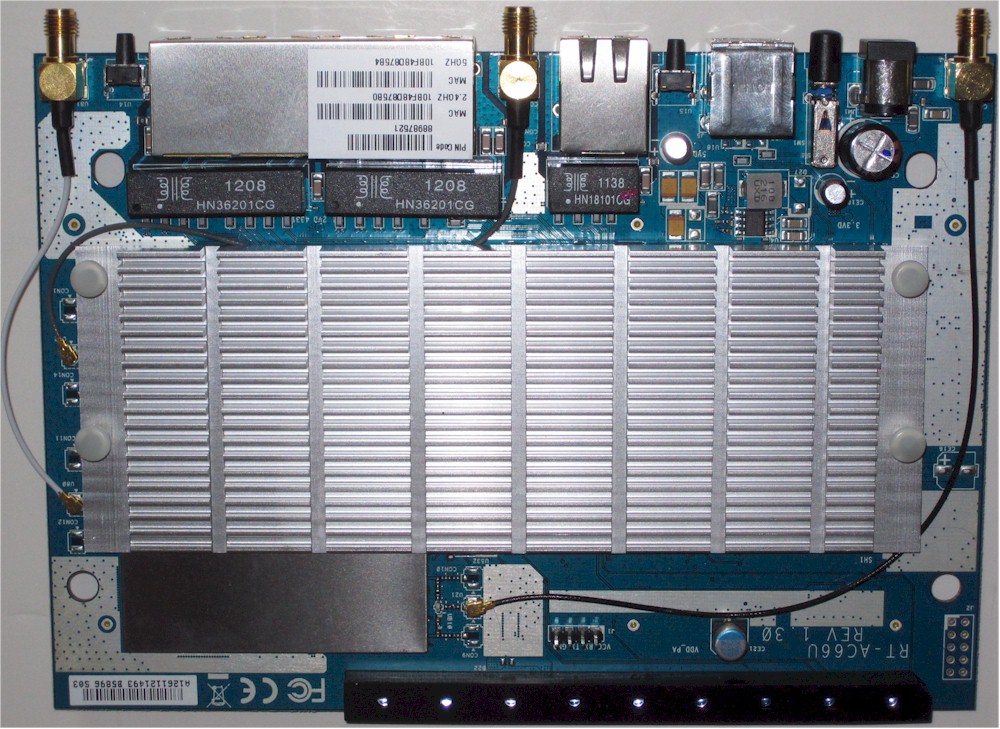
ASUS RT-AC66U board top with heatsink
Slipping the assembly out of the case and flipping it over shows the bottom covered by a large plate similar to the one covering the N66’s underside. I assume this plate serves as a heatsink since it was pretty warm, as was the outside bottom of the router.
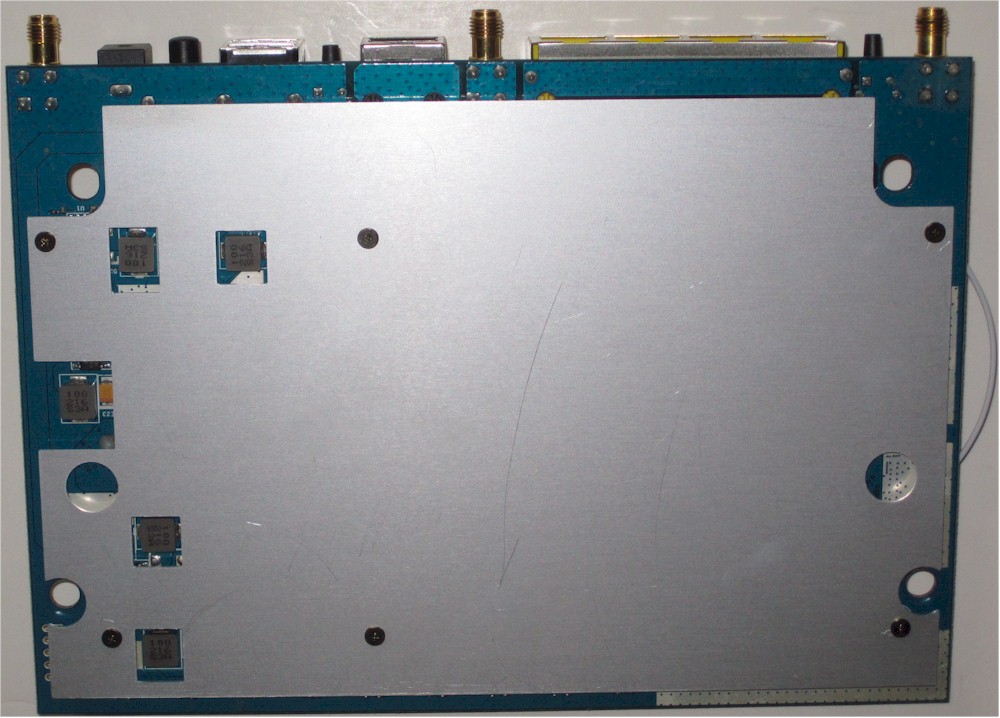
ASUS RT-AC66U board bottom with plate
Removing the bottom plate revealed 128 MB of Samsung flash (K9F1G08U0D) and 2 MB of Macronix serial flash (25L1606E). There are no thermal pads connecting the plate to the board, so thermal connection must be made from board inner layers through the six metal standoffs that connect the plate to the board.
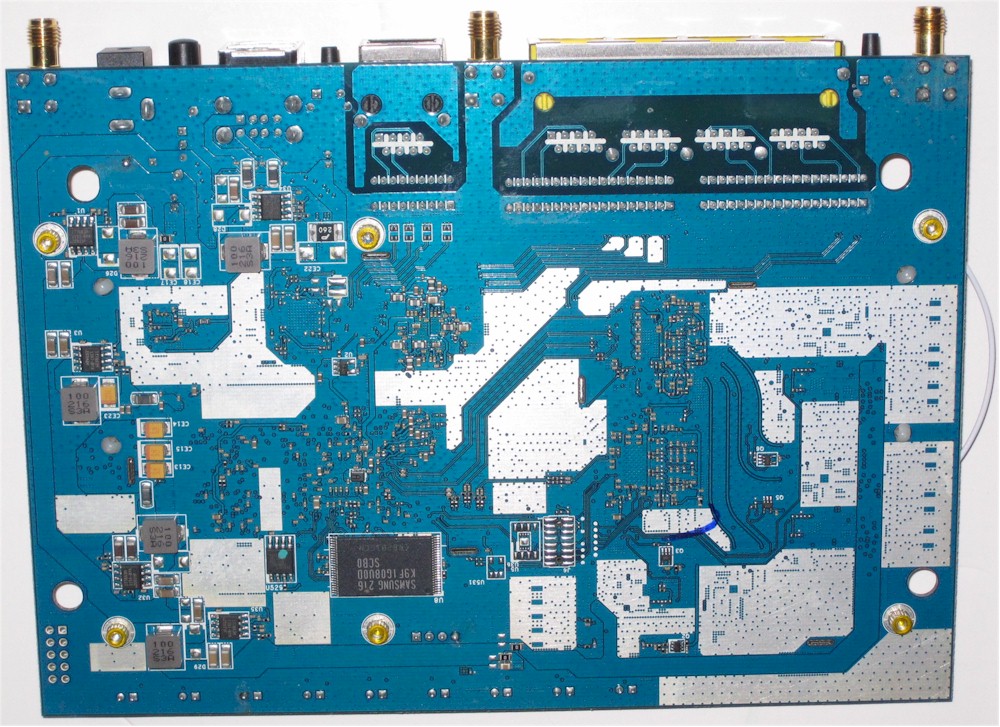
ASUS RT-AC66U board bottom without plate
It took some work to remove the top heatsink and pry off the tops of the two RF "cans" to get the photo below. But was worth it to see the construction details. The left-side can in the photo below holds the CPU, RAM and switch, while the right can houses the radios and their associated parts. The BCM4360 5 GHz radio is toward the top of the photo; the BCM4331 2.4 GHz radio is toward the bottom.
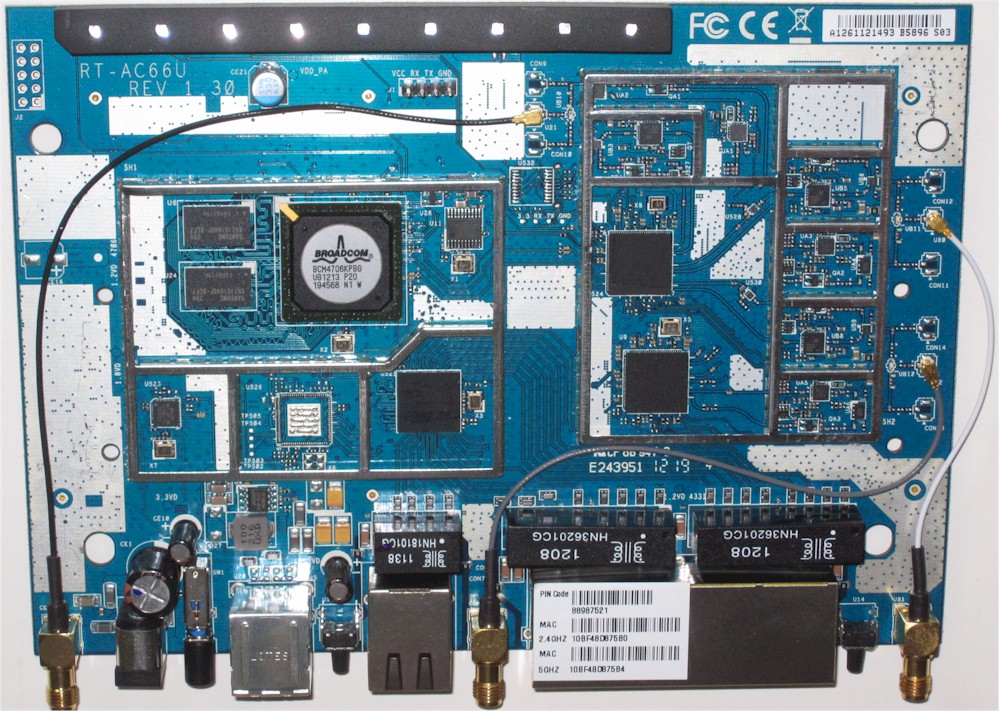
ASUS RT-AC66U board top without heatsink
Features
The AC66 has mostly the same features as the N66. ASUS has tweaked the list via firmware revisions since I last listed them in the N66 review, however. So here is an updated list that applies to both products, assuming you have the latest firmware loaded.
NOTE: The AC66 firmware is undergoing a fairly high rate of change at the time of this review. So some of the features you see listed below might be temporarily removed by ASUS while they are repaired.
Routing
- Static and Dynamic IP, PPPoE , PPTP, L2TP WAN connections
- MTU/MRU adjust (PPPoE only)
- DHCP Server w/ lease time setting, default domain and primary/secondary DNS
- DHCP Client list
- DHCP reservation
- Multicast routing and forwarding
- UDP proxy
- Switch jumbo frame enable
- UPnP enable/disable
- IPv4 Static Routes
- IPv6 support: Native; Native w/DHCP; Tunnel 6to4; Tunnel 6in4; Tunnel 6rd
- DDNS support for asus.com, dyndns.org, tzo.com, zoneedit.com
- Five level bandwidth-based QoS for up and download traffic.
Firewall
- Firewall enable/disable
- DoS protection enable
- Virtual Server/port forwarding for single or multiple ports with TCP, UDP or both protocols forwarded. Separate source and destination ports, not schedulable
- Triggered port forwarding for single ports, TCP or UDP, not schedulable
- URL and keyword filter
- Per client internet access scheduling
- DMZ Host
- RTSP passthrough
- PPPoE relay
- Ignore Ping Packet from WAN port
- Outbound port filtering: black/white list with port range, source/destination IP, protocol and day/time filter
VPN
- PPTP server
- PPTP, L2TP, IPsec passthrough (default enable)
Management
- Remote Management with user configurable port and HTTPS support
- Syslog server support
- Command line interface via Telnet (default disable)
- Reboot and reset to factory default
- Save/restore settings
- Logs: System console, DHCP, Wireless, port forwarding, routing table
Wireless
- WEP, WPA / WPA2 Personal and Enterprise (RADIUS) support
- Wi-Fi Protected Setup (WPS) support, pushbutton and PIN
- Auto, N-only, Legacy modes
- Auto and manual channel set
- Channel bandwidth
- SSID broadcast enable/disable
- Radio enable day/time schedule
- WDS bridging / repeating
- Multicast tranmsit rate
- Beacon period, RTS threshold, DTIM interval adjusts
- Transmit burst (default enable), multicast forwarding (default disable), WMM APSD (default enable) enables
- Wireless client isolation (from each other)
- AP/router/Media bridge software mode switch
- Three Guest networks per radio
- Wireless MAC address filtering (allow or deny based on MAC address)
Note that ASUS has added secure HTTPS admin access and the ability to limit remote admin access to an IP address or range. Note too, that the AC66 currently (firmware 3.0.0.4.164) does not expose the transmit power adjustment. This was available in earlier firmware, but was removed because it was showing incorrect maximum power levels in some cases.
ASUS has given the AC66 a Media Bridge mode, like NETGEAR did for its R6300. This saves ASUS the hassle of making a dedicated media bridge for folks who would actually like to try out the draft 11ac higher throughput that they are allegedly buying.
Media Bridge mode doesn’t require WDS to work, so will work with any router. Like the NETGEAR R6300, however, there is no scan function to find networks to connect to, so you must manually enter the SSID.
If you don’t like running a bridged connection unsecured, you will like that you can encrypt the connection via WEP, WPA or WPA2. You get N and AC link rates only when running unsecured or WPA2/AES, however. I have a few shots about Media Bridge mode in the gallery if you want to take a look.
Table 2 summarizes key wireless settings. Note that both Personal and Enterprise (RADIUS) forms of WPA/WPA2 security are supported and there is one more 5 GHz channel (165) than many other routers support.
| Setting | 5 GHz | 2.4 GHz |
|---|---|---|
| Channel | Auto, 36, 40, 44, 48, 149, 153, 157, 161, 165 | Auto, 1 – 11 |
| Bandwidth control | Auto [default] 20 MHz 40 MHz |
Auto [default] 20 MHz 40 MHz 80 MHz (802.11ac) |
| Security | Open System Shared Key (WEP) WPA Personal WPA2 Personal WPA Auto Personal WPA Enterprise WPA2 Enterprise WPA2 Auto Personal RADIUS w/ 802.1x |
|
Table 2: Wireless settings summary
ASUS provides three Channel Bandwidth settings on the 2.4 GHz radio, i.e. Auto (default), 20 MHz and 40 MHz, and adds one more (80 MHz) on the 5 GHz radio. When set to Auto, you can’t set the operating channel (ASUS labels this the Control Channel, when it exposes the setting).
Like other router manufacturers, ASUS is adding "cloud" features to its routers, which are called AiCloud. The graphic below taken from the AiCloud site summarizes the features, which appear to be all storage and file-access related. The AiCloud menu currently contains only a link to ASUS’ Facebook page, which is where you are supposed to monitor AiCloud’s progress.

AiCloud feature summary
I’ve put a few images in the gallery for screens that are different than those in the N66 review.
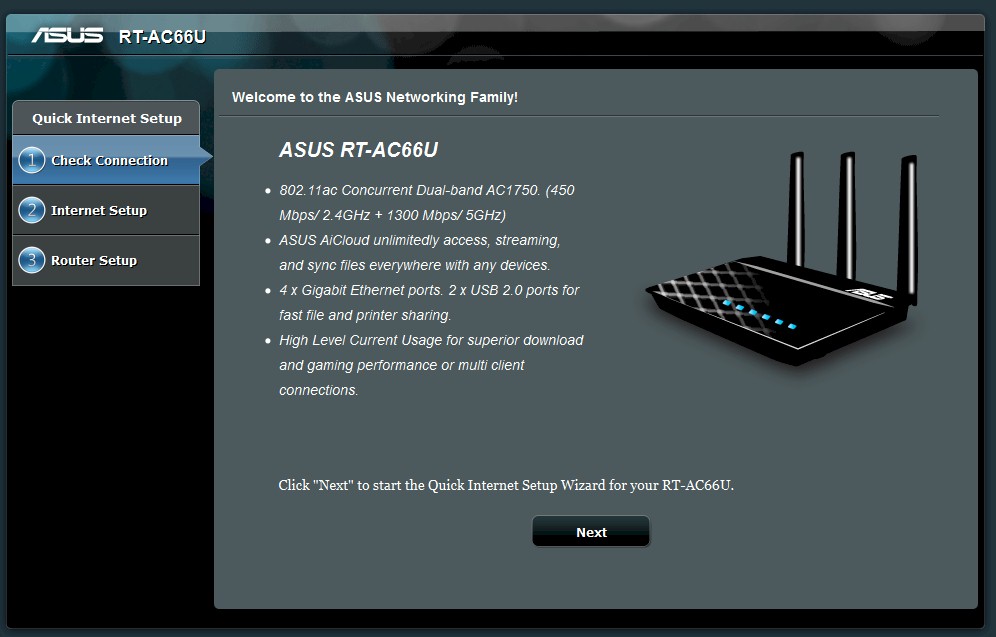
The router automatically redirects you to the setup wizard until you complete it
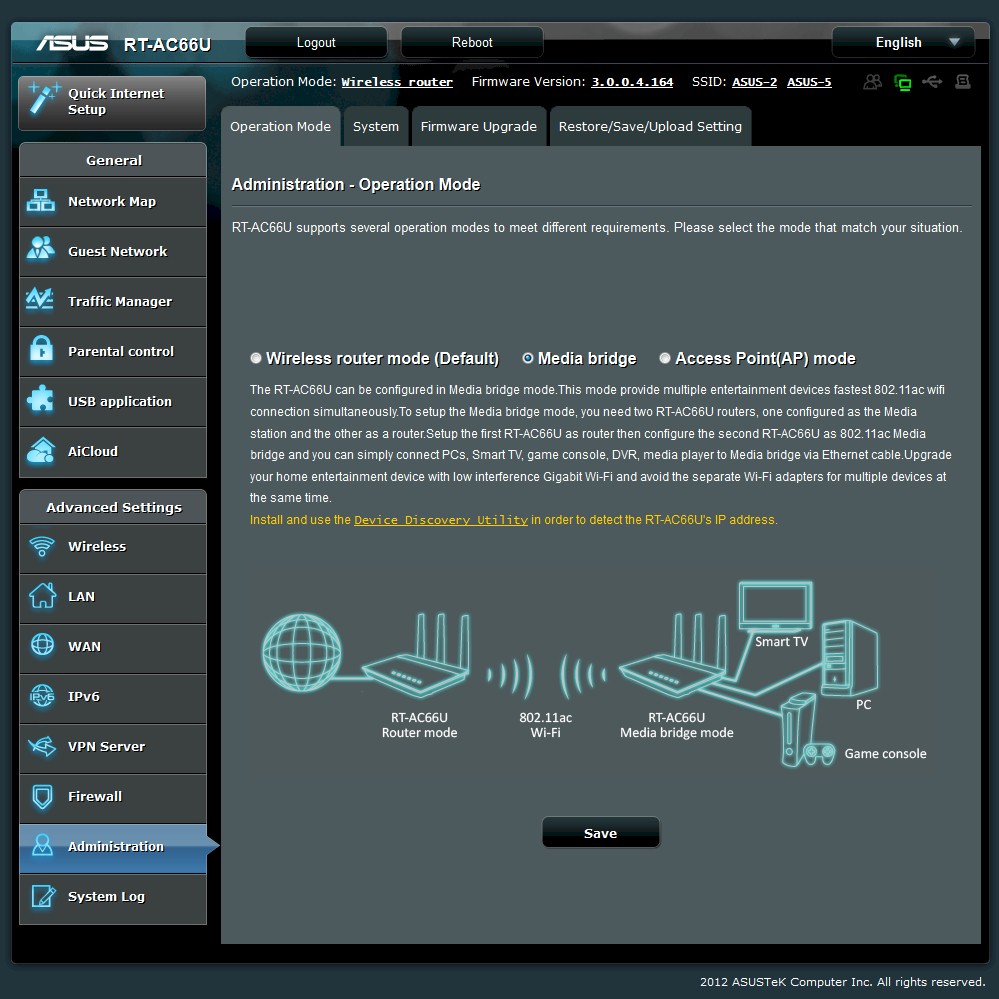
This mode lets you connect to another AC66U (or any other router). You would use this mode to pair with another AC66U (or other draft 11ac router) to actually use 80 MHz (draft 11ac) mode.
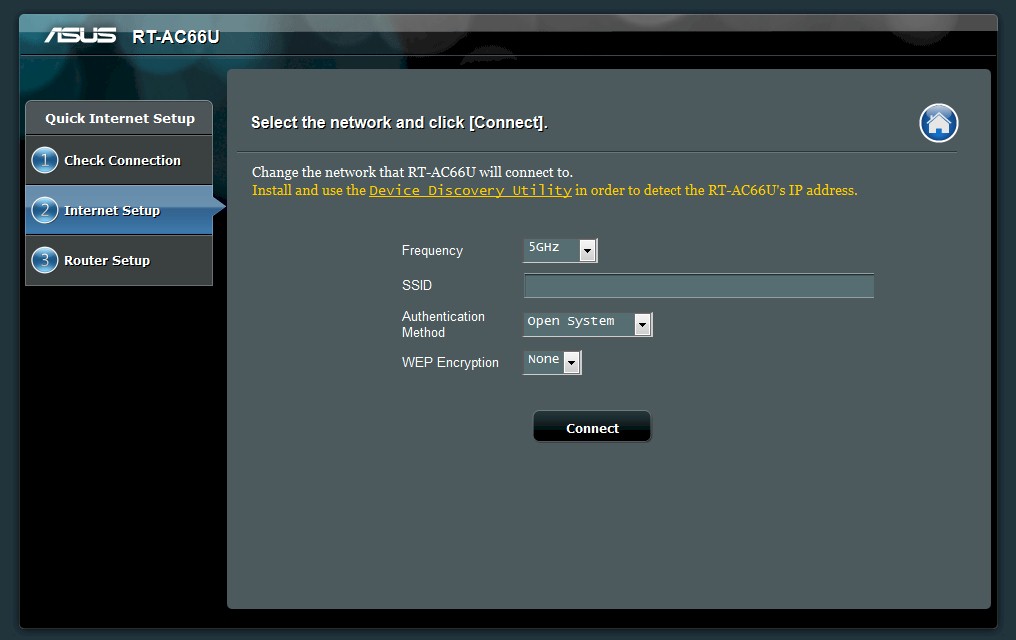
You must manually enter the SSID for the router/network you want to connect to in Bridge mode. There is no network scan ability. The connection, however, can be WEP, WPA or WPA2 secured. You must use no encryption or WPA2 to get full 802.11n or 11ac link rates.
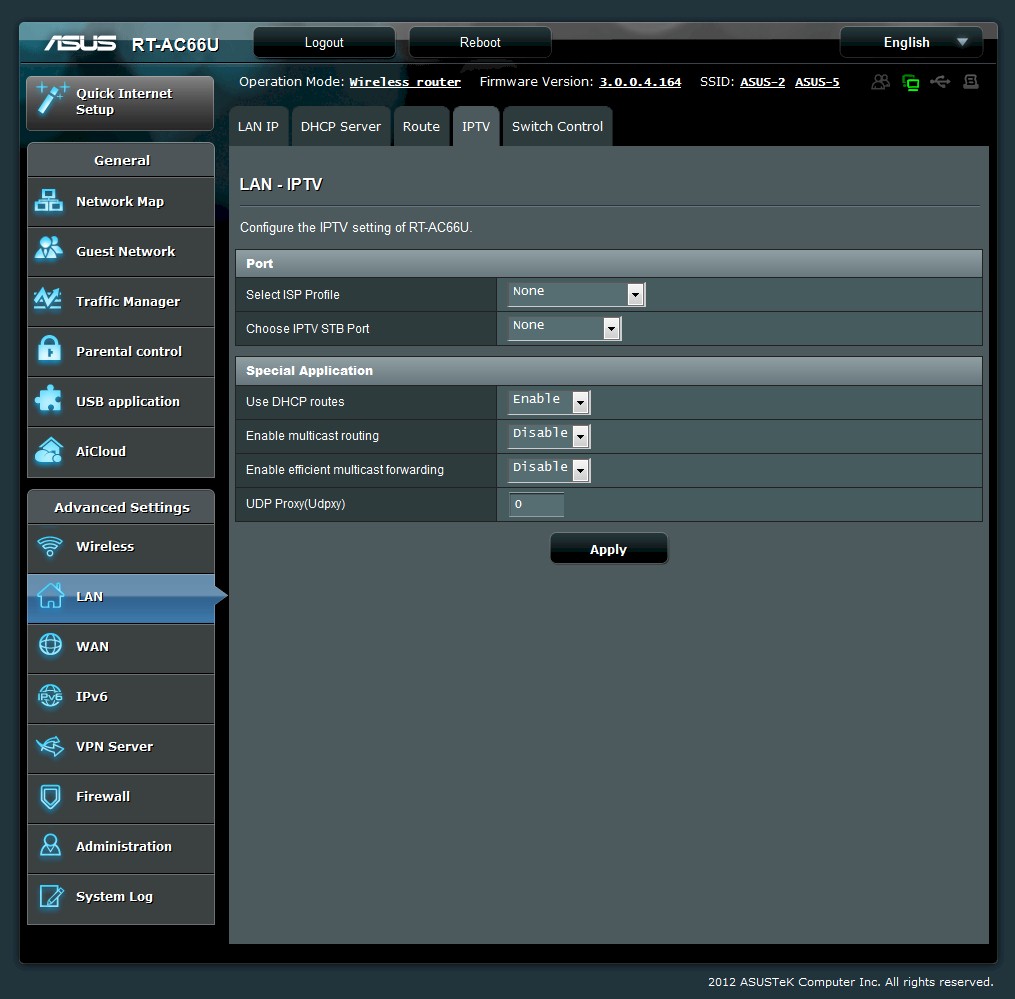
Settings for internet TV go beyond simple multicast enable.
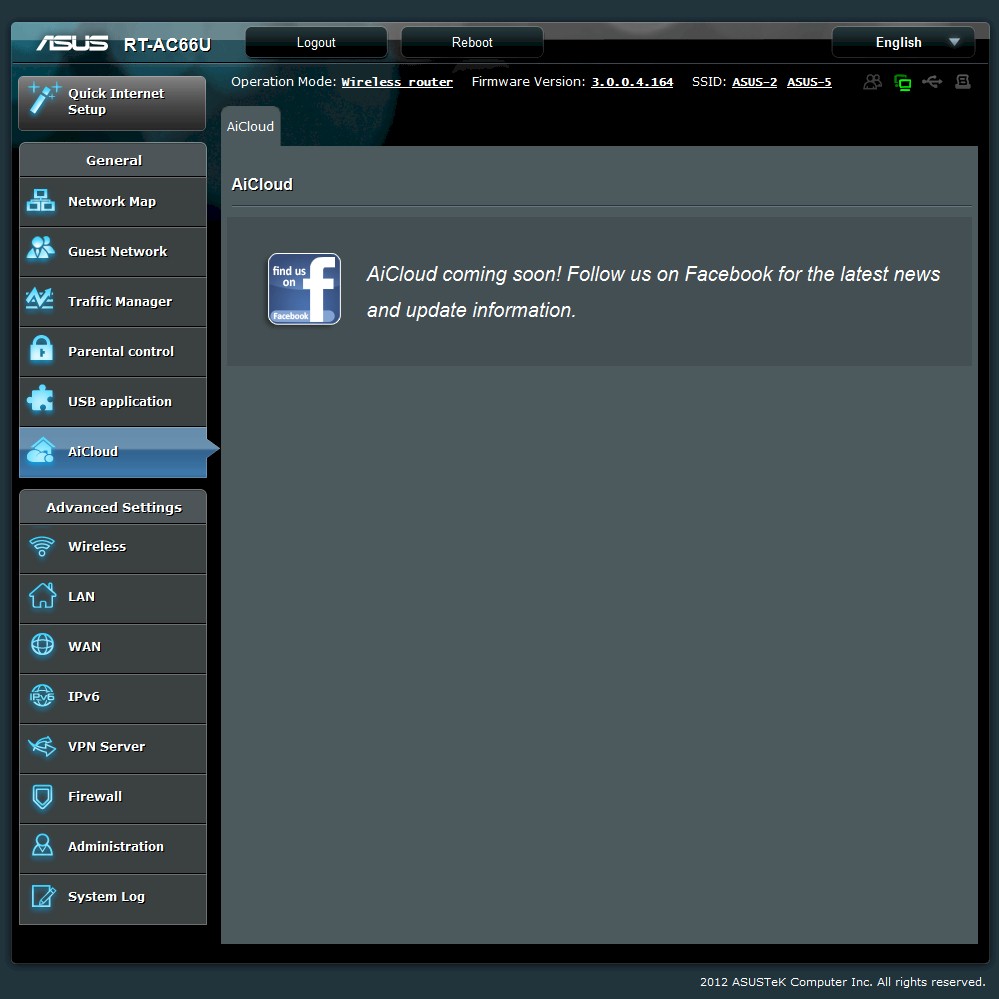
At some point, this link to the ASUS Facebook page will be replaced by AiCloud related controls.
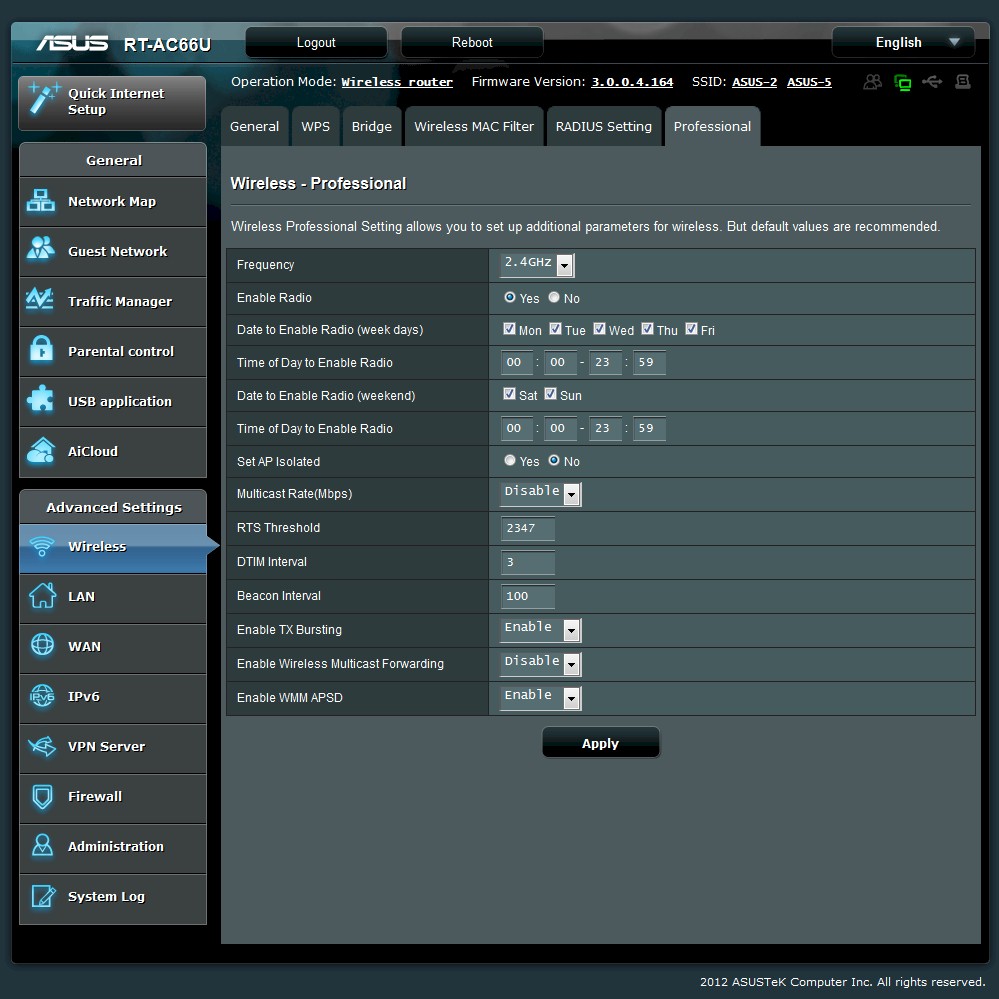
These advanced settings are available for each radio.
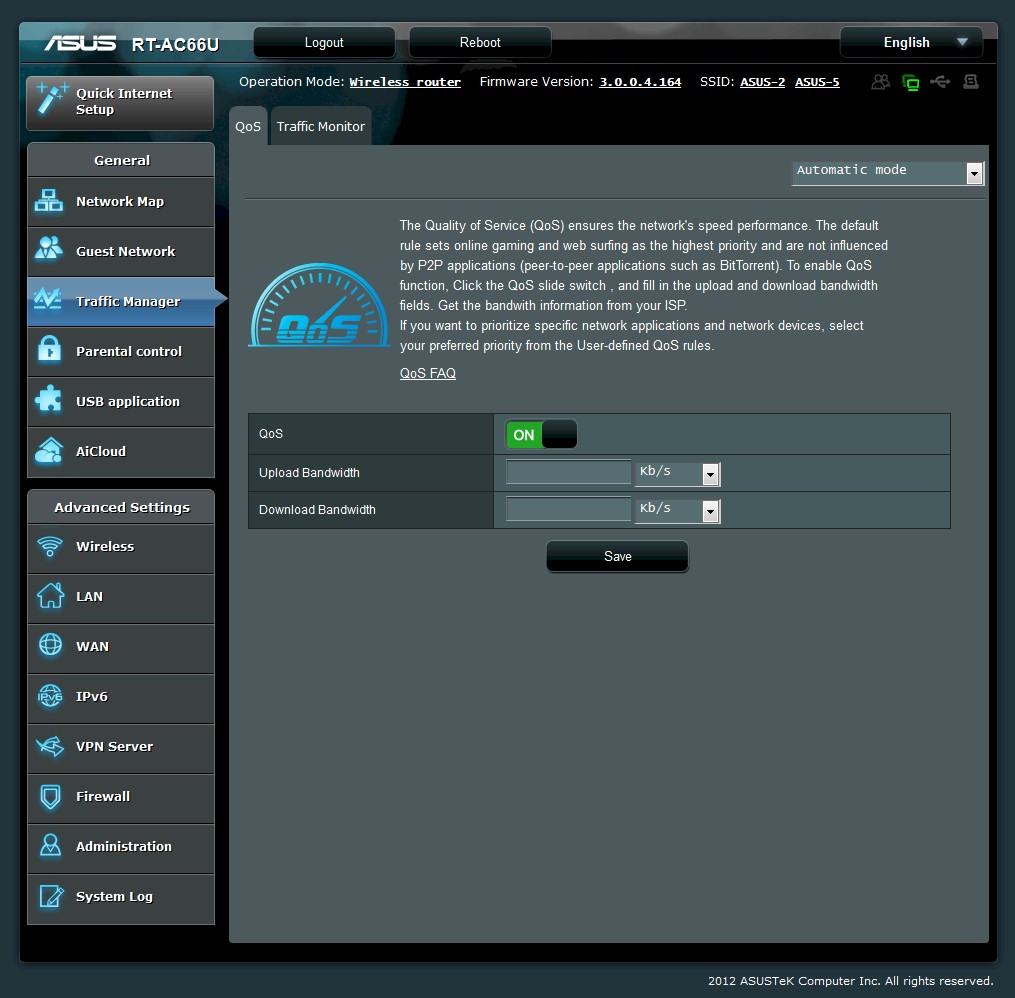
After enabling QoS, you set the upload and download bandwidth supported by your ISP. Automatic mode takes care of managing bandwidth and priority automatically.
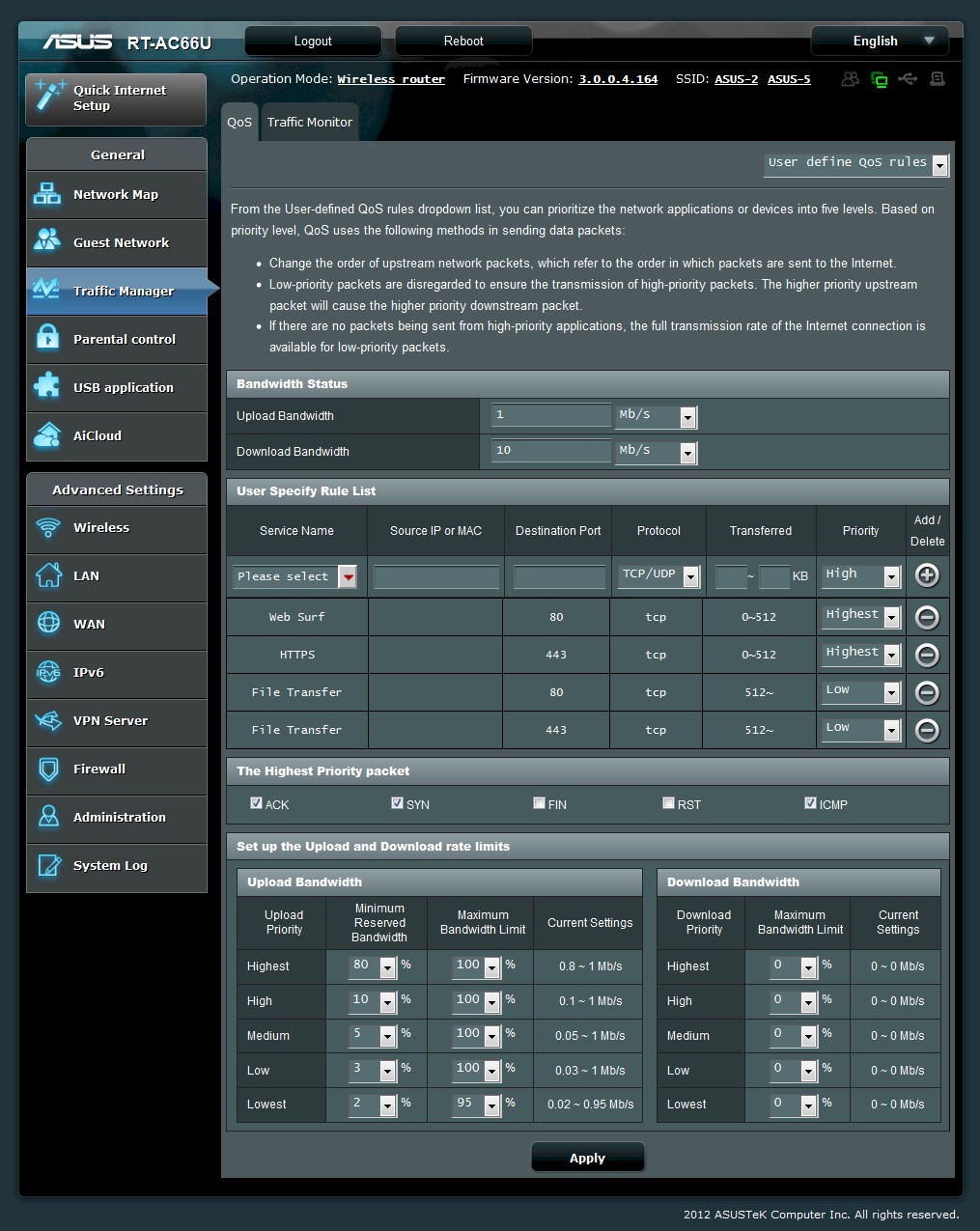
The manual mode lets you assign one of five priorities to services and also specific IP or MAC addresses or address ranges. Each priority has separate settings for max and min bandwidth limits for up and download directions.
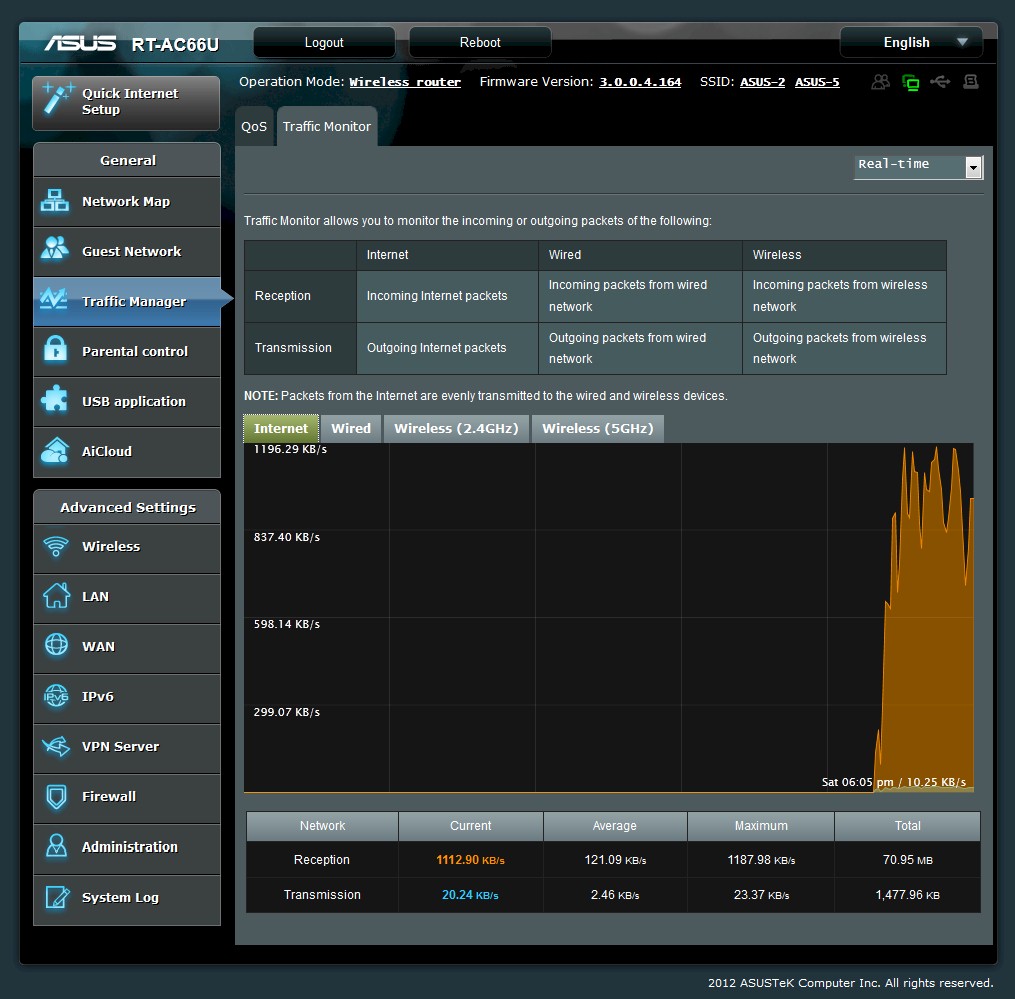
You can monitor traffic in real time, last 24 hours and last 30 days.
VPN
Since I couldn’t get the PPTP server to work on the N66, I thought it fair to try it again on the AC66. ASUS has improved (and fixed) this feature, adding more settings and a summary of the steps required to get up and running right on the settings page (see screenshot below).
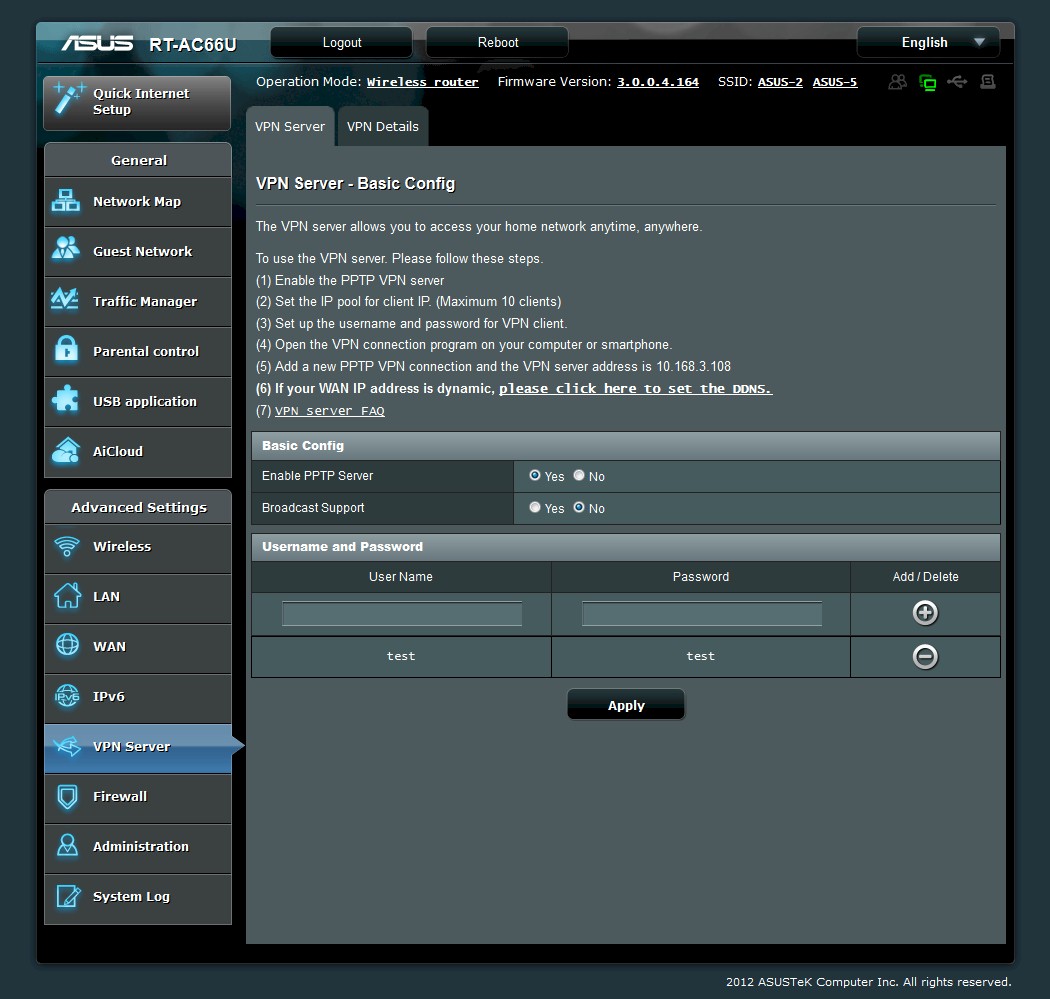
ASUS RT-AC66U PPTP server settings
I just enabled the VPN Server, added a test/test user and left the other defaults alone. I then created a VPN connection in a Win 7 Home Premium system, using the new connection wizard in the Network and Sharing Center. I followed the prompts, entering the AC66’s WAN IP address and test username and password I had set in the router. Windows created a VPN with Automatic connection method that successfully connected on the first try.
My only complaint about this feature at this point is that the only way you can tell in the admin GUI that a PPTP connection is active is to check the system log.
Routing Performance
Routing performance for the AC66 using our standard test method is summarized in Table 3. Note that these results are with Hardware acceleration enabled (default). Disabling this acceleration knocked the simultaneous up/down routing test down to around 240 Mbps.
The Maximum Simultaneous Connections test result is lower than measured for the N66. After some checking I found this is the new maximum test limit due to our recent changeover to using all Win 7 systems for testing. Win 7 uses some high numbered ports that Win XP didn’t, which causes the test to quit at a lower port number when it detects an in-use port.
| Test Description | RT-AC66U |
|---|---|
| WAN – LAN | 836 Mbps |
| LAN – WAN | 839 Mbps |
| Total Simultaneous | 819 Mbps |
| Maximum Simultaneous Connections | 30,069 |
| Firmware Version | 3.0.0.4.164 |
Table 3: Routing throughput
The IxChariot plot for the routing tests shows very stable throughput.
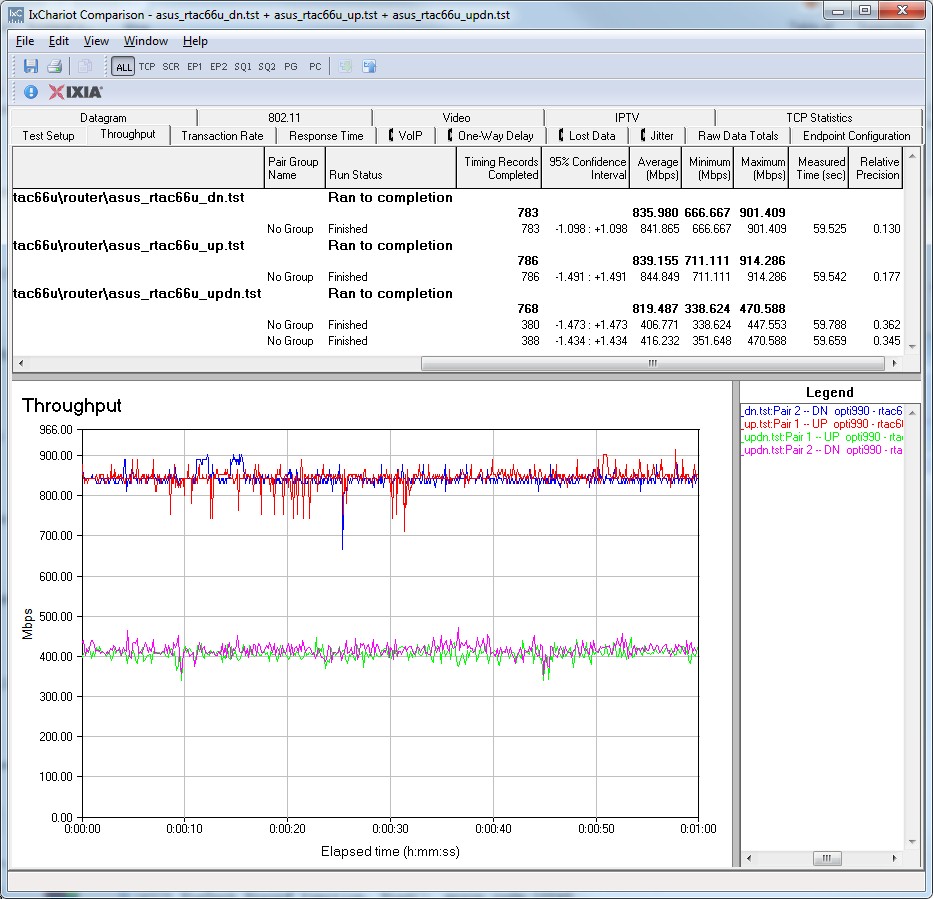
RT-AC66U Routing throughput IxChariot plot summary
Storage Performance
I ran quick Windows filecopy tests using the standard NAS testbed to the AC66 with our standard Iomega UltraMax Pro drive configured in RAID 0 and formatted in FAT32 and NTFS. The results are summarized in Table 4, along with other draft AC routers and two others.
| ASUS RT-AC66U |
Buffalo WZR-D1800H |
NETGEAR R6300 |
ASUS RT-N66U |
Cisco-Linksys E4200V2 |
|
|---|---|---|---|---|---|
| FAT32 Write | 9.0 | 7.3 | 8.6 | 10 | 9.8 |
| FAT32 Read | 9.9 | 11.8 | 10.2 | 12 | 21.6 |
| NTFS Write | 13.5 | 8.4 | 11.3 | 17 | 20.1 |
| NTFS Read | 9.4 | 8.7 | 10.3 | 11 | 22.2 |
Table 4: Router filecopy performance comparison – MB/s
Results show that the storage sharing throughput champ is still the Cisco Linksys E4200V2/EA4500 with 20+ MB/s reads and writes using an NTFS formatted drive. The AC66 turns in its best performance doing NTFS writes—the only test to exceed the 12.5 MB/s limit of a 100 Mbps connection.
Wireless Performance – Overview
The RT-AC66U is not Wi-Fi Certified. It defaulted to Auto 20/40 mode on both bands on power-up. The 2.4 GHz radio’s default SSID is ASUS and the 5 GHz radio is set to ASUS_5G. If you don’t run the setup wizard, the 5 GHz radio is unsecured. But you can’t use the internet without running the wizard first, which prompts you to set up wireless security.
The 2.4 GHz radio is secured by default and prompted for a WPS PIN code to be entered by the Win 7 test client. Entering the code resulted in a WPA2/AES secured connection.
I ran 40 MHz Coexistence and Fat channel intolerant tests to see if the AC66 properly refrained from switching into 40 MHz bandwidth mode. The router properly stayed in 20 MHz bandwidth mode when the client had its Fat Channel Intolerant bit set. But when I deliberately parked a neighboring wireless network on an interfering channel for the 40 MHz Coexistence test, the AC66 ignored it and ran in 40 MHz bandwidth mode. I ran the 40 MHz Coexistence test both in Auto and 40 MHz Channel bandwidth modes and it failed in both cases.
Note that the 802.11n standard does not specify how fast an AP must switch from 40 to 20 MHz bandwidth when another network is detected. I monitored the AC66 for three minutes and it did not switch during that time.
I conducted wireless testing using two methods. The first measured 5 GHz, 80 MHz bandwidth mode (draft 802.11ac) with pair of AC66’s. One was configured in its normal router mode, while the test "client" was configured in "media bridge" mode.
The second test method used an Intel Centrino Advanced-N 6200 in a Acer Aspire 1810T notebook running Win 7 Home Premium SP1 (64 bit) for the two-stream N tests and an Intel Centrino Ultimate-N 6300 in a Lenovo X220i notebook running Win 7 Home Premium SP1 (64 bit) for three-stream testing. 3.0.0.4.164 firmware was loaded in both routers for all testing.
As is our standard practice, all tests were run using WPA2/AES encrypted connections with Channel 1 used for 2.4 GHz tests and Channel 36 for 5 GHz.
Each entry in the Benchmark Summary below shows the average of throughput measurements made in all test locations.
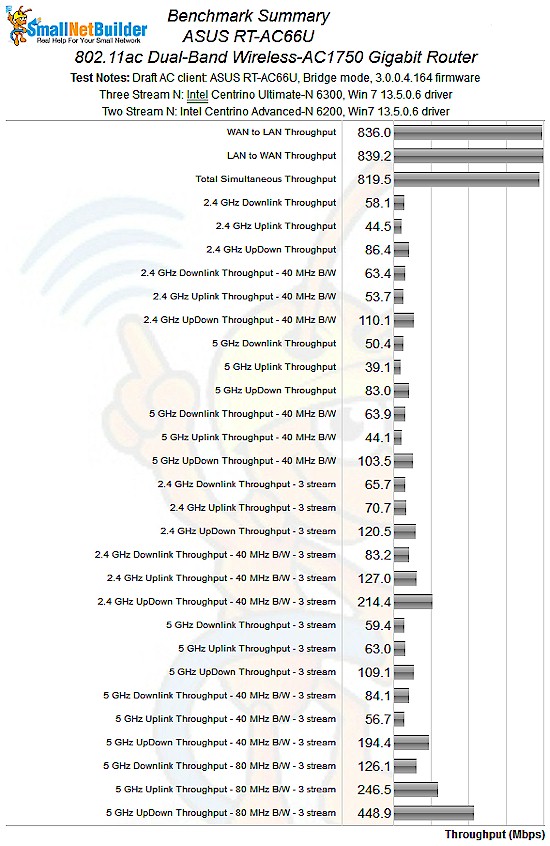
ASUS RT-AC66U Benchmark Summary
Table 5 summarizes the highest wireless throughput measured out of all locations in the 20 MHz mode test runs. In most cases, highest throughput was measured in Location A. Note that the Dn/Up result is for simultaneous up and downlink tests in Location A. This table shows significant throughput gain between two and three stream operation, except for 5 GHz downlink. The largest gain was measured running uplink in 2.4 GHz and just shy of 2X!
| Test Group | Max Dn (Mbps) | Max Up (Mbps) | Dn/Up (Mbps) |
|---|---|---|---|
| 2.4 GHz, 2 stream, 20 MHz | 70 | 60 | 86 |
| 2.4 GHz, 3 stream, 20 MHz | 90 | 118 | 120 |
| 5 GHz, 2 stream, 20 MHz | 62 | 55 | 83 |
| 5 GHz, 3 stream, 20 MHz | 67 | 97 | 109 |
Table 5: Highest Throughput, 20 MHz mode
Table 6 summarizes highest 40 MHz mode throughput. Some of the gains here are extrodinarily large, with 2.4 GHz uplink again showing the largest gains, this time approaching 300%, i.e. 3X! I reran the test multiple times and achieved similar results each time. That 231 Mbps result is real and the highest I’ve measured to date in a three-stream N product. Nonetheless, I think this result is a fluke that may not be reproduceable with other clients and with future firmware releases.
| Test Group | Max Dn (Mbps) | Max Up (Mbps) | Dn/Up (Mbps) |
|---|---|---|---|
| 2.4 GHz, 2 stream, 40 MHz | 84 | 81 | 110 |
| 2.4 GHz, 3 stream, 40 MHz | 105 | 231 | 214 |
| 5 GHz, 2 stream, 40 MHz | 70 | 74 | 104 |
| 5 GHz, 3 stream, 40 MHz | 94 | 70 | 194 |
Table 6: Highest Throughput, 40 MHz mode
Table 7 calls out the draft 11ac mode best case throughputs. % gains from the 5 GHz, 3 stream 40 MHz benchmarks are 166%, 516% and 231% for downlink, uplink and up/down, respectively.
| Test Group | Max Dn (Mbps) | Max Up (Mbps) | Dn/Up (Mbps) |
|---|---|---|---|
| 5 GHz, 3 stream, 80 MHz | 156 | 361 | 449 |
Table 7: Highest Throughput, 80 MHz mode
A general observation is that the AC66 seems to significantly favor upstream vs. downstream when allocating bandwidth. The imbalance was so great in simultaneous up/downlink tests, that I conducted many additional tests and experiments, trying to see if the inequality was due to something in Win 7.
The upshot is that I think most of the imbalance is largely due to the way the AC66 actually works, with a some contribution from Windows 7. If anyone cares to shed light on this or share his/her findings, please get in touch or post in the Forums.
Wireless Performance – Draft 802.11ac
As noted earlier, draft 11ac mode tests were run with a pair of AC66’s with one set to Media Bridge mode. The connection on channel 36 was secured with WPA2/AES and 80 MHz bandwidth mode was set on the 5 GHz radio to kick in the draft 11ac mode.
Throughput vs. location plots, including the NETGEAR R6300 and Buffalo WZR-D1800H, show that the pair of AC66’s outperform the other two draft AC routers in the lower signal level test locations C and D. And, in a first for draft 11ac products, I was able to run tests in our weakest signal test location F—with over 50 Mbps of throughput!
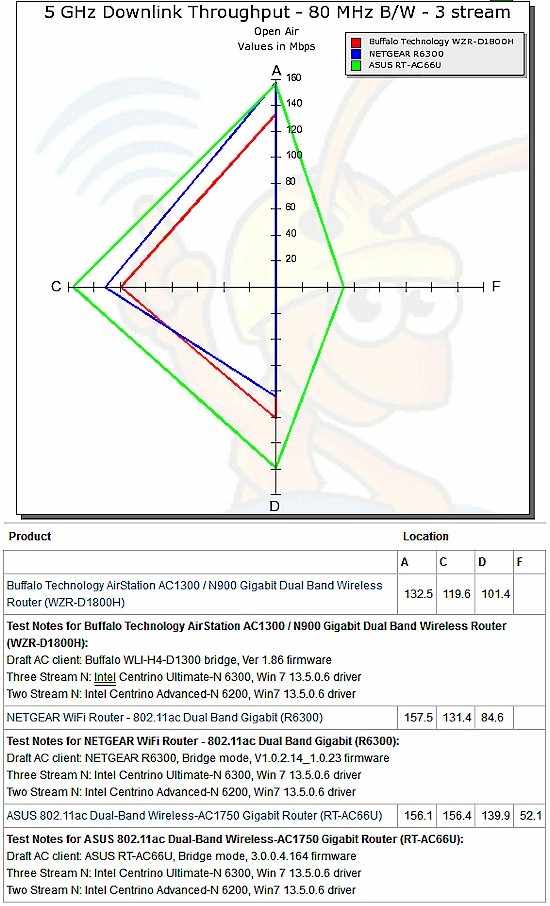
Draft 802.11ac throughput vs. location – downlink
Draft 11ac uplink performance was even more impressive, with much higher throughput than obtained with the Buffalo and NETGEAR products and 28 Mbps of throughput in location F.
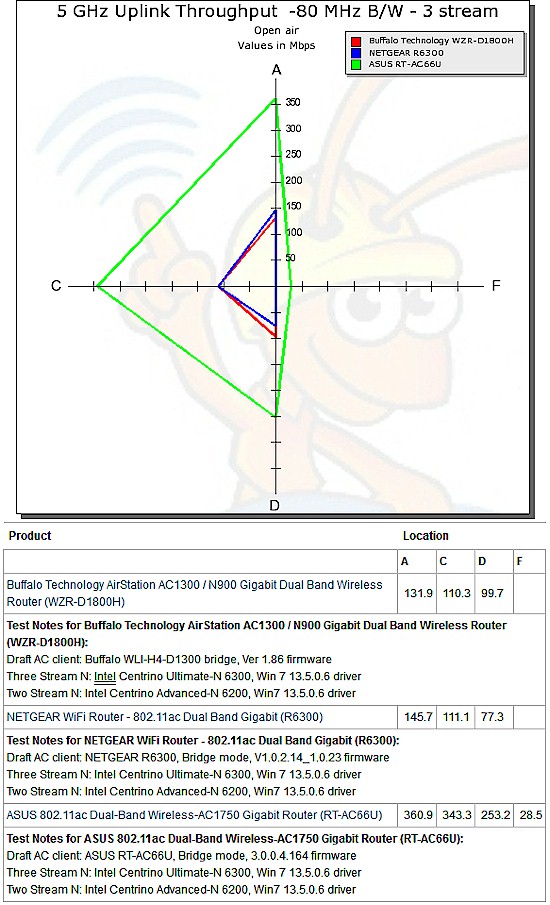
Draft 802.11ac throughput vs. location – uplink
Here’s the IxChariot plot for downlink. Throughput is surprisingly stable, although there are plenty of large dropouts.
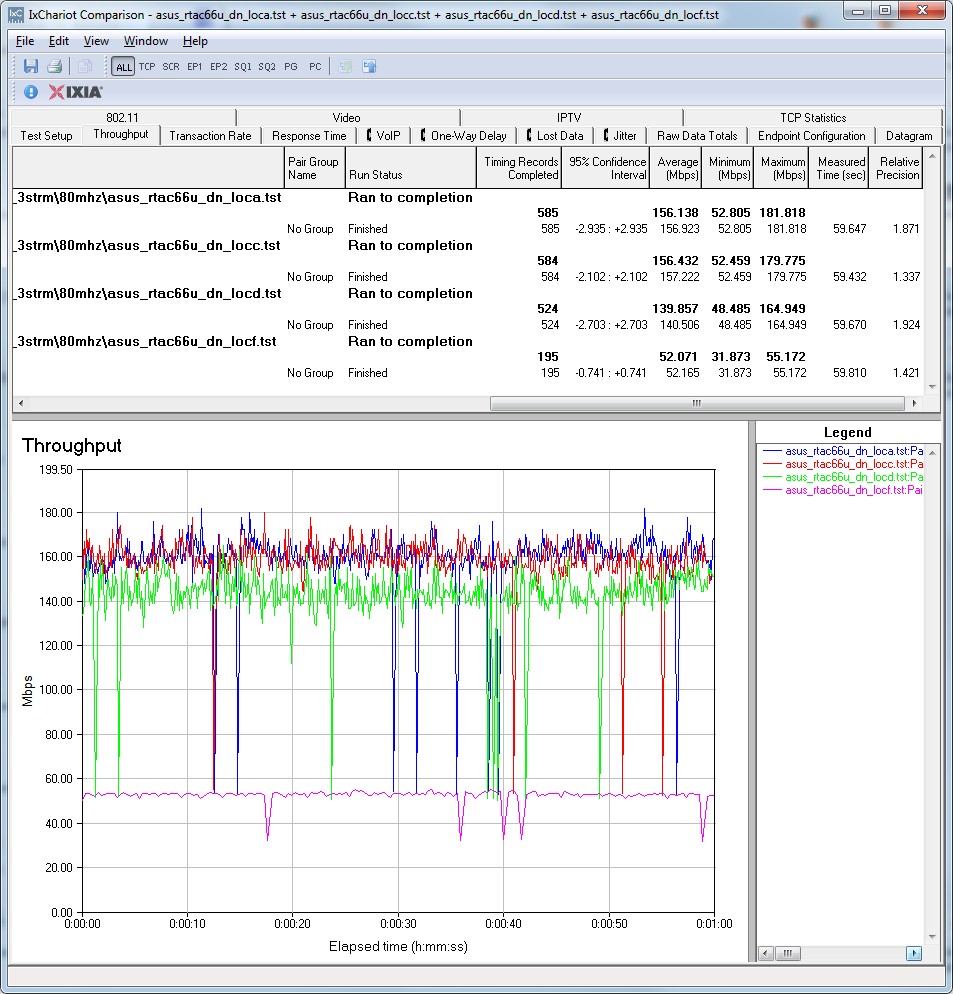
Draft 802.11ac throughput IxChariot plot – ASUS RT-AC66U – downlink
It’s a bit hard to see in the uplink plot below, but it takes a few seconds at the start of the location A and C tests to ramp up to the high levels that produce the 350+ Mbps average thoughput for the one minute runs.
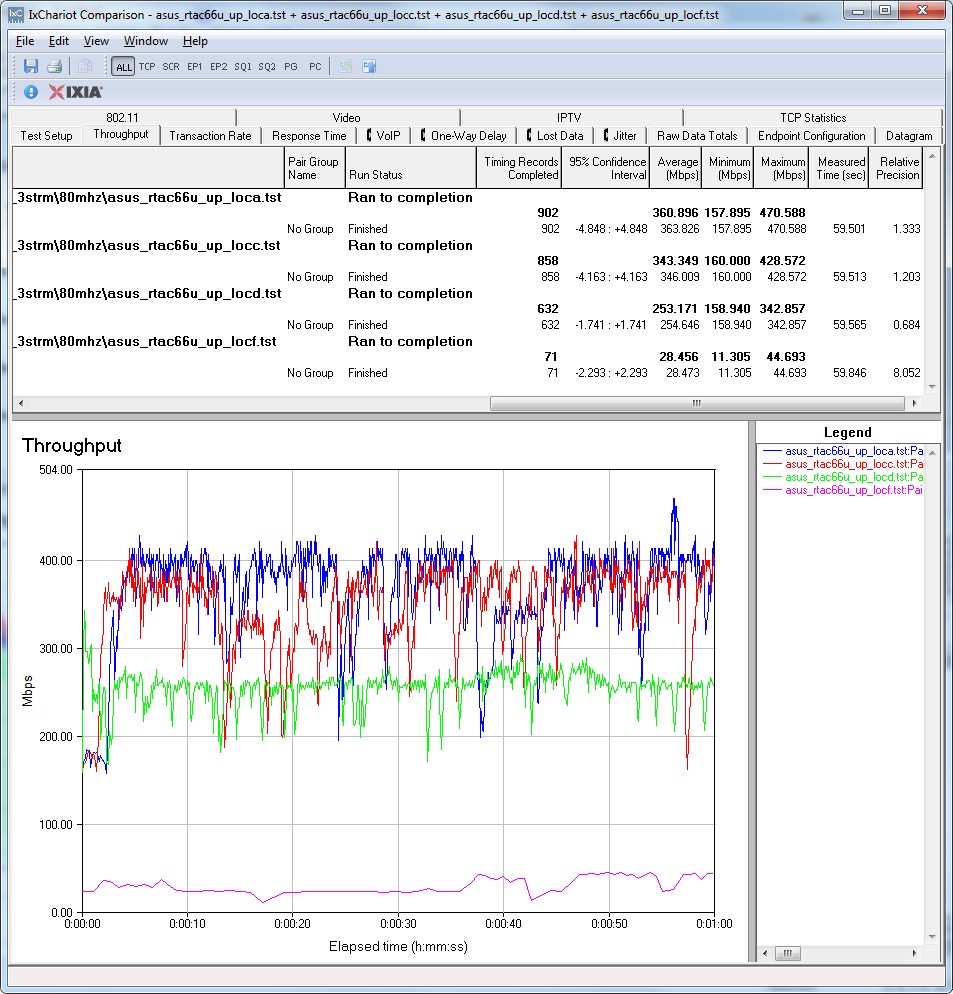
Draft 802.11ac throughput IxChariot plot – ASUS RT-AC66U – uplink
Maximum 11ac Throughput
I ran the multi-pair test to see how throughput scales as more test scripts are run simultaneously. The plot below shows that the AC66’s performance is tuned so that almost 450 Mbps of throughput is available to a single up/downlink test pair.
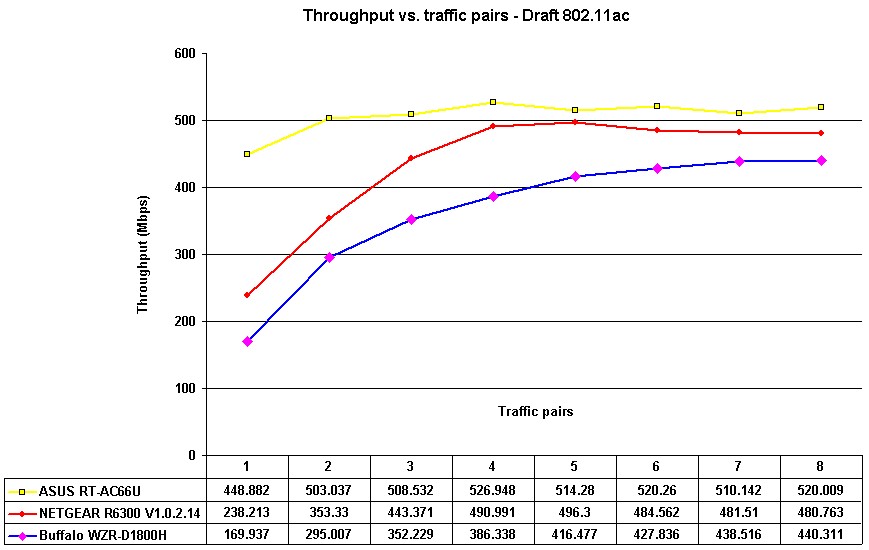
Draft 11ac throughput vs. traffic pairs
Since throughput starts out so high, it doesn’t increase as much as the NETGEAR and Buffalo products do as additional up/down pairs are added. Throughput plateaus at around 525 Mbps with four test pairs.
I should note that throughput distribution among the pairs is very unequal, both pair to pair and between up and downlink. A glance at the IxChariot plot below for four pairs illustrates what I mean.
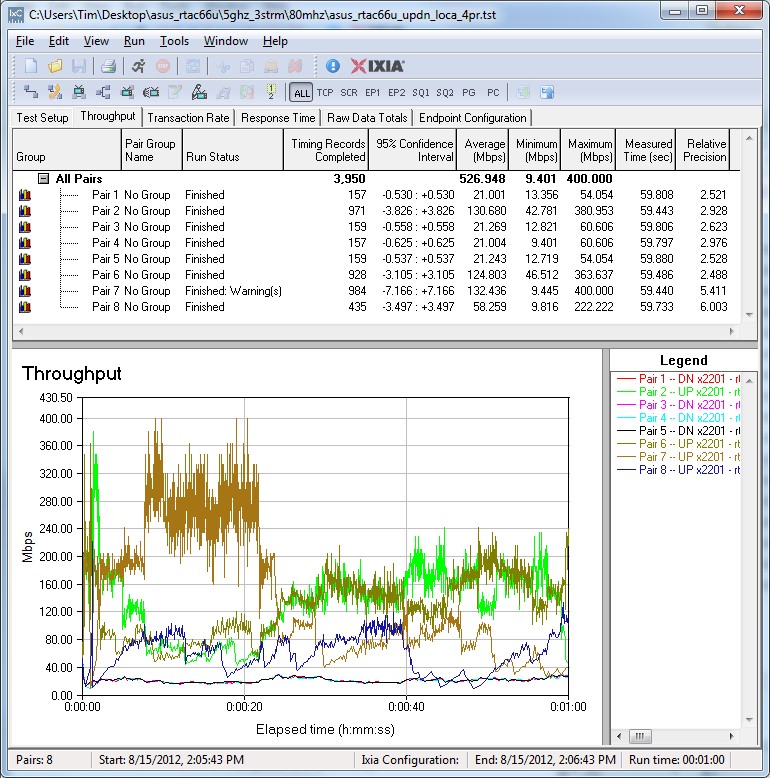
Draft 11ac throughput vs. traffic pairs IxChariot plot – 4 pair
Wireless Performance – 2.4 GHz 2 Stream
I used our standard test method to test the the AC66’s two-stream N wireless performance using our standard two-stream client, an Intel Centrino Advanced-N 6200 in a Acer Aspire 1810T notebook running Win 7 Home Premium SP1 (64 bit). 2.4 GHz tests were run on Channel 1 and 5 GHz band tests on Channel 36. As noted earlier, data was taken with 3.0.0.4.164 firmware.
For performance comparison, I chose the other two draft 11ac routers tested so far, the Buffalo WZR-D1800H and NETGEAR R6300 and threw in the ASUS RT-N66U for those of you wavering between the AC and it.
The comparison tables are large, so I’m going to provide links that will open them in a new window/tab to make things easier. Let’s start with the Performance Table for Two-stream 2.4 GHz.
Like the N66, the A66’s performance with two-stream clients is in the same ballpark as the other Broadcom-based draft 11ac routers. The AC66’s main strength is Location D throughput, which tends to indicate superior range. This is reinforced by the 30 Mbps Location F downlink result in 20 MHz mode. But other Location F results aren’t as good.
The IxChariot plot summary below for 20 MHz mode downlink shows fairly large variation in Locations A, C and D and a lot more in Location F.
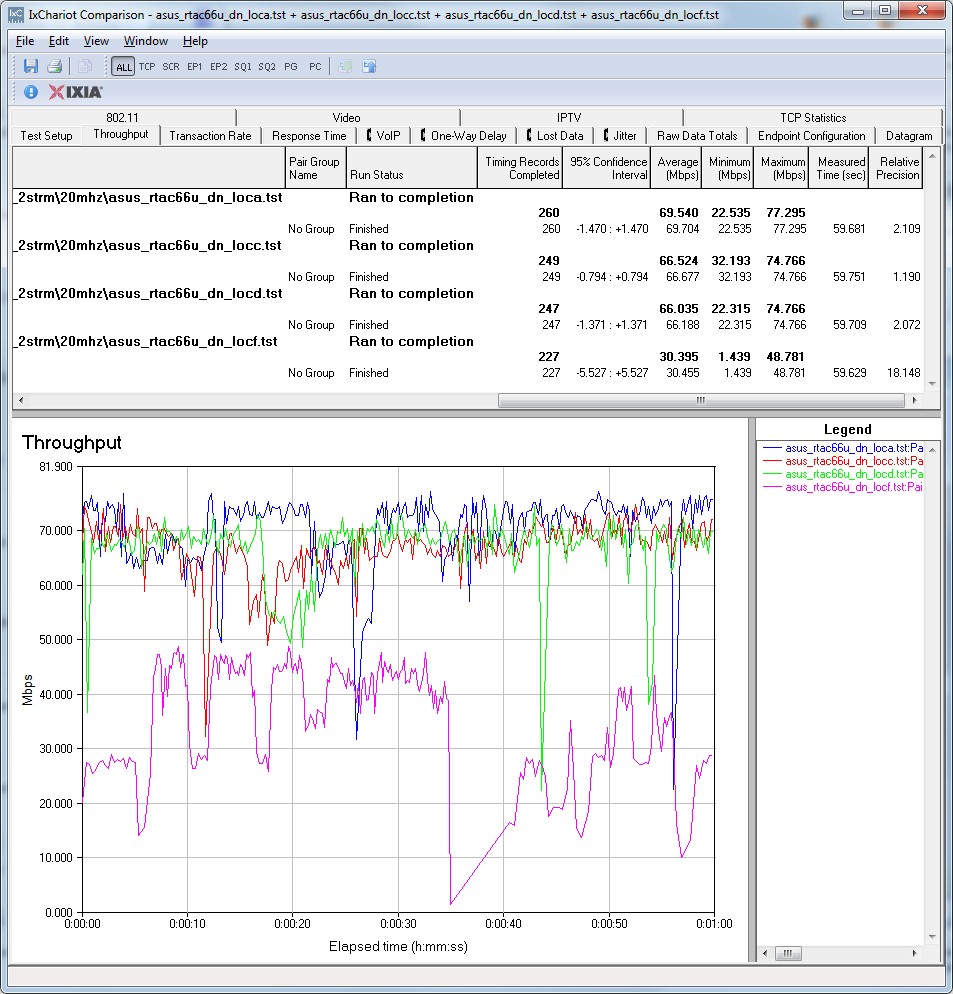
ASUS RT-AC66U IxChariot plot summary – 2.4 GHz, 20 MHz mode, downlink, 2 stream
Throughput is a bit more stable, although with frequent downward spikes on many of the other plots linked below:
- 2.4 GHz / 20 MHz uplink
- 2.4 GHz / 20 MHz up and downlink
- 2.4 GHz / 40 MHz downlink
- 2.4 GHz / 40 MHz uplink
- 2.4 GHz / 40 MHz up and downlink
Wireless Performance – 2.4 GHz 3 Stream
Next, we’ll look at the Performance Table for three-stream 2.4 GHz.
Although the AC66 and N66 use the same Broadcom SoC, performance is a bit different, perhaps due to the different external components used. But the performance table still shows many similarities between the two. Location D and F throughput is again pretty good, especially in 40 MHz downlink. But 40 MHz mode uplink results are, as mentioned earlier, higher than I’ve ever seen for strong signal test locations A and C.
The IxChariot plot summary below for 20 MHz mode downlink once again shows sizeable periodic downward throughput spikes.
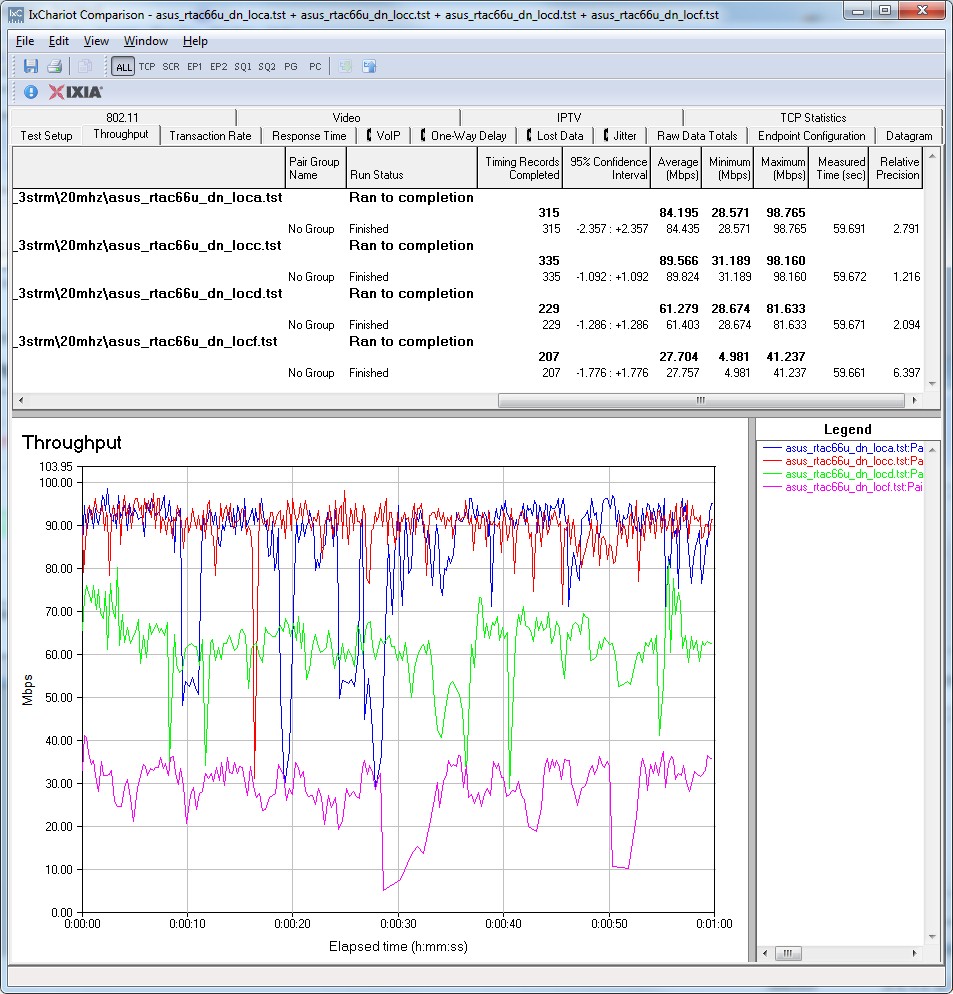
ASUS RT-AC66U IxChariot plot summary – 2.4 GHz, 20 MHz mode, downlink, 3 stream
You will see similar effects on these other plots:
- 2.4 GHz / 20 MHz uplink
- 2.4 GHz / 20 MHz up and downlink
- 2.4 GHz / 40 MHz downlink
- 2.4 GHz / 40 MHz uplink
- 2.4 GHz / 40 MHz up and downlink
Wireless Performance – 5 GHz 2 Stream
Next, we’ll look at the Performance Table for two-stream 5 GHz.
The AC66 isn’t that impressive in this group of tests. I suspect, however, that there could be overload issues causing the unusually low result in Location A downlink, 20 MHz mode. The takeaway for this group of tests is that all products are about equal.
The IxChariot plot summary below for 20 MHz mode downlink shows some rate-shifting behavior in the location A run. As is my custom, I reran the test a few times and got similar results.
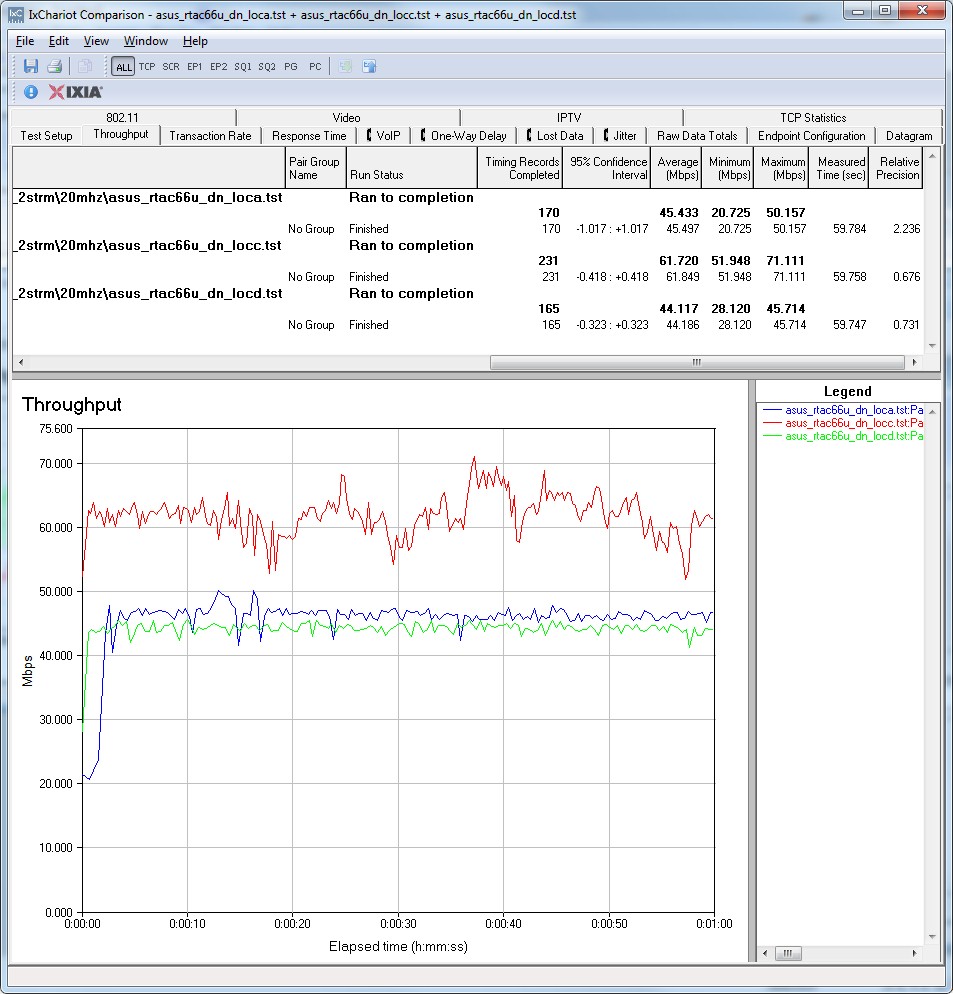
ASUS RT-AC66U IxChariot plot summary – 5 GHz, 20 MHz mode, downlink, 2 stream
Throughput stability is generally good in the other plots linked below:
- 5 GHz / 20 MHz uplink
- 5 GHz / 20 MHz up and downlink
- 5 GHz / 40 MHz downlink
- 5 GHz / 40 MHz uplink
- 5 GHz / 40 MHz up and downlink
Wireless Performance – 5 GHz 3 Stream
Finally, we’ll look at the Performance Table for three-stream 5 GHz.
This group of results shows the N66 winning more comparisons than the AC66. The AC66’s speeds in this mode are not knock-your-socks-off good, with only two Location A results coming within spittin’ distance of 100 Mbps.
The IxChariot plot summary below for 20 MHz mode downlink shows some pretty long and big dropouts.
ASUS RT-AC66U IxChariot plot summary – 5 GHz, 20 MHz mode, downlink, 3 stream
The other plots linked below show more of the same and some rate-shifting at the start of 40 MHz mode uplink tests:
- 5 GHz / 20 MHz uplink
- 5 GHz / 20 MHz up and downlink
- 5 GHz / 40 MHz downlink
- 5 GHz / 40 MHz uplink
- 5 GHz / 40 MHz up and downlink
Closing Thoughts
Buyers in search of a high performance wireless router should stick with the RT-N66U Dark Knight vs. the RT-AC66U, at least for now. Given the reports in the SNB Forums, it looks like the AC66’s firmware is not yet stable, with some features disappearing to be worked on and others partially functioning. So if you are expecting smooth sailing with the AC66U, you may be unpleasantly surprised.
Even if you’re willing to pay for the privilege of helping ASUS debug its product, you are unlikely to be rewarded with higher performance. For most uses, i.e. with two-stream clients, you’ll get essentially the same performance in the 2.4 GHz band and, at least with the firmware used, better results in 5 GHz with the Dark Knight.
If you are one of the few folks with three-stream N devices, I wouldn’t let the high 40MHz mode 2.4 GHz uplink results influence your choice. First, you shouldn’t be using 40 MHz mode in the overcrowded 2.4 GHz band anyway and second, I think the abnormally high 40 MHz mode uplink results are a fluke.
As I’ve said before, there is no reason to jump on the draft 11ac bandwagon at this point in hope of improving speed or range for two or three-stream N devices, because 11ac brings nothing to the table for them. 11ac should (at least that’s the plan) improve throughput for single-stream N devices. But new chipsets supporting draft 11ac need to be baked into smart phones, tablets and other mobile thingies before that dream becomes reality.
If you’re looking to "future proof" your wireless router choice, the current crop of draft 11ac routers isn’t a good choice given their first-generation draft 11ac chipset. Router-side devices will probably benefit from a move to second (or third) generation 11ac chipsets, which hopefully will be designed to the final standard and include multi-user MIMO support.
The only viable argument for buying the RT-AC66U, or any other draft 11ac router, is to buy two and use one as a bridge to form a high-bandwidth 5 GHz link to a HD media player. But even there, I think using a three-stream N router and less-expensive bridge like the ASUS EA-N66 or TRENDnet TEW-640MB will get you to the same place and let you save your money for the inevitable move to an 11ac router, once the standard is released and the dust settles.
Buy 802.11ac Dual-Band Wireless-AC1750 Gigabit Router from Amazon