

Introduction
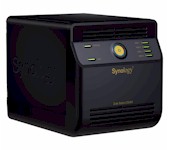
| At a Glance | |
|---|---|
| Product | Synology Disk Station (DS408) |
| Summary | Four drive, single Ethernet port version of the DS508 |
| Pros |
• Gigabit Ethernet ports with jumbo frame support • RAID 1,5, and RAID expansion • Built-in servers for Web, FTP, iTunes, Printer, UPnP AV, Photo sharing, Backup, and Bit Torrent download. • Direct recording from IP-based cameras • High performance |
| Cons |
• Not cheap • Drives don’t hot-swap |
Synology’s DS508 that we looked at in May is a high performance, full-featured NAS/server (NASver?) that also carries the highest price tag of the BYOD NASes that currently occupy the top positions in our NAS Charts. But not everyone needs dual-gigabit ports that support link aggregation, nor do they need five hot-swappable drives.
The DS408 is Synology’s answer to NAS fanboys that have been craving a higher-performance four-drive offering to replace the CS407/407e "Cube Station", which has been getting a bit long in the tooth.
Since Synology now uses the same "DSM-2.0" OS across virtually all of its NASes, the DS408’s feature set is the same as the DS508’s, minus those that require the 508’s five drives and dual gigabit Ethernet ports. So you can think of the 408 as the four-drive, not hot-swappable, single LAN port and (perhaps most importantly) lower-cost version of the 508.
I started out to take internal pictures of the DS408, but soon found that Craig had done a good job in the CS407 review. So Figure 1 is actually a photo of the CS407, which also accurately shows what I saw when I removed the four thumbscrews and dropped the back fan panel on the DS408.
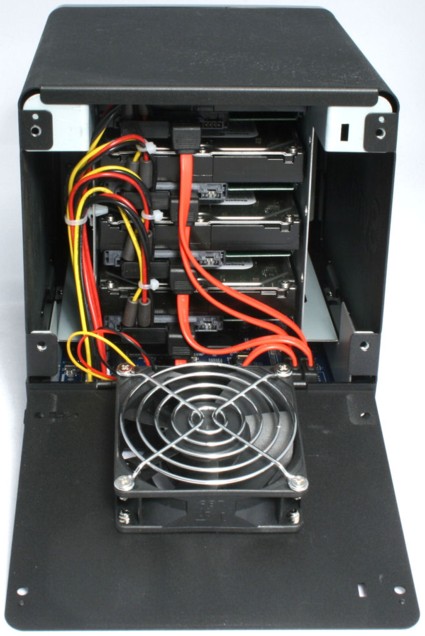
Figure 1: CS407 / DS408 internal view
What you can’t see is the new main board because, frankly, Synology has made it clear that it doesn’t want you pulling this beastie apart. Aside from the 10 screws that hold the drive cage, main board and front and bottom case panels together, the cage is secured to the board (or bottom plate) with long metallized adhesive strips along both sides of the cage.
So I gave up on the photo and instead managed to peek into the gaps in the drive cage to get a look at the components used. Like the 508, the 408 uses a Freescale MPC8543 CPU clocked at 800 MHz (hidden under a pin-fin heatsink). There is also 512MB of DDR2 RAM on a SODIMM with a big "Remove this and void your warranty" sticker over it and 4 MB of flash.
A Marvell 88E1118 PHY provides the single gigabit Ethernet LAN port, a Marvell 88SX7042 4 Port SATA controller handles the drives and an NEC D720102 3-port USB 2.0 Host Controller provides the two USB 2.0 ports. So aside from the single SATA controller and newer USB controller, the 408 has essentially the same compute power as the 508.
Synology recently released the 0722 version of its DSM 2.0 OS, which Craig covered nicely in the DS508 review. The release notes are here and the press release here. The three biggest improvements are the addition of RAID 6 support, which can withstand two drive failures, the NFS filesystem, which was conspicuous by its omission and Link Aggregation, which might help improve performance on dual-LAN models (the DS508, RS408 and RS408-RP).
The other improvements are enhancements of existing features including multiple scheduled Local Backup tasks and support for eMule and NZB in the Download Station feature.
Performance
I used IOzone to check out the file system performance on the 408 (the full testing setup and methodology are described on this page). My test unit had the latest DSM 2.0-0722 firmware and it was equipped with four 500 GB Seagate ST3500320AS Barracuda 7200.11 drives (SATA 3Gb/s, 7200RPM, 32MB) supplied by Synology. I tested it in RAID 0 and 5 modes with 100 Mbps, 1000 Mbps and 1000 Mbps w/ 4k jumbo frame LAN connections.
Figure 2 summarizes the write performance benchmarks. (I have included a data table in the larger version of Figures 2 and 3, so you can better see the exact performance results.) A 100 Mbps LAN connection clearly limits the 408’s performance, so it’s more instructive to look at the 1000 Mbps LAN tests.
RAID 5 imposes a throughput penalty, which is only slightly reduced by using a 4k jumbo frame connection. The best write performance is in RAID 0 with 4k jumbo frames, which comes in at 42.4 MB/s averaged across results for file sizes from 32 MB to 1 GB. Keep in mind that the 408’s RAM is 512 MB. So it looks like Synology has tuned performance so that caching effects are greatly reduced from what we normally see.
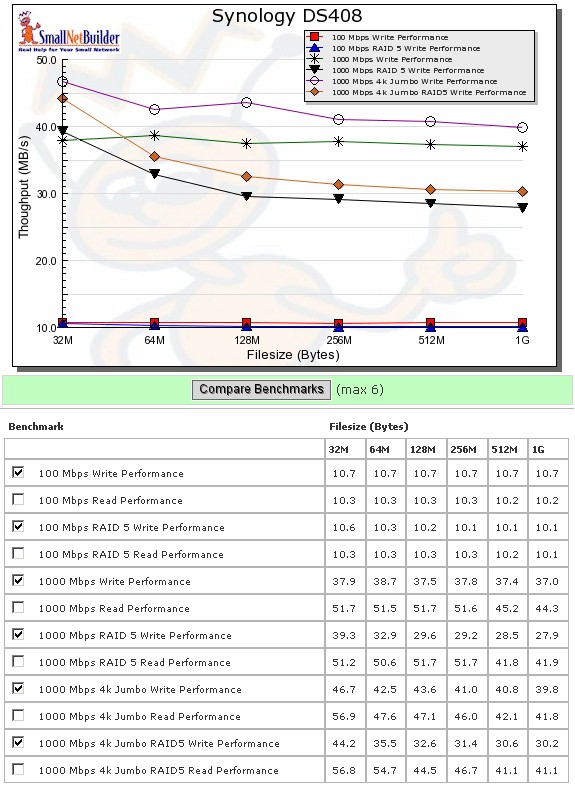
Figure 2: DS408 Write Benchmarks
Read performance (Figure 3) is much more tightly clustered, but with less help from turning on jumbo frames. RAID 0 once again wins out, with a 49.3 MB/s large file size average for RAID 0 and 48.1 for RAID 5, which places the 408 at or near the top of the 1000 Mbps Read and 1000 RAID 5 Read charts.
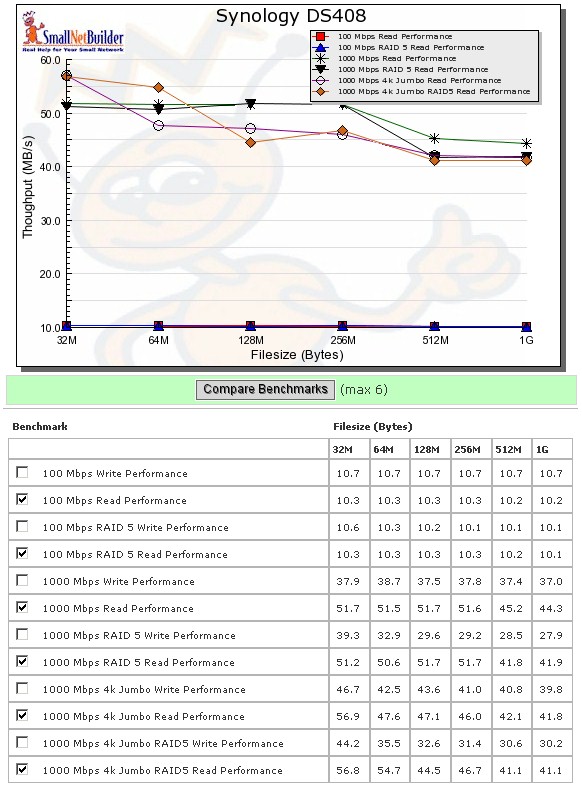
Figure 3: DS408 Read Benchmarks
With this in mind, let’s look at how the 408 stacks up against some competition, including the DS508 for good measure. After perusing the NAS charts a bit, I chose the Sans Digital MN4L+ (which hasn’t had its full review yet) and the QNAP TS-509 Pro.
The 408’s flat performance across file sizes is apparent in Figure 4. The Sans Digital is the winner for the RAID 0 write comparison with 48.3 MB/s averaged across the 32 MB to 1 GB file sizes. It’s followed by the DS508 and TS-509 Pro virtually tied at 44.8 and 44.7 MB/s respectively, with the DS408 holding down the bottom of the ranking with 37.7 MB/s.
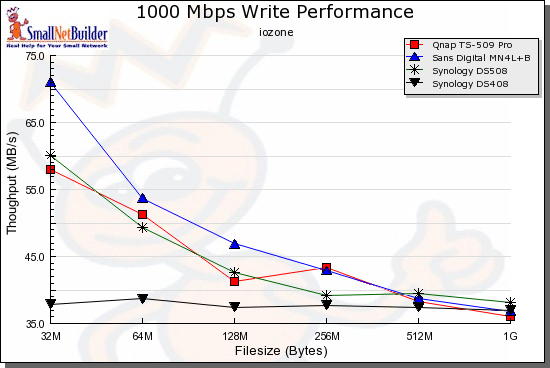
Figure 4: RAID 0 Write performance comparison – 1000 Mbps LAN connection
Raid 0 read (Figure 5) is a bit of a different story. The TS-509 Pro takes the top position in this chart with 51.4 MB/s, followed by the DS408 in the number 2 Chart position with 48.3 MB/s. The MN4L+ comes in third with 46.9 MB/s and the DS508 brings up the rear with 43.6 MB/s.
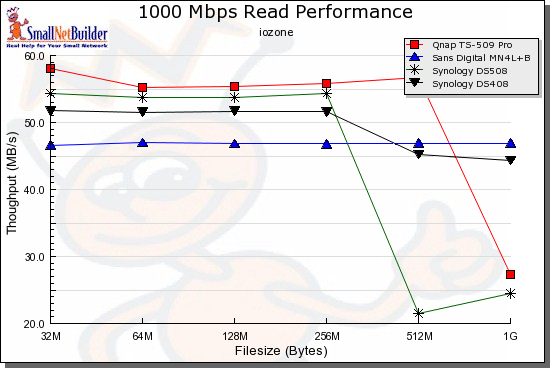
Figure 5: RAID 0 Read performance comparison – 1000 Mbps LAN connection
For RAID 5 write (Figure 6) the products average 46.2 MB/s for the MN4L+, 45.5 MB/s for the TS-509 Pro, 40.1 MB/s for the DS508 and 31.2 MB/s for the DS408.
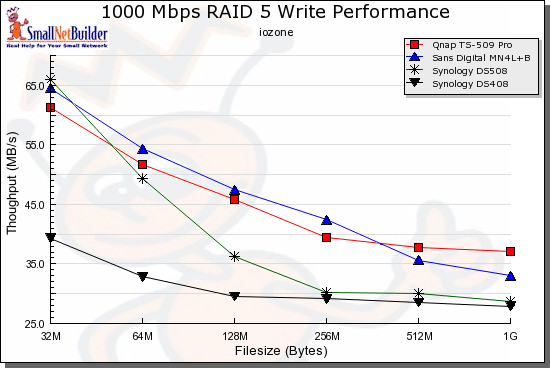
Figure 6: RAID 5 Write performance comparison – 1000 Mbps LAN connection
For RAID 5 read (Figure 7) the averages are 54.2 MB/s for the TS-509 Pro, 48.1 for the DS408, 44.3 for the MN4L+ and 40.2 for the DS508.
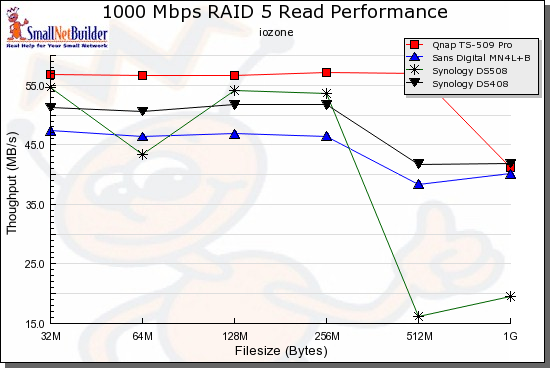
Figure 7: RAID 5 Read performance comparison – 1000 Mbps LAN connection
Of course, you can run your own comparisons using the interactive NAS charts.
Closing Thoughts
I brought all the Competitive Performance results into Table 1 for easier comparison. The two winners in this comparison seem to be the Sans Digital MN4L+ for both RAID 0 and 5 writes and the QNAP TS-509 Pro for reads. But more importantly, these results would seem to indicate that the DS408 is not just a four-drive, less-expensive version of the DS508.
| Product | RAID 0 | RAID 5 | ||
|---|---|---|---|---|
| Write MB/s |
Read MB/s |
Write MB/s |
Read MB/s |
|
| Synology DS408 | 37.7 | 48.3 | 31.2 | 48.1 |
| Synology DS508 | 44.8 | 43.6 | 40.1 | 40.2 |
| QNAP TS-509 Pro | 44.7 | 51.4 | 45.5 | 54.2 |
| Sans Digital MN4L+ | 48.3 | 46.9 | 46.2 | 44.3 |
Table 1: Throughput comparison summary
On the other hand, Synology’s own performance data, which uses Windows XP SP2 system-to-system file copy as the benchmark, shows very similar performance between the DS408 and 508, but with different hard drives and an earlier firmware version.
My testing has two differences between the DS408 and 508—the hard drives and the firmware version. Of the two, I suspect the firmware more than the drives, since both drives were 3 Gb/s, 7200 RPM SATA. The DS508 has long gone back to Synology, so I couldn’t rerun it for this review. But if Synology wants to resubmit it for testing, using the same drives and firmware as the DS408, I’ll be happy to retest it and update the charts.
If you’re sold on a RAID 5 Synology, but have been stopped short by the DS508’s >$1000 price tag, and the age and performance of the CS407, at least you now have a lower-cost, current-generation option. The DS408 isn’t exactly cheap at a list price of $749, though, and remember, that’s without drives.
The performance comparison and Charts show that there are other products that will provide similar or better performance than the DS408 if all you want is basic file sharing and storage. But Synology and QNAP aren’t after those customers, given all the features they cram into their products.
I didn’t include QNAP’s TS-409 Pro in the Performance comparison, because frankly, it’s not even in the same performance class, although both have similar feature sets. The Marvell-based TS-409 Pro is simply no match for the Freescale-based DS408, although it does win on price, coming in around $200 less.
The DS408 puts the ball back into QNAP’s court to come up with a competitive quad-drive offering in the NASver sweepstakes. In the meantime, if you’re sold on the DS408, be sure to shop around. Most etailers are currently selling it above list, closer to $800. Unless you really want it that badly, you might wait for pricing to settle down a bit.