

Introduction
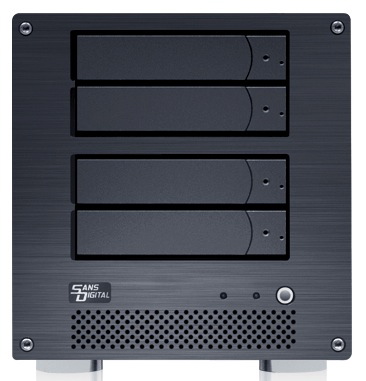
| At a Glance | |
|---|---|
| Product | Sans Digital MobileNAS Linux NAS + iSCSI 4 Bay Network Storage Server Tower (MN4L+B) |
| Summary | High-performance four drive RAID 5, 6, 10 NAS with root access and console connections. |
| Pros | • High Performance • Extensive protocol support • Multiple RAID volumes • VGA root level console support |
| Cons | • Poor documentation • Buggy |
Introduction
You have many choices when choosing a Network Attached Storage (NAS) device for your home or small-office these days. Choices range from a simple, small-single disk unit all the way up to a multi-disk RAID product loaded with features. And when high-performance is a concern, it’s increasingly common to find gigabit Ethernet as part of the package.
But even though it’s available, I’ve found that most desktop NASes really lack the horsepower to take advantage of their gigabit capabilities. Generally, these devices have a relatively slow CPU with little RAM available for caching.
But in this review, I’m going to check out a NAS that breaks that mold. The Sans Digital MobileNAS MN4L+B is a four-disk , RAID NAS that packs a real punch. Along with its gigabit Ethernet (with jumbo frame support), the MN4L+ comes with a 1.2 GHz Intel Pentium M and can be ordered with up to 2 GB of DDR2 RAM to maximize cache.
Setup
The MN4L+B can be purchased with or without drives, but the unit supplied for review came with four Seagate ST3100340AS Barracuda 7200.11 1TB SATA drives installed. The operating system is installed on a 1GB SSD drive so you can boot up with no other drives installed.
I should note that the Plus is actually available in five models in each of the two colors. The base model comes without drives and the 1T, 2T, 3T and 4T suffixes to the base model numbers indicate four 250 GB, 500 GB, 750 GB or 1 TB installed drives, respectively. (Sans Digital says that it uses Seagate 7200.11 drives and sometimes Hitachi T7K250 for 250 GB.)
There are also "2G" versions (MN4L+B2G and MN4L+2G) available that bump the 512 MB of memory to 2 GB. If you want to upgrade RAM yourself, you can install your own DIMM without voiding your warranty, although it’s a bit difficult to get into the box. Figure 1 shows the back panel of the unit.
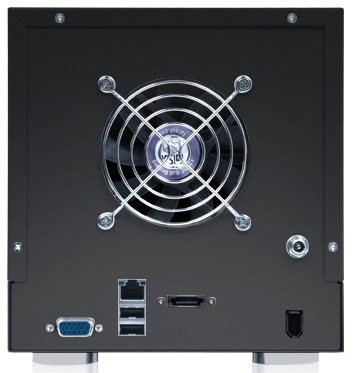
Figure 1: Back Panel
The case itself is heavy metal and feels fairly sturdy. You’ll notice that along with the standard power and USB ports you normally have on these units, there’s also an external SATA (eSATA) port and two ports you don’t often see: Firewire 400, and VGA. I’ve never previously seen Firewire on any of the NASes that I have tested, and VGA support is also quite rare.
Having VGA support means that if you really get in a jam with the box and can’t contact it on the network, you can hook up a USB keyboard and mouse, plug in a monitor and log in locally to diagnose the issue. It’s a nice feature, if you know your way around a Linux command-line , since that’s what the Plus is running (more details later).
You’ll also note that the fan vent is on the large side, which usually indicates lower fan noise. Unfortunately, the Plus’ fan is loud while running. When the box is booted with the four drives in use, it draws around 60 Watts, so compared to other NASes I’ve worked with, the greenness rating of this box would make Al Gore cry, particularly because it lacks idle drive spindown and programmable shutdown / startup features.
I’ll note at this point that I had some issues with the power connector seen just above the Firewire port. The connector seemed to be quite touchy so you’ll need to be careful with it. A number of times when I was fiddling around with cables or adjusting the position of the Plus, I lost power. The back panel could definitely use a cable tie-down, like I’ve seen on other products.
One thing that doesn’t show up in the picture is second hidden eSATA port underneath the first. Sans Digital says that this port is not exposed because the license of the internal OS supports the use of only a single eSATA port. But the port would be fully functional under a different OS.
Setup – more
Sans Digital documents several ways to initialize the unit after it’s powered up. You can plug in a keyboard and VGA monitor to do the initial setup via command-line. Or you can run a Windows-only (DOS) utility (Figure 2) to find the unit and configure the IP address.
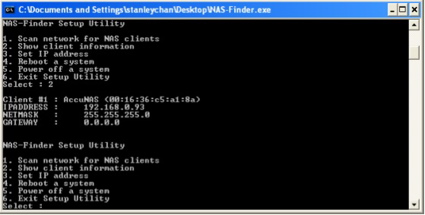
Figure 2: DOS-Based initialization
If you can determine the initial IP address of the unit via some other method, you can log straight into the web interface to do setup that way. Figure 3 shows an initial Web configuration menu once you connect via a web browser.
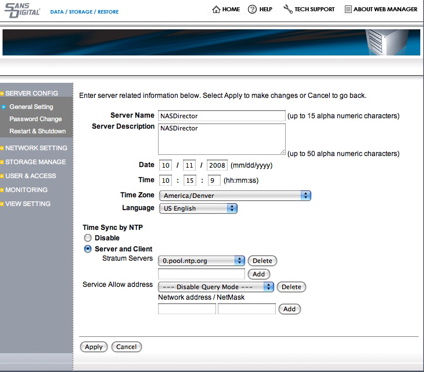
Figure 3: Web Maintenance Menu
Web administration is available over both HTTP and secure HTTPS connections. From the “Server Config” set of menus, you can set some standard options such as the admin password, name of the NAS, the time zone, language, etc.
One unique option I noticed in this section was the ability for the Plus to become a NTP server. This means you can configure all of the computers on your LAN to get their time from the Plus, a nice feature.
Feature Tour
The “Network Settings” menu (Figure 4) gets into the details of getting the product configured with services for your network.
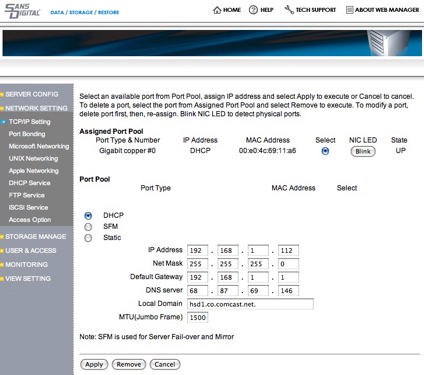
Figure 4: Network Settings Menu
This set of menus had me confused due to numerous options that appeared to indicate that the device had multiple Ethernet ports that could be configured and bonded in various ways. That would be nice, except for the fact that there is only one Ethernet port on the MN4L+B.
I also noticed that when I hit the “Help” or the “Tech Support” options on this menu, I was just redirected to the top-level page of Sans Digital’s web site, rather than any page or information related to the product.
Checking the specs of the product on the web site showed no option for multiple Ethernet ports. When I consulted the manual that accompanied the box, it didn’t help much either stating: “The MN4L+(B) is equipped with 2 Gigabit ports”.
A query to Sans Digital revealed the source of the bad information. Sans Digital has a rack-mount product that shares the same basic manual and web interface. These issues (and a number of other similar inaccuracies in the manual) are a holdover from that product. Sans Digital said the errors will be corrected in a later revision of the manual, but gave no timeframe for the revision.
Moving on to networking options that made actually made sense with this product, I found a lot of features. Figure 5 shows setup for Microsoft protocols.
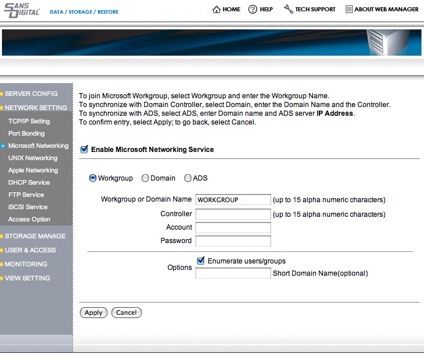
Figure 5: Microsoft Networking Setup
This menu allows you to join a workgroup or work with a Microsoft Domain controller and an Active Directory Service.
Feature Tour – more
You also have an extensive set of configuration options for controlling access to the shares on your system. Individual users and groups can both be created so that you can give find-grained access control. Figure 6 shows the Access Control menu for Microsoft (SMB/CIFS) shares:
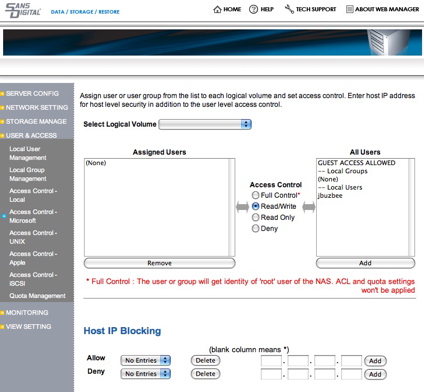
Figure 6: Access control for Microsoft shares
In this menu, you can control the groups and users who have access to shares and also control read/write privileges. An option is also present for controlling access via IP address.
It’s nice to see that the MN4L+B also has complete support for Unix or Linux systems via NFS as shown in Figure 7.
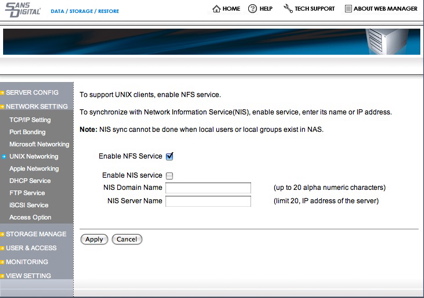
Figure 7: Unix / NFS controls
From this menu you can enable NFS and also arrange to use a NIS service for user account information. For access control, there is an extensive set of options as shown in Figure 8.
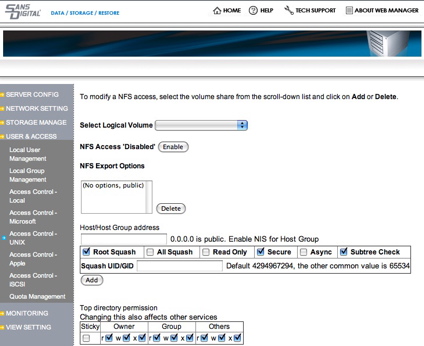
Figure 8: NFS Access control
With options such as “Root Squash” and “Subtree Check”, this menu is really designed for someone who knows the ins and outs of NFS. But it’s nice to have that level of control when you need it.
For Apple users wishing to use the AFP protocol, the MN4L+B has similar detailed options for controlling access as shown in Figure 9.
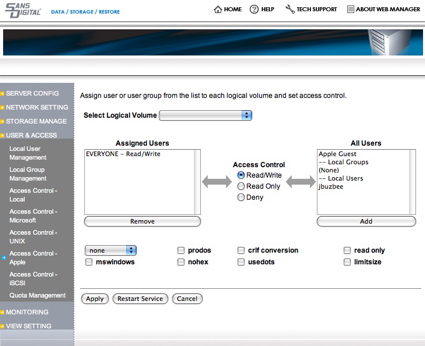
Figure 9: Apple Access control
There’s probably not a whole lot of call for the Apple II compatibility option prodos these days, but if you need it, it’s available on this menu.
If you want your MN4L+B to act as a DHCP server, there’s a menu for it as shown in Figure 10.
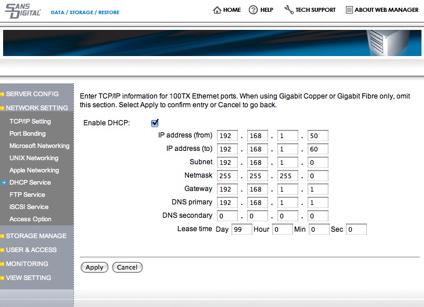
Figure 10: DHCP server
According to the manual, the MN4L+B can be a DHCP server, but the web configuration menu warns that this capability is only available when using a 100 Mbps Ethernet port and not when using gigabit or fiber. This is quite odd since the box has only gigabit, but maybe once again, this menu is a holdover from some other device. My tests showed that the warning on the web form was correct, however. After enabling the server, my DHCP requests went unanswered.
An interesting feature of the MN4L+B is iSCSI support. This allows the unit to either use disks on a remote iSCSI server (Initiator mode) or it can serve up its own disks as iSCSI initiator itself (iSCSI target mode). Figure 11 shows the iSCSI setup menu.
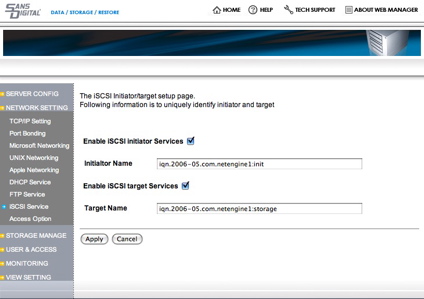
Figure 11: iSCSI Setup
This is the first time I’ve seen iSCSI capabilities in this class of device, and people who have an iSCSI setup will appreciate it. (Tim actually did some experimenting with iSCSI and the Plus as part of his Fast NAS series.)
Another interesting feature of the device is off-the -shelf support for Telnet and secure shell (SSH) access. Both are turned on by default. It’s nice to have Telnet, but you’re probably better off with it disabled since it sends your password across the network in the clear. Figure 12 shows the menu where you can turn the services on and off.
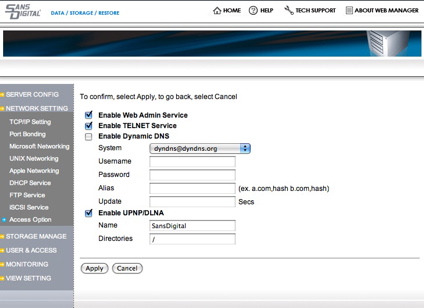
Figure 12: Network services
Note that there is no menu item for turning off ssh. If you really want it off, Sans Digital documents a method to turn it off via the command-line. There’s also an option on this menu to turn on a UpnP media-server. So you can use the Plus to serve up multimedia to a compatible device on your LAN.
I found no documentation or mention of this feature in the manual, but with ssh access, I could see that support was via ushare so you can get your documentation on their web site.
Storage Management
The MN4L+B has support for a number of different RAID levels: 0, 1, 5, 10 and JBOD. Figure 13 shows the management screen while a RAID 5 initialization is underway.
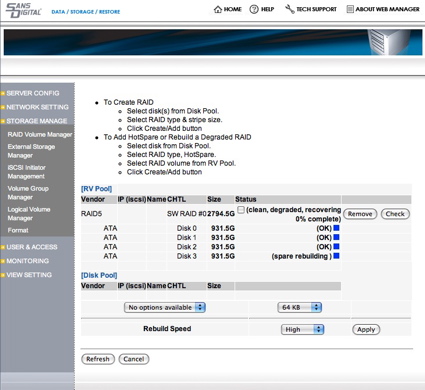
Figure 13: RAID 5 initialization
In this case, total storage size will be reduced by one-fourth of the raw drive capacity, but I’ll be protected against one disk failing. When you build an array, be prepared to wait awhile. My RAID 5 creation took around 12 hours using four one-terabyte drives although it is possible to continue the initialization while the initial RAID build is underway.
The MN4L+B also supports spare disks. The idea is that you can assign one or more disks to the spare pool for use when a disk fails or for general storage expansion as the need arises.
For additional local storage, you can also use external devices over firewire, USB or eSATA. I couldn’t find any documentation related to what format of external disks were supported, but a FAT32 formatted drive I had was recognized. And since the system is running Linux and has drivers for a number of standard filesystems such as EXT 2/3, Reiserfs and XFS, I’d assume that these would work fine as well.
Once you get your disks initialized, you’re not done yet. First you have to create a “Physical Volume” from the “Raw Volume” that your original initialization created. Then, from the Physical volume, you can create a “Logical Volume” as seen in Figure 14.
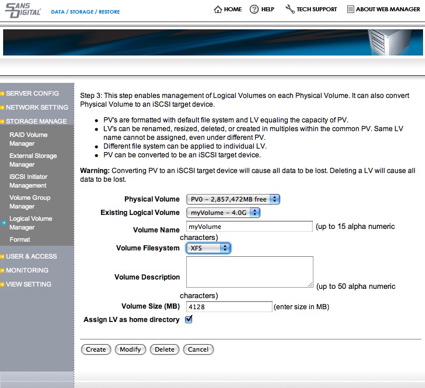
Figure 14: Logical Volume Creation
The upside of this extra step is that you can create multiple volumes or various sizes and then format them as either a XFS or a Resierfs filesystem. This multi-level volume capability provides a lot of flexibility, with the downside being the addition of multiple layers of configuration and added complexity.
When you’re relying on a device like this to store your data, you want to know when something goes wrong. To address this, the MN4L+B has a set of monitoring capabilities. Figure 15 shows the monitoring setup menu.
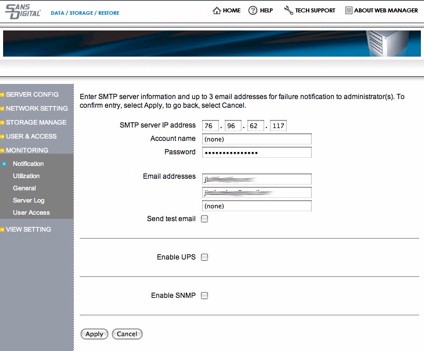
Figure 15: Monitoring Setup
The basic idea here is that you enter your email information so that when a problem occurs, you’re emailed an alert. Note that the form requires a username and password for accessing your SMTP server. My ISP, Comcast, doesn’t support usernames and passwords for sending email, so this didn’t work for me. The other email server I use supports usernames and passwords, but only over a secure socket connection. So once again, the options available in this form didn’t support my SMTP server requirements.
You can also see support for a UPS connection on this menu. But the manual states that for monitoring, it should be connected up to the non-existent “COMM2” port of the MN4L+B, so good luck with that.
The final option allows for SNMP monitoring so if you have a SNMP client on your network, you can check status that way. If you can’t get the email alert capability to work, there is an online “Server Log” menu that shows status menus (Figure 16)
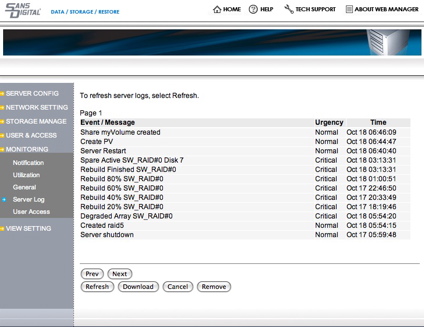
Figure 16: Logging
Figure 16 shows messages from my system while I was doing a RAID 5 setup. One oddball feature of this menu is sorting. I’m not sure how the messages were sorted, but it didn’t appear to be either by date or by criticality.
RAID Failure Testing
To see how the system would behave during a real error, I did my usual test of simulating a drive failure by pulling a drive out while everything was up and running. As expected in a RAID 5 setup, after I pulled the drive everything seemed normal. I could read files, write files, mount shares, etc. Looking a bit closer, the system log showed that I was now running in a “degraded mode” which was also expected.
Since this is a hot-swappable system, my next step was to replace the drive, also while everything was up and running. After the drive was in, I checked the log and saw that there didn’t appear to be any automatic recovery underway. So as a quick test, I just did a reboot of the system to see if the Plus would start the recovery process automatically like many other products that I have worked with. It didn’t.
To make matters worse, my “Storage Manage” menu now showed that I didn’t have any drives installed at all! Oops. Everything was gone. To see if I could recover, I pulled the original drive back out and rebooted. I put it back in and rebooted. I pulled all drives and rebooted. I put them in and rebooted. Nothing helped. And finally, I tried hitting the “factory default” button from the “Update” menu to see if I could at least get back to scratch. It didn’t help.
My system was acting as if no drives were installed and the only diagnostic I was getting were “volume not found” messages in the log file. It was time for tech support. I described the test I had run to Sans Digital and they tried to reproduce my failure without success. So to let me continue with the review, Sans Digital was kind enough to ship me a replacement Plus.
Going back through the documentation to see if I could find any clues about my failure, I saw this notice: “…replacement disk must not have any RAID signature as a result of having been a member of another RAID volume. Not following this recommendation can result in unstable RAID volume and loss of data.” So it could be that this is what had happened to me.
The “replacement” disk I used had obviously been part of a RAID volume, since I had just removed it from the system I was trying to add it back to. So perhaps that explains my problem. That said, I’ve done this same test numerous other RAID NAS systems and never had a "fatality" before.
I can see this situation happening in the “real world”, when one disk in a RAID array gets pulled out and then pushed back in. You’d expect to have to do a rebuild, but you wouldn’t expect to lose all data, all disks and have to return the unit to the manufacturer!
Performance
With its relatively powerful CPU and 2 GB of RAM, this box should fly! And the NAS Charts show that it does, with the Plus currently occupying the top two Chart positions on most benchmarks.
I’ve skipped the 100 Mbps benchmarks in the composite write and read plots below because the slower LAN connection prevents the Plus from delivering its real performance. Figures 17 and 18 show RAID 0, 5 and 10 write and read benchmarks respectively with both 1000 Mbps and 1000 Mbps plus 4k jumbo frame LAN connections.
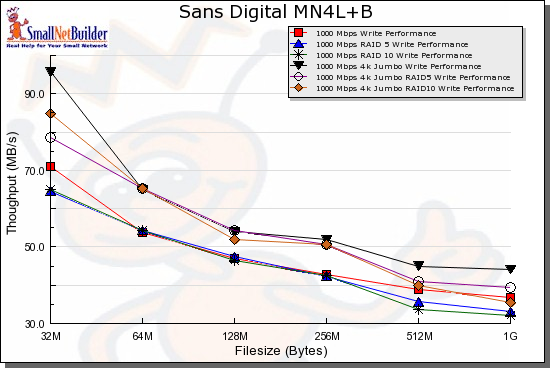
Figure 17: Write benchmark comparison – 1000 Mbps
The write chart shows two things: that the 4k jumbo frames help squeeze out a bit more performance; and that there is little write performance difference among the three modes.
The read chart isn’t as easy on the eyes. But it shows that jumbo frames actually result in lower read performance in some modes.
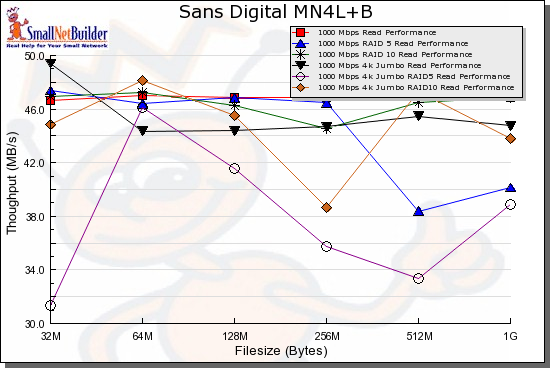
Figure 18: Read benchmark comparison – 1000 Mbps
For a competitive comparison, I chose a few other high-performance Intel-based RAID NASes: the Qnap Turbo NAS (TS-509 Pro) ; the Intel Entry Storage System (SS4200-E); and the Thecus N5200 Pro.
Figure 19 shows that the four products are quite evenly matched for RAID 5 writes. The main difference is in the smaller file sizes, where the Intel SS4200-E edges out the other products, even with its 512 MB of RAM.
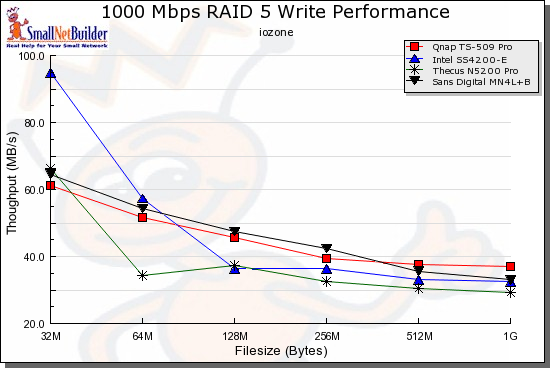
Figure 19: RAID 5 write competitive comparison – 1000 Mbps
The read comparison in Figure 20 is also interesting, showing the Qnap TS-509 Pro clearly outperforming the other products at all points except the 1 GB test. The Intel again, does quite well, staying with the Plus until caching effects drop out at the 512 MB file size and above.
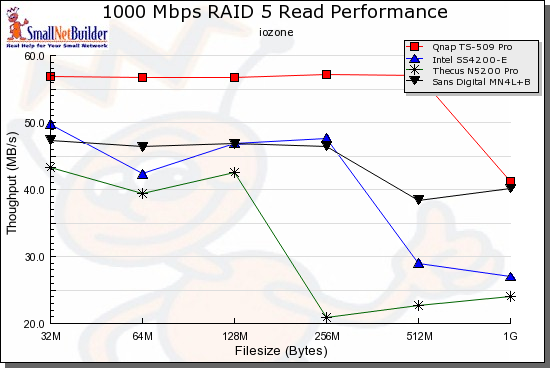
Figure 19: RAID 5 read competitive comparison – 1000 Mbps
Use the NAS Charts to run your own comparisons.
Under the Covers
Figure 21 shows the Plus’ motherboard. Note the two DIMM slots at the bottom of the photo and extra large heatsink for the Intel 1.2 GHz Pentium M CPU. The Intel 915G Express chipset that includes the SATA and USB controllers looks like it sits under a heatsink with fan atop at the upper left.
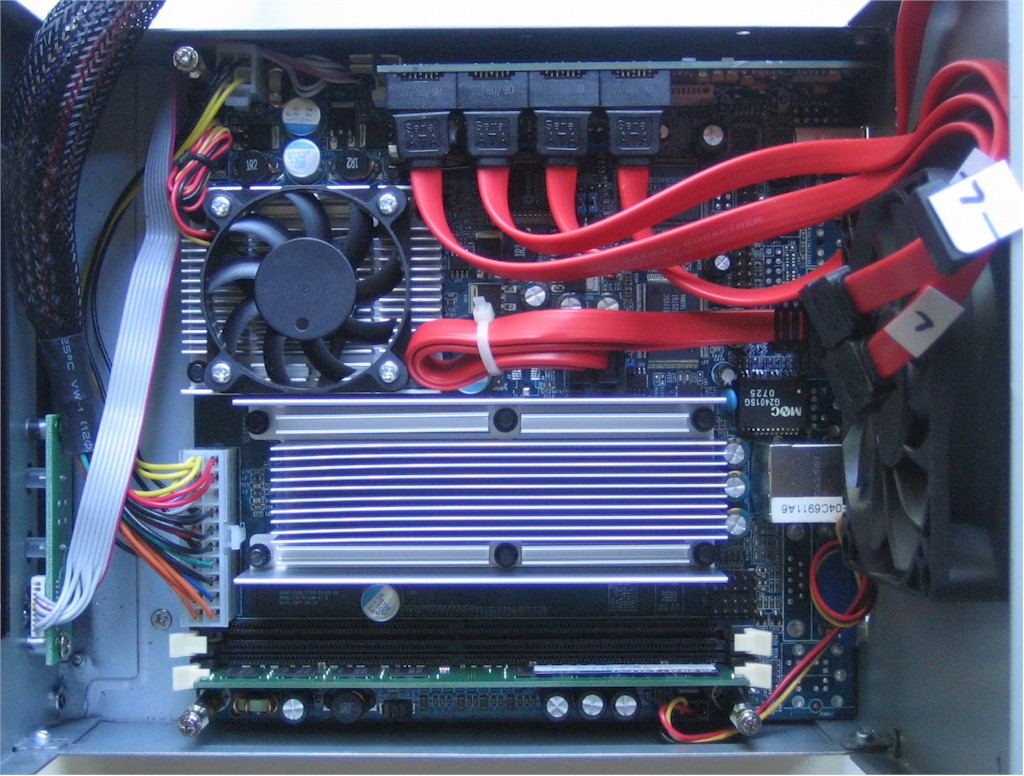
Figure 21: MN4L+ Main Board
Ethernet comes from a Realtek RTL8110SC, which uses the PCI, not PCIe for its bus connection. Other key devices are a flash SSD composed of a Samsung K9K8G08U0A and Hyperstone F2-16X Flash Memory Controller , 512 KB of other Flash and a VIA VT6306 Firewire controller.
Since the Plus has SSH support, it was easy to log in and poke around checking out the software in use. Sans Digital documents that the Plus is running Linux and the distribution is via Centos. With this Linux-based system, you’ll find most of usual suspects with standard utilities and servers such as Samba, bash, afp, etc. The Linux kernel version is 2.6.18-53 , and there’s an extensive set of drivers for USB devices, filesystems, network capabilities, etc.
Since you get root-level access with no hacking required, you would think that the Plus would be easy to customize. But Sans Digital says that changes to the system made via the console will not be saved on system reboot. The product will return to the original settings because it uses a "dedicated" file for system configuration that is located in an unspecified location.
Since there’s a ton of GPL software in use, you’d expect to see source code available as required by the GPL license that allows Sans Digital to ship it. But I found no reference to source code or the GPL, either in the documentation or on Sans Digital’s web site. In fact , Sans Digital includes an extensive “End User License Agreement” with the product that explicitly prohibits most everything that the GPL license is designed to encourage, such as copying or modifying the software on the product. Hopefully, this is just a misunderstanding on Sans Digital’s part that will be cleared up soon.
Conclusions
There is little doubt that the MN4L+B is a top performer. And with its extensive protocol support, it should fit right into almost any network. The MN4L+B’s support for iSCSI and its VGA output were also powerful capabilities that few other tabletop NAS devices provide. When I deploy a box, I want direct access for problem resolution, so I really appreciated support for local and network command-line access.
But there are things I miss. The MN4L+B does not include any backup software or print-serving capabilities, althouth Sans Digital does document ways to install your own. The MN4L+B also has no ability to spin down drives when not in use, which could help mitigate its relatively high power consumption.
Another big problem I found was in polish. With inaccurate documentation, and configuration menu items that were misleading or non-functional , the Plus is harder to use than it should be. Although experienced users who are comfortable with Linux command line administration should have few problems, the incorrect documentation can still have even them chasing their tails for awhile.
Other negatives include the flakey power connection that made me nervous about even touching the box while it was running. And the failure I had when testing RAID is also a real concern. One of the main reasons people use RAID is for data integrity. But if you can’t count on trouble-free recovery from failure (simulated or real), then why mess with the extra cost and complexity?
For myself, and for the very reason demonstrated in this review, I’ve turned away from depending on RAID to protect my data. I don’t want a failure in one device to take both my original and my mirror down. Instead, I just mirror data over the network to a separate standalone device (a capability the MN4L+B also supports through the “replication” menu).
At around $600 for the driveless, 512 MB model, the Plus is lower than the competition from QNAP and Thecus, but about $100 more expensive than the Intel SS4200-E. But in overall “server” features, the Plus falls short compared to the Qnap, which comes complete with print, LAMP, media server and other handy features. It’s more similar to the Intel, although each has features that the other doesn’t.
In the end, the MN4L+ has some unique and powerful features and it is a top performer. But until the kinks are worked out, I’d have a hard time recommending it over its competitors.