

Introduction
| At a Glance | |
|---|---|
| Product | NETGEAR Digital Entertainer Elite (EVA9150) |
| Summary | Disk-based Network Multimedia Player supporting many formats and Internet Video and photos without requiring a companion PC. |
| Pros | • Hard drive buffering provides uninterrupted playback with almost any speed network • No computer required for YouTube, Flickr & other Internet content • Smooth 1080p / 24 playback • Improved remote with ability to control other devices |
| Cons | • Internet video content limited to partners • User Interface still clunky in spots |
The EVA8000 has been NETGEAR’s top-of-line networked media player for almost two years—an eternity in the consumer electronics business. Part of the reason it has lasted so long, even with infrequent updates, is its support for a wide array of content encodings. But it has its share of problems and shortcomings, too, most notably its dependence on a Windows PC running a companion application required to access YouTube and other Internet content and marginal ability to handle H.264 video.
But the EVA8000’s main problem, which is shared by most other networked media players, is that many prospective purchasers don’t have Ethernet network access at their entertainment center. Despite the the industry’s continued pitches that powerline, wireless and now coax-based MoCA Ethernet alternatives can do the job of handling trouble-free HD streams, buyers’ experiences have proven otherwise.
So with the EVA9150, NETGEAR has bitten the bullet and done the only thing that will guarantee a happy HD streaming video experience no matter how slow, variable or unreliable your network connection might be. The addition of a 500 GB hard drive adds essentially unlimited buffer capacity for streaming and the ability to store plenty of content locally if you don’t want to hassle with network-based play.
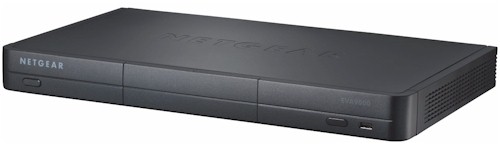
Figure 1 shows front and rear views of the EVA9, which is just about the same size as the EVA8000, but with rounded corners and more of an A/V component styling approach. The 500 GB Seagate drive is mounted on the same sled used in NETGEAR’s ReadyNAS NASes and sits behind a drop-down door. The only other items you’ll find on the front panel are the power switch, IR sensor window and one of the two USB 2.0 ports that allow connection of flash or disk-based storage for file play and or copying.
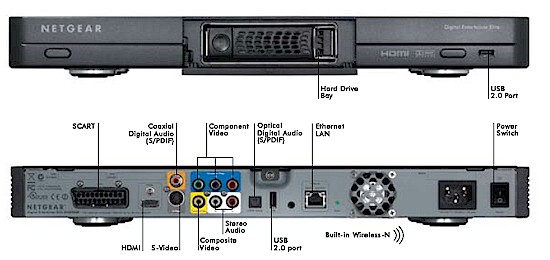
Figure 1: EVA9150 Front and Rear panels with callouts
The rear panel contains all the output connectors that you would want including HDMI, S, component and composite video, RCA analog and coaxial and optical S/PDIF digital audio and SCART for European markets. The single Ethernet port is 10/100, which is fine for streaming, but which will slow you down if you want to move files to the EVA9’s local drive. The second USB 2.0 port, power socket and power switch round out the rest of the rear panel collection.
Construction Details
Figure 2 shows the inside of the EVA9150. There is plenty of empty space with the 100 – 240 VAC power supply on the left, hard drive bay in the center and main board to the right. The FCC ID photo has the front and two side panels folded down to show the three dual-band internal Rayspan metamaterial antennas.
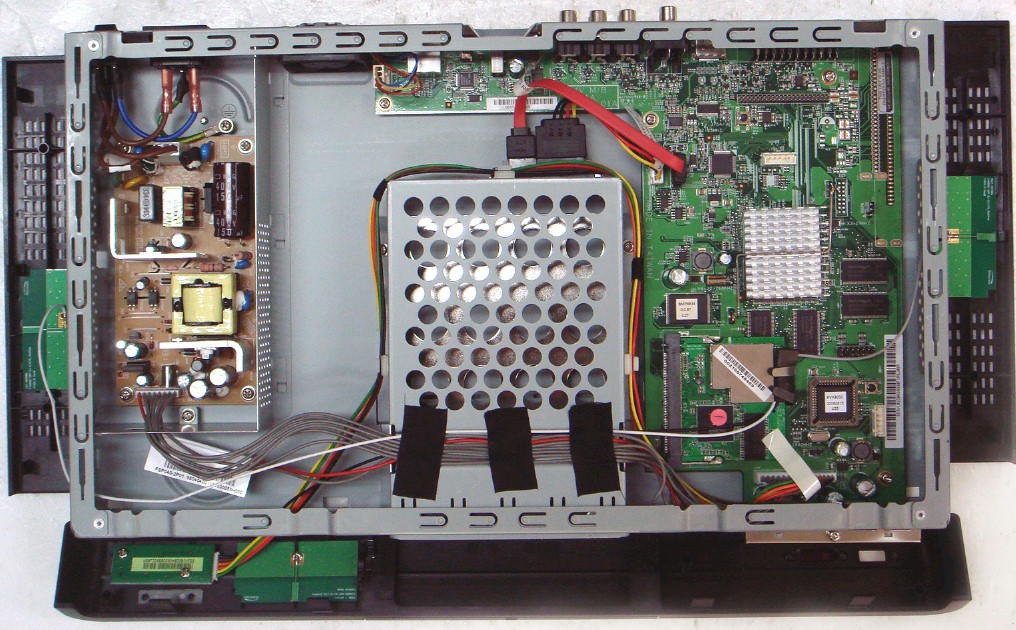
Figure 2: EVA9150 internal view
The main processor is hidden under a heatsink, which was firmly attached and I left undisturbed. I wouldn’t be surprised, however, if it were a Sigma Designs device, since the Sigma Designs EML8623 is used in the EVA8000. In fact, NETGEAR told me that the processor is a Sigma Designs SMP8634.
The devices I could see included a Realtek RTL8201CP for 10/100 Ethernet, 256 MB of RAM and JMicron JM20330 SATA bridge. A Seagate DB35.3 Series SATA drive (ST3500830SCE) provides 500 GB of storage. If 500 GB isn’t enough storage for you, the user guide describes the process for installing and initializing an “optional” drive. This is because NETGEAR only recently decided to make a drive part of the base product, which was a very smart move.
The dual-band draft 11n radio shown in Figure 3 uses a 2T3R radio using a Ralink RT2880 MIMO Wireless Access Point/Router/iNIC SoC and RT2850 2.4 / 5 GHz radio.
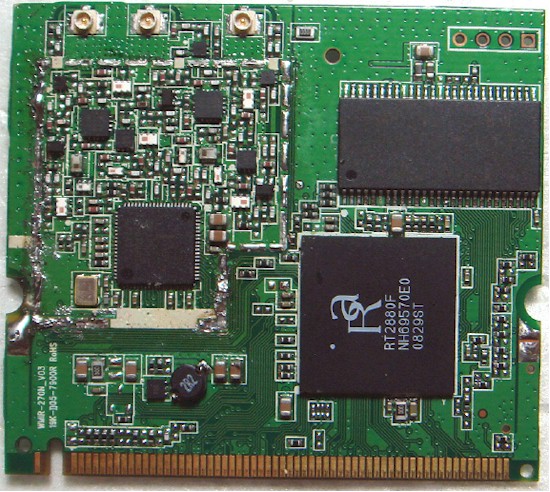
Figure 3: Radio board
NETGEAR hasn’t yet posted the EVA9’s GPL-licensed software for download. But once they do, there may be more details available within it.
Setup
Setup was pretty much a non-event. I was surprised to not see a printed setup poster in the box, given the target customer. But it apparently got lost somewhere along the way, since NETGEAR says a printed setup guide normally does come in the box. The included CD contains PDF files for the user manual, setup sheet and “universal” remote that is the EVA9’s main control source.
Also on the CD is the Digital Entertainer for Windows application, which is optional to install. I installed it to get a quick look at what it does, which is mainly to help you enable sharing for media-containing folders and make sure that the EVA9’s network connection gets set up properly.
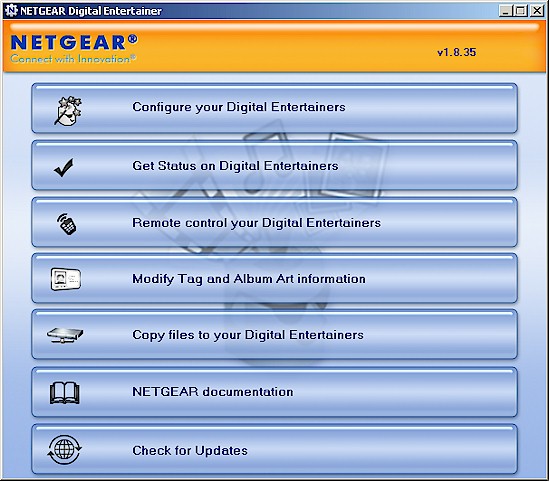
Figure 4: Digital Entertainer for Windows
But since one of the EVA9’s advantages over the EV8000 is that you don’t need a PC to either act as a media server or to enable YouTube viewing, I didn’t use the application for setup. Instead, I carried the EVA9 up to my living room where my Panasonic plasma set sits, connected Ethernet, power and HDMI (supplied!) cables and then powered up the unit.
After an attractive splash screen, a setup wizard auto-launched to guide me in setting the EVA9’s output resolution, network and Internet connection and confirming that audio worked. It did not, however, automatically check for the firmware update (2.2.127 NA) that was available, which I found via the administrator update menu. In fact, there is no auto-update function. It doesn’t appear that firmware is posted on the EVA9150’s product support page, either. So you’ll just have to manually check for updates from time to time.
Once setup was complete, the Main Menu page was displayed. Note that I asked NETGEAR to provide some of the screenshots for the review, since photographing TV screens is not my favorite thing. (You’ll be able to see why when you see my screenshots!) Figure 5 shows the main screen with the Picture-In-Picture feature activated.
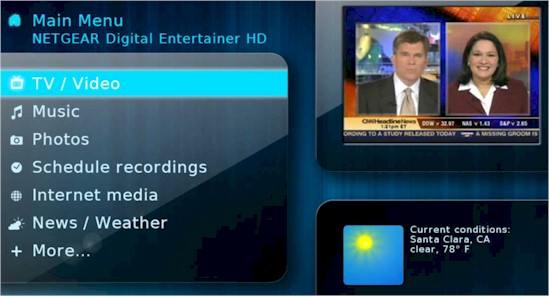
Figure 5: Main Menu
The “PIP” box appears anytime that you come back to the Main Menu while something is playing, whether it is video, slideshow or music. The Current Weather box will always display on the Main Menu as long as you have an Internet connection and input your ZIP code.
For comparison, Figure 6 shows the main menu page for the EVA8000 (without “PIP”). Aside from look and feel, the main menu selections and functionality are the same for both systems. The EVA9 uses a GUI “skin” system that can be used to change the GUI look. The EVA9 FAQ says that the product comes with two skins, but the selection menu shows only one.
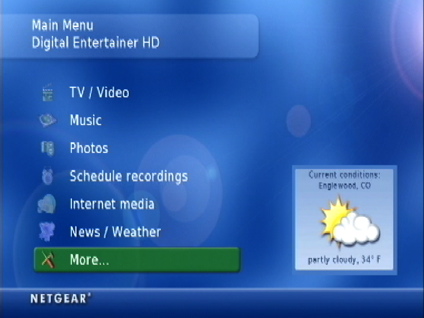
Figure 6: EVA8000 Main Menu
Like the EVA8000, the EVA9 doesn’t require a UPnP AV or DLNA server running on your network because it contains all the functions needed to scan your network for shares, build a list of playable video, audio and still image files and store the index for later use.
You’ll be asked to scan for shares if you select the Advanced option in the setup wizard. Otherwise, you’ll be prompted to load the Digital Entertainer for Windows application so that it can build the content database. Figure 7 shows the screen after the share scan where you can select the shares scanned for content files.
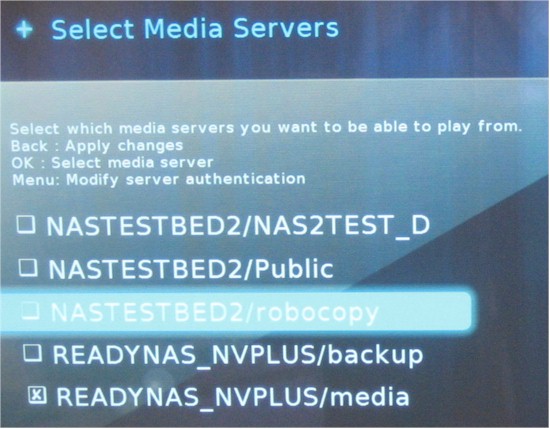
Figure 7: Network share selection
As in the EVA8000, you can set a periodic automatic scan for new files or do a quick scan. If you change servers or move content around, there isn’t a way to delete individual folders or files from the database. The only way to get rid of the old ones is to launch a new full scan. I don’t have a huge media library, with under 2,000 songs and images each and only a few dozen video files. So a full scan took easily less than 5 minutes to complete.
Setup – more
An interesting new feature that I found while exploring the admin menus is the Network Test function. Selecting it launches a throughput test between the EVA9 and each of your selected shares. The test cycles continuously until you cancel it.
Note that this test actually appears to measure a combination of network speed and share performance. Both the PC and ReadyNAS NV+ in Figure 8 below connect via gigabit switches to the EVA9. But the NV+ serves files more slowly than my Core 2 Duo E4400 desktop, which is reflected in the almost 2X difference between the two “network connection” test results. Still, this can be a handy feature for setting up or troubleshooting a network connection.
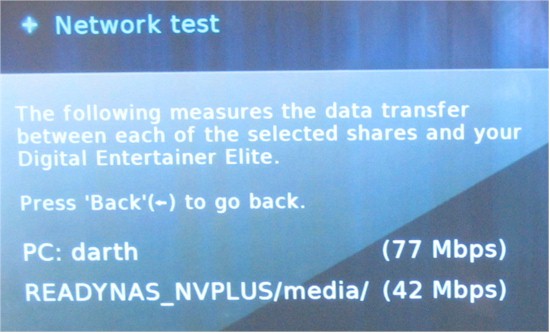
Figure 8: Network test
The admin functions also include a set of Hard Drive Tools shown in Figure 9. The Manage data on disk feature includes copy, move and delete functions and is one way to copy files over to the internal drive. However, if you enable the File Sharing feature (More > Supervisor functions > Advanced Settings > Power and Hard Drive), which is disabled by default, you’ll be able to drag and drop files directly between your computer and the EVA9’s drive.
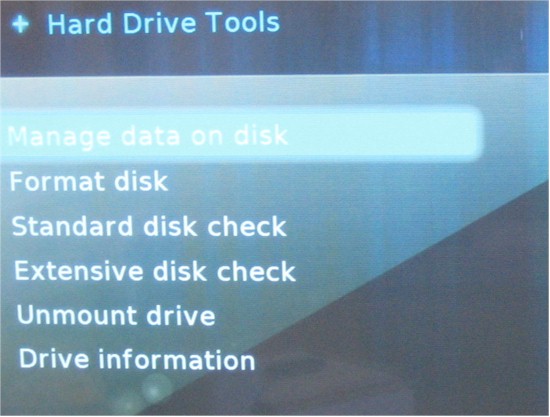
Figure 9: Hard Drive Tools
Feature Tour – Video
As I noted earlier, the EVA9 can do everything that the EVA8000 does, but without requiring a companion PC to access YouTube and other Internet content. The supported video "containers" and codecs supported are a bit fuzzy, because the information on the datasheet and online KB (which is where the user manual sends you) don’t match. So this information is from the online KB document.
Supported video “container” formats are AVI, DivX, Xvid WMV, MOV, VOB, MPG, MP1, MP2, MP4, ISO, IFO, M4V, TS, M2TS, MKV and MKA. While MP1/2/4, Xvid, VC-1/WMV-9, H.264, OpenDivX codecs are all supported “to 1080p”. But, take it from me, the only way to know whether the EVA9, or any other media player, will support your files is to try it out. Unfortunately, if things don’t work out, you’ll end up paying a 15% "restock" fee for the experiment.
Content can be viewed by title, genre, artist or you can browse by folder. The Cover Art view (Figure 10) showed only demo content that NETGEAR had pre-loaded onto the internal drive. Getting this view requires using the Tag Tool application that is part of the Digital Entertainer for Windows collection to link in the cover art.
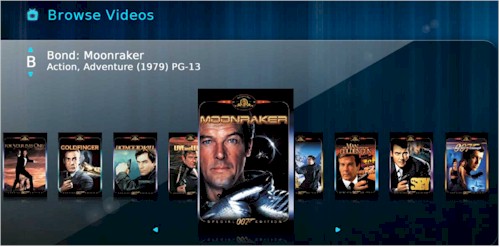
Figure 10: Cover Art Browser
I don’t have an extensive video library, with most of it consisting of Quicktime / H.264 test movie trailers downloaded from Apple’s trailer site. But I do have some AVI files from a Canon SD200 digicam and a ripped standard-def DVD that I use as part of my NAS test suite.
I used the folder-based view of my videos, which was serviceable, although not as visually enticing. Unlike Jim’s experience with the EVA8000, my ripped DVD, which was in a folder, played just like a normal DVD with selection menus intact. And the 720p H.264 trailers that caused stuttering when played with the EVA8000 played flawlessly. I even tried 1080p / 24 trailers that also played without a hitch.
But, just like the EVA8000, the EVA9 choked when I tried to play the AVI files from my Canon camera. There isn’t anything exotic about the files (640 x 480 MJPG, 30 fps), but I got errors each time I tried to play them.
Feature Tour – Internet Video
I confirmed that the EVA9 was able to access YouTube without Digital Entertainer for Windows running on a PC (Figure 11), although I at one point got an error telling me that I needed to be running the companion application.
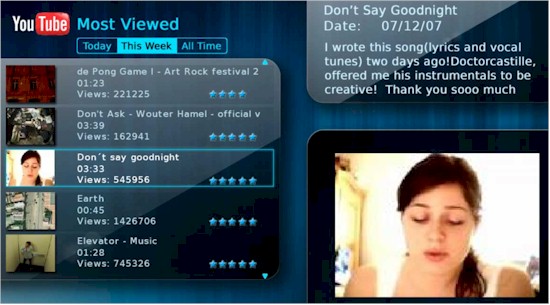
Figure 11: YouTube on the EVA9
I’m not a YouTube fan by any means, so didn’t spend a lot of time with the feature. I did, however, confirm that it played an HD video flawlessly. There’s also a Search feature if you need it.
The Internet channels feature is a work in progress (Figure 12). It’s a typical walled-garden approach to accessing Internet video, which means that you can access only content that NETGEAR has worked out partnership deals on.
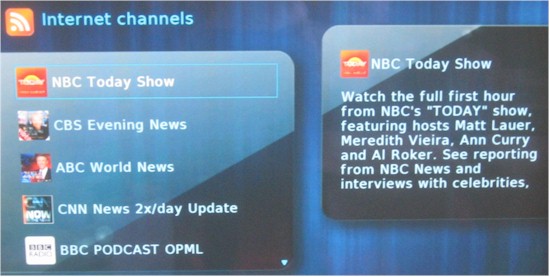
Figure 12: Internet channels
There are more channels than I found with the EVA8000’s latest firmware and some of them actually worked. But more often than not, I got an error message like that shown in Figure 13 when I tried to access some of the content.
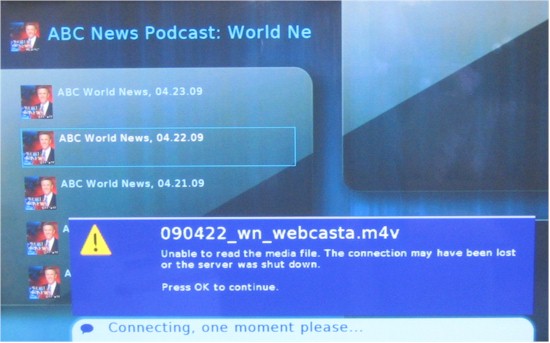
Figure 13: Internet channel error
The content that I was able to view had quality that ranged from decent standard def to borderline unwatchable (I suspect due to the source quality, not the EVA9). But between the uncompelling selection that didn’t include Hulu or any other popular network or cable channel sites and the errors that I got, I would not recommend buying the EVA9 for the Internet channel feature.
I was also surprised to find a complete lack of pay-to-view partners such as Netflix or Amazon on Demand. Perhaps these will be coming in the future, since I would hope that NETGEAR is hard at work lining up content agreements for its ITV2000 Internet TV Player that I liked so much at CES in January.
I’ll cover more about my video-viewing experiences in the In Use section.
Feature Tour – Music
The EVA9’s Music features are enough like those on the EVA8000 for me to not notice any significant differences. MP3, WAV, WMA, AAC, FLAC,WMA-Pro, M4A, and M4P file types are playable with MP3 up to 320 Kbps or variable bit rate (VBR) and WMA8 and WMA9 files up to 192 Kbps or VBR. Playing protected iTunes requires running the Digital Entertainer for Windows application, however. Supported playlist formats are WPL, ASX, WAX, WVX, PLS, M3U and RMP. But I didn’t try any of those.
I use iTunes to manage my music, which is stored on a NETGEAR ReadyNAS NV+. It’s all DRM-free, with a mix of ripped CD’s and a few purchases from iTunes and Amazon Downloads. The EVA9 found and played everything played just fine.
Figure 14 shows the general browser view, and you also get the same alternative views as for videos, i.e. Playlist, Artist, Album, Genre and Cover Art.
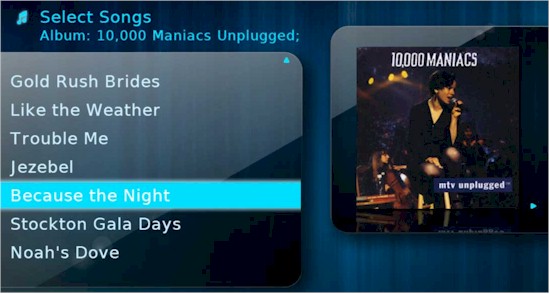
Figure 14: Music browser
The Cover Art feature tries to emulate Apple’s CoverFlow, but misses by a mile. Most of my cover art, which was gathered by iTunes wasn’t shown. The only cover art that displayed was for albums I purchased via Amazon Downloads. Every other album just had a generic "cover". You can use the remote left and right arrows to scroll through the covers, or hit a keypad key to skip through the alphabet. But I found the fast scrolling that accompanied the large navigational jumps to be annoying, not cool.
The Internet radio feature is a big disappointment, or maybe I have just been spoiled by the excellent features provided by the Squeezebox Boom. Stations are organized by Title, Genre and my nomination for deletion on the next firmware update: Quality. But forget using Title, unless you like scrolling and the Genre selections were not extensive and poorly chosen. I gave up trying to find anything decent to listen to after only a minute or so. And I didn’t bother trying to enter a station using a URL.
The feature is really crippled by decent Browsing categories and the lack of a Search feature. But the bigger omission is the omission of free Internet radio services such as Slacker, Pandora and last.fm. And again, NETGEAR is missing partner revenue opportunity by not offering paid alternatives such as Rhapsody or Sirius.
In short, you can use the EVA9 to access your music library. But if I had both connected to my AV receiver, I would probably opt for the combination of the Squeezbox Boom and iPeng, which beats the EVA9 handily on both features and ease-of-use.
Feature Tour – Photos
The EVA9 says it supports JPEG, BMP, PNG, TIFF image formats. But I found it was most reliable for viewing JPGs, i.e. photos, since it didn’t even include many PNG files in its scan results. Note that GIF isn’t a supported type.
Photos are selected by folder, month / year / decade as well as camera and size. You start a slideshow by just browsing to a folder and pressing the remote Play button to play all the files in the folder in order. If you enter the folder, you can select a random slideshow play, or select individual images to view.
Pressing the fast forward and reverse remote buttons while a slideshow is playing will decrease the change delay from its 6 second default or increase it again. If you dig into the admin preference menus, you can change the transition effect (dissolve, fade, shrink [annoying!]), have the image fill the screen instead of being displayed in its natural format and tweak a few other settings. While a slide show is playing, you can navigate into the music menu and select music to accompany your slide show.
You also have the ability to view Flickr and ReadyNAS Photo online services, neither of which I tried.
Feature Tour – Other Features
Like the EVA8000, the EVA9 includes the ability to view RSS feeds and weather maps. The weather maps are much better than on the EVA8000 and are even at readable resolution! You also can control the EV9 via a web interface, accessible by pointing your browser at the EVA9’s IP address (Figure 15).
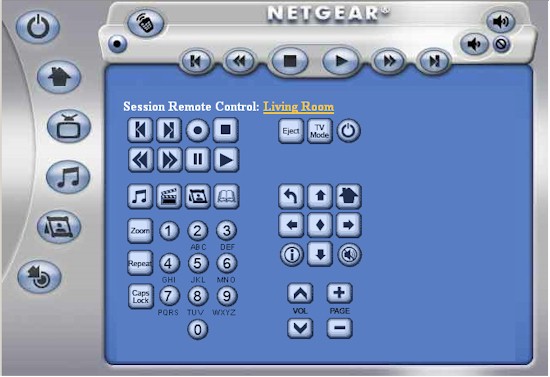
Figure 15: Browser control
The control the desktop of your PC on your TV feature has been also carried over from the EVA8000, but requires running that good ol’ Windows app. You have to move the PC mouse cursor around with the remote, however, and use the Select button for mouse clicks. You can also send text messages between multiple EVA’s, or arrange to have your media playback moved from one to the other.
If you need to connect the EVA9 via wireless, you should find setup pretty painless. Detected networks are displayed with indication of encryption status, frequency band and signal strength (Figure 16).
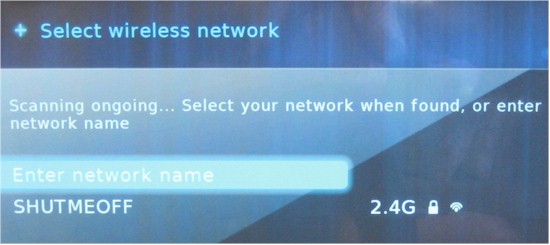
Figure 16: Site survey result
If you’re connecting to an encrypted network, you can either enter the key manually via a pop-up keyboard. Or if you are connecting to a router that supports WPS, you can use either WPS push-button or PIN methods to connect.
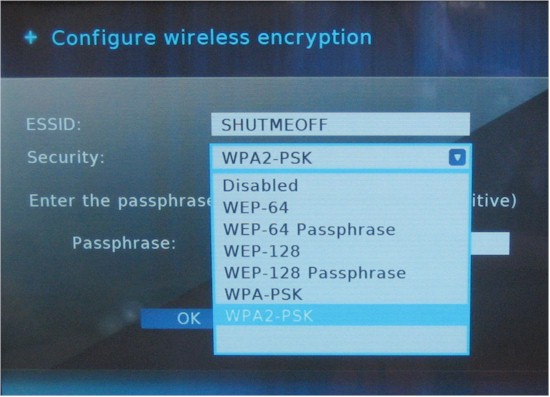
Figure 17: Encryption methods
In Use
Using the EVA9 is very much like using the EV8000, with menu organization and operation essentially the same. The main difference between the two products is that the EVA9’s beefier processor, memory and internal hard drive make for a much more trouble-free viewing experience. Basically, if your network isn’t fast enough to provide the bits in real time, the EVA9 will pre-load enough of the file before play starts so that playback will be smooth and trouble-free.
Moving from screen to screen and around the admin menus was fairly quick. But I found that if I tried to move too swiftly from menu to menu while an HD video was playing, or when playing a slideshow and selecting music, I could get the EVA9 to temporarily lock up. In all my experiments, however, I wasn’t able to completely crash it or lock it up so that I had to reboot it.
I tried HD video playback using 720p and 1080p H.264 files with both Ethernet and 2.4 GHz draft 802.11n wireless connections. Both connections were able to provide trouble-free viewing thanks to the hard-drive buffering. The main difference from using the slower Wi-Fi connection was a longer delay before file play started due to the longer time it took to fill the buffer. Using "trick" modes (FF, REV) with a wireless connection also tended to pop up the Insufficient bandwidth / buffering message. But once the buffer refilled, play restarted without a problem.
The buffering seems to be intelligent and appears to take network bandwidth into account in determining the size of the buffer. If the EVA9 does make a mistake in calculating the buffer size (or network bandwidth noticably drops after play starts), the worst that happens is that play pauses to refill the buffer. At no time did I see stuttering or breakup in any of the test videos.
One of the changes that makes the EVA9 more enjoyable to use is the new “universal” remote that comes with it (Figure 18). The new remote is more professional looking than the EVA8000’s. It’s much more like something that one would expect to come with a piece of consumer A/V equipment instead of something that was designed by networking engineers.
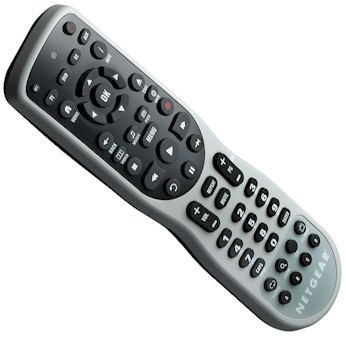
Figure 18: EVA9150 “Universal” Remote
The new remote fits comfortably in the hand and can be programmed to control your TV, VCR, DVD player, cable or satellite receivers, amplifier, tuner, etc. I’ll have to take NETGEAR’s word on this, since I didn’t subject myself to the programming process, which is of the code-look-up-and-enter variety.
My main complaint about the remote is its separate Back button. I’m so used to using the left cursor button to move back a step in the menu tree on my DirecTV HD DVR and other AV gear, that I kept forgetting to use it. It would be really nice if NETGEAR changed this to allow use of both the left arrow and Back button to do the same thing when navigating menus trees.
I like my A/V gear quiet and the EVA9 did a good job in that regard. Although the low hum of the hard drive could be heard from my viewing position about 10 feet away in a quiet room, I didn’t hear any other noises, including the small internal fan. I did try out the Fan Override control, however, and found that it was pretty annoying at the 50% setting and a real screamer at 100%. But in normal operation, albeit, not for an extended period, I didn’t hear the fan ramp up to cool down the box.
I measured the EVA9’s power draw at 18 W when active and the same when in “standby”. Thankfully, “off” seems to be really “off” with 0 W drawn in that state. I was surprised to find that the standby and power-off features were disabled by default, which is not very “green” of NETGEAR.
When you enable them, you can set the EVA9 to power completely off instead of go into standby when you hit the Power switch on the remote and set the times for the EVA9 to automatically go into standby when idle and when to completely shut off. You can’t however, set an idle spindown time for the hard drive, although it does spin down if the EVA9 is idle long enough, reducing power draw to 14 W.
Another default that I wish were different is that the screensaver is disabled by default. It didn’t seem to work at first when I enabled it. But when I left the room for awhile, upon my return I found the screensaver had activated. You are supposed to be able to select a photo used for the screensaver, but I couldn’t get that feature to work.
Closing Thoughts
The bottom line is pretty simple. The EVA9150 is a more powerful version of the EVA8000 that can provide trouble-free viewing of even 1080p content over virtually any speed network connection and costs only around $50 more. Although it’s not perfect, the EVA8000 has been one of the more capable HD networked media players available and the EVA9150 is its worthy successor. If you have been considering an EVA8000, don’t even go there. Instead head straight for the EVA9000.