

Introduction
Update 5/9/09: Corrected UPnP server information
| At a Glance | |
|---|---|
| Product | Synology Disk Station (DS109+) (DS109) |
| Summary | Latest, faster versions of single-drive multi-function BYOD NASes |
| Pros | • Many features including full LAMP webserving • Fast attached backup to USB and eSATA drives • High performance |
| Cons | • Relatively expensive |
The last time we looked at Synology’s single-drive NASes, we put the DS107, 107e and 107+ to the test. This time, Synology sent their single-drive replacements, the DS109 and 109+. They did not send the 109j, the "economical" member of the 109 family. I hope they will sometime soon, however, since the "j" costs 65% less than the top-of-group 109+ ($140 vs. $400). But, I get ahead of myself…
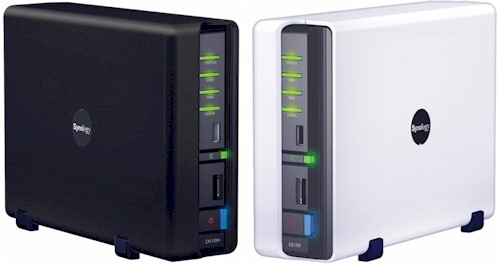
The 109s (which is how I’ll refer to both the 109 and 109+) both come in cases that look a lot like the previous generations’, but have reworked front panels that put the indicators and switches on a wider flat surface and have some styling details that give them a fresher look. That’s the 109+ in black and the 109 in white in the opening product shot above.
Figure 1 shows the indicators, controls and ports, which include an eSATA connector for speedier backups to attached drives in addition to two rear and one front-mounted USB 2.0 ports. Unlike the fanless QNAP TS119, both 109s have small, but quiet fans. (The TS119 is the most relevant competition to the 109s, so I’ll be making comparisons to it as I go along.)
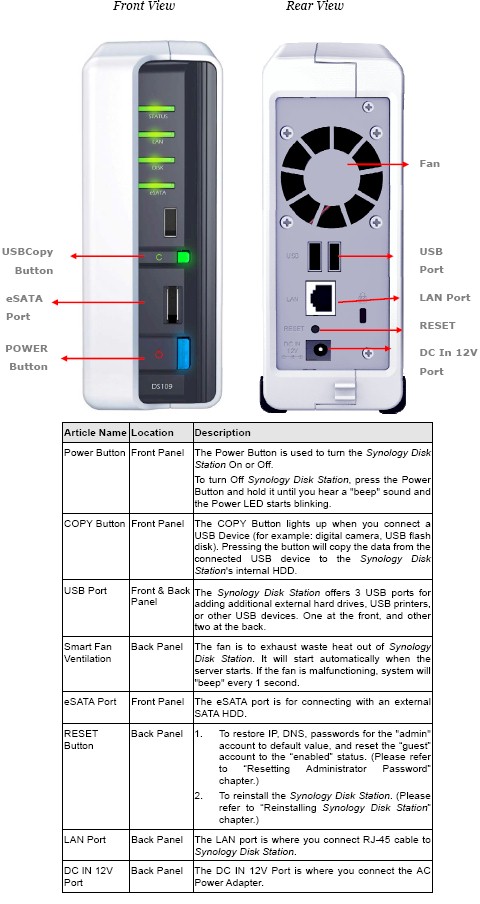
Figure 1: Front and Rear panels
The 109+ isn’t as frugal with power as other single-drive NASes that have passed through the lab lately. It measured 23 W / 17 W standby, compared to 14 W / 7 W for the TS119 and 11W for the Buffalo LinkStation Pro XHL. The 109, by comparison, draws only 14 W active and 9 W with the drive spun down. Both 109s had a Samsung HD753LJ 750 GB drive installed by Synology for our testing convenience.
Both 109s also have the ability to spin down the drive after idle times from 10 minutes to 5 hours and have a shutdown / startup schedule set for further power savings.
Internal Details
Figure 3 shows the inside of the DS109+, with the cover removed. The 3.5" SATA drive plugs into SATA power and data connectors and is secured to the metal base plate with four screws. Synology also sent along a 2.5" Disk Holder for those who want to experiment with installing 2.5" SATA drives, but I didn’t try it out.
The complete list of supported drives includes 3.5" SATA, 2.5" SATA, 2.5" Solid State Drives (SSD) and even IDE drives for the DS106j that Synology still has in its lineup.
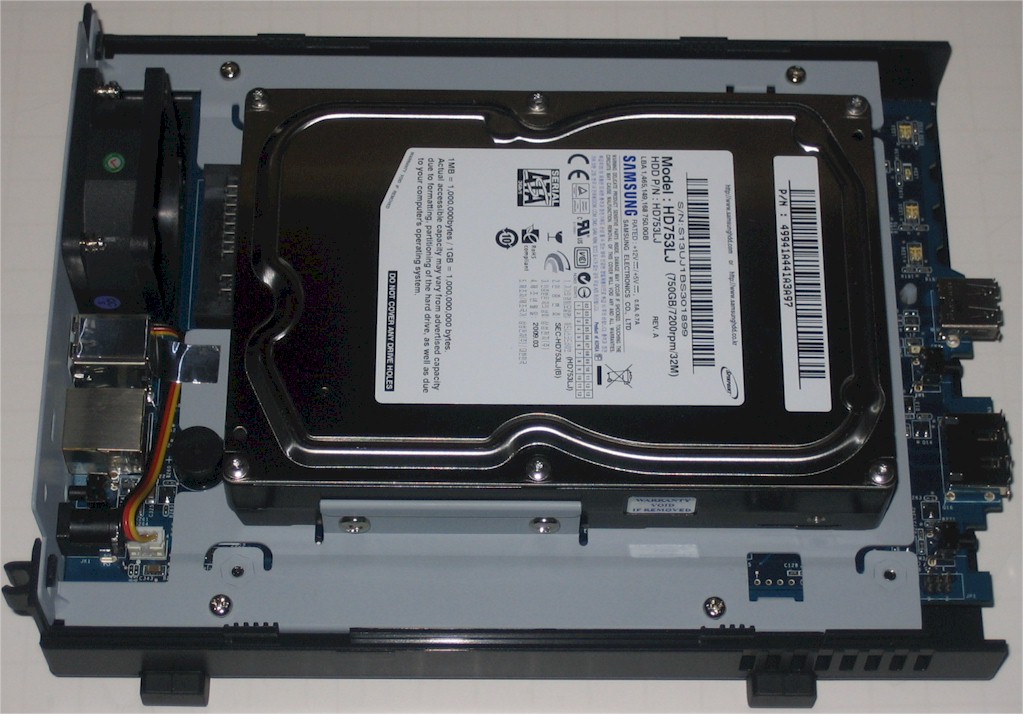
Figure 2: DS109+ inside
Figure 3 is a shot of the DS109+ board, which mounts to the bottom of the base plate. The CPU hidden under the black heatsink plate is a Freescale MPC8533 @ 1.06 GHz and that’s a 512 MB SoDIMM that will void your warranty if you choose to upgrade it.
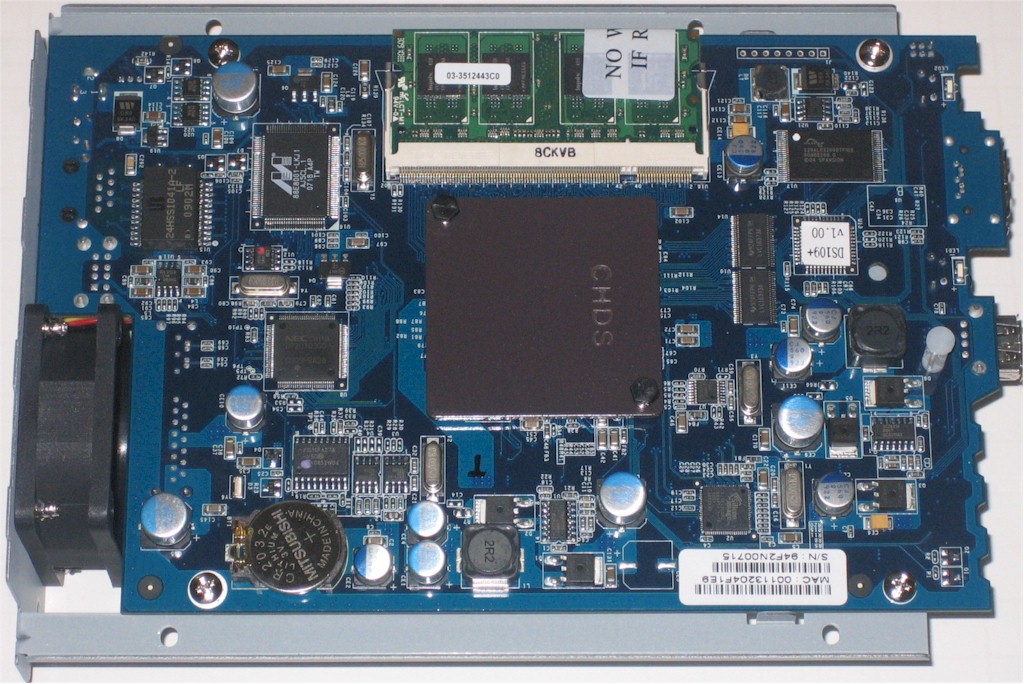
Figure 3: DS109+ board
Other components include 4 MB of flash, Silicon Image Sil3132 SATALink PCI Express to 2-Port Serial ATA II Host Controller, NEC D702102GC USB 2.0 controller, Marvell 88E8001 Yukon Gigabit Ethernet controller, Microchip PIC16F627 CMOS FLASH-based 8-bit microcontroller and a Lattice 4032V CPLD under the DS109+ sticker.
The inside of the DS109 looks the same as the 109+, so I didn’t bother with a photo. The board is different, however, as you can see in Figure 4. The CPU is Marvell’s new "Kirkwood" 88F6281, clocked at 1.2 GHz, which is also used in the QNAP TS-119 and Buffalo LinkStation XHL. Memory has is a paltry (by today’s standards) 128 MB.

Figure 5: DS109 board
Other components include 4 MB of flash, Genesys Logic GL850G USB Hub 2.0 controller, Marvell 88E116R Gigabit Ethernet controller and Microchip PIC16F627 CMOS FLASH-based 8-bit microcontroller.
Features
Like QNAP and Thecus, Synology takes the approach of supporting the same feature set across its NASes. Of the three vendors, Synology is the only one to have completely moved to a modern AJAX-based GUI, Disk Station Manager (DSM) 2.1, on all of its products (Figure 6).
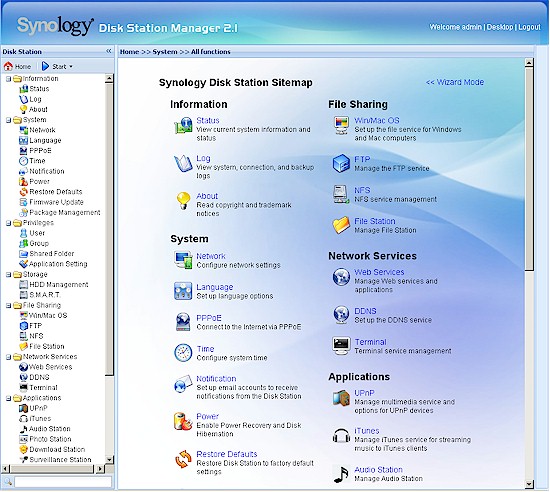
Figure 6: Home page
We have explored Synology’s feature set in previous reviews, most recently the DS508‘s, which provides a DSM overview and details on the IP cam Surveillance Station and Photo and Audio Stations. The base feature set was covered long ago and has changed mostly via the updated look-and-feel provided by the DSM.
Update 5/9/09: Corrected UPnP server information
The Synology Feature Comparison Chart is the best place to match up the 109s’ feature sets against your shopping checklist. But because the Chart is a bit unwieldy, I’ll summarize the key features below:
- Network file sharing via SMB/CIFS, NFS, AFP
- Telnet / SSH admin and root access
- FTP and secure FTP with bandwidth control
- HTTP / HTTPs file access
- Built-in Dynamic DNS for DynDNS.org, 3322.org, NoIP.org, Two-DNS.de
- Joins NT Domain / Active Directories for account information
- Attached Backup: Immediate or scheduled supporting FAT32, EXT3 formats (built-in formatter)
- Network Backup: Immediate or scheduled to other Synology or via rsync w/ encryption, block-level and incremental options. Schedule can be as often as hourly.
- Client Backup: Synology Data Replicator 3 (Windows only)
- User quotas
- Email alerts
- Logging
- USB print server
- UPS shutdown synchronization
- LAMP webserving with MySQL, SQLite databases, phpMyAdmin, Joomla
- Media servers: UPnP AV, iTunes, Audio Station (proprietary), SqueezeCenter (optional module)
- Web photo album
- BitTorrent / HTTP / FTP download service w/ scheduling
- IP camera recording and playback (5 cameras for DS109, 10 for DS109+ )
The latest DSM version also adds a "user home" feature where a private folder is automatically set up when a user is created.
Even more features can be added via installable modules, which include the Mail Station email server, SqueezeCenter for supporting Logitech Squeezebox products like the SqueezeBox Boom and Webalizer for analyzing the built-in Web Station’s traffic. And since full LAMP webserving is supported, you can install WordPress, Joomla, PHPBB and more PHP-based applications (verified PHP application list).
Finally, you can check any or all of these features out yourself via a live DSM 2.1 demo of the DS209+.
In Use
The AJAX GUI is responsive and logically organized and I didn’t run into any hiccups during testing. Both 109s ran quietly although with a low hum from the fan and drive in each.
I’m going to go into a little detail on the Backup features, since I have recently added it to my testing. Figure 7 shows the Backup summary with the network and local test backup jobs that I created. Both jobs were created via a wizard, that guided me properly through all the required steps for each type of backup.
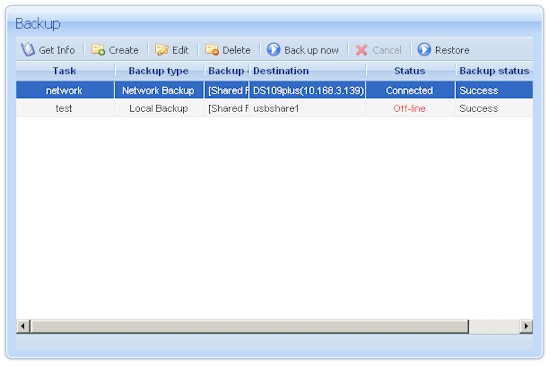
Figure 7: Backup summary
My only gripe is that for networked backups, you get all the way through the wizard (Figure 8) before it checks that the backup target has the required backup service enabled. The good news, however, is that the wizard lets you go fix the problem and try again without losing the settings.
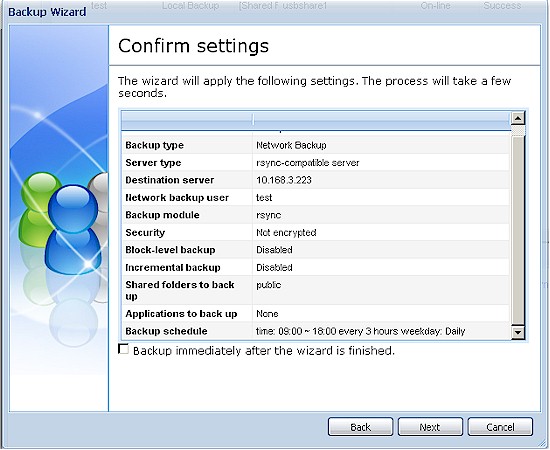
Figure 8: Backup wizard summary
Once a job is created, editing it is easy (Figure 9). Might be nice to let folks create backup jobs this way in addition to the wizard, since everything is logically presented and organized. Note the encryption, block level and incremental options. The encryption option uses an SSH-encrypted NAS-to-NAS connection and doesn’t encrypt the files themselves.
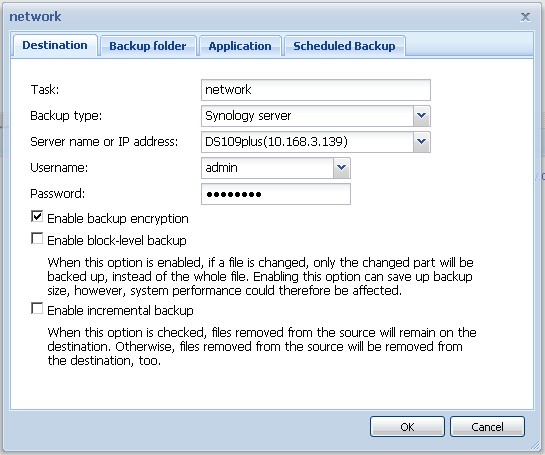
Figure 8: Backup edit
Backups can be done to USB and eSATA drives, which can be formatted in FAT32 and EXT3 (the 109 internal format) via the built-in formatter. I had no problem formatting the Iomega UltraMax Pro that I’m using for attached backup testing, with either format.
I also was able to unmount and remount the Iomega drive using USB and eSATA connections without having to reboot the 109s—something that I appreciated since I tested both formats via USB and eSATA connections (results are in the Performance section).
Performance
The 109s were tested with our standard test process. I upgraded the 109+ to its latest DSM 2.1-0843 and left the 109’s latest DSM 2.1-0839 in place before starting to test. Both products had Samsung HD753LJ 750 GB drives installed by Synology.
Tests were run with 1000 Mbps and 1000 Mbps with 4k jumbo LAN connections. I’m generally no longer testing with a 100 Mbps connection, unless performance shows that it won’t limit speed.
Backup
I first checked backup performance to an Iomega UltraMax Pro Desktop Hard Drive configured in RAID 0 attached via both USB 2.0 and eSATA. The test copies a 4.35 GB ripped DVD test folder that I use in the NAS Chart Vista SP1 file copy tests from the NAS to the attached drive.
The results summarized in Table 1 show a new backup performance high of 66.63 MBytes/sec when the 109+ backed up via eSATA to the EXT3-formatted Iomega drive.
| Product | Synology DS109+ Backup Throughput (MBytes/s) |
Synology DS109 Backup Throughput (MBytes/s) |
QNAP TS119 Backup Throughput (MBytes/s) |
|---|---|---|---|
| USB – FAT32 | 17.44 | 20.96 | 20.67 |
| USB – EXT3 | 17.86 | 23.62 | N/A |
| eSATA – FAT32 | 46.02 | 40.58 | 45.09 |
| eSATA – EXT3 | 66.63 | 49.05 | N/A |
Table 1: Attached backup throughput test summary
Since I had two Synology products on the bench, I tested network backup between them. Table 2 summarizes the results, for full backups without and with the encryption option enabled. Speeds are roughly equivalent to backing up to an attached USB drive. Note, however, that enabling the encrypted (SSH) connection knocked backup speeds down by slightly over 70%.
| Product | Synology DS109+ Backup Throughput to DS109 target (MBytes/s) |
Synology DS109 Backup Throughput to DS109+ target (MBytes/s) |
|---|---|---|
| NAS-NAS | 17.78 | 19.00 |
| NAS-NAS (encrypted) | 5.01 | 5.32 |
Table 2: Networked backup throughput test summary
Benchmarks
Figure 9 presents a summary of the benchmark tests run for the DS109+. Moderate cache effects are present up to 256 MB file size for writes and throughput is slightly reduced with 4K jumbo frames—typical for my test setup.
Performance with a 1000 Mbps LAN connection averaged over the 32 MB to 4 GB file sizes and with cached results above 125 MB/s removed from the average comes in at 46.9 MB/s for writes and 59.1 for reads.
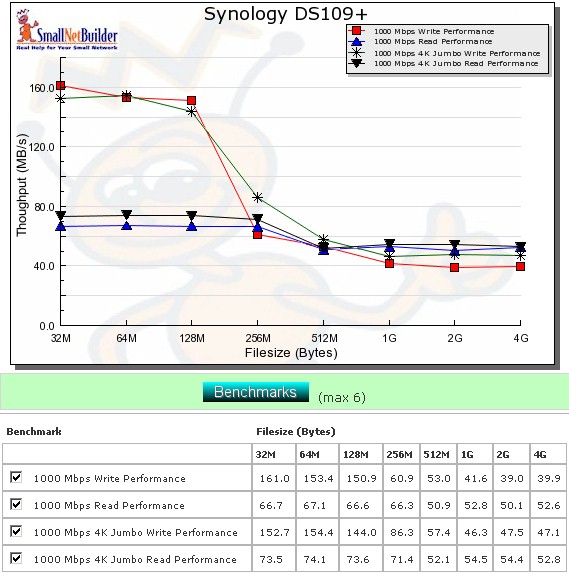
Figure 9: Performance benchmark summary – DS109+
Figure 10 presents a summary of the benchmark tests run for the DS109. Performance with a 1000 Mbps LAN connection averaged over the 32 MB to 4 GB file sizes and with cached results above 125 MB/s removed from the average comes in at 60.2 MB/s for writes and 51.7 for reads.
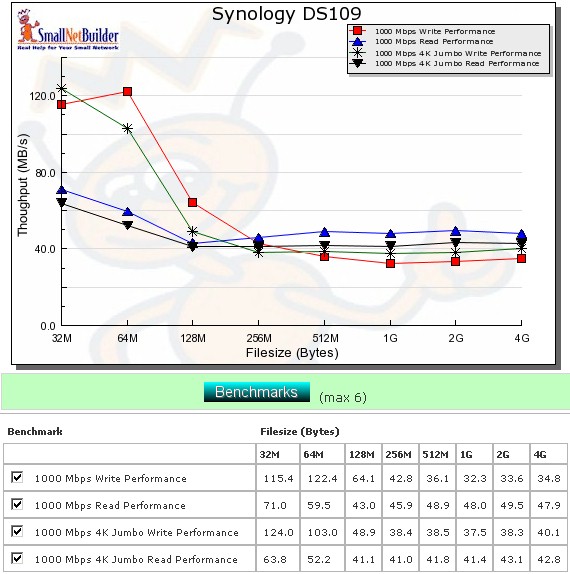
Figure 10: Performance benchmark summary – DS109
Since all write results came in under the 125 MB/s cache effect limit, all the higher cache speeds at the lower filesizes are included in the average calculation. This has the effect of making the DS109’s average write speed look higher than the DS109+’s in the Charts. But when you look at the throughput vs. file size plot in the competitive plots below, you’ll see that the DS109+ really is faster!
Performance – Competitive
For the competitive comparison, I included the 109+, 109, and two other single-drive NASes using the new Marvell processor, the Buffalo LinkStation Pro XHL and QNAP TS119. I also threw in Synology’s top-of-line previous-generation single-bay NAS, the DS107+.
Figure 11 shows the DS109+ clearly on top across all "large" file sizes tested and the 109 in second place, followed closely by the QNAP TS-119. The Buffalo XHL suffers from a faster speed falloff than the other products up to the 256 MB file size, but then recovers to join the TS-119 in the mid to high 20 MB/s at higher file sizes.
The previous-generation DS107+ cruises along mostly in the mid-teens, which is typical for Marvell Orion-based NASes tested on the previous testbed.
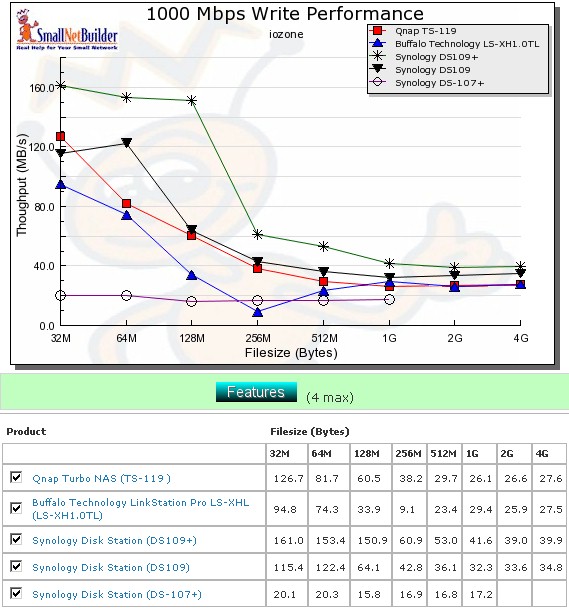
Figure 11: Competitive write comparison – 1000 Mbps LAN
Figure 12 compares the read performances, where rankings are a bit different. The QNAP beats the DS109+ up to 256 MB file size. But it then drops off significantly to the mid-40 MB/s, while the DS109+ stays up above 50 MB/s. The DS109 maintains a slight edge over the Buffalo XHL at higher file sizes, staying up in the high vs. low 40 MB/s range.
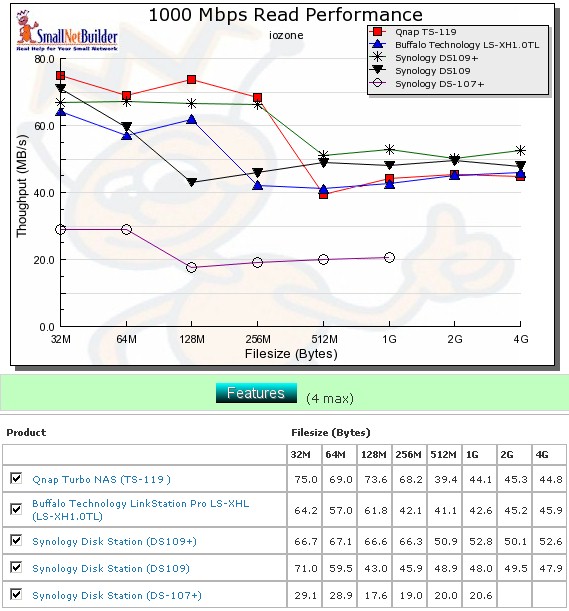
Figure 12: Competitive read comparison – 1000 Mbps LAN
Performance – File Copy
Vista SP1 1000 Mbps file copy write results in Figure 13 provide another view into the competitive rankings. The DS109+ comes out on top with 45.8 MB/s, while the QNAP and Buffalo products measure in the low 30 MB/s range.
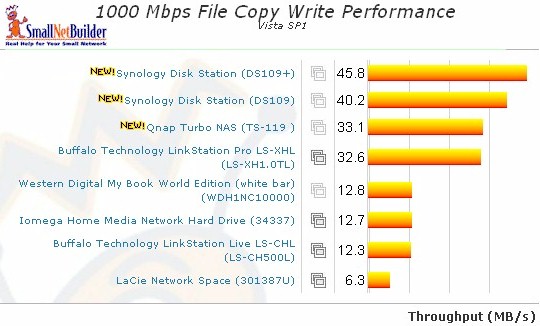
Figure 13: 1000 Mbps LAN Vista SP1 File Copy Write
Figure 14 shows the 1000 Mbps File Copy read. The DS109+ again leads the pack at 73.3 MB/s, but the QNAP pops up to the #2 position at 70.8 MB/s, beating out the DS109.
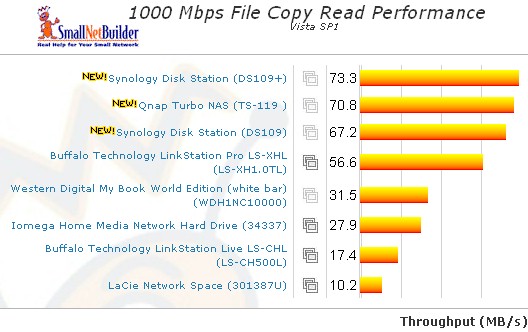
Figure 14: 1000 Mbps LAN Vista SP1 File Copy Read
Use the NAS Charts to further explore performance.
Closing Thoughts
Freescale CPUs haven’t been as popular with NAS makers as Marvell’s application-specific storage processors. But Synology seems to be a fan, continuing to use them in some of their current "09" series products, including the DS109+, DS209+ and top-of-line DS509+. It seems like a good choice, too, since it gives the DS109+ the extra oomph it needed to come in first in most of our single-drive benchmarks.
But in the end, it’s the price vs. performance that counts. And among BYOD single-bay NASes, the DS109, 109+ seem to set new highs in the Price vs. Performance Charts on both counts. And adding $90 or so for a 1 TB drive brings the 109+ to almost $500, which is a lot to pay for any single-drive NAS.
Even the $229 starting point for the DS109 will end you up at around $320 for a Terabyte. Considering that you can get just about the same performance from the Buffalo Linkstation Pro XHL for almost $100 less, you need to think about what you really need.
Synology has done a good job at developing their product line, continuously improving performance, feature set and ease of use. But, like NETGEAR and its ReadyNASes, Synology knows that they have products with a unique combination of features and performance and price them accordingly. That might not sit well with buyers whose technolust is bigger than their wallets, but such is life.
If you want one of the most full-featured, high-performance, single-drive NASes that your money can buy, you just might swallow hard, dig deep and get the DS109+. The DS109 is a good alternative that’s a little easier on your wallet and will still provide 40 – 50 MB/s of performance. The best price vs. performance deal, though, could be the DS109j since it’s priced to move at around $140. But that decision will have to wait for another time, when Synology decides to send one my way.