

Introduction
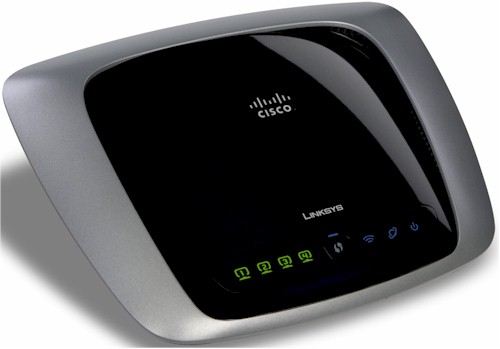
| At a Glance | |
|---|---|
| Product | Linksys by Cisco Wireless-N Gigabit Router (WRT310N) |
| Summary | 2.4 GHz Broadcom-based 802.11n Draft 2.0 router with gigabit switch, Parental Control and Security Features |
| Pros | • Scheduled web access and activity reporting • Includes four TrendMicro AV licenses • Gigabit WAN and switch |
| Cons | • Ineffective web filtering • Requires Windows application to administer • No jumbo frame support |
Cisco recently introduced a subscription-based security enhancement called Home Network Defender for their Linksys by Cisco draft 802.11n WRT310N and WRT610N wireless routers. (The WRT160N will be added "soon".) The focus of this review will be on the HND service. But I will also briefly look at the 310N’s routing and wireless features, which are very similar to the previously reviewed WRT610N’s.
Home Network Defender (HND) is comprised of router-executed web filtering, parental control, and user-activity reporting provided through a partnership with TrendMicro. Although the services themselves run on the router, setup and administration are accomplished by functions added to the Linksys EasyLink Advisor (LELA)—a setup and network management application shipped with all Linksys routers.
The last time we looked at LELA, we weren’t very impressed. But that was before Cisco acquired Pure Networks and its Network Magic application that provides many of LELA’s functions. LELA has matured and, with the addition of HND, now widened its scope. LELA’s Setup Wizard now even runs on Windows and Mac OS systems. But LELA’s network mapping / viewing, management, repair and now, HND functions require a Windows XP or Vista machine for configuration. Once the router’s HND features are set up, however, I confirmed that you don’t need to have a Windows machine running LELA.
It’s an odd design choice to have router-based, OS neutral network security depend on a Windows machine to install and administer it. Other routers with similar security features that I have reviewed, specifically the Zyxel USG100 and the D-Link DFL-CPG310, both execute the security functions and provide browser-based administration.
HND also includes four licenses for TrendMicro Antivirus plus Antispyware (available via download), which run independently of HND.
Setup
After being installed on a Windows system, LELA uses HNAP, or Home Network Administration Protocol to construct a map of LAN devices. Device discovery is performed by running arp requests to all devices connected to the 310N’s wired and wireless networks.
I configured my 310N to use the 192.168.199.0 address range on its LAN, and as you can see from the Wireshark capture in Figure 1, HND is systematically running arp requests from my PC (192.168.199.101) to the entire range of addresses from 192.168.199.1 to 192.168.199.254.
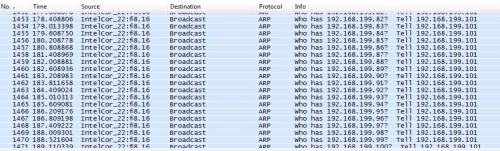
Figure 1: ARP discovery
Once LELA discovers a device via arp, it then attempts to set up a TCP connection with it using a multitude of ports to determine various details about the device such as its make, model, and operating system. This process can take awhile. But other LELA functions are still available while discovery is running.
I would advise against installing LELA on a notebook that travels between home and office. I had the pleasure of having a fellow engineer at work ask why my personal PC was trying to discover and connect to various secure corporate network devices. I found that LELA’s network discovery runs regardless of whether LELA itself is launched, due to two services that are started when the system that LELA is installed on boots. The services are nmctxth.exe and nmsrvc.exe, which are Pure Networks Platform Assistant and Pure Networks Platform Service.
Note that if you have more than one router in your network, HND will not find devices behind the other router(s). Arp (address resolution protocol) broadcasts are limited to a single subnet, so HND will only manage devices directly connected (wired or wireless) to the 310N.
LELA displays discovered devices in an graphic "global" network map with the 310N in the center or in a "list" style map as displayed in Figure 2. You can flip between the global and list displays by clicking the map icon on the bottom right of the screen.
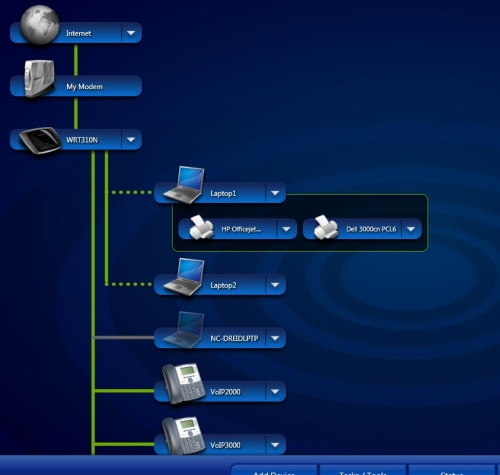
Figure 2: Network Device List Style Map
LELA will display each device with a generic name of "Network Device". But you can rename them to anything you want and choose from over 30 different icons to more accurately depict each device. Linksys has the home network covered, with icons for laptops, desktops, Macs, PDAs, printers, VoIP phones, storage devices, even gaming consoles.
LELA provides a dropdown menu for each device (Figure 3), with choices based on the device type. You can see MAC and IP address in the Details option, and devices can be assigned a name via the Rename option. If you have configurable network devices, the Advanced Settings option makes the Linksys map a handy place to view your network and launch individual device web configuration tools.
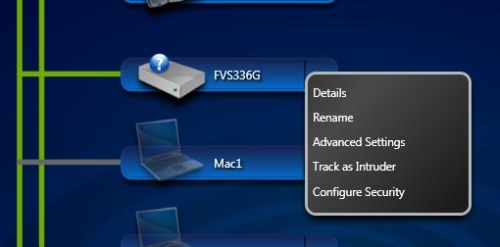
Figure 3: LELA Device menu
Linksys’ manual says the Advanced Settings only works with Linksys devices. But I noticed it worked with several of my non-Linksys network devices, such as a NETGEAR router. It appears that LELA’s Advanced Settings option works with devices that are configurable via HTTP port 80. Devices that are configured via port 8080 or HTTPS didn’t have the Advanced Settings option.
There is also the option to Track a device as an Intruder, which turns the device icon red on the map and then inserts its MAC address into the 310N’s Wireless MAC filter table, preventing that device from accessing your network. A downside to this feature is if you are already using the router’s MAC filtering, the allowed MAC filter table will be erased and overwritten with disallowed Intruder devices.
Third, content filtering and scheduling is not dependent on the PC running the HND application. I loaded LELA and HND on my Vista laptop and applied restrictions to other PCs in my network. I then turned off my Vista laptop and verified both content filtering and scheduling were still in effect.
HND Features
HND provides three main security functions: Safe Web Surfing; Parental Controls; and Network Activity Reporting.
Safe Web Surfing uses a website database maintained by TrendMicro for real-time blocking of potentially dangerous sites. This feature’s controls allow settings of Maximum, Medium and Minimum security (Figure 4) and apply to all devices connected to the router, such as networked game consoles, in addition to computers. There is no ability to tweak any of levels, however; what you see is what you get.
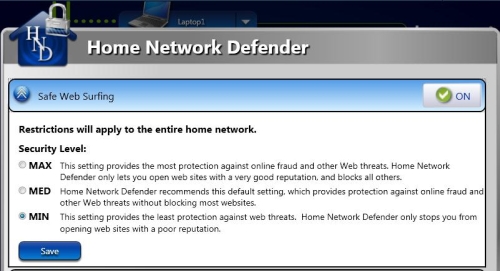
Figure 4: Safe Web Surfing settings
The second HND function is Parental Controls, which include content filtering and scheduled access. There are four pre-defined rules for content filtering that can be applied to the entire network or to individual users. Those rules are labeled as Kids (<13), Young Teen (13-15), Mature Teen (16-17), and Adults (18+).
Each of these rules will block sites based on 32 categories (Table 1). In addition to the four preset rules above, you can create custom rules with selected categories. You can also apply Internet access timers to each rule.
| Categories | |
|---|---|
| Abortion | Pay to Surf |
| Alcohol/Tobacco/Drugs | Peer-to-peer |
| Alternate Journals | Personal Network Storage Services |
| Blogs/Forums | Personal Websites |
| Chat/IM | Personals/Dating |
| Crime | Photo Searches |
| Cult | Pornography |
| Religion | |
| Gambling | Ringtones |
| Games | Sex Education |
| Hacking | Shopping/Auctions |
| Hate/Racism/Violence | Social Networking |
| Homosexuality | Society/Lifestyle |
| Mature Content | Software Downloads |
| Media Downloads/Streaming | Weapons |
| News Groups | Web Advertisements |
Table 1: Parental Control Categories
As a test, I set up a custom rule to allow Internet use from 6 AM – 9 PM, seven days a week, and block website categories of Alcohol/Tobacco, Crime, Gambling, Pornography, and Weapons. I applied this rule to my laptop and started surfing to see how well the restrictions worked.
The general Internet access timer feature was very effective. Once I hit the 9 PM "off" time I had set, I was presented with the message in Figure 5 for any website I was trying to reach.
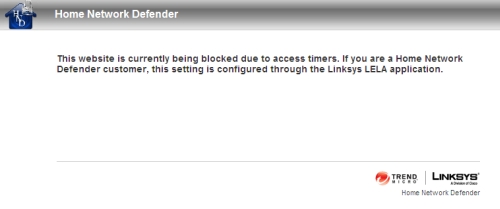
Figure 5: Access timer message
The access timer feature applies to all Internet access, not just web browsing. With access blocked, I couldn’t even ping yahoo.com. I also applied a timed access rule to our PS3 to see if it would work on a gaming console. Indeed, with the schedule in place, our PS3 could not connect to multiplayer online games after specified hours. I liked this schedule feature. It means a "lights out" rule can be applied and you can be sure the specified devices in the house aren’t getting on the Internet.
Web Filtering
But the real test of Parental Controls is web filtering. In our review of many other products containing parental control features, we have yet to find a fool-proof web filtering solution. I won’t keep you in suspense; HND is no exception.
I set up a custom rule that contained filters for the Alcohol/Tobacco category then Googled "Marlboros". Google returned links to sites related to Marlboros, such as PhilipMorris’ corporate website or the Wikipedia page on Marlboros. It also returned links to general tobacco-related sites. But clicking on a link to cigoutlet.net produced the message in Figure 6. So while I could see links to "banned" sites, I couldn’t access them.
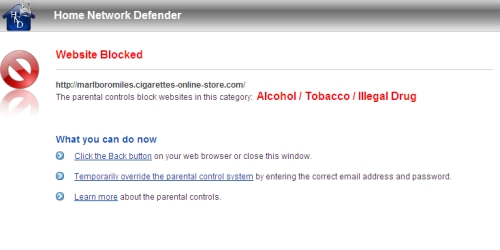
Figure 6: Parental Control Category Block message
As I continued to test HND’s web filtering, however, I found weaknesses. I set up a computer with the predefined rule for Young Teen (13-15) restrictions. I then went to that machine, opened a browser and typed "porn" in a Yahoo.com search and received a list of numerous adult sites. The good news is that clicking on any of the links returned an HND Website Blocked page, as expected.
However, when selecting Images or Video instead of Web results to my search on porn, I was presented with images and video links that I wouldn’t want my 13-15 year old to see. In other words, the Young Teen level blocked access to porn sites, but not objectionable images, videos or even link descriptions that I wouldn’t want my child to see. Not good.
Changing the restriction to the Kids level (under 13) blocked the entire search results for Images and Video links, presenting the Website Blocked page shown in Figure 7. This made me think that perhaps I would just use the Kids level for my Young Teens, as the Young Teens level appears ineffective, at least for my requirements.
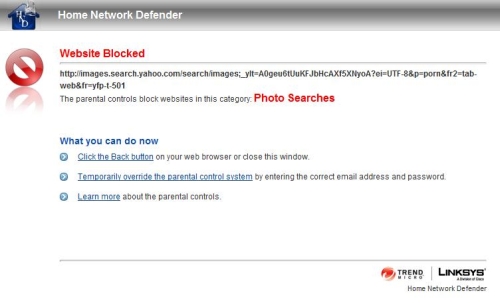
Figure 7: Blocked Image search results
This illustrates the general problem with all Parental Control solutions, i.e. finding the balance between excessive and ineffective filtering. For example, I have two middle-schoolers who frequently use the Internet for school projects. In the past, I’ve often had to turn off excessive web filters to let them get to legitimate sites to complete their projects.
The downside to excessive filtering is you’ll disable it so your kids can do their homework and you’ll either forget to turn it back on or leave it off as you’re sick of them asking you to turn it off so they can get their homework done. Either way, a disabled filter is ineffective.
One of my kids recently did a school project on the Pyrenees mountains, so I checked to see if the Kids level would have limited her research. I found I was able to get to sites on the Pyrenees mountains. But if I clicked a link to learn more about Great Pyrenees dogs at the akc.org website, I was hit with a blocking message stating a violation of the Society/Lifestyle category (Figure 8). I would call this an example of excessive filtering.
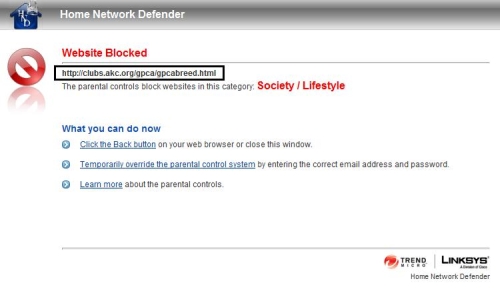
Figure 8: Excessive web filtering
On the other hand, a simple Google keyword search on the word “boob” from a PC with the Kids level restriction returned numerous links advertising sites catering to those whose interests matched the word, with detailed descriptions of what one would find on those sites. For example, one link advertised “This site is dedicated to huge boobs and pictures…” I tried the same search using a custom rule blocking all 32 categories and still got the same results. I would call this an example of ineffective filtering.
Reporting
The third element for managing web use and security is tracking and reporting. HND can run a Network Activity report locally using LELA (Figure 9), which provides a log of all device state changes and activity.
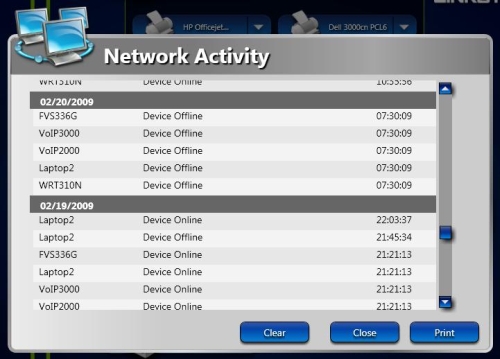
Figure 9: Network Activity report – all devices
Another tracking component is a report on network activity by device. Selecting the Report and Notification Settings option in HND will redirect you to a Linksys web page where you log in and select the devices you want included in the report, as well as the time intervals you want reported. Intervals available are Daily, Weekly, and Monthly. Reports are then run "in the cloud" and you are notified via email when they are ready.
I enabled this feature for daily reporting on all devices and received an email every day with a link to a Linksys website where I could log in and view the reports as shown in Figure 10.
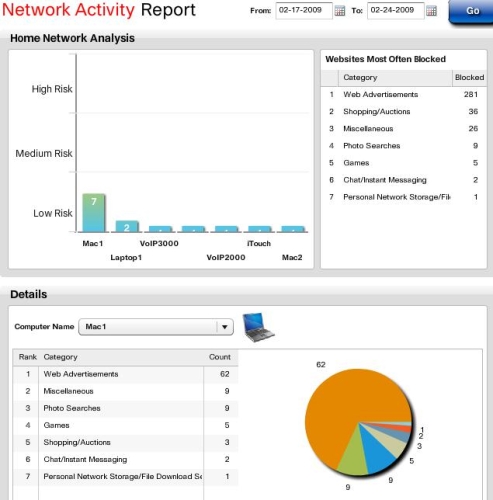
Figure 10: Network activity by Device report
The data on the top right of the report shows total websites blocked by category on my network. On the top left is a bar chart showing network "risk" by device. My device labeled Mac1 generated the most "risky" traffic. You can do a limited drill-down on each device via the Details section on the bottom, which will show the number of block events by category.
This is the extent of the drill-down, however, which is pretty limited. I would have expected report options that displayed the actual blocked URLs, or at least the site domains. A traffic summary of Top N blocked domains across all devices would also be informative.
For example, in Figure 10, I’ve selected my "riskiest" device named Mac1, which appears to have earned that distinction by having 62 blocked Web Advertisement events. I’m not sure how much a threat this category is because there is very little information provided about each of the Content Filter categories. There is some information in the LELA online help. But there is also a well-hidden Home Network Defender manual that doesn’t shed much light, either. This is where the ability to see the actual blocked URLs would be very helpful.
Anti-Virus
While it isn’t integrated at the router level, HND includes four licenses for TrendMicro Antivirus plus Antispyware software, which I installed on my Vista PC without issue. This bundling helps enhance the value of HND’s subscription fee, but that’s the limit of its integration.
Neither LELA nor HND monitor its use or whether clients are keeping current on AV signatures. For example, the Details option (discussed back in Figure 3) for each device produces a summary of that device’s known attributes as shown in Figure 11.
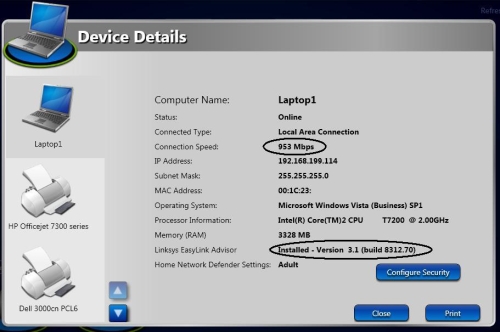
Figure 11: Device Details
Notice that HND/LELA recognizes my connection to the router at 953 Mbps as well as the fact that I have LELA version 3.1 installed on this PC. I would think it wouldn’t take much for TrendMicro to be able to keep tabs on the "health" of its AV client and this would further enhance HND’s value (as well as network security).
Competitive Analysis
I have touched on how HND compares to other home network security products. But now it’s time to dig a little deeper. I have had the opportunity to review multiple security products for small networks, including small-business oriented Unified Threat Management (UTM) routers such as the SonicWall TZ190W, D-Link DFL-CPG310, and Zyxel USG100 and an open source solution called Copfilter. I have also looked at Bill Meade’s review of the Yoggie Gatekeeper Pro and Craig Ellison’s D-Link’s SecureSpot review.
The router based solutions from SonicWall, D-Link, and Zyxel are more powerful network devices with dual WAN and VPN functionality as well as Intrusion Detection and Prevention (IDS/IPS) capable firewalls. So comparing HND to them isn’t perhaps fair. But sizing up HND against the others is fair game.
Copfilter is a pretty cool open source (and subscription free) UTM solution that works with the Linux-based IPCop router/firewall. It lacks content filtering in its base form, however, although you can use another open source application—OpenDNS—to add it. But Copfilter, IPCop and OpenDNS are for the technically adventurous only; installing and configuring them requires skills way beyond the "Mom and Pop" user that is HND’s target.
Yoggie’s Gatekeeper Pro is an interesting option because it can be used with any router. The current version has evolved considerably since our review and is probably due for another look. It offers more features than HND including individual protocol filtering, email spam filtering, download size control and more. But its web filtering has holes similar to HND’s and it’s more costly, requiring the purchase of $200 hardware and a $70 annual subscription fee (for 5 computers).
Of these different security choices, HND is most similar to D-Link’s SecureSpot, which is probably its competitive target. SecureSpot is available with D-Link’s DIR-625, DIR-628 and DIR-655 routers.
HND and SecureSpot are similar in features but differ in implementation. The key difference is that all of HND’s functions run in the router, except for its AV and requires a Windows application for administration. SecureSpot runs its parental control, timed access and threat blocking features in the router, as well as its administration console. But SecureSpot requires a Windows-only "thin client" to provide individualized parental control filtering in addition to its AV functions.
Table 2 compares HND and SecureSpot key features.
| Home Network Defender | SecureSpot | |
|---|---|---|
| Control Software | Windows Application | Web Application |
| Control/Client Integration | None | Limited |
| Client AV Licenses | 4 | 3 |
| Client Software | TrendMicro | McAfee |
| Content Filtering (CF) | TrendMicro | Bsecure |
| CF Age Groups | 4 | 4 |
| CF Categories | 32 | 81 |
| CF Custom Option | Y | Y |
| CF Scheduling | Y | Y |
| Reporting | Y | Y |
| Free 30 Day Trial | Y | Y |
| Annual Cost | $59.99* | $60.00 |
| Routers | Linksys WRT310N, WRT610N (160N "soon") | D-Link DIR-625, DIR-628, DIR-655 |
(*HND has an introductory price of $49.99/year to expire 60 days after its 2/17/09 launch.)
Table 2: HND and SecureSpot Comparison
SecureSpot has the edge on HND for reporting (it includes email / SMS block alerts, activity calendar view and you can see the URLs of blocked sites). But HND has the edge for robustness, since all filtering and access control is router-based and doesn’t depend on client-based software. Both products, however, have (very) imperfect web content filtering— a trait they share with every other parental control "solution".
Pricing is uncannily similar, but note that HND includes four AV seats vs. SecureSpot’s three. Both are nice values, compared to buying AV software separately, but more so with HND. According to Pricegrabber, one license for TrendMicro Antivirus plus Antispyware 2008 costs around $30. Thus, for the cost of two AV licenses you get HND for free, plus two more licenses.
Routing Overview
The WRT310N uses the new "UFO" enclosure with internal antennas that is the standard for Linksys by Cisco draft 11n routers, including the WRT160N and WRT610N. I like the sleek design with enclosed antennas since it’s a nice change from the usual boring boxes.
We covered the WRT310N’s innards in this slideshow over a year ago and they still apply because Cisco hasn’t revised the product. The Broadcom-based design uses a BCM4705 High-Performance 802.11n/MIMO Intensi-fi GbE Processor, BCM4321 Draft 11n Baseband/MAC and BCM2055 2.4/5GHZ Intensi-fi draft 11n radio. The gigabit switch chip part number is covered by a thermal pad, but it is probably a BCM5397 5 port gigabit switch.
The WRT310N implements Linksys’ standard routing feature set, including:
- DHCP, Static, PPPoE, PPTP, L2TP, Telstra Cable WAN types
- Built-in Dynamic DNS clients for TZO and DynDNS
- Static and dynamic routing
- SPI firewall disable, multicast, WAN ping and IDENT filtering and Proxy, Java, ActiveX and Cooking blocking
- IPsec, PPTP and L2TP VPN passthrough (enabled by default)
- Single port forwarding and Port Range forwarding and triggered ports
- HTTPS admin access, remote management (HTTP / HTTPS) enable with IP range restriction and port setting
- Logging with support for Linksys Logviewer recording
As mentioned earlier, please reference our review of the 610N for more details.
I appreciate the fact that the 310N has Gigabit Ethernet ports. But as with the 610N, the 310N doesn’t support jumbo frames. I confirmed this by taking a pair of jumbo frame capable devices and was able to successfully pass 7900 Byte frames between them over a known good network supporting jumbo frames. But when using the 310N, the largest frames that would pass between the same two devices were non-jumbo 1514 byte frames.
For example, to determine if you can pass 7000 byte jumbo frames from your PC to a device at 192.168.1.100, type ping -f -l 7000 192.168.100.1 in Windows and ping -s 7000 192.168.100.1 in Linux.
If you get a reply, you’re passing 7000 byte jumbo frames. If no reply, keep trying smaller frame sizes until you find the largest that works.
The 310N also supports including RIP and static routing. I was able to easily set up and use a static route to a downstream router on my LAN. (See this how-to if you’re looking to set up multiple routers on a network.)
Access to my work VPN was no problem via both an SSL and IPSec client with VPN Passthrough enabled, which is the default. Port Forwarding and port triggering were also useful. I set up port forwarding to allow access to my internal router over the Web. Port triggering was useful to ensure ports were opened on the firewall to keep my VoIP line connected.
The Linksys WRT610N has a built-in Application Layer Gateway (ALG) function, which changes Layer 5 SIP messages, replacing the internal private IP address assigned to the VoIP device with the router’s external public IP address. This can create problems for VoIP networks, causing them to erroneously assume a registered device is not behind a NAT. The problem with the 610N is an end user can’t turn the ALG feature on or off. I was pleased to see the 310N didn’t have the ALG function at all, so this wasn’t an issue.
I like the QoS configurations on Linksys’ 160N, 310N and 610N routers. I’ve had customers at my day job (a VoIP service provider) complain of dropped calls. We often find the problem is due to multiple devices inside the customer’s home network competing for bandwidth. The 160N, 310N, and 610N can successfully resolve dropped call problems by prioritizing upstream bandwidth utilization. (Most Linksys routers cannot prioritize download traffic.)
With a MAC based rule, a VoIP device can be given top priority to the Internet, while still allowing access for the other devices. The key is being able to apply prioritization based on MAC address, which eliminates the hassle of assigning a static IP to a device.
Figure 12 shows that I’ve assigned High Priority to a device I’ve called "Phone"; with MAC address 00:20:F0:00:00:20. I have over a dozen other devices on my network, but this single QoS rule makes them all play together happily. This is the configuration I recommend to customers with VoIP devices using the 160N, 310N, and 610N models of Linksys routers.
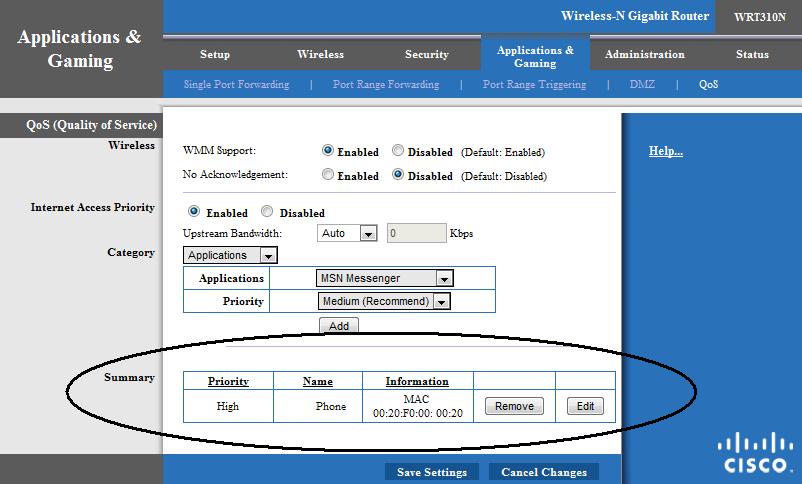
Figure 12: QoS settings
Two small things I hope Linksys will address in a future firmware release include correcting the sharpness of the color in the web GUI and an error message that occurs when using Dynamic DNS. The washed-out look of the configuration menu in Figures 12 and 13 isn’t due to the images we posted, it is the look of the actual configuration pages. Linksys’ previous 310N firmware 1.0.06 did not have this washed out coloring; it surfaced in firmware 1.0.07.
Dynamic DNS functionally is fine and I was able to configure my DynDNS.org account which successfully tracked my domain to my public IP. However, the 310N’s configuration page displayed an erroneous DDNS server is currently closed message (Figure 13). I didn’t experience this with 1.0.06 firmware.

Figure 13: DDNS status error
Routing Performance
Testing and analysis by Tim Higgins
I tested routing performance using our standard router tests, using desktop machines with Gigabit Ethernet cards running Windows XP SP2 for both IxChariot endpoints and the LAN client in DMZ.
Table 3 shows around 148 Mbps of total simultaneous routing throughput, which places it in the #11 slot in our current Router Performance Charts. The 160 simultaneous connections result was a surprise, given that the WRT610N hit the 200 connection limit of our test setup and it uses the same BCM4705 processor. But the WRT310N’s simultaneous connections are more the norm for Linksys’ Broadcom-based routers.
| Test Description | Throughput (Mbps) |
|---|---|
| WAN – LAN |
136.3
|
| LAN – WAN |
156.2
|
| Total Simultaneous |
147.8
|
| Maximum Simultaneous Connections | 160 |
| Firmware Version |
v1.0.07-LS-HND
|
Table 3: Routing performance
Wireless Overview
The WRT310N implements Linksys’ standard wireless feature set for its draft 11n routers, including:
- Mixed, BG-Mixed, N-only, G-only, B-only Disable modes
- Auto, Standard – 20 MHz, Wide – 40 MHz channel width
- Auto and manual channel selection
- SSID Broadcast disable
- Wi-Fi Protected Setup, WEP, WPA/WPA2 Personal and Enterprise security
- Wireless MAC filtering with Permit / Prevent options
- AP Isolation, Frame Burst control, Basic and Transmit Rate controls
- CTS Protection, Beacon and DTIM interval, Fragmentation and RTS Threshold, WMM
Note that there is no transmit power control, nor is there a control to convert the 310N to function as an access point instead of a router, nor support for WDS bridging and repeating.
Wireless Performance
Testing and analysis by Tim Higgins
I used the open air test method described here to test the 310N’s wireless performance. Testing was done using the new SNB standard wireless test client, an Intel Wi-Fi Link 5300 AGN mini-PCIe card and 12.2.0.11 driver in a Dell Mini 12 running WinXP Home SP3.
The router had the latest v1.0.07-LS-HND firmware and I left all factory default settings in place, except to set channel 1. On the Intel client side, I left all defaults in place except for enabling throughput enhancement (packet bursting).
Figure 14 shows the summary of up and downlink tests in all six test locations with the default 20 MHz and "Auto" (40 MHz) channel bandwidth modes. Best-case throughput of 83.8 Mbps was measured running uplink with a 40 MHz channel. I was able to connect and complete the 1 minute tests in all six locations. But except for running uplink with the default 20 MHz channel bandwidth, speed in Locations E and F was barely usable.
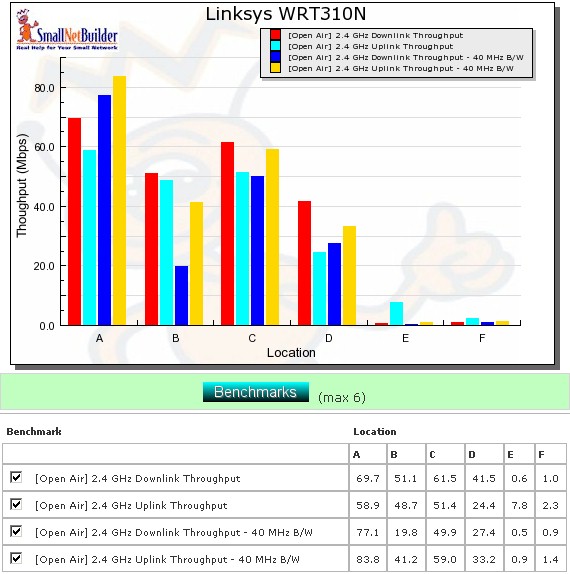
Figure 14: Six location wireless throughput summary
Figure 15 shows a summary plot of IxChariot downlink tests with a 20 MHz channel width. The high throughput variation, which is common in all draft 11n routers, seems to indicate that the Forward Error Correction (FEC) technology that Broadcom told me about at CES doesn’t seem to have made it into at least this version of the 310N’s firmware.
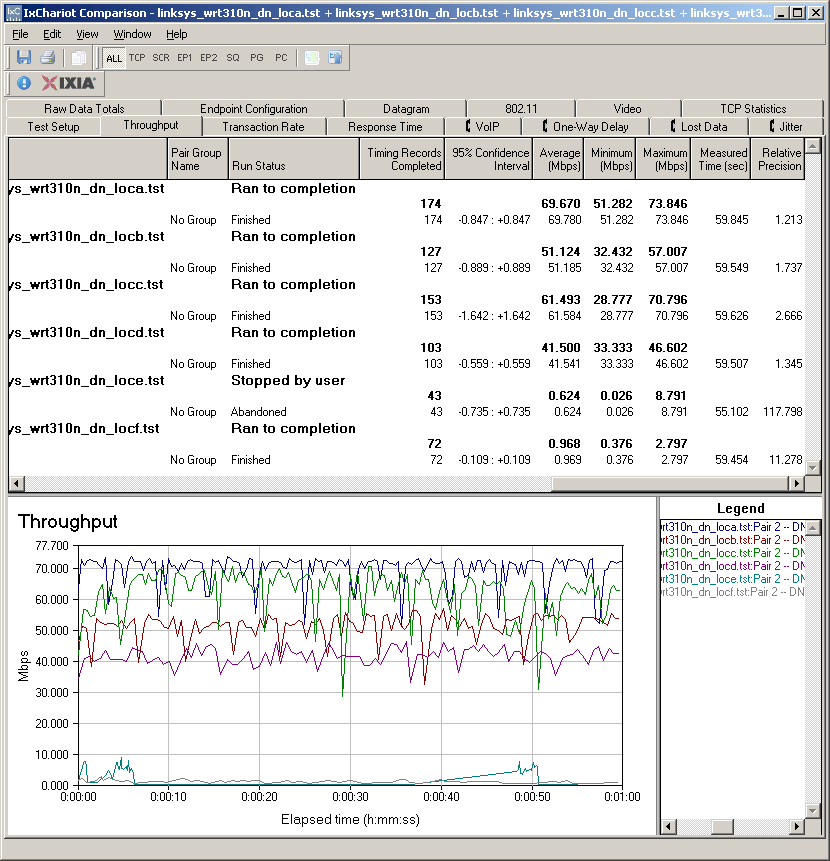
Figure 15: Wireless throughput summary – downlink, 20 MHz channel
Variation is about the same running uplink and with 40 MHz channels. You can check out the plots via these links: (uplink – 20 MHz, downlink – 40 MHz, uplink – 40 MHz).
Figure 16 summarizes the wireless security mode check, showing over 60% throughput reduction when using either WEP or WPA/TKIP security, but no measurable loss using WPA2/AES.
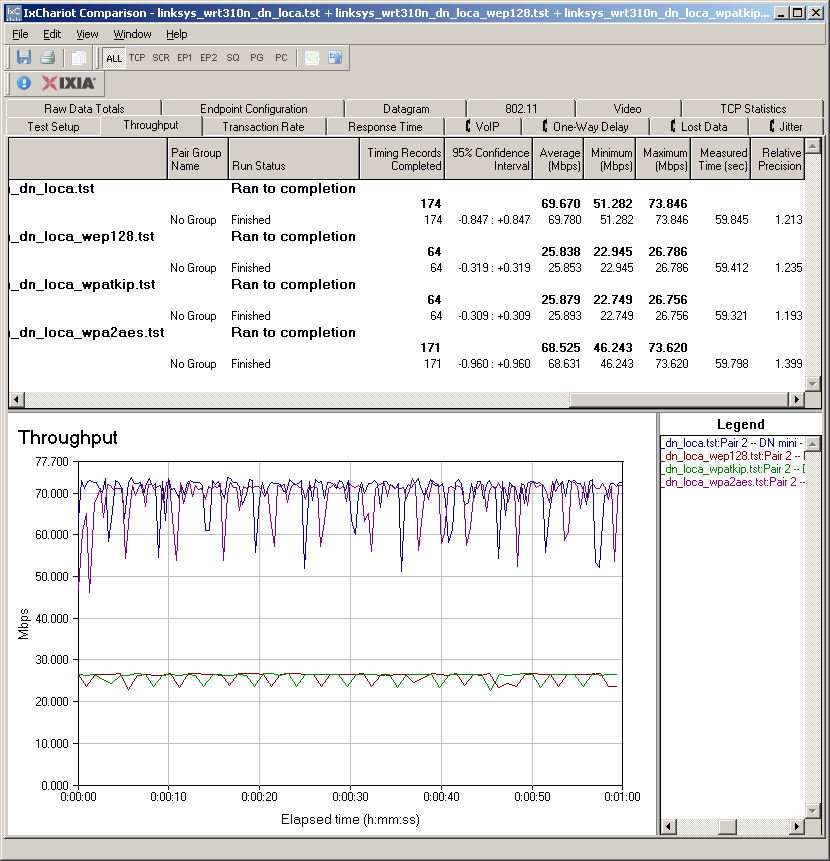
Figure 16: Wireless security throughput – downlink, 20 MHz channel
Wireless Performance – more
For a competitive comparison I chose the WRT610N and the 310N’s direct competitor, D-Link’s DIR-655. I recently tested the latest A4 version of the DIR-655 with the Intel 5300 AGN client, so its data is as apples-to-apples comparison as I can make. The WRT610N data was taken with a Linksys WPC600N client, which throws a little variation into the comparison.
As is usually the case, there is no clear winner in all locations and modes. For downlink in 20 MHz mode (Figure 17), the WRT310 / Intel 5300 AGN pair seem to have an edge at the stronger signal Locations A, B and C and even at the strong to weak signal transition Location D. But at the toughest locations E and F, there is no clear winner.
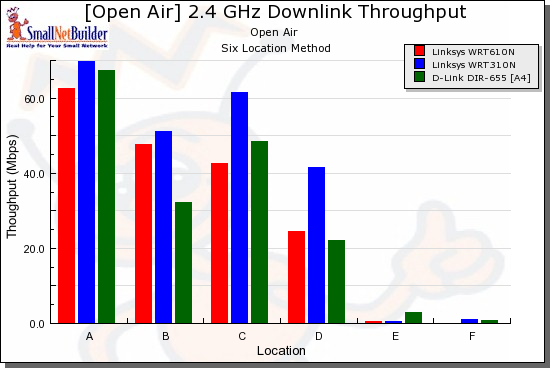
Figure 17: Competitive comparison – downlink, 20 MHz channel
Uplink in 20 MHz mode (Figure 18) is a real mixed bag, with each of the three products taking the lead in some locations.
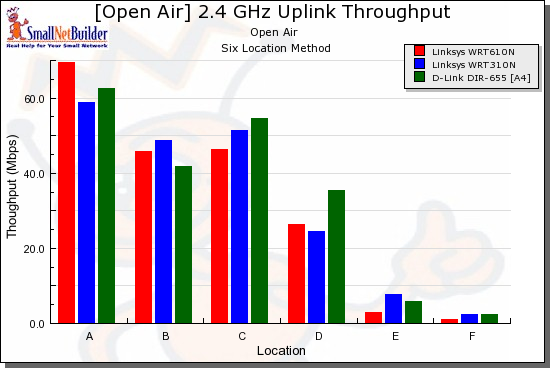
Figure 18: Competitive comparison – uplink, 20 MHz channel
Switching over to 40 MHz mode, downlink (Figure 19), the only thing that’s clear is that the WRT610N / WPC600N pair don’t fare well at Locations E and F. But I suspect that this is more due to an advantage provided by the Intel 5300 AGN client than a weakness in the WRT610N.
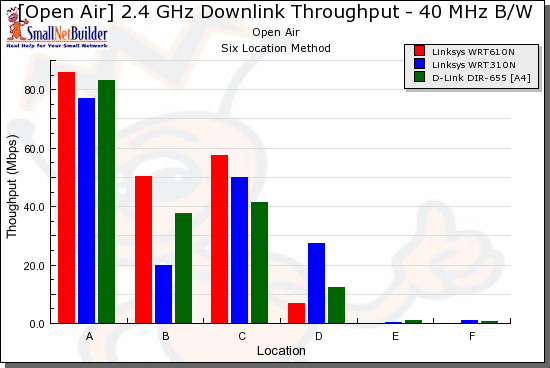
Figure 19: Competitive comparison – downlink, 40 MHz channel
And finally, with a 40 MHz channel and running uplink (Figure 20), the pattern of no clear winner across all locations continues.
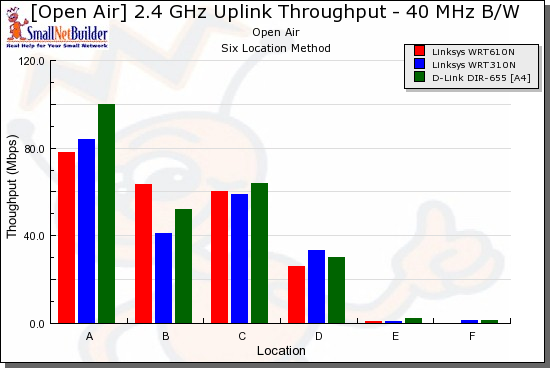
Figure 20: Competitive comparison – uplink, 40 MHz channel
The only conclusion that I can reach from this is that these three products, which occupy the top three positions in the Open Air Wireless Charts are pretty evenly matched.
Closing Thoughts
To wrap this all up, we need to look at the WRT310N as a wireless router, then as a home network security solution. Table 4 summarizes of key features of the Linksys draft 802.11n lineup, plus a comparison to the D-Link DIR-655.
| WRT160N | WRT310N | WRT610N | DIR-655 | |
|---|---|---|---|---|
| Lowest Street Price | $75 | $81 | $152 | $92 |
| Dual Band | N | N | Y | N |
| Gigabit | N | Y | Y | Y |
| USB Device Support | N | N | Y | Y |
| WAN-LAN (Mbps) | 87.9 | 136.3 | 135.6 | 257.3 |
| LAN-WAN (Mbps) | 84.6 | 156.2 | 157.2 | 272.1 |
| Total Thruput (Mbps) | 92.8 | 147.8 | 143.1 | 254 |
| Max Connections | 96 | 160 | 200 | 200 |
Table 4:Key Feature Comparison
The most direct comparison is to the DIR-655, which beats the 310N on routing throughput and simultaneous connections. The 655 also has an edge with its ability to share USB devices and the fact that its gigabit switch supports jumbo frames. Both products are about equal, however, when it comes to wireless performance.
Comparing the WRT310N and the DIR-655 as security solutions, there is no clear winner either. Both use code running in the router to provide some of their features and can protect networked devices other than computers. Both also rely on software running on PCs to provide Anti-Virus protection.
But both also have web content filters that may leave you wondering why you bothered setting them up since they frequently err on the side of over and underprotection. It didn’t take too much effort to find holes in HND’s content filters. HND’s Young Teen level blocked porn websites, but didn’t block porn images in a web search. Further, HND’s Kid level failed a simple adult keyword search. But HND isn’t alone in this problem, since Craig was easily able to find similar problems with SecureSpot’s content filtering.
I know that any time I leave my children unsupervised in front of a screen, whether TV or the Internet, I run the risk of them being exposed to something I would rather they weren’t. Bottom line: HND didn’t provide Internet supervision that I can trust, so it looks like my parental supervision duties are intact.
In the end, I like the WRT310N as a draft 11n router and recommend it. But despite the peace of mind implied by the Cisco and TrendMicro names on the product, I can’t recommend Home Network Defender as a parental control solution.